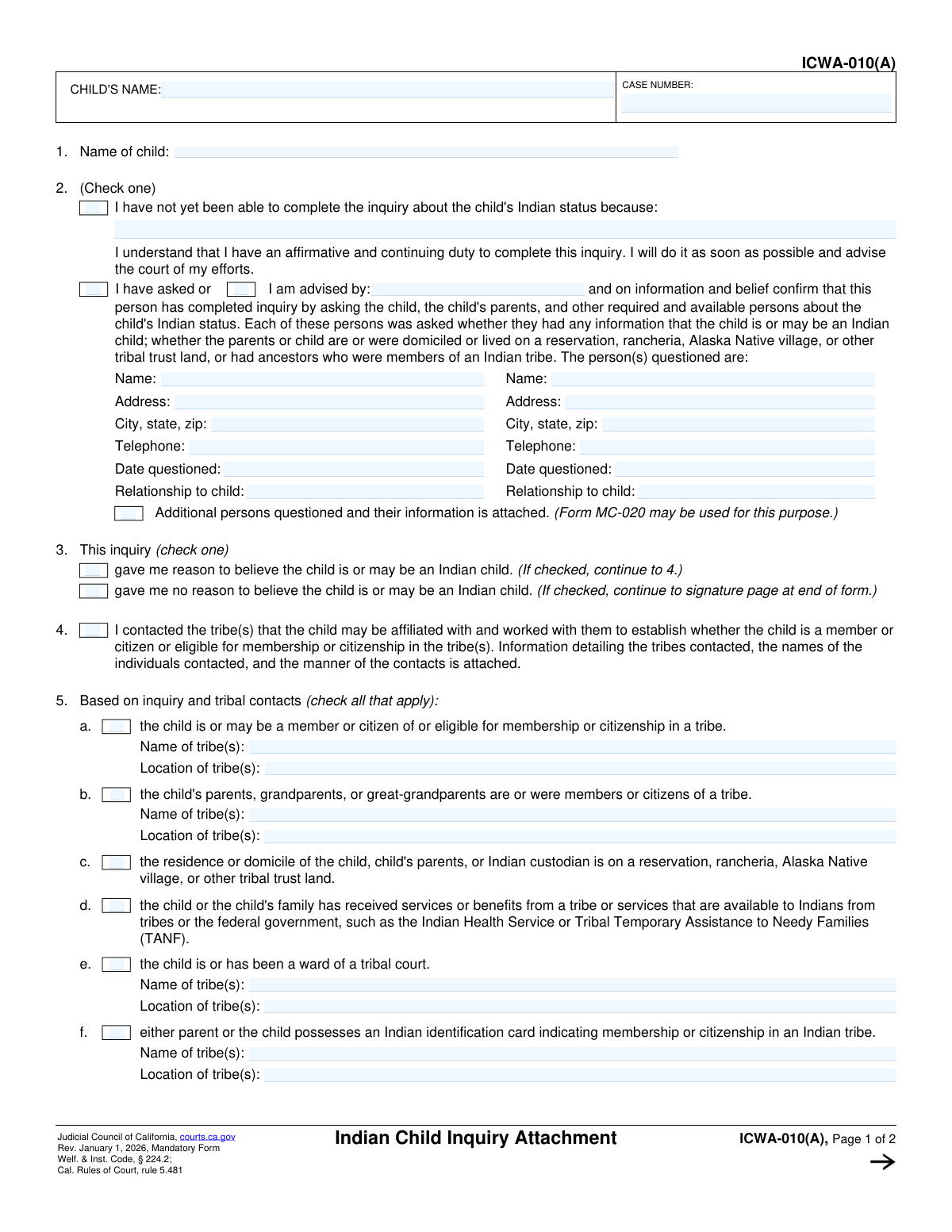
Yes! You can use AI to fill out Form ICWA-010(A), Indian Child Inquiry Attachment
The Indian Child Inquiry Attachment, Form ICWA-010(A), is a legal document used in California courts to record the steps taken to determine if a child involved in a dependency or delinquency proceeding is an 'Indian child' as defined by the Indian Child Welfare Act. This inquiry is a crucial step to ensure compliance with federal and state laws protecting the rights of Native American children, families, and tribes. Today, this form can be filled out quickly and accurately using AI-powered services like Instafill.ai, which can also convert non-fillable PDF versions into interactive fillable forms.
Our AI automatically handles information lookup, data retrieval, formatting, and form filling.
It takes less than a minute to fill out ICWA-010(A) using our AI form filling.
Securely upload your data. Information is encrypted in transit and deleted immediately after the form is filled out.
Form specifications
| Form name: | Form ICWA-010(A), Indian Child Inquiry Attachment |
| Number of fields: | 47 |
| Number of pages: | 1 |
| Language: | English |
Instafill Demo: How to fill out PDF forms in seconds with AI
How to Fill Out ICWA-010(A) Online for Free in 2026
Are you looking to fill out a ICWA-010(A) form online quickly and accurately? Instafill.ai offers the #1 AI-powered PDF filling software of 2026, allowing you to complete your ICWA-010(A) form in just 37 seconds or less.
Follow these steps to fill out your ICWA-010(A) form online using Instafill.ai:
- 1 Navigate to Instafill.ai and upload your ICWA-010(A) form or select it from their template library.
- 2 Provide the child's name and the court case number in the designated header fields.
- 3 Use the AI assistant to complete Section 2, detailing who was questioned about the child's Indian status, their relationship to the child, and the date of the inquiry.
- 4 In Section 3, check the box indicating whether the inquiry gave you reason to believe the child is or may be an Indian child.
- 5 If applicable, fill out Sections 4 and 5 with information about tribal contacts, potential tribal affiliations, and other evidence of Indian heritage.
- 6 Complete the signature block by providing the date, your printed name, and your signature to declare the information is true and correct under penalty of perjury.
- 7 Review the entire AI-completed form for accuracy, then download, save, or print your finalized ICWA-010(A) for court submission.
Our AI-powered system ensures each field is filled out correctly, reducing errors and saving you time.
Why Choose Instafill.ai for Your Fillable ICWA-010(A) Form?
Speed
Complete your ICWA-010(A) in as little as 37 seconds.
Up-to-Date
Always use the latest 2026 ICWA-010(A) form version.
Cost-effective
No need to hire expensive lawyers.
Accuracy
Our AI performs 10 compliance checks to ensure your form is error-free.
Security
Your personal information is protected with bank-level encryption.
Frequently Asked Questions About Form ICWA-010(A)
This form, the Indian Child Inquiry Attachment, is used in California courts to document the investigation into whether a child involved in a legal case has Native American heritage, as required by the Indian Child Welfare Act (ICWA).
The person with a legal duty to inquire about the child's Indian status, such as a social worker, probation officer, or another court-appointed individual, must complete and sign this form.
You will need the child's name, the court case number, and detailed notes from your inquiry. This includes the names, contact information, and relationship to the child for everyone you questioned about their potential Indian heritage.
This means your responsibility to investigate the child's potential Indian status is ongoing. You must continue to seek information throughout the case and report any new findings to the court.
You must ask the child, the child's parents, and other available persons who might have knowledge, such as grandparents or other relatives, about the child's potential Indian status.
If you check that box, you must continue and complete Sections 4 and 5 of the form. These sections require you to detail your contact with potential tribes and specify the information that supports the belief of Indian heritage.
Section 6 only needs to be completed if the case is a delinquency proceeding under Welfare and Institutions Code section 601 or 602. You must indicate if the child is in, or is likely to enter, foster care.
The form becomes part of the official court record. If it indicates a reason to believe the child has Indian heritage, the court will proceed with providing formal notice to the relevant tribes as required by ICWA.
You should document all information provided, even if it's incomplete, in the appropriate sections of the form. This information is still valuable and can be used by the court to conduct further research.
Yes, services like Instafill.ai use AI to help you accurately auto-fill form fields from your case management system, which can save time and reduce the risk of errors.
Simply upload the ICWA-010(A) PDF to the Instafill.ai platform. It will become an interactive form that you can connect to your data sources to auto-fill known information like the child's name and case number.
You can use a service like Instafill.ai, which is designed to convert flat, non-fillable PDFs into interactive forms. This allows you to type directly into the fields, save your progress, and easily print the completed document for filing.
This is an official Judicial Council of California form and must be filed with the clerk of the court that is handling the child's case.
Compliance ICWA-010(A)
Validation Checks by Instafill.ai
1
Header and Page 1 Name Consistency
Ensures the 'CHILD'S NAME' in the header (fields `headerpg1[0].childName[0]` and `LastPage[0].headerpg1[0].childName[0]`) matches the 'Name of child' in question 1 (`List1[0].item1[0].childName[0]`). This is a data integrity check to confirm all references to the child's name on the form are identical. If the names do not match, it could lead to confusion or processing errors for the wrong individual.
2
Cross-Page Header Consistency
Validates that the 'CHILD'S NAME' and 'CASE NUMBER' in the header of page 1 are identical to the 'CHILD'S NAME' and 'CASE NUMBER' in the header of page 2. This check is critical for ensuring that the pages of the document are correctly associated with each other and belong to the same case file. A mismatch would indicate a potential document assembly error, requiring user correction before submission.
3
Section 2 Exclusive Selection
Verifies that exactly one of the two primary checkboxes in question 2 is selected. The user must declare either that they have not yet completed the inquiry or that they have completed it. This is a mandatory choice, and the form cannot be processed if neither or both options are selected, as it creates ambiguity about the status of the inquiry.
4
Conditional Requirement for Person Questioned
Checks that if the second option in question 2 ('I have asked or I am advised by...') is selected, at least one full block of information for a 'person questioned' (Name, Address, Telephone, Date, Relationship) is provided. This information is the evidence supporting the declaration that an inquiry was made. Failure to provide these details when the box is checked would make the declaration incomplete and invalid.
5
Date Questioned Format and Logic
Validates that any 'Date questioned' field (`DateQuestioned_1`, `DateQuestioned_2`) contains a valid date in a recognized format (e.g., MM/DD/YYYY). The validation also ensures the date is not in the future. This is important for establishing a credible and accurate timeline of events for the legal record.
6
Telephone Number Format
Ensures that the 'Telephone' fields (`Telephone_1`, `Telephone_2`) conform to a standard North American phone number format (e.g., 10 digits, optional parentheses and hyphens). This validation improves data quality and ensures the contact information is usable if follow-up is required. An invalid format would prevent successful contact and should be flagged for correction.
7
Section 3 Exclusive Selection
Confirms that exactly one of the two checkboxes in question 3 is selected, indicating whether the inquiry gave reason to believe the child is an Indian child. This is a pivotal determination that dictates the next steps in the process. The form is logically incomplete if this choice is not made, as it's impossible to know whether to proceed to section 4 or the signature page.
8
Logical Dependency for 'Reason to Believe'
If the first checkbox in question 3 ('gave me reason to believe...') is checked, this validation ensures that question 4 is also checked and at least one checkbox in question 5 is selected. This enforces the form's explicit instructions and ensures that the necessary follow-up details are provided when a potential ICWA case is identified. The submission would be considered incomplete without this corresponding information.
9
Logical Dependency for 'No Reason to Believe'
If the second checkbox in question 3 ('gave me no reason to believe...') is checked, this validation ensures that questions 4 and 5 are left entirely blank. This prevents contradictory information from being submitted. Providing details in sections 4 or 5 would conflict with the declaration that there is no reason to believe the child has Indian status, and the user should be prompted to resolve the inconsistency.
10
Conditional Requirement for Tribe Name in Section 5a
Verifies that if checkbox 5a ('the child is or may be a member...') is checked, the corresponding 'Name of tribe(s)' and 'Location of tribe(s)' fields are filled out. The checkbox is meaningless without the specific tribe information it pertains to. This check ensures that actionable information is captured, which is essential for providing proper notice to the correct tribal authorities.
11
Conditional Requirement for Tribe Name in Section 5b
Verifies that if checkbox 5b ('the child's parents, grandparents, or great-grandparents are or were members...') is checked, the corresponding 'Name of tribe(s)' and 'Location of tribe(s)' fields are filled out. This information is crucial for genealogical verification with the tribe. An error should be raised if the box is checked but the tribe details are missing.
12
Conditional Requirement for Tribe Name in Section 5e
Verifies that if checkbox 5e ('the child is or has been a ward of a tribal court') is checked, the corresponding 'Name of tribe(s)' and 'Location of tribe(s)' fields are filled out. Identifying the specific tribal court is necessary to verify the child's history and legal status. The submission is incomplete if this information is omitted when the box is checked.
13
Signature Date Presence and Validity
Ensures the 'Date' field in the signature block (`Date_tf`) is not empty and contains a valid date that is not in the future. The signature date is legally significant as it marks when the declaration was made. The form cannot be considered properly executed without a valid date.
14
Printed Name Requirement
Validates that the 'TYPE OR PRINT NAME' field (`PrintName_tf`) in the signature block is filled out. This field identifies the declarant, which is essential for accountability and verification of the signature. A submission without a printed name is considered incomplete and anonymous.
Common Mistakes in Completing ICWA-010(A)
Users often enter the Child's Name or Case Number incorrectly or inconsistently between the top of page 1 and page 2. This can happen due to simple typos or copy-paste errors. Such inconsistencies can lead to filing rejections, delays in processing, and confusion in the court record, potentially linking the document to the wrong case. To avoid this, double-check that all header information is identical on every page before submission; AI-powered tools like Instafill.ai can help by auto-populating recurring fields consistently across the entire document.
A frequent error is selecting conflicting options regarding the inquiry status. For example, a user might check the box stating 'I have not yet been able to complete the inquiry' while also filling out the section detailing who was questioned. This creates ambiguity and forces the court to seek clarification, delaying the case. You must choose only one path: either the inquiry is incomplete, or it is complete and you are providing the details. Carefully read both options and select the one that accurately reflects your current status.
When indicating that the inquiry is complete in Section 2, filers often provide a name but omit the full address, telephone number, date questioned, or relationship to the child. Each piece of information is required to validate that a thorough inquiry was conducted. Missing details can undermine the credibility of the inquiry and may require the filer to resubmit the form, causing significant delays. Ensure every field for each person questioned is filled out completely.
Filers sometimes skip Section 3 entirely, or they make a selection that contradicts the information provided in Section 5. For instance, checking 'gave me no reason to believe the child is... an Indian child' but then providing tribal information in Section 5. This makes the form's conclusion unclear and legally insufficient. You must check one of the boxes in Section 3, and your choice must logically flow to either stopping or continuing to Sections 4 and 5.
The form allows for attachments for 'Additional persons questioned' (Section 2) and 'Information detailing the tribes contacted' (Section 4). A common mistake is checking the box to indicate an attachment is included but then failing to physically attach the document (e.g., Form MC-020). This renders the declaration incomplete and can invalidate the filing. If you check a box indicating an attachment, ensure the corresponding document is included with your submission.
In Section 5, when identifying a tribe, users often write a general name like 'Cherokee' or 'Sioux' instead of the specific, federally recognized tribal entity (e.g., 'Cherokee Nation' or 'Oglala Sioux Tribe'). This is a critical error, as the court cannot provide proper legal notice to a vague entity, which is a primary purpose of the ICWA. Always research and provide the full, official name and location of the specific tribe(s) to ensure legal compliance and prevent case delays.
Users frequently check a box in Section 5 (e.g., 5a, 5b, 5e, or 5f) to indicate a potential tribal connection but then leave the corresponding 'Name of tribe(s)' and 'Location of tribe(s)' fields blank. A checked box without supporting details is insufficient for the court's purposes. Each claim of affiliation must be substantiated with the specific tribe's name and location to be considered valid.
Forgetting to sign, date, or legibly print one's name at the bottom of page 2 is a very common and costly mistake. An unsigned or undated form is not a valid legal declaration and will be rejected by the court clerk, halting progress in the case. Always review the final page to ensure you have provided your signature, the current date, and a clearly printed name under the penalty of perjury statement.
When a filer checks the first box in Section 2, stating the inquiry is not yet complete, they sometimes mistakenly believe this single filing satisfies their obligation. The form explicitly states there is an 'affirmative and continuing duty to complete this inquiry.' This means the filer must continue their efforts and submit a new, updated ICWA-010(A) form once the inquiry is complete or new information is found, a step that is often forgotten.
This form is often available as a non-fillable PDF, leading people to print it and fill it out by hand. Illegible handwriting for names, addresses, and case numbers can lead to data entry errors by court staff, misdirected notices, and form rejection. To prevent this, use a tool like Instafill.ai, which can convert flat PDFs into fillable forms, allowing you to type your answers clearly and ensure all information is legible and professional.
Saved over 80 hours a year
“I was never sure if my IRS forms like W-9 were filled correctly. Now, I can complete the forms accurately without any external help.”
Kevin Martin Green
Your data stays secure with advanced protection from Instafill and our subprocessors

Robust compliance program
Transparent business model
You’re not the product. You always know where your data is and what it is processed for.
ISO 27001, HIPAA, and GDPR
Our subprocesses adhere to multiple compliance standards, including but not limited to ISO 27001, HIPAA, and GDPR.
Security & privacy by design
We consider security and privacy from the initial design phase of any new service or functionality. It’s not an afterthought, it’s built-in, including support for two-factor authentication (2FA) to further protect your account.
Fill out ICWA-010(A) with Instafill.ai
Worried about filling PDFs wrong? Instafill securely fills form-icwa-010a-indian-child-inquiry-attachment forms, ensuring each field is accurate.