Yes! You can use AI to fill out New Jersey Judiciary Child Welfare Mediation Referral

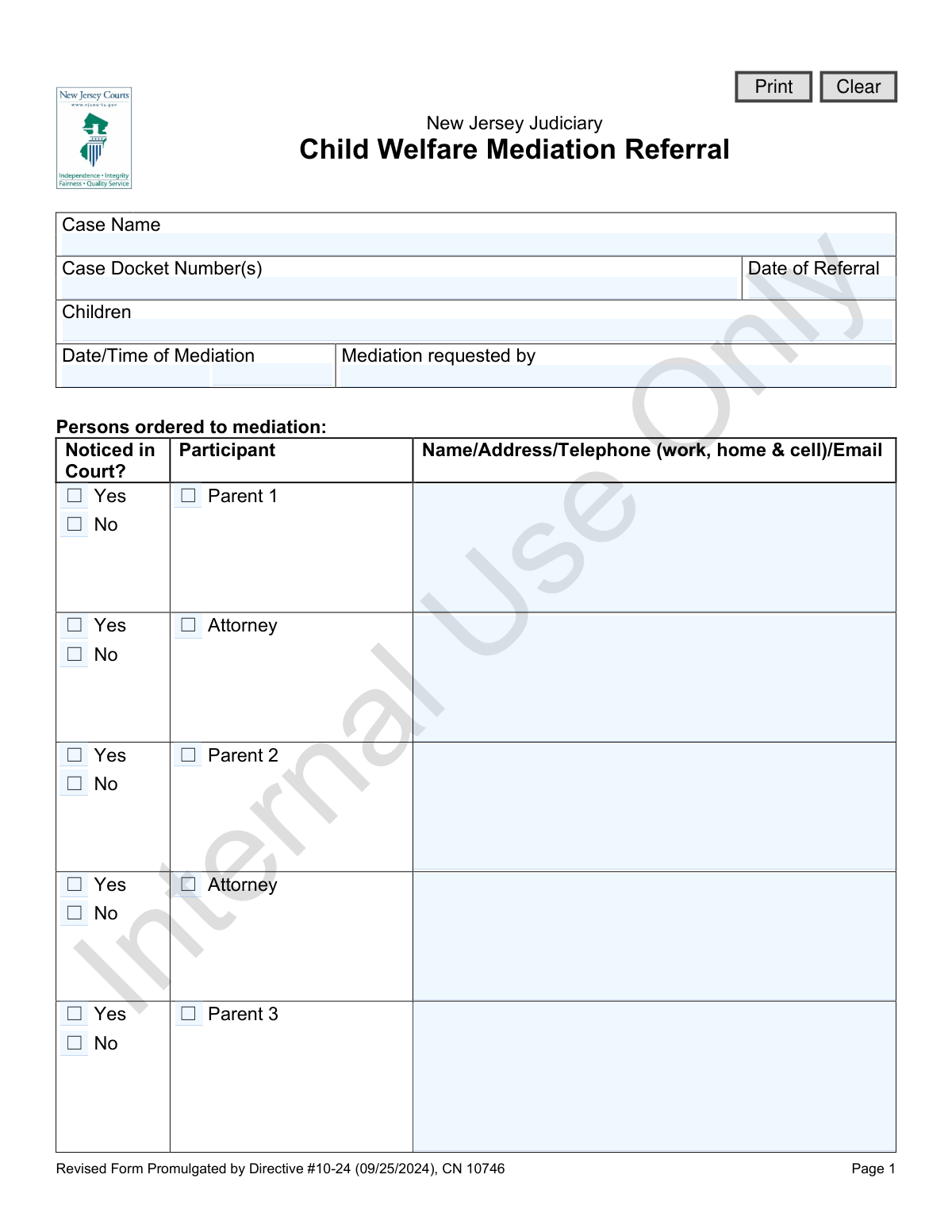
This form is an official document from the New Jersey Judiciary used by the court to order parties involved in a child welfare case into mediation. It identifies the case, the children, all participants required to attend, and the specific issues to be addressed, such as custody, placement, or permanency planning. Today, this form can be filled out quickly and accurately using AI-powered services like Instafill.ai, which can also convert non-fillable PDF versions into interactive fillable forms.
CN 10746 is part of the child welfare forms and New Jersey forms categories on Instafill.
Our AI automatically handles information lookup, data retrieval, formatting, and form filling.
It takes less than a minute to fill out CN 10746 using our AI form filling.
Securely upload your data. Information is encrypted in transit and deleted immediately after the form is filled out.

Form specifications

Form name: New Jersey Judiciary Child Welfare Mediation Referral
Number of fields: 101
Number of pages: 1
Language: English
main-image

Instafill Demo: How to fill out PDF forms in seconds with AI

How to Fill Out CN 10746 Online for Free in 2026

Are you looking to fill out a CN 10746 form online quickly and accurately? Instafill.ai offers the #1 AI-powered PDF filling software of 2026, allowing you to complete your CN 10746 form in just 37 seconds or less.
Follow these steps to fill out your CN 10746 form online using Instafill.ai:
  1. 1 Navigate to Instafill.ai and upload or select the New Jersey Child Welfare Mediation Referral form (CN 10746).
  2. 2 Use the AI assistant to input the case name, docket number(s), and the date of the referral.
  3. 3 List the names of the children involved in the case.
  4. 4 Identify all persons ordered to mediation, such as parents, attorneys, and DCP&P staff, and provide their complete contact information.
  5. 5 Check the boxes corresponding to the specific issues that will be discussed during the mediation, like custody, visitation, or permanency planning.
  6. 6 Indicate any special requirements, such as the need for an interpreter or a writ for an incarcerated party, and fill in the next court date details.
  7. 7 Review the auto-filled information for accuracy, then download, print, or electronically submit the completed referral form.

Our AI-powered system ensures each field is filled out correctly, reducing errors and saving you time.

Why Choose Instafill.ai for Your Fillable CN 10746 Form?

Speed

Complete your CN 10746 in as little as 37 seconds.

Up-to-Date

Always use the latest 2026 CN 10746 form version.

Cost-effective

No need to hire expensive lawyers.

Accuracy

Our AI performs 10 compliance checks to ensure your form is error-free.

Security

Your personal information is protected with bank-level encryption.

Frequently Asked Questions About Form CN 10746

This form is used by the New Jersey Judiciary to formally refer a child welfare case to mediation. It identifies the parties involved, the specific issues to be discussed, and schedules the mediation session.

This form is typically completed by a court official, judge, or an attorney involved in the case, as indicated by the 'Mediation requested by' field. It serves as the official court order for parties to attend mediation.

You must provide the case name, docket number, date of referral, and the names of the children involved. You also need to list all individuals ordered to mediation, along with their complete contact information.

Participants can include parents, their attorneys, a Law Guardian, DCP&P caseworkers, a Deputy Attorney General (DAG), CASA representatives, and other relatives or resource parents. The form has specific sections for each potential participant.

For each person ordered to mediation, you must provide their full name, address, work, home, and cell telephone numbers, and their email address. This ensures all parties can be properly notified about the mediation.

The form provides a checklist of common issues, such as services, custody/visitation, and permanency planning. Simply check the boxes that apply to the case or specify any other issues in the space provided.

This checkbox indicates whether a participant was officially notified about the mediation while they were present in court. This helps track who has received the information directly versus who needs to be notified separately.

If a party is incarcerated, you must check 'Yes' for 'Writ/Notice to Produce Required' and specify the name of the facility. This initiates the legal process required to ensure their participation in the mediation.

The form includes a checkbox to indicate if a 'spoken language interpreter' is required. If you check it, you must also write in the specific language needed to ensure proper accommodations are made.

Yes, if the court orders it, a child can participate in the mediation. There is a specific section on the form to list the child's name and details, which should only be completed upon a direct court order.

Yes, services like Instafill.ai use AI to accurately auto-fill form fields, which can save you significant time and help prevent errors. This is especially useful for forms requiring detailed participant information.

You can use a service like Instafill.ai to easily complete this form online. Simply upload the form to the platform, and it will make the fields interactive for you to fill, save, and print.

If you have a non-fillable or 'flat' PDF, you can use a tool like Instafill.ai to convert it into an interactive, fillable form. This allows you to type your information directly into the fields instead of filling it out by hand.

Compliance CN 10746
Validation Checks by Instafill.ai

1
Case Docket Number Format Validation
This check ensures the 'Case Docket Number(s)' field follows the standard New Jersey Judiciary format (e.g., FN-XX-YYYY-ZZ or FG-XX-YYYY-ZZ). Validating the format helps prevent data entry errors and ensures the referral can be correctly filed and tracked within the court system. A failure would prompt the user to correct the number before submission.
2
Referral Date is a Valid and Past/Present Date
This validation confirms that the 'Date of Referral' is a real calendar date and is not set in the future. This is important for maintaining an accurate timeline of case events and ensuring the record's integrity. A referral cannot logically be made on a future date, so submissions with future dates would be rejected.
3
Mediation Date Chronology
This check verifies that the 'Date of Mediation' is on or after the 'Date of Referral'. This maintains the logical sequence of events, as a mediation cannot be scheduled before it has been referred. An invalid entry could cause significant scheduling confusion and would require correction.
4
Next Court Date Chronology
This validation ensures the 'Next Court Date' occurs on or after the 'Date of Mediation'. This logical check is critical for proper case scheduling and workflow, ensuring that mediation happens before the subsequent court appearance as intended. If the court date precedes the mediation date, the submission will be flagged for correction.
5
Conditional Interpreter Language Requirement
This check ensures that if the 'spoken language interpreter required' box is checked, the corresponding 'Language' field is not empty. This is critical for ensuring the correct interpreter is arranged, which is a legal and accessibility requirement for the proceedings. A failure to specify the language would prevent the form from being submitted until the information is provided.
6
Conditional Incarcerated Party Facility Requirement
This validation confirms that if 'Yes' is selected for 'Writ/Notice to Produce Required for Incarcerated Party', the 'facility' name field must be filled out. This information is essential for the court to issue the writ to the correct correctional facility to ensure the party's presence at the mediation. The submission will be blocked if the facility name is missing when a writ is required.
7
At Least One Participant Required
This check verifies that at least one participant (e.g., Parent 1, Attorney, Law Guardian) has been selected and their corresponding contact information has been provided. A mediation referral is meaningless without participants, so this check ensures the form is actionable. The form would be considered incomplete and rejected if no participants are listed.
8
Participant Information Completeness
For every participant checkbox that is selected, this validation ensures the associated text area for 'Name/Address/Telephone/Email' is not empty. This guarantees that if a person is ordered to mediation, their contact details are on file for notification purposes. A failure would trigger an error, requiring the user to either deselect the participant or provide their information.
9
At Least One Mediation Issue Selected
This validation ensures that at least one checkbox under 'Issues for mediation' has been selected. The purpose of the mediation must be clearly defined for the mediator to be effective and for the referral to be valid. A submission without any selected issues would be rejected as incomplete.
10
Conditional 'Other Issues' Specification
This check requires that if the 'Other issues' checkbox is selected under 'Issues for mediation', the corresponding text field for specifying those issues must be filled out. This provides necessary context and detail for the mediator and all parties involved. The form cannot be submitted with 'Other' checked but no explanation provided.
11
Participant Type Specification Requirement
This validation ensures that for participant types requiring clarification, such as 'Paternal Relatives', 'Maternal Relatives', 'Resource Parent', or 'Other', the '(specify)' field is completed. This is crucial for identifying exactly who is being ordered to mediation. A failure to specify would result in an incomplete and ambiguous referral.
12
DCP&P Worker Local Office Requirement
This check verifies that if a 'DCP&P Case Worker' is listed as a participant, the 'Local Office' field is filled in. This information is vital for ensuring that notifications and documents are sent to the correct regional office of the Division of Child Protection and Permanency. The submission would be flagged as incomplete without this specific detail.
13
Contact Information Format (Phone/Email)
This validation scans all participant information fields to ensure that any provided telephone numbers and email addresses adhere to standard formats (e.g., ###-###-#### for phone, [email protected] for email). Correctly formatted data is essential for successful communication and automated notification systems. An invalid format would trigger a warning and request correction.
14
Case Identifier Completeness
This check ensures that both the 'Case Name' and 'Case Docket Number(s)' fields are filled out. These two fields are the primary identifiers for the legal matter and are absolutely essential for filing, tracking, and associating the referral with the correct case file. The form is fundamentally incomplete and cannot be processed without them.

Common Mistakes in Completing CN 10746

Incorrect Case Docket Number

Users often mistype or enter an incomplete docket number when transcribing it from other court documents. An incorrect docket number is a critical error that can lead to the referral being misfiled or rejected, causing significant processing delays. To avoid this, carefully double-check the docket number against official court records. AI-powered form filling tools like Instafill.ai can help by validating the format of the docket number to catch potential errors before submission.

Incomplete Participant Contact Information

The form requires a full name, address, multiple phone numbers (work, home, cell), and an email for each participant. A common mistake is providing only one phone number or omitting the email address, which severely hampers the mediator's ability to schedule the session. This lack of information leads to communication breakdowns and delays. Always fill in all available contact details; if a detail is unknown, it's better to mark it as 'unknown' than to leave the field blank.

Overlooking the 'Noticed in Court?' Checkbox

For each of the many potential participants, there is a 'Noticed in Court?' checkbox that is frequently missed. Forgetting to check 'Yes' or 'No' creates ambiguity about whether a participant is officially aware of the mediation order. This can cause procedural issues and may require the court to re-notify the individual, delaying the entire process. To prevent this, systematically review each participant entry and ensure the corresponding box is checked.

Vague Details in 'Specify' Fields

Fields for 'Paternal Relatives,' 'Maternal Relatives,' and 'Other' participants are often filled with vague terms like 'Grandmother' or 'Aunt.' This is insufficient, as the form requires the person's full name and their exact relationship to the child or case for proper identification. This ambiguity can lead to confusion about who is actually ordered to attend. Always provide the full name and a clear description, such as 'Jane Doe, Paternal Grandmother,' in all 'specify' fields.

Forgetting the Child's Name for Resource Parents

When listing a 'Resource Parent' or 'Adoptive Parent,' the form explicitly asks for both the parent's name and the specific child's name. People often forget to include the child's name, a critical error in cases with multiple children in different placements. This omission can cause confusion and may result in the wrong resource parent being contacted. Ensure you specify which child each resource parent is connected to for clarity.

Missing DCP&P Local Office Information

When listing the DCP&P Case Worker, there is a dedicated field for their 'Local Office' that is often left blank. Without this information, it can be difficult to route communications correctly within the Division of Child Protection and Permanency, especially if the listed caseworker is unavailable. This can delay important correspondence related to the mediation. Always include the specific local office to ensure proper and timely communication.

Failing to Request an Interpreter

The section for ADA accommodations, specifically the 'spoken language interpreter required' checkbox, is frequently overlooked. If a participant has limited English proficiency, failing to request an interpreter will cause the mediation to be postponed on the scheduled day, wasting time for all parties. It is crucial to identify any language needs upfront, check the box, and specify the required language to ensure the mediation can proceed as planned.

Incomplete Information for Incarcerated Parties

If a party is incarcerated, the form requires checking 'Yes' for the 'Writ/Notice to Produce' and specifying the correctional facility. A common mistake is to check 'Yes' but leave the facility name blank. Without knowing the facility, the court cannot issue the writ to arrange for the party's participation, making their involvement impossible. Always provide the full name and location of the correctional facility to avoid this critical failure.

Omitting Next Court Date Details

The form asks for the 'Next Court Date,' 'Time,' and 'Judge.' Users sometimes only provide the date, omitting the time and the presiding judge's name. This information is vital for the mediator to schedule the session with enough time to report back to the court before the hearing. Leaving this information out can lead to scheduling conflicts or reports not being ready in time.

Submitting a Messy, Handwritten Form

Often, official forms are only available as flat, non-fillable PDFs, leading to handwritten submissions that are difficult to read. Illegible handwriting for critical data like docket numbers, names, or contact details can cause processing errors and delays equivalent to leaving fields blank. To avoid this, use a tool like Instafill.ai, which can convert non-fillable PDFs into interactive, fillable forms, ensuring a clean, typed, and easily readable submission.
Saved over 80 hours a year

“I was never sure if my IRS forms like W-9 were filled correctly. Now, I can complete the forms accurately without any external help.”

Kevin Martin Green

Your data stays secure with advanced protection from Instafill and our subprocessors

Robust compliance program

Transparent business model

You’re not the product. You always know where your data is and what it is processed for.

ISO 27001, HIPAA, and GDPR

Our subprocesses adhere to multiple compliance standards, including but not limited to ISO 27001, HIPAA, and GDPR.

Security & privacy by design

We consider security and privacy from the initial design phase of any new service or functionality. It’s not an afterthought, it’s built-in, including support for two-factor authentication (2FA) to further protect your account.

Fill out CN 10746 with Instafill.ai

Worried about filling PDFs wrong? Instafill securely fills new-jersey-judiciary-child-welfare-mediation-referral forms, ensuring each field is accurate.

Related forms by category

child welfare forms ICPC 100B, Interstate Compact on the Placement of Children Report on Child’s Placement Status, Form ICWA-005-INFO, Inquiry and Notice Under the Indian Child Welfare Act (ICWA), CFS 718, Application for Child Welfare Employee Licensure, AAP 2, Reassessment Information - Adoption Assistance Program, Adoption Assistance Program (AAP) - Request for Benefits, Adoption Assistance Program (AAP) Eligibility Certification, Adoption Assistance Program (AAP) Rate Questionnaire, Adoption and Safe Families Act (ASFA) Survey, Form ICWA-030, Notice of Child Custody Proceeding for Indian Child (Indian Child Welfare Act), Form ICWA-010(A), Indian Child Inquiry Attachment, child-welfare-mediation-confidentiality-agreement-form-cn-10743-english, child-welfare-mediation-case-status-report
New Jersey forms State of New Jersey Alternate Benefit Program Withdrawal Request Acknowledgement Receipt, Horizon Blue Cross Blue Shield of New Jersey Applied Behavior Analysis Supplemental Information Form, State of New Jersey Application for Employment (Form DPF-663), New Jersey Judiciary Plea Form (Plea 01), Supplemental Plea Form for Certain Sexual Offenses: Megan’s Law/Parole Supervision for Life/Community Supervision for Life (Plea 05), Financial Questionnaire to Establish Indigency, New Jersey Judiciary Resource Family Information Form, Foreclosure Case Information Statement (FCIS) - Appendix XII-B2, New Jersey Judiciary Records Request Form, Superior Court of New Jersey, Application for Appeal and Order, FL Certification of Requested Background Checks for Kinship Legal Guardianship, Certification of Caregiver as to Knowledge of Identity and/or Location of Parents, FL Order Judgment for Kinship Legal Guardianship, New Jersey Judiciary Certification of Repair and Plea of Guilty, Uniform Summary Support Order (USSO), New Jersey Judiciary Volunteer Application (CN 10293), Application to Take the New Jersey Court Interpreter Oral Examination, New Jersey Judiciary Attorney Fee Arbitration Request, Order to Show Cause with Temporary Restraints Pursuant to Rule 4:52, Tax Court of New Jersey, State Tax Complaint · + 158 more →