Yes! You can use AI to fill out Adoption Assistance Program (AAP) Rate Questionnaire

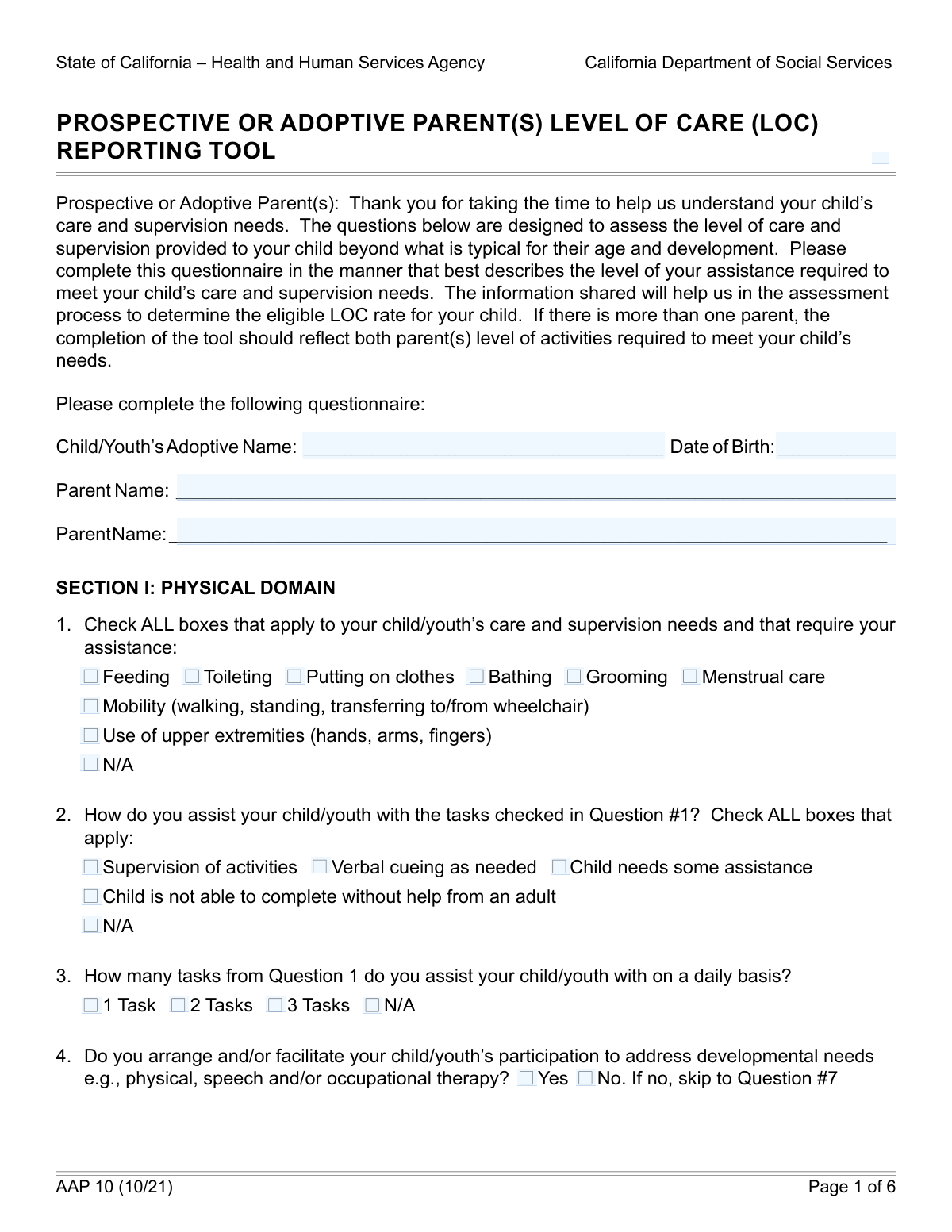
The Adoption Assistance Program (AAP) Rate Questionnaire, or AAP 2, is a crucial document for adoptive families in California seeking financial assistance for children with special needs. It allows parents to detail the child's specific care, supervision, developmental, medical, and behavioral needs, which helps social services determine the appropriate level of financial support. Today, this form can be filled out quickly and accurately using AI-powered services like Instafill.ai, which can also convert non-fillable PDF versions into interactive fillable forms.
Our AI automatically handles information lookup, data retrieval, formatting, and form filling.
It takes less than a minute to fill out AAP 2 using our AI form filling.
Securely upload your data. Information is encrypted in transit and deleted immediately after the form is filled out.

Form specifications

Form name: Adoption Assistance Program (AAP) Rate Questionnaire
Number of fields: 163
Number of pages: 6
Language: English
Categories: adoption forms
main-image

Instafill Demo: How to fill out PDF forms in seconds with AI

How to Fill Out AAP 2 Online for Free in 2026

Are you looking to fill out a AAP 2 form online quickly and accurately? Instafill.ai offers the #1 AI-powered PDF filling software of 2026, allowing you to complete your AAP 2 form in just 37 seconds or less.
Follow these steps to fill out your AAP 2 form online using Instafill.ai:
  1. 1 Navigate to Instafill.ai and upload or select the AAP 2 form.
  2. 2 Use the AI assistant to fill in the child's and parents' basic information, such as names and date of birth.
  3. 3 Carefully review and answer the detailed questions about the child's care and supervision needs, checking all applicable boxes for daily tasks, mobility, and personal care.
  4. 4 Provide information on the child's developmental, behavioral, and educational needs, including therapies, IEP/504 plans, and any required special assistance.
  5. 5 Document any medical conditions, specialist care, and medication administration requirements.
  6. 6 Add any additional comments or information in the provided sections to give a complete picture of the child's needs.
  7. 7 Review the completed form for accuracy, then have the adoptive parent(s) and the Adoption Services Worker sign and date the document electronically.

Our AI-powered system ensures each field is filled out correctly, reducing errors and saving you time.

Why Choose Instafill.ai for Your Fillable AAP 2 Form?

Speed

Complete your AAP 2 in as little as 37 seconds.

Up-to-Date

Always use the latest 2026 AAP 2 form version.

Cost-effective

No need to hire expensive lawyers.

Accuracy

Our AI performs 10 compliance checks to ensure your form is error-free.

Security

Your personal information is protected with bank-level encryption.

Frequently Asked Questions About Form AAP 2

This form is for prospective or adoptive parents to document the specific care, supervision, and support needs of their child. It helps in assessing the level of assistance required for the child's daily activities, developmental progress, and behavioral health.

You will need to enter the child's full adoptive name and their date of birth at the beginning of the form. This information is crucial as some sections are dependent on the child's age.

If your child is independent in all the areas listed, such as bathing, grooming, and mobility, you should check the box labeled 'N/A (Care and Supervision Needs)'. This will indicate that the subsequent questions in that section do not apply.

The 'Assistance with Tasks' section should only be completed if you have first indicated that your child requires help with one or more of the 'Care and Supervision Needs' like toileting, feeding, or mobility.

No, the section titled 'Tasks requiring assistance for child age 14 or older' is specifically for older children. If your child is younger than 14, you can skip this part of the form.

Yes, the form specifies that you should only check 'Yes' for 'Behavioral/Emotional Challenges Diagnosis' if your child has been diagnosed by a Licensed Therapist or a Medical Doctor (MD).

For any assistance or care you provide that is not covered by the specific checkboxes, you can use the 'Additional Comments, Concerns, and Assistance' section to provide a detailed description.

The form must be signed by the prospective or adoptive parent(s). It also includes a signature line for the Adoption or Post-Adoption Services Worker who is handling the case.

Yes, services like Instafill.ai use AI to accurately auto-fill form fields, which can save you time and reduce errors. This is particularly helpful for complex forms with many conditional questions.

You can upload the form to a platform like Instafill.ai to fill it out electronically. Their service allows you to type directly into the fields, check boxes, and add a digital signature before downloading the completed PDF.

If your PDF is a 'flat' or non-interactive file, you can use a tool like Instafill.ai to convert it into a fillable form. Simply upload the document, and the platform will make the fields interactive for you to complete online.

This refers to the time you spend arranging and attending meetings with your child's school, communicating with teachers and specialists, and advocating for the services outlined in their educational support plan.

'Supervision of activities' means you are present and watching over the child to ensure they complete a task safely and correctly. 'Verbal cueing' is more specific, involving giving spoken prompts or step-by-step instructions to guide the child through the task.

If your child participates in a therapy that is not listed, such as art or music therapy, you can check the 'Other' box. You should then use the 'Other Support Type Description' field to specify the type of support they receive.

Compliance AAP 2
Validation Checks by Instafill.ai

1
Child's Date of Birth Format and Validity
This check ensures that the 'Child/Youth's Date of Birth' field is not empty, contains a valid date in a recognized format (e.g., MM/DD/YYYY), and that the date is in the past. This is critical for calculating the child's age, which determines eligibility for certain sections of the form. If the date is invalid or in the future, the form submission will be rejected with an error message prompting the user to enter a valid past date.
2
Mutually Exclusive Care and Supervision Needs
This validation verifies that if the 'N/A (Care and Supervision Needs)' checkbox is selected, no other specific need checkboxes in that same section (e.g., 'Mobility', 'Toileting', 'Bathing') are selected. Selecting 'N/A' indicates no assistance is needed, which logically conflicts with selecting a specific assistance need. A failure would trigger a prompt asking the user to either uncheck 'N/A' or deselect all specific needs.
3
Conditional Requirement for Assistance with Tasks
This check ensures that the 'Assistance with Tasks' section (e.g., 'Supervision of activities', 'Verbal cueing') is only filled out if at least one specific 'Care and Supervision Needs' checkbox is checked. This prevents users from describing how they assist with tasks when they have already indicated no tasks require assistance. If this rule is violated, the system will prevent submission and highlight the dependency between the two sections.
4
Age-Dependent Validation for Tasks for Older Children
This validation calculates the child's age from their Date of Birth and ensures the 'Tasks requiring assistance for child age 14 or older' section is only completed if the child is 14 years of age or older. This prevents irrelevant information from being collected for younger children. If a user tries to fill this section for a child under 14, the fields will be disabled or an error message will be displayed upon submission.
5
Conditional Requirement for Behavioral Support Types
This check verifies that specific 'Behavioral/Emotional Support Types' (e.g., 'Group therapy', 'Family therapy') are only selected if the 'Yes' option for 'Behavioral/Emotional Challenges Diagnosis' is also selected. This ensures that details about support are only provided when a relevant diagnosis has been confirmed. An error will be shown if support types are selected without the prerequisite 'Yes' selection.
6
Required Description for 'Other' Support Type
This validation ensures that if the 'Option 4 of 5 Other' checkbox is selected in the 'Behavioral/Emotional Support Types' section, the corresponding 'Other Support Type Description' text field is not left empty. This is important for data completeness, as selecting 'Other' without an explanation provides no useful information. Failure to provide a description will result in a validation error, requiring the user to either provide details or uncheck the 'Other' option.
7
Signature and Date Co-dependency
This check ensures that if a signature field ('First Parent Signature', 'Second Parent Signature', 'Adoption Services Worker Signature') is filled, its corresponding date field must also be completed. A signature is legally incomplete without a date of signing. If a signature is present but the date is missing, the form will prompt the user to enter the signature date before submission is allowed.
8
Completeness of Second Parent Information
This validation rule checks that if 'Parent Name 2' is filled out, the 'Second Parent Signature' and 'Second Signature Date' fields are also completed. This ensures that if a second parent is officially listed on the form, their attestation is fully captured. If the name is present but the signature or date is missing, an error will prompt the user to complete the second parent's signature block.
9
Logical Consistency of Daily Task Count
This check compares the number of checkboxes selected in the 'Care and Supervision Needs' section with the option chosen in the 'Daily Task Assistance Count' section. For example, if a user checks two needs (e.g., 'Toileting' and 'Bathing'), they cannot select '1 Task' in the count section. This ensures the reported number of assisted tasks is logically consistent with the specified needs, preventing contradictory data entry.
10
Conditional Requirement for Specialist Care Frequency
This validation ensures that if the 'Specialist Care' checkbox is selected under 'Current Medical and Mental Health Services', then one of the frequency options ('Two times per year', '11 times per year', etc.) must also be selected. This prevents incomplete data entry where the type of care is indicated but its frequency is omitted. A validation failure would prompt the user to specify how often the specialist care is received.
11
Conditional Requirement for Therapist Consultation Frequency
This check verifies that if the 'Arrange, facilitate, provide and/or consult with a therapist...' checkbox is checked, the 'Times Per Month' numeric field must be filled out. This ensures that when a user indicates they consult with professionals, they also quantify the frequency of that activity. If the checkbox is ticked but the number is missing, the system will flag it as an error and require a value.
12
Mutually Exclusive Yes/No Selections
This validation applies to all pairs of 'Yes'/'No' checkboxes, such as for 'Developmental Needs Participation'. It ensures that a user cannot select both 'Yes' and 'No' for the same question. This prevents ambiguous or contradictory answers and maintains data integrity. If both are selected, the system will display an error and require the user to choose only one option.

Common Mistakes in Completing AAP 2

Ignoring Conditional Logic for Follow-Up Questions

Many sections, like 'Assistance with Tasks', are conditional and should only be filled out if a primary need like 'Mobility' or 'Toileting' is selected first. Users often answer these follow-up questions without selecting the prerequisite, which invalidates their responses and can lead to an underestimation of the child's needs. To avoid this, carefully follow all 'Fill only if...' instructions. AI-powered form filling tools like Instafill.ai can prevent this by automatically showing or hiding dependent questions based on your answers.

Contradictory 'N/A' and Specific Need Selections

A frequent error is checking the 'N/A (Care and Supervision Needs)' box while also checking a specific need like 'Bathing' or 'Grooming'. This creates a direct contradiction that makes the form unprocessable and requires clarification, delaying the assessment. This usually happens when a user changes their mind but forgets to uncheck the previous selection. Always review your choices in a section to ensure they are consistent; if the child has any needs, do not check the 'N/A' box.

Incorrectly Filling Out Age-Dependent Sections

The section 'Tasks requiring assistance for child age 14 or older' is strictly conditional on the child's date of birth. Parents often either fill this out for a younger child or, more commonly, forget to complete it for an eligible teenager. This error results in an inaccurate assessment of an older child's needs for developing independence. Always calculate the child's current age from the 'Date of Birth' field and only complete this section if they are 14 or older. Tools like Instafill.ai can automatically validate the age and guide you to the correct sections.

Mismatching Task Counts with Selections

The form asks users to select individual 'Care and Supervision Needs' and then separately select the total number of tasks assisted with daily (e.g., '1 Task', '2 Tasks'). A common mistake is checking three specific needs but then selecting '1 Task' in the count section. This discrepancy forces the agency to seek clarification, causing delays. To avoid this, carefully count the number of daily tasks you checked and ensure the number matches your selection in the 'Daily Task Assistance Count' section.

Selecting an Activity but Not Specifying the Hours

Many sections, such as 'IEP/504 Plan Participation' or 'Advocacy with Educational Professionals', require a two-part answer: checking the activity and then selecting the hours spent per week. Users frequently check the main activity box but forget to select the corresponding time commitment. This omission makes it impossible to quantify the level of support provided, potentially reducing the assessed need. Always double-check that after selecting an activity, you also complete the required follow-up question about hours.

Missing Signature Dates

A form is often considered invalid without both a signature and a corresponding date. A very common administrative error is for a parent to sign the form but forget to enter the date in the 'First Parent Signature Date' or 'Second Signature Date' field. This simple oversight can lead to the form being rejected and returned, delaying the entire process. To prevent this, make it a habit to date the form immediately after signing it. AI tools like Instafill.ai can flag missing signature dates before submission.

Answering 'No' but Still Filling Out Dependent Sections

Several questions, like 'Developmental Needs Participation,' have a 'Yes/No' choice where answering 'No' instructs the user to skip subsequent questions. However, people often answer 'No' and then proceed to fill out the dependent fields anyway (e.g., 'Frequency of arranging/facilitating therapy'). This creates confusion and requires manual correction by the reviewer. Carefully follow all 'skip to' instructions to ensure your form is logical and can be processed quickly.

Checking 'Other' Without Providing a Description

In the 'Behavioral/Emotional Support Types' section, users often check the 'Other' box but fail to write a description in the corresponding text field. This leaves reviewers unable to understand or credit the type of support being provided, potentially overlooking a critical service. Always ensure that if you select 'Other,' you provide a clear, concise explanation in the 'Other Support Type Description' field to give a complete picture of the support system.

Misinterpreting Levels of Assistance

The form asks for nuanced levels of assistance, such as 'Child needs some assistance' versus 'Child is not able to complete without help from an adult.' Users may not understand the distinction, leading to an inaccurate portrayal of the child's abilities. 'Some assistance' implies the child can do parts of the task, while 'cannot complete without help' implies total dependence. Choosing the wrong option can significantly impact the assessment, so consider the child's actual level of independence for each task carefully.

Leaving Required Text Fields Blank

When a text field like 'Care Coordination Details' is required based on a previous answer, users sometimes leave it blank. A blank field is ambiguous—it's unclear if the user forgot to fill it or has nothing to add. This can halt processing. If a field is required but you have no information, it is better to write 'N/A' or 'None' to show the question was considered. If the form is a non-fillable PDF, a tool like Instafill.ai can convert it to a fillable version, making it easier to complete all required fields.
Saved over 80 hours a year

“I was never sure if my IRS forms like W-9 were filled correctly. Now, I can complete the forms accurately without any external help.”

Kevin Martin Green

Your data stays secure with advanced protection from Instafill and our subprocessors

Robust compliance program

Transparent business model

You’re not the product. You always know where your data is and what it is processed for.

ISO 27001, HIPAA, and GDPR

Our subprocesses adhere to multiple compliance standards, including but not limited to ISO 27001, HIPAA, and GDPR.

Security & privacy by design

We consider security and privacy from the initial design phase of any new service or functionality. It’s not an afterthought, it’s built-in, including support for two-factor authentication (2FA) to further protect your account.

Fill out AAP 2 with Instafill.ai

Worried about filling PDFs wrong? Instafill securely fills adoption-assistance-program-aap-rate-questionnaire forms, ensuring each field is accurate.