Yes! You can use AI to fill out California Department of Social Services (CDSS) Community Care Licensing Division — Administrative Organization (LIC 309)
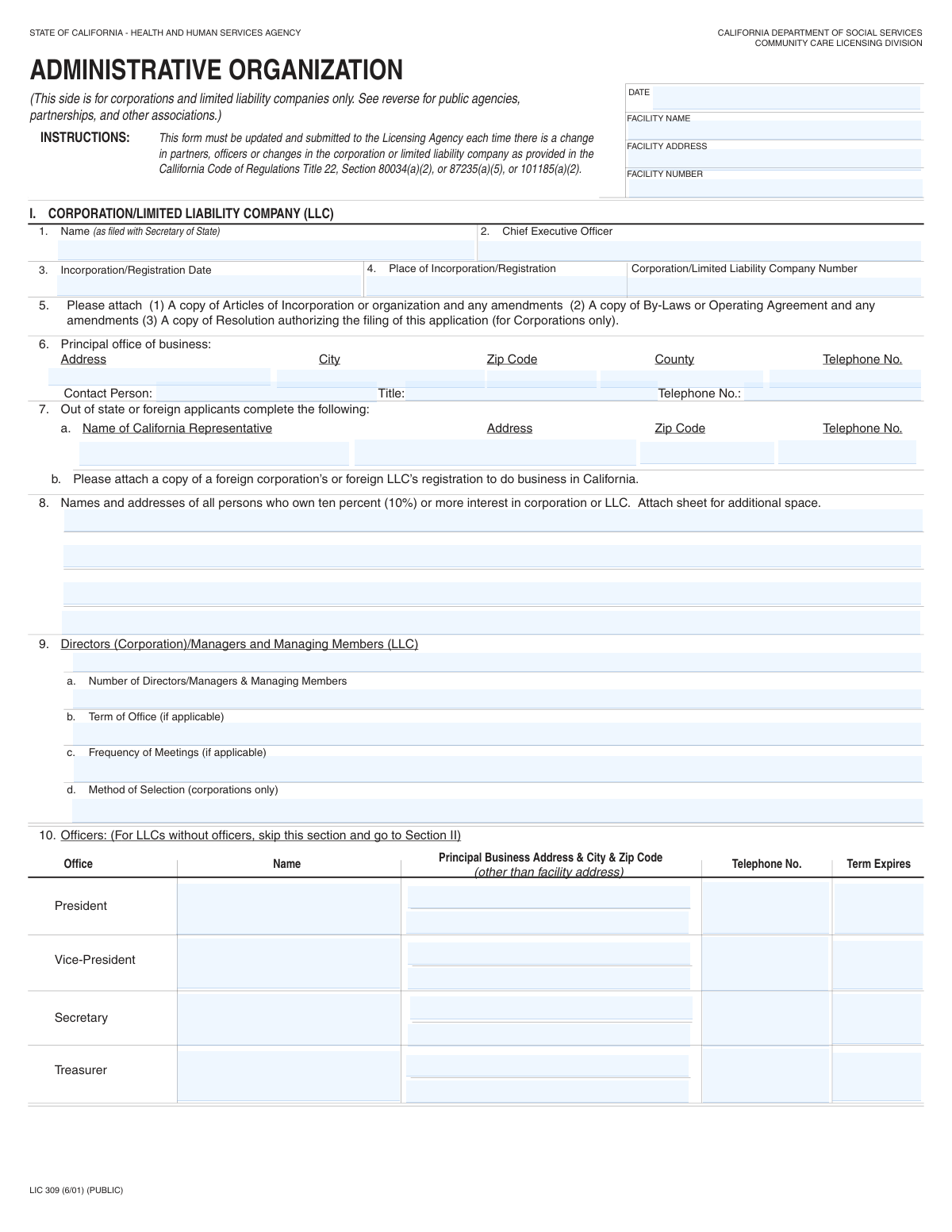
LIC 309 (Administrative Organization) is an official California Department of Social Services, Community Care Licensing Division form used to document the legal and management structure of an applicant/licensee—such as the corporation/LLC name, officers, directors/managers, and owners with 10% or more interest—along with key facility identifiers. It must be updated and submitted to the Licensing Agency whenever there are changes in partners, officers, or corporate/LLC structure as required by California Code of Regulations, Title 22 (e.g., sections 80034(a)(2), 87235(a)(5), and 101185(a)(2)). Accurate completion helps the licensing authority verify who is legally responsible for operating the facility and ensures compliance and accountability. Today, this form can be filled out quickly and accurately using AI-powered services like Instafill.ai, which can also convert non-fillable PDF versions into interactive fillable forms.
Our AI automatically handles information lookup, data retrieval, formatting, and form filling.
It takes less than a minute to fill out LIC 309 using our AI form filling.
Securely upload your data. Information is encrypted in transit and deleted immediately after the form is filled out.
Form specifications
| Form name: | California Department of Social Services (CDSS) Community Care Licensing Division — Administrative Organization (LIC 309) |
| Number of pages: | 2 |
| Filled form examples: | Form LIC 309 Examples |
| Language: | English |
| Categories: | CAR forms, CDSS forms, California DSS forms, care licensing forms, community care forms |
Instafill Demo: filling out a legal form in seconds
How to Fill Out LIC 309 Online for Free in 2026
Are you looking to fill out a LIC 309 form online quickly and accurately? Instafill.ai offers the #1 AI-powered PDF filling software of 2026, allowing you to complete your LIC 309 form in just 37 seconds or less.
Follow these steps to fill out your LIC 309 form online using Instafill.ai:
- 1 Go to Instafill.ai and upload the LIC 309 PDF (or search/select “LIC 309” from the form library).
- 2 Let the AI detect and convert the document into a fillable form, then confirm you are completing the correct section (Corporation/LLC vs. Public Agency/Partnership/Other Association).
- 3 Enter the facility information (date, facility name, facility address, and facility number) exactly as shown on your license/records.
- 4 Complete the Corporation/LLC identification details (legal name as filed with the Secretary of State, CEO, incorporation/registration date, place of incorporation/registration, and entity number).
- 5 Fill in principal office and contact details, then list all 10%+ owners and all directors/managers/managing members (including addresses, phone numbers, and term expiration where required).
- 6 Add officer information if applicable (President, Vice-President, Secretary, Treasurer) and provide principal business addresses/phones; skip officer section if the LLC has no officers as instructed.
- 7 Upload/attach required supporting documents (e.g., Articles of Incorporation/Organization, By-Laws/Operating Agreement, resolutions, foreign registration if applicable), run Instafill.ai validation checks, then download/sign and submit to the Licensing Agency.
Our AI-powered system ensures each field is filled out correctly, reducing errors and saving you time.
Why Choose Instafill.ai for Your Fillable LIC 309 Form?
Speed
Complete your LIC 309 in as little as 37 seconds.
Up-to-Date
Always use the latest 2026 LIC 309 form version.
Cost-effective
No need to hire expensive lawyers.
Accuracy
Our AI performs 10 compliance checks to ensure your form is error-free.
Security
Your personal information is protected with bank-level encryption.
Frequently Asked Questions About Form LIC 309
This form tells California Community Care Licensing (CCLD) who is legally responsible for operating a licensed facility (e.g., the corporation/LLC owners, directors/managers, and officers). It helps CCLD keep the facility’s administrative and ownership information current.
This side is for corporations and limited liability companies (LLCs) only. Public agencies, partnerships, and other associations should use the sections on the reverse/other parts of the form.
You must update and submit it each time there is a change in partners, officers, or changes in the corporation/LLC (as referenced in Title 22 regulations listed on the form). Submit it as soon as the change occurs so licensing records stay accurate.
You must provide the date, facility name, facility address, and facility number. Use the facility’s official licensed name/address and the license/ID number assigned by the licensing agency.
Enter the legal entity name exactly as filed with the California Secretary of State (including punctuation like “LLC,” “Inc.,” etc.). If the facility uses a DBA, do not substitute it for the legal entity name unless CCLD specifically instructs you to.
Attach (1) Articles of Incorporation/Organization and any amendments, (2) By-Laws or Operating Agreement and any amendments, and (3) a Resolution authorizing the filing of this application (corporations only). Missing attachments are a common reason forms are returned or delayed.
You must list all persons/entities who own ten percent (10%) or more interest in the corporation or LLC, including their addresses. If you need more room, attach an additional sheet.
Enter the total number of directors/managers/managing members, then list each person’s name, mailing address, telephone number, and term expiration (if applicable). If the form doesn’t have enough lines, attach a sheet with the same details.
If your LLC does not have officers, skip the Officers section and proceed to the next section as instructed. If your LLC does have officers, complete the officer names and their principal business addresses/phone numbers (not the facility address, unless that is truly their business address).
Complete the “California Representative” fields and attach a copy of the foreign corporation/foreign LLC registration to do business in California. This ensures CCLD has an in-state contact and proof of authority to operate in California.
Submit it to your facility’s assigned CCLD Regional Office/Licensing Agency (the office that handles your facility’s license). If you’re unsure which office, check your licensing correspondence or contact CCLD for the correct submission location.
Processing times vary by office and workload, and the form itself does not list a standard timeline. To avoid delays, include all required attachments and ensure names/addresses match Secretary of State and licensing records.
Yes—AI form-filling services like Instafill.ai can help auto-fill fields from your existing business and licensing information, reducing manual entry and errors. You should still review the final output for accuracy and compliance before submitting.
Upload the LIC 309 PDF to Instafill.ai, then provide or connect your source details (e.g., Secretary of State entity info, addresses, owner/director lists, and contact numbers). Instafill.ai can map your data into the correct fields, after which you review, download, and submit to CCLD.
If the PDF isn’t fillable, Instafill.ai can convert flat, non-fillable PDFs into interactive fillable forms so you can type directly into the fields. After conversion, you can auto-fill and export a clean, legible completed form.
Compliance LIC 309
Validation Checks by Instafill.ai
1
Facility Information Required Fields Completeness
Validates that the Facility Date, Facility Name, Facility Address, and Facility Number are all present when the form is submitted. These fields identify the licensed facility and anchor the administrative change to a specific license record. If any are missing, the submission should be rejected or routed to an exception queue because the licensing agency cannot reliably match the update to the correct facility.
2
Date Fields Format and Valid Calendar Date
Checks that all date fields (e.g., Facility Date, Incorporation/Registration Date, officer/director term expiration dates) are in an accepted format (e.g., MM/DD/YYYY) and represent real calendar dates. This prevents downstream parsing errors and incorrect timelines in compliance tracking. If validation fails, the system should flag the specific field and require correction before acceptance.
3
Chronological Consistency: Incorporation Date vs. Form Date
Ensures the Incorporation/Registration Date is not after the form completion/change Date, and is not unreasonably far in the future. This is important because an entity cannot be incorporated after the date it is reporting administrative details for licensing purposes. If inconsistent, the submission should be blocked pending confirmation or corrected dates.
4
Facility Number Format and Character Set Validation
Validates that the Facility Number matches the expected licensing identifier pattern (e.g., numeric-only or a known alphanumeric format used by the agency) and does not contain illegal characters. Correct formatting is essential for matching to licensing databases and preventing misfiled updates. If the format is invalid, the system should reject the submission or require the user to re-enter the facility number.
5
Corporation/LLC Section Applicability and Required Fields
Checks that if the submission is for a corporation/LLC (as indicated by using Section I fields), the required Section I fields are completed: legal entity name (as filed), CEO name, incorporation/registration date, place of incorporation/registration, and entity number. This ensures the legal operator is clearly identified and verifiable with the Secretary of State. If any required entity identifiers are missing, the submission should be marked incomplete and not processed.
6
Entity Number (Corporation/LLC Number) Format Validation
Validates that the Corporation/LLC Number conforms to expected patterns (e.g., California SOS entity numbers often have specific prefixes/lengths; FEIN-like numbers should not be accepted in this field unless explicitly allowed). This prevents users from entering a tax ID where a Secretary of State registration number is required. If the value does not match the allowed pattern, the system should prompt for correction and optionally provide field-level guidance.
7
Telephone Number Format Normalization and Validity
Checks that all telephone numbers (principal office, contact person, representative, directors, officers, partners) contain a valid 10-digit US number (optionally with country code +1 and extensions) and rejects clearly invalid values (too short/long, non-numeric noise). Consistent phone formatting is critical for contacting responsible parties and for deduplication. If invalid, the system should flag the specific phone field and require a corrected number.
8
Address Completeness and Component Validation (Street/City/State/ZIP)
Validates that required addresses include at minimum street line, city, state (when applicable), and ZIP code, and that ZIP codes are 5 digits (or ZIP+4 in 12345-6789 format). This is important for official correspondence and for jurisdictional routing (e.g., county-based licensing offices). If an address is incomplete or ZIP format fails, the submission should be returned for correction or routed to manual review.
9
County Consistency with Principal Office City/ZIP (California Addresses)
For California principal office addresses, checks that the entered county is consistent with the city/ZIP (using a ZIP-to-county reference). This reduces misrouting and ensures correct regional oversight. If the county does not match the derived county, the system should warn the user and require confirmation or correction.
10
Out-of-State/Foreign Applicant Conditional Requirements
If the Place of Incorporation/Registration indicates a non-California jurisdiction, validates that the California Representative name, address, ZIP, and telephone are provided and that the foreign registration attachment is indicated/present. This is required so the agency has an in-state point of contact and proof of authority to do business in California. If missing, the submission should be rejected as noncompliant or held until the representative details and documentation are provided.
11
10%+ Owners List Presence and Minimum Data Quality
Validates that at least one 10%+ owner is listed (or an explicit statement/attachment indicates none) and that each listed owner includes both a name and a complete mailing address. Ownership transparency is a licensing requirement and supports background checks and accountability. If owners are missing or entries are incomplete, the system should fail validation and request completion or an attached continuation sheet reference.
12
Directors/Managers Count Matches Listed Individuals
Checks that the 'Number of Directors/Managers & Managing Members' equals the number of director/manager entries actually provided in the list section (including any continuation sheets if referenced). This prevents underreporting or data entry mistakes that can affect compliance review. If the count and list do not reconcile, the system should flag the discrepancy and require correction or an attachment reference.
13
Director/Manager Term Expiration Year Reasonableness
Validates that director/manager 'Term Expires' values are either valid dates or valid years (if the form allows year-only) and fall within a reasonable range (e.g., not before the incorporation date and not excessively far in the future). Accurate term data supports governance oversight and ensures the listed leadership is current. If unreasonable or malformed, the system should require correction and prevent submission finalization.
14
Officer Section Conditional Logic for LLCs Without Officers
If the organization is an LLC and indicates it has no officers (or leaves all officer roles blank), validates that the system does not require officer fields and that governance is instead captured via managers/managing members. Conversely, if any officer role is filled, validates that the corresponding address, city/ZIP, telephone, and term expiration fields for that officer are also completed. If conditional requirements are not met, the submission should be flagged for missing dependent fields or inconsistent structure.
15
Meeting Governance Fields Consistency (Term/Frequency/Selection)
When directors/managers are present (count > 0), validates that Term of Office and Frequency of Meetings are provided, and that Method of Selection is provided for corporations (and not required for LLCs unless configured). These governance details are part of administrative organization reporting and help confirm the entity’s operating structure. If missing where required, the system should mark the submission incomplete and request the missing governance information.
16
Signature/Contact Identification for Responsible Party
Validates that a responsible contact person name, title, and phone are provided for the submitting organization (e.g., principal office contact or listed contact at the bottom where present) and that the name is not just an initial-only entry. This ensures the agency can follow up on discrepancies and confirms accountability for the submission. If absent or clearly insufficient, the submission should be rejected or routed for manual follow-up before processing.
Common Mistakes in Completing LIC 309
People often focus on the corporation/LLC section and forget the top “Facility Info” fields (Date, Facility Name, Facility Address, Facility Number), or they reuse old information after a move or name change. This can cause the Licensing Agency to be unable to match the update to the correct licensed facility, delaying processing or triggering follow-up requests. Always enter the current facility’s legal name, full physical address (with city/state/ZIP), and the official facility number exactly as shown on the license. AI-powered tools like Instafill.ai can help by auto-populating and validating these identifiers consistently across submissions.
A very common error is entering the facility’s branding/DBA name where the form asks for the corporation/LLC name “as filed with Secretary of State.” This mismatch can lead to rejection or requests for clarification because the licensing file must align with Secretary of State records. Avoid this by copying the entity name exactly from the Secretary of State registration (including commas, “LLC,” “Inc.,” and spacing). Instafill.ai can reduce this risk by storing the canonical legal entity name and reusing it with consistent formatting.
Applicants frequently confuse the Corporation/LLC Number with the federal EIN or the facility license number, especially when numbers look similar. Providing the wrong identifier can prevent the agency from verifying the entity and may delay approval until corrected. Confirm which number is requested: the Corporation/LLC Number is the Secretary of State entity/registration number, while the EIN is federal and the Facility Number is assigned by the licensing agency. Instafill.ai can help by labeling and validating each identifier type and flagging mismatches.
People often put today’s date in the Incorporation/Registration Date field, or they use inconsistent date formats across the form. Incorrect dates can create compliance issues because the form is used to document official administrative changes and entity status. Use the actual incorporation/registration date from Secretary of State records, and use a consistent date format (e.g., MM/DD/YYYY) for all date fields. Instafill.ai can automatically format dates and prompt you when a date doesn’t make sense for the field.
The principal office section is often partially completed—street address without ZIP, missing county, or phone numbers entered without area code or with no separators. Incomplete contact/location data can lead to returned forms or inability for the analyst to contact the organization quickly. Enter the full principal office address (including suite/unit if applicable), city, ZIP, county, and a reachable phone number with area code (and extension if needed). Instafill.ai can validate address completeness and standardize phone formatting.
This form contains multiple sections, and applicants sometimes complete partnership or public agency fields even though the front indicates it’s for corporations/LLCs only, or they fail to skip sections as instructed. Mixing sections creates conflicting information and can trigger requests for resubmission. Follow the instructions carefully: corporations/LLCs complete Section I; LLCs without officers should skip the Officers section; partnerships/public agencies should use the appropriate reverse sections. If the form is a flat non-fillable PDF, Instafill.ai can convert it into a fillable version and guide users to the correct sections with conditional logic.
Applicants often list only the most visible owners (or only managers) and forget that the form requires all persons/entities with ten percent (10%) or more interest, including complete addresses. Missing owners can be treated as incomplete disclosure and may delay licensing actions or require corrective filings. Review cap tables/membership interest records and list every 10%+ owner; if space is insufficient, attach a clearly labeled sheet referencing Item 8. Instafill.ai can help track ownership lists and ensure required thresholds and fields are not missed.
Many filers mix up roles—entering managers in the officers table, or listing directors but leaving “Number of Directors/Managers,” term length, meeting frequency, or method of selection blank (especially for corporations). This can create governance inconsistencies that prompt follow-up questions or rejection for incompleteness. Ensure the directors/managers/managing members are listed in the correct section, provide the total number, and complete term/meeting/method fields when applicable (method of selection is corporations only). Instafill.ai can enforce role-based placement and prompt for missing governance fields based on entity type.
For “Term Expires,” people often enter just a year (e.g., “2030”) or a term length in a date field, while other rows use full dates. Ambiguous term data can cause the agency to question whether the term is a specific expiration date or a general timeframe, leading to clarification requests. Use a clear, consistent format: either a full expiration date (MM/DD/YYYY) if known, or follow the form’s guidance consistently across all directors/officers. Instafill.ai can standardize term formats and flag entries that don’t match the expected pattern.
Officer rows and some sections specify “principal business address (other than facility address),” but applicants frequently repeat the facility address out of convenience. This can be problematic if the agency needs a separate business contact location or if the facility address is not the officer’s business address. Provide the officer’s actual principal business address when it differs, and only repeat the facility address if it truly is the principal business address and the form allows it. Instafill.ai can detect repeated addresses and prompt you to confirm when a non-facility address is required.
A frequent reason for delays is submitting the form without the required supporting documents listed in Item 5 (and foreign registration proof for out-of-state entities). Without these attachments, the Licensing Agency may not be able to verify authority, governance, or legal standing, resulting in an incomplete application packet. Use a checklist: include Articles (and amendments), Bylaws/Operating Agreement (and amendments), the corporate resolution authorizing filing (corporations), and foreign registration to do business in CA if applicable. Instafill.ai can help by generating an attachment checklist and ensuring the packet is complete before submission.
Saved over 80 hours a year
“I was never sure if my IRS forms like W-9 were filled correctly. Now, I can complete the forms accurately without any external help.”
Kevin Martin Green
Your data stays secure with advanced protection from Instafill and our subprocessors

Robust compliance program
Transparent business model
You’re not the product. You always know where your data is and what it is processed for.
ISO 27001, HIPAA, and GDPR
Our subprocesses adhere to multiple compliance standards, including but not limited to ISO 27001, HIPAA, and GDPR.
Security & privacy by design
We consider security and privacy from the initial design phase of any new service or functionality. It’s not an afterthought, it’s built-in, including support for two-factor authentication (2FA) to further protect your account.
Fill out LIC 309 with Instafill.ai
Worried about filling PDFs wrong? Instafill securely fills california-department-of-social-services-cdss-community-care-licensing-division-administrative-organization-lic-309 forms, ensuring each field is accurate.



