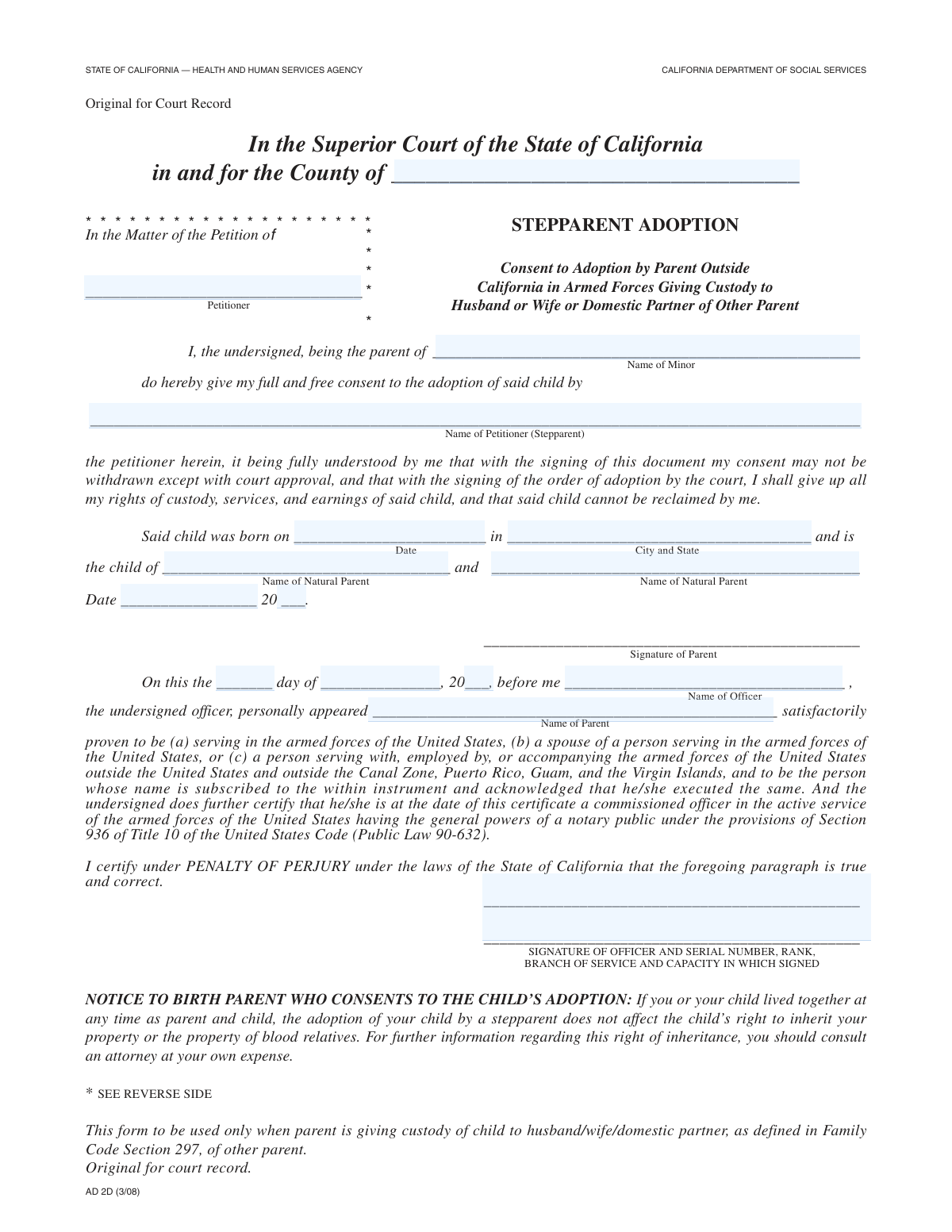
Yes! You can use AI to fill out Consent to Stepparent Adoption by Parent in Military

This form is a critical legal document where a parent serving in the military formally gives their consent for their child to be adopted by a stepparent. It is essential for court proceedings, as it provides certified proof of the non-custodial parent's agreement to terminate their parental rights, allowing the adoption to proceed. Today, this form can be filled out quickly and accurately using AI-powered services like Instafill.ai, which can also convert non-fillable PDF versions into interactive fillable forms.
Our AI automatically handles information lookup, data retrieval, formatting, and form filling.
It takes less than a minute to fill out Stepparent Adoption Military Consent using our AI form filling.
Securely upload your data. Information is encrypted in transit and deleted immediately after the form is filled out.

Form specifications

Form name: Consent to Stepparent Adoption by Parent in Military
Number of fields: 16
Number of pages: 2
Language: English
Categories: adoption forms, Military forms
main-image

Instafill Demo: How to fill out PDF forms in seconds with AI

How to Fill Out Stepparent Adoption Military Consent Online for Free in 2026

Are you looking to fill out a STEPPARENT ADOPTION MILITARY CONSENT form online quickly and accurately? Instafill.ai offers the #1 AI-powered PDF filling software of 2026, allowing you to complete your STEPPARENT ADOPTION MILITARY CONSENT form in just 37 seconds or less.
Follow these steps to fill out your STEPPARENT ADOPTION MILITARY CONSENT form online using Instafill.ai:
  1. 1 Navigate to Instafill.ai and upload or select the 'Consent to Stepparent Adoption by Parent in Military' form.
  2. 2 Use the AI assistant to fill in the court and county information where the adoption is being filed.
  3. 3 Enter the full names of the petitioner, the minor child, the stepparent petitioner, and both natural parents.
  4. 4 Provide the child's complete birth details, including the date, city, and state of birth.
  5. 5 Review all the information for accuracy before the consenting parent signs the document.
  6. 6 Present the form to a designated certifying officer (e.g., a military officer) to witness the signature and complete the certification section with their details.
  7. 7 Download the completed and certified form to be filed with the court as part of the official adoption records.

Our AI-powered system ensures each field is filled out correctly, reducing errors and saving you time.

Why Choose Instafill.ai for Your Fillable Stepparent Adoption Military Consent Form?

Speed

Complete your Stepparent Adoption Military Consent in as little as 37 seconds.

Up-to-Date

Always use the latest 2026 Stepparent Adoption Military Consent form version.

Cost-effective

No need to hire expensive lawyers.

Accuracy

Our AI performs 10 compliance checks to ensure your form is error-free.

Security

Your personal information is protected with bank-level encryption.

Frequently Asked Questions About Form Stepparent Adoption Military Consent

This form is a legal document used to provide essential information about a minor child and their natural parents for a stepparent adoption case being filed in the Superior Court.

The 'Petitioner' is typically the natural parent who is married to the stepparent. The 'Stepparent Petitioner' is the individual seeking to legally adopt their spouse's child.

You will need the full legal names of the child, the stepparent, and both natural parents, as well as the child's full date and city/state of birth.

This section must be completed by an authorized certifying officer, like a notary public or a commissioned military officer. They will verify the identity of the person signing the document and witness their signature.

This is the full name of the individual who is physically present before the certifying officer to sign the document. The officer will fill this in after confirming your identity.

You should fill in all the information you have and consult with a legal professional for guidance. Adoption proceedings have specific legal steps for cases involving an unknown or absent parent.

This form should be filed with the Clerk of the Superior Court in the county where you are filing the stepparent adoption petition. It will become part of your official case file.

Yes, services like Instafill.ai use AI to accurately auto-fill form fields from your saved profile, which saves time and helps reduce errors on important legal documents.

Simply upload the form to the Instafill.ai platform. You can then type your information directly into the fields, use the AI auto-fill feature, and sign it digitally before downloading or printing.

You can use a service like Instafill.ai, which can convert non-fillable PDFs into interactive, fillable forms. Just upload your file, and the platform will make it easy to complete online.

The form specifically requests the 'Last Two Digits' of the year for both the parent's information date and the officer's certification date, so you should enter only the last two digits (e.g., '24').

Yes, if the certifying officer is a member of the armed forces, they must provide their signature, serial number, rank, and branch of service. A civilian notary would provide their official title and commission details instead.

Compliance Stepparent Adoption Military Consent
Validation Checks by Instafill.ai

1
Ensures Child's Birth Date is a Valid Past Date
This check validates that the 'Child's Birth Date' is a correctly formatted date and occurs before the current date. It is crucial for establishing the minor's age and the timeline of events accurately. A future or invalid date would render the legal document void and cause processing to fail.
2
Verifies Child's Legal Minor Status
This validation calculates the child's age based on the 'Child's Birth Date' to confirm they are under 18 years old. The form pertains to a 'Minor', so this check is essential to ensure the legal proceedings are appropriate for the child's age status. If the calculated age is 18 or over, the form is inapplicable and should be rejected.
3
Stepparent and Natural Parent Names are Distinct
This check ensures that the 'Stepparent Petitioner Name' does not match either 'Natural Parent 1 Name' or 'Natural Parent 2 Name'. This is a critical logical validation to maintain the integrity of the stated family relationships. A match would indicate a fundamental error in the data entry that misrepresents the core facts of the stepparent adoption.
4
Completeness of All Required Name Fields
This validation verifies that essential name fields, including 'Petitioner Name', 'Minor's Name', 'Stepparent Petitioner Name', and 'Natural Parent 1 Name', are not left blank. These fields are fundamental to identifying the parties involved in the legal action. An incomplete submission would be legally insufficient and would require correction before it can be processed.
5
Consistency Between Petitioner and Stepparent Petitioner Names
This check confirms that the 'Petitioner Name' and 'Stepparent Petitioner Name' fields contain the same full name. In the context of a stepparent adoption, these fields should identify the same individual. A mismatch suggests a data entry error or confusion about the roles, which must be clarified for the document to be legally sound.
6
Chronological Integrity of Form Dates
This validation ensures the dates on the form follow a logical sequence: 'Child's Birth Date' must be before the 'Date of Natural Parents' Information', which must be on or before the 'Certification Date'. This chronological order is vital for creating a valid timeline of events for the legal record. Any date out of sequence would invalidate the document's timeline and likely lead to its rejection.
7
Composite Certification Date Validity
This check combines the 'Certification Day', 'Certification Month', and 'Certification Year' fields to ensure they form a valid calendar date (e.g., preventing February 30). An invalid date makes the certification legally meaningless as it did not occur on a real day. This validation prevents the submission of nonsensical data that would halt the legal process.
8
Parent's Information Year Field Consistency
This validation cross-references the year from the full 'Date of Natural Parents' Information' with the separate 'Year of Natural Parents' Information' (last two digits) field. This ensures there are no contradictions or typos between the two related fields. Failure to match indicates a data entry error that needs correction to ensure the date is recorded accurately and consistently.
9
Identity Verification of Person Appearing Before Officer
This check verifies that the 'Name of Person Appeared' matches one of the primary parties listed on the form, such as the 'Stepparent Petitioner Name'. This is crucial to confirm that the correct individual was physically present for the certification process. A mismatch would invalidate the certification, as the officer would have certified the appearance of an incorrect or unidentified person.
10
Completeness of Court County Information
This validation ensures that the 'County Name' field is not empty. Specifying the county is a jurisdictional requirement for filing legal documents with the Superior Court. Omitting this information would make it impossible to file the form in the correct venue, causing significant delays or rejection.
11
Birth Location Format and Completeness
This check validates that the 'Child's Birth City and State' field contains both a city and a state. This information is a key part of the minor's official record and is required for vital statistics. An incomplete or improperly formatted location could lead to issues with amending the birth certificate post-adoption.
12
Certification Date is Not in the Future
This validation ensures the date constructed from the 'Certification Day', 'Month', and 'Year' fields is not a future date. A certification is a record of an event that has already happened. A future date is logically impossible and would invalidate the officer's attestation, requiring the form to be corrected and re-certified.
13
Completeness of Certifying Officer Details
This check verifies that the textual details accompanying the officer's signature, such as 'serial number, rank, branch of service', are filled out. This information is required to identify and verify the authority of the certifying officer. Missing details could call the authenticity of the certification into question and lead to rejection by the court.

Common Mistakes in Completing Stepparent Adoption Military Consent

Using Incorrect Court County

People often enter the county where they live instead of the specific county where the Superior Court handling the case is located. This is a critical jurisdictional error that can lead to the form being filed in the wrong court, causing rejection and significant delays in the legal process. To avoid this, always verify the correct court venue for your case before filling out the form.

Inconsistent or Incomplete Legal Names

Applicants frequently use nicknames, initials, or forget to include middle names for the petitioner, minor, or parents. Legal documents require full legal names as they appear on official records like birth certificates to ensure all parties are correctly identified. Using incomplete or informal names can create ambiguity, leading to requests for clarification or rejection of the petition.

Incorrectly Splitting Date Components

The form requires dates to be split into separate fields, such as 'Certification Day,' 'Month,' and 'Year (Last Two Digits).' A common error is entering the full four-digit year instead of the last two, or writing the entire date in a single field. This formatting error can invalidate the signature or certification date, requiring the form to be re-signed and re-certified.

Omitting Natural Parent Information

Petitioners may leave the 'Natural Parent 1 Name' or 'Natural Parent 2 Name' fields blank, particularly if a parent is unknown or not involved in the child's life. However, legal adoption proceedings require this information for proper notification and the termination of parental rights. Omitting these details will almost certainly result in the court returning the form for completion, delaying the entire process.

Confusing the Certifying Officer with the Signatory

A frequent mix-up occurs between the 'Certifying Officer Name' and the 'Name of Person Appeared' fields. The applicant might enter their own name in the officer's field or vice-versa, invalidating the official certification. The 'Person Appeared' is the individual signing the document, while the 'Certifying Officer' is the official witnessing the signature.

Incomplete Certifying Officer Details

The 'Officer Signature and Details' field requires multiple pieces of information, including serial number, rank, branch of service, and the capacity in which they signed. It is very common for the certifying officer to omit one of these details, especially their official capacity (e.g., 'Commanding Officer'). An incomplete certification section can render the document legally invalid, forcing the petitioner to get it re-certified.

Misinterpreting Petitioner vs. Stepparent Petitioner

The form has separate fields for 'Petitioner Name' and 'Stepparent Petitioner Name,' which can be confusing. An applicant might fill in only one field or enter the same name in both without understanding the specific legal roles intended by the form. This can cause confusion about the parties involved, potentially requiring an amended filing to clarify the stepparent's role in the petition.

Illegible Handwriting on a Printed Form

If the form is a non-fillable PDF, it must be printed and completed by hand, where illegible handwriting is a primary reason for rejection. If a court clerk cannot accurately read names, dates, or officer details, the form will be returned. AI-powered tools like Instafill.ai can convert flat PDFs into fillable versions, ensuring all entries are typed, legible, and correctly formatted.

Mismatched or Illogical Dates

An applicant might enter dates that are inconsistent, such as a certification date that is earlier than the signature date on the same document. This logical error is a red flag for court clerks, suggesting the form was filled out incorrectly or not in the proper sequence. All dates must be reviewed for consistency before submission to avoid immediate rejection.

Incorrect Date of Birth Format

For the 'Child's Birth Date' field, people often use an incorrect format, such as swapping the month and day (e.g., DD/MM/YYYY instead of the standard US MM/DD/YYYY). This simple mistake can create an incorrect official record of the child's birthdate, leading to significant legal and administrative problems in the future. Using a tool like Instafill.ai can help auto-format dates correctly to prevent this issue.
Saved over 80 hours a year

“I was never sure if my IRS forms like W-9 were filled correctly. Now, I can complete the forms accurately without any external help.”

Kevin Martin Green

Your data stays secure with advanced protection from Instafill and our subprocessors

Robust compliance program

Transparent business model

You’re not the product. You always know where your data is and what it is processed for.

ISO 27001, HIPAA, and GDPR

Our subprocesses adhere to multiple compliance standards, including but not limited to ISO 27001, HIPAA, and GDPR.

Security & privacy by design

We consider security and privacy from the initial design phase of any new service or functionality. It’s not an afterthought, it’s built-in, including support for two-factor authentication (2FA) to further protect your account.

Fill out Stepparent Adoption Military Consent with Instafill.ai

Worried about filling PDFs wrong? Instafill securely fills consent-to-stepparent-adoption-by-parent-in-military forms, ensuring each field is accurate.