Yes! You can use AI to fill out Adoption Assistance Program (AAP) Eligibility Certification
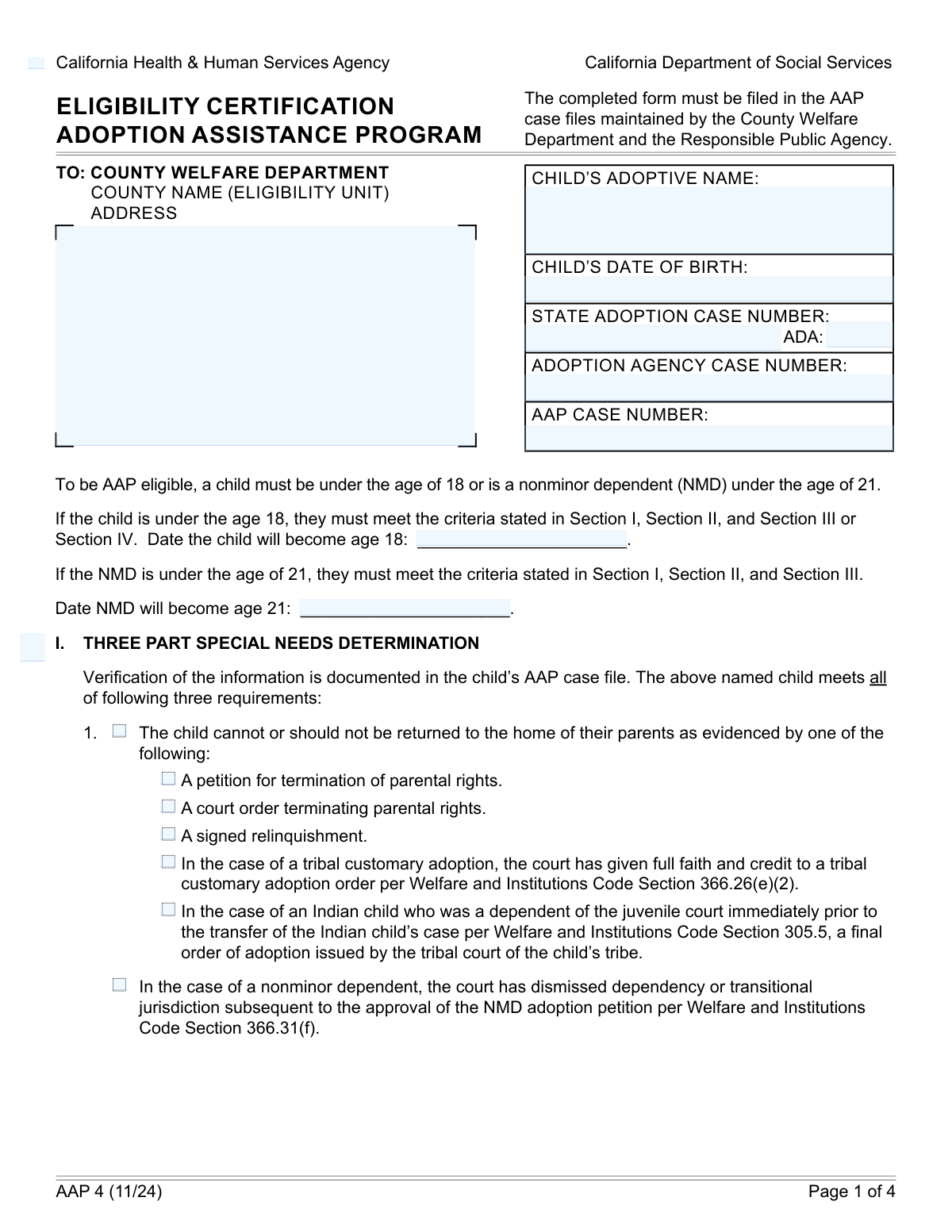
This form is a legal document used by California county welfare and social service agencies to verify that a child meets the specific criteria for the Adoption Assistance Program (AAP), including special needs requirements, citizenship status, and federal Title IV-E eligibility pathways. This certification is essential for securing financial support for adoptive families, making it possible for more children with special needs to find permanent homes. Today, this form can be filled out quickly and accurately using AI-powered services like Instafill.ai, which can also convert non-fillable PDF versions into interactive fillable forms.
Our AI automatically handles information lookup, data retrieval, formatting, and form filling.
It takes less than a minute to fill out AAP Eligibility Certification using our AI form filling.
Securely upload your data. Information is encrypted in transit and deleted immediately after the form is filled out.
Form specifications
| Form name: | Adoption Assistance Program (AAP) Eligibility Certification |
| Number of fields: | 75 |
| Number of pages: | 4 |
| Language: | English |
| Categories: | adoption forms, certification forms |
Instafill Demo: How to fill out PDF forms in seconds with AI
How to Fill Out AAP Eligibility Certification Online for Free in 2026
Are you looking to fill out a AAP ELIGIBILITY CERTIFICATION form online quickly and accurately? Instafill.ai offers the #1 AI-powered PDF filling software of 2026, allowing you to complete your AAP ELIGIBILITY CERTIFICATION form in just 37 seconds or less.
Follow these steps to fill out your AAP ELIGIBILITY CERTIFICATION form online using Instafill.ai:
- 1 Navigate to Instafill.ai and upload or select the AAP Eligibility Certification form.
- 2 Use the AI assistant to automatically populate the child's case information, including their name, date of birth, and various case numbers.
- 3 Complete Section 1 by checking the boxes that verify the child's special needs determination, such as the inability to return to the parents' home and specific barriers to placement without assistance.
- 4 In Section 2, confirm the child's citizenship or qualified alien status as documented in the case file.
- 5 Proceed to Section 3 to select the applicable Title IV-E federal eligibility pathway based on the child's circumstances, such as time in foster care or meeting SSI requirements.
- 6 Review all entered information for accuracy, then provide the authorized official's digital signature and date to certify the child's eligibility for the program.
- 7 For county eligibility workers, complete the final section to designate the funding source (Title IV-E or State/Nonfed) before saving or submitting the completed form.
Our AI-powered system ensures each field is filled out correctly, reducing errors and saving you time.
Why Choose Instafill.ai for Your Fillable AAP Eligibility Certification Form?
Speed
Complete your AAP Eligibility Certification in as little as 37 seconds.
Up-to-Date
Always use the latest 2026 AAP Eligibility Certification form version.
Cost-effective
No need to hire expensive lawyers.
Accuracy
Our AI performs 10 compliance checks to ensure your form is error-free.
Security
Your personal information is protected with bank-level encryption.
Frequently Asked Questions About Form AAP Eligibility Certification
This form is used to certify a child's eligibility for the Adoption Assistance Program (AAP) by documenting that they meet specific special needs, citizenship, and funding pathway requirements.
This form is completed and signed by authorized officials from the responsible public child welfare agency and the County Welfare Department, not by the adoptive parents.
This is a set of three criteria a child must meet to be considered 'special needs' for AAP. It requires proving the child cannot return to their parents, has a specific barrier to adoption without aid, and that an effort was made to find a non-assisted placement.
Barriers include the child being three years or older, having a certified disability, being part of a sibling group that should remain together, or having a parental background that could adversely affect development.
You must provide a detailed description of the child's certified mental, physical, emotional, or developmental disability. The form also requires the name of the licensed professional who provided the certification and the date it was made.
Generally, yes, an unsuccessful search must be documented. However, this requirement can be waived if the child has significant emotional ties to the prospective adoptive parents and remaining in that home is in the child's best interest.
The child must be a U.S. citizen, a qualified alien, or part of an exempted group such as refugees or asylees. Specific residency rules may apply depending on when the child entered the United States.
Title IV-E is a federal funding source with strict eligibility pathways. If a child meets the special needs criteria but not the specific federal requirements, they may still qualify for state-only AAP funding.
Once signed, this form serves as the official certification of the child's eligibility for the Adoption Assistance Program. A County Eligibility Worker then uses it to determine the final funding source, whether federal or state.
Yes, the form includes specific fields and criteria for nonminor dependents (NMDs). This includes noting the date the NMD will turn 21 and a special needs requirement related to the dismissal of dependency jurisdiction.
You will need to provide the State Adoption Case Number (and ADA number), the Adoption Agency Case Number, and the Adoption Assistance Program (AAP) Case Number.
Yes, services like Instafill.ai use AI to help agency personnel accurately auto-fill form fields from saved information, which saves time and helps prevent errors.
Simply upload the form to the Instafill.ai platform. The AI will make the document interactive, allowing you to click and fill fields with your saved data or type information directly.
You can use a service like Instafill.ai, which is designed to convert flat, non-fillable PDFs into interactive forms. This will allow you to easily type your information into the correct fields online before printing.
Compliance AAP Eligibility Certification
Validation Checks by Instafill.ai
1
Validate Child's Age Milestones Against Date of Birth
This check ensures that the 'Date Child Becomes Age 18' and 'Date NMD Becomes Age 21' are precisely 18 and 21 years after the 'Child's Date of Birth', respectively. This is critical for maintaining data integrity and correctly calculating eligibility periods for benefits. If the dates do not align, the system will flag an error, requiring the user to correct the milestone dates to match the date of birth.
2
Enforce Conditional Requirement for Disability Details
This validation verifies that if the 'Certified Disability' checkbox is selected, the 'Child's Disability' description and the 'Certifying Professional and Date' fields are not empty. This information is essential for substantiating the special needs determination. A failure to provide these details when the disability box is checked will prevent form submission and prompt the user to complete the required fields.
3
Verify Date Format and Plausibility
This check validates that all date fields, such as 'Child's Date of Birth' and 'Signature Date', are entered in a valid format (e.g., MM/DD/YYYY) and represent logical dates. For instance, a birth date cannot be in the future, and a signature date should not predate the application events. This prevents data entry errors and ensures the chronological accuracy of the record. An invalid date will trigger an error message requiring correction.
4
Ensure Mutual Exclusivity of Final Eligibility Certification
This validation confirms that only one of the two 'Certification of Eligibility' checkboxes ('Eligible for Adoption Assistance Program' or 'Not Eligible for Adoption Assistance Program') is selected. These options are mutually exclusive, and selecting both or neither creates an ambiguous and invalid record. This check is crucial for a clear determination of the child's AAP status. If the rule is violated, the user will be required to select exactly one option.
5
Mandate Selection of a Specific Special Needs Requirement
This check ensures that if the 'Child Cannot Be Returned to Parents' box is checked, at least one of the subsequent legal justifications (e.g., 'Petition for Termination of Parental Rights', 'Signed Relinquishment') is also selected. The general statement requires specific evidence to be valid for the special needs determination. Failure to select a specific criterion will result in a validation error, as the claim is unsubstantiated.
6
Validate Conditional Requirement for Placement Effort Details
This validation verifies that if 'Unsuccessful search for adoptive home...' is checked, the 'Search Efforts Included Description' field is filled out. Similarly, if 'Search requirement waived...' is checked, the 'Child Living Start Date' must be provided. This ensures that the justification for needing AAP benefits is properly documented with the required evidence. An error will be shown if the corresponding detail field is left empty.
7
Check for Required Case Identification Numbers
This check ensures that essential case identifiers like 'State Adoption Case Number' and 'AAP Case Number' are provided and are not empty. These numbers are fundamental for tracking the case across different systems and agencies. Submitting the form without these core identifiers would be blocked to prevent the creation of an unidentifiable or incomplete record.
8
Confirm Logical Consistency of Child's Age Checkbox
This validation cross-references the 'Age of three years or older' checkbox with the child's age as calculated from the 'Child's Date of Birth'. If the box is checked, the child must actually be three years or older. This check prevents contradictory information from being submitted. If a mismatch is found, the user will be prompted to either uncheck the box or correct the child's date of birth.
9
Enforce Selection of a Citizenship Requirement
This check ensures that exactly one of the checkboxes under 'Section 2. Citizenship' is selected, as the form states the child must meet 'one' of these requirements. This selection is mandatory and mutually exclusive, and it is vital for determining federal funding eligibility. The form cannot be submitted until one, and only one, option is chosen.
10
Validate Conditional Requirement for Relinquishment Details
This validation checks that if the 'Relinquished to Licensed Agency' box is checked, the 'Responsible Agency County' and 'Certification Date' fields are completed. This information is required to verify the circumstances of the relinquishment and identify the responsible agency. Failure to provide these details will halt submission and require the user to fill in the missing information.
11
Verify Responsible Agency Telephone Number Format
This check validates that the 'Responsible Public Agency Telephone Number' follows a standard 10-digit phone number format. This ensures the contact information is correctly structured, usable for communication, and can be properly parsed by other systems. An incorrectly formatted number will trigger an error message prompting the user for correction.
12
Ensure Completeness of County Welfare Department Address
This validation verifies that the 'County Welfare Department Address' field is not empty and contains sufficient detail for mailing. This address is critical for official correspondence and routing the form to the correct office for processing. An incomplete or missing address would prevent submission and prompt the user to provide the full mailing address.
13
Validate Signature Date Chronology
This check ensures the 'Signature Date' is on or after any other key event dates on the form, such as the 'Certification Date' or 'Child Living Start Date'. A signature cannot predate the events it is attesting to, and this check maintains the chronological and legal integrity of the document. If the signature date is out of sequence, an error will be displayed.
14
Enforce Conditional Requirement for Race/Ethnicity Specification
This validation ensures that if the 'Race, ethnicity, color, or language' checkbox is selected as a barrier to placement, the corresponding 'Race, Ethnicity, Color, or Language Specification' text field is filled out. This provides necessary context for the determination and is required for complete documentation. The form will not be submittable until this required detail is provided.
Common Mistakes in Completing AAP Eligibility Certification
This form requires multiple distinct identification numbers, such as the 'State Adoption Case Number', 'Adoption Agency Case Number', and 'AAP Case Number'. Applicants often mistakenly enter the same number in multiple fields or transpose digits. This error leads to significant processing delays as officials cannot locate the correct case file, requiring them to contact the applicant for clarification. To avoid this, carefully double-check each number against your official documents before entry.
Many fields on this form are conditional, meaning they should only be filled out if a specific preceding box is checked. A common error is either filling out a field that should be blank or, more frequently, checking a box and then failing to provide the required follow-up information. This creates an incomplete or contradictory application, which can lead to rejection. AI-powered tools like Instafill.ai can prevent this by automatically showing or hiding relevant fields based on your answers, ensuring you only fill out what is necessary.
Several sections, such as 'Parental Background', 'Child's Disability', and 'Adoption Subsidy Need', require a detailed written explanation if the corresponding checkbox is selected. Applicants often check the box but forget to provide the mandatory narrative in the text field. Without this supporting detail, the claim is unsubstantiated and cannot be verified, often resulting in the form being returned for completion. Always review the form to ensure every checked box has its required written explanation.
Section 1 requires verification that the child meets a three-part special needs determination, starting with evidence that the child cannot be returned to their parents' home. A frequent mistake is failing to check one of the supporting criteria, such as 'Petition for Termination of Parental Rights' or 'Signed Relinquishment'. This omission invalidates the entire section and is a critical error that will halt the eligibility determination process. Ensure at least one of the evidentiary boxes in this section is checked to proceed.
The form asks for specific future dates, like when a child turns 18 or an NMD turns 21, which must be calculated from the date of birth. Manual calculation can lead to off-by-one errors or incorrect date formatting (MM/DD/YYYY). An incorrect milestone date can cause issues with the timing and duration of benefits. To prevent this, use a reliable date calculator and double-check your entry, or use a form-filling tool that can perform these calculations automatically.
When claiming a special need due to a certified disability, checking the box is not enough; the form also requires the name of the 'Certifying Professional and Date' of certification. Applicants frequently omit this information, making it impossible for the agency to verify the disability claim. This leads to requests for information and delays the approval process. Always provide the full details of the professional who made the certification.
Section 2, which documents the child's citizenship or qualified alien status, is a mandatory part of establishing eligibility. A common oversight is leaving this section entirely blank, assuming it's optional or not applicable. Failure to select one of the options (e.g., 'US Citizen or Qualified Alien') results in an immediate halt to processing, as this is a fundamental requirement for federal and state assistance. Ensure one of the boxes in this section is checked.
Section 3 is the most complex part of the form, with nested logic for 'Applicable Child' definitions and 'Eligibility Pathways'. Applicants often get confused and check a pathway without meeting the prerequisite 'Applicable Child' criteria, or they select a pathway that doesn't align with the child's history. These errors can lead to an incorrect funding determination or outright denial. If the form is a non-fillable PDF, a tool like Instafill.ai can convert it to a smart, fillable version with built-in validation to help guide you through this complex logic.
The form asks for the complete address of the 'County Welfare Department', including the specific county name and eligibility unit. People often provide a generic or incomplete address, which can cause official correspondence to be misdirected or delayed. This slows down the entire application process. To avoid this, find the exact, complete mailing address for the specific unit handling your case and enter it precisely as required.
The form has multiple signature blocks for different officials, and their necessity is often conditional on answers in previous sections. A common mistake is having the wrong official sign, or failing to secure a signature for a required section, such as the 'Authorized Official of the Responsible Public Agency'. An unsigned or incorrectly signed form is not legally binding and will be immediately returned, causing significant delays. Carefully read the conditions for each signature block to ensure the correct person signs in the correct place.
Saved over 80 hours a year
“I was never sure if my IRS forms like W-9 were filled correctly. Now, I can complete the forms accurately without any external help.”
Kevin Martin Green
Your data stays secure with advanced protection from Instafill and our subprocessors

Robust compliance program
Transparent business model
You’re not the product. You always know where your data is and what it is processed for.
ISO 27001, HIPAA, and GDPR
Our subprocesses adhere to multiple compliance standards, including but not limited to ISO 27001, HIPAA, and GDPR.
Security & privacy by design
We consider security and privacy from the initial design phase of any new service or functionality. It’s not an afterthought, it’s built-in, including support for two-factor authentication (2FA) to further protect your account.
Fill out AAP Eligibility Certification with Instafill.ai
Worried about filling PDFs wrong? Instafill securely fills adoption-assistance-program-aap-eligibility-certification forms, ensuring each field is accurate.