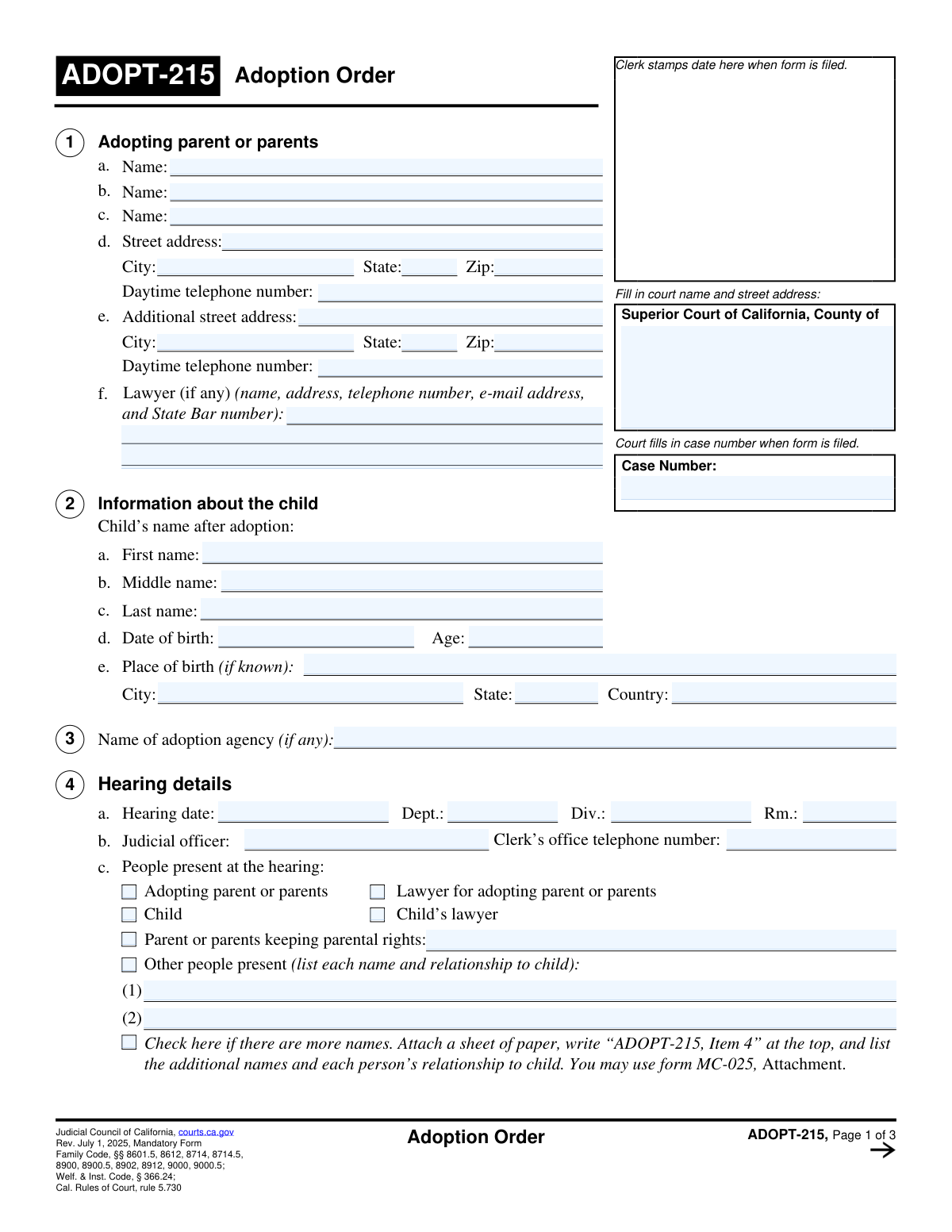
Yes! You can use AI to fill out Form ADOPT-215, Adoption Order

Form ADOPT-215, Adoption Order, is the official court document that legally finalizes the adoption of a child. It records the judge's decision, confirms the new parent-child relationship, officially changes the child's name, and addresses important legal considerations such as the Indian Child Welfare Act or post-adoption contact agreements. This order is the culminating legal instrument that creates the new family unit, and today this form can be filled out quickly and accurately using AI-powered services like Instafill.ai, which can also convert non-fillable PDF versions into interactive fillable forms.
Our AI automatically handles information lookup, data retrieval, formatting, and form filling.
It takes less than a minute to fill out ADOPT-215 using our AI form filling.
Securely upload your data. Information is encrypted in transit and deleted immediately after the form is filled out.

Form specifications

Form name: Form ADOPT-215, Adoption Order
Number of fields: 87
Number of pages: 3
Language: English
Categories: adoption forms
main-image

Instafill Demo: How to fill out PDF forms in seconds with AI

How to Fill Out ADOPT-215 Online for Free in 2026

Are you looking to fill out a ADOPT-215 form online quickly and accurately? Instafill.ai offers the #1 AI-powered PDF filling software of 2026, allowing you to complete your ADOPT-215 form in just 37 seconds or less.
Follow these steps to fill out your ADOPT-215 form online using Instafill.ai:
  1. 1 Navigate to Instafill.ai and upload or select the Form ADOPT-215.
  2. 2 Use the AI assistant to populate court and case information, including the court name, address, and case number.
  3. 3 Provide the full names and contact information for the adopting parent(s) and their legal counsel.
  4. 4 Enter the child's details, including their name before and after adoption, date of birth, and place of birth.
  5. 5 Detail the hearing information, specify who was present, and check the relevant boxes regarding the child's consent and legal status (e.g., Indian Child Welfare Act).
  6. 6 Review all the information pre-filled by the AI for accuracy, make any necessary corrections, and prepare the form for the judicial officer's signature.
  7. 7 Download, save, or print the completed Form ADOPT-215 for filing with the court clerk.

Our AI-powered system ensures each field is filled out correctly, reducing errors and saving you time.

Why Choose Instafill.ai for Your Fillable ADOPT-215 Form?

Speed

Complete your ADOPT-215 in as little as 37 seconds.

Up-to-Date

Always use the latest 2026 ADOPT-215 form version.

Cost-effective

No need to hire expensive lawyers.

Accuracy

Our AI performs 10 compliance checks to ensure your form is error-free.

Security

Your personal information is protected with bank-level encryption.

Frequently Asked Questions About Form ADOPT-215

This form is the official court order that finalizes a child's adoption. It documents the judge's decision and records key details about the child, the new parent(s), and the legal terms of the adoption.

Typically, the adopting parent or parents, or their lawyer, will complete the informational sections of this form. A judicial officer then reviews and signs it to make the adoption legally binding.

You will need the court case number, the child's full name before and after adoption, the child's birth details, and the full names and addresses of the adopting parents. You may also need details from the adoption hearing and your lawyer's information.

While less common than one or two-parent adoptions, some legal situations allow for three parents. This form includes a field to accommodate such cases.

This is a formal agreement (form ADOPT-310) that specifies the type and frequency of contact the child may have with their birth family after the adoption. The judge must approve this agreement, and this form documents that approval.

For children aged 12 or older, their consent to the adoption is usually required. This form has a specific checkbox for the judge to confirm that the child agrees to the adoption.

This section applies if the child is a member of, or eligible for membership in, a Native American tribe, as defined by the Indian Child Welfare Act (ICWA). Adoptions of Indian children have specific legal requirements that must be documented.

A tribal customary adoption is an adoption finalized according to the laws and traditions of a specific Native American tribe, rather than through the state court system alone. This form has fields to incorporate the tribal order into the state court's records.

Yes, in some circumstances, a child can have more than two legal parents. This form includes a section to document when an existing parent retains their parental rights while a new parent is added through adoption.

If you are represented by a lawyer in the adoption proceedings, you must provide their full name, address, telephone number, email, and State Bar number in the designated section.

Yes, services like Instafill.ai use AI to help you accurately auto-fill form fields with your saved information. This can save time and reduce the chance of making errors on complex legal forms.

You can use a service like Instafill.ai to complete the form digitally. Simply upload the form to their platform, and it will become an interactive document you can fill out online.

If you have a non-fillable or 'flat' PDF, you can use a tool like Instafill.ai to convert it into an interactive, fillable form. This allows you to type your information directly into the fields.

This applies to international adoptions between countries that are part of the Hague Convention. If your adoption falls under this treaty, you must check the box and attach the required verification form (ADOPT-216).

Compliance ADOPT-215
Validation Checks by Instafill.ai

1
Child's Age and Date of Birth Consistency
This validation checks that the entered 'Age' is mathematically consistent with the provided 'Date of Birth'. This cross-field validation is crucial for preventing data entry errors and ensuring the child's age is accurate for legal purposes, such as determining consent requirements. If the calculated age from the date of birth does not match the entered age, the system will flag the discrepancy and require the user to correct one of the fields before submission.
2
Required First Adopting Parent
Validates that the 'First Adopting Parent Name' field is not empty. An adoption order legally requires at least one adopting parent to be named. If this primary field is left blank, the form is considered incomplete and cannot be processed, as it lacks the fundamental information about who is adopting the child.
3
Parent Address Completeness
Ensures that if the 'Parent Street Address' field is provided, then the corresponding 'Parent City', 'Parent State', and 'Parent Zip Code' fields are also filled out. A partial address is unusable for legal records and official mailings from the court. The system will flag the missing address components and prevent submission until a complete primary address is entered.
4
Phone Number Formatting
Verifies that the 'Parent Daytime Telephone Number' and 'Additional Daytime Telephone Number' fields follow a standard 10-digit format (e.g., NNN-NNN-NNNN or NNNNNNNNNN). This check ensures that the contact information is valid and can be used by court personnel if they need to reach the adopting parents. An invalid format will trigger an error message requesting the user to re-enter the number correctly.
5
Child's Consent Status Logic
This check enforces the conditional logic for the child's consent based on their age. If the child's calculated age is 12 or older, the form should only allow the 'Child is 12 or older and agrees' checkbox to be selected. Conversely, if the child is under 12, only the 'Child is under 12' checkbox should be available. This prevents contradictory or legally invalid selections regarding the child's consent to the adoption.
6
Conditional Fields for 'Other People Present'
Validates that the 'Other Person Present 1' and 'Other Person Present 2' fields are only filled if the 'Other people present' checkbox is checked. This prevents stray, out-of-context data from being submitted and ensures data integrity. If the checkbox is unchecked but the name fields contain data, the system will either clear the fields or prompt the user to check the box to confirm their intent.
7
Case Number Consistency
Compares the 'Case Number' entered in the 'Court And Case Information' section with the 'Case Number' in the 'Rev. July 1, 2025' section to ensure they are identical. This is critical for maintaining data consistency across the document and linking it to the correct court file. A mismatch will halt submission and require the user to correct the discrepancy to ensure document integrity.
8
Date Field Formatting and Validity
Ensures all date fields ('Date of Birth', 'Hearing Date', 'Tribal Order Date', etc.) are entered in a valid format (e.g., MM/DD/YYYY) and represent a real calendar date. Furthermore, it validates that the 'Date of Birth' is a date in the past. This check prevents data corruption and ensures all dates are parseable and legally sound for official records.
9
Conditional Requirement for Tribal Adoption Details
This check ensures that the 'Tribal Order Tribe', 'Tribal Order Date', and 'Tribal Order Pages' fields are completed if and only if the 'This is a tribal customary adoption' checkbox is selected. This is important for capturing all necessary information for this specific type of adoption. If the box is checked and these dependent fields are empty, the user will be prompted to provide the required details.
10
Conditional Requirement for Existing Parental Rights
Validates that the name and relationship fields under 'First Person with Existing Parental Rights' are filled out only when the 'Child has more than two parents' checkbox is checked. This enforces the form's logic and ensures that extra-parental information is only collected when legally relevant. The system will require these fields to be filled if the box is checked, ensuring complete information for this specific legal scenario.
11
State and Zip Code Format Validation
Verifies that all 'State' fields contain a valid two-letter postal abbreviation and all 'Zip Code' fields contain a 5-digit or 9-digit (ZIP+4) number. This ensures the accuracy of all addresses on the form for official records and communication. An invalid entry will trigger an error message with formatting guidance to improve data quality.
12
Mutual Exclusivity of Child's Consent Status
Ensures that only one of the checkboxes under 'Child's Consent Status' ('Child is 12 or older', 'Child is under 12', 'Not required to consent') can be selected at a time. Selecting multiple options would create a logical contradiction regarding the child's legal status for consent. The system should enforce this by using radio buttons or a validation rule that flags multiple selections as an error.
13
Completeness of Child's Name After Adoption
This check ensures that both the 'First Name' and 'Last Name' fields under 'Child's Name After Adoption' are filled out. A legal name change is a primary outcome of an adoption, and a complete name is required for the new birth certificate and other legal documents. The form submission will fail if either of these mandatory fields is empty.
14
Conditional Requirement for Indian Child Documents
This validation confirms that fields related to filed documents and mailing (e.g., 'Adoption Request (form ADOPT-200)', 'Mailing Date') are only enabled and validated if the 'Indian Child Status' checkbox is checked. This is crucial for compliance with the Indian Child Welfare Act (ICWA), which has specific documentation and notification requirements. If the box is checked, the system will verify that the related information is provided.

Common Mistakes in Completing ADOPT-215

Inconsistent Case Number or Parent Name Entry

This form asks for the Case Number and Adopting Parent names in multiple sections. People often make typos or use slight variations when re-entering this information, leading to inconsistencies. Such errors can cause the document to be rejected by the court clerk or create confusion during case processing, delaying the adoption. To avoid this, carefully copy and paste the information or use an AI-powered tool like Instafill.ai, which can auto-populate recurring fields consistently.

Confusing Child's Name Before and After Adoption

A critical error is incorrectly entering the child's name in the 'Name Before Adoption' and 'Name After Adoption' fields. Applicants may accidentally swap them or enter the new name in both places, which could result in the legal name change not being properly recorded. This mistake can lead to significant legal hurdles and require amended court orders. It is vital to double-check that the child's original birth name and desired new legal name are in their correct, respective fields.

Omitting the Lawyer's State Bar Number

When filling out the 'Lawyer Information' section, it's common for filers to provide the name, address, and phone number but forget to include the State Bar number. This number is a unique identifier for the attorney and is essential for the court to verify their credentials and good standing. Leaving it blank can halt the processing of the form until the information is provided, causing unnecessary delays in the legal proceedings.

Mishandling Conditional 'People Present' Fields

The form requires checking a box for 'Other people present' and then listing their names and relationships in separate fields. A frequent mistake is to do one without the other—either checking the box and forgetting to list the names, or listing names without checking the box. This creates an incomplete or contradictory record of who attended the hearing. To prevent this, ensure that if the 'Other' box is checked, the corresponding name and relationship fields are fully completed.

Incorrectly Selecting the Child's Consent Status

The form has specific checkboxes for the child's consent based on their age (e.g., 'Child is 12 or older and agrees' vs. 'Child is under 12'). People sometimes misread these options or select the wrong one based on the child's actual age. This can invalidate a portion of the judge's findings and may require correction. AI form-filling tools like Instafill.ai can help prevent this by using conditional logic to highlight the correct option based on the entered date of birth.

Using Abbreviations for the Court Name

In the 'Court Name and Address' field, applicants often use common abbreviations or acronyms for the court (e.g., 'LA Superior Court' instead of 'The Superior Court of California, County of Los Angeles'). While seemingly minor, this can lead to filing errors or rejection if the clerk's office requires the full, official name. Always write out the complete and formal name of the court as it appears on official documents to ensure proper processing.

Miscalculating or Mismatching the Child's Age

The form asks for both the child's 'Date of Birth' and their 'Age'. A common human error is to miscalculate the current age based on the birth date, especially if the form is filled out long before it is filed. This discrepancy can affect other age-dependent sections, like child consent, and may raise questions about the accuracy of the information provided. Using a tool that automatically calculates age from the date of birth can eliminate this simple but impactful error.

Incomplete 'Contact After Adoption Agreement' Details

When indicating that the judge has approved the 'Contact After Adoption Agreement', filers must also check a subsequent box specifying if it was approved 'As submitted' or 'As amended'. People frequently check the approval box but forget to select one of the two clarifying options. This omission leaves the order ambiguous and legally incomplete, requiring clarification and potentially delaying the finalization of the adoption.

Errors in Conditional Indian Child Welfare Act (ICWA) Sections

Several sections, such as 'Filed Documents' and 'Mailing Information', are conditional upon the child's status as an 'Indian child'. A common mistake is to either fill out these sections when the child does not have this status, or to forget them entirely when they do. This can have serious legal consequences, as compliance with ICWA is strictly monitored. If the form is a non-fillable PDF, a tool like Instafill.ai can convert it to a smart, fillable version that can help guide users through these complex conditional requirements.

Forgetting to Attach Required Supplemental Forms

The form references other forms that may need to be attached, such as ADOPT-310 (Contact After Adoption Agreement) or ADOPT-216 (Hague Adoption Convention). Filers may check a box indicating an agreement was amended or that it's a Hague Convention adoption but then forget to physically attach the corresponding document. This results in an incomplete filing that will be rejected by the court, forcing the applicants to refile and causing significant delays.
Saved over 80 hours a year

“I was never sure if my IRS forms like W-9 were filled correctly. Now, I can complete the forms accurately without any external help.”

Kevin Martin Green

Your data stays secure with advanced protection from Instafill and our subprocessors

Robust compliance program

Transparent business model

You’re not the product. You always know where your data is and what it is processed for.

ISO 27001, HIPAA, and GDPR

Our subprocesses adhere to multiple compliance standards, including but not limited to ISO 27001, HIPAA, and GDPR.

Security & privacy by design

We consider security and privacy from the initial design phase of any new service or functionality. It’s not an afterthought, it’s built-in, including support for two-factor authentication (2FA) to further protect your account.

Fill out ADOPT-215 with Instafill.ai

Worried about filling PDFs wrong? Instafill securely fills form-adopt-215-adoption-order forms, ensuring each field is accurate.