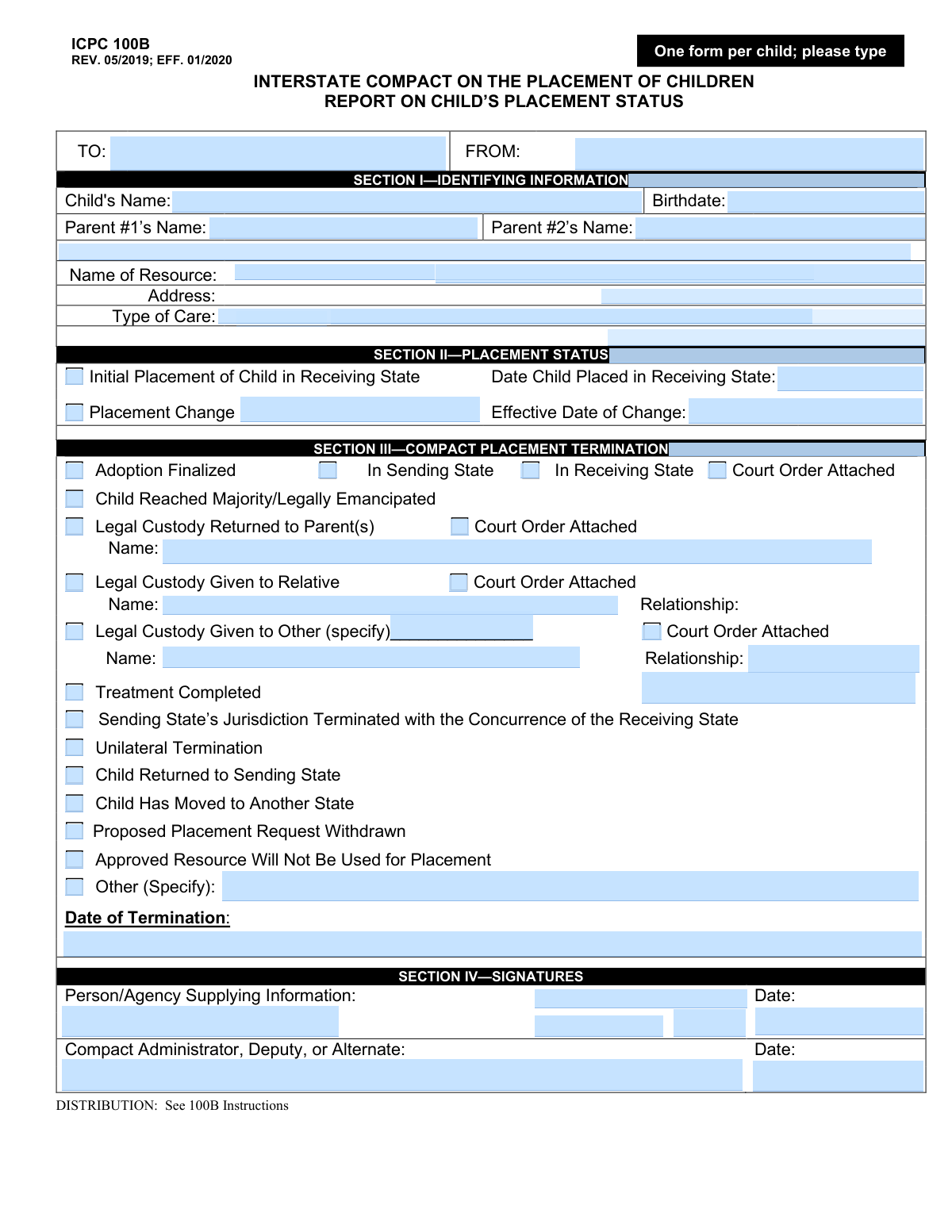
Yes! You can use AI to fill out ICPC 100B, Interstate Compact on the Placement of Children Report on Child’s Placement Status
Form ICPC 100B, Report on Child’s Placement Status, is a legal document used by child welfare agencies to report on the status of a child placed in another state under the Interstate Compact on the Placement of Children (ICPC). It serves to notify the sending and receiving states of initial placements, changes in placement, or the termination of the compact's jurisdiction. Today, this form can be filled out quickly and accurately using AI-powered services like Instafill.ai, which can also convert non-fillable PDF versions into interactive fillable forms.
Our AI automatically handles information lookup, data retrieval, formatting, and form filling.
It takes less than a minute to fill out ICPC 100B using our AI form filling.
Securely upload your data. Information is encrypted in transit and deleted immediately after the form is filled out.
Form specifications
| Form name: | ICPC 100B, Interstate Compact on the Placement of Children Report on Child’s Placement Status |
| Number of pages: | 1 |
| Language: | English |
Instafill Demo: How to fill out PDF forms in seconds with AI
How to Fill Out ICPC 100B Online for Free in 2026
Are you looking to fill out a ICPC 100B form online quickly and accurately? Instafill.ai offers the #1 AI-powered PDF filling software of 2026, allowing you to complete your ICPC 100B form in just 37 seconds or less.
Follow these steps to fill out your ICPC 100B form online using Instafill.ai:
- 1 Navigate to Instafill.ai and upload or select the ICPC 100B form.
- 2 Use the AI assistant to accurately input the child's and parents' identifying information, along with details of the placement resource, in Section I.
- 3 Complete Section II by indicating if this is an initial placement or a placement change, and provide the relevant effective dates.
- 4 If the placement is being terminated, fill out Section III by selecting the reason for termination (e.g., adoption, child reached majority) and attaching any required court orders.
- 5 Review all the information entered by the AI for accuracy and completeness across all sections.
- 6 Electronically sign and date the form in Section IV as the person/agency supplying the information and as the Compact Administrator.
- 7 Download, print, or securely share the completed ICPC 100B form with the appropriate sending and receiving state agencies.
Our AI-powered system ensures each field is filled out correctly, reducing errors and saving you time.
Why Choose Instafill.ai for Your Fillable ICPC 100B Form?
Speed
Complete your ICPC 100B in as little as 37 seconds.
Up-to-Date
Always use the latest 2026 ICPC 100B form version.
Cost-effective
No need to hire expensive lawyers.
Accuracy
Our AI performs 10 compliance checks to ensure your form is error-free.
Security
Your personal information is protected with bank-level encryption.
Frequently Asked Questions About Form ICPC 100B
The ICPC 100B form, 'Report on Child’s Placement Status,' is used to officially communicate the status of a child placed across state lines under the Interstate Compact on the Placement of Children. It reports events like the initial placement, a change in placement, or the termination of the ICPC case.
This form is typically completed by the child welfare agency in either the sending or receiving state. It must be signed by the person supplying the information and countersigned by the state's Compact Administrator, deputy, or alternate.
No, you must complete a separate ICPC 100B form for each child. The instructions at the top of the form clearly state, 'One form per child'.
Section II is used to report on an active placement, such as the initial placement date or a subsequent change in the child's placement location. Section III is used only when the ICPC jurisdiction is being terminated for a specific reason, like adoption or the child returning to the sending state.
You must attach a court order when reporting a termination reason in Section III that involves a legal change of custody. This includes adoption finalization, return of legal custody to a parent, or legal custody being granted to a relative or other individual.
You will need the child's full name and birthdate, the names of their parents, and the name, address, and type of care for the placement resource (e.g., foster home, relative's home).
The form is sent between the ICPC offices of the sending and receiving states to keep all parties officially informed. Refer to the '100B Instructions' mentioned at the bottom of the form for specific distribution requirements.
The 'Name of Resource' refers to the name of the foster family, relative, group home, or facility where the child is currently placed.
If you have a non-fillable PDF, you can use a service like Instafill.ai to convert it into an interactive, fillable form. This allows you to type information directly into the fields for a clean, professional document.
Yes, AI-powered services like Instafill.ai can help you fill out forms like the ICPC 100B more efficiently. These tools can accurately populate fields, save your progress, and help reduce the time spent on paperwork.
To fill out the form using Instafill.ai, simply upload the ICPC 100B PDF to the platform. The AI will make the document fillable online, allowing you to type in all the required information, save, and print the completed form.
If the reason for termination is not one of the standard options, you should check the box next to 'Other (Specify)'. Then, write a clear and concise explanation of the reason for termination in the space provided.
Use the 'Placement Change' option when the child moves from one approved placement to another within the receiving state, and the ICPC case is remaining open. You must provide the effective date of this new placement.
Compliance ICPC 100B
Validation Checks by Instafill.ai
1
Child's Birthdate Validity
This check ensures the 'Birthdate' field in Section I contains a valid, properly formatted date (e.g., MM/DD/YYYY). It also verifies that the date is in the past and not a future date. This is critical for establishing the child's identity and age, which affects legal statuses like reaching the age of majority. A failure would prevent the form from being processed due to invalid or nonsensical data.
2
Chronological Date Integrity
Verifies that all event dates on the form, such as 'Date Child Placed', 'Effective Date of Change', and 'Date of Termination', occur after the 'Child's Birthdate'. This check prevents logical impossibilities, like a placement occurring before the child was born. If this validation fails, it indicates a data entry error that must be corrected to maintain an accurate case timeline.
3
Mutually Exclusive Report Sections
Ensures that information is entered in either Section II (Placement Status) or Section III (Compact Placement Termination), but not both. A single ICPC 100B report is intended to either update the status of an active placement or to terminate the compact. Submitting information for both sections simultaneously is logically inconsistent and would lead to ambiguity in the child's case status.
4
Conditional Requirement for 'Legal Custody Given to Relative'
If the 'Legal Custody Given to Relative' checkbox is selected in Section III, this validation confirms that the corresponding 'Name' and 'Relationship' fields are also filled out. This is important for clearly identifying the new legal custodian. Failure to provide these details would render the custody change information incomplete and legally insufficient.
5
Conditional Requirement for 'Other (Specify)' Termination Reason
This check ensures that if the 'Other (Specify)' checkbox is selected in Section III as the reason for termination, the adjacent text field must contain an explanation. This prevents ambiguity and ensures a clear, documented reason for termination is recorded when a standard option does not apply. A blank description would result in an incomplete and potentially invalid termination record.
6
Exclusive Choice for Adoption Location
If the 'Adoption Finalized' checkbox is selected, this validation verifies that exactly one of the 'In Sending State' or 'In Receiving State' checkboxes is also selected. An adoption can only be finalized in one jurisdiction. This check prevents contradictory or incomplete information about where the legal finalization occurred, which is critical for jurisdictional records.
7
Completeness of Core Identifying Information
Verifies that essential fields in Section I, specifically 'Child's Name', 'Birthdate', and 'Name of Resource', are not empty. This information is the minimum required to uniquely identify the child and the placement being reported on. Missing data in these fields would make it impossible to associate the report with the correct case file.
8
Signature Date Validity
This check validates that the dates entered in the signature blocks of Section IV are valid dates that are not in the future. It also ensures the signature date is on or after any event date (e.g., 'Date of Termination') listed on the form. This confirms the form was signed after the reported events occurred, which is essential for the document's legal validity.
9
Mutually Exclusive Placement Status Update
Ensures that within Section II, the checkboxes for 'Initial Placement of Child in Receiving State' and 'Placement Change' are mutually exclusive. A report can either be for the very first placement or a change to an existing placement, but not both at the same time. Selecting both would create a conflicting and illogical status update.
10
Conditional Requirement for Court Order Attachment
When a checkbox indicating a significant legal action is selected (e.g., 'Adoption Finalized', 'Legal Custody Returned to Parent(s)'), this validation flags a warning if the corresponding 'Court Order Attached' checkbox is not also checked. While the system cannot verify the physical attachment, this check ensures the user confirms the presence of required legal documentation. Failure to attach the order can delay or invalidate the reported action.
11
Completeness of Signatory Details
This validation ensures that if a signature is provided in Section IV, the signatory's printed name and the date of signature are also filled out. An anonymous or undated signature has no legal weight. This check is crucial for accountability and verifying who authorized the report and when.
12
Routing Information Completeness
Verifies that the 'TO' and 'FROM' fields at the very top of the form are completed with the names of the receiving and sending states or agencies. This information is fundamental for inter-agency communication and ensuring the report is sent to the correct jurisdiction. An error here could cause the report to be lost or severely delayed, impacting the child's case management.
Common Mistakes in Completing ICPC 100B
Users often confuse the 'TO' (Receiving State/Agency) and 'FROM' (Sending State/Agency) fields at the top of the form. This typically happens when the person filling out the form misunderstands the direction of communication, thinking 'FROM' means their own name rather than the originating agency. This error can cause the report to be misrouted or rejected, leading to significant processing delays and failure to properly log the child's placement status. To avoid this, always confirm that 'FROM' identifies the agency in the state that placed the child and 'TO' identifies the agency in the state where the child is currently located.
In Section II, filers must report either an 'Initial Placement' or a 'Placement Change,' but not both. A frequent mistake is to either leave the section entirely blank or check both boxes simultaneously, creating confusion about the report's purpose. This ambiguity forces the receiving agency to seek clarification, delaying updates to the child's official record. To prevent this, ensure you select only one of the two options and fill in the corresponding date to clearly define the event being reported.
Section III contains several termination reasons, such as 'Adoption Finalized' or 'Legal Custody Returned to Parent(s)', that require an accompanying legal document. A critical error is checking the 'Court Order Attached' box without including the document, or vice-versa. This omission renders the termination legally incomplete and will cause the receiving state to reject the form until the proper documentation is provided, delaying case closure. Always double-check that any box indicating an attachment is checked and that the corresponding document is included with the submission.
When selecting 'Legal Custody Given to Relative' or 'Legal Custody Given to Other' in Section III, it is mandatory to fill out the name and relationship of the new custodian. Filers often check the main box but leave these crucial detail fields blank, assuming the information is known elsewhere. Without this information, the receiving state cannot verify the identity of the new legal guardian, which halts the termination process. To prevent this, treat the 'Name' and 'Relationship' fields as required whenever you select a custody change option.
Although the form instructs users to 'please type,' it is often printed and filled out by hand, resulting in illegible entries for names, addresses, and dates. Unclear handwriting can lead to critical data entry errors, such as misspelling a child's name or recording an incorrect address, which has serious consequences for tracking and services. To prevent this, always type directly into the form. If you only have a non-fillable PDF, AI-powered tools like Instafill.ai can convert it into a fillable version to ensure all entries are clear and legible.
The form requires multiple dates (Birthdate, Placement Date, Termination Date) but does not specify a required format like MM/DD/YYYY. Users may enter dates in various ways (e.g., 'Jan 5, 2023' or '5/1/23'), which can be ambiguous and lead to data entry errors or legal confusion about when events officially occurred. To avoid this, consistently use the full MM/DD/YYYY format and double-check all dates for accuracy. Using a form-filling tool like Instafill.ai can help by automatically standardizing date formats across the document.
A form submitted without the required signatures and dates in Section IV is invalid. This often happens when the form is passed between the person supplying the information and the Compact Administrator, and one party forgets to sign or date their entry. An unsigned form cannot be processed and will be rejected, delaying critical updates to the child's case. Always perform a final review to ensure both the 'Person/Agency' and 'Compact Administrator' signature and date fields are complete before submission.
The form header explicitly states 'One form per child.' In cases involving siblings placed together, caseworkers sometimes mistakenly try to list all children on a single form to save time. This is incorrect and will lead to the form's immediate rejection, as each child requires a separate, individual ICPC record for legal and tracking purposes. A new, distinct form must be completed for each child involved in an interstate placement, even if they share the same case number and placement resource.
In Section III, the 'Other (Specify)' option is intended for unique termination situations not covered by the standard checkboxes. A common mistake is to use this field for a reason that is already listed, such as writing 'Child emancipated' instead of checking the 'Child Reached Majority/Legally Emancipated' box. This creates unnecessary work for the reviewer and can lead to misclassification of the termination reason. Before using 'Other,' carefully review all available checkboxes to ensure a more specific option does not already apply.
In Section I, the 'Name of Resource' field is meant for the placement provider, such as a foster parent's name or a group home's name. Filers sometimes mistakenly re-enter the biological parent's name or leave it blank if the placement is with a relative. This creates ambiguity about where the child is actually living. It is crucial to enter the full, correct name of the person or facility at the placement address to ensure accurate records for the child's location and care.
Saved over 80 hours a year
“I was never sure if my IRS forms like W-9 were filled correctly. Now, I can complete the forms accurately without any external help.”
Kevin Martin Green
Your data stays secure with advanced protection from Instafill and our subprocessors

Robust compliance program
Transparent business model
You’re not the product. You always know where your data is and what it is processed for.
ISO 27001, HIPAA, and GDPR
Our subprocesses adhere to multiple compliance standards, including but not limited to ISO 27001, HIPAA, and GDPR.
Security & privacy by design
We consider security and privacy from the initial design phase of any new service or functionality. It’s not an afterthought, it’s built-in, including support for two-factor authentication (2FA) to further protect your account.
Fill out ICPC 100B with Instafill.ai
Worried about filling PDFs wrong? Instafill securely fills icpc-100b-interstate-compact-on-the-placement-of-children-report-on-childs-placement-status forms, ensuring each field is accurate.