
Yes! You can use AI to fill out California Department of Social Services, Sworn Statement
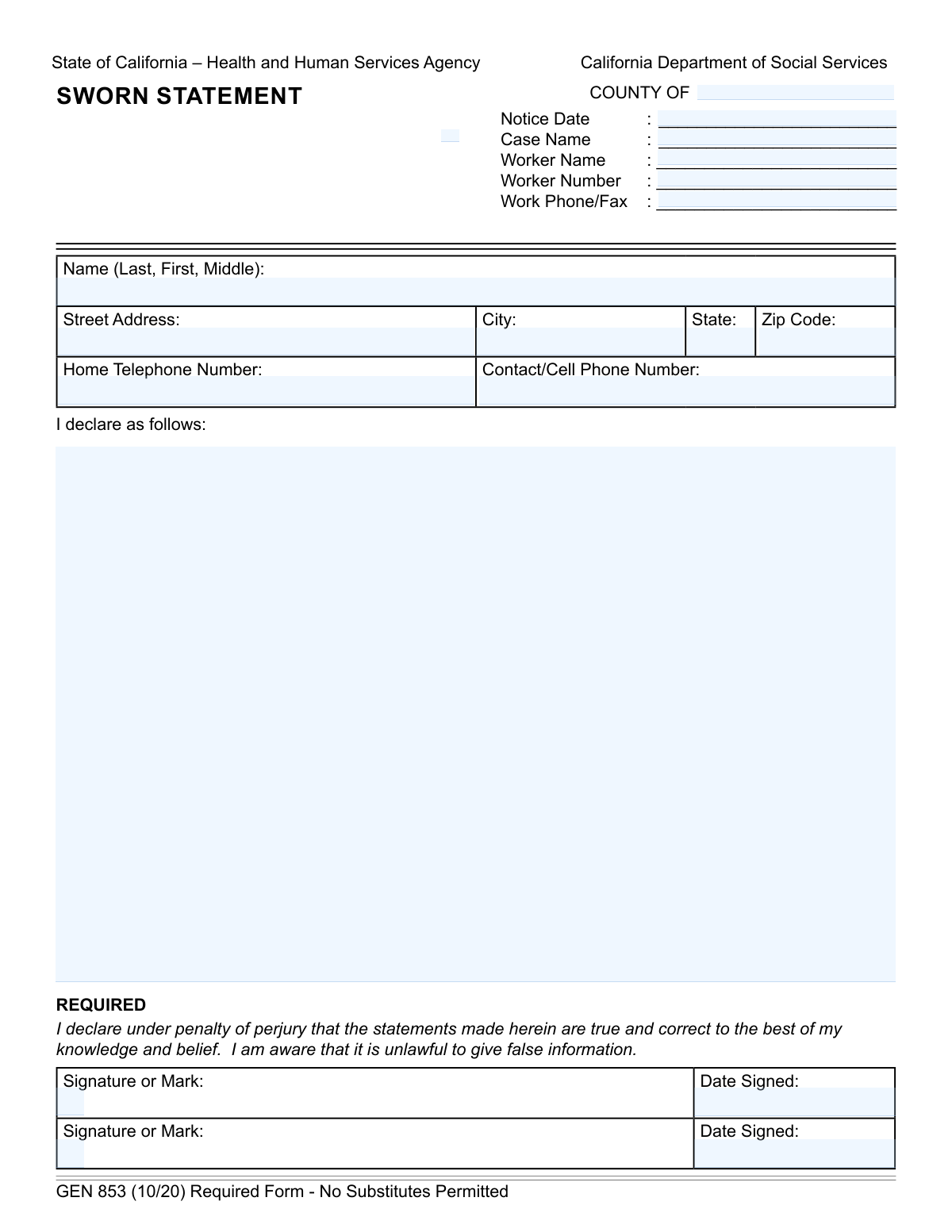
Don't type 19 fields by hand. Tell our AI about yourself, or upload a document you already have, and it fills every field in seconds. You check it, then download, print or sign.
The AI does the filling. You just check it.
No typing into boxes, nothing to install.
What this form asks for
The AI fills all of it, from your answers or your documents.
The AI checks your answers before you download
14 checks built for this form, so a wrong date or a missing answer is caught before anyone else sees it.
Checks if the entered county name exists in the official list of 58 California counties. This is crucial for routing the form to the correct local agency and ensuring jurisdiction is correct. A failed validation would prevent submission until a valid county is entered.
Verifies that the 'First Signature or Mark' field is not empty, as it is marked 'REQUIRED'. A sworn statement is legally invalid without a signature, so this check is mandatory for the form's purpose. If the signature is missing, the form submission will be blocked and the user will be prompted to sign.
Confirms that the 'First Date Signed' is on or after the 'Notice Date'. A person cannot legally attest to a notice before it has been issued. This check prevents chronological errors and ensures the legal timeline of events is sound, rejecting submissions with an invalid date sequence.
Ensures that all date fields, including 'Notice Date' and 'Date Signed', adhere to a consistent format like MM/DD/YYYY. This prevents data entry errors and ensures dates are parsed correctly by backend systems for record-keeping and legal purposes. An invalid format would trigger an error message requiring the user to correct the entry.
This check ensures that if the 'Second Signature or Mark' field is filled, the corresponding 'Second Date Signed' field must also be filled. A signature is incomplete without a date to establish when it was made. Failure to provide the date would result in an error, prompting the user to enter the date or clear the second signature.
Validates that the 'Declarant Name' field contains, at a minimum, a distinct first name and last name. A full legal name is required for proper identification on a legal document. The system will flag incomplete entries to ensure the identity of the person making the sworn statement is unambiguous.
And 8 more checks
- Confirms Declaration Content is Provided
- Validates Phone Number Structure
- Validates ZIP Code Format and State Consistency
- Ensures All Required Case Information is Present
- Restricts Declarant State to California
- Logical Sequence of Signature Dates
- Requires Full Declarant Address
- Verifies Worker Number Format
Let AI fill out your GEN 853
No typing. Every field filled in seconds, checked, ready to sign.
How to Fill Out GEN 853 Online for Free in 2026
What the AI walks you through.
- Navigate to Instafill.ai and upload or select the GEN 853 Sworn Statement form.
- Use the AI assistant to automatically fill in case information such as County, Case Name, Worker Name, and Notice Date.
- Enter your personal details, including your full name, address, and contact phone numbers.
- Carefully type your declaration into the main text field, ensuring the statements are true and correct to the best of your knowledge.
- Review all entered information for accuracy and completeness before proceeding.
- Electronically sign and date the form in the designated signature block to certify your statement.
- Securely download, print, or share your completed GEN 853 form directly from the platform.
Common Mistakes in Completing GEN 853
The ones the AI is built to catch.
Leaving Case Information Fields Blank
Incorrectly Formatting the Declarant's Name
Forgetting to Sign or Date the Declaration
Providing a Vague or Incomplete Declaration
Submitting a Form with Illegible Handwriting
Omitting the County Name at the Top
Misunderstanding the Second Signature Block
Entering Incorrect or Inconsistent Dates
Failing to Provide a Valid Contact Phone Number
Using a P.O. Box for the Street Address
Frequently Asked Questions About GEN 853
Is it really free for 7 days?
Can I fill other forms too?
How do I cancel?
How does the AI fill out GEN 853?
What happens to my information?
How complex is GEN 853 to fill out?
What is the purpose of the GEN 853 Sworn Statement form?
Who needs to fill out this form?
Where can I find my Case Name and Worker Number?
What information should I write in the main declaration section?
Why are there two signature lines? Do two people need to sign?
What does 'under penalty of perjury' mean?
Can I write my statement on a separate piece of paper instead of using this form?
How do I submit the form after I've completed it?
Can an AI tool help me complete this form?
How can I fill out the GEN 853 form online?
The PDF I downloaded is not fillable. What can I do?
What is the 'Notice Date'?
What should I do if I make a mistake on the form?
Get your GEN 853 filled out by AI
$0 today. Cancel before Nov 4 and you pay nothing.
Other forms like this one
California state forms: Judicial Council of California Form DE-111, Petition for Probate (Probate—Decedents Estates), DS 1891, Applicant/Vendor Disclosure Statement (State of California Department of Developmental Services), Judicial Council of California Form DE-120, Notice of Hearing—Decedent's Estate or Trust, Judicial Council of California Form DE-120, Notice of Hearing—Decedent's Estate or Trust, Murrieta Police Department Citizen Complaint Form (California Penal Code § 148.6 Advisory Statement), State of California Department of Transportation California Civil Rights Laws Certification, State of California Department of Transportation Darfur Contracting Act Certification, Form DOT ADM-0077, State of California Department of Transportation, Contract Requirements, State of California Department of Transportation Subcontractor List, State of California Department of Transportation, Certified DVBE Summary, Bidder Declaration GSPD-05-105, State of California Level of Care Rate Determination Protocol Matrix, State of California Accessible Form, State of California Form SOC 321, Request for Order and Consent - Paramedical Services, State of California Darfur Contracting Act Certification, State of California Department of Veterans Affairs COMMERCIALLY USEFUL FUNCTION (CUF) CERTIFICATION FORM, Form ADR-100, Statement of Agreement or Nonagreement, Civil Appeal Case Information Statement, Form APP-014, Appellant's Proposed Statement on Appeal (Unlimited Civil Case), form-app-015-respondents-proposed-corrections-toadditions-to-appellants-proposed-settled-statement-unlimited-civil-case
social services forms: California Department of Social Services (CDSS) Community Care Licensing Child Care Forms Packet (LIC 9150, LIC 282, LIC 627, LIC 700, LIC 995A, CDPH 286, LIC 9227), Missouri Department of Social Services, Family Support Division — Application for Supplemental Nutrition Assistance Program (SNAP) (MO 886-0460 / FS-1), California Department of Social Services (CDSS) Community Care Licensing Division — Administrative Organization (LIC 309), California Department of Social Services Form RFA 07 (2/18), Resource Family Approval (RFA) Health Questionnaire (Mandatory), AAP 2, Reassessment Information - Adoption Assistance Program, Adoption Assistance Program (AAP) - Request for Benefits, Adoption Assistance Program (AAP) Eligibility Certification, Adoption Assistance Program (AAP) Rate Questionnaire, Adoption Assistance Program Nonrecurring Adoption Expense Agreement and Claim, Health & Human Services Agency California Department of Social Services APPLICATION FOR A FAMILY CHILD HOME LICENSE LIC 279
Department of State forms: Center for Infertility & Reproductive Surgery – New Patient Questionnaire and Patient/Guarantor Statement (Brigham and Women’s Hospital, Department of Obstetrics and Gynecology), State of Illinois Department of Human Services (IDHS) – Bureau of Child Care and Development Child Care Application (Form IL444-3455), State of Illinois Department of Children and Family Services Medical Report on an Adult in a Child Care Facility (CFS 602), State of Florida Department of Highway Safety and Motor Vehicles (FLHSMV) Form HSMV 82993, Separate Odometer Disclosure Statement and Acknowledgment, DS 1891, Applicant/Vendor Disclosure Statement (State of California Department of Developmental Services), New York State Department of State (Division of Licensing Services) Property Condition Disclosure Statement (DOS-1614-f), State of Hawaii Department of Commerce and Consumer Affairs (DCCA) Contractors License Board – Application for Contractor's License (Sole Proprietor) (CT-36) with supporting forms (Experience Certificate CT-03, Contractors Financial Statement CT-02, and Chronological History of Projects/Project List), Murrieta Police Department Citizen Complaint Form (California Penal Code § 148.6 Advisory Statement), Pennsylvania Department of State — Certificate of Termination (Domestic Limited Liability Company) (15 Pa.C.S. § 8872(f)) (DSCB:15-8872(f)), Colorado Judicial Department Form JDF 1111SC (Form 35.2), Sworn Financial Statement, New York State Department of Labor (NYSDOL) Division of Labor Standards Complaint Form (LS 223), New York State Department of Labor, Division of Labor Standards Complaint Form (LS 223), Dallas Area Rapid Transit Police Department Personal History Statement (Peace Officer / Telecommunicator), State of California Department of Transportation California Civil Rights Laws Certification, State of California Department of Transportation Darfur Contracting Act Certification, Form DOT ADM-0077, State of California Department of Transportation, Contract Requirements, State of California Department of Transportation Subcontractor List, State of California Department of Transportation, Certified DVBE Summary, State of Florida Department of Business and Professional Regulation Form DBPR CILB 6-B, Application for Certified Building Contractor Who is Qualifying a Business, New York State Department of Health Certificate of Qualification Questionnaire - Virology
social service forms: California Department of Social Services (CDSS) Community Care Licensing Child Care Forms Packet (LIC 9150, LIC 282, LIC 627, LIC 700, LIC 995A, CDPH 286, LIC 9227), Missouri Department of Social Services, Family Support Division — Application for Supplemental Nutrition Assistance Program (SNAP) (MO 886-0460 / FS-1), California Department of Social Services (CDSS) Community Care Licensing Division — Administrative Organization (LIC 309), California Department of Social Services Form RFA 07 (2/18), Resource Family Approval (RFA) Health Questionnaire (Mandatory), Health & Human Services Agency California Department of Social Services APPLICATION FOR A FAMILY CHILD HOME LICENSE LIC 279
California social services forms: Form SOC 295, Application for In-Home Supportive Services, California Department of Social Services (CDSS) Community Care Licensing Child Care Forms Packet (LIC 9150, LIC 282, LIC 627, LIC 700, LIC 995A, CDPH 286, LIC 9227), California Department of Social Services (CDSS) Community Care Licensing Division — Administrative Organization (LIC 309), California Department of Social Services Form RFA 07 (2/18), Resource Family Approval (RFA) Health Questionnaire (Mandatory), Health & Human Services Agency California Department of Social Services APPLICATION FOR A FAMILY CHILD HOME LICENSE LIC 279
SOC forms: Form SOC 295, Application for In-Home Supportive Services, Form 4137, Social Security and Medicare Tax on Unreported Tip Income, Form 8919, Uncollected Social Security and Medicare Tax, Form SS-5-FS, Application for a Social Security Card, Form SSA-4-BK, Application for Social Security Benefits, California Department of Social Services (CDSS) Community Care Licensing Child Care Forms Packet (LIC 9150, LIC 282, LIC 627, LIC 700, LIC 995A, CDPH 286, LIC 9227), Form SSA-1042S, Social Security Benefit Statement, Application for Scope of Clinical Practice (SoCP) – Application Form SoCP Only (v1.00 06/2014), Missouri Department of Social Services, Family Support Division — Application for Supplemental Nutrition Assistance Program (SNAP) (MO 886-0460 / FS-1), Form SSA-3369-BK, Work History Report (Social Security Administration), California Department of Social Services (CDSS) Community Care Licensing Division — Administrative Organization (LIC 309), California/National Apartment Association Official Form B-15, Rental Application for Residents and Occupants (May 2015) with Application Agreement, National Apartment Association (NAA) Rental Application for Residents and Occupants (Virginia) and Supplemental Rental Application for Units Under Government Regulated Affordable Housing Programs, California Association of REALTORS® (C.A.R.) Form LR, Residential Lease or Month-to-Month Rental Agreement (Revised 12/19), Pacific Gastroenterology Associates Referral Form, Chicago Residential Lease for Apartments, Condominiums, Single Family Homes, and Townhomes (Chicago Association of REALTORS®) (V13.0 2026), Form 8919, Uncollected Social Security and Medicare Tax on Wages, Liantis / RSVZ – Aanvraagformulier voor vrijstelling van sociale bijdragen als zelfstandige (artikel 17 van het koninklijk besluit nr. 38 van 27 juli 1967), Form SSA-827 (06-2024), Authorization to Disclose Information to the Social Security Administration (SSA), Tesorería General de la Seguridad Social (TGSS) — Mandato / Orden de domiciliación de adeudos directos SEPA para el pago de cuotas de la Seguridad Social (TC 1/15-3, 06-2022)
Let AI fill out your GEN 853
Your trial starts once a card is added. You pay nothing before Nov 4.
Our AI already knows this form, all 19 fields of it. Skip the typing: tell it about yourself, or upload what you have, and it fills the whole form in seconds.
- AI fills every field on the form, checkboxes included
- No typing into boxes: answer a few questions, or upload a document you already have, an old copy of this form, a photo of a document
- The AI checks the answers; you review and change anything before you download
- Download the finished PDF, print it, or sign it online
- Encrypted, and never used to train AI
Cancel before Nov 4 and you pay nothing.
A card is needed to start the trial. Cancel in two clicks from your account.
Terms · Privacy