Yes! You can use AI to fill out Form ADR-107, Mediation Attendance Sheet
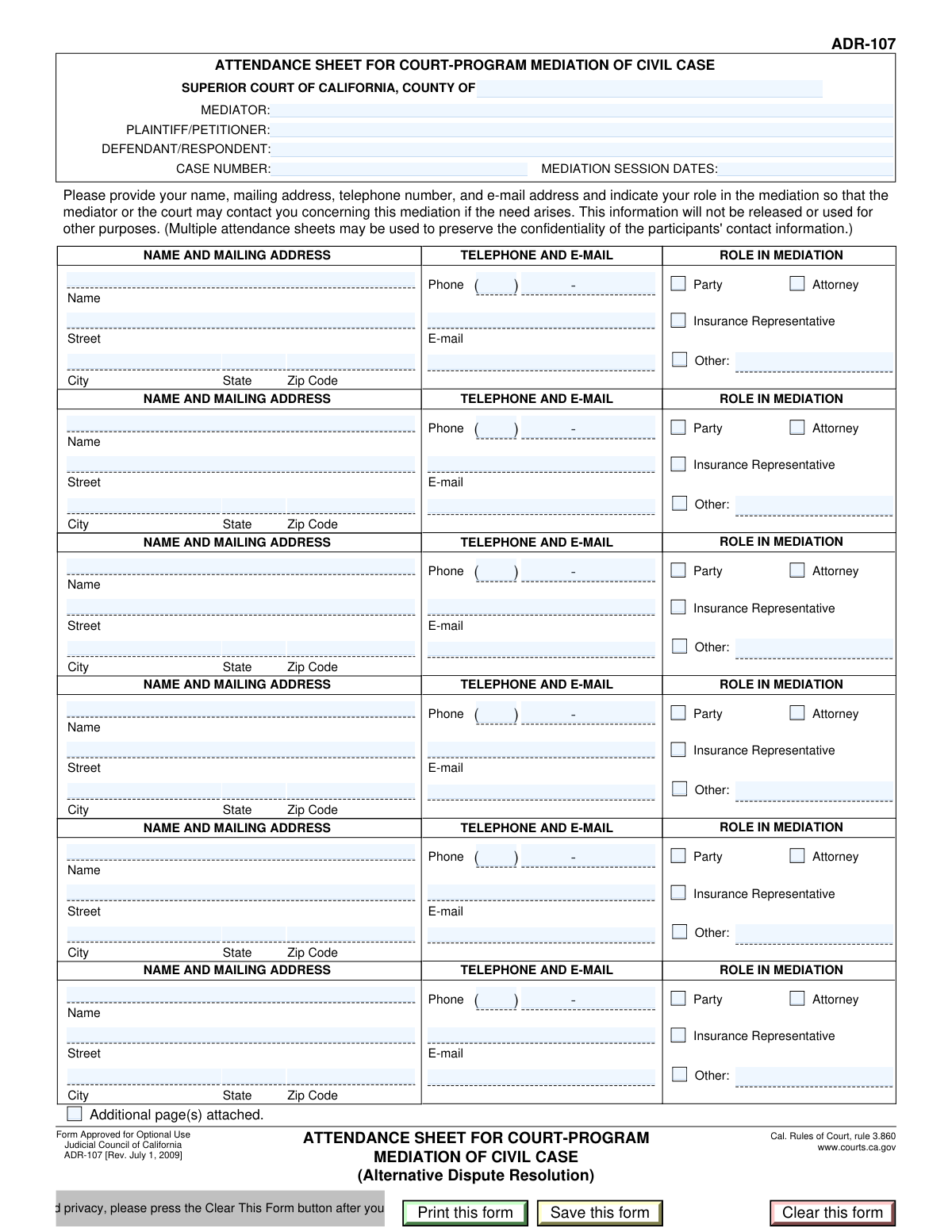
Form ADR-107 is the official Mediation Attendance Sheet for the Superior Court of California, used to create a formal record of everyone present at a mediation session. It captures the contact details and specific role (e.g., party, attorney, insurance representative) of each attendee, which is crucial for court records. Today, this form can be filled out quickly and accurately using AI-powered services like Instafill.ai, which can also convert non-fillable PDF versions into interactive fillable forms.
Our AI automatically handles information lookup, data retrieval, formatting, and form filling.
It takes less than a minute to fill out ADR-107 using our AI form filling.
Securely upload your data. Information is encrypted in transit and deleted immediately after the form is filled out.
Form specifications
| Form name: | Form ADR-107, Mediation Attendance Sheet |
| Number of fields: | 96 |
| Number of pages: | 1 |
| Language: | English |
Instafill Demo: How to fill out PDF forms in seconds with AI
How to Fill Out ADR-107 Online for Free in 2026
Are you looking to fill out a ADR-107 form online quickly and accurately? Instafill.ai offers the #1 AI-powered PDF filling software of 2026, allowing you to complete your ADR-107 form in just 37 seconds or less.
Follow these steps to fill out your ADR-107 form online using Instafill.ai:
- 1 Navigate to Instafill.ai and upload your ADR-107 form or select it from the template library.
- 2 Allow the AI to process the document and identify all the required fields for case information and participant details.
- 3 Enter the case information at the top of the form, including the county, case number, mediator's name, and the date(s) of the mediation session.
- 4 For each participant, fill in their full name, contact information (address, phone, email), and check the box corresponding to their role (Party, Attorney, Insurance Representative, or Other).
- 5 Continue to fill out the details for all attendees, using the separate sections provided for each participant.
- 6 Review all the entered information for accuracy and completeness, ensuring all required fields are filled for every person who attended.
- 7 Once verified, save, download, and print the completed ADR-107 form for your records and for submission to the court.
Our AI-powered system ensures each field is filled out correctly, reducing errors and saving you time.
Why Choose Instafill.ai for Your Fillable ADR-107 Form?
Speed
Complete your ADR-107 in as little as 37 seconds.
Up-to-Date
Always use the latest 2026 ADR-107 form version.
Cost-effective
No need to hire expensive lawyers.
Accuracy
Our AI performs 10 compliance checks to ensure your form is error-free.
Security
Your personal information is protected with bank-level encryption.
Frequently Asked Questions About Form ADR-107
This form is used to officially document the names, contact information, and roles of all individuals who participated in a mediation session for a specific case in the Superior Court of California.
Typically, the mediator assigned to the case completes and submits this form. However, an attorney for one of the parties may also be responsible for its completion as part of the case record.
You will need the official case number, the county of the court, the names of the parties (plaintiff/defendant), and the full contact details for every person who attended the mediation session.
The form has space for six participants. If more people attended, you should use an additional page for the extra participants, check the 'Additional page(s) attached' box, and submit it with the form.
A 'Party' is the actual plaintiff or defendant in the lawsuit. An 'Attorney' is the legal professional representing a party in the mediation.
If a participant is not a Party, Attorney, or Insurance Representative, you should check the 'Other' box and write a short description of their role in the space provided.
No, providing a secondary or additional email address is optional. You only need to fill this field if the participant has one and it is relevant for case communications.
In the 'Mediation Session Dates' field, you should list all the individual dates on which the mediation sessions occurred for this case.
This form should be filed with the Superior Court in the county where the case is being heard. Follow the specific filing procedures for that court, which may include in-person, mail, or electronic filing.
Yes, services like Instafill.ai use AI to accurately auto-fill form fields with your saved information, which can save time and help prevent errors.
Simply upload the form to the Instafill.ai platform. The service will make all the fields interactive, allowing you to type your information, save your progress, and download the completed PDF.
If you have a non-fillable or 'flat' PDF, you can use a tool like Instafill.ai. Upload the file, and it will automatically convert it into an interactive form that you can fill out on your computer.
The 'Clear This Form' button is a security feature designed to protect your privacy. You should press it to erase all personal data from the form after printing, especially when using a public or shared computer.
Compliance ADR-107
Validation Checks by Instafill.ai
1
Validates Case Number Format
This check ensures the 'Case Number' field conforms to the standard format used by the Superior Court of California. A valid case number is crucial for correctly identifying and filing the document with the court. If the format is incorrect, the form may be rejected by the court clerk, causing delays in the legal process.
2
Ensures Mediation Session Date is a Valid Past or Present Date
This validation verifies that the 'Mediation Session Dates' field contains a valid calendar date, such as in MM/DD/YYYY format, and that the date is not in the future. Since this form reports on sessions that have already occurred, a future date is logically impossible. An invalid or future date would lead to rejection and require correction before the report can be accepted.
3
Verifies Completeness of Core Case Information
This check ensures that the 'County', 'Plaintiff/Petitioner', 'Defendant/Respondent', and 'Case Number' fields are all filled out. This information is fundamental for identifying the case to which this mediation report pertains. Missing any of these core details would render the form useless and lead to immediate rejection by the court.
4
Ensures Each Participant Has at Least One Role Selected
For each participant section that is filled out, this validation confirms that at least one role checkbox ('Party', 'Attorney', 'Insurance Representative', or 'Other') is selected. Knowing the role of each person present is essential for understanding the context of the mediation. A submission with a participant lacking a defined role would be considered incomplete and require clarification.
5
Requires 'Other Role Description' When 'Other Role' is Checked
This check enforces a conditional requirement: if the 'Other Role' checkbox is selected for any participant, the corresponding 'Other Role Description' text field must not be empty. Simply checking 'Other' without providing a description offers no useful information about the participant's function. Failure to provide this detail will result in an error, prompting the user to specify the role before submission.
6
Validates Format of All Email Address Fields
This validation inspects all primary and secondary email address fields for each participant to ensure they follow a standard email format (e.g., [email protected]). Correct email addresses are vital for future communication regarding the case. An invalid format would prevent electronic correspondence and could lead to missed notifications, so the system should flag it for correction.
7
Validates Structure of Participant Phone Numbers
This check verifies that the phone number fields for each participant are correctly formatted. It ensures the 'Phone Area Code' is 3 numeric digits and the 'Phone Local Number' is 7 numeric digits. This structured data is essential for accurate contact information, and failure to adhere to the format will trigger an error to ensure the data is clean and usable.
8
Ensures Zip Code is a Valid 5-Digit Format
This validation confirms that all 'Zip Code' fields contain exactly five numeric digits. A valid zip code is critical for mail delivery and address verification. Submitting an incorrectly formatted zip code could lead to returned mail and communication breakdowns, so the form should enforce this standard.
9
Validates State Field is a Valid Abbreviation
This check verifies that the 'State' field for each participant's address contains a valid two-letter state abbreviation. While the form is for a California court, participants may reside out-of-state, so checking against a list of valid US state abbreviations is important for data integrity. An invalid entry like 'Calif' or 'Cali' would be flagged for correction to maintain standardized address data.
10
Ensures At Least Two Participants are Listed
This validation ensures that information for at least two participants has been entered, with at least one being a 'Party'. A mediation, by its nature, involves at least two opposing sides or their representatives. A form submitted with only one participant would be logically incomplete and likely an error, so the system should prevent submission until at least a second participant is added.
11
Cross-references Plaintiff/Defendant with Participants List
This check verifies that the names entered in the 'Plaintiff/Petitioner' and 'Defendant/Respondent' fields also appear in the name fields of participants marked with the 'Party' role. This ensures the primary parties to the case are correctly identified as attending the mediation. A mismatch could indicate a data entry error or that a primary party was not present, which is significant information that needs to be accurate.
12
Validates County is an Official California County
This check ensures the 'County' field contains the name of one of the 58 official counties in California. Since the form is for the 'Superior Court of California,' specifying a valid county is non-negotiable for routing the document to the correct courthouse. An invalid or misspelled county name would cause filing errors and significant delays.
13
Verifies Completeness of Entered Participant Information
This check ensures that if a 'Participant Name' field is filled out, then the corresponding address (Street, City, State, Zip) and at least one role are also provided. An entry with just a name is incomplete and not useful for record-keeping or communication. The system should prompt the user to complete the required fields for any participant they have started to enter.
14
Ensures Secondary Email Differs from Primary Email
This validation checks that for any given participant, the secondary or additional email address is not identical to the primary email address. The purpose of a secondary email is to provide an alternative contact point, so having it be the same as the primary defeats the purpose. This check prevents redundant data entry and ensures the secondary email field serves its intended function.
Common Mistakes in Completing ADR-107
Users often mistype the case number by transposing digits, omitting characters, or using incorrect separators. This is a critical error because the case number is the primary identifier for the legal matter, and an incorrect one can lead to the document being misfiled or rejected by the court clerk, causing significant delays. To avoid this, carefully double-check the case number against official court documents before submission.
The form inconsistently asks for phone numbers, sometimes splitting them into two fields (Area Code, Local Number) and other times into three (Area Code, Prefix, Line Number). This confusion leads users to enter the full number in one field or split it incorrectly, resulting in invalid contact information. Always check the specific labels for each phone number field to ensure the digits are entered in the correct places.
A frequent mistake is checking the 'Other' box to indicate a participant's role but then failing to write a description in the corresponding text field. This leaves the participant's function in the mediation completely undefined, which can cause confusion for the court and other parties. If a participant's role is not Party, Attorney, or Insurance Representative, you must check 'Other' and clearly specify their role, such as 'Paralegal' or 'Expert Witness'.
People sometimes meticulously fill out a participant's name and contact information but forget to check one of the boxes (Party, Attorney, Insurance Representative, or Other) to define their role. This omission makes the form incomplete, as the relationship of the person to the case is unknown. To prevent this, review each participant's section to confirm that one role has been explicitly selected before finalizing the form.
In the rush to complete the form, individuals may accidentally switch the names of the Plaintiff/Petitioner and the Defendant/Respondent. This fundamental error can create significant confusion in the case record and may require filing a corrected document. Always verify the parties' roles by referring to the original complaint or other official court filings before entering them.
Users may enter nicknames, initials, or incomplete names for the mediator, plaintiffs, or defendants instead of their full legal names. Legal documents require precise identification, and using informal names can lead to ambiguity and potential rejection of the form. Ensure that every name entered matches the official name used in court records.
Simple typos in email addresses, such as writing '.con' instead of '.com' or misspelling a name, are extremely common data entry errors. These mistakes are critical because they prevent the court and other parties from sending important electronic notifications. Carefully proofread every character of each email address; AI-powered form fillers like Instafill.ai can also help by validating email formats to catch some of these errors.
When a mediation occurs over multiple days, filers sometimes only enter the first or last date instead of all applicable dates. The form asks for the 'date or dates,' and failing to provide a complete record can be problematic for billing, compliance, and the official case timeline. Be sure to list every single date on which a mediation session took place.
The form includes a 'Clear This Form' button with a privacy warning, which can lead users to click it after printing but before saving a digital copy for their records. This results in the complete loss of all entered information, forcing the user to start over. To avoid this, always save a final, filled-in version of the PDF to your computer before you print or clear the form.
If this form is only available as a non-fillable PDF, users are forced to print and fill it out by hand, which often results in illegible handwriting. Poorly written case numbers, names, or email addresses can lead to processing errors and communication failures. To ensure clarity, it is best to use a digital tool; for instance, Instafill.ai can convert flat, non-fillable PDFs into interactive forms that you can type into directly.
Saved over 80 hours a year
“I was never sure if my IRS forms like W-9 were filled correctly. Now, I can complete the forms accurately without any external help.”
Kevin Martin Green
Your data stays secure with advanced protection from Instafill and our subprocessors

Robust compliance program
Transparent business model
You’re not the product. You always know where your data is and what it is processed for.
ISO 27001, HIPAA, and GDPR
Our subprocesses adhere to multiple compliance standards, including but not limited to ISO 27001, HIPAA, and GDPR.
Security & privacy by design
We consider security and privacy from the initial design phase of any new service or functionality. It’s not an afterthought, it’s built-in, including support for two-factor authentication (2FA) to further protect your account.
Fill out ADR-107 with Instafill.ai
Worried about filling PDFs wrong? Instafill securely fills form-adr-107-mediation-attendance-sheet forms, ensuring each field is accurate.