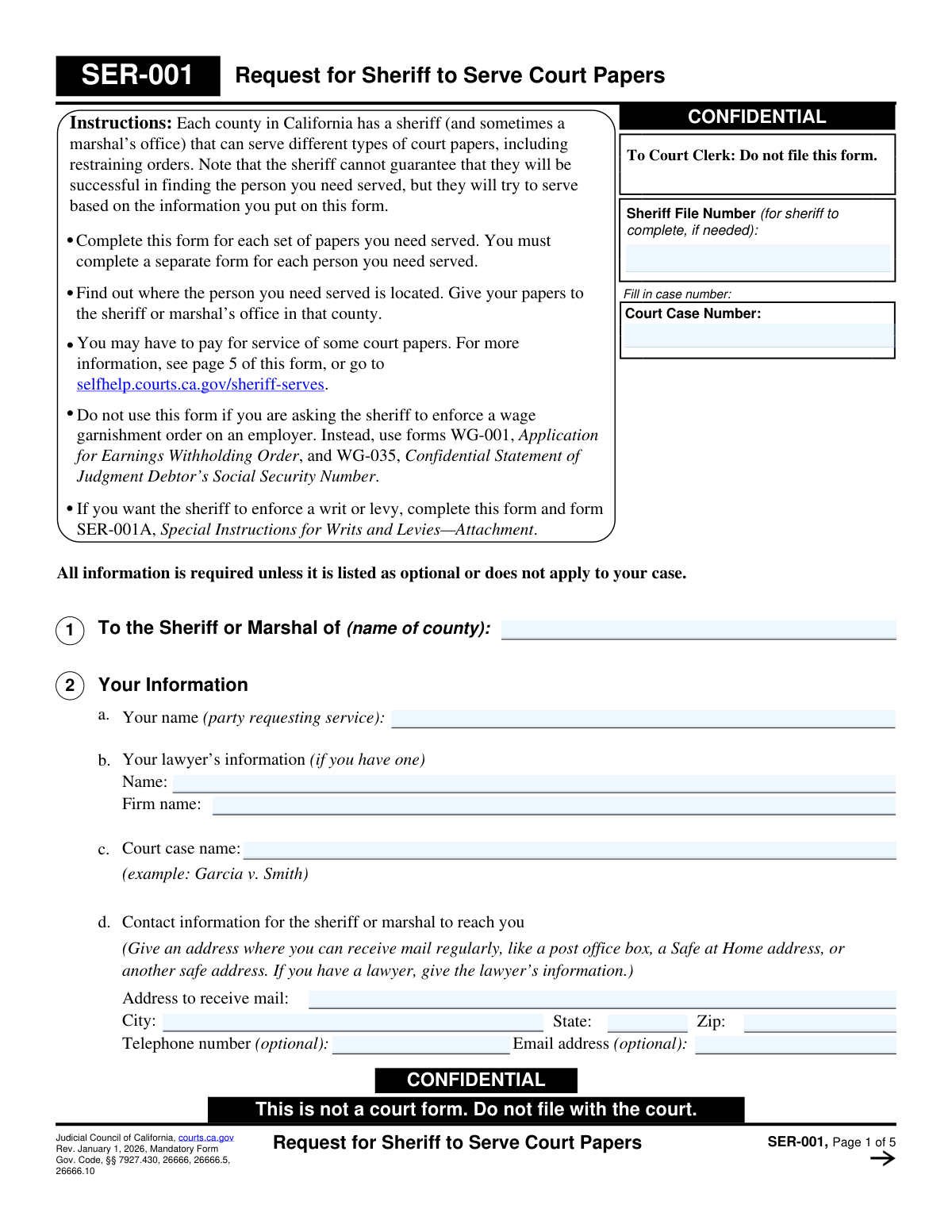
Yes! You can use AI to fill out Judicial Council of California Form SER-001, Request for Sheriff to Serve Court Papers
SER-001 is a confidential Judicial Council of California form used to provide the sheriff or marshal with the information needed to attempt service of court papers on a specific person or an entity in a particular county. It captures the requesterâs contact details, the case number, the recipientâs identifying information, service addresses, timing details, and any safety/accessibility concerns so law enforcement can plan and document service attempts. It is important because incomplete or inaccurate service information can delay a case, cause missed deadlines, or result in unsuccessful service. Today, this form can be filled out quickly and accurately using AI-powered services like Instafill.ai, which can also convert non-fillable PDF versions into interactive fillable forms.
Our AI automatically handles information lookup, data retrieval, formatting, and form filling.
It takes less than a minute to fill out SER-001 using our AI form filling.
Securely upload your data. Information is encrypted in transit and deleted immediately after the form is filled out.
Form specifications
| Form name: | Judicial Council of California Form SER-001, Request for Sheriff to Serve Court Papers |
| Number of pages: | 5 |
| Language: | English |
| Categories: | legal service forms, California court forms, Judicial Council forms, California judicial forms, civil court forms |
Instafill Demo: filling out a legal form in seconds
How to Fill Out SER-001 Online for Free in 2026
Are you looking to fill out a SER-001 form online quickly and accurately? Instafill.ai offers the #1 AI-powered PDF filling software of 2026, allowing you to complete your SER-001 form in just 37 seconds or less.
Follow these steps to fill out your SER-001 form online using Instafill.ai:
- 1 Go to Instafill.ai and upload the SER-001 PDF (or select SER-001 from the form library).
- 2 Enter the court case number and the county where the sheriff or marshal will attempt service, and confirm the form is for one set of papers and one person/entity to be served.
- 3 Provide your information (requesting party name, attorney details if any, case name, and a safe mailing address plus optional phone/email).
- 4 Choose whether the recipient is a person or an entity, then complete the identification details (name, aliases, optional phone, and for a person any physical description and safety/accessibility information).
- 5 Enter the primary service address (home/business, gate code/special instructions, best time to serve, and jail/prison facility if applicable) and add an alternate address if available and allowed by the county.
- 6 Describe what papers are being served, list the documents/form numbers if known, and provide any hearing date, service deadline, and whether substituted service is authorized (attach the court order if applicable).
- 7 If requesting writ/levy enforcement, indicate the sheriff’s role and prepare SER-001A if required; then e-sign, download/print, and submit the completed SER-001 with copies of the papers to the appropriate sheriff/marshal office.
Our AI-powered system ensures each field is filled out correctly, reducing errors and saving you time.
Why Choose Instafill.ai for Your Fillable SER-001 Form?
Speed
Complete your SER-001 in as little as 37 seconds.
Up-to-Date
Always use the latest 2026 SER-001 form version.
Cost-effective
No need to hire expensive lawyers.
Accuracy
Our AI performs 10 compliance checks to ensure your form is error-free.
Security
Your personal information is protected with bank-level encryption.
Frequently Asked Questions About Form SER-001
SER-001 is used to ask a California sheriff or marshal to serve court papers on a person or an entity (like a business or agency). It provides the sheriff with the case details, documents to serve, and the best information to locate the recipient.
No. The form says âDo not file this formâ and âThis is not a court form.â You give it directly to the sheriff or marshalâs office along with the papers you want served.
Yes. You must complete a separate SER-001 for each set of papers and a separate form for each person (or entity) you need served.
Submit the form to the sheriff (or marshal) in the county where the person or entity to be served is located. If you only have an address in a different county, you generally need to submit to that county instead.
At minimum, provide the personâs name and a service address in the county. Any extra detailsâlike physical description, vehicle info, best times to serve, and gate codesâcan improve the chances of successful service.
Check the box for serving an entity and provide the entityâs legal name and type. If you know the specific person to serve or the agent for service of process, list that name to help the sheriff serve the correct recipient.
List any known concerns that could affect safe or effective service, such as weapons, aggressive animals, history of violence, language barriers, or hearing impairment. Only include information you know; if you donât know of any issues, check âNo.â
Yes, you can list an alternate address (optional). Some sheriffs may attempt a second address if it is in the same county, so include it if it could help locate the person.
Check the box indicating the person is in jail or prison and provide the facility name. This helps the sheriff direct service to the correct institution.
Listing documents in section 5(b) is optional, but it can help confirm what the sheriff received and should serve. If you list them, use form numbers (like FL-100 or SC-100) or document titles if there is no form number.
Indicate whether there is a court date and/or a service deadline and provide the dates if known. This helps the sheriff prioritize attempts, but you should still submit your request as early as possible.
If the court has allowed a method other than personal service, check âYesâ and include a copy of the court order. If you are unsure, you can check âI donât knowâ and confirm with the court or self-help center.
Sometimes yes, but there are common exceptions. You may not have to pay if you have a fee waiver (FW-003 or FW-005) or if you are serving certain restraining orders (including domestic violence, elder abuse, gun violence, and some credible-threat restraining orders).
The sheriff will attempt service and then provide paperwork back to you. If service is successful, you should receive a proof of service to file with the court; if unsuccessful, you may receive a declaration of due diligence describing the attempts.
No. The form specifically says not to use SER-001 for wage garnishment on an employer; instead use WG-001 and WG-035.
Complete SER-001 and also complete SER-001A (Special Instructions for Writs and LeviesâAttachment). In section 6, indicate whether you want the sheriff to both serve and act as levying officer, or only act as levying officer.
Yes. AI form-filling services like Instafill.ai can help auto-fill fields (names, addresses, case details, and checkboxes) based on your provided information, saving time and reducing missed fields.
Upload the SER-001 PDF to Instafill.ai, answer the guided questions (who to serve, addresses, case number, documents, deadlines), and review the auto-filled form for accuracy. Then download the completed PDF to submit to the sheriff or marshal with copies of the papers to be served.
Instafill.ai can convert flat, non-fillable PDFs into interactive fillable forms so you can type into the fields. After conversion, you can auto-fill and export a clean, completed version for submission.
Compliance SER-001
Validation Checks by Instafill.ai
1
Court Case Number is present and consistently repeated across the form
Validates that a Court Case Number is provided and that all repeated instances of the Court Case Number field (appearing on multiple pages/sections) match exactly. This is critical because the sheriff may refuse to attempt service if the case number is missing on the order/summons/notice, and mismatches can cause misrouting or rejection. If validation fails, block submission and prompt the user to correct the case number everywhere it appears.
2
County name (Sheriff/Marshal) is provided and is a valid California county
Checks that the 'To the Sheriff or Marshal of (name of county)' field is not blank and matches an allowed list of California counties (or a controlled vocabulary used by the system). Correct county selection is essential because service must be requested in the county where the person/entity is located and where the sheriff has jurisdiction. If validation fails, require correction and prevent submission to avoid sending the request to the wrong agency.
3
Requestor identity completeness (party requesting service) and mailing address completeness
Ensures the party requesting service name is present and that the mailing address fields (street, city, state, ZIP) are complete because the sheriff must be able to contact and mail results (proof of service or due diligence). This also enforces that the state is a valid 2-letter code (typically 'CA' but allow out-of-state if business rules permit) and that no required address component is missing. If validation fails, flag missing fields and do not allow submission until a deliverable mailing address is provided.
4
Mailing ZIP code format validation (5-digit or ZIP+4)
Validates that the mailing ZIP code is either 5 digits (e.g., 94102) or ZIP+4 (e.g., 94102-1234) and contains only digits and an optional hyphen. Proper ZIP formatting improves deliverability and reduces returned mail, which can delay service attempts and notifications. If validation fails, prompt the user to correct the ZIP code format.
5
Optional contact fields format validation (telephone and email)
If a telephone number is provided, validate it against a standard North American format (10 digits, allowing punctuation and optional country code +1). If an email address is provided, validate it using a robust email pattern and reject obvious invalid entries (missing '@', invalid domain). If validation fails, allow the user to either correct the value or clear the optional field to proceed.
6
Service recipient type is exclusively selected (Person vs Entity)
Enforces that exactly one of 'Serve a Person' or 'Serve an Entity' is selected, and that the corresponding section is completed while the other is not required. This prevents ambiguous requests and ensures the sheriff receives the correct identifying information for the target. If validation fails, require the user to choose one recipient type and complete the appropriate fields.
7
Person recipient minimum identification requirements
When 'Serve a Person' is selected, validates that the person's name is provided and is not obviously incomplete (e.g., a single initial only) per system rules. This is important because insufficient identification reduces the likelihood of successful service and can create safety risks or mistaken identity. If validation fails, require a fuller name or additional identifying details before submission.
8
Entity recipient minimum identification requirements
When 'Serve an Entity' is selected, validates that 'Entity Name and Type' is provided (e.g., 'ABC, Inc. (corporation)' or 'City of X (government agency)'). If a specific person or agent for service of process is provided, ensure it is a plausible name (not blank/placeholder text) and does not conflict with the entity name field. If validation fails, require the entity name/type and prompt for corrections to any inconsistent entries.
9
Person description section consistency (No description vs Yes description)
Validates that the user does not select both 'No, I do not have any information' and 'Yes' for the person description availability. If 'Yes' is selected, require at least one descriptive attribute (e.g., gender, approximate age/DOB, height, hair color, or other distinguishing info) to be filled in to make the selection meaningful. If validation fails, prompt the user to either select 'No description' or provide at least one description detail.
10
Gender selection is limited to one option when provided
Checks that at most one of Male/Female/Nonbinary is selected to avoid contradictory descriptors. Clear, non-conflicting descriptors help deputies identify the correct person and reduce the risk of misidentification. If validation fails, require the user to select only one gender option or leave all unselected if unknown.
11
Physical description numeric plausibility (height/weight) and allowed units
If height and/or weight are provided, validate that they are numeric and within reasonable human ranges (e.g., height 36â96 inches or 3'0"â8'0" equivalent; weight 50â600 lbs), and that the input matches the systemâs expected unit format. Implausible values can indicate data entry errors and reduce the usefulness of the description for service attempts. If validation fails, prompt the user to correct the values or leave them blank if unknown.
12
Date of birth or age format and mutual exclusivity
Validates that the 'Date of birth or age' field is either a valid date (MM/DD/YYYY or ISO per system standard) or a numeric age (integer), and not an unparseable free-text string. If both a DOB and an age are entered (e.g., via separate UI inputs), ensure they are consistent (age aligns with DOB within a reasonable tolerance). If validation fails, require correction to a valid DOB or age estimate.
13
Safety/accessibility issues selection and dependent details (including language)
Ensures the user does not select both 'No safety/accessibility issues' and 'Yes' simultaneously. If 'Yes' is selected, require at least one detail checkbox or narrative entry; additionally, if 'Does not speak English' is checked, require the language field to be populated. If validation fails, prompt the user to resolve the contradiction and/or provide the required dependent details to support safe service planning.
14
Primary service address completeness and address-type selection
Validates that the primary service address includes street, city, state, and ZIP, and that exactly one of Home/Business is selected for that address. A complete, correctly categorized address is essential for the sheriff to attempt service during appropriate hours and to avoid wasted attempts. If validation fails, require completion of missing address components and correction of the Home/Business selection.
15
Incarceration indicator requires facility name and constrains address expectations
If 'In jail or prison' is checked, require the facility name and ensure the service address is compatible with incarceration service (e.g., facility address present or clearly indicated in the service address fields, depending on implementation). This prevents incomplete submissions that would force the sheriff to guess the location or reject the request. If validation fails, require the facility name and sufficient location information before submission.
16
Alternate service address validation (all-or-nothing and same-county rule support)
If any alternate address field is entered, require the full alternate address set (street, city, state, ZIP) and exactly one of Alternate Home/Business to be selected. Because some sheriffs only attempt a second address if it is in the same county, the system should also flag (or warn) when the alternate city/ZIP appears outside the selected county (if county-lookup is available). If validation fails, require completion of the alternate address or allow the user to clear it; if out-of-county, show a warning or block per business rules.
Common Mistakes in Completing SER-001
People often treat SER-001 like other Judicial Council forms and file it with the clerk, but the form clearly says âDo not file this formâ and âThis is not a court form.â Filing it can delay service because the sheriff never receives the instructions and you may assume service is in progress when it is not. Avoid this by delivering (or e-submitting, if allowed) SER-001 and the service packet directly to the correct county sheriff/marshal; AI tools like Instafill.ai can flag âdo not fileâ forms and help ensure the right delivery workflow is followed.
A very common error is forgetting the case number or copying an internal reference number instead of the official court case number. The sheriff may be unable to proceed if the case number is missing on the order/summons/notice, and the form itself repeatedly requests the case number on multiple pages. Avoid this by copying the case number exactly as it appears on the filed/stamped court documents and ensuring itâs consistent everywhere; Instafill.ai can auto-populate repeated fields and validate consistent case-number formatting.
Applicants often enter a guess, a prior case number, or a random reference into âSheriff File Number,â even though itâs typically for the sheriff to complete after intake. Incorrect entries can cause confusion, misrouting, or duplicate records at the sheriffâs office. Leave it blank unless the sheriff has already assigned a file number and instructed you to include it; Instafill.ai can detect âagency-useâ fields and prevent accidental edits.
People frequently submit the request to the county where the case was filed rather than the county where the person/entity to be served is located. This leads to rejection or delays because the sheriff generally serves within their county jurisdiction. Avoid this by confirming the service address county first, then writing that county name in Section 1 and submitting to that countyâs office; Instafill.ai can help cross-check the service ZIP/city against the selected county.
The instructions require a separate SER-001 for each person to be served and for each set of papers, but filers often list multiple recipients or multiple unrelated packets on one form. This can result in incomplete service attempts, incorrect proofs of service, or the sheriff refusing the request. Avoid this by preparing one SER-001 per recipient (and per packet if needed) and labeling each packet clearly; Instafill.ai can duplicate and re-map entries to generate clean, separate requests.
Because Section 3 is a âcheck a or bâ choice, people sometimes mark both or fill parts of both sections, especially when serving a business owner personally. This creates ambiguity about who must be served and can cause improper service (e.g., serving the wrong individual instead of the registered agent). Avoid this by deciding whether service is on an individual or an entity and completing only the applicable subsection; Instafill.ai can enforce mutually exclusive selections and prompt for the correct entity/agent details.
Service fails most often due to bad address dataâmissing apartment/unit numbers, incorrect ZIP codes, no gate/access instructions, or no indication of when the person is likely present. The sheriff cannot guarantee success and relies heavily on the details you provide; incomplete information leads to repeated unsuccessful attempts and added time/cost. Avoid this by verifying the full street address (including unit), adding gate codes and access notes, and listing realistic âbest time to serveâ windows; Instafill.ai can standardize addresses and flag missing components.
If the person is in jail or prison, people sometimes forget to check the incarceration box or they check it but donât provide the facility name. This can send deputies to a residential address when the person is actually in custody, wasting attempts and delaying service. Avoid this by confirming custody status and entering the exact facility name (and any booking identifiers if available) so the sheriff can route service correctly; Instafill.ai can prompt for required facility details when incarceration is selected.
Even though Section 5(b) is marked optional, many people omit it and also fail to include a complete packet, or they write vague descriptions like âcourt papersâ without form numbers/titles. This increases the risk that something required by a court order is not served, which can cause continuances, denied requests, or the need to re-serve. Avoid this by listing every document by form number (e.g., SC-100) or exact title and double-checking against the judgeâs order; Instafill.ai can help compile and format document lists consistently.
People often overlook the hearing date or service deadline on the summons/order and mark âI donât know,â which can prevent the sheriff from prioritizing attempts appropriately. Late service can lead to postponed hearings, inability to proceed, or other procedural setbacks. Avoid this by reading the filed/stamped documents carefully and entering the exact hearing date and last day to serve (if any); Instafill.ai can extract dates from your documents and validate date formats.
Some filers check âYesâ for alternative service methods because they want it to be easier, but substituted service generally requires court authorization (or specific legal conditions) and the form asks for a copy of the order if allowed. If the order isnât attached or the authorization doesnât exist, the sheriff may refuse that method and service may fail or be challenged later. Avoid this by checking âYesâ only when you have a court order permitting another method and attaching it; Instafill.ai can remind you to include required attachments when certain boxes are selected.
Saved over 80 hours a year
âI was never sure if my IRS forms like W-9 were filled correctly. Now, I can complete the forms accurately without any external help.â
Kevin Martin Green
Your data stays secure with advanced protection from Instafill and our subprocessors

Robust compliance program
Transparent business model
Youâre not the product. You always know where your data is and what it is processed for.
ISO 27001, HIPAA, and GDPR
Our subprocesses adhere to multiple compliance standards, including but not limited to ISO 27001, HIPAA, and GDPR.
Security & privacy by design
We consider security and privacy from the initial design phase of any new service or functionality. Itâs not an afterthought, itâs built-in, including support for two-factor authentication (2FA) to further protect your account.
Fill out SER-001 with Instafill.ai
Worried about filling PDFs wrong? Instafill securely fills judicial-council-of-california-form-ser-001-request-for-sheriff-to-serve-court-papers-1 forms, ensuring each field is accurate.