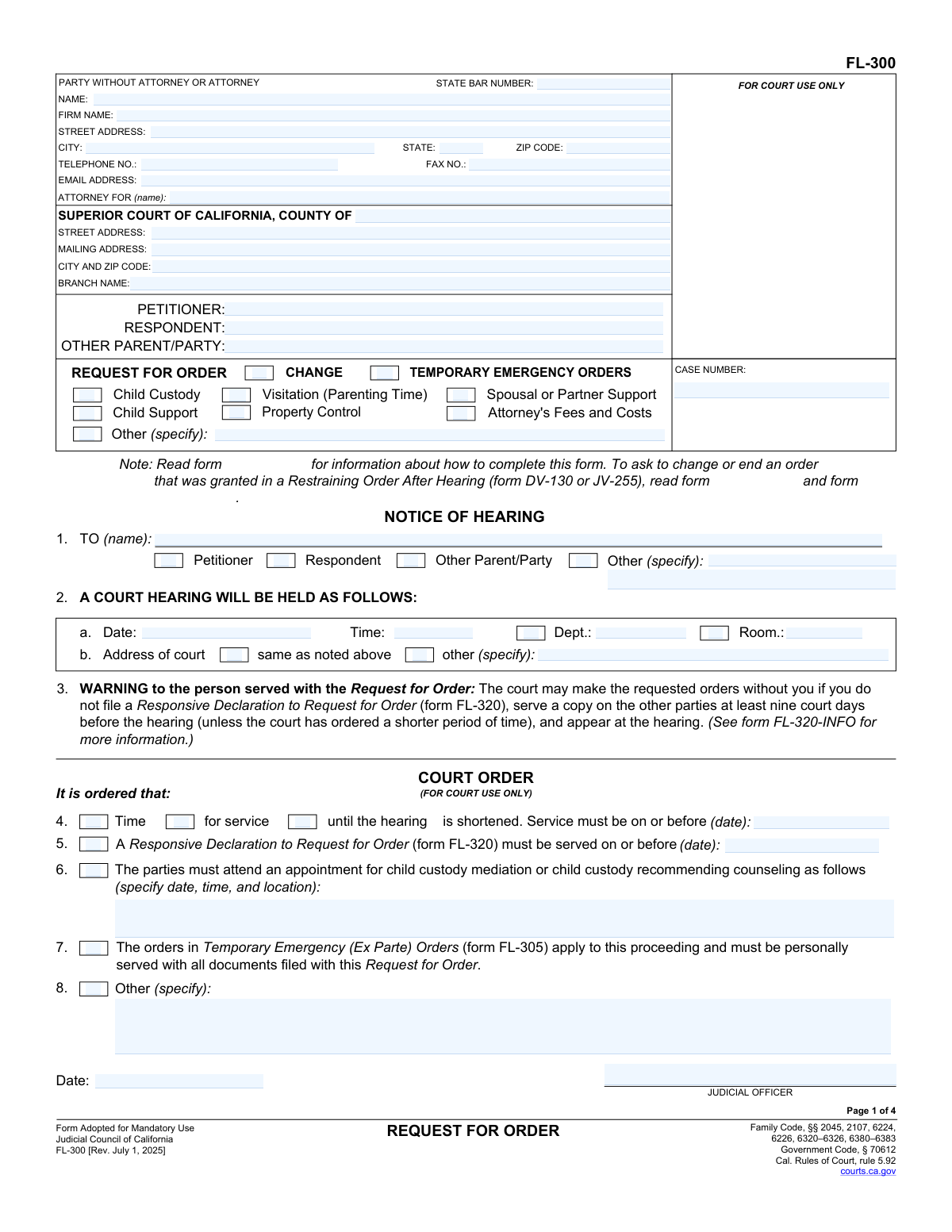
Yes! You can use AI to fill out Judicial Council of California Form FL-300, Request for Order

FL-300 (Request for Order) is the primary Judicial Council form used to request family law orders in a California Superior Court case, such as custody/visitation, support, property control, and attorney’s fees. It can be used to request temporary emergency (ex parte) orders and to request changes to existing orders by identifying the prior order date and what should be modified. The form also contains the Notice of Hearing section and warnings about responding (including reference to FL-320), making it central to scheduling and due process. Accurate completion is important because the court may issue orders based on the written request and supporting facts, and strict service and filing deadlines apply.
Our AI automatically handles information lookup, data retrieval, formatting, and form filling.
It takes less than a minute to fill out FL-300 using our AI form filling.
Securely upload your data. Information is encrypted in transit and deleted immediately after the form is filled out.

Form specifications

Form name: Judicial Council of California Form FL-300, Request for Order
Number of pages: 4
Language: English
main-image

Instafill Demo: filling out a legal form in seconds

How to Fill Out FL-300 Online for Free in 2026

Are you looking to fill out a FL-300 form online quickly and accurately? Instafill.ai offers the #1 AI-powered PDF filling software of 2026, allowing you to complete your FL-300 form in just 37 seconds or less.
Follow these steps to fill out your FL-300 form online using Instafill.ai:
  1. 1 Enter attorney/party information and court details (county, branch, addresses), then fill in the case caption (petitioner, respondent, other parent/party) and case number.
  2. 2 Select the type(s) of orders you are requesting (e.g., child custody/visitation, child support, spousal/partner support, property control, attorney’s fees, other) and indicate whether you are requesting temporary emergency (ex parte) orders.
  3. 3 Complete the relevant request sections: list children and requested custody/visitation terms; specify support amounts or guideline request; describe spousal/partner support request; identify property to control and debt payments; and state any other orders requested.
  4. 4 If you are asking to change existing orders, provide the date of the current order(s) and summarize what the court previously ordered, then explain what you want changed and why.
  5. 5 Write the “Facts to Support” declaration (up to 10 pages unless the court permits more) and attach any referenced attachments/forms (e.g., custody/visitation attachments, support declarations, attorney’s fees attachments) and copies of any existing restraining/protective orders if available.
  6. 6 Complete and attach required financial forms when applicable (e.g., current Income and Expense Declaration or simplified financial statement if eligible) and any required support declarations for spousal/partner support or fees.
  7. 7 Review for accuracy, sign under penalty of perjury, then generate a filing-ready packet for e-filing/filing and service; track the hearing date, service deadline, and response deadlines shown in the Notice of Hearing section.

Our AI-powered system ensures each field is filled out correctly, reducing errors and saving you time.

Why Choose Instafill.ai for Your Fillable FL-300 Form?

Speed

Complete your FL-300 in as little as 37 seconds.

Up-to-Date

Always use the latest 2026 FL-300 form version.

Cost-effective

No need to hire expensive lawyers.

Accuracy

Our AI performs 10 compliance checks to ensure your form is error-free.

Security

Your personal information is protected with bank-level encryption.

Frequently Asked Questions About Form FL-300

FL-300 is used in California family law cases to ask the court to make new orders or change existing orders. Common requests include child custody/visitation, child support, spousal/partner support, property control, and attorney’s fees and costs.

Any party in a family law case (petitioner, respondent, or other parent/party) can file FL-300 when they need the court to issue or modify orders. You must have an existing case number (or be filing within an existing case) in the correct county.

Check every category that matches what you want the judge to order, and leave the others blank. If you need more space or details, mark the relevant “Attachment” and provide a labeled attachment with your name, case number, and “FL-300” at the top.

Temporary emergency (ex parte) orders are for urgent situations where you need orders right away, often before the hearing. A regular request is decided at the noticed hearing date after the other side has time to respond.

If there are current domestic violence restraining/protective orders in effect, you should identify them in section 1 and attach a copy if you have one. If you don’t have a copy, still list the court, county/state, and case number if known.

In section 2(d), check that it is a change and provide the date the current order was filed and what the court ordered. Then clearly state what new custody/visitation schedule you want and why it is in the children’s best interest.

List each child’s name and date of birth, and specify who you want to have physical custody (where the child lives) and legal custody (who makes major decisions). If you have more children than space allows, use an attachment labeled as instructed on the form.

The form indicates you must file a current Income and Expense Declaration (commonly FL-150) or, if you qualify, a Financial Statement (Simplified) (FL-155). These documents support the court’s calculation of guideline child support.

If you are modifying spousal/partner support after entry of judgment, you must attach a Spousal or Partner Support Declaration Attachment (FL-157) or a declaration covering the same factors. You also must file a current Income and Expense Declaration (commonly FL-150).

Property control requests ask the court to give one party temporary exclusive use/possession of specific property (owned, being bought, leased, or rented) and/or to order who pays certain debts while the order is in effect. Be specific about the property and the payments requested.

Yes—section 6 allows you to request attorney’s fees and costs and list the total amount requested. You generally must support the request with a current Income and Expense Declaration and the required fee/cost attachments or equivalent declarations.

Section 9 states your supporting facts and attachments cannot be longer than 10 pages unless the court gives you permission. Keep your declaration focused on the key facts that support the orders you are requesting.

The Notice of Hearing warns that the responding party must file and serve a Responsive Declaration (FL-320) at least nine court days before the hearing unless the court orders a shorter time. The court may also set specific service and response deadlines in items 4 and 5 on page 1.

The form warns the court may make the requested orders without the served person if they do not file and serve a Responsive Declaration (FL-320) on time and do not appear at the hearing. Proper service and proof of service are critical.

Yes—section 8 lets you request shortened time for service and/or an earlier hearing date, but you must explain why you urgently need it. The judge decides whether to grant shortened time and will set the deadlines if approved.

Compliance FL-300
Validation Checks by Instafill.ai

1
Validates party identity fields are complete (Petitioner/Respondent/Other Parent/Party)
Checks that the form includes the names for Petitioner and Respondent, and includes Other Parent/Party when that role is selected or referenced elsewhere in the request. This is essential to ensure the court and all parties can identify who the orders apply to and who must be served. If missing or inconsistent, the submission should be flagged as incomplete and prevented from filing until corrected.
2
Validates case number presence and format consistency across pages
Ensures the CASE NUMBER field is provided (when required for an existing case) and matches the same value wherever it appears on the form. This prevents misfiling into the wrong case and ensures the clerk can associate the request with the correct docket. If the case number is missing or inconsistent, the system should reject the submission or route it to manual review depending on whether the filing is initiating or post-judgment.
3
Validates court venue fields (County, branch, addresses) are complete and non-contradictory
Checks that the Superior Court county is provided and that branch name and court address fields are present when required, especially if an 'other (specify)' address is selected for the hearing location. Accurate venue information is critical for scheduling, service, and ensuring the request is heard in the correct location. If venue fields are incomplete or contradictory (e.g., county missing but branch address provided), the submission should be blocked for correction.
4
Validates attorney vs. self-represented section completeness (State Bar number, firm, contact info)
If an attorney is indicated, verifies that attorney name, State Bar number, firm name (if applicable), and contact details (address, phone, email) are provided in acceptable formats. If the filer is self-represented, ensures the attorney fields are not incorrectly populated in a way that implies representation. If validation fails, the system should require correction to avoid improper service and incorrect attorney-of-record designation.
5
Validates contact information formats (telephone, fax, email, ZIP code)
Checks that telephone and fax numbers (if provided) follow a valid North American numbering format and that email addresses match standard email syntax; ZIP codes should be 5 digits or ZIP+4. Reliable contact information is necessary for notices, service coordination, and court communications. If formats are invalid, the system should prompt for correction; if required contact fields are missing, the submission should be marked incomplete.
6
Validates Notice of Hearing fields are complete when present (TO, date, time, dept, room, address)
Ensures that when the Notice of Hearing section is included in the submission, the 'TO (name)' recipient is specified and the hearing date, time, department, and room are provided, along with a valid hearing address selection. These fields are essential for due process and proper notice to the served party. If any are missing or malformed, the system should prevent finalization or require court/clerk completion before issuance.
7
Validates service deadline logic (service date and responsive declaration due date)
Checks that the 'Service must be on or before' date and the 'Responsive Declaration must be served on or before' date are valid dates and logically occur on or before the hearing date/time. This prevents impossible or unlawful timelines and reduces the risk of defective notice. If deadlines occur after the hearing or are not valid dates, the system should flag the filing for correction or clerk review.
8
Validates restraining/protective order information completeness when indicated
If the filer marks that domestic violence restraining/protective orders are in effect, verifies that at least one court type (criminal/family/juvenile/other) includes a county/state and, if known, a case number. It also checks that the parties between whom the orders are in effect are identified (Petitioner/Respondent/Other Parent/Party). If incomplete, the system should require additional details or an explicit 'unknown' indicator to avoid misleading the court about existing protective orders.
9
Validates child custody/visitation child list completeness and date-of-birth format
When child custody or visitation is requested, ensures at least one child is listed with a name and a valid date of birth (e.g., MM/DD/YYYY) and that custody designations are provided (physical custody to, legal custody to) for each child or via a clearly referenced attachment. This is necessary for the court to identify the children subject to the requested orders. If any child entry is missing required elements or DOB is invalid/future-dated, the submission should be rejected or require correction.
10
Validates custody/visitation request method selection (attached forms vs. narrative) and attachment references
Checks that the filer either identifies the attached forms used to specify requested custody/visitation orders or provides the 'As follows' narrative, and that any marked 'Attachment' references (e.g., Attachment 2a) are actually included. This prevents blank requests where the court cannot determine what orders are being sought. If neither method is completed or attachments are missing, the system should block submission as incomplete.
11
Validates 'change from current order' fields include prior order date and description
If the filer indicates the request is a change from a current order (custody/visitation, child support, spousal/partner support, or property control), verifies that the prior order filing date is provided and that the existing order terms are described. This is important because modification requests require the court to know what is being modified and when it was ordered. If the change box is checked without the prior order date/terms, the system should require completion before filing.
12
Validates child support request entries and monetary amount rules
When child support is requested, ensures each child entry includes the child’s name and age (or DOB from the custody section if the system cross-links), and that any 'Monthly amount requested' is a valid non-negative currency amount with reasonable precision (two decimals). It also checks that the filer does not provide a non-guideline amount without indicating guideline basis or providing an explanation in the support-reasons field. If amounts are invalid or required child details are missing, the submission should be rejected or returned for correction.
13
Validates required financial disclosure forms are included for support/fees requests
If child support, spousal/partner support, or attorney’s fees and costs are requested, verifies that a current Income and Expense Declaration (e.g., FL-150) or a qualifying simplified financial statement (e.g., FL-155) is indicated as filed, consistent with the form’s checkboxes. Financial disclosures are typically required for the court to set support and evaluate fee requests. If the request is made without the required financial form selection/attachment, the system should flag as noncompliant and prevent submission.
14
Validates spousal/partner support amount and modification/end selection consistency
When spousal or domestic partner support is requested, checks that the monthly amount is a valid currency value and that the filer selects whether they are requesting to change or end an existing order when a prior order date is provided. If the request is post-judgment modification, verifies that the Spousal or Partner Support Declaration Attachment (e.g., FL-157) or an equivalent declaration is attached/indicated. If these elements are missing or contradictory, the system should require correction to avoid an unsupported or ambiguous request.
15
Validates property control requests include property description and responsible party selection
If property control is requested, ensures the filer selects which party is to receive exclusive use/possession/control and provides a meaningful description of the property (owned/buying/lease/rent selection should not be blank when property is listed). For debt payment orders, validates each line item includes payee, purpose, amount (valid currency), and due date (valid date). If property/debt details are incomplete, the system should flag the request as insufficient for enforcement and require completion.
16
Validates attorney’s fees and costs total amount and supporting attachments
When attorney’s fees and costs are requested, checks that the total amount is a valid non-negative currency value and that at least one supporting basis is indicated (Income and Expense Declaration and/or the relevant fee request/supporting declaration attachments). This ensures the court has the information needed to assess need and ability to pay. If the amount is missing/invalid or no supporting documentation is indicated, the system should prevent submission or route to manual review per court policy.
17
Validates urgency/time-shortening request fields (court days) and justification
If the filer requests shortened time for service or an earlier hearing, verifies that the number of court days is a positive integer and that a specific justification is provided in the 'I need the order because' field. This is important because expedited relief requires a stated basis and a clear requested timeline. If the filer selects urgency options without a valid day count or without a justification narrative, the system should require completion before allowing the request to proceed.
18
Validates declaration signature block completion (date, printed name, signature) and page-limit acknowledgment
Ensures the declaration section includes a date, the applicant’s typed/printed name, and a signature indicator (electronic signature acceptance or wet signature capture, depending on channel). It also checks that any attached 'Facts to Support' declaration does not exceed 10 pages unless an explicit court permission indicator is included. If signature/date are missing or attachments exceed limits without permission, the submission should be rejected as not properly executed or noncompliant.

Common Mistakes in Completing FL-300

Leaving the caption/party information incomplete or inconsistent

People often skip or partially fill the top caption fields (petitioner/respondent/other parent-party names, county, branch, and case number) or use names that don’t match the existing case exactly. This happens because filers focus on the request section and assume the court can “look it up.” Missing or mismatched caption information can cause the clerk to reject the filing or misfile it under the wrong case. Copy the party names and case number exactly as they appear on prior filed documents and confirm the correct county/branch before submitting.

Not checking the correct boxes for what is being requested (or checking too many without clarity)

A common error is marking multiple request types (custody, visitation, support, property control, fees, “other”) without clearly stating what orders are actually sought, or forgetting to mark the box at all. This usually happens because the form is checkbox-driven and people assume their narrative will cover it. The court may not address an issue that isn’t clearly requested, or the other party may argue they lacked notice. Mark only the boxes that apply and make sure each checked category has a matching, specific order request in the details/attachments.

Failing to complete the Notice of Hearing section (or using the wrong hearing details)

Filers sometimes leave the hearing date/time/department/room blank, write in a date they chose themselves, or forget to list who the notice is “TO.” This happens because hearing information is typically assigned by the clerk or e-filing system, not selected by the filer. Incorrect or missing hearing details can lead to improper notice, continuances, or the request not being heard. Obtain the hearing information from the court/efile confirmation and ensure the “TO” party designation (petitioner/respondent/other) matches who must be served.

Requesting emergency (ex parte) orders without completing/serving the required ex parte paperwork

People check “temporary emergency orders” but do not file the related Temporary Emergency (Ex Parte) Orders form (FL-305) or do not personally serve it as required. This often happens because filers assume the FL-300 alone is enough to get immediate orders. The court may deny emergency relief or refuse to consider it if the required forms and service method are missing. If you need emergency orders, file the correct ex parte forms, follow local ex parte rules, and personally serve the FL-305 and all required documents.

Incomplete child information or unclear custody designations

A frequent mistake is listing children without full names and dates of birth, or leaving “Physical Custody to” and “Legal Custody to” blank or vague (e.g., “both” without specifying joint/sole and details). This happens because people confuse physical vs. legal custody or assume the court knows the current arrangement. Missing details can delay orders and create enforceability problems. Provide complete child identifiers and clearly state who will have legal custody and physical custody (joint or sole) and what the schedule will be.

Not identifying the existing order when requesting a change (missing dates and current terms)

When asking to change custody/visitation/support/property control, filers often forget to fill in the date the current order was filed and what the court previously ordered. This happens because people don’t have the prior order in front of them or assume “the court has it.” Without the baseline order, the judge may not be able to evaluate what is changing and why, and the request may be continued. Attach or accurately quote the current order terms and enter the filed date(s) so the court can compare old vs. requested orders.

Requesting child support or spousal support without filing the required financial forms

Many filers request or modify support but do not file a current Income and Expense Declaration (or the correct simplified financial statement when eligible). This happens because the financial forms feel separate from the FL-300 and require documentation people may not have ready. The court may deny the request, continue the hearing, or make an order based on incomplete information. File the required financial disclosure form(s) with current income, expenses, and attachments (pay stubs, etc.) and ensure they are served on the other party.

Entering support amounts incorrectly (guideline vs. specific dollar request confusion)

People often write a monthly child support amount while also checking that they want guideline support, or they leave the “monthly amount requested” blank when they are not requesting guideline. This happens because filers don’t understand that guideline support is calculated from financial inputs and timeshare, not guessed. Conflicting entries can confuse the court and the other party and may undermine credibility. If requesting guideline, state that clearly and provide accurate financial/timeshare information; if requesting a non-guideline amount, explain the exact amount and the legal/factual reason.

Attorney’s fees request without the required attachments or justification

A common mistake is requesting attorney’s fees and costs with only a total dollar figure, but without the supporting fee attachments/declarations and without a current Income and Expense Declaration. This happens because people assume the court will award fees automatically if they “need help.” The court may deny fees or reduce them significantly without evidence of need, ability to pay, and reasonableness. Include the required fee-related attachments/declarations, itemize fees/costs, and explain why an award is appropriate under the relevant factors.

Property control requests that are too vague to enforce

Filers often request “exclusive use” of property or debt payments but fail to identify the property precisely (address, account, vehicle VIN, lease details) or list debts without payee, amount, and due dates. This happens because people describe property informally (“the car,” “the house”) and don’t gather account documents. Vague orders are hard to enforce and may be denied or rewritten by the court. Specify each item with identifying details and provide a clear payment table (pay to/for/amount/due date) so the order can be enforced.

Missing or improper attachments (not labeled, not referenced, or exceeding the 10-page limit)

People frequently add extra pages of narrative without labeling them as “Attachment 2a,” “Attachment 9,” etc., forget to put their name/case number/FL-300 on each attachment, or exceed the 10-page facts limit without permission. This happens because filers treat attachments like informal letters rather than court pleadings. Poorly organized or overlength submissions can be rejected, ignored, or frustrate the judge’s review. Follow the attachment instructions exactly, reference the attachment number in the form, include identifying headers, and keep the facts section within the page limit unless the court authorizes more.
Saved over 80 hours a year

“I was never sure if my IRS forms like W-9 were filled correctly. Now, I can complete the forms accurately without any external help.”

Kevin Martin Green

Your data stays secure with advanced protection from Instafill and our subprocessors

Robust compliance program

Transparent business model

You’re not the product. You always know where your data is and what it is processed for.

ISO 27001, HIPAA, and GDPR

Our subprocesses adhere to multiple compliance standards, including but not limited to ISO 27001, HIPAA, and GDPR.

Security & privacy by design

We consider security and privacy from the initial design phase of any new service or functionality. It’s not an afterthought, it’s built-in, including support for two-factor authentication (2FA) to further protect your account.

Fill out FL-300 with Instafill.ai

Worried about filling PDFs wrong? Instafill securely fills judicial-council-of-california-form-fl-300-request forms, ensuring each field is accurate.