Yes! You can use AI to fill out Inventory and Appraisal (Judicial Council of California) (Form DE-160/GC-040)

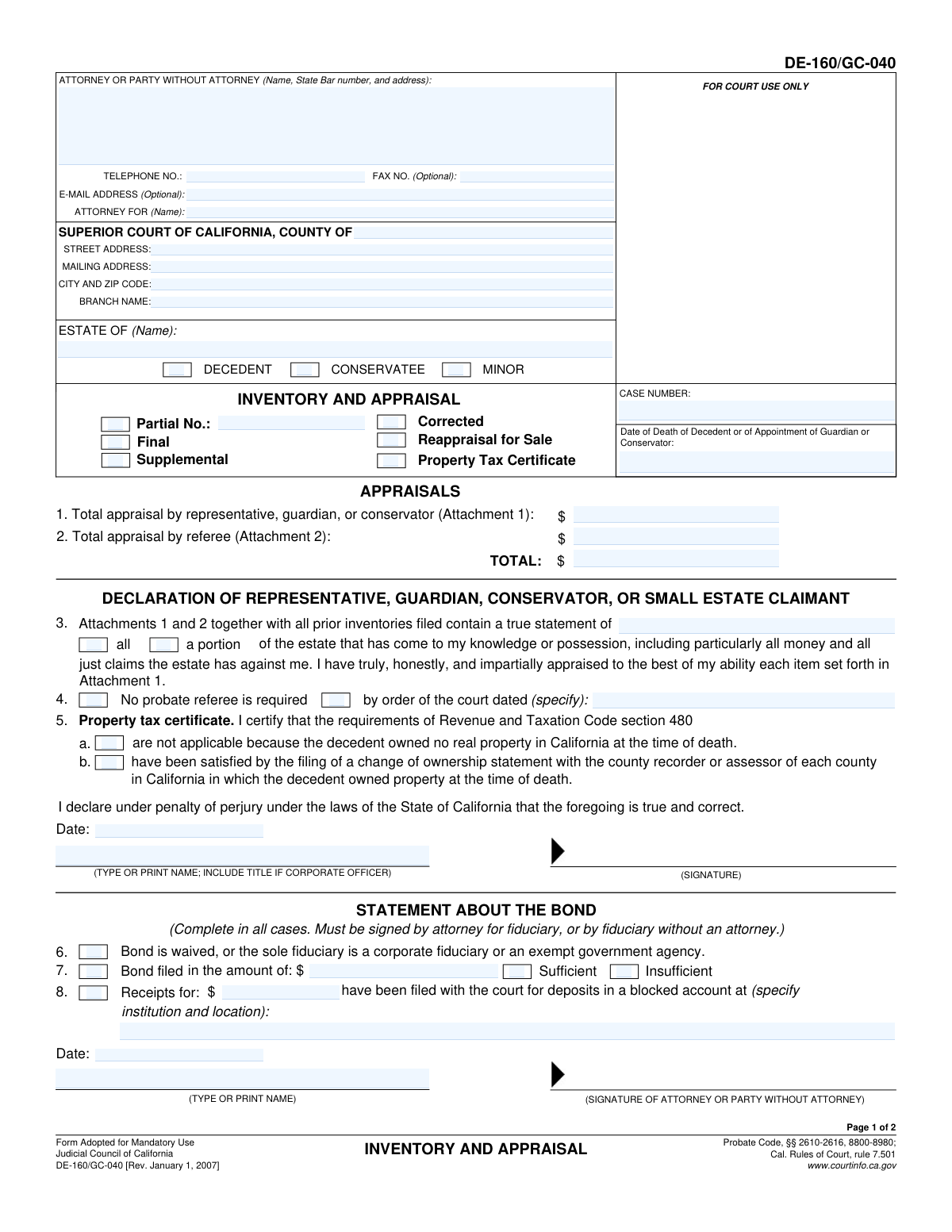
DE-160/GC-040 (Inventory and Appraisal) is a California Judicial Council probate form used to formally list and value assets of a decedent’s estate or a conservatorship/guardianship estate, with separate treatment for items appraised by the representative (Attachment 1) and items appraised by a probate referee (Attachment 2). It includes sworn declarations, property tax certificate statements, and bond-related information that the court uses to verify completeness, valuation, and compliance with Probate Code and Rules of Court requirements. Accurate completion is important because the inventory values affect court oversight, potential bond amounts, and administration of the estate. Today, this form can be filled out quickly and accurately using AI-powered services like Instafill.ai, which can also convert non-fillable PDF versions into interactive fillable forms.
Our AI automatically handles information lookup, data retrieval, formatting, and form filling.
It takes less than a minute to fill out DE-160/GC-040 using our AI form filling.
Securely upload your data. Information is encrypted in transit and deleted immediately after the form is filled out.

Form specifications

Form name: Inventory and Appraisal (Judicial Council of California) (Form DE-160/GC-040)
Number of pages: 2
Language: English
Categories: probate forms, California court forms, Judicial Council forms, estate forms, California judicial forms
main-image

Instafill Demo: filling out a legal form in seconds

How to Fill Out DE-160/GC-040 Online for Free in 2026

Are you looking to fill out a DE-160/GC-040 form online quickly and accurately? Instafill.ai offers the #1 AI-powered PDF filling software of 2026, allowing you to complete your DE-160/GC-040 form in just 37 seconds or less.
Follow these steps to fill out your DE-160/GC-040 form online using Instafill.ai:
  1. 1 Go to Instafill.ai and upload the DE-160/GC-040 PDF (or select it from the form library).
  2. 2 Enter or import the case and court details (county, addresses/branch, case number, and date of death or appointment).
  3. 3 Provide estate identifiers and select the estate type (decedent, conservatee, or minor) and the filing type (partial/final/supplemental/corrected/reappraisal for sale/property tax certificate).
  4. 4 Use Instafill.ai to populate the inventory totals and supporting information from your records for Attachment 1 (representative/guardian/conservator appraisal) and Attachment 2 (probate referee appraisal), then confirm the overall total.
  5. 5 Complete the declarations and compliance sections (all vs. portion of estate statement, probate referee requirement/order date if applicable, and property tax certificate selection a or b).
  6. 6 Finish the bond section (bond waived vs. bond filed amount and sufficiency, or blocked account receipts with institution/location and amounts) and add attorney/party contact details.
  7. 7 Review for consistency, then e-sign where allowed or prepare signatures/dates for the representative and probate referee, and download/print the completed form for filing with the Superior Court.

Our AI-powered system ensures each field is filled out correctly, reducing errors and saving you time.

Why Choose Instafill.ai for Your Fillable DE-160/GC-040 Form?

Speed

Complete your DE-160/GC-040 in as little as 37 seconds.

Up-to-Date

Always use the latest 2026 DE-160/GC-040 form version.

Cost-effective

No need to hire expensive lawyers.

Accuracy

Our AI performs 10 compliance checks to ensure your form is error-free.

Security

Your personal information is protected with bank-level encryption.

Frequently Asked Questions About Form DE-160/GC-040

This form is used in California probate, guardianship, or conservatorship cases to report the estate’s assets and their values. It includes declarations by the representative (Attachment 1) and, when required, the probate referee (Attachment 2).

The personal representative, guardian, conservator, or small estate claimant completes the main declaration and signs it under penalty of perjury. If a probate referee is required, the referee completes and signs the declaration on page 2 for Attachment 2.

Attachment 1 lists assets the representative can appraise (typically cash, bank accounts, and certain lump-sum payable-to-estate benefits) as of the date of death/appointment. Attachment 2 lists all other estate assets that must be appraised by a probate referee.

Assets are generally appraised as of the decedent’s date of death, or the date of appointment of the guardian or conservator (as applicable). Use fair market value as of that date.

Check the box that matches why you’re filing: Partial (not all assets yet), Final (last filing), Supplemental (adds assets to a prior filing), Corrected (fixes errors), or Reappraisal for Sale (reappraisal before selling assets). If you check “Partial,” include the partial inventory number.

A probate referee typically appraises the assets listed on Attachment 2. If the court ordered that no probate referee is required, check the “No probate referee is required” box and provide the date of the court order.

This section addresses California change-of-ownership reporting requirements. Check (a) if the decedent owned no California real property at death, or (b) if you filed the required change of ownership statement with the recorder/assessor in each county where real property was owned.

You must complete it in all cases: indicate whether bond is waived/exempt, a bond was filed (and whether sufficient), or receipts for blocked account deposits were filed (including the institution, location, and amount). It must be signed by the attorney for the fiduciary, or by the fiduciary if there is no attorney.

You’ll need the county, court addresses/branch, the estate name, the case number, and whether the matter is for a decedent, conservatee, or minor. These should match your existing court case documents exactly.

If you list joint tenancy or other non-probate assets for appraisal purposes only, they must be listed separately on additional attachments and excluded from the total valuation of Attachments 1 and 2. This helps avoid overstating the probate estate value.

Common items include bank statements as of the valuation date, insurance/retirement payout information payable to the estate, account statements for investments, and documentation for personal property and real property. You may also need the court order regarding a probate referee and any bond/blocked account paperwork.

Processing time varies by county and court workload, and it may also depend on whether a probate referee appraisal is involved. For the most accurate estimate, check your local Superior Court probate division’s timelines or ask the probate clerk.

Yes—AI form-filling services like Instafill.ai can help auto-fill fields from your information and supporting documents, reducing manual entry and errors. You should still review everything carefully because you sign under penalty of perjury.

Upload the DE-160/GC-040 PDF to Instafill.ai, then provide your case details (court, case number, estate type, dates) and asset totals for Attachments 1 and 2. Instafill.ai can map your inputs to the correct fields, generate a completed PDF, and you can download it to print/sign and file with the court.

If the PDF isn’t fillable, Instafill.ai can convert a flat, non-fillable PDF into an interactive fillable form so you can type directly into the fields. After conversion, you can auto-fill and export a clean, court-ready version for printing and filing.

Compliance DE-160/GC-040
Validation Checks by Instafill.ai

1
Court venue fields completeness (County + address block)
Validates that the County is provided and that the court address block is sufficiently complete (at minimum: street address or mailing address, plus city and ZIP code, and branch name if applicable). This is important because the filing must clearly identify the correct Superior Court location for routing and docketing. If any required venue/address elements are missing, the submission should be flagged as incomplete and prevented from finalization until corrected.
2
Case number presence and format validation
Ensures the Case Number is present and matches the expected county/court formatting rules (e.g., allowed characters, length, and separators) and is not just placeholder text. Correct case number formatting is critical to associate the inventory/appraisal with the correct proceeding and avoid misfiling. If the case number is missing or malformed, the system should reject submission or require correction before acceptance.
3
Estate name required and non-generic
Checks that the Estate Name is provided and appears to be a real party/estate identifier (not blank, not 'N/A', not only punctuation). The estate name is a primary identifier used across pages/attachments and for indexing. If invalid, the form should be returned for correction because downstream matching to the case and attachments becomes unreliable.
4
Estate type selection is exactly one (Decedent vs Conservatee vs Minor)
Validates that exactly one of Decedent, Conservatee, or Minor is checked on each relevant page/section, and that the selection is consistent across Page 1 and Page 2. This matters because the governing rules and the meaning of the key date field differ depending on the estate type. If none or multiple are selected, the system should block submission and prompt the filer to choose a single, consistent estate type.
5
Date of death/appointment required and valid date
Ensures the 'Date of Death of Decedent or of Appointment of Guardian or Conservator' is present and is a valid calendar date (MM/DD/YYYY or court-accepted format), not in the future. This date drives valuation timing and statutory compliance for inventory/appraisal. If the date is missing, invalid, or future-dated, the submission should fail validation and require correction.
6
Inventory and appraisal filing type selection rules (Partial/Final/Supplemental/Corrected/Reappraisal/Property Tax Certificate)
Validates that at least one filing type checkbox is selected and that mutually incompatible combinations are not selected together (e.g., Final with Partial, or Corrected with Reappraisal for Sale if the court’s rules treat them as distinct filings). The filing type determines how the court interprets the submission and whether additional information is required. If the selection is missing or logically conflicting, the system should require the filer to resolve the conflict before submission.
7
Partial inventory number required when 'Partial No.' is checked
If 'Partial No.' is checked, validates that the Partial Inventory Number is provided and follows an expected numeric or alphanumeric pattern (and is not zero/blank). This is important to sequence multiple partial inventories and prevent misordering in the case record. If missing or invalid, the system should block submission and request a valid partial number.
8
Declaration scope selection (All estate vs A portion) is exactly one
Ensures exactly one of 'all' or 'a portion' of the estate is selected in the declaration statement, and that it aligns with the filing type (e.g., 'all' is expected for a Final inventory, while 'a portion' is typical for Partial/Supplemental). This matters because it affects whether the court treats the inventory as complete. If both or neither are selected, or if inconsistent with the filing type, the system should flag the issue and require correction.
9
Probate referee requirement logic (No referee required vs Attachment 2 referee appraisal present)
Validates consistency between the 'No probate referee is required' checkbox (and any court order date) and the presence of referee-related fields (Attachment 2 totals, referee declaration, commission/expenses). If no referee is required, referee appraisal totals and referee declaration fields should generally be absent/blank; if a referee appraisal is included, the 'no referee required' option should not be selected unless explicitly supported by an order. If inconsistent, the system should flag for review and require the filer to correct selections or provide the court order date.
10
Court order date required and valid when 'No probate referee is required by order of the court dated' is selected
If the option indicating a court order is selected, validates that the Probate Referee Requirement Date is provided, is a valid date, and is not after the declaration signing date. The order date is the legal basis for bypassing a referee and must be specific. If missing/invalid, the system should prevent submission or require the date to be entered correctly.
11
Property tax certificate certification is internally consistent
Validates that exactly one of Property Tax Certificate options (a. Not Applicable vs b. Requirements Satisfied) is selected when the Property Tax Certificate filing type is checked, and that neither is selected if the filing type is not checked (unless the court allows standalone certification). This is important because the two statements are mutually exclusive and have different legal implications. If both/neither are selected when required, the system should block submission and prompt for a single correct certification.
12
Signature and printed name/date completeness for representative declaration
Ensures the representative/guardian/conservator/small estate claimant declaration includes a signature indicator, a Declaration Date, and a Declarant Printed Name (including title if corporate officer). These elements are required to make the declaration enforceable under penalty of perjury. If any are missing, the system should mark the filing as unsigned/incomplete and prevent final submission.
13
Bond statement selection and dependency checks (items 6–8)
Validates that the bond section has a coherent selection: either bond is waived/exempt (item 6) OR bond filed (item 7) OR receipts for blocked account deposits filed (item 8), and that incompatible combinations are not selected unless explicitly allowed by local rules. This matters because the court must understand what security exists for the fiduciary’s administration. If selections are missing or contradictory, the system should require clarification and completion of the dependent fields.
14
Bond amount and sufficiency/insufficiency logic
If 'Bond filed' is checked, validates that Bond Amount is provided, is a valid currency value (non-negative, reasonable precision), and that exactly one of 'Sufficient' or 'Insufficient' is selected. This is important for assessing whether the bond meets statutory/court requirements. If the amount is missing/invalid or sufficiency is ambiguous, the system should block submission and request correction.
15
Blocked account receipts details required when receipts are indicated
If 'Receipts for deposits have been filed' is checked, validates that the Receipts Amount is provided as a valid currency value and that the Blocked Account Institution and Location field is completed (not blank, includes identifiable institution and location). This information is necessary for the court to verify restricted funds and compliance with blocked account orders. If missing, the system should fail validation and require the missing details.
16
Attorney/party contact information format validation (phone/fax/email) and required identity fields
Validates that the Attorney or Party Without Attorney block includes a name and address, and if a State Bar number is provided it matches an expected numeric format; also validates telephone number format and, when provided, fax and email formats. Accurate contact information is required for notices, deficiencies, and court communication. If required identity fields are missing or contact formats are invalid, the system should flag errors and require correction before submission.
17
Appraisal totals are valid currency and mathematically consistent
Ensures Total Appraisal by Representative (Attachment 1) and Total Appraisal by Referee (Attachment 2) are valid currency values (allowing blanks only when the corresponding attachment is not used) and that Total Appraisal Sum equals the arithmetic sum of the two totals. This prevents filing incorrect estate valuation totals that can affect fees, bond calculations, and court review. If totals are non-numeric, negative, or do not reconcile, the system should block submission and prompt for corrected amounts.
18
Referee commission/expenses total reconciliation
Validates that Statutory Commission and Expenses are valid currency values (non-negative) and that Total Commission and Expenses equals commission plus expenses. This is important for transparency and to ensure the referee’s claimed amounts are internally consistent. If the total does not match or values are invalid, the system should flag the discrepancy and require correction.
19
Referee declaration completeness when Attachment 2 is used
If a referee appraisal total is provided or Attachment 2 is indicated as included, validates that the referee declaration includes the referee’s signature indicator, declaration date, and printed name. This is required to authenticate the appraisal performed by the probate referee. If missing, the system should treat Attachment 2 as incomplete and prevent submission until the declaration is properly completed.

Common Mistakes in Completing DE-160/GC-040

Checking the wrong estate type box (Decedent vs. Conservatee vs. Minor)

People often check multiple boxes or the wrong one because the form is used for different proceedings and the labels look similar across pages. This can cause the clerk/court to reject the filing or misroute it to the wrong case type, delaying the inventory and appraisal. Verify the underlying proceeding (probate estate, conservatorship, or guardianship) and check only the box that matches the case. AI-powered tools like Instafill.ai can flag inconsistent selections (e.g., a conservatorship case number with the “Decedent” box checked) before you file.

Using the wrong valuation date (not as of death/appointment)

A frequent error is valuing assets as of “today” or the statement date instead of the date of death (decedent) or date of appointment (guardian/conservator), as required by the instructions. This can lead to incorrect totals, objections, and requests for a corrected inventory or reappraisal. Always confirm the correct valuation date and ensure Attachment 1 and Attachment 2 values are based on that date. Instafill.ai can prompt for the correct triggering date and help keep valuations tied to the required date across attachments.

Misclassifying assets between Attachment 1 (representative) and Attachment 2 (referee)

Filers commonly place assets that must be appraised by the probate referee into Attachment 1, or they omit cash/bank accounts from Attachment 1 because they assume the referee handles everything. This can result in an incomplete or noncompliant inventory and require refiling, delaying administration. Put cash, bank accounts, and similar “ostensible value” items in Attachment 1, and list all other assets for referee appraisal in Attachment 2. Instafill.ai can help by categorizing assets and warning when an item type is placed on the wrong attachment.

Incorrect “Partial/Final/Supplemental/Corrected/Reappraisal” selection (and missing partial number)

People often check “Final” when it’s actually a partial or supplemental filing, or they check “Partial” but forget to enter the Partial Inventory Number. This creates confusion about what assets are covered and can trigger clerk rejections or court questions about missing property. Choose the filing type that matches your procedural posture and prior filings, and if “Partial” is checked, include the correct partial number that tracks the sequence. Instafill.ai can validate that the partial number is present when required and can remind you when “Final” conflicts with prior partial filings.

Totals don’t reconcile (Attachment 1 + Attachment 2 ≠ TOTAL)

A very common mistake is arithmetic errors or copying the wrong totals from the attachments into the “Total appraisal by representative,” “Total appraisal by referee,” and “TOTAL” fields. Mismatched totals can lead to rejection, requests for correction, or later accounting/bond issues because the estate value drives other requirements. Recalculate totals directly from the attachments and ensure the sum matches exactly, including cents if used. Instafill.ai can automatically compute and cross-check totals to prevent reconciliation errors.

Property Tax Certificate section completed incorrectly (a vs. b, or checked when not applicable)

Filers often check both 5(a) and 5(b), or they certify “no California real property” when the decedent actually owned real property, because they misunderstand what the certificate is confirming. Incorrect certification can cause compliance problems with county recording/assessor requirements and may require amended filings. Only check 5(a) if there was no California real property at death; otherwise check 5(b) only after filing the required change of ownership statement(s) in each relevant county. Instafill.ai can prompt you to confirm real property ownership and ensure only the appropriate box is selected.

Marking “No probate referee is required” without a valid court order date

Some filers check the “No probate referee is required” box assuming it’s optional, but the form indicates it must be supported by a court order and date when applicable. This can lead to rejection or a court request to appoint a referee and redo the appraisal portion. Only select this if you have an order waiving the referee requirement and enter the exact order date. Instafill.ai can require the order date when that box is checked and flag missing supporting information.

Bond section contradictions (waived vs. filed vs. blocked account receipts)

The “Statement About the Bond” is often filled out with conflicting selections—e.g., checking “Bond is waived” and also “Bond filed,” or marking “Receipts for deposits filed” without providing the institution/location and amount. Inconsistencies can delay approval, trigger court inquiries, or cause problems meeting fiduciary security requirements. Select only the option(s) that match the court’s bond orders and provide all required details (bond amount, sufficiency, blocked account institution/location, and receipt amount). Instafill.ai can detect contradictory checkboxes and enforce completion of dependent fields.

Missing or improper signatures, dates, and printed names/titles

People frequently sign in the wrong place, omit the date, or forget to type/print the declarant’s name and title (especially when a corporate fiduciary is involved). Unsigned or undated declarations are typically rejected and can require re-service or re-filing, causing delays. Ensure the representative/guardian/conservator signs the declaration, and the attorney or party without attorney signs the bond statement section, each with dates and printed names/titles. Instafill.ai can highlight required signature blocks and prevent submission when mandatory signature metadata is missing.

Attorney/party identification errors (State Bar number, address, and “Attorney for” mismatch)

A common issue is leaving out the State Bar number, using an outdated address/phone, or listing the wrong “Attorney for” party name, especially when multiple fiduciaries or related cases exist. This can cause notice and communication problems and may lead to clerk rejection for incomplete attorney information. Confirm the attorney’s current State Bar number and contact details, and ensure “Attorney for” matches the fiduciary/party in this specific case. Instafill.ai can auto-format contact fields and validate Bar number patterns to reduce these errors.

Referee commission/expenses section miscalculated or left blank when required

On page 2, filers (or referees) often enter the statutory commission but forget to add expenses, or they enter a total that doesn’t equal commission plus expenses. Incorrect commission reporting can lead to objections, delayed approval of the referee’s compensation, or requests for correction. Enter commission and itemized/identified expenses, then ensure the total matches the sum exactly. Instafill.ai can calculate totals automatically and flag when the “TOTAL” doesn’t reconcile with the component amounts.
Saved over 80 hours a year

“I was never sure if my IRS forms like W-9 were filled correctly. Now, I can complete the forms accurately without any external help.”

Kevin Martin Green

Your data stays secure with advanced protection from Instafill and our subprocessors

Robust compliance program

Transparent business model

You’re not the product. You always know where your data is and what it is processed for.

ISO 27001, HIPAA, and GDPR

Our subprocesses adhere to multiple compliance standards, including but not limited to ISO 27001, HIPAA, and GDPR.

Security & privacy by design

We consider security and privacy from the initial design phase of any new service or functionality. It’s not an afterthought, it’s built-in, including support for two-factor authentication (2FA) to further protect your account.

Fill out DE-160/GC-040 with Instafill.ai

Worried about filling PDFs wrong? Instafill securely fills inventory-and-appraisal-judicial-council-of-california-form-de-160gc-040 forms, ensuring each field is accurate.



