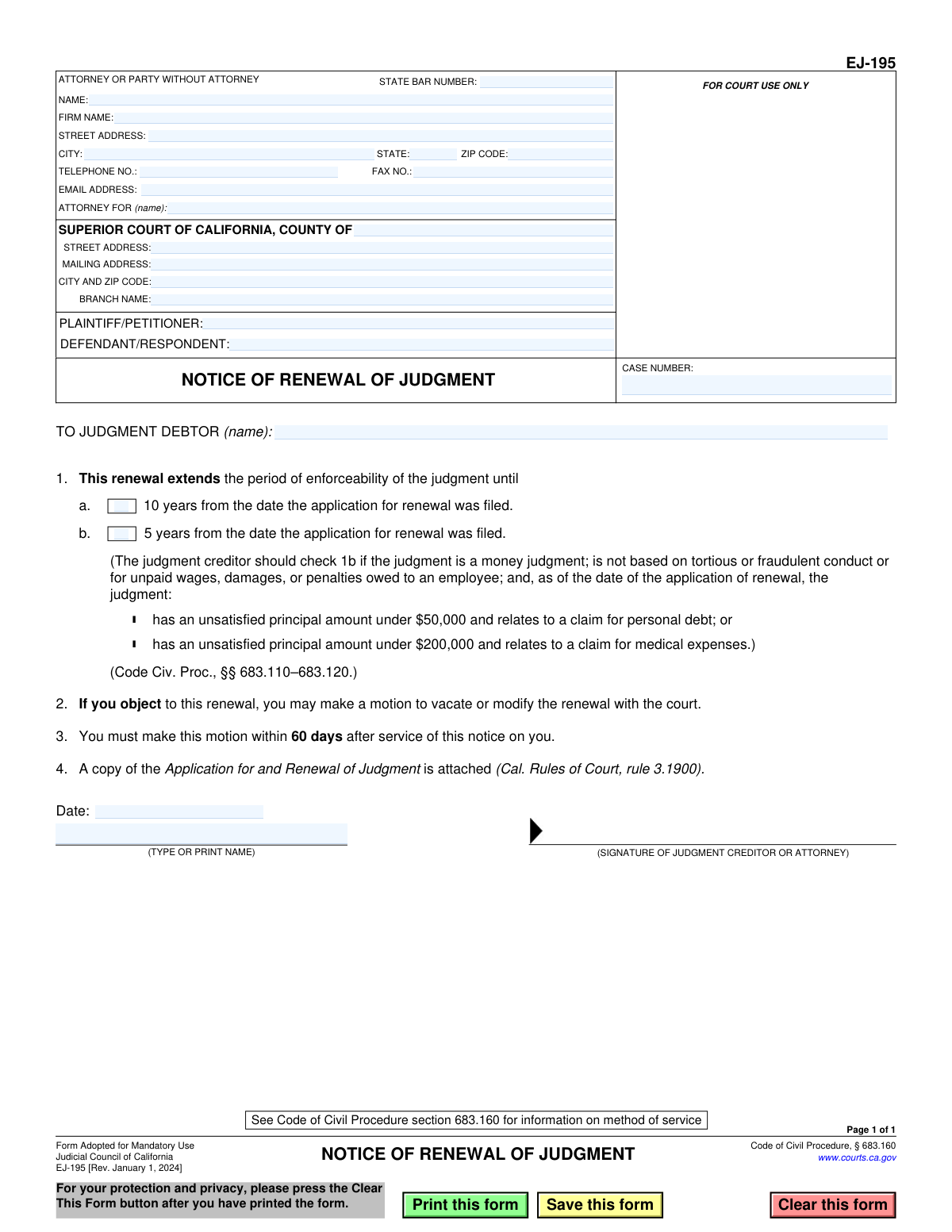
Yes! You can use AI to fill out Form EJ-195, Notice of Renewal of Judgment
The California Judicial Council Form EJ-195, Notice of Renewal of Judgment, is a mandatory form used by a judgment creditor to inform a judgment debtor that a court judgment has been extended. This notice specifies the new period of enforceability and informs the debtor of their right to object by filing a motion to vacate or modify the renewal within 60 days of being served. Today, this form can be filled out quickly and accurately using AI-powered services like Instafill.ai, which can also convert non-fillable PDF versions into interactive fillable forms.
EJ-195 is part of the
California court forms and judgment enforcement forms categories on Instafill.
Our AI automatically handles information lookup, data retrieval, formatting, and form filling.
It takes less than a minute to fill out EJ-195 using our AI form filling.
Securely upload your data. Information is encrypted in transit and deleted immediately after the form is filled out.
Form specifications
| Form name: | Form EJ-195, Notice of Renewal of Judgment |
| Number of fields: | 29 |
| Number of pages: | 1 |
| Language: | English |
Instafill Demo: How to fill out PDF forms in seconds with AI
How to Fill Out EJ-195 Online for Free in 2026
Are you looking to fill out a EJ-195 form online quickly and accurately? Instafill.ai offers the #1 AI-powered PDF filling software of 2026, allowing you to complete your EJ-195 form in just 37 seconds or less.
Follow these steps to fill out your EJ-195 form online using Instafill.ai:
- 1 Navigate to Instafill.ai and upload or select the Form EJ-195, Notice of Renewal of Judgment.
- 2 Provide the court and case information, including the county, court address, case number, and the names of the plaintiff and defendant.
- 3 Enter the contact details for the attorney or party filing the notice, such as name, address, phone number, and state bar number.
- 4 Specify the name of the judgment debtor to whom the notice is being given.
- 5 Select the correct checkbox to indicate whether the judgment's enforceability is extended for 10 years or 5 years, based on the criteria described on the form.
- 6 Review all the auto-filled information for accuracy, then provide the date and your digital signature.
- 7 Download the completed form, ready for filing with the court and for service on the judgment debtor along with the required attachments.
Our AI-powered system ensures each field is filled out correctly, reducing errors and saving you time.
Why Choose Instafill.ai for Your Fillable EJ-195 Form?
Speed
Complete your EJ-195 in as little as 37 seconds.
Up-to-Date
Always use the latest 2026 EJ-195 form version.
Cost-effective
No need to hire expensive lawyers.
Accuracy
Our AI performs 10 compliance checks to ensure your form is error-free.
Security
Your personal information is protected with bank-level encryption.
Frequently Asked Questions About Form EJ-195
This form is a legal notice used by a judgment creditor to inform a judgment debtor that a court judgment against them has been officially extended. This renewal allows the creditor to continue collection efforts for an additional period.
Receiving this notice means a money judgment you owe has not expired and has been renewed, extending the time the creditor has to collect the debt. You should review the notice carefully, as it explains your right to object and the deadline for doing so.
The judgment creditor (the person or entity owed the money) or their attorney is responsible for completing this form and serving it on the judgment debtor after filing an Application for Renewal with the court.
The renewal typically extends the judgment's enforceability for 10 years. However, it may be limited to 5 years for certain consumer or medical debts under specific dollar amounts, as detailed in section 1b of the form.
To object, you must file a 'motion to vacate or modify the renewal' with the court that issued the judgment. You must file this motion within 60 days after you were served with the Notice of Renewal.
If you do not file a motion to object within the 60-day deadline, the renewal becomes final. The judgment creditor can then continue collection actions like wage garnishments or bank levies for the new enforcement period.
This is a separate form (EJ-190) that the creditor first files with the court to request the renewal. A copy of that filed application must be attached to this Notice of Renewal (Form EJ-195) when it is served on the debtor.
You will need the court case number, the names of the plaintiff and defendant, court address details, and the contact information for the person filing the notice. You must also check the box for the correct renewal period (5 or 10 years).
A 5-year renewal is used for specific consumer debts. This applies if the unsatisfied principal is under $50,000 for personal debt or under $200,000 for medical expenses, as specified by California law.
The form must be served on the judgment debtor according to the methods described in the California Code of Civil Procedure, section 683.160. This typically involves personal service or service by mail to the debtor's last known address.
Yes, services like Instafill.ai use AI to help you accurately auto-fill form fields with your case information. This can save time and help prevent common errors when preparing the notice.
To fill out this form online, you can upload the PDF to the Instafill.ai platform. The AI will make the form interactive, allowing you to easily type your information into the correct fields before printing for signature and service.
If you have a non-fillable or 'flat' PDF, you can use a tool like Instafill.ai. It can convert the document into an interactive, fillable form online so you can easily complete it on your computer.
Compliance EJ-195
Validation Checks by Instafill.ai
1
Case Number Presence
This check ensures the 'CASE NUMBER' field is not empty. The case number is the unique identifier for the legal proceeding in the court system. A missing case number would make it impossible to associate this notice with the correct case file, leading to immediate rejection by the court clerk.
2
Party Identification Completeness
Validates that both the 'PLAINTIFF/PETITIONER' and 'DEFENDANT/RESPONDENT' fields are filled. These fields identify the primary parties to the judgment. Failure to name both parties makes the notice legally deficient and ambiguous as to who is involved in the renewal.
3
Judgment Debtor Name Consistency
This check verifies that the name entered in the 'TO JUDGMENT DEBTOR' field matches the name in the 'DEFENDANT/RESPONDENT' field. This is critical to ensure the notice is correctly and unambiguously addressed to the party against whom the judgment is being renewed. A mismatch could invalidate the service of the notice.
4
Filer Information Completeness
Ensures that the name and full street address (street, city, state, zip) for the 'ATTORNEY OR PARTY WITHOUT ATTORNEY' are provided. This information is mandatory for official correspondence, service of documents, and court records. An incomplete address will result in the form being rejected for filing.
5
State Bar Number Validation for Attorneys
If the 'ATTORNEY FOR' field is filled out, this check validates that the 'STATE BAR NUMBER' field contains a numeric value. This number is required to verify the attorney's credentials and authority to practice law. Filing without a valid bar number when represented by counsel can invalidate the document.
6
Attorney Representation Consistency
Verifies that the name provided in the 'ATTORNEY FOR (name)' field matches one of the parties listed as 'PLAINTIFF/PETITIONER'. Since this form is filed by the judgment creditor to renew a judgment, the attorney must be representing the plaintiff. This prevents ambiguity about who the attorney represents.
7
Court County Specification
This check ensures the 'COUNTY OF' field under the court information section is completed. The county is the primary determinant of the correct court jurisdiction for filing the document. Submitting the form without specifying the county will lead to its rejection as it cannot be routed to the correct court.
8
Exclusive Renewal Period Selection
Validates that exactly one of the checkboxes, either 1a (10 years) or 1b (5 years), is selected. These options are mutually exclusive and determine the length of the judgment's renewal. Selecting neither or both creates ambiguity about the legal term of the renewal, making the form invalid.
9
Signature Date Presence and Format
This check ensures the 'Date' field is filled with a valid date, typically in MM/DD/YYYY format. An undated legal document is considered incomplete and legally ineffective. The date of signature is crucial for establishing timelines, such as the 60-day period for the debtor to object.
10
Signature Date Validity
Validates that the 'Date' of signature is not a future date. A post-dated signature is legally invalid and suggests the document was not signed on the date claimed. This can lead to the court rejecting the filing or challenges to its validity.
11
Printed Signatory Name Requirement
Ensures that the 'TYPE OR PRINT NAME' field accompanying the signature line is not empty. This field legibly identifies the individual who signed the document, which is a standard requirement for legal attestations. A missing printed name can render the signature unidentifiable and the document invalid.
12
ZIP Code Format Validation
This check verifies that the 'ZIP CODE' field for the filer's address is in a valid 5-digit or 9-digit (ZIP+4) format. A valid ZIP code is essential for the mailability of court notices and other official correspondence. An incorrect format can lead to returned mail and delays in the legal process.
13
Email Address Format Validation
If an email address is provided in the 'EMAIL ADDRESS' field, this check ensures it follows the standard '[email protected]' format. With courts increasingly using electronic communication and service, a valid email address is crucial for timely notifications. An invalid format would render the contact method useless.
Common Mistakes in Completing EJ-195
Users often mistakenly select the default 10-year renewal period (Box 1a) when the judgment only qualifies for a 5-year renewal (Box 1b), or vice versa. This happens due to not carefully reading the specific criteria for the 5-year renewal related to debt type and amount. An incorrect selection can lead to the renewal being challenged, modified, or vacated by the court, potentially jeopardizing the creditor's ability to enforce the judgment for the intended duration. Always verify the judgment details against the specific conditions listed under section 1b before making a selection.
Transcribing the case number incorrectly is a frequent and critical error, often due to a simple typo. This number is the primary identifier linking the renewal notice to the original court case. An incorrect case number will cause the court clerk to reject the filing or, if missed, could result in the renewal being filed in the wrong case, rendering it ineffective and causing significant delays. To avoid this, meticulously double-check the case number against the original judgment or other official court documents.
The form explicitly states in section 4 that a copy of the 'Application for and Renewal of Judgment' (Form EJ-190) is attached. Filers sometimes overlook this and submit the EJ-195 notice by itself. Submitting the notice without the corresponding application makes the filing incomplete and will lead to its rejection by the court, delaying the renewal process and potentially causing you to miss statutory deadlines. Always ensure both the application (EJ-190) and the notice (EJ-195) are filed together as required.
When an attorney fills out the form, they sometimes leave the 'ATTORNEY FOR (name):' field blank, assuming it's obvious they represent the plaintiff/judgment creditor. However, this field must be explicitly completed with the name of the party they represent. Leaving it blank can cause confusion or lead to the document being rejected for incompleteness. Always state the full name of the client (the judgment creditor) in this field.
People often enter the wrong county, an incorrect court address, or the wrong branch name, especially if they are unfamiliar with the specific court where the original judgment was entered. Filing in the wrong jurisdiction will result in an immediate rejection and loss of filing fees. To prevent this, refer to the original judgment to confirm the exact Superior Court, county, and branch name and address before filling out this section. AI-powered tools like Instafill.ai can help by auto-populating correct court information based on the case number or jurisdiction.
Forgetting to sign or date the form is a simple but fatal mistake. An unsigned renewal notice is invalid and will be rejected by the court. An incorrect or missing date can create ambiguity regarding filing and service deadlines. This often happens when filers are in a rush. Always perform a final review of the form before filing, paying special attention to the signature and date fields to ensure they are properly completed.
Mistakes in the 'TO JUDGMENT DEBTOR (name):' field, such as misspellings or using an incomplete legal name, can invalidate the notice. Proper and legally accurate identification of the debtor is essential for the notice to be effective and for proper service of process. An error here could give the debtor grounds to challenge the renewal. Carefully copy the debtor's full legal name exactly as it appears on the original judgment.
It is common for filers to inadvertently switch the names of the plaintiff and defendant in the caption of the form. This creates confusion and can lead to processing delays or rejection if the clerk cannot match the parties to the case file. To avoid this, carefully check the original court documents to confirm which party is the plaintiff/petitioner and which is the defendant/respondent and enter them in the correct fields. Using a tool like Instafill.ai can help prevent this by saving party information and populating it consistently across related forms.
Attorneys filing the form are required to include their State Bar Number, but this field is sometimes left blank. The bar number is a key identifier for the attorney of record and is required for court processing. Omitting it can lead to the filing being rejected for being incomplete, forcing a refiling. Attorneys should ensure their bar number is included in the designated field every time.
Often, court forms are only available online as flat, non-fillable PDFs, leading to users printing them and filling them out by hand. This can result in illegible handwriting, which may cause data entry errors by the court clerk or rejection of the form. To ensure clarity and professionalism, these forms should be filled out electronically. Tools like Instafill.ai can convert non-fillable PDFs into interactive, fillable forms, preventing legibility issues and making the process more efficient.
Saved over 80 hours a year
“I was never sure if my IRS forms like W-9 were filled correctly. Now, I can complete the forms accurately without any external help.”
Kevin Martin Green
Your data stays secure with advanced protection from Instafill and our subprocessors

Robust compliance program
Transparent business model
You’re not the product. You always know where your data is and what it is processed for.
ISO 27001, HIPAA, and GDPR
Our subprocesses adhere to multiple compliance standards, including but not limited to ISO 27001, HIPAA, and GDPR.
Security & privacy by design
We consider security and privacy from the initial design phase of any new service or functionality. It’s not an afterthought, it’s built-in, including support for two-factor authentication (2FA) to further protect your account.
Fill out EJ-195 with Instafill.ai
Worried about filling PDFs wrong? Instafill securely fills form-ej-195-notice-of-renewal-of-judgment forms, ensuring each field is accurate.