Yes! You can use AI to fill out Form WG-007/EJ-165, Financial Statement (Wage Garnishment—Enforcement of Judgment)
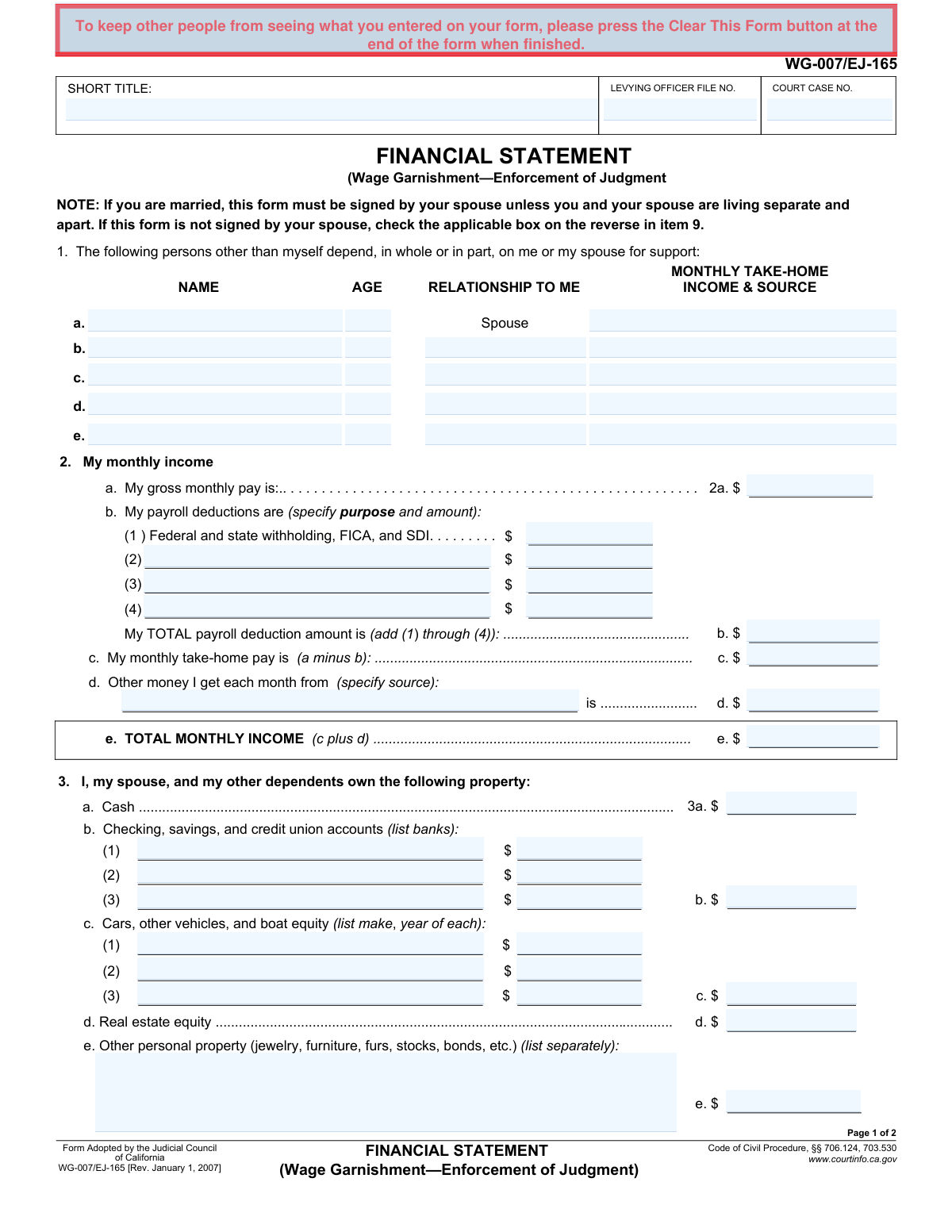
The WG-007/EJ-165, Financial Statement, is a legal document required by the Judicial Council of California in wage garnishment proceedings. It provides the court and creditors with a detailed breakdown of a debtor's income, expenses, assets, and dependents to determine their ability to pay and to assess claims of exemption. Today, this form can be filled out quickly and accurately using AI-powered services like Instafill.ai, which can also convert non-fillable PDF versions into interactive fillable forms.
WG-007/EJ-165 is part of the
California court forms, California state forms and judgment enforcement forms categories on Instafill.
Our AI automatically handles information lookup, data retrieval, formatting, and form filling.
It takes less than a minute to fill out WG-007/EJ-165 using our AI form filling.
Securely upload your data. Information is encrypted in transit and deleted immediately after the form is filled out.
Form specifications
| Form name: | Form WG-007/EJ-165, Financial Statement (Wage Garnishment—Enforcement of Judgment) |
| Number of fields: | 118 |
| Number of pages: | 1 |
| Language: | English |
Instafill Demo: How to fill out PDF forms in seconds with AI
How to Fill Out WG-007/EJ-165 Online for Free in 2026
Are you looking to fill out a WG-007/EJ-165 form online quickly and accurately? Instafill.ai offers the #1 AI-powered PDF filling software of 2026, allowing you to complete your WG-007/EJ-165 form in just 37 seconds or less.
Follow these steps to fill out your WG-007/EJ-165 form online using Instafill.ai:
- 1 Navigate to Instafill.ai and upload or select Form WG-007/EJ-165.
- 2 Use the AI assistant to accurately input your case details, including the Levying Officer File Number and Court Case Number.
- 3 Provide information about your dependents, monthly income, and payroll deductions in the designated sections.
- 4 List all your assets, such as cash, bank accounts, vehicles, and real estate, as prompted by the system.
- 5 Detail your monthly expenses and itemize all outstanding debts to provide a complete financial picture.
- 6 Add any other relevant facts or unusual expenses that support your Claim of Exemption in the provided space.
- 7 Review all the information filled in by the AI, have your spouse sign if required, then sign and date the form before downloading the completed document.
Our AI-powered system ensures each field is filled out correctly, reducing errors and saving you time.
Why Choose Instafill.ai for Your Fillable WG-007/EJ-165 Form?
Speed
Complete your WG-007/EJ-165 in as little as 37 seconds.
Up-to-Date
Always use the latest 2026 WG-007/EJ-165 form version.
Cost-effective
No need to hire expensive lawyers.
Accuracy
Our AI performs 10 compliance checks to ensure your form is error-free.
Security
Your personal information is protected with bank-level encryption.
Frequently Asked Questions About Form WG-007/EJ-165
This form is used to detail your financial situation when your wages are being garnished. It supports a Claim of Exemption by showing that you need your earnings to provide for the basic necessities of life for yourself and your family.
You need to complete this form if you are subject to a wage garnishment (Earnings Withholding Order) and you want to ask the court to reduce the amount being withheld due to financial hardship.
Yes, your spouse must sign the form unless you are not married or you and your spouse are living separate and apart. If your spouse does not sign, you must check the applicable box in item 9 on the second page.
Gross monthly pay is your total earnings before any deductions. Monthly take-home pay is the amount you actually receive after all deductions like taxes, FICA, and health insurance have been subtracted.
Use this section to describe any unusual financial circumstances not listed elsewhere, such as high medical bills, emergency expenses, or special educational needs for a dependent. These details help the judge understand your unique budget pressures.
Equity is the current market value of the asset minus the amount you still owe on it. For example, if your car is worth $10,000 and you have a $4,000 loan balance, your equity is $6,000.
You should list the total of all your installment payments, including credit cards, in item 4j. Then, provide a detailed breakdown of each debt, including the creditor and monthly payment, in the table under item 5.
You must file the completed and signed form with the levying officer (e.g., the county sheriff) who served the wage garnishment. Keep a copy for your records and send another copy to the creditor.
After you file, the creditor has a period to object to your claim. If they do not object, the levying officer will adjust your withholding; if they do object, a court hearing will be set to decide the matter.
Yes, services like Instafill.ai use AI to help you accurately auto-fill form fields, which can save time and reduce the risk of errors. This is particularly useful for complex forms requiring detailed financial data.
Simply upload the WG-007/EJ-165 PDF to the Instafill.ai platform. The service will make the document interactive, allowing you to enter your information once and have it auto-filled in all the correct fields.
If you have a non-fillable or 'flat' PDF, you can use a tool like Instafill.ai. It can convert the static document into an interactive, fillable form that you can easily complete and save on your computer.
An earnings withholding order is a general wage garnishment for a debt judgment. A wage assignment for support is a specific order to withhold wages for court-ordered child or spousal support, which often takes priority.
Compliance WG-007/EJ-165
Validation Checks by Instafill.ai
1
Verifies Monthly Take-Home Pay Calculation
This check ensures the 'My monthly take-home pay' (field 2c) is correctly calculated by subtracting 'My TOTAL payroll deduction amount' (field 2b) from 'My gross monthly pay' (field 2a). This is a critical calculation for determining disposable income, and an error could misrepresent the filer's financial situation. If the calculation is incorrect, the form submission should be flagged for manual review or rejected until corrected.
2
Verifies Total Monthly Income Calculation
This validation confirms that the 'TOTAL MONTHLY INCOME' (field 2e) is the correct sum of 'My monthly take-home pay' (field 2c) and 'Other money I get each month' (field 2d). This total figure is fundamental to the entire financial statement. An incorrect total would invalidate any assessment of the filer's ability to pay, leading to an improper judgment.
3
Verifies Total Monthly Expenses Calculation
This check ensures that the 'TOTAL MONTHLY EXPENSES' (field 4n) accurately reflects the sum of all itemized expenses from fields 4a through 4m. This total is compared against total income to assess financial hardship. A miscalculation could either overstate or understate the filer's necessary expenses, skewing the outcome of the wage garnishment claim.
4
Ensures Consistency Between Installment Payments and Debts
This validation cross-references the 'Installment payments' total in the expenses section (field 4j) with the sum of all 'MO. PAYMENTS' listed in the debts section (item 5). The two values must be equal to ensure the filer's listed debts and expenses are consistent. A mismatch indicates either an omission of a debt or an error in reporting monthly expenses, requiring correction for an accurate financial picture.
5
Mandatory Marital Status Declaration
This check verifies that exactly one of the three checkboxes in item 9 ('My spouse has signed below', 'I have no spouse', 'My spouse and I are living separate and apart') is selected. This declaration is legally required and determines the signature requirements for the form. Failure to select one option makes the form incomplete and legally invalid.
6
Conditional Requirement for Spouse's Signature
This validation enforces the rule that if the 'My spouse has signed below' checkbox in item 9 is selected, then the 'SIGNATURE OF SPOUSE' and 'TYPE OR PRINT NAME OF SPOUSE' fields must be filled. This is crucial for legal validity, as it confirms the spouse's acknowledgment of the shared financial information. If the box is checked but the signature is missing, the form is considered incomplete.
7
Prohibits Spouse's Signature When Not Applicable
This check ensures that if the filer selects 'I have no spouse' or 'My spouse and I are living separate and apart' in item 9, the spouse's signature and name fields are left empty. This prevents contradictory information on the form. A signature in this case would create legal ambiguity about the filer's marital status and the spouse's involvement.
8
Ensures Primary Declarant Signature and Date
This validation confirms that the primary 'SIGNATURE', 'TYPE OR PRINT NAME', and 'Date' fields at the bottom of the form are all completed. The signature and date are essential for the declaration under penalty of perjury, making the document legally binding. An unsigned or undated form is invalid and cannot be processed.
9
Validates Format of All Monetary Fields
This check scans all fields expecting a dollar amount (e.g., 2a, 3a, 4a) to ensure they contain valid, non-negative numeric data. This prevents data entry errors, such as text in a currency field, which would break calculations. This rule ensures data integrity and allows for the automated calculations required to process the form.
10
Validates Format of Dependent's Age
This check ensures that the 'AGE' field for any dependent listed in Section 1 contains a positive integer. This maintains data quality and prevents nonsensical entries like text or negative numbers. Accurate age information can be relevant for determining dependency status and associated expenses like child care.
11
Completeness Check for Case Identifiers
This validation ensures that the 'COURT CASE NO.' and 'LEVYING OFFICER FILE NO.' fields are not empty. These numbers are critical for associating the financial statement with the correct legal action and jurisdiction. Without this information, the document cannot be correctly filed or processed, causing significant delays.
12
Logical Consistency of Spousal Information
This check verifies that if 'Spouse' is listed as a dependent in Section 1, the marital status in Section 9 is not 'I have no spouse'. This cross-field validation prevents contradictory statements within the form. A mismatch would indicate a significant error by the filer and requires clarification before the form can be accepted.
13
Verifies Payroll Deduction Summation
This check ensures the 'My TOTAL payroll deduction amount' in section 2b is the correct sum of the itemized deductions listed in lines (1) through (4). This confirms the accuracy of the components that lead to the take-home pay calculation. An error here would cascade into the final income total, making the entire financial statement unreliable.
Common Mistakes in Completing WG-007/EJ-165
The form explicitly states that a spouse must sign unless they are living separate and apart. This is one of the most common reasons for rejection, as it's a strict legal requirement. Forgetting the signature or failing to check the appropriate box in item 9 will invalidate the statement. Always review the signature requirements and ensure all necessary parties sign and date the form before submission.
People often enter their take-home pay in the 'gross monthly pay' field (2a) or vice-versa. Gross pay is your total earnings before any deductions, while take-home pay is what you actually receive after taxes and other withholdings. This error skews the entire financial picture and can lead to an incorrect assessment of your ability to pay. To avoid this, carefully check your pay stub to distinguish between the gross amount and the net (take-home) amount.
The form requires several manual calculations, such as total payroll deductions (2b), monthly take-home pay (2c), and total monthly expenses (4n). Simple arithmetic errors are frequent and can undermine the credibility of your entire statement. An incorrect total can lead to judges or creditors questioning the accuracy of all the information provided. Double-check all your math, or use a calculator to ensure accuracy. AI-powered tools like Instafill.ai can prevent this by performing calculations automatically as you enter data.
In section 3, for items like cars (3c) and real estate (3d), the form asks for 'equity,' not the total value. Equity is the property's current market value minus the amount you still owe on it. Listing the full value of a car or home without subtracting the loan balance dramatically overstates your assets. To avoid this, first determine the property's market value, then subtract the outstanding loan balance to find the correct equity figure to report.
When listing dependents in section 1, filers often forget to include the dependent's own income, if any. The form specifically asks for the 'Monthly Take-Home Income & Source' for each dependent to assess the actual level of financial dependency. Omitting this information provides an incomplete picture and may be interpreted as an attempt to exaggerate financial hardship. Ensure you accurately report any income your dependents receive, such as from part-time jobs or benefits.
A frequent mistake is listing an auto loan payment under 'Transportation & auto expenses' (4i) and also including it in the 'Installment payments' total (4j) which is itemized in section 5. The form specifically instructs filers to list car payments in item 5. This error inflates your monthly expenses, making your budget appear inaccurate. To prevent this, list auto loan payments only in section 5 and ensure the total is correctly carried over to line 4j.
In section 5, filers are required to list all debts with the creditor, monthly payment, total balance owed, and who is responsible for the debt. People often list only the monthly payment, forgetting to include the total outstanding balance. This missing information prevents a full understanding of your debt obligations. Always provide all requested details for each debt to present a complete and accurate financial profile.
The top of the form requires a 'Short Title,' 'Levying Officer File No.,' and 'Court Case No.' People sometimes leave these fields blank because they don't have the information readily available. This information is critical for linking your financial statement to the correct legal case. Leaving it blank can cause significant processing delays or result in the document being misplaced. Locate these numbers on previous court notices or legal documents before you begin filling out the form.
The form asks for specific itemization in several areas, such as payroll deductions (2b) and installment payments (5). Instead of breaking down the amounts as requested, people sometimes enter a single, unexplained lump sum. This lack of detail can raise questions about the validity of the figures. Always provide the specific breakdown where requested to ensure your statement is transparent and easy to understand.
Filers sometimes focus only on their primary job's income and forget to list other sources in section 2d, such as freelance work, gig economy income, government benefits, or financial support from family. Omitting any source of income, no matter how small or irregular, can be viewed as a misrepresentation of your financial situation. Be thorough and list all money you receive on a monthly basis to ensure your statement is true and correct. AI form-fillers like Instafill.ai can help by providing prompts and reminders for commonly forgotten fields.
For the monthly expenses in section 4, people often guess or estimate amounts for categories like 'Food' or 'Utilities' rather than using actual figures. These estimates can be inaccurate and may not reflect your true spending, potentially weakening your claim. To avoid this, review your last few months of bank and credit card statements to calculate an accurate monthly average for each category. If the form is a non-fillable PDF, a tool like Instafill.ai can convert it to a fillable version, making it easier to input precise data.
Saved over 80 hours a year
“I was never sure if my IRS forms like W-9 were filled correctly. Now, I can complete the forms accurately without any external help.”
Kevin Martin Green
Your data stays secure with advanced protection from Instafill and our subprocessors

Robust compliance program
Transparent business model
You’re not the product. You always know where your data is and what it is processed for.
ISO 27001, HIPAA, and GDPR
Our subprocesses adhere to multiple compliance standards, including but not limited to ISO 27001, HIPAA, and GDPR.
Security & privacy by design
We consider security and privacy from the initial design phase of any new service or functionality. It’s not an afterthought, it’s built-in, including support for two-factor authentication (2FA) to further protect your account.
Fill out WG-007/EJ-165 with Instafill.ai
Worried about filling PDFs wrong? Instafill securely fills form-wg-007ej-165-financial-statement-wage-garnishmentenforcement-of-judgment forms, ensuring each field is accurate.