Yes! You can use AI to fill out Form ADR-100, Statement of Agreement or Nonagreement
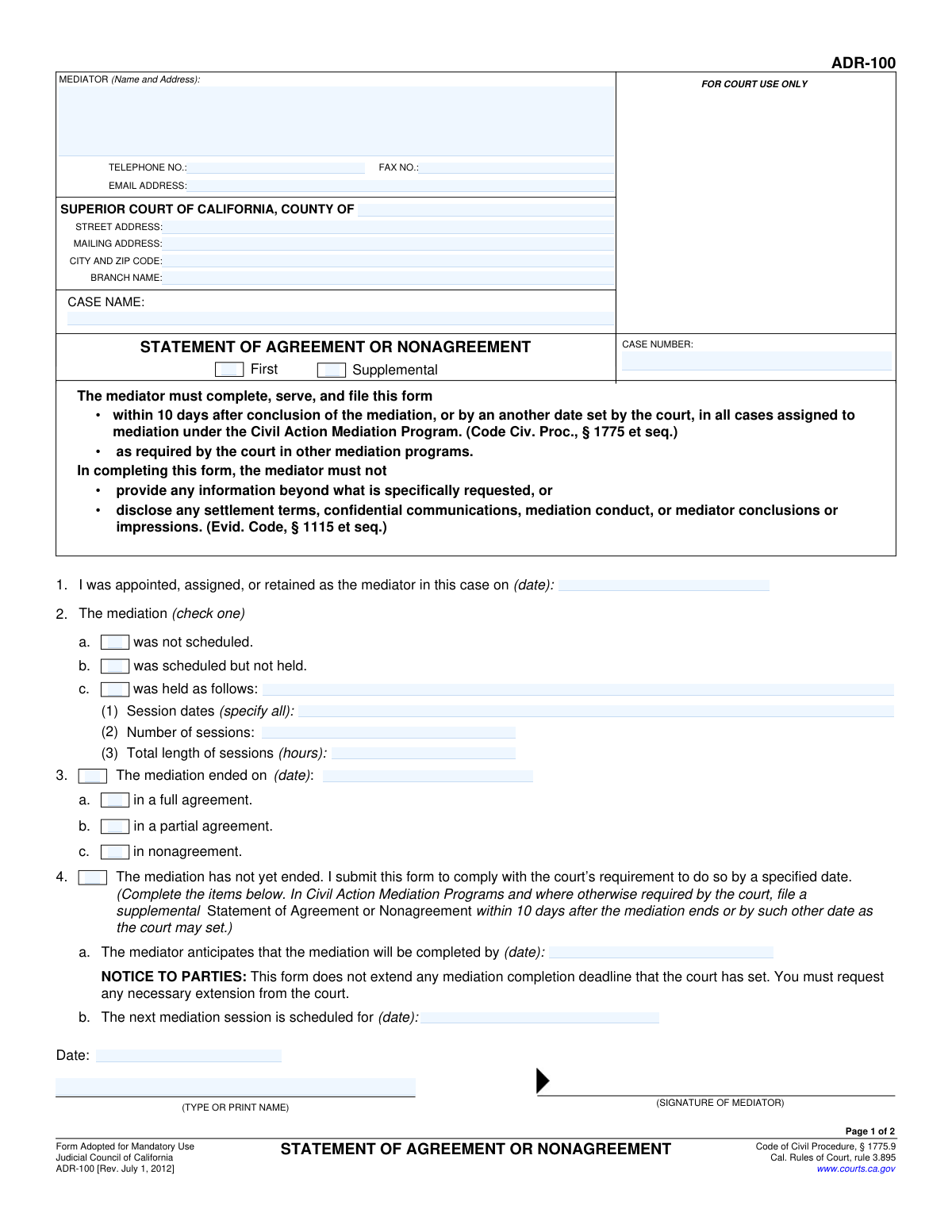
This is Form ADR-100, a mandatory legal document for the Superior Court of California used by a court-appointed mediator to officially report the status and outcome of a mediation. The mediator must indicate whether the mediation resulted in a full agreement, partial agreement, or nonagreement, and file it with the court within a specified timeframe. Today, this form can be filled out quickly and accurately using AI-powered services like Instafill.ai, which can also convert non-fillable PDF versions into interactive fillable forms.
Our AI automatically handles information lookup, data retrieval, formatting, and form filling.
It takes less than a minute to fill out ADR-100 using our AI form filling.
Securely upload your data. Information is encrypted in transit and deleted immediately after the form is filled out.
Form specifications
| Form name: | Form ADR-100, Statement of Agreement or Nonagreement |
| Number of fields: | 71 |
| Number of pages: | 1 |
| Language: | English |
Instafill Demo: How to fill out PDF forms in seconds with AI
How to Fill Out ADR-100 Online for Free in 2026
Are you looking to fill out a ADR-100 form online quickly and accurately? Instafill.ai offers the #1 AI-powered PDF filling software of 2026, allowing you to complete your ADR-100 form in just 37 seconds or less.
Follow these steps to fill out your ADR-100 form online using Instafill.ai:
- 1 Navigate to Instafill.ai and upload or select Form ADR-100, Statement of Agreement or Nonagreement.
- 2 Use the AI assistant to automatically populate the header with the mediator's contact information and the details of the Superior Court of California handling the case.
- 3 Enter the specific case name and case number in the designated fields.
- 4 Complete the main statement by checking the appropriate boxes to indicate if the mediation was held, the session dates, and whether it concluded in a full agreement, partial agreement, or nonagreement.
- 5 If the mediation has not concluded, provide the anticipated completion date or the date of the next scheduled session.
- 6 The mediator must digitally or manually sign and date the first page to certify the statement's accuracy.
- 7 Fill out the 'Proof of Service' on the second page, detailing how, when, and to whom the document was sent, then sign the declaration.
Our AI-powered system ensures each field is filled out correctly, reducing errors and saving you time.
Why Choose Instafill.ai for Your Fillable ADR-100 Form?
Speed
Complete your ADR-100 in as little as 37 seconds.
Up-to-Date
Always use the latest 2026 ADR-100 form version.
Cost-effective
No need to hire expensive lawyers.
Accuracy
Our AI performs 10 compliance checks to ensure your form is error-free.
Security
Your personal information is protected with bank-level encryption.
Frequently Asked Questions About Form ADR-100
This form is used by the mediator to officially report the status and outcome of a court-ordered mediation to the Superior Court of California. It indicates whether the mediation resulted in a full agreement, partial agreement, or no agreement.
The mediator who was appointed, assigned, or retained for the case is responsible for completing, serving, and filing Form ADR-100.
The mediator must file this form within 10 days after the mediation concludes, or by an alternative date if one has been set by the court.
No, you are strictly prohibited from disclosing any settlement terms, confidential communications, or your impressions of the mediation. The form should only contain the information specifically requested.
You should complete section 4 of the form, indicating that the mediation has not yet ended and providing an anticipated completion date. You will be required to file a supplemental statement once the mediation is complete.
No, the form explicitly states that it does not extend any mediation completion deadline set by the court. You must request any necessary extensions directly from the court.
The Proof of Service is a mandatory section where the person serving the document declares under penalty of perjury that they have sent a copy of the completed form to all other parties in the case.
You will need the court and case information, the date you were appointed as mediator, the dates and total length of the mediation sessions, and the final outcome of the mediation.
Check 'First' for the initial statement you file about the mediation. Check 'Supplemental' for any follow-up statement you file, such as after reporting that a mediation was still in progress.
Yes, services like Instafill.ai use AI to accurately auto-fill form fields with your case and contact information, which can save time and help prevent errors.
Simply upload the ADR-100 PDF to the Instafill.ai platform. Its AI will make the document interactive, allowing you to fill in all the required fields, sign, and download it easily.
If you have a non-fillable or 'flat' PDF, you can use a service like Instafill.ai. It can convert the document into an interactive, fillable form that you can complete on your computer.
Compliance ADR-100
Validation Checks by Instafill.ai
1
Ensures Case Number is Provided
This check verifies that the 'CASE NUMBER' field is not empty. The case number is a critical identifier for associating the document with the correct legal proceeding in the court's system. Failure to provide it will result in the form being rejected by the court clerk, as it cannot be filed correctly.
2
Mutually Exclusive Mediation Status Selection
Validates that exactly one option is selected in Section 2 for the mediation status ('was not scheduled', 'was scheduled but not held', or 'was held'). Selecting none or more than one of these options creates an ambiguous and contradictory statement about the mediation's progress. The form must be corrected to reflect a single, clear status.
3
Conditional Requirement for Session Details
This check ensures that if 'was held' (Section 2c) is selected, the fields for 'Session dates', 'Number of sessions', and 'Total length of sessions' are all filled. These details are mandatory to document the mediation activities when a session has occurred. If this information is missing, the statement is incomplete and does not provide the court with required information.
4
Logical Date Chronology for Mediation
Verifies that the 'mediation ended on' date (Section 3) is on or after the 'mediator was appointed on' date (Section 1). This ensures a logical sequence of events, as the mediation cannot end before the mediator is appointed. An illogical date sequence would invalidate the timeline of the report.
5
Mutually Exclusive Mediation Outcome Sections
This validation ensures that information is provided in either Section 3 (mediation ended) or Section 4 (mediation has not yet ended), but not both. These sections are mutually exclusive, as the mediation cannot be both finished and ongoing simultaneously. Filling both sections would create a logical contradiction requiring user correction.
6
Future Date for Anticipated Completion
If Section 4 ('The mediation has not yet ended') is completed, this check validates that the 'anticipated completion date' is a future date. This is important for court scheduling and oversight, as it provides a timeline for when to expect a final resolution. An invalid or past date would be nonsensical and unhelpful for case management.
7
Valid Mediator Email Address Format
This check ensures the mediator's email address follows the standard '[email protected]' format. A valid email is crucial for the court and parties to communicate with the mediator electronically. An improperly formatted email address would lead to communication failures and delays.
8
Proof of Service Row Completeness
For each person listed as served in the table in Section 4, this validation confirms that all corresponding fields (Name, Manner of service, Address, Date, and Time) are completed. Incomplete rows make the proof of service legally deficient, as it's impossible to confirm who was served, how, or when. The entire row must be filled to be considered valid.
9
Service Manner Consistency Check
Verifies that the method of service listed in the Section 4 table (e.g., 'mail', 'fax') has a corresponding detailed explanation checked in Section 5. This links the act of service to the legal declaration of how it was performed. A mismatch would invalidate the proof of service, as the declared method would not support the claimed service.
10
Conditional Requirement for Mailing Location
This check ensures that if service was performed by mail via 'ordinary business practices' (Section 5.b.(2)), the 'city and state' of mailing must be specified. This detail is a legal requirement for this type of service declaration under California law. Omitting this information makes the proof of service by mail incomplete and potentially invalid.
11
Required Mediator and Declarant Information
Validates that the signature date and typed name are present for both the mediator on page 1 and the declarant on page 2. These fields are essential for authenticating the document and the proof of service. Missing a signature date or name renders the respective section invalid and legally non-binding.
12
Logical Service Date
This check ensures the 'Date of service' listed in the Proof of Service table (Section 4) is on or after the mediator's signature date on page 1. A document cannot be served before it has been finalized and signed. This validation prevents a chronologically impossible and legally invalid declaration of service.
13
Numeric Validation for Session Count and Length
Verifies that the 'Number of sessions' and 'Total length of sessions' fields in Section 2c contain only positive numeric values. These fields quantify the mediation effort and must be numerical for reporting and statistical purposes. Entering text or a negative number would be invalid data and cause processing errors.
14
Court and Case Information Completeness
Ensures that the essential court identification fields, including 'COUNTY OF', 'CASE NAME', and 'CITY AND ZIP CODE', are filled out. This information is fundamental for routing the document to the correct courthouse, judge, and case file. Missing this data would make it impossible for the court to process and file the statement.
Common Mistakes in Completing ADR-100
Users often enter an incorrect case number or fail to specify the exact court branch name. This typically happens due to a typo or not having the correct case documents on hand. An incorrect case number can lead to the form being rejected or misfiled, causing significant delays in the legal process. Always double-check the case number and court details against official court notices or filings to ensure accuracy.
At the top of the form, the filer must check a box to indicate if this is the 'First' or a 'Supplemental' statement. This small detail is easily overlooked but is crucial for the court to track the mediation's progress. Forgetting to check a box can cause confusion for the court clerk and may require clarification or refiling. To avoid this, start filling out the form from the very top and review all checkboxes before submission.
A common logical error is selecting conflicting options, such as checking both 'was held' (Item 2c) and 'has not yet ended' (Item 4). These sections are mutually exclusive; the mediation has either concluded or it is ongoing. This mistake signals confusion and will likely result in the court rejecting the form for being ambiguous. Carefully read each section and select only the one option that accurately describes the current status of the mediation.
When selecting that the mediation 'was held' (Item 2c), filers must provide all session dates, the total number of sessions, and the total length in hours. People frequently miss one of these three required data points, rendering the submission incomplete. This can lead to the form being returned for correction. To prevent this, gather all session records before filling out the form and ensure all three sub-fields are completed.
This two-page form requires two different signatures: the mediator signs Page 1, and the 'Declarant' (the person who served the form) signs the Proof of Service on Page 2. A frequent error is having the mediator sign both pages, even if they did not personally serve the document. This invalidates the Proof of Service. Ensure the person who actually performed the service completes and signs the declaration on Page 2.
The table in Item 4 on the Proof of Service page has five columns for each person served, including name, manner of service, address, date, and time. Filers often leave columns blank, especially the 'Time of service' column. An incomplete Proof of Service is defective and can be challenged, potentially nullifying the service. To avoid this, methodically fill in every required field for each party served.
On Page 2, the 'Manner of service' listed in the table (Item 4b) must match the detailed declaration checked in Item 5. For example, a user might write 'Mail' in the table but then check the box for 'Personal Service' in Item 5a. This inconsistency makes the Proof of Service invalid. Always cross-reference your selection in Item 4b with the corresponding detailed checkbox in Item 5.
When indicating service by mail (Item 5b), the form requires the filer to specify the city and state where the mailing occurred. This detail is a required part of the declaration but is often missed. Omitting this information creates an incomplete and potentially challengeable Proof of Service. Carefully read the entire text of the selected service option and fill in all blanks.
Item 2 on the Proof of Service page requires the residence or business address of the person who served the form. This information is essential for identifying the declarant and is often left blank. An anonymous or unidentified declarant makes the Proof of Service invalid. The person signing the declaration on page 2 must provide their full address in this section.
If service is completed by fax (Item 5c), the form explicitly states that a copy of the fax transmission record must be attached. Mediators or their staff often forget to print and attach this confirmation page. Without the attached record, there is no proof the fax was successfully sent, and the service can be deemed invalid. Always remember to attach the machine-printed confirmation sheet when serving by fax.
Saved over 80 hours a year
“I was never sure if my IRS forms like W-9 were filled correctly. Now, I can complete the forms accurately without any external help.”
Kevin Martin Green
Your data stays secure with advanced protection from Instafill and our subprocessors

Robust compliance program
Transparent business model
You’re not the product. You always know where your data is and what it is processed for.
ISO 27001, HIPAA, and GDPR
Our subprocesses adhere to multiple compliance standards, including but not limited to ISO 27001, HIPAA, and GDPR.
Security & privacy by design
We consider security and privacy from the initial design phase of any new service or functionality. It’s not an afterthought, it’s built-in, including support for two-factor authentication (2FA) to further protect your account.
Fill out ADR-100 with Instafill.ai
Worried about filling PDFs wrong? Instafill securely fills form-adr-100-statement-of-agreement-or-nonagreement forms, ensuring each field is accurate.