Yes! You can use AI to fill out Bidder Declaration GSPD-05-105
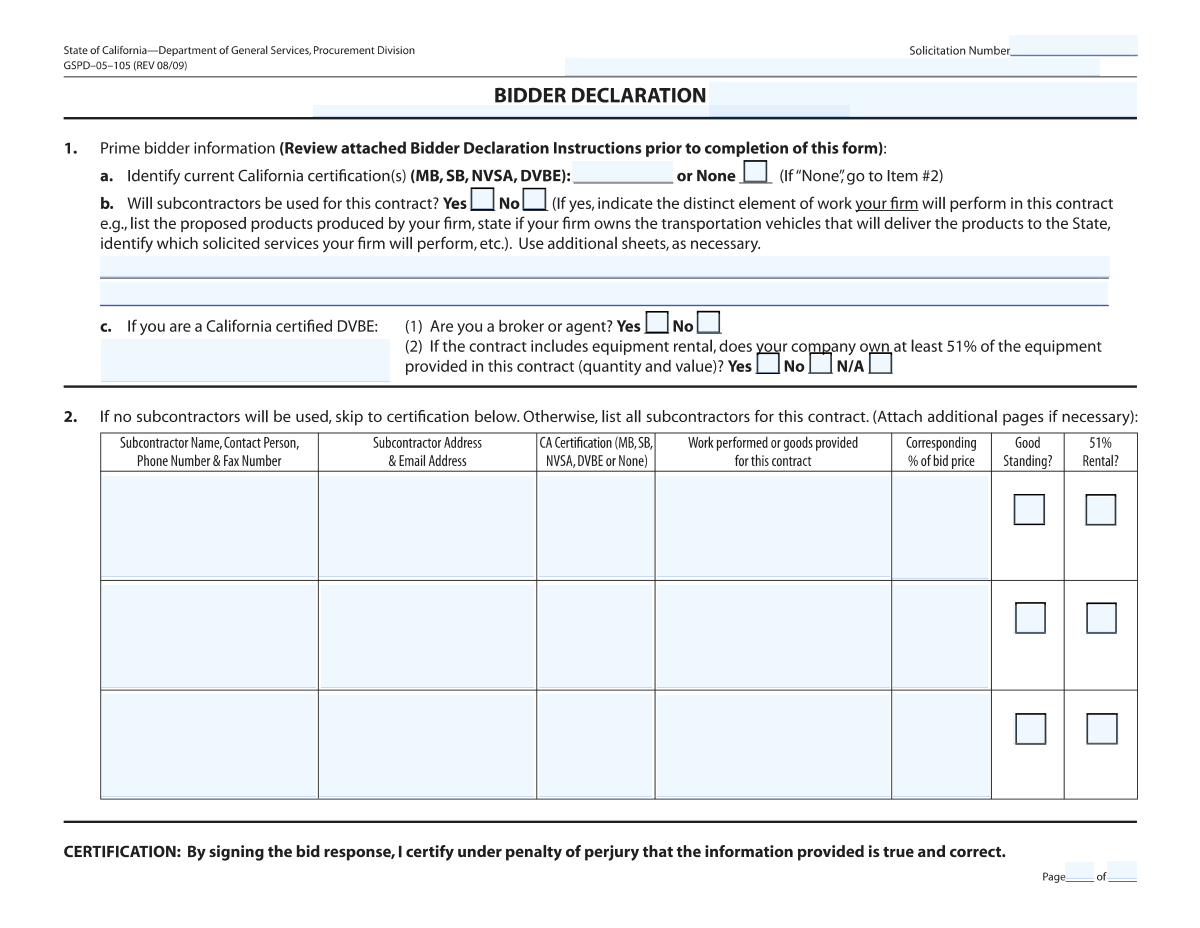
The Bidder Declaration (GSPD-05-105) is a mandatory document for businesses bidding on contracts with the State of California. It serves to formally declare the bidder's information, including any state-issued certifications like DVBE or SB, and to detail any subcontractors who will be part of the project. This declaration is critical for ensuring transparency and compliance with California's procurement policies. Today, this form can be filled out quickly and accurately using AI-powered services like Instafill.ai, which can also convert non-fillable PDF versions into interactive fillable forms.
Our AI automatically handles information lookup, data retrieval, formatting, and form filling.
It takes less than a minute to fill out GSPD-05-105 using our AI form filling.
Securely upload your data. Information is encrypted in transit and deleted immediately after the form is filled out.
Form specifications
| Form name: | Bidder Declaration GSPD-05-105 |
| Number of pages: | 2 |
| Language: | English |
Instafill Demo: How to fill out PDF forms in seconds with AI
How to Fill Out GSPD-05-105 Online for Free in 2026
Are you looking to fill out a GSPD-05-105 form online quickly and accurately? Instafill.ai offers the #1 AI-powered PDF filling software of 2026, allowing you to complete your GSPD-05-105 form in just 37 seconds or less.
Follow these steps to fill out your GSPD-05-105 form online using Instafill.ai:
- 1 Navigate to Instafill.ai and upload your Bidder Declaration form or select the GSPD-05-105 template.
- 2 Use the AI assistant to fill in the header information, including the Bidder Name, Solicitation Number, and Solicitation Title.
- 3 Enter the prime bidder's California certification details (e.g., MB, SB, DVBE) or select 'None'.
- 4 Indicate whether subcontractors will be used. If yes, proceed to provide details for each subcontractor.
- 5 For each subcontractor, input their name, contact information, work description, California certification status, and the corresponding percentage of the bid price.
- 6 Complete the specific DVBE details and equipment rental questions if applicable to your business or subcontractors.
- 7 Review all auto-filled and manually entered information for accuracy, then download the completed form for signature and submission.
Our AI-powered system ensures each field is filled out correctly, reducing errors and saving you time.
Why Choose Instafill.ai for Your Fillable GSPD-05-105 Form?
Speed
Complete your GSPD-05-105 in as little as 37 seconds.
Up-to-Date
Always use the latest 2026 GSPD-05-105 form version.
Cost-effective
No need to hire expensive lawyers.
Accuracy
Our AI performs 10 compliance checks to ensure your form is error-free.
Security
Your personal information is protected with bank-level encryption.
Frequently Asked Questions About Form GSPD-05-105
This form is used to declare the prime bidder's information and to list all subcontractors that will be used for a specific contract or solicitation. It helps ensure compliance with state requirements, particularly regarding small business and veteran enterprise participation.
The prime bidder submitting a proposal for the specified solicitation number must complete and submit this form as part of their bid package.
You will need each subcontractor’s business name, contact details, address, a description of their work, their percentage of the total bid price, and their California certification status.
These acronyms represent California state certifications: MB (Minority Business), SB (Small Business), NVSA (Non-Profit Veteran Service Agency), and DVBE (Disabled Veteran Business Enterprise). You must indicate any current certifications for your firm and your subcontractors.
You should check the 'No' box in the 'Will subcontractors be used for this contract?' section. You will still need to describe the work your own firm will perform.
The form provides fields for up to three subcontractors. If you have more, you should attach additional pages using the same format and update the page numbering fields accordingly.
This percentage represents the value of the subcontractor's work or goods divided by the total price of your bid. Ensure the total percentage of all subcontracted work is accurately reflected.
This question applies if a subcontractor is providing equipment rental. You should check this box if the subcontractor owns at least 51% of the equipment they are providing, measured by both quantity and value.
As a DVBE, you must answer specific questions about whether you are acting as a broker or agent. You also need to provide details regarding equipment rental ownership if that is part of the contract.
The Solicitation Number and Title are provided in the procurement or bid documents you received from the contracting entity. You must enter this information accurately in the header section of the form.
Yes, services like Instafill.ai use AI to accurately auto-fill form fields from your saved information, which can save you significant time and reduce errors.
You can upload the form to Instafill.ai, which will make it fillable online. The AI can then help you populate the fields for the prime bidder and each subcontractor quickly and accurately.
You can use a service like Instafill.ai to convert the non-fillable PDF into an interactive, fillable form. This allows you to easily type your information into the correct fields online without printing.
Compliance GSPD-05-105
Validation Checks by Instafill.ai
1
Conditional Subcontractor Data Entry
This check verifies that if the user selects 'No' for 'Will subcontractors be used for this contract?', all fields related to the First, Second, and Third subcontractors are left empty. This prevents the submission of contradictory information and ensures data cleanliness. If subcontractor data is present when 'No' is selected, the form should return an error prompting the user to either clear the subcontractor fields or change their selection to 'Yes'.
2
Mutually Exclusive Subcontractor Usage Selection
This validation ensures that the user selects either 'Yes' or 'No' for the question 'Will subcontractors be used for this contract?', but not both. These options are mutually exclusive and represent a critical decision point in the form. A failure in this check indicates a form state error, and the submission should be blocked until a single, valid choice is made.
3
Required First Subcontractor Information
This check is triggered if the user selects 'Yes' for using subcontractors. It validates that the essential details for at least the 'First Subcontractor,' such as Business Name, Work Description, and Percentage of Bid, are provided. This ensures that a declaration to use subcontractors is backed by concrete information for at least one partner. A failure would prompt the user to complete the required fields for the first subcontractor.
4
Standard Phone and Fax Number Formatting
This validation inspects all phone and fax number fields to ensure they conform to a standard North American format, such as (XXX) XXX-XXXX or XXX-XXX-XXXX. Proper formatting is crucial for data consistency and for ensuring the contact information is usable for communication. Submissions with incorrectly formatted numbers should be rejected with a message indicating the expected format.
5
Valid Email Address Structure
This check uses a pattern (regular expression) to verify that any entered email address is structurally valid, meaning it contains an '@' symbol and a domain. This is important for ensuring that electronic communications can be successfully delivered to the subcontractors and bidder. An invalid email format would prevent form submission and require the user to correct the entry.
6
Aggregate Subcontractor Percentage Check
This validation calculates the sum of the percentages entered for all listed subcontractors ('% of Bid Price'). It then ensures this total does not exceed 100%. This is a critical logical check to prevent erroneous bid calculations and ensure the subcontracted work portions are mathematically sound. If the sum is over 100, an error must be displayed.
7
Valid Subcontractor Bid Percentage Value
This check ensures that each individual '% of Bid Price' field contains a valid numeric value greater than 0 and less than or equal to 100. This prevents non-numeric or out-of-range entries that would corrupt financial calculations. An invalid entry should trigger an error message specifying the allowed range for that field.
8
Controlled Vocabulary for CA Certification
This validation confirms that the values entered for all 'CA Certification' fields are from the predefined list: MB, SB, NVSA, DVBE, or None. Using a controlled vocabulary is essential for accurate reporting and compliance tracking. Any entry not matching the allowed values should be flagged as an error, prompting the user to select a valid option.
9
Mandatory DVBE Details for Certified Bidders
This rule checks if the 'Prime Bidder California Certifications' field includes 'DVBE'. If it does, the 'DVBE Details' text area becomes a required field. This ensures that bidders claiming DVBE status provide the necessary explanatory information as required by procurement regulations. Failure to provide these details would block the submission.
10
Completeness of Core Bid Information
This validation ensures that fundamental fields in the form header, specifically 'Bidder Name' and 'Solicitation Number,' are not left blank. This information is essential for identifying the bidder and linking the submission to the correct procurement opportunity. The form cannot be considered complete or be processed without this core data.
11
Logical Page Numbering
This check validates any page numbering fields (e.g., 'Page __ of __'). It ensures that the current page number is a positive integer that is less than or equal to the total number of pages, which must also be a positive integer. This prevents illogical numbering like 'Page 5 of 3' and ensures document integrity. An error would require the user to correct the page numbers before proceeding.
12
Subcontractor Data Block Integrity
This validation ensures that if a subcontractor's name is entered, then their corresponding 'Work Performed' and '% of Bid Price' fields must also be completed. This prevents partial or incomplete subcontractor entries, which are unusable for evaluation. The system should highlight the missing fields within the specific subcontractor block.
13
Mutually Exclusive Equipment Rental Ownership Selection
This validation ensures that for the question regarding 51% equipment ownership, exactly one of the three options (Yes, No, or N/A) is selected. These choices are mutually exclusive and provide critical information for DVBE compliance and other regulations. The form submission should be blocked if zero or more than one option is selected.
Common Mistakes in Completing GSPD-05-105
The form has repetitive sections for up to three subcontractors, making it easy to enter a subcontractor's details in the wrong section. This happens when filers lose track of which subcontractor they are documenting, leading to incorrect data association. This can cause significant delays in processing, require clarification, and may lead to the bid being deemed non-responsive. To avoid this, carefully complete one subcontractor's information in its entirety before moving to the next, and double-check that the name, work description, and certification all match for each listed entity.
Bidders often enter a dollar amount instead of a percentage, miscalculate the value, or leave the 'Corresponding % of Bid Price' field blank. This information is critical for the contracting agency to understand the cost breakdown and ensure compliance with subcontracting goals. An incorrect or missing percentage can lead to the bid being rejected as incomplete or non-compliant. Always calculate this figure carefully as a percentage of the total bid price and ensure the field is not left empty for any listed subcontractor.
When describing the work a subcontractor will perform, applicants may use overly broad terms like 'services,' 'consulting,' or 'labor.' These descriptions are insufficient for evaluators to determine the specific scope of work and verify that the subcontractor is performing a commercially useful function. This ambiguity can result in requests for information or disqualification. To prevent this, provide a clear and detailed description of the specific tasks, services, or goods the subcontractor will provide.
A common logical error is checking the 'Yes' box for 'Will subcontractors be used for this contract?' but then failing to provide any subcontractor details, or vice-versa. This contradiction makes it impossible for the reviewer to understand the bidder's intent and renders the submission invalid. This mistake often happens due to rushing or oversight. Before submitting, ensure that your answer to this yes/no question aligns perfectly with whether the subcontractor information sections are filled out.
The form requires specific California certification types (MB, SB, NVSA, DVBE). Bidders may list expired certifications, guess the certification type, or forget to check 'None' if no certification is held. Since these certifications are often tied to bid preferences or requirements, an error can lead to loss of eligibility or disqualification. Always verify your firm's and your subcontractors' certification status and type directly from the official California state procurement database before filling out the form.
A field labeled 'Subcontractor Work Description' confusingly asks the bidder to 'Describe the distinct element(s) of work your firm will perform'. Bidders often misread this and only describe subcontractor work, completely omitting their own scope. This leaves a critical gap in the proposal, as it fails to state what the prime contractor is responsible for. To avoid this, read field instructions carefully, not just the labels, and ensure you clearly detail the work your own company will perform.
The form contains several crucial but easily missed checkboxes, such as 'Good Standing' and '51% Rental' for subcontractors. These are not optional fields; they are legal attestations about the subcontractor's status. Leaving them blank creates ambiguity and results in an incomplete form, which may be rejected. Perform a final review of the form specifically to ensure every required checkbox is marked correctly.
For bidders with a DVBE (Disabled Veteran Business Enterprise) certification, the question 'Are you a broker or agent?' has significant legal and compliance implications. Answering incorrectly can misrepresent the firm's role and may jeopardize DVBE participation credit, potentially leading to bid disqualification or future penalties. Bidders should fully understand the state's official definition of a 'broker' or 'agent' in the context of procurement rules before answering this question.
Often, these forms are provided as non-fillable PDFs, tempting users to print and complete them by hand. This frequently leads to illegible handwriting, which can cause data entry errors by the receiving agency or make the form impossible to process, leading to rejection. To ensure a professional and error-free submission, use a tool like Instafill.ai, which can convert flat PDFs into digitally fillable forms, preventing legibility issues and reducing data entry mistakes.
Multiple fields ask for page numbers in a 'Page __ of __' format. Bidders frequently forget to fill these in, enter the wrong total number of pages, or have inconsistent numbering across the document. Correct pagination is essential for the reviewing agency to verify they have received the complete submission. An error here could lead them to believe pages are missing, potentially invalidating the entire bid. This should be one of the last steps, completed after the entire bid package is assembled.
Saved over 80 hours a year
“I was never sure if my IRS forms like W-9 were filled correctly. Now, I can complete the forms accurately without any external help.”
Kevin Martin Green
Your data stays secure with advanced protection from Instafill and our subprocessors

Robust compliance program
Transparent business model
You’re not the product. You always know where your data is and what it is processed for.
ISO 27001, HIPAA, and GDPR
Our subprocesses adhere to multiple compliance standards, including but not limited to ISO 27001, HIPAA, and GDPR.
Security & privacy by design
We consider security and privacy from the initial design phase of any new service or functionality. It’s not an afterthought, it’s built-in, including support for two-factor authentication (2FA) to further protect your account.
Fill out GSPD-05-105 with Instafill.ai
Worried about filling PDFs wrong? Instafill securely fills bidder-declaration-gspd-05-105 forms, ensuring each field is accurate.