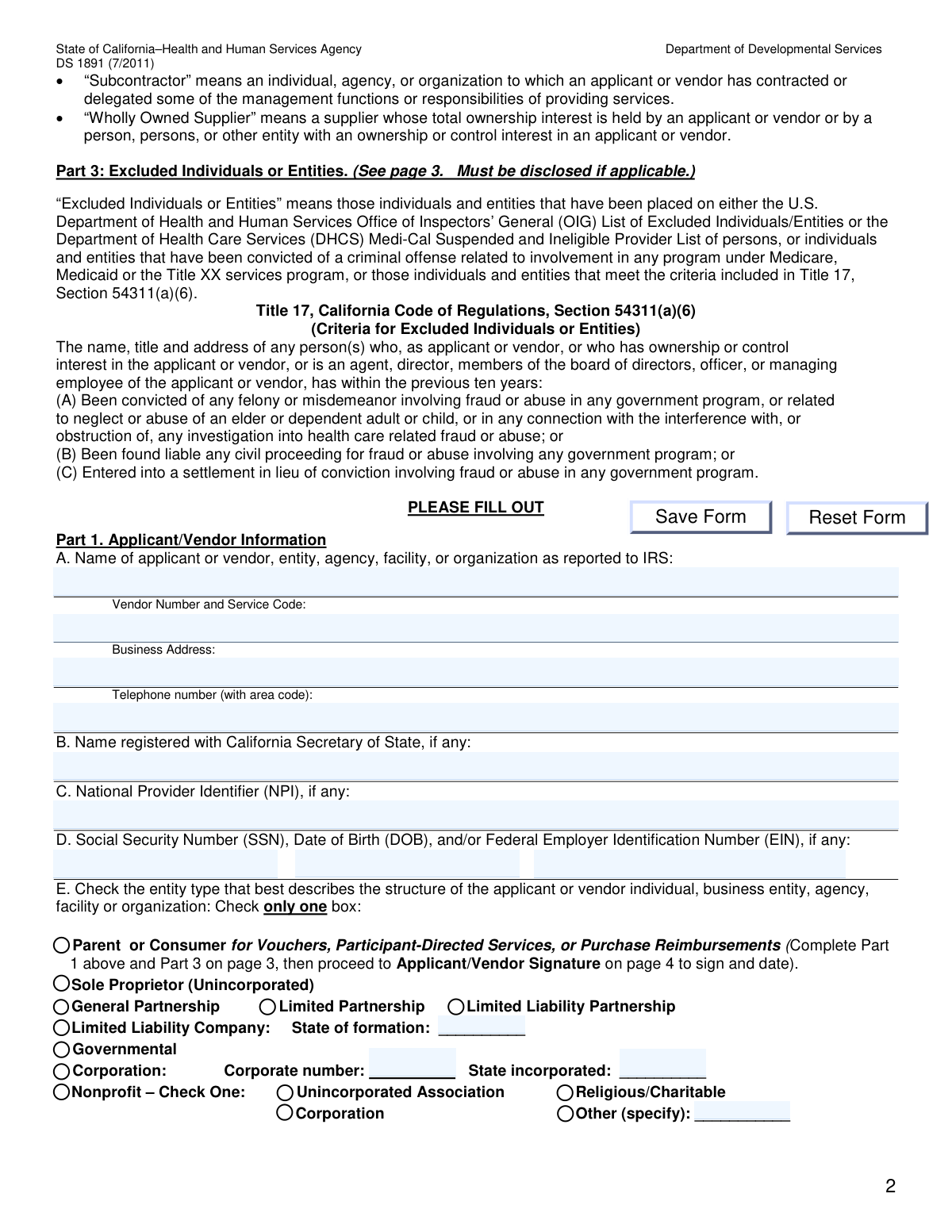
Yes! You can use AI to fill out DS 1891, Applicant/Vendor Disclosure Statement (State of California Department of Developmental Services)

DS 1891 (Applicant/Vendor Disclosure Statement) is an official California Department of Developmental Services form required for applicants seeking vendorization with a regional center, or when requested by the vendoring regional center. It collects key compliance disclosures such as ownership/control interests (including managing employees), related-party relationships, subcontractor and significant business transaction information, and whether any involved individuals/entities are excluded under federal or state rules. The form is important because incomplete or inaccurate disclosure can lead to denial of enrollment or termination of vendorization, and the signer certifies the information under penalty of perjury and must report changes within 30 days.
Our AI automatically handles information lookup, data retrieval, formatting, and form filling.
It takes less than a minute to fill out DS 1891 using our AI form filling.
Securely upload your data. Information is encrypted in transit and deleted immediately after the form is filled out.

Form specifications

Form name: DS 1891, Applicant/Vendor Disclosure Statement (State of California Department of Developmental Services)
Number of pages: 4
Filled form examples: Form DS 1891 Examples
Language: English
Categories: disclosure forms, California state forms, California DDS forms, developmental services forms
main-image

Instafill Demo: filling out a legal form in seconds

How to Fill Out DS 1891 Online for Free in 2026

Are you looking to fill out a DS 1891 form online quickly and accurately? Instafill.ai offers the #1 AI-powered PDF filling software of 2026, allowing you to complete your DS 1891 form in just 37 seconds or less.
Follow these steps to fill out your DS 1891 form online using Instafill.ai:
  1. 1 Enter Part 1 identifying information: legal name as reported to the IRS, vendor number/service code (if applicable), business address, phone number, Secretary of State registered name (if any), NPI (if any), and SSN/DOB and/or EIN.
  2. 2 Select the correct entity type in Part 1(E) (e.g., sole proprietor, partnership, LLC with state of formation, corporation with corporate number/state, nonprofit type, governmental, or parent/consumer for vouchers/participant-directed services).
  3. 3 Complete Part 2 ownership/control disclosures by listing all individuals/entities with direct or indirect ownership interests and/or managing employees (names, titles, addresses, SSNs, DOBs), and attach additional pages if needed.
  4. 4 In Part 2(B) and 2(C), disclose family relationships among listed persons (spouse/parent/child/sibling) and identify any other vendors/providers where an owner/controller also holds at least a 5% interest (including vendor number/service code and SSN/NPI/EIN).
  5. 5 Complete Part 3 by listing any excluded individuals or entities connected to the applicant/vendor (or indicate not applicable), using the definitions provided (e.g., OIG exclusions, Medi-Cal suspended/ineligible list, or qualifying convictions/settlements).
  6. 6 Complete Part 4 subcontractor disclosures (or indicate not applicable): list ownership/control interests in subcontractors where the applicant/vendor has 5%+ direct/indirect ownership (include percentage), and list subcontractors/wholly owned suppliers with significant business transactions within the last 5 years.
  7. 7 Review for accuracy and currency, make any corrections by lining through/initialing (no correction fluid), then sign and date the Applicant/Vendor Signature section as the applicant or authorized representative and submit with the full vendorization application packet to the appropriate regional center.

Our AI-powered system ensures each field is filled out correctly, reducing errors and saving you time.

Why Choose Instafill.ai for Your Fillable DS 1891 Form?

Speed

Complete your DS 1891 in as little as 37 seconds.

Up-to-Date

Always use the latest 2026 DS 1891 form version.

Cost-effective

No need to hire expensive lawyers.

Accuracy

Our AI performs 10 compliance checks to ensure your form is error-free.

Security

Your personal information is protected with bank-level encryption.

Frequently Asked Questions About Form DS 1891

It is used by the California Department of Developmental Services and regional centers to collect required ownership, control, subcontractor, and exclusion information as part of a vendorization application or when a regional center requests an updated disclosure.

Every applicant or vendor seeking vendorization (or already vendored when requested) must complete and submit a current DS 1891 as part of the application packet or upon request of the vendoring regional center.

Complete Part 1 (page 2) and Part 3 (page 3), then go to the Applicant/Vendor Signature section (page 4) to sign and date.

Return the completed disclosure statement with your complete application package to the regional center to which you are applying.

Yes—answer all applicable questions, and for sections that do not apply, indicate that they are not applicable (the form notes this for Parts 2, 3, and 4).

Part 1 asks for the applicant/vendor name as reported to the IRS, vendor number and service code (if any), business address, phone number, any California Secretary of State registered name, NPI (if any), and SSN/DOB and/or EIN (if any), plus your entity type.

The form says to provide the NPI or EIN “if any,” so you should leave it blank or mark as not applicable if you do not have one, while still completing the rest of the required fields.

Enter the nine-digit EIN in the format XX-XXXXXXX, as instructed in Part 1(D).

Check only one box that best matches your organization’s structure (e.g., sole proprietor, partnership type, LLC with state of formation, corporation with corporate number and state, nonprofit type, governmental, or parent/consumer category).

List individuals/entities with direct or indirect ownership interests and/or managing employees, and include officers/directors (for corporations), partners (for partnerships), and anyone meeting the 5% ownership/control thresholds described in the definitions.

If a person or entity has 5% or more ownership (direct, indirect, or combined), or certain secured interests meeting the 5% value test, they are considered a person with an ownership or control interest and must be disclosed as applicable.

You must list people named in Part 2(A) (or Part 4(A)) who are related to each other as spouse, parent, child, or sibling, along with the relationship and address.

Excluded individuals/entities include those on the OIG exclusion list, the DHCS Medi-Cal Suspended and Ineligible Provider List, or those meeting the Title 17 criteria (e.g., certain fraud/abuse convictions or settlements within the last 10 years). If applicable, list the person’s name, title, and address in Part 3.

Complete Part 4 if you have subcontractors or wholly owned suppliers that meet the criteria described, including ownership/control interests of 5% or more in subcontractors and significant business transactions within the last 5 years.

Do not use correction fluid; instead, line through the error, then date and initial the correction in ink, and make sure all information is current as of the date you complete the form.

The form states that failure to disclose complete and accurate information may result in denial of enrollment/vendorization and/or termination of vendorization.

Yes—by signing, you agree to inform the vendoring regional center in writing within 30 days of any changes or if additional information becomes available.

Compliance DS 1891
Validation Checks by Instafill.ai

1
Part 1A required identifying information completeness
Validates that Part 1A includes the applicant/vendor legal name (as reported to IRS), vendor number and service code (if already assigned/known), business address, and telephone number. These fields are the minimum identifiers needed to match the disclosure to the correct entity and to contact the applicant. If any required element is missing, the submission should be flagged as incomplete and rejected or routed for correction before processing.
2
Business telephone number format and plausibility
Checks that the telephone number includes an area code and conforms to a valid NANP format (e.g., 10 digits, allowing standard punctuation). This reduces failed contact attempts and prevents invalid characters from entering downstream systems. If the phone number fails validation, the form should be returned for correction and not treated as a valid contact method.
3
Entity type selection is single-choice and present
Ensures exactly one entity type checkbox is selected in Part 1E (e.g., Parent/Consumer, Sole Proprietor, Partnership types, LLC, Governmental, Corporation, Nonprofit variants). The entity type drives which identifiers and ownership disclosures are expected and how the vendor is classified. If none or multiple boxes are checked, the submission should be rejected for clarification because subsequent sections cannot be validated reliably.
4
Conditional workflow: Parent/Consumer selection enforces required sections
If 'Parent or Consumer for Vouchers, Participant-Directed Services, or Purchase Reimbursements' is selected, validates that the applicant completed Part 1 and Part 3 and provided the Applicant/Vendor Signature and Date, and that Parts 2 and 4 are not required. This prevents unnecessary ownership/subcontractor disclosures for this category while still capturing exclusion information. If the required sections are missing (or if the wrong sections are submitted in lieu of required ones), the packet should be marked incomplete.
5
SSN format validation (where provided/required)
Validates that any Social Security Number entered (for the applicant/vendor in Part 1D or individuals listed in Parts 2/4) is exactly 9 digits and formatted consistently (e.g., XXX-XX-XXXX or digits-only), and is not an obvious invalid value (all zeros, repeated digits). Correct SSN formatting is critical for identity matching, tax reporting (where applicable), and exclusion screening. If invalid, the system should block submission or require correction, and should not attempt automated matching with malformed SSNs.
6
Date of Birth (DOB) format and reasonableness
Checks that any DOB provided uses a valid date format and represents a real calendar date, and that it is plausible (e.g., not in the future and not unreasonably old/young for an owner/managing employee). DOB is used for identity resolution and screening against exclusion lists. If DOB fails validation, the record should be flagged for correction and excluded from automated screening until fixed.
7
EIN format validation and mutual exclusivity with SSN for entity context
Validates that any Federal Employer Identification Number is in the required IRS format XX-XXXXXXX (or normalized to 9 digits) and is not an invalid placeholder. Also checks logical consistency: organizations (e.g., corporation/LLC/nonprofit) should generally provide an EIN, while individuals/sole proprietors may provide SSN and/or EIN depending on tax setup. If the identifier type conflicts with the selected entity type (e.g., corporation with only a DOB and no EIN/SSN), the submission should be flagged for follow-up.
8
NPI format validation (if provided)
Ensures the National Provider Identifier, when entered in Part 1C or elsewhere, is exactly 10 digits and passes the NPI Luhn check-digit algorithm. NPI integrity is important for cross-system provider matching and to prevent misidentification. If the NPI is present but invalid, the system should require correction or treat the NPI as unusable and flag the submission.
9
Secretary of State registration name required for registered entities
If the entity type indicates a registered business (e.g., Corporation, LLC, LLP/LP, many nonprofits), validates that Part 1B (name registered with California Secretary of State) is provided and is not blank. This supports legal entity verification and alignment with licensing/registration records. If missing for a registered entity type, the submission should be returned for completion or routed to manual review.
10
Corporation and LLC formation details completeness
If 'Corporation' is selected, validates that the corporate number and state incorporated are provided; if 'Limited Liability Company' is selected, validates that the state of formation is provided. These fields are necessary to verify the entity’s legal standing and to distinguish similarly named entities across jurisdictions. If formation details are missing, the form should be considered incomplete for that entity type.
11
Part 2 applicability statement or complete ownership/managing employee listing
Validates that Part 2 is either explicitly marked 'not applicable' or contains the required details for all applicable individuals/entities (names, titles, addresses, and SSN/DOB where requested), including group practice members when relevant. Ownership and control disclosures are legally required for vendorization and are used for compliance screening. If Part 2 is left blank without a 'not applicable' indication, or if required columns are missing for listed persons, the submission should be rejected as incomplete.
12
Ownership/control threshold logic for Part 2C and Part 4A (≥5%)
Checks that entries in Part 2C and Part 4A are consistent with the stated rule that the ownership/control interest is at least 5 percent, and that Part 4A includes a percentage value for each listed subcontractor-related ownership interest. This ensures the form captures all reportable relationships and avoids over/under-disclosure. If a percentage is missing, non-numeric, or below 5% where the section requires ≄5%, the system should flag the entry for correction or move it to the appropriate section if miscategorized.
13
Relationship disclosure consistency (Part 2B references valid names)
Validates that each person listed in Part 2B (spouse/parent/child/sibling relationships) also appears in Part 2A or Part 4A as required by the form instructions, and that the relationship type is one of the allowed categories. This prevents orphan relationship records that cannot be tied to disclosed owners/managing employees. If a referenced name is not found in the relevant sections or the relationship is outside allowed values, the submission should be flagged for correction.
14
Excluded Individuals/Entities section completion or explicit 'not applicable'
Ensures Part 3 is either completed with name/title/address for each excluded person/entity or explicitly marked as not applicable. Exclusion disclosure is a critical compliance requirement and is used to prevent enrollment of ineligible providers. If Part 3 is blank without a not-applicable indication, the submission should be treated as incomplete and held from approval.
15
Subcontractor and significant business transaction disclosures completeness
Validates that Part 4A and 4B are either explicitly marked 'not applicable' or include complete entries (name, title, address, and SSN/NPI/EIN as applicable), and that Part 4B reflects transactions within the last 5 years as required. These disclosures support transparency into subcontracting arrangements and potential conflicts of interest. If the section is partially filled (e.g., names without identifiers/addresses) or left blank without a not-applicable statement, the submission should be returned for completion.
16
Applicant/Vendor signature, title, and date presence and date validity
Checks that the Applicant/Vendor or Authorized Representative name, title, signature, and date are all present, and that the date is a valid calendar date not in the future. The signature attests under penalty of perjury and is required to make the disclosure legally effective. If any signature element is missing or the date is invalid, the form should be rejected as unsigned/undated and not processed.

Common Mistakes in Completing DS 1891

Using a business name that doesn’t match IRS or license records

Applicants often enter a “doing business as” name in Part 1A or Part 1B that doesn’t exactly match the legal name on IRS records, the California Secretary of State registration, or the facility/license name. This creates verification problems and can delay or derail vendorization because the regional center cannot match the entity across systems. To avoid this, use the exact legal name as reported to the IRS in Part 1A and the exact Secretary of State registered name in Part 1B (if applicable), and ensure it matches any licensing documentation.

Leaving Vendor Number/Service Code blank or entering the wrong identifiers

People frequently skip the Vendor Number and Service Code field because they assume it’s only for existing vendors, or they enter an internal tracking number instead. Missing or incorrect identifiers can cause misrouting, duplicate records, or delays in processing the application packet. If you already have a vendor number/service code, enter it exactly as issued; if you are a new applicant and truly do not have one, clearly mark “N/A” rather than leaving it blank.

Incorrect EIN format or mixing up EIN and SSN

A common error is entering an EIN without the required format (XX-XXXXXXX), transposing digits, or putting an SSN in the EIN field (or vice versa). This can trigger tax reporting and identity verification issues and may result in requests for correction or denial for incomplete/incorrect information. Double-check the IRS-issued EIN, use the required hyphenated format, and only provide SSN/DOB where the form requests it for the appropriate person/entity.

Not selecting exactly one entity type (or selecting the wrong structure)

Applicants often check multiple boxes in Part 1E or choose an entity type that doesn’t match their legal formation (e.g., checking “Sole Proprietor” when they are an LLC, or omitting the state of formation/incorporation). This mismatch can conflict with Secretary of State records and ownership disclosure requirements, leading to follow-up requests and processing delays. Select only one box, and complete the related details (state of formation, corporate number, state incorporated) exactly as shown on official filings.

Omitting required ownership/managing employee details in Part 2A

Many submissions list only the primary contact and fail to include all individuals/entities with direct or indirect ownership interests (5% or more), officers/directors (for corporations), partners (for partnerships), and managing employees as defined in the instructions. Incomplete disclosure is a major compliance issue and can result in denial of enrollment or later termination of vendorization. Use the definitions provided, list every applicable person with name, title, address, SSN, and DOB, and attach additional pages when needed rather than compressing or skipping entries.

Misunderstanding the 5% threshold and indirect ownership rules

People commonly assume only majority owners must be disclosed, or they ignore indirect ownership (ownership through another entity) and mortgage/debt interests that meet the 5% criteria. This leads to under-reporting of “persons with an ownership or control interest,” which is specifically required under 42 CFR 455.101 and Title 17. To avoid this, calculate both direct and indirect ownership percentages, include combined interests, and disclose any qualifying secured obligations that meet the 5% of property/assets test.

Failing to list family relationships among disclosed persons (Part 2B)

Applicants often leave Part 2B blank because they think it is optional or only applies to spouses, overlooking parent/child/sibling relationships among owners, officers, directors, or managing employees. Missing relationship disclosures can raise red flags during review and prompt additional documentation requests. Review everyone listed in Part 2A (and any relevant later sections) and explicitly list all qualifying relationships with names, relationship type, and addresses.

Not disclosing other related provider interests in Part 2C

A frequent mistake is answering Part 2C incompletely by listing only the applicant entity and not other vendors/providers where an owner/controller also holds 5% or more. This can cause compliance issues because the form specifically asks about cross-ownership (e.g., Medicare/Medicaid facilities or other vendors). To avoid this, identify every other applicant/vendor entity where any person with ownership/control in your organization also has at least a 5% interest, and provide the requested identifiers (vendor number/service code, SSN/NPI/EIN).

Marking “not applicable” for Excluded Individuals/Entities without checking or disclosing

Some applicants assume exclusions only apply to the organization itself and fail to consider owners, board members, officers, agents, or managing employees within the last ten years, or they do not check OIG/DHCS lists. Non-disclosure can lead to denial, termination, and potential legal consequences because the signature certifies truth under penalty of perjury. To avoid this, screen relevant individuals/entities against the OIG LEIE and DHCS Medi-Cal lists and disclose any applicable names, titles, and addresses in Part 3.

Incomplete subcontractor and significant business transaction reporting (Part 4A/4B)

Applicants often omit subcontractors/wholly owned suppliers or misunderstand what counts as a “significant business transaction” within the last five years, especially when services are delegated informally. Missing subcontractor ownership/control details can delay approval and may be treated as incomplete disclosure if later discovered. Keep a list of subcontractors and suppliers, identify any where you have 5% or more direct/indirect ownership (include percentage), and report significant transactions as defined (exceeding the lesser of $25,000 or 5% of operating expenses).

Improper corrections, illegible entries, or missing attachments/references

People frequently use correction fluid, overwrite fields, submit hard-to-read handwriting, or attach extra pages without referencing the specific part/question, making the packet difficult to audit. This can result in the form being returned for correction or delays while staff seek clarification. Follow the instructions: type or print clearly in ink, line through errors and initial/date corrections, and label any attachments with the exact Part and question number they supplement.

Missing signature, date, or authorized representative details (certification section)

A common final-step error is forgetting to sign/date, leaving the title blank, or having someone sign who is not an authorized representative for the entity. Because the form is a certification under penalty of perjury, an incomplete or unauthorized signature can invalidate the submission and halt processing. Ensure the signer is authorized (e.g., owner, officer, or designated representative), print the name and title, sign, and date the form, and be prepared to update the regional center within 30 days of any changes.
Saved over 80 hours a year

“I was never sure if my IRS forms like W-9 were filled correctly. Now, I can complete the forms accurately without any external help.”

Kevin Martin Green

Your data stays secure with advanced protection from Instafill and our subprocessors

Robust compliance program

Transparent business model

You’re not the product. You always know where your data is and what it is processed for.

ISO 27001, HIPAA, and GDPR

Our subprocesses adhere to multiple compliance standards, including but not limited to ISO 27001, HIPAA, and GDPR.

Security & privacy by design

We consider security and privacy from the initial design phase of any new service or functionality. It’s not an afterthought, it’s built-in, including support for two-factor authentication (2FA) to further protect your account.

Fill out DS 1891 with Instafill.ai

Worried about filling PDFs wrong? Instafill securely fills ds-1891-applicantvendor-disclosure-statement-state forms, ensuring each field is accurate.