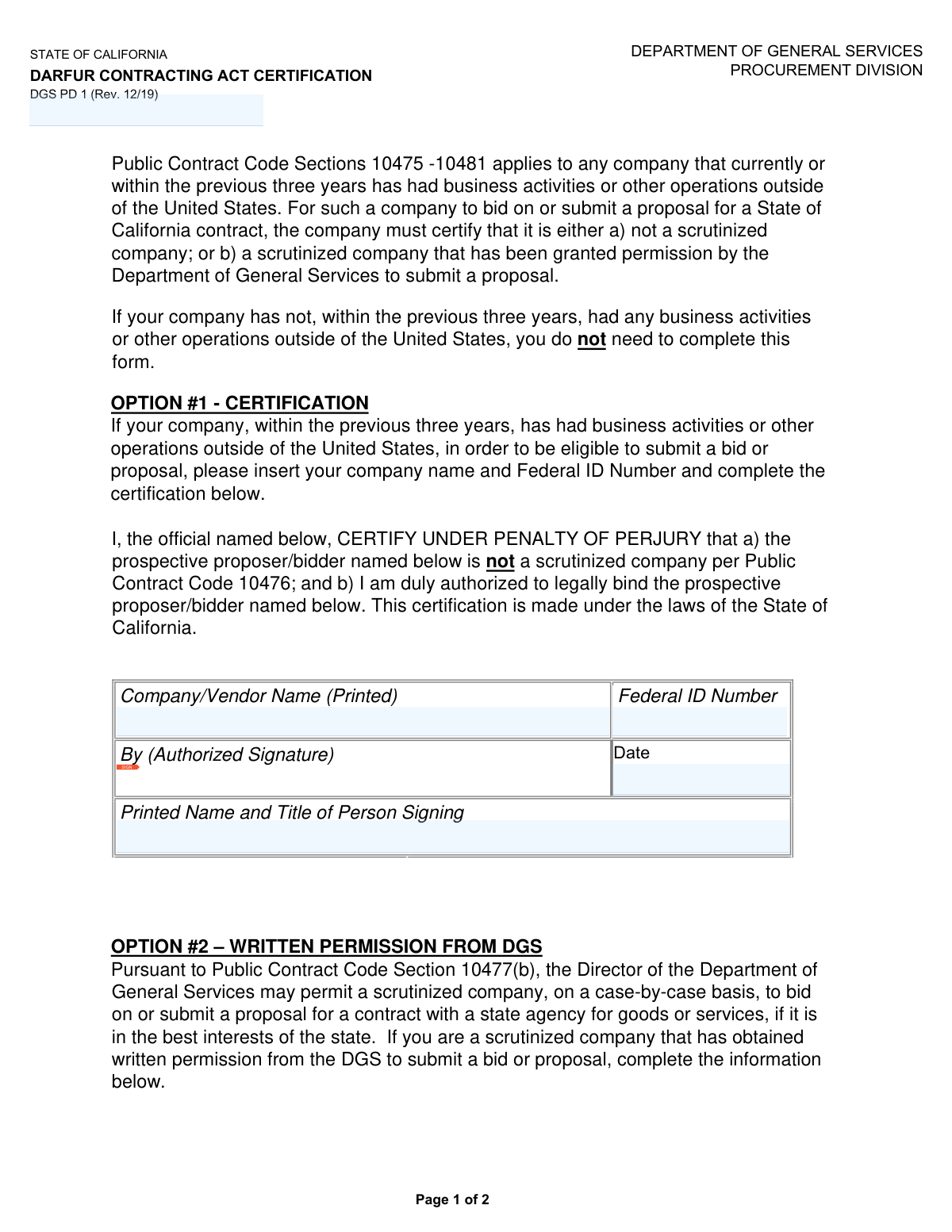
Yes! You can use AI to fill out State of California Darfur Contracting Act Certification

The Darfur Contracting Act Certification (DGS PD 1) is a document required by the State of California for any company with business operations outside the U.S. that wishes to bid on a state contract. It serves as a sworn statement that the company is not a 'scrutinized company' under Public Contract Code 10476, or that it has received special permission from the Department of General Services (DGS). Today, this form can be filled out quickly and accurately using AI-powered services like Instafill.ai, which can also convert non-fillable PDF versions into interactive fillable forms.
Our AI automatically handles information lookup, data retrieval, formatting, and form filling.
It takes less than a minute to fill out DGS PD 1 using our AI form filling.
Securely upload your data. Information is encrypted in transit and deleted immediately after the form is filled out.

Form specifications

Form name: State of California Darfur Contracting Act Certification
Number of fields: 11
Number of pages: 2
Language: English
main-image

Instafill Demo: How to fill out PDF forms in seconds with AI

How to Fill Out DGS PD 1 Online for Free in 2026

Are you looking to fill out a DGS PD 1 form online quickly and accurately? Instafill.ai offers the #1 AI-powered PDF filling software of 2026, allowing you to complete your DGS PD 1 form in just 37 seconds or less.
Follow these steps to fill out your DGS PD 1 form online using Instafill.ai:
  1. 1 Navigate to Instafill.ai and upload your DGS PD 1 form, or select it from their library of official documents.
  2. 2 Determine if your company has had business activities outside the United States within the previous three years. If not, you do not need to complete the form.
  3. 3 Choose the appropriate certification: Select Option #1 to certify you are not a scrutinized company, or Option #2 if you are a scrutinized company with written permission from the DGS.
  4. 4 Enter your company's full legal name and Federal ID Number (EIN) into the corresponding fields for your chosen option.
  5. 5 An authorized individual must provide their signature, printed name, title, and the date to legally bind the company to the certification.
  6. 6 If you selected Option #2, ensure you attach a copy of the written permission from the DGS to your bid or proposal.
  7. 7 Review the entire completed form for accuracy before submitting it with your bid or proposal to the State of California.

Our AI-powered system ensures each field is filled out correctly, reducing errors and saving you time.

Why Choose Instafill.ai for Your Fillable DGS PD 1 Form?

Speed

Complete your DGS PD 1 in as little as 37 seconds.

Up-to-Date

Always use the latest 2026 DGS PD 1 form version.

Cost-effective

No need to hire expensive lawyers.

Accuracy

Our AI performs 10 compliance checks to ensure your form is error-free.

Security

Your personal information is protected with bank-level encryption.

Frequently Asked Questions About Form DGS PD 1

This form is used to certify that your company complies with the Darfur Contracting Act, which is a requirement for bidding on contracts with the State of California if you have business operations outside the U.S.

You must complete this form if your company wants to bid on a State of California contract and has had any business activities or operations outside the United States within the last three years.

If your company has not had any business activities or operations outside the United States within the previous three years, you do not need to complete or submit this form.

A 'scrutinized company' is a company with specific business activities related to Sudan, as defined in Public Contract Code section 10476. You should review this code section to determine if your company meets the criteria.

Option #1 is a certification that your company is NOT a 'scrutinized company.' Option #2 is for 'scrutinized companies' that have already received written permission from the Department of General Services (DGS) to bid.

Complete Option #1 if your company has had international business operations in the last three years but is NOT considered a 'scrutinized company' under the Darfur Contracting Act.

Complete Option #2 if your company is a 'scrutinized company' and has obtained prior written permission from the DGS to bid. You must include a copy of this written permission with your bid proposal.

You will need your company's full legal name, your nine-digit Federal ID Number (EIN), and the name and title of an individual who is authorized to legally bind your company.

You must enter your company's nine-digit Federal Employer Identification Number (EIN) without any hyphens or spaces, for example, 123456789.

The form must be signed by an official who is duly authorized to legally bind your company to the certification being made under penalty of perjury.

This certification form should be submitted as part of your complete bid or proposal package to the state agency you are contracting with.

Yes, services like Instafill.ai use AI to help you accurately auto-fill form fields with your saved information, which can save time and reduce errors.

Simply upload the Darfur Contracting Act Certification form to the Instafill.ai platform. The AI will identify the fields, and you can quickly fill them in, sign electronically, and download the completed document.

You can use a service like Instafill.ai, which can convert flat, non-fillable PDFs into interactive, fillable forms online, allowing you to complete and sign them digitally.

Compliance DGS PD 1
Validation Checks by Instafill.ai

1
Exclusive Option Selection
This validation ensures that the submitter has completed the fields for either 'OPTION #1 - CERTIFICATION' or 'OPTION #2 – WRITTEN PERMISSION FROM DGS,' but not both. It prevents ambiguity and ensures a clear, single certification path is declared. If fields from both options are filled, the form submission should be rejected with an error instructing the user to clear the fields for the unintended option.
2
Option 1 Completeness Check
Verifies that if any data is entered for Option 1, all its required fields (Company Name, Federal ID, Signature, Printed Name/Title, and Date) are fully completed. This is crucial because a partial certification is invalid and could lead to the bid being disqualified. A failure would prompt the user to complete all required fields within that section before submission.
3
Option 2 Completeness Check
Confirms that if a user selects Option 2, all associated required fields (Company Name, Federal ID, Signature, Printed Name/Title, and Date) are filled out. This check is critical because an incomplete Option 2 submission is invalid and lacks the necessary authorization for a scrutinized company. Failure to complete all fields would block submission and prompt the user for the missing information.
4
Federal ID Number (EIN) Format
This check validates that the Federal ID Number field contains exactly nine numerical digits (0-9) with no hyphens, spaces, or other characters, as specified. This is critical for accurate identification of the business entity with the IRS and state agencies. An incorrectly formatted EIN can cause significant processing delays or rejection, so the system should reject any input that does not match the '#########' pattern.
5
Signature Date Format
Ensures the date entered in either Option 1 or Option 2 is in the strict MM/DD/YYYY format. This standardization is important for data parsing, record-keeping, and establishing the legal timeline of the certification. If the date is entered in a different format (e.g., 'Jan 1, 2023' or '2023-01-01'), the submission should be flagged with an error message guiding the user to correct the format.
6
Signature Date Logical Validity
This validation checks that the provided signature date is a valid calendar date (e.g., not 02/30/2023) and is not set in the future. It can also check that the date is not unreasonably far in the past, which could question the certification's currency. This check prevents typographical errors and ensures the certification is timely and applicable to the present bid.
7
Required Signature Presence
Verifies that the 'By (Authorized Signature)' field has been electronically signed or contains an uploaded signature image for the selected option. A signature is a fundamental component of a legal certification, indicating the signer's intent to be bound by the statement under penalty of perjury. A submission lacking a signature is legally void and must be rejected until a valid signature is provided.
8
DGS Permission Attachment for Option 2
This is a critical conditional validation that triggers if Option 2 is selected. It checks for the presence of an uploaded file, which must be the written permission from the Department of General Services (DGS). Since Option 2 is predicated on having this permission, the form is incomplete and invalid without the corresponding document. The system must block submission if Option 2 is chosen and no file is attached.
9
Signer's Name and Title Format
Validates that the 'Printed Name and Title of Person Signing' field is not empty and contains both a name and a title. While a strict format isn't enforceable on free text, the system can check for a comma to encourage the suggested 'First Last, Job Title' format, improving data quality. This ensures the identity and authority of the signatory are clearly recorded, which is essential for legal verification.
10
Company Name Consistency
This check ensures the 'Company/Vendor Name' provided on this certification form exactly matches the legal company name used on other documents within the bid proposal package. Inconsistencies in the company name can create legal ambiguity and complicate contract processing. This validation helps maintain data integrity across the entire submission and prevents potential disqualification due to clerical errors.
11
Required Company Name Presence
This is a fundamental check to ensure the 'Company/Vendor Name (Printed)' field is not left blank for whichever option is being completed. The company name is the primary identifier for the bidding entity on this legal certification. A submission without a company name is meaningless and must be blocked, with an error message prompting the user to provide this essential information.
12
Signatory Authority Verification
This check validates that the title listed for the signatory (e.g., 'Vice President', 'Director') corresponds to a role with legal authority to bind the company to a contract. While this may require a cross-reference to a list of authorized roles or a manual review flag, it is crucial for ensuring the certification is legally binding. A submission signed by an individual without apparent authority (e.g., 'Intern') should be flagged for verification, as it may render the certification invalid.

Common Mistakes in Completing DGS PD 1

Unnecessary Form Submission

Applicants fill out the form when they are not required to. The instructions clearly state that companies with no business activities outside the United States in the previous three years do not need to complete the form. This mistake wastes time and can introduce unnecessary complexity into the bidding process. To avoid this, carefully read the introductory paragraphs to determine if the form applies to your company's situation before filling it out.

Choosing the Incorrect Certification Option

A user incorrectly certifies as a non-scrutinized company (Option #1) when they actually meet the definition of a scrutinized company, or vice versa. This is a serious error as the certification is made under penalty of perjury and can lead to bid disqualification and legal consequences. Before selecting an option, companies must thoroughly understand the legal definition of a 'scrutinized company' per Public Contract Code 10476.

Using an Abbreviated or DBA Company Name

Instead of providing the full, official legal name, applicants enter a DBA ('Doing Business As') name, an abbreviation, or omit the corporate suffix (e.g., 'Inc.', 'LLC'). This causes a mismatch with state registration and tax records, which can delay verification or lead to the rejection of the entire proposal. Always use the company's complete legal name as it appears on official IRS and Secretary of State documents.

Incorrectly Formatting the Federal ID Number (EIN)

The form requires a nine-digit Federal ID Number with no hyphens or spaces, but people often enter it in the standard IRS format (e.g., 12-3456789) out of habit. This can cause failures in automated data processing systems and may require manual correction or cause the form to be flagged as incomplete. AI-powered form filling tools like Instafill.ai can help prevent this by automatically formatting the number correctly based on the field's specific requirements.

Signature by an Unauthorized Person

The form is signed by an employee who is not legally authorized to bind the company in a contract. This mistake often occurs when an administrative assistant or a manager without signatory authority completes the form. An invalid signature renders the certification void and can lead to immediate disqualification of the bid. Ensure the signer is an officer or designated agent of the company with the proper legal authority.

Omitting the Signer's Title

The applicant provides the signer's printed name but forgets to include their official job title as required. The title is crucial as it helps verify that the signer possesses the authority to make a legal certification on behalf of the company. A missing title can lead to follow-up inquiries and processing delays. Always provide the full name and title exactly as requested (e.g., 'Jane Doe, Vice President').

Filling Out Both Certification Options

A confused applicant completes and signs both Option #1 and Option #2 on the form. This creates a direct contradiction, as a company cannot simultaneously be and not be a 'scrutinized company'. Such a submission is invalid and will be rejected. Applicants must carefully determine which single option applies to their situation and complete only that section.

Forgetting to Attach DGS Permission Letter for Option #2

A company correctly identifies as a scrutinized company and fills out Option #2, but fails to include the required written permission letter from the Department of General Services (DGS). The form explicitly states that a copy of this permission must be included with the proposal. Without this attachment, the certification is incomplete and the bid will be deemed non-responsive.

Using an Incorrect Date Format

The form specifies the MM/DD/YYYY date format, but users may enter it differently, such as DD/MM/YYYY (common internationally) or YYYY-MM-DD. This can lead to data entry errors and ambiguity, especially in automated systems. To avoid this, always follow the specified format. Using a tool like Instafill.ai can ensure dates are automatically entered in the correct format required by the form.

Signing in the Wrong Section

The user completes the fields for Option #1 but accidentally signs in the signature block for Option #2 on the second page, or vice versa. This simple mistake creates confusion and invalidates the intended certification. It is crucial to double-check that the signature is placed in the correct section corresponding to the certification being made. If the form is a non-fillable PDF, a tool like Instafill.ai can convert it into a smart, fillable version with clearly delineated sections to help prevent this error.
Saved over 80 hours a year

“I was never sure if my IRS forms like W-9 were filled correctly. Now, I can complete the forms accurately without any external help.”

Kevin Martin Green

Your data stays secure with advanced protection from Instafill and our subprocessors

Robust compliance program

Transparent business model

You’re not the product. You always know where your data is and what it is processed for.

ISO 27001, HIPAA, and GDPR

Our subprocesses adhere to multiple compliance standards, including but not limited to ISO 27001, HIPAA, and GDPR.

Security & privacy by design

We consider security and privacy from the initial design phase of any new service or functionality. It’s not an afterthought, it’s built-in, including support for two-factor authentication (2FA) to further protect your account.

Fill out DGS PD 1 with Instafill.ai

Worried about filling PDFs wrong? Instafill securely fills state-of-california-darfur-contracting-act-certification forms, ensuring each field is accurate.