Yes! You can use AI to fill out DL 142, Request for Cancellation or Surrender of a Driver License or Identification Card (State of California Department of Motor Vehicles)
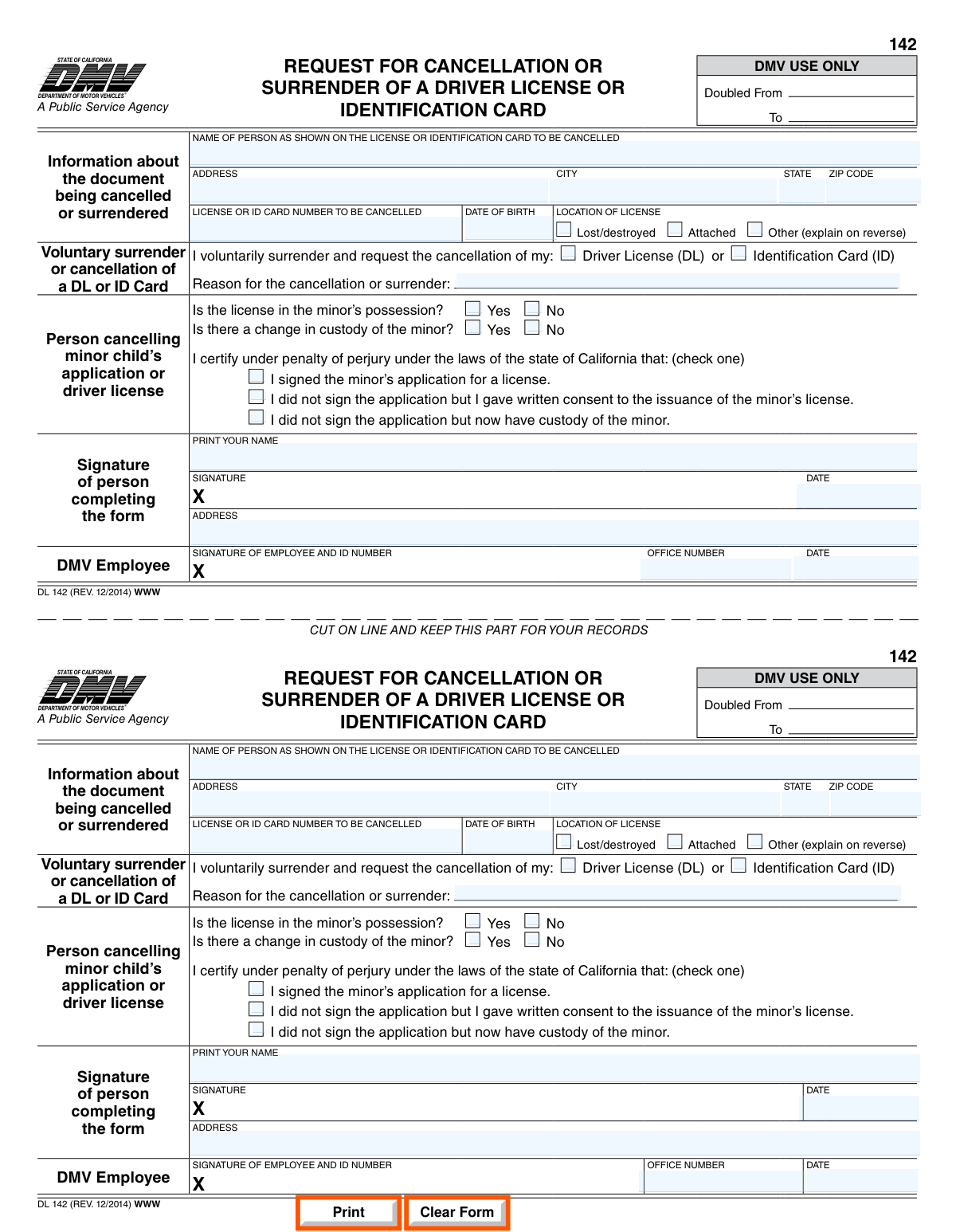
DL 142 is an official California Department of Motor Vehicles form used to request the cancellation or surrender of a driver license (DL) or identification (ID) card, such as when the document is being returned, lost/destroyed, or otherwise needs to be cancelled. It also includes a section for a parent/guardian or other authorized person to cancel a minor childâs application or driver license and certify the basis for that request under penalty of perjury. Submitting the form helps the DMV update its records and formally document the surrender/cancellation request. Today, this form can be filled out quickly and accurately using AI-powered services like Instafill.ai, which can also convert non-fillable PDF versions into interactive fillable forms.
Our AI automatically handles information lookup, data retrieval, formatting, and form filling.
It takes less than a minute to fill out DL 142 using our AI form filling.
Securely upload your data. Information is encrypted in transit and deleted immediately after the form is filled out.
Form specifications
| Form name: | DL 142, Request for Cancellation or Surrender of a Driver License or Identification Card (State of California Department of Motor Vehicles) |
| Number of pages: | 1 |
| Filled form examples: | Form DL 142 Examples |
| Language: | English |
| Categories: | CAR forms, DMV forms, California DMV forms, California state forms, driver license forms |
Instafill Demo: filling out a legal form in seconds
How to Fill Out DL 142 Online for Free in 2026
Are you looking to fill out a DL 142 form online quickly and accurately? Instafill.ai offers the #1 AI-powered PDF filling software of 2026, allowing you to complete your DL 142 form in just 37 seconds or less.
Follow these steps to fill out your DL 142 form online using Instafill.ai:
- 1 Go to Instafill.ai and upload the DL 142 PDF (or select DL 142 from the form library).
- 2 Let the AI detect the form fields and confirm the form version (e.g., DL 142 Rev. 12/2014).
- 3 Enter the document holder’s information exactly as shown on the DL/ID (name, address, DL/ID number, date of birth, and location of license).
- 4 Indicate the status of the document being cancelled/surrendered (lost/destroyed, attached, or other) and provide any required explanation if “other” is selected.
- 5 Complete the appropriate section: voluntary surrender/cancellation of your own DL/ID (and state the reason) or the minor-child cancellation section (possession, custody change, and the correct certification checkbox).
- 6 Review the completed form for accuracy, then add the required signatures and dates (and print name/address as requested).
- 7 Download/print the finalized form and submit it according to California DMV instructions (and keep the cut-off record portion for your files, if applicable).
Our AI-powered system ensures each field is filled out correctly, reducing errors and saving you time.
Why Choose Instafill.ai for Your Fillable DL 142 Form?
Speed
Complete your DL 142 in as little as 37 seconds.
Up-to-Date
Always use the latest 2026 DL 142 form version.
Cost-effective
No need to hire expensive lawyers.
Accuracy
Our AI performs 10 compliance checks to ensure your form is error-free.
Security
Your personal information is protected with bank-level encryption.
Frequently Asked Questions About Form DL 142
Form DL 142 is used to request the cancellation or voluntary surrender of a California driver license (DL) or identification (ID) card. It documents the request and the reason for canceling or surrendering the credential.
You should complete this form if you want to voluntarily surrender and cancel your own California DL or ID card, or if you are canceling a minor childâs application or driver license under the conditions listed on the form.
Yes. The form allows you to request cancellation of either a Driver License (DL) or an Identification Card (ID) by selecting the appropriate option.
You must provide the name as shown on the credential, address (city/state/ZIP), the DL/ID number, date of birth, and location of issuance. You also indicate whether the card is lost/destroyed, attached, or âotherâ (with an explanation on the reverse).
If you still have the card, you can attach it and mark âattached.â If it is lost or destroyed, mark âlost/destroyedâ instead and complete the rest of the form.
Provide a brief, clear explanation for why you are surrendering or canceling the DL/ID (for example, no longer need it, moving, or other personal reasons). If you need more space, use the reverse side if applicable.
Answer whether the license is in the minorâs possession and whether there has been a change in custody. Then check the one certification statement that applies to you (signed the application, gave written consent, or now have custody).
Check the option stating you did not sign the application but gave written consent to the issuance of the minorâs license. Make sure the rest of the minor-related questions are answered accurately.
Mark âYesâ for the custody change question and select the certification that matches your situation (for example, you did not sign the application but now have custody). Provide accurate information because the form is signed under penalty of perjury.
Yes, the person completing the form must print their name, sign, and date it. âPenalty of perjuryâ means you are legally declaring the information is true and could face penalties if you knowingly provide false information.
Sections labeled âDMV USE ONLY,â including items like âDoubled From/Toâ and the DMV employee signature/ID number and office number/date, are completed by DMV staff, not by you.
Submission instructions are not shown on the excerpt, but the form includes a DMV employee section, which typically indicates in-person processing at a DMV office. Check the California DMV website or contact DMV to confirm whether an appointment is required for your situation.
Processing time is not listed on the form itself and can vary by DMV office and method of submission. For the most accurate estimate, confirm with the California DMV when you submit the form.
Yes. AI form-filling services like Instafill.ai can help auto-fill fields using your information, reducing errors and saving time while you still review and confirm everything before signing.
You can upload the PDF to Instafill.ai, which can convert flat, non-fillable PDFs into interactive fillable forms and then auto-fill the fields. After it fills the form, review the entries, download the completed version, and sign/date it as required.
Compliance DL 142
Validation Checks by Instafill.ai
1
Required identity fields present (name, address, DL/ID number, DOB, location of license)
Validates that the core identification section is complete: the personâs name as shown on the credential, full address (city/state/ZIP), the driver license/ID card number, date of birth, and location of license. These fields are necessary to uniquely identify the record to be cancelled/surrendered and to prevent processing the wrong personâs document. If any required field is missing, the submission should be rejected or routed to manual review with a request for completion.
2
Name format and character validation (as shown on license/ID)
Checks that the name field contains a plausible legal name (e.g., letters, spaces, hyphens, apostrophes) and is not empty, all punctuation, or obviously invalid placeholders (e.g., 'N/A', 'UNKNOWN'). This reduces mismatches when searching DMV records and prevents data-entry artifacts from being stored. If the name fails validation, the form should be flagged for correction before processing.
3
Address completeness and structure validation (street, city, state, ZIP)
Ensures the address includes a street address (or acceptable mailing format), city, a valid two-letter state code (e.g., CA), and a 5-digit ZIP code (optionally ZIP+4). A complete address is important for correspondence, record matching, and audit trails. If the address is incomplete or malformed, the submission should be returned for correction or held for manual verification.
4
ZIP code format validation
Validates that the ZIP code is either 5 digits (e.g., 95814) or ZIP+4 (e.g., 95814-1234) and does not contain letters or invalid lengths. Correct ZIP formatting supports address validation and reduces undeliverable mail. If invalid, the system should prompt for a corrected ZIP or mark the address as unverified.
5
DL/ID card number format validation (California credential pattern)
Checks that the license/ID number matches expected California formats (commonly 1 letter followed by 7 digits for DL; ID formats may vary but should match DMV-defined patterns) and contains no illegal characters. This is critical to locate the correct credential and avoid cancelling the wrong document. If the number does not match an accepted pattern, the submission should be rejected or routed to manual review.
6
Date of birth (DOB) format and plausibility validation
Validates DOB is a real calendar date in an accepted format (e.g., MM/DD/YYYY) and falls within a plausible range (not in the future, not unreasonably old). DOB is a key identifier used to disambiguate records with similar names. If DOB is invalid or implausible, the form should be flagged and not auto-processed.
7
Location of license field validation (allowed values / non-empty)
Ensures the 'location of license' field is completed and conforms to expected inputs (e.g., city/state, country, or a controlled list if implemented). This information supports the reason/status of the physical document and can affect handling instructions. If missing or nonsensical, the submission should be held for clarification.
8
Document status selection validation (lost/destroyed vs attached vs other)
Checks that exactly one document status is selected: 'lost/destroyed', 'attached', or 'other'. This is important because processing steps differ depending on whether the physical credential is surrendered. If none or multiple are selected, the system should require correction before acceptance.
9
‘Other’ explanation required when ‘other’ is selected
If the applicant selects 'other (explain on reverse)', validates that an explanation text is provided (or that a reverse-side attachment/notes field is present in the submission). Without the explanation, staff cannot determine the correct handling or whether additional documentation is needed. If missing, the submission should be marked incomplete and returned for additional details.
10
Credential type selection validation (Driver License vs Identification Card)
Validates that the applicant indicates whether they are surrendering/cancelling a Driver License (DL) or an Identification Card (ID), and that the selection is not both unless the form/process explicitly allows it. The credential type affects record routing and cancellation logic. If not selected or conflicting, the form should be stopped for correction.
11
Reason for cancellation/surrender required and minimum quality check
Ensures the 'reason for the cancellation or surrender' field is completed and contains meaningful content (e.g., minimum length, not only 'N/A' or a single character). The reason supports auditability and may determine whether additional steps are required. If the reason is missing or low-quality, the submission should be flagged for follow-up.
12
Minor-cancellation section consistency (only if acting for a minor)
Validates that the 'Person cancelling minor childâs application or driver license' section is completed only when the request is for a minor, and that it is not partially filled in a way that conflicts with a self-surrender request. This prevents mixing two different workflows (self-cancellation vs parent/guardian action) and reduces legal/authorization errors. If minor-related fields are filled but the request appears to be for the adult applicant (or vice versa), route to manual review.
13
Minor possession and custody questions answered (Yes/No required when minor section used)
If the minor-cancellation section is used, checks that both Yes/No questions are answered: whether the license is in the minorâs possession and whether there is a change in custody. These answers can affect required documentation and whether the credential can be physically surrendered. If either question is unanswered or both Yes and No are marked, the submission should be considered incomplete.
14
Perjury certification checkbox: exactly one option selected (minor section)
Validates that exactly one certification statement is checked under penalty of perjury (signed application, gave written consent, or now have custody) when the minor-cancellation section applies. This is a legal attestation and must be unambiguous to establish authority for the request. If none or multiple are selected, the form should be rejected pending correction.
15
Applicant signature and date required (person completing the form)
Ensures the person completing the form provides a signature and a date, and that the date is a valid calendar date (and not in the future beyond an allowed tolerance). Signature/date are required to authorize the cancellation/surrender request and to support legal enforceability. If missing or invalid, the request should not be processed.
16
DMV employee section completeness (when processed in-office)
If the submission is marked as processed by DMV staff (or includes any DMV employee fields), validates that the employee signature/ID number, office number, and date are present and properly formatted. This supports chain-of-custody, audit requirements, and accountability for cancellations. If partially completed, the record should be flagged for internal correction before finalizing the cancellation.
Common Mistakes in Completing DL 142
People often write a preferred name, omit a middle name/initial, or use a married name that doesnât match the physical driver license/ID card. This can cause DMV staff to be unable to match the request to the correct record, delaying cancellation/surrender. Copy the name exactly as printed on the card, including suffixes (Jr., III) and spacing. AI-powered form filling tools like Instafill.ai can help by pulling the standardized name from your saved identity profile and formatting it consistently.
A common error is writing only a street address or forgetting the ZIP code, or entering an address that differs from DMV records without realizing it. Incomplete or outdated addresses can lead to processing delays or misdirected correspondence. Enter the full address (street, city, state, ZIP) and ensure it matches your current DMV record when possible. Instafill.ai can validate address completeness and standardize formatting to reduce omissions.
Applicants frequently mistype the license/ID number, swap digits, or confuse similar characters (e.g., 0 vs O, 1 vs I). An incorrect number can result in the wrong record being referenced or the request being rejected for mismatch. Carefully copy the number directly from the card and double-check each character before submitting. Instafill.ai can automatically format and validate ID numbers to catch common entry errors.
People sometimes leave the date of birth blank, use an ambiguous format (e.g., 03/07/04), or write it in a nonstandard way thatâs hard to interpret. This can prevent DMV from verifying identity and slow down processing. Use a clear, standard format (MM/DD/YYYY) and ensure it matches the DL/ID record. Instafill.ai can enforce date formatting and flag incomplete dates.
The âlocation of licenseâ area is often misread, and people either skip it or write something unrelated (like their address) instead of indicating where the physical card is or its status. This can create confusion about whether the card is being surrendered, lost, or otherwise unavailable. Provide the requested location/status information clearly and consistently with the checkbox selection (lost/destroyed/attached/other). Instafill.ai can guide field-by-field entry so the location/status details align with the selected option.
Many submitters forget to check any box, check multiple boxes, or check âotherâ without providing an explanation on the reverse. This can lead to follow-up requests or rejection because DMV needs to know whether the card is physically surrendered or not. Check exactly one status and, if âotherâ is selected, provide a clear explanation where instructed (on the reverse). Instafill.ai can prevent conflicting selections and prompt for required explanations.
Because the form allows cancellation of either a DL or an ID, people sometimes donât clearly indicate which document they are surrendering/canceling. This can cause DMV to cancel the wrong credential or delay processing while they confirm intent. Explicitly mark whether it is a Driver License (DL) or Identification Card (ID) and ensure the number provided matches that document type. Instafill.ai can cross-check the document type against the number pattern and your saved profile to reduce mismatches.
Applicants often skip the âreasonâ line or write something unclear (e.g., âdonât need itâ) without context. Missing or vague reasons can trigger additional questions or slow processing, especially if the request relates to legal/custody issues. Provide a concise, specific reason (e.g., medical, moving out of state, voluntary surrender, duplicate issued, etc.) consistent with the rest of the form. Instafill.ai can prompt for a complete reason and help keep it within typical DMV expectations.
People sometimes fill out the minor child section even when canceling their own license, or they skip required minor-related questions (possession of license, custody change) when it does apply. Incorrect completion can invalidate the request or require resubmission because the certifications are legally significant. Only complete the minor section if you are canceling a minorâs application/license, and answer the Yes/No questions clearly. Instafill.ai can conditionally show only the relevant sections and reduce accidental completion of the wrong area.
In the minor section, the form requires checking exactly one certification statement under penalty of perjury, but people often forget to check any or check more than one. This can make the request incomplete or legally ambiguous, leading to rejection or follow-up. Read the three statements carefully and select the single one that accurately reflects your situation. Instafill.ai can enforce single-choice selection and warn if none is selected.
A frequent issue is forgetting to sign, forgetting to date, or printing a name that doesnât match the signer (especially when someone else helps fill out the form). Missing signatures/dates typically make the form invalid and require resubmission. Ensure the person completing the form prints their name, signs in the signature box, and dates it the same day itâs signed. Instafill.ai can highlight required signature/date fields and reduce missed required entries (though signatures may still need to be applied per DMV submission rules).
Some people fill in âDMV USE ONLYâ fields (e.g., office number, employee signature/ID) or submit the wrong portion because the form includes a cut-and-keep record section. This can confuse processing staff and may result in missing required information on the submitted portion. Do not write in DMV-use-only boxes, and submit the correct section as instructed while keeping the record portion for yourself. If the form is only available as a flat, non-fillable PDF, Instafill.ai can convert it into a fillable version and help ensure you complete only the applicant sections.
Saved over 80 hours a year
âI was never sure if my IRS forms like W-9 were filled correctly. Now, I can complete the forms accurately without any external help.â
Kevin Martin Green
Your data stays secure with advanced protection from Instafill and our subprocessors

Robust compliance program
Transparent business model
Youâre not the product. You always know where your data is and what it is processed for.
ISO 27001, HIPAA, and GDPR
Our subprocesses adhere to multiple compliance standards, including but not limited to ISO 27001, HIPAA, and GDPR.
Security & privacy by design
We consider security and privacy from the initial design phase of any new service or functionality. Itâs not an afterthought, itâs built-in, including support for two-factor authentication (2FA) to further protect your account.
Fill out DL 142 with Instafill.ai
Worried about filling PDFs wrong? Instafill securely fills dl-142-request-for-cancellation-or-surrender-of-a-driver-license-or-identification-card-state-of-california-department forms, ensuring each field is accurate.



