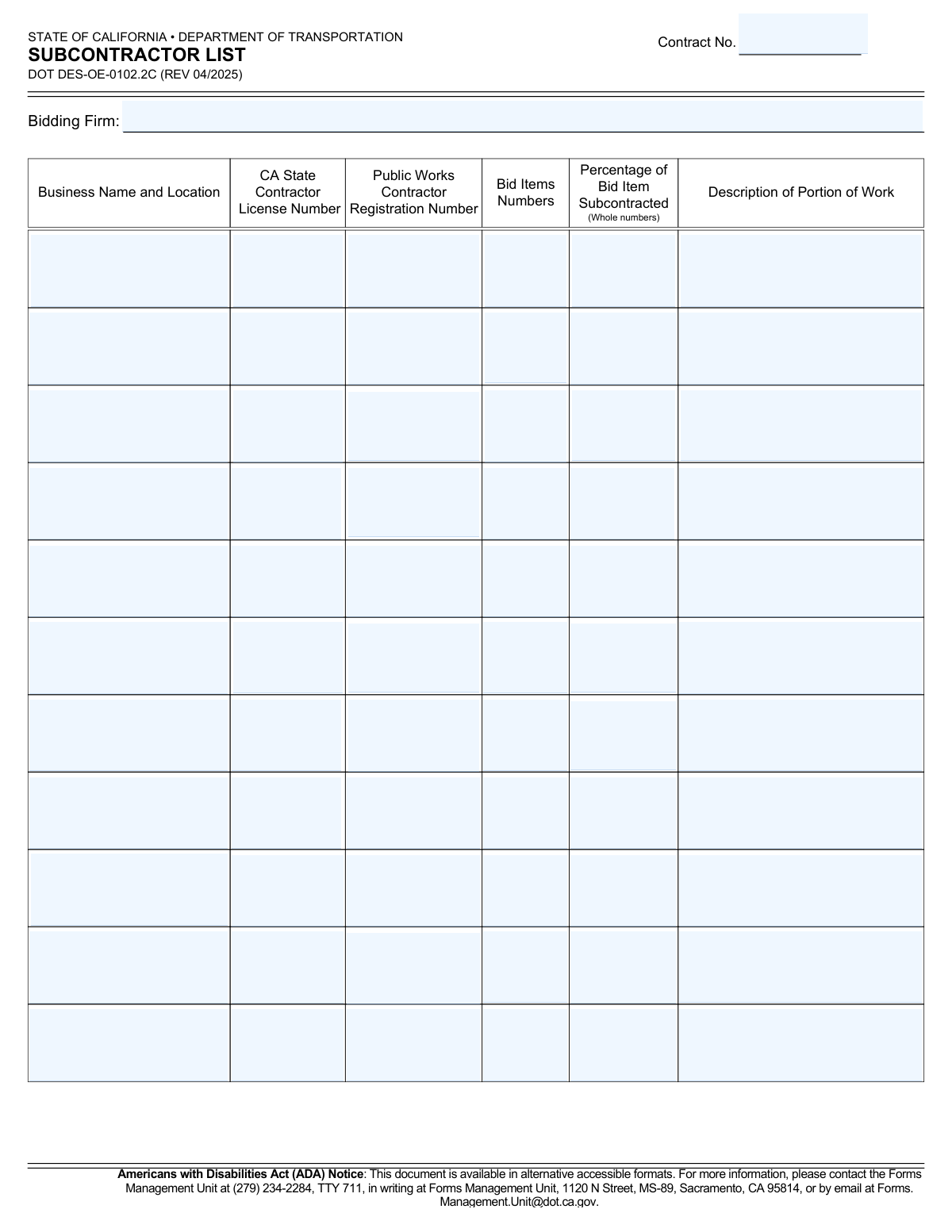
Yes! You can use AI to fill out State of California Department of Transportation Subcontractor List

Form DOT DES-OE-0102.2C, the Subcontractor List, is a mandatory document for firms bidding on California Department of Transportation projects. It requires the primary bidding firm to list every subcontractor they intend to use, detailing their license information, public works registration, and the specific portion of work they will perform, ensuring transparency and compliance. Today, this form can be filled out quickly and accurately using AI-powered services like Instafill.ai, which can also convert non-fillable PDF versions into interactive fillable forms.
Our AI automatically handles information lookup, data retrieval, formatting, and form filling.
It takes less than a minute to fill out DOT DES-OE-0102.2C using our AI form filling.
Securely upload your data. Information is encrypted in transit and deleted immediately after the form is filled out.

Form specifications

Form name: State of California Department of Transportation Subcontractor List
Number of pages: 1
Language: English
Categories: transportation forms, California state forms, PA state forms, contractor forms, Department of State forms, NJ state forms
main-image

Instafill Demo: How to fill out PDF forms in seconds with AI

How to Fill Out DOT DES-OE-0102.2C Online for Free in 2026

Are you looking to fill out a DOT DES-OE-0102.2C form online quickly and accurately? Instafill.ai offers the #1 AI-powered PDF filling software of 2026, allowing you to complete your DOT DES-OE-0102.2C form in just 37 seconds or less.
Follow these steps to fill out your DOT DES-OE-0102.2C form online using Instafill.ai:
  1. 1 Navigate to Instafill.ai and upload or select the DOT DES-OE-0102.2C form.
  2. 2 Enter the main contract number and the legal name of your bidding firm in the designated header fields.
  3. 3 For the first subcontractor, use the AI assistant to accurately input their business name, location, CA State Contractor License Number, and Public Works Contractor Registration Number.
  4. 4 Specify the bid item numbers, the percentage of the item being subcontracted, and a clear description of the work for that subcontractor.
  5. 5 Repeat the process for each additional subcontractor, filling in a new row with their complete information until all parties are listed.
  6. 6 Carefully review all entered data across the form, verifying that all license numbers, registration numbers, and work descriptions are correct.
  7. 7 Securely download, print, or share the completed Subcontractor List for inclusion in your official bid package.

Our AI-powered system ensures each field is filled out correctly, reducing errors and saving you time.

Why Choose Instafill.ai for Your Fillable DOT DES-OE-0102.2C Form?

Speed

Complete your DOT DES-OE-0102.2C in as little as 37 seconds.

Up-to-Date

Always use the latest 2026 DOT DES-OE-0102.2C form version.

Cost-effective

No need to hire expensive lawyers.

Accuracy

Our AI performs 10 compliance checks to ensure your form is error-free.

Security

Your personal information is protected with bank-level encryption.

Frequently Asked Questions About Form DOT DES-OE-0102.2C

This form is used by a bidding firm to list all subcontractors who will perform work on a California Department of Transportation (Caltrans) contract. It is a required part of the bid submission to ensure transparency and compliance.

The primary contractor, identified as the 'Bidding Firm' on the form, is responsible for completing and submitting the Subcontractor List with their bid package.

The CA State Contractor License Number is a general license for construction work in California, while the Public Works Contractor Registration Number is specifically required for any firm working on public works projects. Both are required for subcontractors on this form.

The Bid Item Numbers correspond to the specific line items detailed in the official bid documents for the contract. You must reference the project's bid proposal to find the correct numbers for the work each subcontractor will perform.

You must enter the percentage of the specific bid item being subcontracted, not the percentage of the total contract value. This should be entered as a whole number (e.g., '50' for 50%).

Provide a brief but clear description of the specific tasks the subcontractor will perform, such as 'traffic control,' 'structural steel installation,' or 'asphalt paving.' This should directly relate to the bid items listed.

If you need to list more subcontractors than the form allows, you should make copies of a blank form page to use as continuation sheets. Ensure the Contract Number and Bidding Firm name are on every attached page.

The Subcontractor List must be submitted along with your complete bid package by the bid opening date and time specified in the contract documents.

No, all subcontractors must have a valid and current Public Works Contractor Registration Number at the time of bid submission. Failure to provide a valid number may result in your bid being rejected.

Yes, services like Instafill.ai use AI to auto-fill form fields accurately, which can save time and reduce errors. This is especially useful for entering repetitive company information for multiple subcontractors.

Simply upload the DOT DES-OE-0102.2C PDF to the Instafill.ai platform. The AI will make the form fillable online, allowing you to easily type in all required information, save your progress, and download the completed document.

If you have a non-fillable or 'flat' PDF, you can use a service like Instafill.ai to convert it into an interactive form. Just upload the file, and the platform will automatically make the fields fillable online.

As stated in the ADA Notice on the form, you can request an alternative accessible format by contacting the Caltrans Forms Management Unit. Their phone, TTY, mailing address, and email are listed at the top of the document.

Compliance DOT DES-OE-0102.2C
Validation Checks by Instafill.ai

1
Ensures Contract Number is Provided
Verifies that the 'Contract No.' field at the top of the form is not empty. This number is essential for associating the subcontractor list with the correct project and prime contract. A missing contract number will result in the form being rejected as it cannot be processed or filed correctly.
2
Ensures Bidding Firm Name is Provided
Checks that the 'Bidding Firm' field contains the legal name of the prime contractor. This identifies the primary entity responsible for the bid and the project. Failure to provide this name makes the form invalid as the responsible party is unknown.
3
Validates Completeness of Each Subcontractor Entry
If a 'Business Name and Location' is entered for any subcontractor row, this check ensures all other fields in that same row (License No., Registration No., Bid Items, Percentage, Description) are also filled. This prevents submission of incomplete and unusable subcontractor data. An incomplete row will trigger an error, requiring the user to either complete the information or clear the row.
4
Validates CA State Contractor License Number Format
This check verifies that the 'CA State Contractor License Number' for each subcontractor is a numeric value, typically up to 8 digits long. This ensures the license number is in a valid format before any external verification. An incorrectly formatted number would fail lookup and cause compliance issues, so the form will flag it as an error.
5
Validates Public Works Contractor Registration Number Format
Ensures the 'Public Works Contractor Registration Number' is a valid numeric format, typically a 10-digit number. This registration is mandatory for public works projects in California, and a valid number is crucial for compliance. The validation prevents data entry errors and ensures the number can be verified against the state's database.
6
Ensures Percentage Subcontracted is a Whole Number
Confirms that the value entered in the 'Percentage of Bid Item Subcontracted' field is an integer, as explicitly required by the form ('Whole numbers'). This prevents the use of decimals or fractions, which could complicate calculations and contract administration. If a non-integer is entered, the user will be prompted to correct it.
7
Validates Percentage Subcontracted is Between 1 and 100
Checks that the 'Percentage of Bid Item Subcontracted' is a number between 1 and 100, inclusive. A value of 0 is not logical for a listed subcontractor, and a value over 100 is impossible. This validation maintains logical data integrity and prevents errors in assessing the scope of subcontracted work.
8
Ensures Work Description is Provided for Each Subcontractor
Verifies that the 'Description of Portion of Work' field is not empty for any listed subcontractor. This description is critical for understanding the scope of work each subcontractor is responsible for, which is a key requirement of the form. A missing description will result in a validation failure, as the entry is incomplete.
9
Prevents Duplicate Subcontractor Listings
Scans all entered 'CA State Contractor License Number' fields to ensure no number is listed more than once. Listing the same subcontractor multiple times can indicate a data entry error and creates ambiguity. If a duplicate is found, the system should alert the user to consolidate the entries or correct the mistake.
10
Ensures Bid Item Numbers are Specified
Checks that the 'Bid Items Numbers' field is filled for every subcontractor listed on the form. This field links the subcontractor's work directly to specific line items in the bid. Without this information, it's impossible to determine what part of the contract the subcontractor is assigned to, making the entry invalid.
11
Validates Contract Number Format
Checks if the 'Contract No.' follows the expected Caltrans format, which is often alphanumeric with hyphens (e.g., 'XX-XXXXXX'). This pre-emptive check helps catch typos and ensures the number corresponds to a valid contract structure. An invalid format would prompt the user for correction before submission.
12
Validates Bid Item Numbers Content
Ensures the 'Bid Items Numbers' field contains only valid characters, such as numbers, commas, spaces, and hyphens. This prevents the entry of irrelevant text and ensures the data is machine-readable for processing. An entry with invalid characters would be flagged for review and correction.

Common Mistakes in Completing DOT DES-OE-0102.2C

Invalid or Transposed License/Registration Numbers

Manually typing the long California State Contractor License Number or Public Works Contractor Registration Number often leads to typos or transposed digits. Using an invalid, expired, or incorrect number for a subcontractor can render that portion of the bid non-responsive, potentially leading to the bid's rejection. To prevent this, always verify these numbers directly from the subcontractor's official documentation or a state database before entry. AI-powered tools like Instafill.ai can also help by validating number formats and flagging potential errors.

Incorrect Formatting for Percentage Subcontracted

The form explicitly requires a whole number for the percentage of work subcontracted, but bidders often enter decimals (e.g., '15.5') or use a percentage sign ('15%'). This formatting error can cause automated processing to fail or require manual correction, delaying the bid evaluation. Always enter only the whole number as specified to ensure compliance. Form-filling tools can automatically enforce such formatting rules to prevent these simple mistakes.

Vague or Ambiguous Work Description

Providing a generic description like 'construction services' or 'labor' for a subcontractor's work is a common error that fails to clearly define the scope. This ambiguity can lead to compliance issues with the Department of Transportation and potential post-award disputes. The description should be concise but detailed enough to clearly align with the listed bid items, such as 'Install storm drain pipes' or 'Perform roadway striping'.

Incomplete Subcontractor Information

Rushing to complete the form can lead to accidentally leaving critical fields blank, such as a Public Works Contractor Registration Number or the percentage of work. Listing a subcontractor without providing all required information is a major compliance failure and a common reason for bid rejection. Systematically review each row for every listed subcontractor to ensure all fields are filled; if the form is a non-fillable PDF, a tool like Instafill.ai can convert it into an interactive version where required fields can be highlighted to prevent omissions.

Using an Incorrect Bidding Firm or Subcontractor Name

Bidders sometimes enter a common trade name (DBA) instead of the full legal business name for their own firm or for a subcontractor. State agencies cross-reference this information with official registration databases, and a mismatch can cause verification failures and bid disqualification. Always confirm and enter the exact legal business name as it appears on the entity's business license and state registration documents.

Inaccurate or Missing Bid Item Numbers

Bidders may list bid item numbers that don't match the official bid documents, use vague ranges like 'Items 5-10', or fail to list all relevant items for a subcontractor. This ambiguity can lead to disputes over the scope of work and may cause the bid to be deemed non-compliant. To avoid this, cross-reference and list each specific bid item number directly from the project's official item list for each subcontractor.

Incorrect or Missing Contract Number

Bidders working on multiple proposals may confuse contract numbers or simply overlook this field at the top of the form. An incorrect or missing contract number can cause the entire submission to be misfiled or rejected, as it cannot be matched to the correct project. Always double-check the contract number against the official bid solicitation documents before submission.

Mismatched Work Scope Information

This error occurs when the 'Bid Items Numbers,' 'Percentage,' and 'Description of Portion of Work' for a single subcontractor are inconsistent with each other. For example, the description might detail work not covered by the listed bid items, creating confusion and raising questions about the bid's accuracy. Ensure that for each subcontractor row, the description of work is a direct reflection of the tasks associated with the specified bid item numbers.

Improperly Listing Material Suppliers

A frequent mistake is listing companies that are only supplying materials, not performing any on-site labor, as subcontractors. Public works regulations often differentiate between subcontractors (who perform work) and material suppliers, and incorrectly listing a supplier can create unnecessary compliance burdens or confusion. Only list entities that will be performing a portion of the work on the contract site as defined by public contract code.
Saved over 80 hours a year

“I was never sure if my IRS forms like W-9 were filled correctly. Now, I can complete the forms accurately without any external help.”

Kevin Martin Green

Your data stays secure with advanced protection from Instafill and our subprocessors

Robust compliance program

Transparent business model

You’re not the product. You always know where your data is and what it is processed for.

ISO 27001, HIPAA, and GDPR

Our subprocesses adhere to multiple compliance standards, including but not limited to ISO 27001, HIPAA, and GDPR.

Security & privacy by design

We consider security and privacy from the initial design phase of any new service or functionality. It’s not an afterthought, it’s built-in, including support for two-factor authentication (2FA) to further protect your account.

Fill out DOT DES-OE-0102.2C with Instafill.ai

Worried about filling PDFs wrong? Instafill securely fills state-of-california-department-of-transportation-subcontractor-list forms, ensuring each field is accurate.