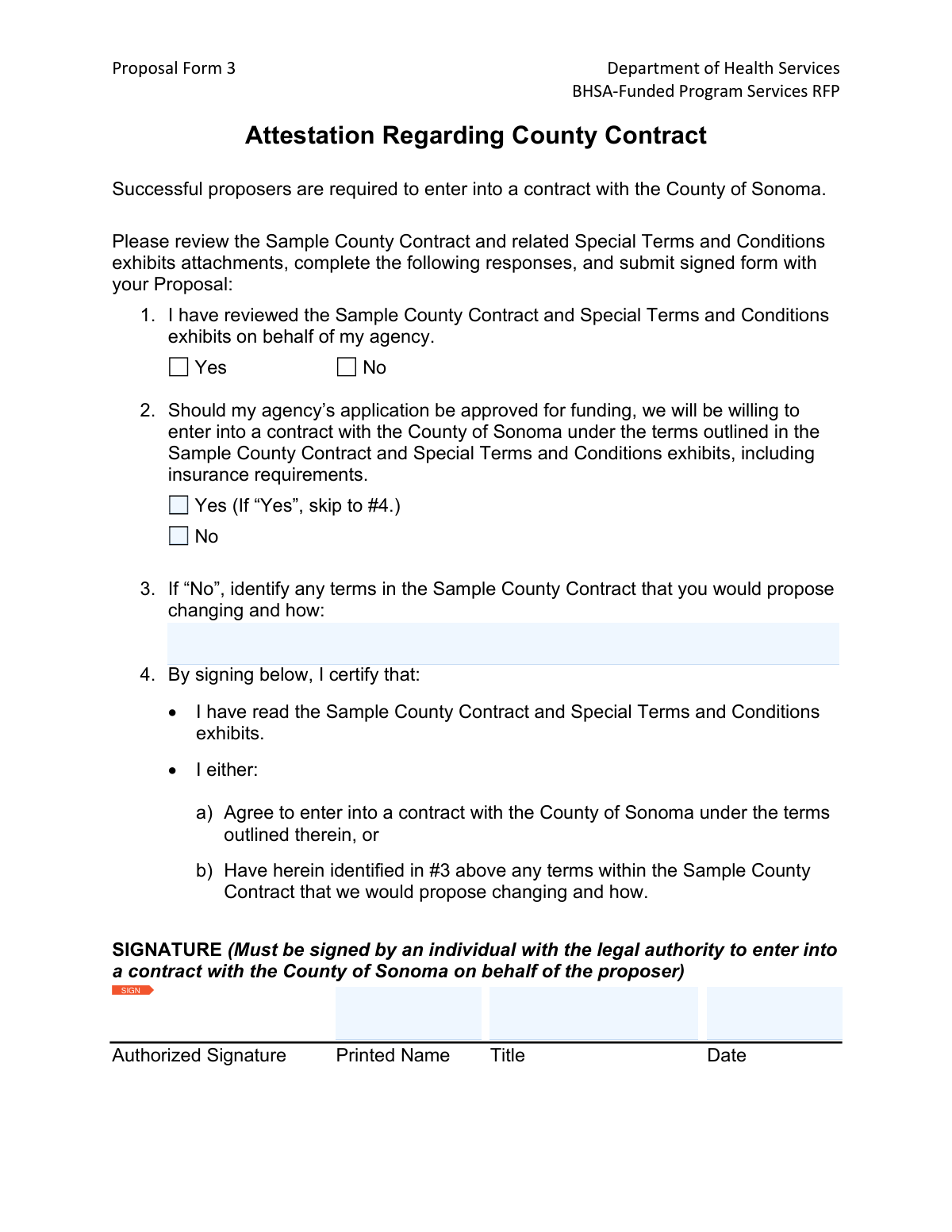
Yes! You can use AI to fill out Proposal Form 3, Attestation Regarding County Contract

Proposal Form 3 is a mandatory attestation for organizations applying for BHSA-funded program services from the Sonoma County Department of Health Services. By completing this form, a proposer certifies that they have reviewed the sample county contract and either agree to its terms or are formally proposing specific changes. This document is a critical part of the proposal package, demonstrating the proposer's willingness to enter into a formal agreement with the county. Today, this form can be filled out quickly and accurately using AI-powered services like Instafill.ai, which can also convert non-fillable PDF versions into interactive fillable forms.
Our AI automatically handles information lookup, data retrieval, formatting, and form filling.
It takes less than a minute to fill out Sonoma County Proposal Form 3 using our AI form filling.
Securely upload your data. Information is encrypted in transit and deleted immediately after the form is filled out.

Form specifications

Form name: Proposal Form 3, Attestation Regarding County Contract
Number of pages: 1
Filled form examples: Form Sonoma County Proposal Form 3 Examples
Language: English
main-image

Instafill Demo: How to fill out PDF forms in seconds with AI

How to Fill Out Sonoma County Proposal Form 3 Online for Free in 2026

Are you looking to fill out a SONOMA COUNTY PROPOSAL FORM 3 form online quickly and accurately? Instafill.ai offers the #1 AI-powered PDF filling software of 2026, allowing you to complete your SONOMA COUNTY PROPOSAL FORM 3 form in just 37 seconds or less.
Follow these steps to fill out your SONOMA COUNTY PROPOSAL FORM 3 form online using Instafill.ai:
  1. 1 Navigate to Instafill.ai and upload or select the 'Attestation Regarding County Contract' form.
  2. 2 Use the AI assistant to pre-fill your agency's details and the information for the authorized signatory, such as printed name and title.
  3. 3 Confirm you have reviewed the Sample County Contract and its terms by checking the 'Yes' box for Question 1.
  4. 4 Indicate your agency's willingness to enter into the contract as-is by checking 'Yes' or 'No' for Question 2.
  5. 5 If you selected 'No' in the previous step, clearly detail any proposed changes to the contract terms in the space provided for Question 3.
  6. 6 Apply a legally binding electronic signature in the 'Authorized Signature' field and enter the current date.
  7. 7 Review all the information for accuracy, then download the completed form to include with your proposal submission to the County of Sonoma.

Our AI-powered system ensures each field is filled out correctly, reducing errors and saving you time.

Why Choose Instafill.ai for Your Fillable Sonoma County Proposal Form 3 Form?

Speed

Complete your Sonoma County Proposal Form 3 in as little as 37 seconds.

Up-to-Date

Always use the latest 2026 Sonoma County Proposal Form 3 form version.

Cost-effective

No need to hire expensive lawyers.

Accuracy

Our AI performs 10 compliance checks to ensure your form is error-free.

Security

Your personal information is protected with bank-level encryption.

Frequently Asked Questions About Form Sonoma County Proposal Form 3

This form serves as a legal attestation that your agency has reviewed the County of Sonoma's sample contract and either agrees to its terms or wishes to propose specific changes. It is a mandatory part of your proposal for BHSA-funded program services.

Any organization submitting a proposal for the BHSA-Funded Program Services RFP must complete this form. It must be signed by an individual, such as an Executive Director or CEO, who has the legal authority to enter into contracts on behalf of your agency.

You are required to thoroughly review the 'Sample County Contract' and all associated 'Special Terms and Conditions' exhibits and attachments. Your signature on this form certifies that you have done so.

If you disagree with any terms, you must check 'No' for question #2. Then, in the space for question #3, you must clearly identify the specific contract terms you propose changing and explain your suggested modifications.

No, if you agree to the contract terms as written and check 'Yes' for question #2, you should skip question #3. You can then proceed directly to the signature section to complete the form.

An authorized individual is a person legally empowered to bind your agency to a contract, such as a CEO, Executive Director, or Board President. If you are unsure, you should consult your organization's bylaws or legal counsel.

Proposing changes does not automatically disqualify your proposal, but it does indicate a point for future negotiation if you are selected for funding. The County will review your proposed changes as part of the overall proposal evaluation.

This signed form must be submitted as a component of your complete proposal package. You should follow the main submission instructions detailed in the BHSA-Funded Program Services RFP document.

The detailed insurance requirements are outlined within the 'Sample County Contract' and its related exhibits. You must review these documents to ensure your agency can meet these obligations if awarded the contract.

Yes, services like Instafill.ai use AI to auto-fill form fields accurately, which can save you time and help prevent errors. However, you are still responsible for reviewing the contract and ensuring all information is correct before signing.

Simply upload the form to the Instafill.ai platform, and its AI will identify the fields for you to fill. You can then type your information, check the appropriate boxes, and add your digital signature before downloading the completed document.

If you have a non-fillable or 'flat' PDF, you can use a service like Instafill.ai to make it interactive. Upload the file, and the tool will automatically convert it into a fillable form that you can complete on your computer.

Compliance Sonoma County Proposal Form 3
Validation Checks by Instafill.ai

1
Ensures Attestation of Contract Review is Completed
This validation confirms that a response ('Yes' or 'No') has been provided for Question 1 regarding the review of the Sample County Contract. This is a mandatory attestation, and leaving it blank results in an incomplete form. Failure to respond prevents the County from knowing if the proposer has acknowledged the contract terms, which is a prerequisite for consideration.
2
Validates Affirmative Review of County Contract
This check ensures the response to Question 1 is 'Yes'. A 'No' response indicates the proposer has not reviewed the required contract documents, making their proposal non-compliant from the start. If 'No' is selected, the submission should be flagged as invalid or rejected, as reviewing the contract is a mandatory step of the RFP process.
3
Ensures Willingness to Contract is Declared
This validation confirms that a response ('Yes' or 'No') has been provided for Question 2 regarding the willingness to enter into a contract. This declaration is critical for the County to understand the proposer's position on the standard contract terms. An unanswered question leaves a critical ambiguity that must be resolved before the proposal can be evaluated.
4
Requires Justification for Contract Term Changes
This check enforces a conditional rule: if the proposer answers 'No' to Question 2 (not willing to enter the contract as-is), then Question 3 must contain text. This is important because the County needs to understand what specific contract terms are unacceptable to the proposer. A 'No' answer without an explanation in Question 3 makes the response incomplete and unactionable.
5
Prevents Contradictory Information on Contract Changes
This validation ensures that if the proposer answers 'Yes' to Question 2 (willing to enter the contract), then Question 3 must be left empty. The form instructions explicitly state to skip to question #4 if answering 'Yes'. Providing text in Question 3 would contradict the 'Yes' answer, creating confusion for the contract evaluation team.
6
Verifies Presence of an Authorized Signature
This check ensures that the 'Authorized Signature' field is not empty and contains a signature. A signature from an individual with legal authority is required to certify the attestations made on the form, making it a legally binding document. A missing signature invalidates the entire attestation and will result in the proposal being rejected.
7
Ensures Signer's Printed Name is Provided
This validation confirms that the 'Printed Name' field has been completed. The printed name is essential for clearly identifying the individual who signed the document, as signatures can often be illegible. Without a printed name, it is difficult to verify the identity and authority of the signer.
8
Verifies Signer's Title is Provided
This check ensures the 'Title' field is filled out. The signer's title (e.g., CEO, Executive Director) is crucial for the County to verify that the individual has the legal authority to enter into a contract on behalf of the proposing agency. A missing title raises questions about the validity of the signature and the commitment.
9
Ensures Signature Date is Provided
This validation confirms that the 'Date' field associated with the signature is not empty. The date of signature establishes when the attestation was made, which is important for legal and record-keeping purposes. An undated form may be considered incomplete or invalid.
10
Validates Format of the Signature Date
This check ensures the date entered in the 'Date' field follows a standard and valid format (e.g., MM/DD/YYYY). Consistent date formatting is crucial for data integrity, automated processing, and clear record-keeping. An invalid format could lead to processing errors or misinterpretation of the signature date.
11
Ensures Signature Date is Not in the Future
This validation checks that the provided signature date is not a future date. A future date is logically impossible and indicates a user error or intentional misrepresentation. This check prevents invalid data from being submitted and ensures the attestation reflects a past or present action.
12
Ensures Exclusive Selection for Yes/No Questions
This check verifies that for both Question 1 and Question 2, only one option ('Yes' or 'No') is selected. It prevents the submission of ambiguous data where both options might be checked due to a form error. This ensures a clear and singular response is recorded for each attestation.

Common Mistakes in Completing Sonoma County Proposal Form 3

Unauthorized Signature

This occurs when the form is signed by an individual who lacks the legal authority to bind the agency to a contract, such as a program manager instead of a CEO or Executive Director. This critical error invalidates the attestation and can lead to the proposal's immediate disqualification, as the County cannot be assured of the agency's commitment. To avoid this, identify the person with contractual signatory authority as defined in your agency's bylaws and ensure they are the one who signs the document.

Contradictory Yes/No Answers

Applicants sometimes answer 'No' to Question 1 (stating they haven't reviewed the contract) but 'Yes' to Question 2 (agreeing to its terms). This logical contradiction happens when rushing and signals a lack of diligence to reviewers. It undermines the credibility of the entire proposal and may lead to disqualification. Always read each question carefully to ensure your answers are consistent and accurately reflect your agency's position.

Answering 'No' to Willingness but Leaving Proposed Changes Blank

A frequent mistake is checking 'No' for Question 2, indicating an unwillingness to accept the contract as-is, but then failing to complete Question 3 with specific proposed changes. This makes the submission non-responsive, as the County has no basis for negotiation and must assume the proposer is unwilling to contract. If you answer 'No' to Question 2, you must provide a detailed explanation in Question 3 to be considered.

Attesting Without Thoroughly Reviewing All Contract Documents

Proposers may check 'Yes' to having reviewed the contract and its exhibits without actually reading them, often assuming they are 'standard boilerplate'. This is a risky shortcut, as the agency becomes legally bound to potentially unfavorable terms regarding insurance, liability, or reporting. To prevent future legal and financial issues, always allocate time for a thorough review of the main contract and all associated exhibits by legal and financial staff before signing.

Incomplete Signature Block

An applicant provides a signature but forgets to fill in their printed name, title, or the date. This happens due to oversight and creates ambiguity about the signer's identity, authority, and when the document was executed. An incomplete block can delay the review process or even invalidate the submission. Always double-check that every field in the signature section—Signature, Printed Name, Title, and Date—is complete.

Vague or Unactionable Proposed Changes

When completing Question 3, proposers provide vague objections like 'indemnification clause is a concern' without specifying the exact language they want to change. The County cannot act on such general statements, which may be treated as a non-responsive answer. To avoid this, work with legal counsel to propose specific, actionable redline changes, citing the exact clause number and providing the desired alternative wording.

Ignoring Conditional Logic

Applicants sometimes answer 'Yes' to Question 2 (agreeing to the terms) but then proceed to fill out Question 3 with suggested changes, ignoring the instruction to 'skip to #4'. This creates confusion for reviewers, as it's unclear whether the acceptance is conditional or not, potentially weakening the proposal. Adhere strictly to the form's instructions; if you agree to the terms, leave the proposed changes section completely blank.

Submitting an Unsigned Form

In the rush to meet a deadline, the most basic step—signing the form—is sometimes forgotten. An unsigned attestation holds no legal weight and will result in the proposal being automatically rejected with no chance for correction after the deadline. To prevent this, implement a final pre-submission checklist where verifying the presence of all required signatures is a mandatory step.

Using an Incorrect Signature Format

The proposer might use a typed font for a signature on a form that requires a scanned 'wet' (ink) signature, or vice-versa. This happens due to confusion over submission guidelines for digital versus physical documents. An invalid signature format can lead to the rejection of the entire proposal. Carefully read the RFP instructions to confirm the required format. If the form is a non-fillable PDF, a tool like Instafill.ai can make it fillable, which can then be printed for a wet signature.

Missing or Ambiguous Date

The date field in the signature block is left blank or filled in with an ambiguous format (e.g., 02-03-24). This creates uncertainty about when the legal attestation was made and can cause processing delays. To avoid this, always use a clear, unambiguous format like 'Month Day, YYYY' (e.g., 'March 2, 2024'). AI-powered form filling tools like Instafill.ai can help by automatically inserting the current date in a standardized format.
Saved over 80 hours a year

“I was never sure if my IRS forms like W-9 were filled correctly. Now, I can complete the forms accurately without any external help.”

Kevin Martin Green

Your data stays secure with advanced protection from Instafill and our subprocessors

Robust compliance program

Transparent business model

You’re not the product. You always know where your data is and what it is processed for.

ISO 27001, HIPAA, and GDPR

Our subprocesses adhere to multiple compliance standards, including but not limited to ISO 27001, HIPAA, and GDPR.

Security & privacy by design

We consider security and privacy from the initial design phase of any new service or functionality. It’s not an afterthought, it’s built-in, including support for two-factor authentication (2FA) to further protect your account.

Fill out Sonoma County Proposal Form 3 with Instafill.ai

Worried about filling PDFs wrong? Instafill securely fills proposal-form-3-attestation-regarding-county-contract forms, ensuring each field is accurate.