
Yes! You can use AI to fill out State of Illinois Department of Children and Family Services Medical Report on an Adult in a Child Care Facility (CFS 602)
Don't type 88 fields by hand. Tell our AI about yourself, or upload a document you already have, and it fills every field in seconds. You check it, then download, print or sign.
The AI does the filling. You just check it.
No typing into boxes, nothing to install.
What this form asks for
The AI fills all of it, from your answers or your documents.
The AI checks your answers before you download
18 checks built for this form, so a wrong date or a missing answer is caught before anyone else sees it.
Validates that the 'Name of Person Examined' field is present and contains a plausible full name (e.g., at least first and last name, not only initials or a single character). This is important to uniquely identify the adult being evaluated and to prevent mismatches with licensing or employment records. If validation fails, the submission should be rejected or routed for correction because the report cannot be reliably attributed to an individual.
Checks that the Birth Date is provided, follows an accepted date format (e.g., MM/DD/YYYY), and represents a real calendar date. It also ensures the date is not in the future and implies a reasonable age for an adult (e.g., at least 18 years old). If invalid, the form should be flagged because age/identity verification and compliance determinations may be incorrect.
Ensures the 'Position (check one)' section has exactly one option selected, unless the business rules explicitly allow multiple roles. This matters because downstream requirements (e.g., Section B applicability for Food Handler/Driver) depend on the selected role. If multiple or none are selected, the system should block submission or require clarification to avoid applying the wrong medical criteria.
Validates that the 'Name of Licensee/applicant for License or Licensed Facility' field is completed and not placeholder text. This is necessary to associate the medical report with the correct DCFS-licensed entity and to support audits and compliance tracking. If missing, the submission should be considered incomplete and returned for completion.
Checks that Street, City, ZIP Code, and County are provided and that the ZIP Code is valid (5 digits or ZIP+4). Address completeness is important for identifying the facility location and jurisdiction, and for ensuring the report is filed under the correct county. If validation fails, the form should be flagged because the facility cannot be reliably located or matched to licensing records.
Validates that a Tuberculin test date and result are provided when the report is marked/treated as an initial examination (per the note '* Required in initial examination only'). This is critical for communicable disease screening compliance and to meet DCFS requirements. If missing for an initial exam, the submission should be rejected or marked non-compliant until test information is supplied.
And 12 more checks
- Test Date and Result Pairing (No Orphan Values)
- Immunizations Discussion Yes/No Must Be Selected
- Tdap/MMR Compliance for Facilities Serving Children Age 6 and Under
- Mutual Exclusivity of 'Received' vs 'Not Medically Indicated' for Same Vaccine
- Food Handler/Driver Contraindication Section Required When Applicable
- Contraindication Explanation Required When 'Yes' Selected
- Fitness Determination Yes/No Must Be Selected
- Explain 'No' Required When Not Fit
- Examination Date Valid and Consistent with Test Dates
- Physician Identification: Name and State License Number Required and Formatted
- Physician Signature Presence
- Physician Contact Information Completeness and Phone Format
Let AI fill out your CFS 602
No typing. Every field filled in seconds, checked, ready to sign.
How to Fill Out CFS 602 Online for Free in 2026
What the AI walks you through.
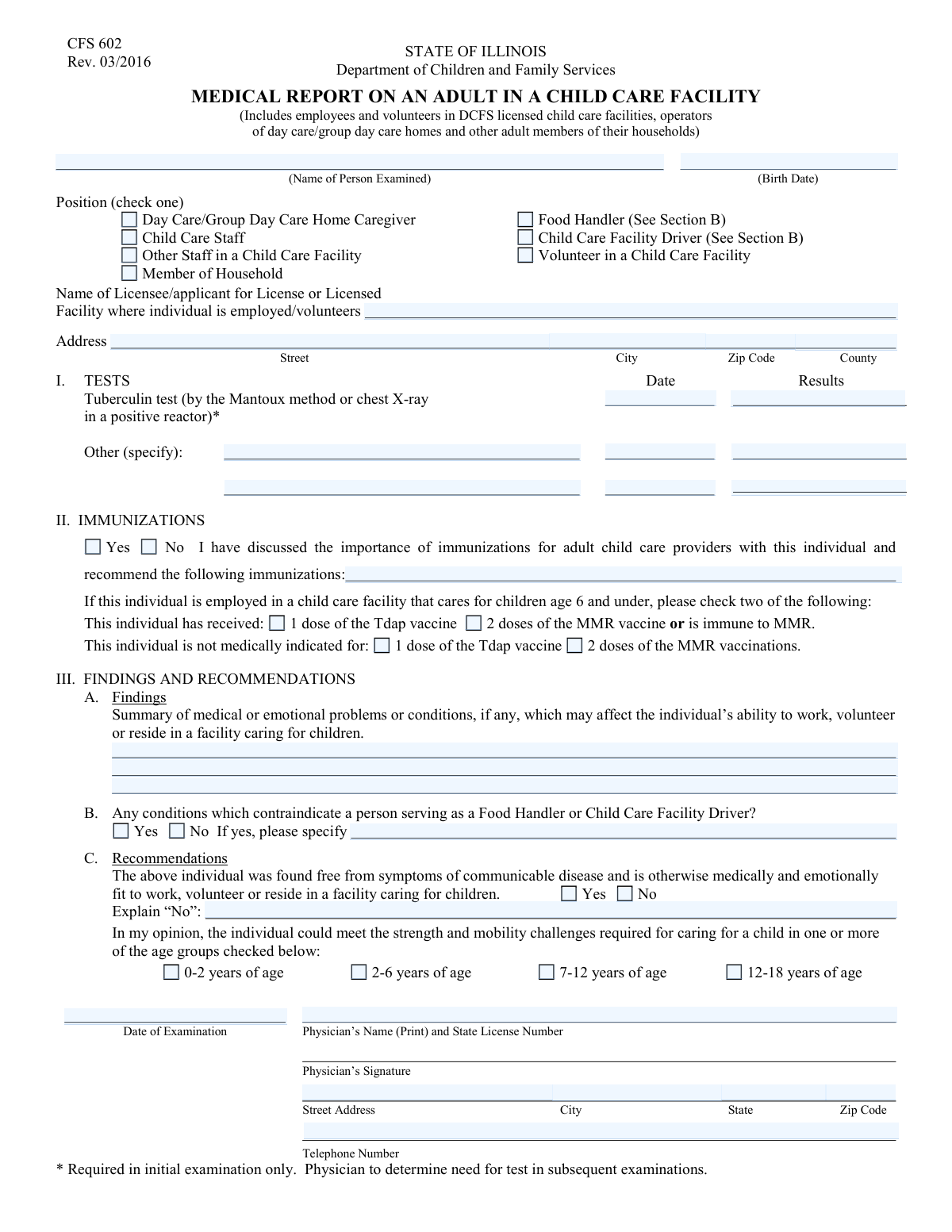
- Enter the individual’s identifying information (name, birth date) and select the appropriate position/role checkbox (e.g., staff, volunteer, caregiver, household member, driver, food handler).
- Provide the child care licensee/applicant or facility name and the facility address (street, city, ZIP code, county).
- Complete Section I (Tests) by entering the date and results for the tuberculin (Mantoux) test or chest X-ray if a positive reactor, and list any other required tests with dates/results.
- Complete Section II (Immunizations) by indicating that immunization importance was discussed and, if applicable for facilities caring for children age 6 and under, check whether the individual has received or is not medically indicated for Tdap and MMR (or is immune).
- Complete Section III-A and III-B by summarizing any medical/emotional findings that may affect the person’s ability to work/volunteer/reside, and indicate whether any conditions contraindicate serving as a food handler or driver (with details if yes).
- Complete Section III-C by selecting whether the individual is free from symptoms of communicable disease and medically/emotionally fit; if “No,” provide an explanation, and check the age groups the individual can physically care for.
- Have the physician enter the examination date, print name and state license number, sign the form, and provide the physician’s address and telephone number; use the reexaminations area to record future exam dates and physician details as needed.
Common Mistakes in Completing CFS 602
The ones the AI is built to catch.
Leaving the person’s name or birth date blank or inconsistent
Not checking exactly one position (or checking the wrong one)
Omitting the licensee/facility name or using an informal facility name
Incomplete facility address (missing county, ZIP, or street details)
TB testing section completed without required date, method, or results
Misunderstanding the ‘initial examination only’ TB requirement
Immunizations section left unmarked or internally inconsistent
Not completing the special requirement for facilities serving children age 6 and under
Findings section too vague or left blank when issues exist
Skipping Section B for Food Handlers/Drivers or failing to specify contraindications
Fitness determination marked ‘No’ without explanation or missing age-group strength/mobility checks
Provider credentials/signature details missing (license number, signature, date, or contact info)
Frequently Asked Questions About CFS 602
Is it really free for 7 days?
Can I fill other forms too?
How do I cancel?
How does the AI fill out CFS 602?
What happens to my information?
How complex is CFS 602 to fill out?
What is the purpose of the DCFS “Medical Report on an Adult in a Child Care Facility” (CFS 602) form?
Who is required to complete this form?
Who fills out and signs the form—me or my doctor?
What information do I need to provide before the medical exam?
Is a TB (tuberculin) test required, and what type is acceptable?
Where do the TB test date and results go on the form?
Do I have to be fully immunized to complete this form?
What immunizations are specifically referenced for adults working with children age 6 and under?
What does the “Findings” section mean, and what should be included?
I’m a food handler or a child care facility driver—what extra part applies to me?
What does it mean if the physician answers “No” to being fit to work/volunteer/reside?
What are the age-group checkboxes (0–2, 2–6, 7–12, 12–18) used for?
What physician details are required for the form to be complete?
How are reexaminations documented on this form?
Where do I submit the completed CFS 602 form, and how long does processing take?
Get your CFS 602 filled out by AI
$0 today. Cancel before Nov 1 and you pay nothing.
Other forms like this one
medical forms: Form OWCP-915, Claim for Medical Reimbursement, Form 8994, Employer Credit for Paid Family and Medical Leave, Form OF-178, Certificate of Medical Examination, Form N-648, Medical Certification for Disability Exceptions, U.S. Coast Guard Form CG-719K, Application for Medical Certificate, The Department of Medical Assistance Services Applied Behavior Analysis Preservice Service Authorization Request Form (Effective Dates of Service 09/01/2025 and after), Carer Payment and Carer Allowance – Medical Report (SA431) for a child under 16 years, Medically Prescribed Treatment (Non-Medication) Form — Provider Treatment Order Form | Office of School Health | School Year 2025–2026, VA Form 10-7959f-2, Foreign Medical Program (FMP) Claim Cover Sheet, Department of Medical Assistance Services Applied Behavior Analysis (97155, Et al.) Initial Service Authorization Request Form, Applied Behavior Analysis Concurrent Service Authorization Request Form (CPT Codes 97153, 97154, 97155, 97156, 97157, 97158, 0373T) – Virginia Department of Medical Assistance Services, Department of Medical Assistance Services Enhanced Services Individual Service Plan (ISP) Template, Form DS-1843, Medical History and Examination for Individuals Age 12 and Older, Scheduled Medical Leave of Absence (MLOA) - BLET 13, Admissions Application, School of Diagnostic Imaging, Mills-Peninsula Medical Center, Albany Medical Center 2024 Benefits Guide, Form BWC-1141, Request for Medical Information, VA Form 21P-8416, Medical Expense Report, Medicare Enrollment Application for Durable Medical Equipment, Prosthetics, Orthotics, and Supplies (DMEPOS) Suppliers, CMS-855S, Form HFS 2243, Provider Enrollment Application Illinois Medical Assistance Program
CAR forms: Form SSA-44, Medicare Income-Related Monthly Adjustment Amount - Life-Changing Event, Form I-90, Application to Replace Permanent Resident Card, Form 2441, Child and Dependent Care Expenses, Form WH-380-E, Certification of Health Care Provider, Form 4137, Social Security and Medicare Tax on Unreported Tip Income, Form 8959, Additional Medicare Tax, Form 8919, Uncollected Social Security and Medicare Tax, Form CMS-1763, Request for Termination of Medicare Coverage, Form CMS-855O, Medicare Enrollment Application, Form CMS-460, Medicare Participation Agreement, Form CMS-4040, Request for Enrollment in Medicare Part B, Form WH-380-F, Certification of Health Care Provider, Form W-10, Dependent Care Provider’s Identification, Form 1099-K, Payment Card and Third Party Network Transactions, Form CMS-40B, Application for Enrollment in Medicare Part B, Form SS-5-FS, Application for a Social Security Card, Form REG 195, Disabled Person Placard, Form AR-11, Alien's Change of Address Card, Form I-905, Application for Authorization to Issue Certification for Health Care Workers, Form I-131A, Application for Carrier Documentation
child care forms: Form 2441, Child and Dependent Care Expenses, California Department of Social Services (CDSS) Community Care Licensing Child Care Forms Packet (LIC 9150, LIC 282, LIC 627, LIC 700, LIC 995A, CDPH 286, LIC 9227), State of Illinois Department of Human Services (IDHS) – Bureau of Child Care and Development Child Care Application (Form IL444-3455), Carer Payment and Carer Allowance – Medical Report (SA431) for a child under 16 years, Pennsylvania Application for Subsidized Child Care (CY 868), Form OCFS-6001, Child Care Provider, Staff, Volunteer and Household Member Information, Form T-3, Children with Special Health Care Needs (CSHCN) Services Program Application, Physician's Report for Child Care, Relationship and Child Care Arrangement Details Form, Level of Care (LOC) Assessment for Children in Foster Care, Intact Family Services Child Care Referral Form, Department of Children and Family Services (DCFS) Day Care Service Eligibility Application, Authorization for Background Check for Child Care, JFS 01443, Request for Payment for Special Services for Children in Out-of-Home Care, Form AD 838, Statement of Monies Paid for 24-Hour Care of Children, Superior Court of New Jersey Certification in Support of Request for Excuse from Jury Service: Personal Obligation to Provide Care for Minor Child(ren)
Illinois state forms: Illinois State Board of Education (ISBE) Application for Employment (ISBE 61-08), State of Illinois Department of Human Services (IDHS) – Bureau of Child Care and Development Child Care Application (Form IL444-3455), Illinois Advanced Practice Nurse Delegation of Prescriptive Authority for Controlled Substances (Delegation Statement)
medical report forms: Carer Payment and Carer Allowance – Medical Report (SA431) for a child under 16 years, VA Form 21P-8416, Medical Expense Report, Form AI-346, Gastos Médicos Mayores Informe Médico, MSF 4104, Medical Examination of Seafarers Report (ENG2), Carer Payment and/or Carer Allowance: Medical Report for a person 16 years or over, Medical Report for Carer Payment and/or Carer Allowance, Carer Allowance - Medical Report for a person 16 years or over (SA332a), SA393 - Medical report for a person who is blind, Form I-693, Report of Immigration Medical Examination and Vaccination Record, SC ISP-2519, Medical Report for Canada Pension Plan Disability Benefits (2025-05-08), SC ISP-2519, Medical Report for Canada Pension Plan Disability Benefits (2024-05-17)
VA medical forms: Form OWCP-915, Claim for Medical Reimbursement, Form 8994, Employer Credit for Paid Family and Medical Leave, Form OF-178, Certificate of Medical Examination, Form N-648, Medical Certification for Disability Exceptions, U.S. Coast Guard Form CG-719K, Application for Medical Certificate, The Department of Medical Assistance Services Applied Behavior Analysis Preservice Service Authorization Request Form (Effective Dates of Service 09/01/2025 and after), Carer Payment and Carer Allowance – Medical Report (SA431) for a child under 16 years, Medically Prescribed Treatment (Non-Medication) Form — Provider Treatment Order Form | Office of School Health | School Year 2025–2026, VA Form 10-7959f-2, Foreign Medical Program (FMP) Claim Cover Sheet, Department of Medical Assistance Services Applied Behavior Analysis (97155, Et al.) Initial Service Authorization Request Form, Applied Behavior Analysis Concurrent Service Authorization Request Form (CPT Codes 97153, 97154, 97155, 97156, 97157, 97158, 0373T) – Virginia Department of Medical Assistance Services, Department of Medical Assistance Services Enhanced Services Individual Service Plan (ISP) Template, Form DS-1843, Medical History and Examination for Individuals Age 12 and Older, Scheduled Medical Leave of Absence (MLOA) - BLET 13, Admissions Application, School of Diagnostic Imaging, Mills-Peninsula Medical Center, Albany Medical Center 2024 Benefits Guide, Form BWC-1141, Request for Medical Information, VA Form 21P-8416, Medical Expense Report, Medicare Enrollment Application for Durable Medical Equipment, Prosthetics, Orthotics, and Supplies (DMEPOS) Suppliers, CMS-855S, Form HFS 2243, Provider Enrollment Application Illinois Medical Assistance Program
Medi-Cal forms: Form OWCP-915, Claim for Medical Reimbursement, Form 8994, Employer Credit for Paid Family and Medical Leave, Form OF-178, Certificate of Medical Examination, Form N-648, Medical Certification for Disability Exceptions, U.S. Coast Guard Form CG-719K, Application for Medical Certificate, The Department of Medical Assistance Services Applied Behavior Analysis Preservice Service Authorization Request Form (Effective Dates of Service 09/01/2025 and after), Carer Payment and Carer Allowance – Medical Report (SA431) for a child under 16 years, Medically Prescribed Treatment (Non-Medication) Form — Provider Treatment Order Form | Office of School Health | School Year 2025–2026, VA Form 10-7959f-2, Foreign Medical Program (FMP) Claim Cover Sheet, ABA Authorization Request (Medi-Cal) – Initial and Concurrent Requests, Department of Medical Assistance Services Applied Behavior Analysis (97155, Et al.) Initial Service Authorization Request Form, Applied Behavior Analysis Concurrent Service Authorization Request Form (CPT Codes 97153, 97154, 97155, 97156, 97157, 97158, 0373T) – Virginia Department of Medical Assistance Services, Department of Medical Assistance Services Enhanced Services Individual Service Plan (ISP) Template, Form DS-1843, Medical History and Examination for Individuals Age 12 and Older, Scheduled Medical Leave of Absence (MLOA) - BLET 13, Admissions Application, School of Diagnostic Imaging, Mills-Peninsula Medical Center, Albany Medical Center 2024 Benefits Guide, Form BWC-1141, Request for Medical Information, VA Form 21P-8416, Medical Expense Report, Medicare Enrollment Application for Durable Medical Equipment, Prosthetics, Orthotics, and Supplies (DMEPOS) Suppliers, CMS-855S
PA state forms: Form 1095-A, Health Insurance Marketplace Statement, Form W-2, Wage and Tax Statement, Form 593, Real Estate Withholding, Form 8938, Statement of Specified Foreign Financial Assets, Form CMS-2567, Statement of Deficiencies, Form 1098, Mortgage Interest Statement, Form 1098-T, Tuition Statement, Form 1099-S, Proceeds From Real Estate Transactions, Form 1098-E, Student Loan Interest Statement, Form DS-3053, Statement of Consent, Form DS-86, Statement of Non-Receipt of a U.S. Passport, Form DS-86, Statement of Non-Receipt of a U.S. Passport, Form 108, Statement of Intention, Form 107, Statement of Financial Affairs, Form 121, Statement About Your SSNs, Form 122A-1, Chapter 7 Statement of Current Monthly Income, Center for Infertility & Reproductive Surgery – New Patient Questionnaire and Patient/Guarantor Statement (Brigham and Women’s Hospital, Department of Obstetrics and Gynecology), Adult Travel Document Application for Stateless and Protected Persons in Canada (16 years of age or over) (PPTC 190), Form W-8IMY (Rev. October 2021), Certificate of Foreign Intermediary, Foreign Flow-Through Entity, or Certain U.S. Branches for United States Tax Withholding and Reporting, Form W-2, Wage and Tax Statement (2025)
L.A. Care forms: Form SSA-44, Medicare Income-Related Monthly Adjustment Amount - Life-Changing Event, Form 2441, Child and Dependent Care Expenses, Form WH-380-E, Certification of Health Care Provider, Form 4137, Social Security and Medicare Tax on Unreported Tip Income, Form 8959, Additional Medicare Tax, Form 8919, Uncollected Social Security and Medicare Tax, Form CMS-1763, Request for Termination of Medicare Coverage, Form CMS-855O, Medicare Enrollment Application, Form CMS-460, Medicare Participation Agreement, Form CMS-4040, Request for Enrollment in Medicare Part B, Form WH-380-F, Certification of Health Care Provider, Form W-10, Dependent Care Provider’s Identification, Form CMS-40B, Application for Enrollment in Medicare Part B, Form I-905, Application for Authorization to Issue Certification for Health Care Workers, DHS-6696-ENG, Minnesota Health Care Programs Application (MNsure/DHS), California Department of Social Services (CDSS) Community Care Licensing Child Care Forms Packet (LIC 9150, LIC 282, LIC 627, LIC 700, LIC 995A, CDPH 286, LIC 9227), State of Illinois Department of Human Services (IDHS) – Bureau of Child Care and Development Child Care Application (Form IL444-3455), Form CH-006: PA-BH-Res-PCS, Oregon Behavioral Health Support Program Plan of Care Authorization (Plan of Care Request for Behavioral Health Residential or Personal Care Services), Carer Payment and Carer Allowance – Medical Report (SA431) for a child under 16 years, Pennsylvania Application for Subsidized Child Care (CY 868)
Department of State forms: Center for Infertility & Reproductive Surgery – New Patient Questionnaire and Patient/Guarantor Statement (Brigham and Women’s Hospital, Department of Obstetrics and Gynecology), State of Illinois Department of Human Services (IDHS) – Bureau of Child Care and Development Child Care Application (Form IL444-3455), State of Florida Department of Highway Safety and Motor Vehicles (FLHSMV) Form HSMV 82993, Separate Odometer Disclosure Statement and Acknowledgment, DS 1891, Applicant/Vendor Disclosure Statement (State of California Department of Developmental Services), New York State Department of State (Division of Licensing Services) Property Condition Disclosure Statement (DOS-1614-f), State of Hawaii Department of Commerce and Consumer Affairs (DCCA) Contractors License Board – Application for Contractor's License (Sole Proprietor) (CT-36) with supporting forms (Experience Certificate CT-03, Contractors Financial Statement CT-02, and Chronological History of Projects/Project List), Murrieta Police Department Citizen Complaint Form (California Penal Code § 148.6 Advisory Statement), Pennsylvania Department of State — Certificate of Termination (Domestic Limited Liability Company) (15 Pa.C.S. § 8872(f)) (DSCB:15-8872(f)), Colorado Judicial Department Form JDF 1111SC (Form 35.2), Sworn Financial Statement, New York State Department of Labor (NYSDOL) Division of Labor Standards Complaint Form (LS 223), New York State Department of Labor, Division of Labor Standards Complaint Form (LS 223), Dallas Area Rapid Transit Police Department Personal History Statement (Peace Officer / Telecommunicator), California Department of Social Services, Sworn Statement, State of California Department of Transportation California Civil Rights Laws Certification, State of California Department of Transportation Darfur Contracting Act Certification, Form DOT ADM-0077, State of California Department of Transportation, Contract Requirements, State of California Department of Transportation Subcontractor List, State of California Department of Transportation, Certified DVBE Summary, State of Florida Department of Business and Professional Regulation Form DBPR CILB 6-B, Application for Certified Building Contractor Who is Qualifying a Business, New York State Department of Health Certificate of Qualification Questionnaire - Virology
NJ state forms: Form 1095-A, Health Insurance Marketplace Statement, Form W-2, Wage and Tax Statement, Form 593, Real Estate Withholding, Form 8938, Statement of Specified Foreign Financial Assets, Form CMS-2567, Statement of Deficiencies, Form 1098, Mortgage Interest Statement, Form 1098-T, Tuition Statement, Form 1099-S, Proceeds From Real Estate Transactions, Form 1098-E, Student Loan Interest Statement, Form DS-3053, Statement of Consent, Form DS-86, Statement of Non-Receipt of a U.S. Passport, Form DS-86, Statement of Non-Receipt of a U.S. Passport, Form 108, Statement of Intention, Form 107, Statement of Financial Affairs, Form 121, Statement About Your SSNs, Form 122A-1, Chapter 7 Statement of Current Monthly Income, Center for Infertility & Reproductive Surgery – New Patient Questionnaire and Patient/Guarantor Statement (Brigham and Women’s Hospital, Department of Obstetrics and Gynecology), Adult Travel Document Application for Stateless and Protected Persons in Canada (16 years of age or over) (PPTC 190), Form W-8IMY (Rev. October 2021), Certificate of Foreign Intermediary, Foreign Flow-Through Entity, or Certain U.S. Branches for United States Tax Withholding and Reporting, Form W-2, Wage and Tax Statement (2025)
state ID forms: Application for Renewal or Duplicate of Alabama Driver License or ID card, Form 1095-A, Health Insurance Marketplace Statement, Form W-2, Wage and Tax Statement, Form 593, Real Estate Withholding, Form 8938, Statement of Specified Foreign Financial Assets, Form CMS-2567, Statement of Deficiencies, Form 1098, Mortgage Interest Statement, Form 1098-T, Tuition Statement, Form 1099-S, Proceeds From Real Estate Transactions, Form 1098-E, Student Loan Interest Statement, Form DS-3053, Statement of Consent, Form DS-86, Statement of Non-Receipt of a U.S. Passport, Form 108, Statement of Intention, Form 107, Statement of Financial Affairs, Form 121, Statement About Your SSNs, Form 122A-1, Chapter 7 Statement of Current Monthly Income, Center for Infertility & Reproductive Surgery – New Patient Questionnaire and Patient/Guarantor Statement (Brigham and Women’s Hospital, Department of Obstetrics and Gynecology), Adult Travel Document Application for Stateless and Protected Persons in Canada (16 years of age or over) (PPTC 190), Form W-8IMY (Rev. October 2021), Certificate of Foreign Intermediary, Foreign Flow-Through Entity, or Certain U.S. Branches for United States Tax Withholding and Reporting, Form W-2, Wage and Tax Statement (2025)
Let AI fill out your CFS 602
Your trial starts once a card is added. You pay nothing before Nov 1.
Our AI already knows this form, all 88 fields of it. Skip the typing: tell it about yourself, or upload what you have, and it fills the whole form in seconds.
- AI fills every field on both pages, tables and checkboxes included
- No typing into boxes: answer a few questions, or upload a document you already have, an old copy of this form, a photo of a document
- The AI checks the answers; you review and change anything before you download
- Download the finished PDF, print it, or sign it online
- Encrypted, and never used to train AI
Cancel before Nov 1 and you pay nothing.
A card is needed to start the trial. Cancel in two clicks from your account.
Terms · Privacy