Yes! You can use AI to fill out Official Form 106G, Schedule G: Executory Contracts and Unexpired Leases
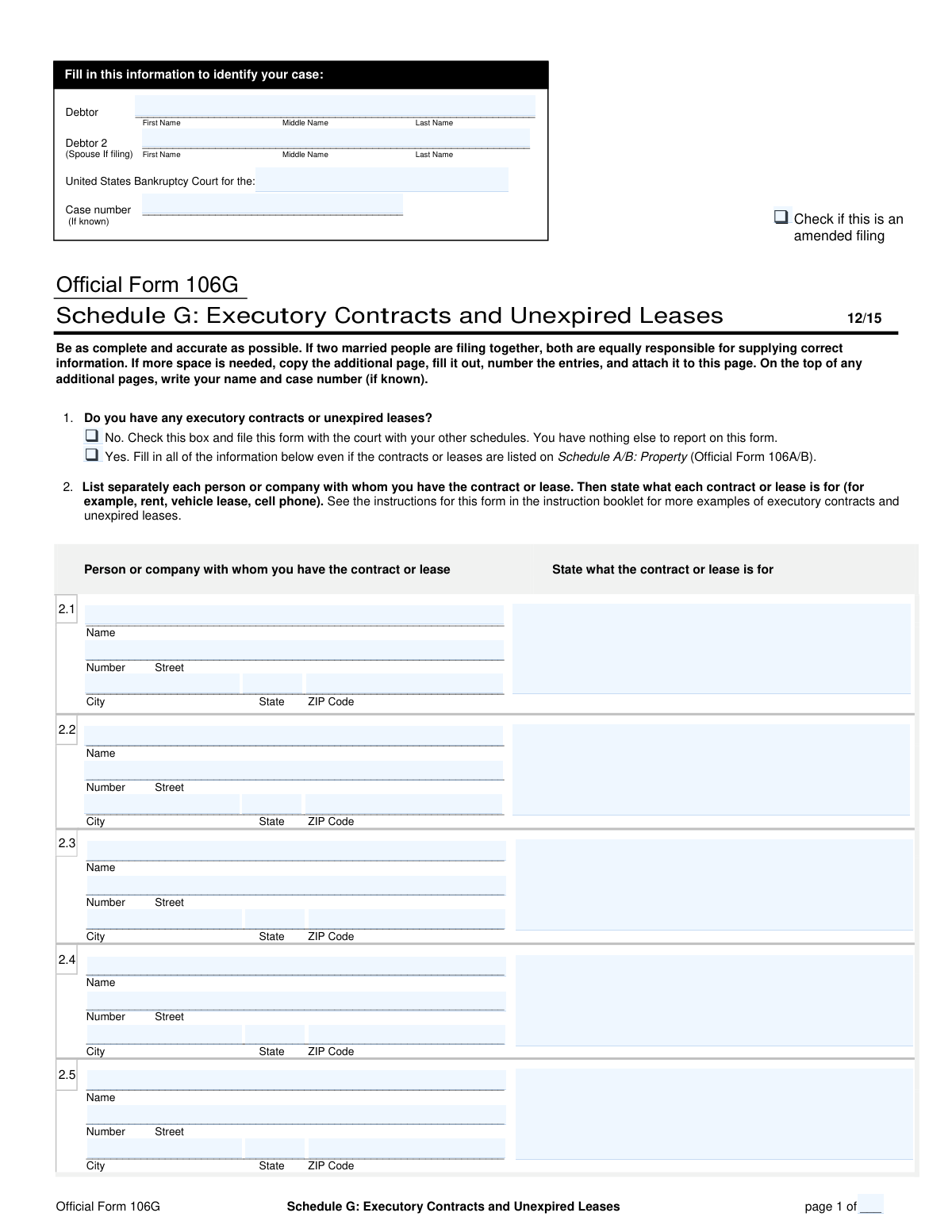
Official Form 106G, also known as Schedule G, is a required component of a bankruptcy filing where the debtor must disclose all their executory contracts and unexpired leases. An executory contract is one where both parties still have significant obligations to perform, such as a service agreement, while an unexpired lease could be for a car or residence. This disclosure is vital for the bankruptcy trustee to decide whether to assume, reject, or assign these agreements. Today, this form can be filled out quickly and accurately using AI-powered services like Instafill.ai, which can also convert non-fillable PDF versions into interactive fillable forms.
Our AI automatically handles information lookup, data retrieval, formatting, and form filling.
It takes less than a minute to fill out Official Form 106G using our AI form filling.
Securely upload your data. Information is encrypted in transit and deleted immediately after the form is filled out.
Form specifications
| Form name: | Official Form 106G, Schedule G: Executory Contracts and Unexpired Leases |
| Number of pages: | 2 |
| Filled form examples: | Form Official Form 106G Examples |
| Language: | English |
Instafill Demo: How to fill out PDF forms in seconds with AI
How to Fill Out Official Form 106G Online for Free in 2026
Are you looking to fill out a OFFICIAL FORM 106G form online quickly and accurately? Instafill.ai offers the #1 AI-powered PDF filling software of 2026, allowing you to complete your OFFICIAL FORM 106G form in just 37 seconds or less.
Follow these steps to fill out your OFFICIAL FORM 106G form online using Instafill.ai:
- 1 Navigate to Instafill.ai and upload your PDF or select Official Form 106G from the template library.
- 2 Provide your personal and case information at the top of the form, including debtor names, the bankruptcy court district, and the case number.
- 3 Indicate whether you have any executory contracts or unexpired leases by checking the 'Yes' or 'No' box in Part 1.
- 4 If you checked 'Yes', proceed to Part 2 and use the AI assistant to list each contract or lease, providing the name and address of the other party and a description of the agreement (e.g., vehicle lease, apartment rental).
- 5 If you have more contracts or leases than space allows on the first page, use the 'Add Attachment' feature to include additional pages.
- 6 Carefully review all the information populated by the AI to ensure it is accurate and complete.
- 7 Download, save, or print the completed Schedule G for filing with the bankruptcy court along with your other schedules.
Our AI-powered system ensures each field is filled out correctly, reducing errors and saving you time.
Why Choose Instafill.ai for Your Fillable Official Form 106G Form?
Speed
Complete your Official Form 106G in as little as 37 seconds.
Up-to-Date
Always use the latest 2026 Official Form 106G form version.
Cost-effective
No need to hire expensive lawyers.
Accuracy
Our AI performs 10 compliance checks to ensure your form is error-free.
Security
Your personal information is protected with bank-level encryption.
Frequently Asked Questions About Form Official Form 106G
Form 106G, also known as Schedule G, is used in a bankruptcy case to list all of your ongoing executory contracts and unexpired leases. This helps the court and trustee understand your current financial obligations.
Anyone filing for bankruptcy is required to file Schedule G. You must submit this form even if you have no contracts or leases to report.
Common examples include residential apartment leases, car leases, cell phone contracts, gym memberships, and equipment rental agreements. Any contract where both you and the other party still have obligations to perform should be listed.
If you have no executory contracts or unexpired leases, simply check the 'No' box in question 1. You must still file the form with the court along with your other schedules.
Yes, the instructions specify that you must list all executory contracts and unexpired leases on this form, even if they are also listed on Schedule A/B: Property.
For each item, you must provide the full name and address of the person or company you have the agreement with. You also need to briefly describe what the contract or lease is for, such as 'car lease' or 'apartment rent'.
If you run out of space, you can copy the 'Additional Page' of the form. Fill out the extra page with the remaining contracts, number the entries, and attach it to the main Schedule G, making sure to include your name and case number.
If you are filing a joint petition, you should list all executory contracts and unexpired leases for both spouses on a single Schedule G. Both parties are equally responsible for ensuring the information is accurate.
Check the 'amended filing' box if you are filing this form to correct or add information to a Schedule G that you previously submitted to the court. This indicates that it is a revised version.
You must file the completed Schedule G with the U.S. Bankruptcy Court for the district where you are filing your case. It should be submitted as part of your complete package of bankruptcy forms.
Yes, services like Instafill.ai use AI to help you fill out forms accurately and quickly. These tools can auto-fill form fields, saving you time and helping to prevent common errors.
To use Instafill.ai, upload the Form 106G PDF to their platform. The AI will make the form interactive, allowing you to easily type your information into the fields and then download the completed document.
If you have a non-fillable or 'flat' PDF, you can use a service like Instafill.ai. Their platform can convert the static document into an interactive, fillable form that you can complete on your computer.
Compliance Official Form 106G
Validation Checks by Instafill.ai
1
Debtor 1 Name Is Required
This check ensures that the 'Debtor 1' full name field is not empty. The debtor's name is the primary identifier for the entire bankruptcy case, and its absence would make the form legally invalid and impossible to process. If this field is left blank, the submission will be rejected, and the user will be prompted to provide their full legal name.
2
Court District Is Required
This validation verifies that the 'District of' field in the header is completed. This information specifies the legal jurisdiction for the bankruptcy filing, which is critical for routing the document to the correct court. A missing district would lead to processing delays or rejection, so the form cannot be submitted until a valid district is entered.
3
Exclusive Selection for Contract Status
This check ensures that for Question 1, either the 'Yes' or 'No' checkbox is selected, but not both. These options are mutually exclusive and determine how the rest of the form should be filled out. An invalid selection, such as checking both or neither, creates ambiguity and prevents the system from knowing whether to expect contract details, so the user must correct the selection before proceeding.
4
Conditional Requirement for Contract Details
This validation enforces a logical rule that if the 'Yes' box is checked for Question 1, at least the first contract entry (2.1) must be completely filled out. This ensures that a 'Yes' answer is substantiated with the required details. If this condition is not met, the form is considered incomplete, and the user will be prompted to either provide contract details or change their answer to 'No'.
5
No Contract Details if 'No' is Selected
This is a logical consistency check that verifies if the 'No' box is checked in Question 1, all contract detail fields in Section 2 must be empty. This prevents contradictory information where a user claims to have no contracts but provides details for one. If any contract data is present, the user will be prompted to either clear the data or change their answer in Question 1 to 'Yes'.
6
Contract Entry Integrity
This check verifies that for any given contract entry (e.g., 2.1, 2.2), if any single field is filled out, then all fields for that entry (Name, Description, and full Address) must be completed. This prevents the submission of partial or incomplete contract records, which are unusable by the court. Failure to provide all required information for an entry will trigger an error, highlighting the incomplete section.
7
Valid ZIP Code Format
This validation ensures that any entered ZIP Code conforms to the standard 5-digit or 9-digit (ZIP+4) format, such as '12345' or '12345-6789'. Accurate ZIP codes are essential for ensuring legal notices and other correspondence are mailed to the correct address. An invalid format will trigger an error, requiring the user to correct the entry before submission.
8
Valid State Abbreviation
This check validates that any entered State field contains a valid, 2-letter US state or territory abbreviation (e.g., CA, NY, TX). Using standardized abbreviations is crucial for address validation and mail delivery. Submitting an invalid or misspelled state could result in failed communication, so the system will reject non-standard entries and prompt for correction.
9
Case Number Required for Amended Filings
This rule ensures that if the 'Amended Filing' checkbox is checked, the 'Case number' field must be filled. An amended document modifies a previously submitted filing, which can only be identified by its unique case number. Without the case number, the court cannot associate the amendment with the correct file, so the submission is blocked until the number is provided.
10
Consistent Page Numbering
This check verifies the pagination fields ('page X of Y') across all submitted pages. The total number of pages ('Y') must be consistent on every page and must be greater than or equal to the current page number ('X'). This ensures that the court receives the complete document and can verify that no pages are missing.
11
Contract Description Is Required for Each Entry
For every contract/lease entry that is filled out, this validation ensures the 'State what the contract or lease is for' field is not blank. This description is vital for the court and trustees to understand the nature of the debtor's obligations, such as a 'car lease' or 'apartment rent'. A missing description makes the entry ambiguous, so the form will be flagged as incomplete until the purpose of the contract is provided.
12
Contract Party Name Is Required for Each Entry
This check confirms that for every contract/lease entry provided, the 'Name' of the other person or company is filled in. A contract cannot be identified or processed without knowing the parties involved. This is a fundamental piece of information, and its absence would render the entry invalid, preventing form submission until the name is supplied.
Common Mistakes in Completing Official Form 106G
Filers often narrowly interpret 'executory contracts,' listing only major items like apartment or car leases. They frequently forget to include ongoing agreements like cell phone plans, internet service, gym memberships, or storage unit rentals. This omission provides an incomplete financial picture, which can lead to questions from the trustee and delays in the bankruptcy case.
In the field 'State what the contract or lease is for,' filers often provide generic descriptions like 'lease' or 'phone.' This lacks the necessary detail for the trustee to understand the nature and terms of the obligation, potentially leading to follow-up inquiries. To avoid this, be specific, for example, 'Vehicle lease for 2022 Toyota Camry' or 'Verizon family cell phone plan'.
Filers may list an informal name for the other party, such as 'my landlord' or 'the cable company,' instead of the full legal name of the business (e.g., 'Main Street Properties, LLC'). This makes it difficult for the court and trustee to properly identify and notify the creditor, which can cause significant legal and administrative problems. Always refer to a recent bill or the original contract to find the exact legal name.
The form requires the full mailing address for each contract party, but filers often omit suite numbers, use outdated information, or enter incorrect ZIP codes. An inaccurate address can result in the creditor not receiving important legal notices, potentially jeopardizing parts of the bankruptcy proceeding. To prevent this, verify the address using a recent statement, and consider using AI-powered form filling tools like Instafill.ai that can help validate addresses for completeness and correct formatting.
A frequent error is checking the 'No' box in question 1 (indicating no contracts) but then proceeding to list contracts in section 2, or vice-versa. This contradiction confuses the court and trustee, which can cause the form to be rejected or require a time-consuming amendment. Always double-check that your answer to question 1 accurately reflects whether you have listed any contracts below.
People often forget to fill in their full name, the correct bankruptcy district, or the case number at the top of every page. This information is crucial for associating the schedule with the correct bankruptcy file, especially if pages become separated. Any omission can lead to filing errors and administrative delays, so it's vital to ensure this data is present and consistent across all documents.
The form requires filers to indicate the current page and the total number of pages (e.g., 'page 1 of 3'). Filers often leave this blank or incorrectly write 'page 1 of 1' even when they have attached additional pages. This creates uncertainty about whether the filing is complete and can lead to the trustee questioning the submission. Always count all pages of Schedule G, including addendums, and fill in the page numbers accurately on every single page.
When more space is needed, filers must use a copy of the official additional page and continue the numbering sequence (e.g., 2.6, 2.7). A common mistake is attaching a blank sheet of paper with a handwritten list or restarting the numbering at '2.1' on the new page. This non-standard formatting can cause the information to be overlooked or rejected, so it is critical to use the proper continuation page.
When a form is only available as a non-fillable PDF, filers may resort to handwriting, which can be illegible. Unclear text can cause data entry errors by the court clerk or make it impossible for the trustee to identify creditors, leading to rejected filings. To ensure clarity, use a tool like Instafill.ai, which can convert flat PDFs into easily fillable digital forms that can be completed with clear, typed text.
Saved over 80 hours a year
“I was never sure if my IRS forms like W-9 were filled correctly. Now, I can complete the forms accurately without any external help.”
Kevin Martin Green
Your data stays secure with advanced protection from Instafill and our subprocessors

Robust compliance program
Transparent business model
You’re not the product. You always know where your data is and what it is processed for.
ISO 27001, HIPAA, and GDPR
Our subprocesses adhere to multiple compliance standards, including but not limited to ISO 27001, HIPAA, and GDPR.
Security & privacy by design
We consider security and privacy from the initial design phase of any new service or functionality. It’s not an afterthought, it’s built-in, including support for two-factor authentication (2FA) to further protect your account.
Fill out Official Form 106G with Instafill.ai
Worried about filling PDFs wrong? Instafill securely fills official-form-106g-schedule-g-executory-contracts-and-unexpired-leases forms, ensuring each field is accurate.



