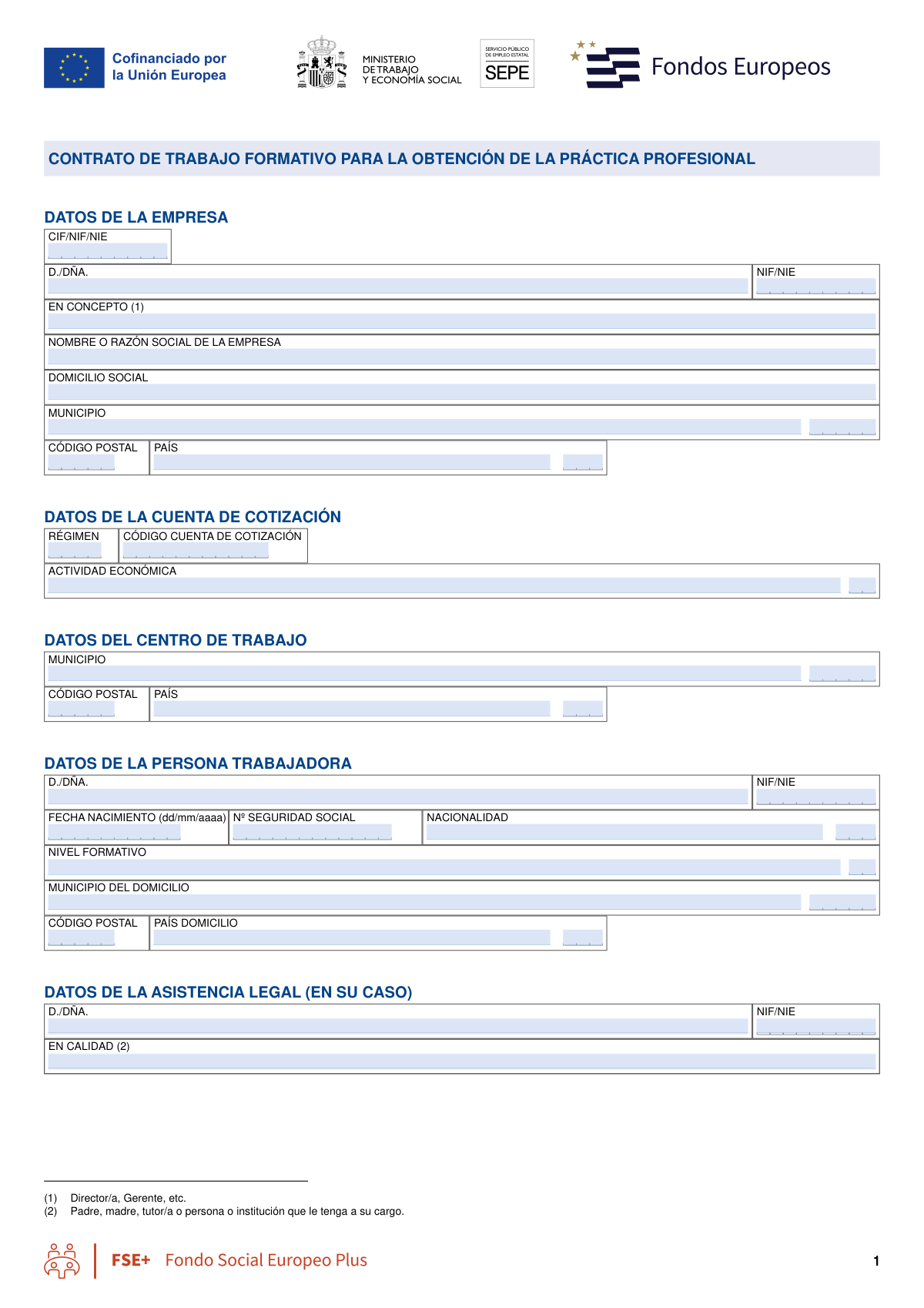
Yes! You can use AI to fill out Contrato de Trabajo en Prácticas (Código 420), Professional Practice Employment Contract

The Contrato de Trabajo en Prácticas (Código 420) is a specific type of Spanish employment contract designed for individuals who have obtained a university degree, vocational training certificate, or equivalent qualification. This agreement formalizes a temporary work relationship, allowing the employee to gain practical professional experience corresponding to their level of study. It is essential for ensuring the employment arrangement complies with Spanish labor regulations and for defining the rights and obligations of both the employer and the employee. Today, this form can be filled out quickly and accurately using AI-powered services like Instafill.ai, which can also convert non-fillable PDF versions into interactive fillable forms.
Contrato de Trabajo en Prácticas (420) is part of the ABA forms, contract forms, employment contract forms, employment forms, HR forms, internship forms, Spanish work forms and ATO forms categories on Instafill.
Our AI automatically handles information lookup, data retrieval, formatting, and form filling.
It takes less than a minute to fill out Contrato de Trabajo en Prácticas (420) using our AI form filling.
Securely upload your data. Information is encrypted in transit and deleted immediately after the form is filled out.

Form specifications

Form name: Contrato de Trabajo en Prácticas (Código 420), Professional Practice Employment Contract
Number of fields: 117
Number of pages: 9
Language: English
main-image

Instafill Demo: How to fill out PDF forms in seconds with AI

How to Fill Out Contrato de Trabajo en Prácticas (420) Online for Free in 2026

Are you looking to fill out a CONTRATO DE TRABAJO EN PRÁCTICAS (420) form online quickly and accurately? Instafill.ai offers the #1 AI-powered PDF filling software of 2026, allowing you to complete your CONTRATO DE TRABAJO EN PRÁCTICAS (420) form in just 37 seconds or less.
Follow these steps to fill out your CONTRATO DE TRABAJO EN PRÁCTICAS (420) form online using Instafill.ai:
  1. 1 Navigate to Instafill.ai and upload your Contrato de Trabajo en Prácticas form, or select it from their template library.
  2. 2 Provide the company's details, including its tax ID (CIF/NIF), legal name, registered address, and Social Security contribution account code (CCC).
  3. 3 Enter the employee's personal and professional information, such as their full name, tax ID (NIF/NIE), date of birth, Social Security number, nationality, and educational qualifications.
  4. 4 Specify the details of the employment agreement, including the job position, professional group, work center address, and whether the work is full-time, part-time, or remote.
  5. 5 Complete the declarations section, indicating if the employee has a recognized disability to apply for social security bonuses and providing details about their completed studies.
  6. 6 Use the AI assistant to review all entered information for accuracy and completeness before the legal representative and the employee sign the document.
  7. 7 Download, print, or securely share the completed and signed contract directly from the platform for official registration and record-keeping.

Our AI-powered system ensures each field is filled out correctly, reducing errors and saving you time.

Why Choose Instafill.ai for Your Fillable Contrato de Trabajo en Prácticas (420) Form?

Speed

Complete your Contrato de Trabajo en Prácticas (420) in as little as 37 seconds.

Up-to-Date

Always use the latest 2026 Contrato de Trabajo en Prácticas (420) form version.

Cost-effective

No need to hire expensive lawyers.

Accuracy

Our AI performs 10 compliance checks to ensure your form is error-free.

Security

Your personal information is protected with bank-level encryption.

Frequently Asked Questions About Form Contrato de Trabajo en Prácticas (420)

This form is an employment contract, likely for professional practice, used to formalize the working relationship, terms, and conditions between a company and a new employee in Spain.

The employer is responsible for completing the form with the company's information and the details provided by the employee. Both the company's legal representative and the worker must review and sign the final document.

The 'domicilio social' is the company's official registered address for legal purposes, while the 'centro de trabajo' is the actual physical location where the employee will perform their job.

The CCC is the Social Security Contribution Account Code, a unique number assigned to a company by the Spanish Social Security system to manage employee contributions. It is required for hiring employees.

In this field, you should specify the role or capacity in which the person is signing for the company, for example, 'Administrador' (Director) or 'Apoderado' (Legal Representative).

Check the 'A tiempo parcial' box, then specify the number of hours to be worked (per day, week, month, or year) and describe the work schedule. You must also indicate if there is an agreement for complementary hours by checking 'Sí' or 'NO'.

You must enter the official name of the university degree or vocational training certificate ('Título universitario'), the date the studies were completed ('Fecha de finalización de estudios'), and the corresponding professional group or level.

You must check the box 'Que el/la trabajador/a es persona con discapacidad' and provide the name of the entity that issued the disability certificate. This is important as it may qualify the contract for social security bonuses.

This section is optional and should only be filled out if a legal professional, such as a lawyer or official representative, is present and assisting with the formalization of the contract.

Yes, you can use AI-powered services like Instafill.ai to auto-fill form fields accurately using your saved information, which helps save time and prevent common errors.

Simply upload the form's PDF to the Instafill.ai platform. The AI will make the document fillable online, allowing you to type directly into the fields or use the auto-fill feature to complete it quickly.

Services like Instafill.ai can convert non-fillable or 'flat' PDFs into interactive, fillable forms. Just upload your document, and the platform will make it easy to complete and sign digitally.

Compliance Contrato de Trabajo en Prácticas (420)
Validation Checks by Instafill.ai

1
Spanish Tax ID (NIF/NIE/CIF) Format Validation
This check verifies that the Company Tax ID, Representative Tax ID, and Worker's Tax ID fields adhere to the official Spanish formats for NIF, NIE, or CIF. It validates the structure, character types, and control digits to ensure accuracy. Incorrect tax IDs can lead to rejection by government agencies and cause significant delays in processing.
2
Company Contribution Account Code (CCC) Format
This validation ensures the 'Código de cuenta de cotización' (CCC) follows the strict format required by the Spanish Social Security system, typically PP NNNNNNNNN DD. It checks the province code, the main number, and the two control digits for correctness. An invalid CCC will prevent the company from correctly registering the employee and making social security contributions.
3
Worker's Social Security Number (NUSS) Format
This check validates that the 'Número de la Seguridad Social' for the worker is entered in the correct format, including the province code, a unique number, and control digits. This number is essential for linking the worker to their social security history and benefits. Failure to provide a valid number will block the registration process.
4
Worker's Minimum Age Verification
This validation uses the 'Fecha de nacimiento' (Date of birth) to calculate the worker's age and confirm they meet the legal minimum age for employment. This is a critical compliance check to prevent child labor and ensure the contract is legally valid. If the worker is underage, the form submission should be blocked with a clear error message.
5
Work Type Mutual Exclusivity
This check ensures that the user has selected either 'A tiempo completo' (Full-time) or 'A tiempo parcial' (Part-time), but not both. These options are mutually exclusive and define the fundamental nature of the work contract. Selecting both or neither would create an ambiguous and invalid contract status.
6
Conditional Requirement for Full-Time Details
This validation rule is triggered if 'A tiempo completo' (Full-time) is selected. It verifies that the 'Weekly working hours', 'Daily work start time', and 'Daily work end time' fields are all filled out. These details are mandatory for defining a full-time work schedule and their absence would make the contract incomplete.
7
Conditional Requirement for Part-Time Details
If 'A tiempo parcial' (Part-time) is selected, this check ensures that the 'Part-time ordinary working hours (quantity)' and 'Distribution of working time' fields are completed. It also confirms that one of the hour units ('al día', 'al mes', etc.) is selected. Without this information, the part-time arrangement is undefined and legally non-compliant.
8
Part-Time Hours Unit Single Selection
When a contract is 'A tiempo parcial' (Part-time), this validation ensures that exactly one of the checkboxes for the time unit ('Horas al día', 'Horas a la semana', 'Horas al mes', 'Horas al año') is selected. This is crucial for correctly interpreting the value entered in 'Part-time ordinary working hours'. Selecting none or more than one unit would make the specified hours ambiguous.
9
Full-Time Work Schedule Logic
For a full-time contract, this check verifies that the 'Daily work end time' is chronologically later than the 'Daily work start time'. This simple logical validation prevents data entry errors that would result in an impossible work schedule. An invalid time range would require manual correction and could cause confusion.
10
Address Component Consistency
This validation cross-references the 'Postal code', 'Municipality', and 'Province / region' fields for the company's registered address. It checks if the provided postal code corresponds to the given municipality and province based on official geographic data. This ensures the address is valid and deliverable, which is critical for official correspondence.
11
Conditional Disability Information Requirement
This rule activates if the 'Que el/la trabajador/a es persona con discapacidad' checkbox is marked 'Yes'. It then validates that the 'Entidad emisora de la certificación de discapacidad' field is not empty. This information is required to process any associated social security bonuses or accommodations, and its absence would make the declaration incomplete.
12
Study Completion Date Validity
This check ensures the 'Fecha de finalización de estudios' is a logical and valid date. It must be a date in the past, and it must occur after the worker's date of birth. This validation prevents nonsensical data entry and confirms the timeline of the worker's qualifications is plausible.
13
Workplace Address Completeness
This validation ensures the 'First Clause - Workplace address' field is properly filled out. This address defines the primary location where the employee will perform their duties and is a fundamental term of the employment contract. An empty or incomplete workplace address makes the contract ambiguous and may be legally insufficient.

Common Mistakes in Completing Contrato de Trabajo en Prácticas (420)

Confusing Registered Address with Workplace Address

Users often incorrectly enter the physical workplace address in the 'Registered address (domicilio social)' field. The 'domicilio social' is the company's official legal address on record, which may differ from the 'centro de trabajo' where the employee will physically work. This error can lead to legal notices being sent to the wrong location and cause administrative discrepancies. To avoid this, always verify the company's official registered address from legal documents and enter the separate workplace address only in the 'Centro de Trabajo' and 'First Clause - Workplace address' fields.

Incorrectly Filling Out Work Schedule Sections

A frequent mistake is selecting both 'A tiempo completo' (Full-time) and 'A tiempo parcial' (Part-time), or filling in details for the wrong work type. For example, entering weekly hours in the full-time section after checking the part-time box. This creates a contractual contradiction and will cause the form to be rejected. Carefully select only one work type and fill only the corresponding fields as indicated by the instructions. AI-powered tools can help by disabling irrelevant sections based on your selection, preventing such logical errors.

Entering Incorrect or Incomplete Identification Numbers (NIF/NIE/CIF)

Typos or formatting errors in the 'Company tax ID (CIF)', 'Representative tax ID (NIF/NIE)', or 'NIF/NIE del trabajador/a' are very common. Users may forget the initial or final letter, use incorrect separators, or mix up the company's ID with the representative's personal ID. An incorrect ID will invalidate the form and cause significant delays in processing with tax authorities and Social Security. Always double-check these numbers against official documents and ensure the complete, exact format is used. AI form-filling tools like Instafill.ai can validate the format of these numbers to catch errors instantly.

Using Descriptive Text Instead of Official Codes

Fields like 'Código de actividad económica', 'Código de cuenta de cotización (CCC)', and 'Nivel formativo - código' require specific alphanumeric codes, not descriptive text. Users who don't know the code often write 'Marketing', 'University Degree', or leave it blank. This leads to processing failures as automated systems cannot interpret the text. To prevent this, consult official company documentation or the relevant public body for the correct codes before filling out the form. Instafill.ai can help by auto-populating these codes based on other company information.

Incomplete Social Security Contribution Account Code (CCC)

The 'Código de cuenta de cotización (CCC)' is a long, structured number that is often entered incorrectly. People may miss digits, especially leading zeros, or fail to include the correct separators, rendering the number invalid. An incorrect CCC will prevent the employee from being correctly registered with Social Security, leading to compliance issues and potential fines. It is crucial to copy this number exactly as it appears on official Social Security documents. Using a tool that saves and reuses this information can eliminate manual entry errors.

Using a Trade Name Instead of the Full Legal Company Name

In the 'Company name / business name' field, people often enter the company's well-known brand or trade name instead of its official legal name ('razón social'). Legal contracts and government forms require the full, registered legal entity name for the document to be valid. Using a trade name can lead to the contract being voided or rejected by administrative bodies. Always refer to the company's articles of incorporation or tax registration documents to find the correct legal name.

Omitting the Legal Representative's Official Capacity

The 'Representative capacity (En concepto)' field is frequently left blank or filled with a generic term like 'Director' instead of the specific legal title such as 'Administrador Único' or 'Apoderado'. This detail is legally significant as it confirms the individual's authority to sign on behalf of the company. An omission or incorrect entry can call the contract's validity into question. The precise capacity should be obtained from the company's power of attorney documents or commercial registry records.

Inconsistent Information Across Redundant Fields

This form asks for the workplace address in two different sections: 'Centro de Trabajo' and 'First Clause - Workplace address'. Users sometimes enter slightly different or conflicting information in these fields, creating ambiguity. This inconsistency can cause confusion regarding the employee's official place of work. To avoid this, ensure the information entered in all related fields is identical. Using an AI form filler like Instafill.ai can ensure consistency by populating related fields automatically after the first entry.

Incorrectly Handling Conditional Declaration Fields

The form contains conditional fields within the 'DECLARAN' section, such as 'Entidad emisora de la certificación de discapacidad', which should only be filled if the disability checkbox is marked. A common error is to either ignore this field when required or fill it out when it's not applicable. This can lead to incorrect benefit applications or data processing errors. Pay close attention to instructions like 'Fill only if...' to ensure data is entered correctly based on your checkbox selections.

Vague Description of Part-Time Work Distribution

When 'A tiempo parcial' is selected, the 'Distribution of working time' field requires a clear description of the work schedule. Users often provide vague information like 'mornings only' instead of specifying the exact days, start/end times, or weekly pattern as required by the collective agreement. This ambiguity can lead to future disputes between the employer and employee. The schedule must be defined precisely, and the corresponding unit of time ('Horas al día', 'a la semana', etc.) must also be checked. If the form is a non-fillable PDF, a tool like Instafill.ai can convert it into a fillable version, making it easier to enter detailed text.
Saved over 80 hours a year

“I was never sure if my IRS forms like W-9 were filled correctly. Now, I can complete the forms accurately without any external help.”

Kevin Martin Green

Your data stays secure with advanced protection from Instafill and our subprocessors

Robust compliance program

Transparent business model

You’re not the product. You always know where your data is and what it is processed for.

ISO 27001, HIPAA, and GDPR

Our subprocesses adhere to multiple compliance standards, including but not limited to ISO 27001, HIPAA, and GDPR.

Security & privacy by design

We consider security and privacy from the initial design phase of any new service or functionality. It’s not an afterthought, it’s built-in, including support for two-factor authentication (2FA) to further protect your account.

Fill out Contrato de Trabajo en Prácticas (420) with Instafill.ai

Worried about filling PDFs wrong? Instafill securely fills contrato-de-trabajo-en-prcticas-cdigo-420-professional-practice-employment-contract forms, ensuring each field is accurate.

Related forms by category

ABA forms Form BHVH, Outpatient Behavioral Health – ABA Treatment Request, ABA Authorization Request (Medi-Cal) – Initial and Concurrent Requests, MetroPlusHealth Applied Behavior Analysis (ABA) Universal ABA Request Form, Alabama Medicaid Agency ABA Therapy Assessment Form (6/20/19) — Behavior Assessment and Treatment Request (CPT 97151) for Applied Behavioral Analysis for Autism Spectrum Disorder, Applied Behavioral Analysis (ABA) Prior Authorization Request Form (Health Net Behavioral Health Autism Center), Applied Behavior Analysis (ABA) Initial Assessment Request, Applied Behavioral Analysis (ABA) Prior Authorization Request Form (Coordinated Care), Applied Behavioral Analysis (ABA) Prior Authorization Form (New Hampshire), Health Net Applied Behavioral Analysis (ABA) Recommendation and Referral Form (24-989), Applied Behavioral Analysis (ABA) Authorization Form, Louisiana Health Connect (BRO-DP-ABA FORM-0822), Applied Behavior Analysis (ABA) Therapy Request Form, Blue Shield of California Prior Authorization Request Form for Applied Behavioral Analysis (ABA) – Commercial Products, Form 5385BSP, Behavioral Health Utilization Management Applied Behavioral Analysis (ABA) Initial Request Form, Evernorth Applied Behavior Analysis (ABA) Prior Authorization Form, Outpatient Behavioral Health (BH) – ABA Treatment Request: Required Information for Precertification (GR-69017-4), Arkansas Medicaid Applied Behavioral Analysis (ABA) Authorization Request, Highmark Health Options Applied Behavioral Analysis (ABA) Prior Authorization Request Form, CareSource PASSE Applied Behavior Analysis (ABA) Prior Authorization Request Form, Applied Behavior Analysis (ABA) Initial Assessment Request and Clinical Service Request Form – Blue Cross and Blue Shield of Illinois (BCBSIL), 1199SEIU Benefit Funds Applied Behavior Analysis (ABA) Prior Authorization Form · + 13 more →
contract forms Memorandum of Contract, Form WH-347, Payroll for Contractors, Form 0896A, Report of Subcontracts to Small and Veteran-Owned Business, Form 1449, Solicitation/Contract/Order for Commercial Products and Services, Application and Contract for Electric Facilities Where Full Advance Payment Is Required (Temporary Service) — Southern California Edison (SCE CSD 274), Texas Real Estate Commission (TREC) One to Four Family Residential Contract (Resale) (TREC No. 20-18), DBPR CILB 6-B, Application for Certified Building Contractor Who is Qualifying a Business, State of Hawaii Department of Commerce and Consumer Affairs (DCCA) Contractors License Board – Application for Contractor's License (Sole Proprietor) (CT-36) with supporting forms (Experience Certificate CT-03, Contractors Financial Statement CT-02, and Chronological History of Projects/Project List), NJ Department of Labor & Workforce Development Form MW-562, Payroll Certification for Public Works Projects (Contractor and Subcontractor’s Weekly and Final Certification), DBPR CILB 6-A, Application for Certified General Contractor Who is Qualifying a Business, Proposal Form 3, Attestation Regarding County Contract, TIAA Trust, N.A. Private Asset Management, Request for a Direct Transfer From IRA Contracts, State of California Department of Transportation Darfur Contracting Act Certification, Form DOT ADM-0077, State of California Department of Transportation, Contract Requirements, State of California Department of Transportation Subcontractor List, DCMA Guidebook for Government Contract Property Administration, Form 1099-R, Distributions From Pensions, Annuities, Retirement or Profit-Sharing Plans, IRAs, Insurance Contracts, etc., Official Form 106G, Schedule G: Executory Contracts and Unexpired Leases, Form ADR-106, Petition to Confirm, Correct, or Vacate Contractual Arbitration Award, Newly Contracted Provider Training Attestation Form · + 6 more →
employment contract forms Form MC 292, Disclosure of Employment or Contract in Michigan School System
employment forms Form I-9, Employment Eligibility Verification, Form I-765, Application for Employment Authorization, Form ETA-9089, Application for Permanent Employment Certification, Form CMS L564, Request for Employment Info, Form OF-306, Declaration for Federal Employment, Form NYS DHR, Employment Complaint Form, Form AO 78, Application for Employment, Illinois State Board of Education (ISBE) Application for Employment (ISBE 61-08), Form SS-8 (Rev. December 2023), Determination of Worker Status for Purposes of Federal Employment Taxes and Income Tax Withholding, Prudential Group Disability Insurance – Education and Employment History Form (GL.2009.009, Ed. 06/2017), HR-Pol-Rec&Res-04 Employment Application Form (Recruitment of Permanent Employees), City of Carlinville Application for Employment (An Equal Opportunity Employer), U.S. Equal Employment Opportunity Commission (EEOC) Form 453, Recommendation for Recognition, The Prudential Insurance Company of America Group Disability Insurance – Education and Employment History Form (GL.2009.009, Ed. 06/2017), St. Paul’s Hospital Application for Employment (職位申請表) – SPHF-HRD-035, U.S. Equal Employment Opportunity Commission (EEOC) Form 453, Recommendation for Recognition, Prudential Group Disability Insurance – Education and Employment History Form (GL.2009.009, Ed. 06/2017), Claim for Special Employment Advance (SU514), New York State Employment Application: Part 1 – Pre-Interview (Form #S1000), New York State Employment Application Form · + 36 more →
HR forms U.S. Equal Employment Opportunity Commission (EEOC) Form 453, Recommendation for Recognition, U.S. Equal Employment Opportunity Commission (EEOC) Form 453, Recommendation for Recognition, EzB – Erklärung zum Beschäftigungsverhältnis (02/2024), New York State Employment Application Form, A Place for Mom 401(k) Plan Request for Rollover Contribution Form, ADP Compensation and Fee Disclosure Statement, ADP Leave Management Application for Leave of Absence, ADP Retirement Services Beneficiary Designation Form, ADP Year-End Seminar Handout Manual, AeroVironment Profit Sharing and Salary Deferral 401(k) Plan In-Service Withdrawal Form, Albany Medical Center 2024 Benefits Guide, Authorization Agreement for Direct Deposit, Beneficiary Designation 401(k) Plan, ENVIRONMENTAL MONITORING LABORATORY, LLC Employment Application, Earnings and Deductions Quick Reference, Employee Direct Deposit Banking Authorization Form (RUN Powered by ADP®), Employee’s Frequently Asked Questions: Leave of Absence, Form 2938, Hardship Withdrawal Request, Form I-9, Employment Eligibility Verification, Group Life Conversion FAQ Sheet · + 68 more →
ATO forms Form 501A, Fantasy Contest Operator Personal Information Form (Commonwealth of Virginia, VDACS Office of Charitable & Regulatory Programs), Régie du logement Mandatory Form – LEASE of a Dwelling, Formato Solicitud de Afiliación (Persona Natural) – Cooperativa de Ahorro y Crédito Universidad Santo Tomás (USTACOOP), FDA Form 1572, Statement of Investigator, Form DE-160/GC-040, Inventory and Appraisal (Declaration of Representative/Guardian/Conservator or Small Estate Claimant and Declaration of Probate Referee), Tesorería General de la Seguridad Social (TGSS) — Mandato / Orden de domiciliación de adeudos directos SEPA para el pago de cuotas de la Seguridad Social (TC 1/15-3, 06-2022), California Department of Social Services Form RFA 07 (2/18), Resource Family Approval (RFA) Health Questionnaire (Mandatory), Dallas Area Rapid Transit Police Department Personal History Statement (Peace Officer / Telecommunicator), Fidelity Change of Account Ownership — Mutual Fund Only Accounts (Changing to a Trust, Estate, Guardian, or Conservator Account), Fidelity Change of Account Registration — Changing to a Trust, Estate, Guardian, or Conservator Brokerage Account, ENVIRONMENTAL MONITORING LABORATORY, LLC Employment Application, Distribution Due to Death for Spouse Beneficiary - Elevator Constructors Union Local No. 1 Annuity and 401(k) Fund, Elevator Constructors Union Local No.1 Annuity and 401(k) Fund Distribution Request Due to Qualified Domestic Relations Order, Incoming Rollover Election for Elevator Constructors Annuity and 401(k) Retirement Plan, Mandatory Distribution Processing Authorization, Alberta Precision Laboratories General Laboratory Requisition (Form 21302), Contrato de Trabajo Indefinido, Anthem Blue Cross Respiratory Syncytial Virus Enrollment Form, Formato de Inscripción al Registro Federal De Contribuyentes a Través de Oficina Virtual, Form CMS-209, CLIA Laboratory Survey Report Form · + 14 more →