Yes! You can use AI to fill out Memorandum of Contract
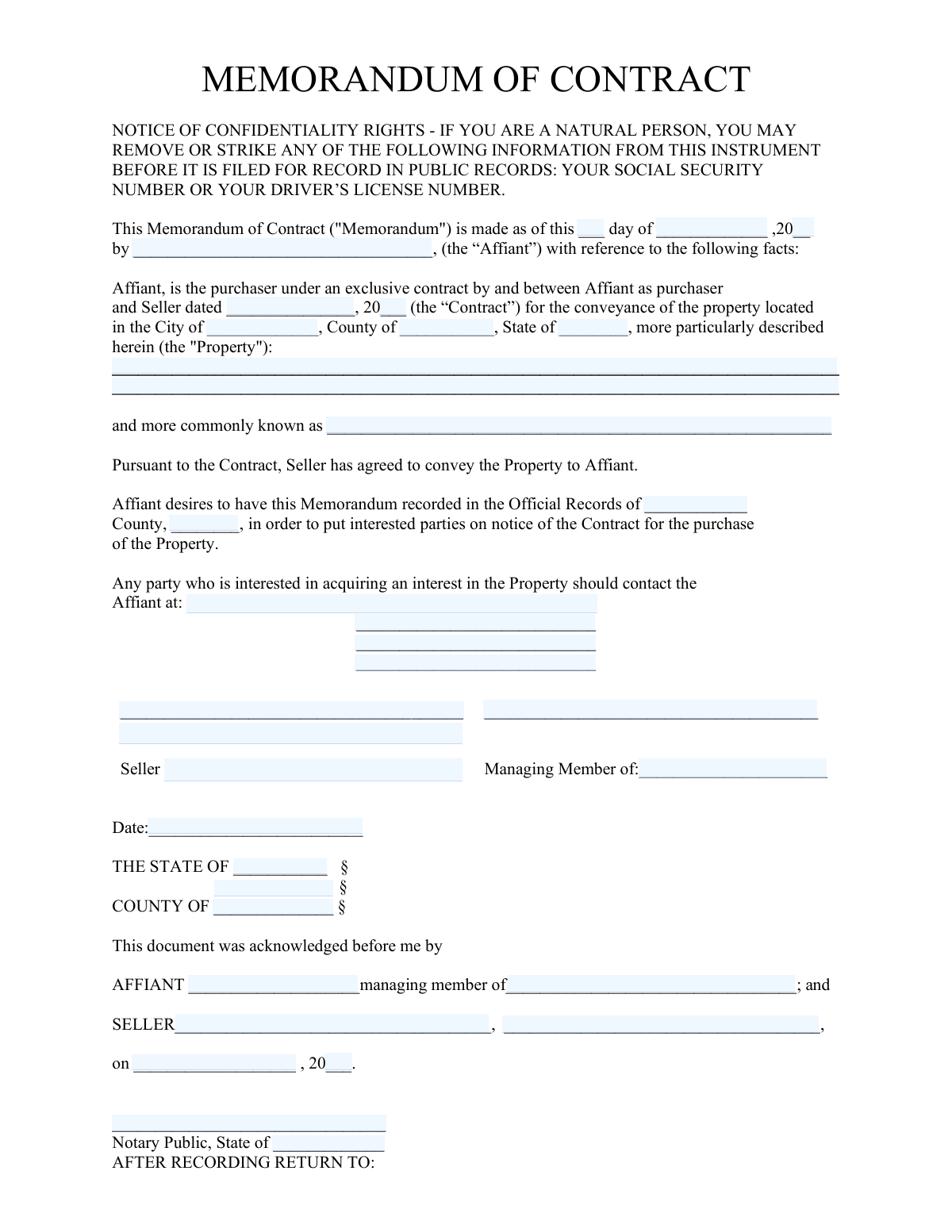
A Memorandum of Contract is a legally binding document recorded in public records to provide notice that a specific property is under contract for sale. It clouds the property's title, preventing the seller from selling it to another party while the original contract is in effect, thereby protecting the buyer's equitable interest. Today, this form can be filled out quickly and accurately using AI-powered services like Instafill.ai, which can also convert non-fillable PDF versions into interactive fillable forms.
Our AI automatically handles information lookup, data retrieval, formatting, and form filling.
It takes less than a minute to fill out Memorandum of Contract using our AI form filling.
Securely upload your data. Information is encrypted in transit and deleted immediately after the form is filled out.
Form specifications
| Form name: | Memorandum of Contract |
| Number of pages: | 2 |
| Language: | English |
Instafill Demo: How to fill out PDF forms in seconds with AI
How to Fill Out Memorandum of Contract Online for Free in 2026
Are you looking to fill out a MEMORANDUM OF CONTRACT form online quickly and accurately? Instafill.ai offers the #1 AI-powered PDF filling software of 2026, allowing you to complete your MEMORANDUM OF CONTRACT form in just 37 seconds or less.
Follow these steps to fill out your MEMORANDUM OF CONTRACT form online using Instafill.ai:
- 1 Navigate to Instafill.ai and upload or select the Memorandum of Contract form.
- 2 Provide the key dates for the memorandum and the original purchase contract, along with the full names of the buyer (Affiant) and the seller.
- 3 Enter the complete legal description of the property, its common street address, and the city, county, and state where it is located.
- 4 Specify the county and state where the memorandum will be officially recorded and input the Affiant's contact information.
- 5 Use the AI to review all entered information for accuracy, including names, dates, property details, and recording jurisdictions.
- 6 Electronically or physically sign the document in the designated fields for the Affiant and Seller, and complete the notarization sections.
- 7 Download the finalized, notarized document, ready for submission to the appropriate county recorder's office.
Our AI-powered system ensures each field is filled out correctly, reducing errors and saving you time.
Why Choose Instafill.ai for Your Fillable Memorandum of Contract Form?
Speed
Complete your Memorandum of Contract in as little as 37 seconds.
Up-to-Date
Always use the latest 2026 Memorandum of Contract form version.
Cost-effective
No need to hire expensive lawyers.
Accuracy
Our AI performs 10 compliance checks to ensure your form is error-free.
Security
Your personal information is protected with bank-level encryption.
Frequently Asked Questions About Form Memorandum of Contract
This form serves as a public notice that a contract exists for the sale of a specific property. It is recorded in public records to inform third parties, like potential lenders or other buyers, of the purchaser's existing interest in the property.
The 'Affiant' is the purchaser of the property under the exclusive contract mentioned in the document. They are the party making the sworn statement that a contract to purchase the property exists.
Filing this memorandum protects the buyer's contractual rights by making the purchase agreement a matter of public record. This helps prevent the seller from attempting to sell the property to someone else while the contract is in effect.
This notice informs you that you have the legal right to remove sensitive personal information, such as your Social Security Number or driver's license number, from the document before it is filed in public records.
The property's legal description can be found in the purchase contract, on the current property deed, or through the county recorder's office. It is a detailed description used in legal documents, distinct from the common street address.
The 'Contract Date' is the date the original purchase agreement between the buyer and seller was signed. The 'Memorandum Date' is the date this specific memorandum document is created and signed to be recorded.
Yes, the form includes multiple acknowledgment sections that must be completed by a Notary Public. Both the Affiant (purchaser) and the Seller must sign the document in the presence of a notary for it to be valid for recording.
After being signed and notarized, the Memorandum of Contract must be submitted for recording at the official records office of the county where the property is located, often called the County Clerk or County Recorder's Office.
This section should contain the full name and mailing address of the person or entity who should receive the original document back after the county has officially recorded it. This is typically the buyer, their attorney, or a title company.
If the seller is a business entity, an authorized representative, such as a 'Managing Member' or officer, must sign on its behalf. Their official title must be included with their signature to show they have the authority to sign.
Yes, services like Instafill.ai use AI to accurately auto-fill form fields from your saved information. This can save you significant time and help prevent errors when completing the memorandum.
Simply upload the form's PDF to the Instafill.ai platform. The AI will identify all the fields, allowing you to type your information directly, save your progress, and download the completed, ready-to-print document.
You can use a service like Instafill.ai, which can convert flat, non-fillable PDFs into interactive, fillable forms. This allows you to easily type your information into the correct fields online without needing to print and write by hand.
Compliance Memorandum of Contract
Validation Checks by Instafill.ai
1
Memorandum Date Validity and Plausibility
This check ensures that the 'Memorandum Month', 'Memorandum Date — Day', and 'Memorandum Date — Year' fields combine to form a valid calendar date. It also verifies that the date is not in the future. This is crucial for establishing a legally sound timeline for the contract notice, and failure to provide a valid, past or present date would render the memorandum invalid.
2
Contract Date Precedes Memorandum Date
This validation verifies that the 'Contract Date (Seller)' is on or before the 'Memorandum Date'. A memorandum of contract serves as a public notice of a pre-existing contract, so its date cannot precede the date of the contract it refers to. An illogical date sequence would call the entire document's validity into question and could lead to its rejection by a recording office.
3
Affiant Name Consistency Across Sections
This check ensures the name entered in the 'Affiant Full Name' field at the beginning of the document is identical to the name in the 'Affiant Name (Acknowledging Parties)' field within the notary section. This consistency is critical to legally link the purchaser (Affiant) to the person whose signature is being notarized. A mismatch would invalidate the acknowledgment and the legal force of the document.
4
Seller Name Consistency Across Sections
This validation confirms that the name entered in the 'Seller Name / Signature' field matches the 'Seller Name (Acknowledging Parties)' field. This is essential for verifying that the entity signing the memorandum is the same seller identified in the notarial acknowledgment. Discrepancies can create ambiguity about the seller's identity and invalidate the notarization.
5
Property Location and Recording Jurisdiction Match
This check verifies that the 'Property County' and 'Property State' fields match the 'Recording County' and 'Recording State' fields, respectively. A memorandum of contract must be recorded in the official records of the county where the property is physically located to provide proper public notice. A mismatch would mean the document is filed in the wrong jurisdiction, failing its primary purpose.
6
Completeness of Property Identifiers
This validation ensures that both the 'Property Legal Description' and 'Property Street Address' fields are filled out. The legal description is the official, binding identifier for real estate transactions, while the street address provides a common reference. Missing either piece of information can create ambiguity and may lead to the document being rejected for recording.
7
Completeness of Affiant Contact Information
This check ensures that all fields related to the Affiant's contact details ('Affiant Contact Address', 'Affiant City, State and ZIP', 'Affiant Contact Name', 'Affiant Phone Number') are completed. The form explicitly states this information is for interested parties to make contact. Incomplete information defeats this purpose and may indicate a fraudulent or incomplete filing.
8
Affiant Phone Number Format
This validation checks that the 'Affiant Phone Number' field contains a valid phone number format (e.g., 10 digits with optional formatting like parentheses or hyphens). A properly formatted number is necessary to ensure that interested parties can successfully contact the Affiant as intended by the document. An invalid format makes the contact information useless.
9
Notary Jurisdiction Consistency
This check ensures the 'State of Acknowledgment' matches the 'Notary State' where the notary is commissioned. A notary public only has legal authority to act within their state of commission. A mismatch in these fields would invalidate the notarial act, rendering the entire acknowledgment legally void.
10
Logical Date Sequence
This validation verifies the chronological order of key dates: Contract Date ≤ Signature Date ≤ Acknowledgment Date. The contract must exist before it can be signed for and acknowledged. An illogical sequence suggests errors in data entry or a flawed process, which undermines the credibility and legal standing of the memorandum.
11
Required Property Legal Description
This check ensures the 'Property Legal Description' field is not empty and does not contain placeholder text. This description is the most critical element for legally identifying the property in public records. Failure to provide a complete and accurate legal description makes the memorandum unenforceable and useless for title purposes.
12
Texas Acknowledgment Year Validation
This validation specifically checks that the year for the second, Texas-specific acknowledgment is '2026', as explicitly written on the form. This is a fixed constraint of this particular document version. Entering any other year would be a direct contradiction of the form's text and would invalidate that specific notarial certificate.
13
Appearing Person Identity Verification
This check validates that the 'Name of appearing person' in the second acknowledgment section matches either the 'Affiant Full Name' or the 'Seller Name / Signature'. The purpose of this field is to identify who is physically present before the notary. A name that does not match one of the principal parties would invalidate the acknowledgment for that person.
14
State Field Format Validation
This check ensures that all state fields ('Property State', 'Recording State', 'Notary State', etc.) contain a valid US state name or a standard two-letter postal abbreviation. Using standardized state information is essential for correct jurisdictional filing and data integrity. Invalid entries could lead to misfiling or rejection of the document.
Common Mistakes in Completing Memorandum of Contract
Users often mistakenly enter the common street address instead of the full legal description, or they provide an abbreviated or incomplete version. The legal description is a precise definition of the property's boundaries (e.g., lot, block, and subdivision name) and is required for the document to be legally sound. An incorrect description can render the memorandum invalid and cause it to be rejected by the county recorder, failing to protect the buyer's interest. Always copy the full legal description verbatim from the title report or the original purchase contract.
The form requires two separate dates: the date the Memorandum is created and the date the original purchase Contract was signed. People frequently enter the same date in both fields out of haste. This creates an inaccurate record of the transaction timeline, which can lead to legal confusion about when rights were established. To avoid this, carefully distinguish between the 'as of' date at the top of the form and the 'Seller dated' field, ensuring each reflects the correct event.
The names of the Affiant (purchaser) and Seller must be written exactly the same way throughout the entire document, including the introductory paragraph, signature blocks, and notary acknowledgments. Using variations like 'John Doe' in one place and 'John A. Doe' in another can create a cloud on the title and may lead to rejection by the recording office. Ensure the full legal names are used consistently in every field where they appear.
When the Seller is an LLC or other business entity, the signature block includes a line for 'Managing Member of:'. Fillers often leave this blank or just enter a title, creating ambiguity about which entity is actually selling the property. This can challenge the authority of the signatory and the validity of the contract. It is crucial to enter the full legal name of the business entity (e.g., 'Main Street Properties, LLC') on this line.
This section is frequently filled out incorrectly by the signer before seeing the notary, leading to errors in names, dates, or jurisdiction. For example, a user might enter their own name in the 'Notary Public' field or list the wrong county. An improperly completed acknowledgment will cause the entire document to be rejected for recording. It's best to leave the notary-specific fields blank and allow the Notary Public to complete them during the signing.
The purpose of this memorandum is to provide public notice by recording it in a specific county's official records. Users sometimes forget to specify which county and state the document should be recorded in. This omission will result in immediate rejection by the clerk's office, as they won't know where to file it, defeating the entire purpose of the form and delaying the protection of the buyer's interest.
This section at the bottom of the form is critical for administrative purposes but is easily overlooked. If this information is missing, the county recorder's office will not know where to mail the original document after it has been officially recorded. This can lead to significant delays or even the loss of the document, creating unnecessary administrative headaches. Always provide a complete and accurate name and mailing address in this section.
In legal documents intended for public record, clarity is paramount. While the form fields mention using a postal abbreviation for the state is acceptable, it is always better practice to write out the full state name (e.g., 'Texas' instead of 'TX') in the property location and jurisdiction sections. This avoids any potential for ambiguity or misinterpretation by clerks or legal reviewers. AI-powered tools like Instafill.ai can help standardize this data entry to ensure consistency and compliance with best practices.
The form provides a multi-line block for the Affiant's contact details, which is intended to notify interested parties. A common mistake is to only provide a name and phone number, which may not be sufficient for formal legal notice. It is essential to provide a full, stable mailing address where official correspondence can be sent. Failing to do so may weaken the legal standing of the notice provided by the memorandum.
This form contains two distinct notary acknowledgment sections, with the second one being specific to Texas. Users may get confused and fill out the wrong one, or fill out both with inconsistent information. This can lead to processing errors or rejection at the county recorder's office, especially if filed outside of Texas. To prevent this, carefully identify the correct acknowledgment section required by the jurisdiction where the document will be notarized and recorded, and complete only that one. Since this form is a non-fillable PDF, a tool like Instafill.ai can convert it into an interactive version, guiding the user to the correct fields.
Saved over 80 hours a year
“I was never sure if my IRS forms like W-9 were filled correctly. Now, I can complete the forms accurately without any external help.”
Kevin Martin Green
Your data stays secure with advanced protection from Instafill and our subprocessors

Robust compliance program
Transparent business model
You’re not the product. You always know where your data is and what it is processed for.
ISO 27001, HIPAA, and GDPR
Our subprocesses adhere to multiple compliance standards, including but not limited to ISO 27001, HIPAA, and GDPR.
Security & privacy by design
We consider security and privacy from the initial design phase of any new service or functionality. It’s not an afterthought, it’s built-in, including support for two-factor authentication (2FA) to further protect your account.
Fill out Memorandum of Contract with Instafill.ai
Worried about filling PDFs wrong? Instafill securely fills memorandum-of-contract forms, ensuring each field is accurate.