Yes! You can use AI to fill out Oklahoma Real Estate Commission, Disclosure of Broker Duties & Responsibilities
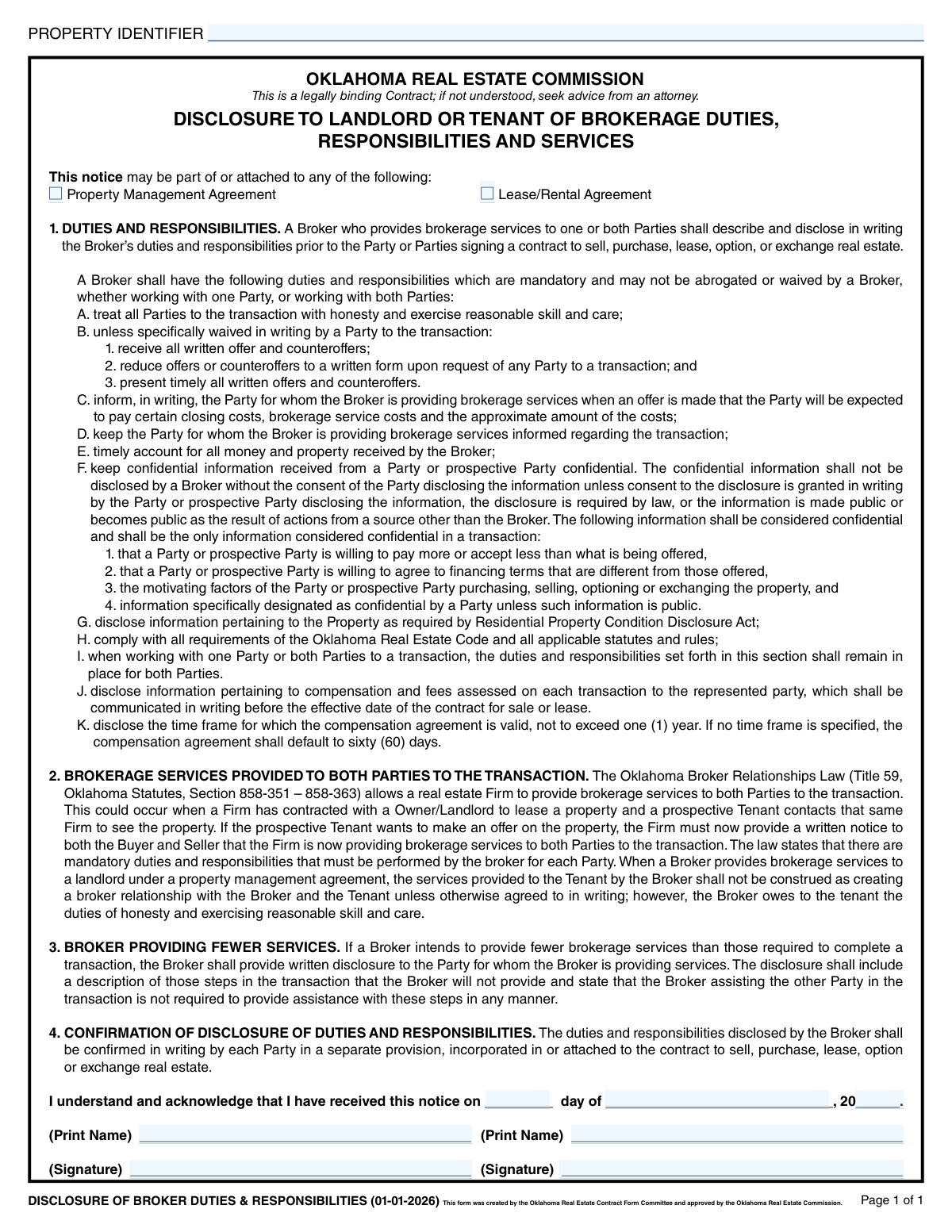
This form is a legally required disclosure in Oklahoma for real estate transactions involving landlords or tenants. It outlines the mandatory duties and responsibilities a real estate broker must provide, ensuring all parties understand the scope of services, confidentiality rules, and how offers are handled. Completing this form accurately is crucial for legal compliance and transparency in rental agreements. Today, this form can be filled out quickly and accurately using AI-powered services like Instafill.ai, which can also convert non-fillable PDF versions into interactive fillable forms.
Our AI automatically handles information lookup, data retrieval, formatting, and form filling.
It takes less than a minute to fill out OREC Disclosure of Broker Duties & Responsibilities using our AI form filling.
Securely upload your data. Information is encrypted in transit and deleted immediately after the form is filled out.
Form specifications
| Form name: | Oklahoma Real Estate Commission, Disclosure of Broker Duties & Responsibilities |
| Number of pages: | 1 |
| Language: | English |
| Categories: | real estate forms, disclosure forms, estate forms, PA state forms, broker forms, NJ state forms |
Instafill Demo: How to fill out PDF forms in seconds with AI
How to Fill Out OREC Disclosure of Broker Duties & Responsibilities Online for Free in 2026
Are you looking to fill out a OREC DISCLOSURE OF BROKER DUTIES & RESPONSIBILITIES form online quickly and accurately? Instafill.ai offers the #1 AI-powered PDF filling software of 2026, allowing you to complete your OREC DISCLOSURE OF BROKER DUTIES & RESPONSIBILITIES form in just 37 seconds or less.
Follow these steps to fill out your OREC DISCLOSURE OF BROKER DUTIES & RESPONSIBILITIES form online using Instafill.ai:
- 1 Navigate to Instafill.ai and upload or select the Oklahoma Disclosure of Broker Duties & Responsibilities form.
- 2 Use the AI assistant to locate and fill in the 'Property Identifier' field with the correct property details.
- 3 Check the appropriate box to indicate whether the disclosure is attached to a 'Property Management Agreement' or a 'Lease/Rental Agreement'.
- 4 Enter the date the notice is received by providing the day, month, and year in the designated fields.
- 5 Type the printed names of the landlord or tenant who are acknowledging receipt of the disclosure.
- 6 Electronically sign the document in the signature fields to confirm understanding and receipt.
- 7 Review all entered information for accuracy, then securely download, print, or share the completed form.
Our AI-powered system ensures each field is filled out correctly, reducing errors and saving you time.
Why Choose Instafill.ai for Your Fillable OREC Disclosure of Broker Duties & Responsibilities Form?
Speed
Complete your OREC Disclosure of Broker Duties & Responsibilities in as little as 37 seconds.
Up-to-Date
Always use the latest 2026 OREC Disclosure of Broker Duties & Responsibilities form version.
Cost-effective
No need to hire expensive lawyers.
Accuracy
Our AI performs 10 compliance checks to ensure your form is error-free.
Security
Your personal information is protected with bank-level encryption.
Frequently Asked Questions About Form OREC Disclosure of Broker Duties & Responsibilities
This form's purpose is to inform landlords and tenants in Oklahoma about the mandatory duties and responsibilities their real estate broker must perform. It ensures all parties understand the services and level of care they will receive before signing a lease or other contract.
Both the landlord and the tenant involved in a lease or rental transaction should sign this form. Signing simply acknowledges that you have received and understood the notice about the broker's duties.
In the 'Property Identifier' field, you should enter the full street address or legal description of the property being leased or managed. This uniquely identifies the property to which this disclosure applies.
You must receive this disclosure from the broker before you sign any legally binding contract, such as a lease or property management agreement. You sign it to confirm you have received the notice on a specific date.
If a broker represents both the landlord and tenant, they must provide a written notice to both parties. The broker is still required to perform all mandatory duties, such as treating both parties with honesty and care.
Your broker must keep certain information confidential, including what you're willing to pay or accept, your financing flexibility, and your personal motivations for the transaction. This information cannot be shared without your written consent.
After signing, the form is typically attached to your lease, rental, or property management agreement. The broker will retain a copy for their records as proof that they have fulfilled their legal disclosure requirement.
No, signing this specific form only confirms that you have received the notice about the broker's duties. It is the lease or rental agreement it's attached to that is the legally binding contract for the tenancy.
Yes, services like Instafill.ai use AI to help you accurately auto-fill form fields, which can save you time and reduce errors. This is especially helpful for filling in your name and date across multiple real estate documents.
You can upload the 'Disclosure of Broker Duties & Responsibilities' PDF to the Instafill.ai platform. The AI will make the fields interactive so you can quickly type your information, add a digital signature, and download the completed document.
You can use a service like Instafill.ai, which can convert flat, non-fillable PDFs into interactive, fillable forms. This allows you to easily type your information and sign the document digitally without needing to print it.
This means the broker will not perform all the steps typically required to complete a transaction. If this is the case, they must provide a separate written disclosure clearly stating which services they will not be providing.
This form states that the broker must disclose compensation in writing, but the specific amounts are not listed here. That information will be provided in a separate written communication before you sign the final contract for sale or lease.
Compliance OREC Disclosure of Broker Duties & Responsibilities
Validation Checks by Instafill.ai
1
Ensures Property Identifier is Provided
This check verifies that the 'Property Identifier' field is not empty. The identifier is crucial for linking this legal disclosure to a specific property, ensuring there is no ambiguity about which property the agreement pertains to. Failure to provide this identifier would make the form incomplete and potentially unenforceable, as it cannot be tied to a transaction.
2
Confirms Notice Context Selection
This validation ensures that at least one of the checkboxes, either 'Property Management Agreement' or 'Lease/Rental Agreement', is selected. This selection provides essential context for the disclosure, clarifying its relationship to other legal documents. If no box is checked, the form's purpose within the transaction is unclear, which could lead to legal disputes.
3
Complete Acknowledgment Date
This check validates that if any part of the acknowledgment date (day, month, or year) is filled, all three parts are present. A partial date is ambiguous and legally insufficient for establishing when the notice was received. An incomplete date would require manual correction and could invalidate the timestamp of the acknowledgment.
4
Valid Day of the Month Format
This validation ensures the 'Notice Day' field contains a numeric value between 1 and 31. This is a basic format check to prevent impossible dates and data entry errors, such as entering a month or year in the day field. An invalid day would cause the entire date to be invalid, failing subsequent logical checks.
5
Valid Two-Digit Year Format
This check verifies that the 'Notice Year' field contains exactly two digits, as specified by the form's '20__' layout. This maintains consistency and prevents ambiguity, such as entering a four-digit year. An incorrect format would lead to an invalid or misinterpreted date, undermining the record of acknowledgment.
6
Logical Date Coherence
This validation cross-references the day, month, and year fields to ensure they form a valid calendar date. For example, it would flag 'April 31' or 'February 30' as invalid. This check is critical for ensuring the legal date of acknowledgment is a real day, preventing errors that could be challenged later.
7
Plausible Acknowledgment Date Range
This check ensures the acknowledgment date is not in the future and is on or after the form's effective date of January 1, 2026. A future date is logically impossible, and a date before the form's effective version would be invalid. This validation is crucial for establishing a legally sound and chronologically correct record of the disclosure.
8
First Signatory Printed Name Requirement
This validation confirms that the 'First Signatory Print Name' field is filled, as at least one party must acknowledge the disclosure. The printed name is essential for clearly identifying the person who signed the document, as signatures can often be illegible. Without a printed name, it may be impossible to legally verify the identity of the signatory.
9
First Signatory Signature Requirement
This check ensures that a signature has been provided in the 'First Signatory Signature' field. The signature is the legal act of acknowledgment and agreement to the terms disclosed. A missing signature means the party has not formally received and acknowledged the disclosure, rendering the form ineffective for that party.
10
Second Signatory Data Consistency
This check verifies that if a 'Second Signatory Signature' is provided, the 'Second Signatory Printed Name' is also filled, and vice-versa. This rule ensures that if a second party is involved, their information is complete. An entry with a signature but no name (or a name but no signature) is incomplete and requires correction to be legally sound.
11
Valid Printed Name Format
This validation checks that the printed name fields contain a plausible full name, consisting of alphabetic characters and appropriate separators like spaces or hyphens. It would flag entries that are clearly not names, such as random numbers, a single character, or 'N/A'. This ensures the data quality of the signatory's identity for record-keeping and legal purposes.
12
Prevents Duplicate Signatories
This check compares the 'First Signatory Print Name' and 'Second Signatory Printed Name' to ensure they are not identical, if both are provided. Two parties to a transaction are typically different individuals or entities. This validation flags a potential data entry error where the same person's name might have been entered twice by mistake.
Common Mistakes in Completing OREC Disclosure of Broker Duties & Responsibilities
People often enter a partial street address instead of the full, unique property identifier required for legal documents. This can include the parcel number or the full address including city, state, and zip code. An incomplete identifier can create ambiguity about which property the disclosure applies to, potentially leading to disputes. To avoid this, use the exact property identifier as it appears on the primary lease or property management agreement.
The form requires the user to check a box indicating whether the disclosure is attached to a 'Property Management Agreement' or a 'Lease/Rental Agreement'. It is common for signers to overlook these checkboxes entirely. This omission makes the context of the disclosure unclear and could weaken its legal standing if challenged. Always double-check the form to ensure the correct box is marked before signing.
Forgetting to fill in the date is a critical error, as the date establishes a legal record of when the disclosure was provided and acknowledged. This happens when people are in a hurry and focus only on the signature line. An undated form can be challenged, creating significant liability for the broker and ambiguity for the client. Ensure the day, month, and year are all filled in at the time of signing.
A frequent mistake is for an individual to legibly print their name on the line designated for a signature. A legal signature is a unique, handwritten mark intended to verify identity and consent, which a printed name does not fulfill. This can render the acknowledgment invalid, requiring the form to be re-signed. Always provide a cursive, handwritten signature on the 'Signature' line.
Conversely, some people place their illegible signature on the line that explicitly asks for a printed name. The purpose of the 'Print Name' line is to ensure the signatory's identity is clear and legible, which a signature alone does not accomplish. This can cause confusion and administrative delays. To prevent this, carefully print your full legal name on the 'Print Name' line.
The form provides space for two signatories, such as a landlord and tenant or two co-tenants. Often, one party will sign but fail to ensure the second party also completes their section. An incompletely signed form means the disclosure has not been formally acknowledged by all required parties, making it non-binding for the person who did not sign. Always verify that all parties have both printed their name and signed.
The form has separate spaces for the day, month, and year ('day of ___, 20__'). A common error is to write the entire date, such as '07/15/24', in the first blank space for the day. This fails to follow the form's layout and can appear unprofessional. To avoid this, enter each component of the date into its respective field. AI-powered tools like Instafill.ai can help by automatically parsing and placing date components into the correct fields.
Signatories sometimes use a nickname, an initial, or an abbreviated version of their name instead of their full legal name. For a legally binding document, the name printed should match the name on the associated lease, contract, and government-issued ID. Using an informal name can create ambiguity regarding the identity of the person signing. Always use your full legal name for consistency and legal validity.
The form is formatted with '20__' for the year, indicating that only the last two digits are required. People often write the full four-digit year (e.g., '2024') out of habit. While a minor error, it shows a lack of attention to the form's specific instructions and may require correction for official records. Following the form's formatting precisely is always the best practice.
Because this is a disclosure and not a payment form, some people sign it without reading, assuming it's a simple formality. This is a legally binding acknowledgment of the broker's duties and responsibilities. Signing without understanding can lead to future misunderstandings about the services the broker will or will not provide. As the form itself advises, you should read it carefully and seek legal advice if any part is not understood before signing. If the form is a non-fillable PDF, a tool like Instafill.ai can convert it to a fillable version, making it easier to review and complete digitally.
Saved over 80 hours a year
“I was never sure if my IRS forms like W-9 were filled correctly. Now, I can complete the forms accurately without any external help.”
Kevin Martin Green
Your data stays secure with advanced protection from Instafill and our subprocessors

Robust compliance program
Transparent business model
You’re not the product. You always know where your data is and what it is processed for.
ISO 27001, HIPAA, and GDPR
Our subprocesses adhere to multiple compliance standards, including but not limited to ISO 27001, HIPAA, and GDPR.
Security & privacy by design
We consider security and privacy from the initial design phase of any new service or functionality. It’s not an afterthought, it’s built-in, including support for two-factor authentication (2FA) to further protect your account.
Fill out OREC Disclosure of Broker Duties & Responsibilities with Instafill.ai
Worried about filling PDFs wrong? Instafill securely fills oklahoma-real-estate-commission-disclosure-of-broker-duties-responsibilities forms, ensuring each field is accurate.