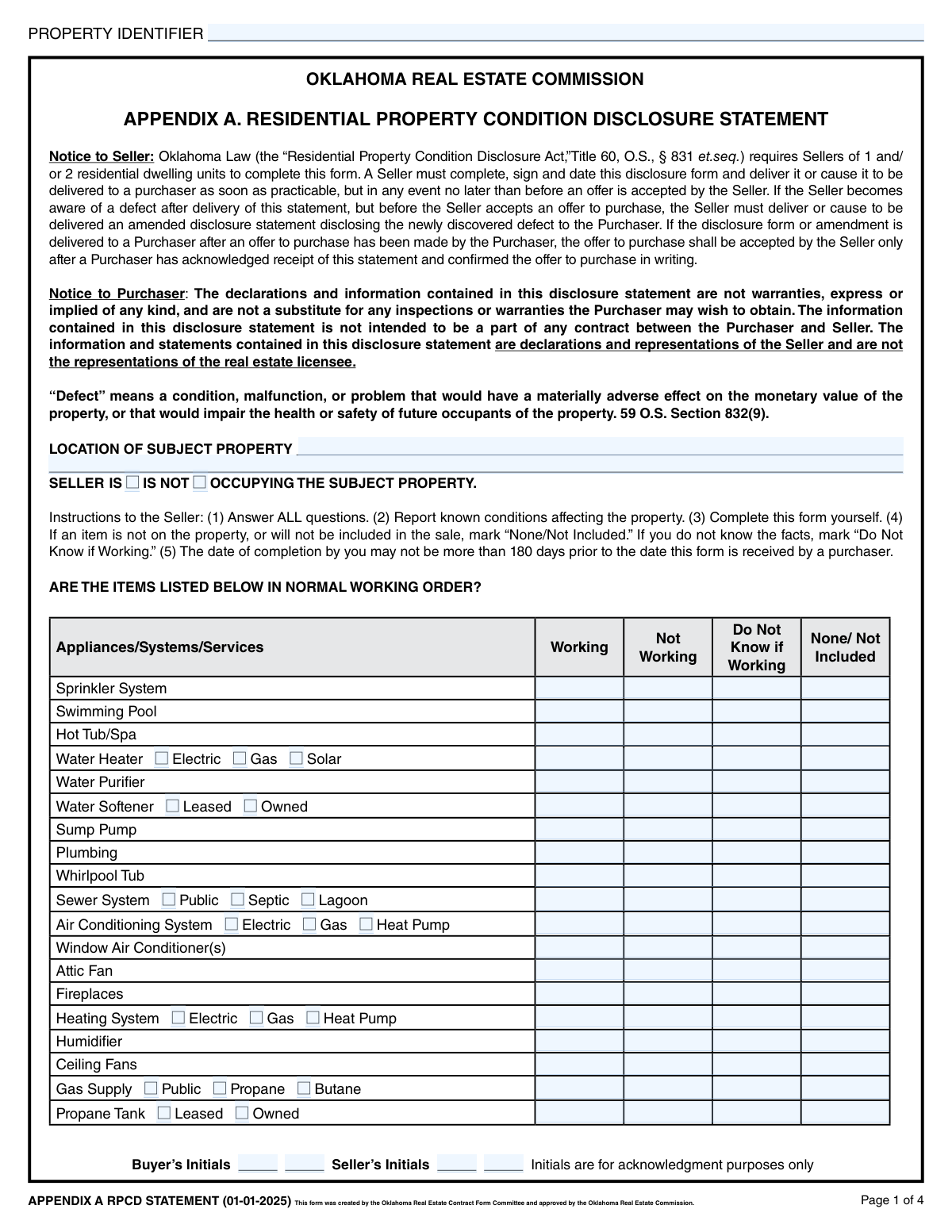
Yes! You can use AI to fill out Oklahoma Residential Property Condition Disclosure Statement (APPENDIX A RPCD STATEMENT)

The Oklahoma Residential Property Condition Disclosure Statement is a legal document used in Oklahoma real estate transactions where sellers must disclose their knowledge of the property's condition. It covers everything from appliances and structural components to environmental hazards, ensuring buyers are fully informed before a purchase. Today, this form can be filled out quickly and accurately using AI-powered services like Instafill.ai, which can also convert non-fillable PDF versions into interactive fillable forms.
Our AI automatically handles information lookup, data retrieval, formatting, and form filling.
It takes less than a minute to fill out Oklahoma RPCD Statement using our AI form filling.
Securely upload your data. Information is encrypted in transit and deleted immediately after the form is filled out.

Form specifications

Form name: Oklahoma Residential Property Condition Disclosure Statement (APPENDIX A RPCD STATEMENT)
Number of fields: 360
Number of pages: 4
Language: English
Categories: disclosure forms, NJ state forms, PA state forms, property forms
main-image

Instafill Demo: How to fill out PDF forms in seconds with AI

How to Fill Out Oklahoma RPCD Statement Online for Free in 2026

Are you looking to fill out a OKLAHOMA RPCD STATEMENT form online quickly and accurately? Instafill.ai offers the #1 AI-powered PDF filling software of 2026, allowing you to complete your OKLAHOMA RPCD STATEMENT form in just 37 seconds or less.
Follow these steps to fill out your OKLAHOMA RPCD STATEMENT form online using Instafill.ai:
  1. 1 Navigate to Instafill.ai and upload your Oklahoma Residential Property Condition Disclosure Statement.
  2. 2 Use the AI assistant to accurately fill in the property identifier, location, and seller occupancy status.
  3. 3 Systematically review each section, providing the status (Working, Not Working, Do Not Know) for all listed appliances, systems (like HVAC, plumbing, electrical), and structural components.
  4. 4 Answer the series of 'Yes/No' questions regarding flood zones, historical designations, environmental hazards (like asbestos or lead paint), and any known structural defects or previous repairs.
  5. 5 If you answered 'Yes' to any defects or issues, or checked 'Not Working' for any items, provide clear and concise explanations in the designated fields as prompted by the tool.
  6. 6 Carefully review all entered information for accuracy, then use the platform to electronically sign and date the document. The buyer will also need to sign to acknowledge receipt.

Our AI-powered system ensures each field is filled out correctly, reducing errors and saving you time.

Why Choose Instafill.ai for Your Fillable Oklahoma RPCD Statement Form?

Speed

Complete your Oklahoma RPCD Statement in as little as 37 seconds.

Up-to-Date

Always use the latest 2026 Oklahoma RPCD Statement form version.

Cost-effective

No need to hire expensive lawyers.

Accuracy

Our AI performs 10 compliance checks to ensure your form is error-free.

Security

Your personal information is protected with bank-level encryption.

Frequently Asked Questions About Form Oklahoma RPCD Statement

This form is a legal document used by sellers in Oklahoma to disclose their knowledge about the condition of a property to potential buyers. It covers the status of appliances, structural elements, systems, and any known defects.

The seller of the property is required to complete this form, providing information based on their actual knowledge. Both the seller and the buyer must sign and initial the form to acknowledge its contents.

The form provides a 'Do Not Know if Working' option for most items. You should select this box if you are genuinely uncertain about an item's condition rather than guessing.

When you indicate that an item is 'Not Working,' you must provide a clear and detailed explanation in the 'Explanation for Not Working Items' section. This ensures the buyer is fully informed about the issue.

Yes, the form asks if you are aware of any previous alterations, repairs, or replacements made to correct defects, including for the foundation and roof. You must answer these questions truthfully.

You must disclose the amount and frequency of dues, any special assessments, whether there are unpaid dues, and provide the name and phone number of the HOA manager.

You are only required to disclose what you are aware of. The form has separate questions to indicate if you are 'aware of the presence' of a substance and whether you have ever 'tested' for it, allowing you to be accurate even without formal testing.

This disclosure is critical to inform the buyer that a known issue exists for which you were compensated but did not perform the repair. It ensures transparency about the property's current, unrepaired condition.

The initials from both the buyer and seller on each page serve as acknowledgment that both parties have received and reviewed the information disclosed on that specific page.

Yes, services like Instafill.ai use AI to help you accurately auto-fill form fields, which can save time and reduce errors. You are still responsible for ensuring all information is truthful and based on your personal knowledge.

Simply upload the PDF of the form to the Instafill.ai platform. Its AI will make all the fields interactive, allowing you to easily type your answers, check boxes, and save your progress online.

You can use a service like Instafill.ai, which is designed to convert flat, non-fillable PDFs into interactive, fillable forms. This will allow you to complete the document on your computer without needing to print it.

For most 'Yes' answers regarding defects, past issues, or specific property features, you must provide a corresponding explanation in the 'Explanation for "Yes" Answers' section. Be sure to reference the item number for clarity.

This question helps establish the seller's level of recent, firsthand knowledge of the property's condition. An occupying seller is generally presumed to be more familiar with the home's day-to-day operation than an absentee owner.

Compliance Oklahoma RPCD Statement
Validation Checks by Instafill.ai

1
Ensures Property Identification is Complete
This check verifies that the 'Property Identifier' and 'Location of Subject Property' fields are not empty. These fields are essential for uniquely identifying the property to which this disclosure applies. A failure in this validation would make the entire form invalid as it cannot be tied to a specific property, leading to rejection of the submission.
2
Validates Exclusive Selection for Item Status
For each property item (e.g., Sprinkler System, Swimming Pool), this validation ensures that only one status from the group ('Working', 'Not Working', 'Do Not Know if Working', 'None/Not Included') is selected. This prevents contradictory and ambiguous data, which is critical for a legal disclosure document. If more than one option is selected for a single item, the form submission should be blocked with an error message prompting the user to select only one status per item.
3
Requires Explanation for 'Not Working' Items
This validation checks if the 'Explanation for Not Working Items' field is populated when any item on the form has been marked as 'Not Working'. Providing a detailed explanation is a legal requirement for property disclosures to inform the buyer about known defects. If an item is marked 'Not Working' and the explanation field is empty, the form submission should fail, forcing the seller to provide the necessary details.
4
Enforces Completion of HOA Details
This check is triggered if 'Mandatory Homeowner's Association - Yes' is selected. It verifies that the 'Amount of Dues', at least one 'Dues Payable' frequency checkbox, 'HOA Manager Name', and 'HOA Manager Phone Number' fields are all filled out. This information is crucial for the buyer's financial planning and due diligence. Failure to provide these details would result in an incomplete disclosure and the form should be rejected until the required HOA information is supplied.
5
Validates Unpaid HOA Dues Amount Entry
If the 'Unpaid Dues/Assessments - Yes' checkbox is selected, this validation ensures that the 'Unpaid Dues or Assessments Amount' field contains a valid, non-zero currency value. This is critical for disclosing any existing financial encumbrances on the property to the potential buyer. A failed validation would require the user to input a specific monetary amount before the form can be submitted.
6
Requires Explanation for Affirmative Disclosures
This validation rule checks that the 'Explanation for "Yes" Answers' text field is filled if any of the specified "Yes" checkboxes on pages 2-4 are selected (e.g., 'Aware of Government Notices - Yes', 'Litigation Aware (Yes)'). This is a critical part of the disclosure, as a simple "Yes" is insufficient without context. Failure to provide an explanation for an affirmative answer should block submission until the required details are provided.
7
Validates 'Additional Pages' Count
This check ensures logical consistency between the 'Additional Pages Disclosure' checkboxes and the page count field. If 'YES' is checked, the 'Number of Additional Pages' field must contain a positive integer (e.g., > 0). Conversely, if 'NO' is checked, the count field should be empty or zero, preventing confusion and ensuring any referenced attachments are accounted for.
8
Ensures Valid and Logical Signature Dates
This validation checks all signature date fields ('First Seller's Signature Date', 'First Purchaser's Signature Date', etc.) to ensure they contain a valid date in the expected format (e.g., MM/DD/YYYY). Furthermore, it should verify that the date is not in the future. This is important for establishing a legal and accurate timeline of when the document was acknowledged by each party.
9
Enforces Single Occupancy Status Selection
This validation ensures that the user selects one and only one of the 'Seller Is Occupying' or 'Seller Is Not Occupying' checkboxes. These two states are mutually exclusive, and selecting both or neither would make the occupancy status ambiguous. The form should require a choice to be made to accurately reflect the property's current situation.
10
Enforces Sub-Details for Included Items
This check applies to complex items like the Water Heater, Air Conditioning, and Security System. If the 'None/Not Included' option for an item is *not* selected, the system must verify that the relevant sub-detail fields (e.g., 'Electric'/'Gas' for the water heater, 'Leased'/'Owned' for the security system) have been filled out. This ensures that when an item is declared present, its key characteristics are also disclosed.
11
Validates HOA Manager Phone Number Format
This check verifies that the value entered into the 'HOA Manager Phone Number' field conforms to a standard phone number format (e.g., 10 digits, possibly with parentheses, spaces, or hyphens). This ensures the data is usable and that the buyer or their agent can successfully contact the HOA manager. An invalid entry should trigger an error message requesting the user to correct the format.
12
Validates Numeric Input for Roof Details
This validation ensures that the 'Approximate Age of Roof Covering' and 'Number of Roof Layers' fields contain only valid numeric inputs. The age should be a reasonable positive number, and the number of layers should be a small positive integer (e.g., 1-4). This prevents entry of text or nonsensical values, ensuring data quality for these important structural details.
13
Requires Dam Maintenance Status if Dam Exists
This validation is triggered if 'Aware of Dams on Property - Yes' is selected. It then verifies that one of the 'Responsible for Dam Maintenance' checkboxes ('Yes' or 'No') is also selected. Disclosing the existence of a dam is not sufficient; the responsibility for its maintenance is a critical piece of information for a potential buyer. The form should be considered incomplete if a dam is declared but maintenance responsibility is not specified.
14
Conditional Termite Bait System Cost
If the 'Termite Bait System Installed - Yes' checkbox is selected, this validation ensures the 'Annual Cost' field is populated with a valid currency amount. This disclosure is important for the buyer to understand the ongoing maintenance costs associated with the property. The form should be rejected if the system is declared as installed but the associated annual cost is missing.

Common Mistakes in Completing Oklahoma RPCD Statement

Failure to Explain Disclosed Issues

Sellers often check 'Not Working' for an appliance or 'Yes' to a question about defects but then fail to provide a mandatory explanation in the designated sections. This omission makes the disclosure incomplete and can lead to buyer suspicion, requests for clarification, and potential transaction delays. To avoid this, carefully review the form after filling it out, ensuring every 'Not Working' or 'Yes' answer is accompanied by a clear, detailed explanation in the appropriate text field.

Contradictory Checkbox Selections

A frequent error is selecting conflicting options for the same item, such as checking both 'Working' and 'None/Not Included' for the sprinkler system. This happens due to haste or misunderstanding and creates ambiguity that can void the disclosure for that item, requiring clarification and potentially delaying the sale. Always select only one status per item ('Working,' 'Not Working,' 'Do Not Know,' or 'None/Not Included') to ensure clarity.

Incomplete Conditional Field Data

The form contains many fields that are conditional upon a 'Yes' answer, such as details for a Homeowner's Association. Sellers frequently check 'Yes' but then neglect to fill in the required follow-up information like dues amounts, payment frequency, and manager contact info. This forces the buyer's agent to track down missing information, causing delays. AI-powered tools like Instafill.ai can help prevent this by automatically highlighting required conditional fields based on your answers.

Missing Initials on Multiple Pages

This extensive form requires buyer and seller initials on multiple pages to acknowledge each section. It is very common to accidentally skip an initial box, especially when dealing with a flat, non-fillable PDF. A missing initial can call the validity of the page's disclosure into question and will almost certainly be caught by the title company, halting the closing process until the document is properly executed.

Incorrectly Identifying Leased vs. Owned Items

Sellers may be unsure if items like a security system, propane tank, or water softener are owned outright or leased, and they may guess incorrectly on the form. This is a critical error, as a leased item does not convey with the property and may involve a contract the buyer must assume or the seller must terminate. To prevent disputes, sellers should verify ownership by checking original purchase documents or contacting the service provider before filling out the form.

Improper Use of 'Do Not Know'

Sellers sometimes select 'Do Not Know' when an item doesn't exist, instead of the correct 'None/Not Included' option. Conversely, a seller might guess an item is 'Working' when they are genuinely unsure, fearing that 'Do Not Know' appears negligent. Both are mistakes; guessing can lead to claims of misrepresentation, while improper use creates confusion. Use 'Do Not Know' only when you genuinely lack knowledge about the condition of an existing item.

Forgetting to Disclose Additional Pages

When providing detailed explanations that require attaching extra pages, sellers often forget to check the 'YES (Additional Pages Disclosure)' box and specify the number of pages attached. This can result in the buyer and their agent being unaware that a complete disclosure includes supplementary documents. Always double-check this section if you attach any addenda to ensure all information is properly accounted for and reviewed.

Vague Property Address or Identifier

The 'Property Identifier' and 'Location of Subject Property' fields are sometimes filled with incomplete or informal information, such as just a street name without a city or zip code. This can lead to clerical errors when matching the disclosure to other legal documents in the transaction. Always use the full, complete street address and the official property identifier from a tax record. AI tools like Instafill.ai can help auto-populate and validate address information.

Confusing Flood Zone and Insurance Disclosures

The flood section has multiple distinct questions: flood zone status, location in a floodway, flood insurance requirements, and current flood insurance coverage. Sellers often get confused and provide inconsistent answers, for example, stating they are unaware of insurance requirements but then confirming the property has a flood insurance policy. This creates ambiguity and requires further investigation, so it's crucial to read each question carefully and answer it specifically.

Ignoring 'Awareness' Nuance in Yes/No Questions

Many questions ask if the seller is 'aware' of a condition (e.g., 'aware of any encroachments'). Sellers sometimes misinterpret this as needing to have absolute certainty, leading them to answer 'No' when they have a suspicion but no proof. This can be seen as a failure to disclose. It is important to answer 'Yes' if you have any knowledge or notice of a potential issue, and then provide an explanation of what you know.
Saved over 80 hours a year

“I was never sure if my IRS forms like W-9 were filled correctly. Now, I can complete the forms accurately without any external help.”

Kevin Martin Green

Your data stays secure with advanced protection from Instafill and our subprocessors

Robust compliance program

Transparent business model

You’re not the product. You always know where your data is and what it is processed for.

ISO 27001, HIPAA, and GDPR

Our subprocesses adhere to multiple compliance standards, including but not limited to ISO 27001, HIPAA, and GDPR.

Security & privacy by design

We consider security and privacy from the initial design phase of any new service or functionality. It’s not an afterthought, it’s built-in, including support for two-factor authentication (2FA) to further protect your account.

Fill out Oklahoma RPCD Statement with Instafill.ai

Worried about filling PDFs wrong? Instafill securely fills oklahoma-residential-property-condition-disclosure-statement-appendix-a-rpcd-statement forms, ensuring each field is accurate.