Yes! You can use AI to fill out Kaiser Permanente Authorization for Use or Disclosure of Patient Health Information
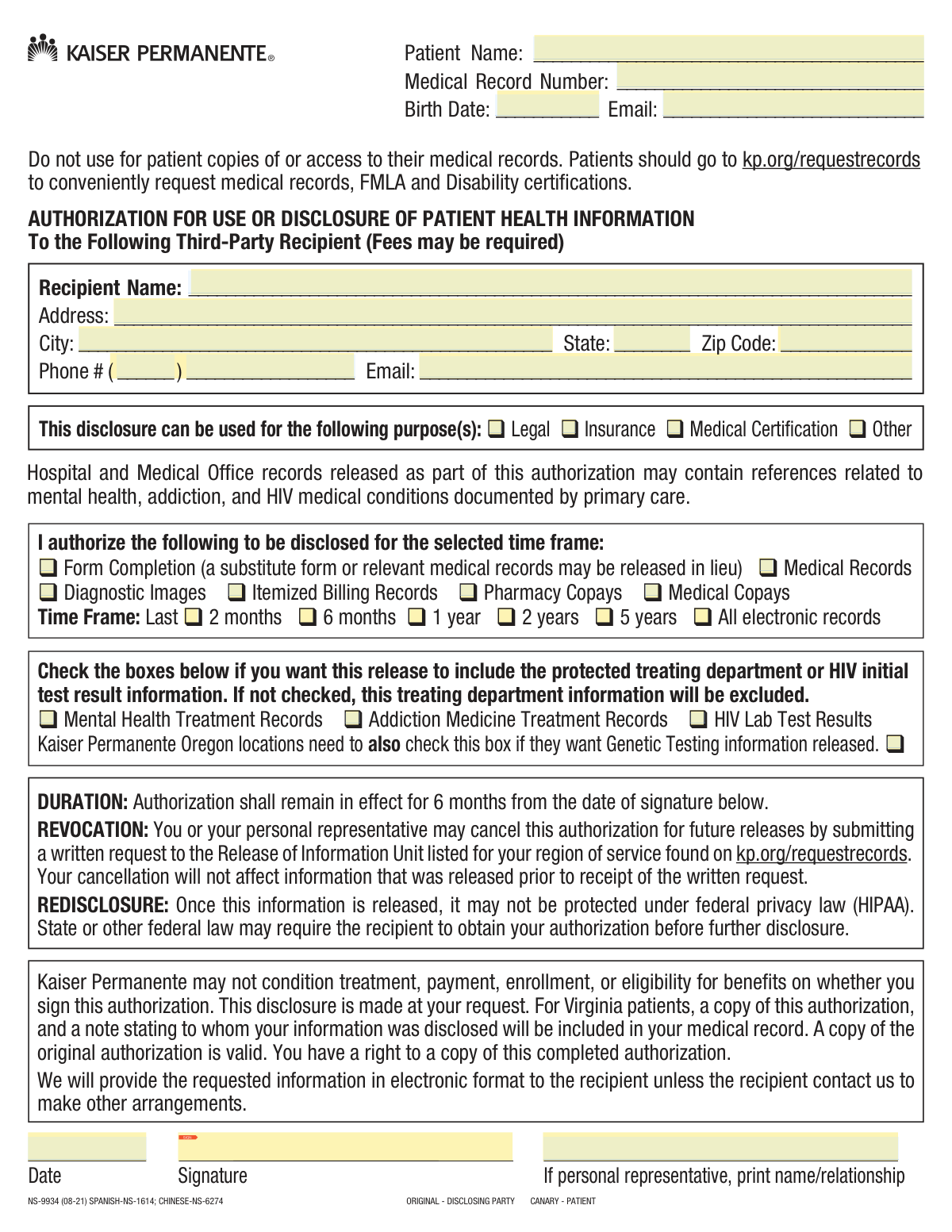
The Kaiser Permanente Authorization for Use or Disclosure of Patient Health Information (Form NS-9934) is a legal document that allows a patient to grant permission for their medical provider to share specific health records with a third-party recipient. This is essential when medical information is required for legal cases, insurance claims, or other personal matters, as it ensures compliance with HIPAA privacy regulations. Today, this form can be filled out quickly and accurately using AI-powered services like Instafill.ai, which can also convert non-fillable PDF versions into interactive fillable forms.
Our AI automatically handles information lookup, data retrieval, formatting, and form filling.
It takes less than a minute to fill out NS-9934 using our AI form filling.
Securely upload your data. Information is encrypted in transit and deleted immediately after the form is filled out.
Form specifications
| Form name: | Kaiser Permanente Authorization for Use or Disclosure of Patient Health Information |
| Number of pages: | 1 |
| Language: | English |
| Categories: | disclosure forms, patient forms, authorization forms, health forms |
Instafill Demo: How to fill out PDF forms in seconds with AI
How to Fill Out NS-9934 Online for Free in 2026
Are you looking to fill out a NS-9934 form online quickly and accurately? Instafill.ai offers the #1 AI-powered PDF filling software of 2026, allowing you to complete your NS-9934 form in just 37 seconds or less.
Follow these steps to fill out your NS-9934 form online using Instafill.ai:
- 1 Navigate to Instafill.ai and upload or select the Kaiser Permanente Authorization for Disclosure of Health Information form.
- 2 Use the AI assistant to automatically populate your patient identification details, such as your name, medical record number, and date of birth.
- 3 Enter the complete information for the third-party recipient, including their name, address, and contact details.
- 4 Specify the purpose of the disclosure and select the exact types of information (e.g., medical records, billing records) and the time frame for the records to be released.
- 5 Carefully review and check the boxes to authorize the release of any specially protected information, such as mental health or addiction treatment records, if required.
- 6 Review all entered information for accuracy, then securely e-sign and date the authorization in the designated fields.
- 7 Download the completed form to provide to the authorized third party and save a copy for your personal records.
Our AI-powered system ensures each field is filled out correctly, reducing errors and saving you time.
Why Choose Instafill.ai for Your Fillable NS-9934 Form?
Speed
Complete your NS-9934 in as little as 37 seconds.
Up-to-Date
Always use the latest 2026 NS-9934 form version.
Cost-effective
No need to hire expensive lawyers.
Accuracy
Our AI performs 10 compliance checks to ensure your form is error-free.
Security
Your personal information is protected with bank-level encryption.
Frequently Asked Questions About Form NS-9934
This form authorizes Kaiser Permanente to release your protected health information to a specific third-party recipient, such as a lawyer, insurance company, or another doctor's office.
No, this form is only for authorizing disclosure to a third party. To request your own records, FMLA, or disability certifications, you should visit kp.org/requestrecords.
You must provide the recipient's full name, complete mailing address, phone number, and a valid email address to ensure the records are sent to the correct person or organization.
Your Medical Record Number (MRN) is typically printed on your Kaiser Permanente membership card, on correspondence from KP, or can be found by logging into your account on kp.org.
You must check the boxes for the type of information you want to disclose (e.g., Medical Records, Billing Records) and select a specific time frame for the records (e.g., Last 2 years).
To release specially protected information, you must check the specific boxes for 'Mental Health Treatment Records,' 'Addiction Medicine Treatment Records,' or 'HIV Lab Test Results.' If these are not checked, that information will be excluded.
After completing and signing the form, you should give it to the third party you are authorizing to receive your records. They will then submit it to Kaiser Permanente to make the request.
This authorization remains in effect for six months from the date you sign the form.
Yes, you can cancel the authorization for any future releases by submitting a written request to the Release of Information Unit. However, this will not affect any information that was already released.
The form indicates that fees may be required for processing the release of information to a third-party recipient.
Once your health information is released to the third party, it may no longer be protected by federal privacy laws like HIPAA. The recipient may be required by other laws to get your permission before disclosing it further.
Yes, services like Instafill.ai use AI to accurately auto-fill form fields, which can save you time and help prevent mistakes.
You can upload the form to Instafill.ai, and its AI will make the document fillable online. You can then type your information, and the platform will help you populate the fields quickly and accurately.
If you have a non-fillable PDF, you can use a service like Instafill.ai. It can convert flat PDFs into interactive, fillable forms that you can complete and sign digitally.
Compliance NS-9934
Validation Checks by Instafill.ai
1
Patient Identification Completeness
This check ensures that the 'Patient Name', 'Medical Record Number', and 'Birth Date' fields are all filled out. These fields are critical for uniquely and accurately identifying the patient whose records are being requested. If any of this information is missing, the authorization cannot be processed as the correct patient account cannot be located.
2
Valid Birth Date Format
Validates that the 'Birth Date' field contains a valid date in a recognized format (e.g., MM/DD/YYYY) and that the date is in the past. This is a crucial data integrity check to ensure the patient's identity is correct and the data is logical. A submission with an invalid or future birth date would be rejected.
3
Recipient Information Completeness
This validation verifies that all fields for the third-party recipient, including 'Recipient Name', 'Address', 'City', 'State', 'Zip Code', 'Phone #', and 'Email', are completed. The form's purpose is to send information to a third party, so complete and accurate recipient details are essential for successful delivery. An incomplete recipient profile will result in a processing failure.
4
Recipient Email Format Validation
This check ensures the 'Recipient Email' address is in a valid format (e.g., [email protected]). The form explicitly states that information will be provided in electronic format, making a valid email address essential for fulfilling the request. An invalid email format would prevent the delivery of the requested health information.
5
Recipient Phone Number Structure
Validates that the recipient's phone number is entered correctly, with a 3-digit area code and a 7-digit main number. This ensures the contact information is properly structured and usable if the recipient needs to be contacted. Incorrectly formatted numbers can cause communication delays or failures.
6
Purpose of Disclosure Requirement
This check ensures that at least one checkbox under 'This disclosure can be used for the following purpose(s)' is selected. Providing a purpose for the disclosure is a legal and procedural requirement for releasing patient health information. A form submitted without a specified purpose is considered incomplete and cannot be processed.
7
Information to Disclose Selection
Verifies that at least one checkbox specifying the type of information to be disclosed (e.g., 'Medical Records', 'Diagnostic Images') has been selected. The authorization is meaningless without a clear indication of what information the patient consents to release. Failure to select any information type will result in the rejection of the form.
8
Exclusive Time Frame Selection
This validation ensures that exactly one option from the 'Time Frame' section is selected. The scope of the record release must be unambiguous. Selecting no time frame or multiple time frames would make it impossible to determine which records to pull, thus halting the request.
9
Signature Presence Verification
Confirms that a signature has been provided in the designated signature field. A patient's or representative's signature is a fundamental legal requirement for a health information release authorization to be valid. An unsigned form has no legal standing and will be immediately rejected.
10
Valid Signature Date
This check validates that the 'Date' field next to the signature is filled with a valid date that is not in the future. This date is critical as it establishes when the authorization was granted and starts the 6-month validity period. A missing, invalid, or future date would render the authorization invalid.
11
Conditional Personal Representative Information
This check ensures that if the form is signed by someone other than the patient, the 'If personal representative, print name/relationship' field is completed. This information is required to verify that the signatory has the legal authority to act on the patient's behalf. If this field is empty when a representative has signed, the request will be paused pending verification of authority.
12
Recipient State and Zip Code Format
Validates that the 'Recipient State' is a valid 2-letter postal abbreviation and the 'Recipient Zip Code' is a valid 5-digit or 9-digit numeric code. Correct formatting is essential for mail delivery systems to route any physical correspondence or billing information accurately. Incorrect formats could lead to lost mail and failure to fulfill the request.
Common Mistakes in Completing NS-9934
Patients often mistakenly use this third-party authorization form to request copies of their own medical records, despite a clear warning at the top. This happens because they are looking for a 'medical records request' form and don't read the instructions carefully. The consequence is that their request is rejected, and they are redirected to the correct patient portal (kp.org/requestrecords), causing significant delays. To avoid this, always read the form's title and initial instructions to confirm it's for the correct purposeāauthorizing disclosure to a third party, not for personal access.
Users frequently check boxes for general medical records but overlook the separate, specific checkboxes for Mental Health, Addiction Medicine, or HIV test results. This oversight leads to an incomplete release of information, as these protected records will be excluded by default. The recipient, such as a new specialist or a legal team, will not receive the complete picture, potentially delaying care or legal proceedings. To prevent this, carefully review all checkboxes and explicitly select the sensitive record types if they are meant to be included in the disclosure.
A common error is selecting the types of information to be disclosed (e.g., 'Medical Records') but failing to also select a corresponding time frame (e.g., 'Last 2 years'). The form requires both a record type and a time period to be valid. Submitting the form without a time frame makes the request ambiguous and will likely lead to its rejection, forcing the user to resubmit. Always ensure you have checked one box for the type of information and one box for the time frame to create a valid authorization.
People often provide an incomplete address for the third-party recipient, such as forgetting a suite number, or enter an incorrect email address. Since the form states information will be provided electronically, a bad email address means the records will never be delivered. This results in failed delivery, delays, and requires follow-up to correct the information. Double-check the recipient's full name, complete mailing address, and especially their email address for accuracy before submitting.
Forgetting to sign and date the authorization is one of the most frequent and critical mistakes. An unsigned or undated form is legally invalid and cannot be processed. This oversight requires the form to be returned to the sender for completion, halting the entire record release process. Always perform a final check to ensure the signature and current date are present in the designated fields before submission. AI-powered form fillers like Instafill.ai can flag empty required fields like signatures to prevent this error.
When this form is provided as a non-fillable PDF, users print it and fill it out by hand, often with illegible handwriting. This can cause data entry errors when staff try to process the request, leading to incorrect recipient details or an inability to identify the patient's Medical Record Number. The request may be delayed or rejected entirely. To avoid this, use a tool like Instafill.ai, which can convert flat PDFs into fillable forms, allowing you to type information clearly and ensure accuracy.
When a personal representative signs on behalf of a patient, they sometimes sign their name but forget to print their name and specify their relationship to the patient (e.g., 'Parent,' 'Legal Guardian'). This omission forces the records office to halt the request and contact the representative to verify their authority, causing unnecessary delays. If you are signing for someone else, always complete the 'If personal representative, print name/relationship' line clearly and be prepared to provide documentation if requested.
A simple typographical error in the Medical Record Number (MRN) is a common data entry mistake. The MRN is the primary identifier used to locate the patient's entire file. An incorrect number will result in a 'patient not found' error, leading to an immediate rejection of the authorization request. To prevent this, carefully copy the MRN from an official document like a patient card or bill. Using an autofill tool like Instafill.ai can help by storing and accurately populating this number across multiple forms.
The form includes a checkbox for releasing Genetic Testing information that is specifically for 'Kaiser Permanente Oregon locations.' Patients outside of Oregon may check this box unnecessarily, or more critically, Oregon patients who need these records released may miss this small, location-specific instruction. This can result in either confusion or an incomplete record release for Oregon patients. Always read the text next to checkboxes carefully to ensure they apply to your specific situation and location.
Users sometimes check multiple, conflicting options, such as selecting both 'Last 2 months' and 'All electronic records' for the time frame. This ambiguity forces the processing staff to either guess the user's intent or reject the form. Similarly, checking 'Other' for the purpose of disclosure without the recipient providing context separately can cause confusion. To avoid this, make clear and specific selections, choosing only one option for the time frame unless you intend to release everything.
Saved over 80 hours a year
āI was never sure if my IRS forms like W-9 were filled correctly. Now, I can complete the forms accurately without any external help.ā
Kevin Martin Green
Your data stays secure with advanced protection from Instafill and our subprocessors

Robust compliance program
Transparent business model
Youāre not the product. You always know where your data is and what it is processed for.
ISO 27001, HIPAA, and GDPR
Our subprocesses adhere to multiple compliance standards, including but not limited to ISO 27001, HIPAA, and GDPR.
Security & privacy by design
We consider security and privacy from the initial design phase of any new service or functionality. Itās not an afterthought, itās built-in, including support for two-factor authentication (2FA) to further protect your account.
Fill out NS-9934 with Instafill.ai
Worried about filling PDFs wrong? Instafill securely fills kaiser-permanente-authorization-for-use-or-disclosure-of-patient-health-information forms, ensuring each field is accurate.