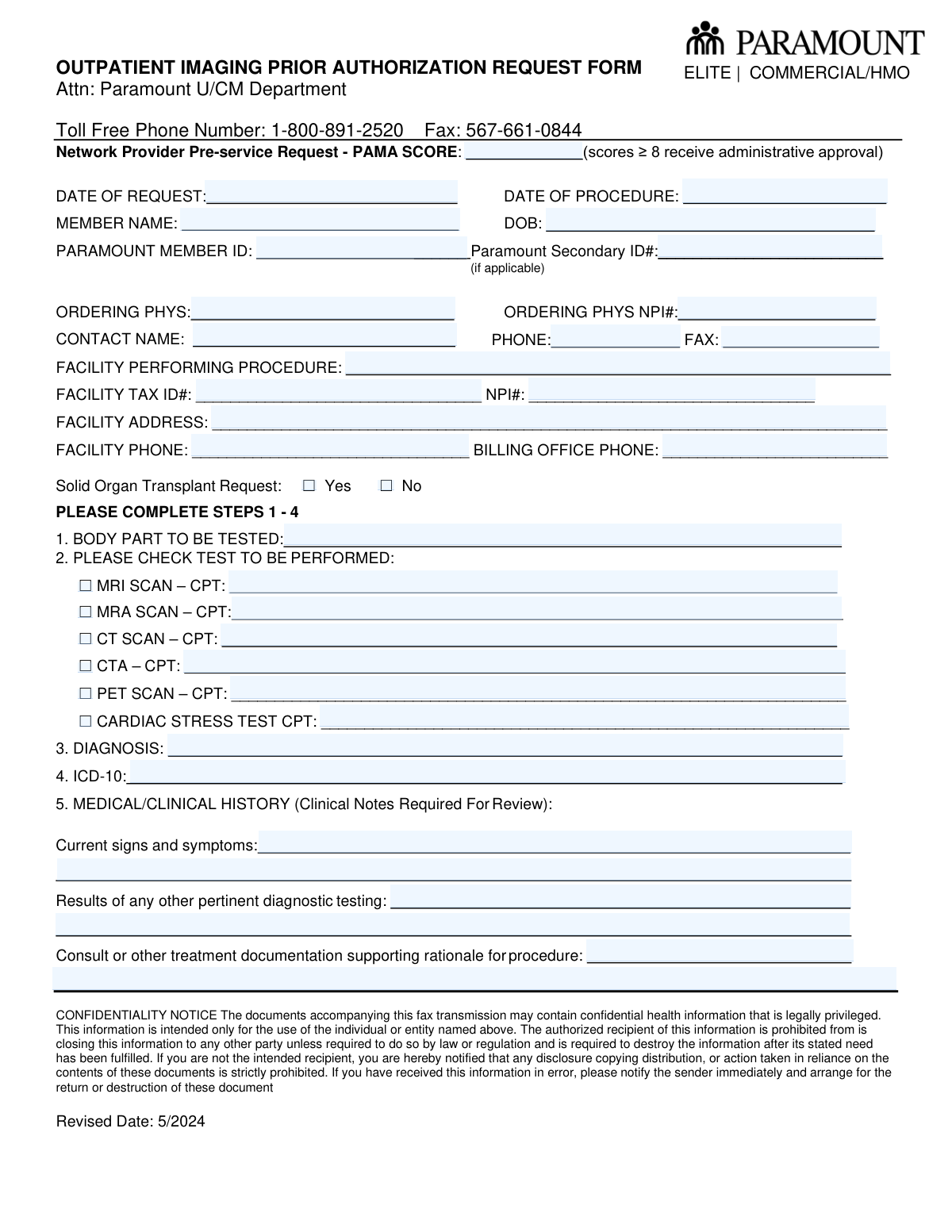
Yes! You can use AI to fill out Outpatient Imaging Prior Authorization Request Form

This form is a pre-service request submitted by network providers to Paramount to obtain prior authorization for outpatient imaging procedures such as MRI, CT, and PET scans. It is crucial for ensuring that the planned medical imaging service is deemed medically necessary and will be covered by the patient's insurance plan, preventing unexpected costs. Today, this form can be filled out quickly and accurately using AI-powered services like Instafill.ai, which can also convert non-fillable PDF versions into interactive fillable forms.
Our AI automatically handles information lookup, data retrieval, formatting, and form filling.
It takes less than a minute to fill out Paramount Outpatient Imaging Prior Authorization using our AI form filling.
Securely upload your data. Information is encrypted in transit and deleted immediately after the form is filled out.

Form specifications

Form name: Outpatient Imaging Prior Authorization Request Form
Number of pages: 1
Language: English
Categories: prior authorization forms, patient forms, authorization forms, outpatient authorization forms
main-image

Instafill Demo: How to fill out PDF forms in seconds with AI

How to Fill Out Paramount Outpatient Imaging Prior Authorization Online for Free in 2026

Are you looking to fill out a PARAMOUNT OUTPATIENT IMAGING PRIOR AUTHORIZATION form online quickly and accurately? Instafill.ai offers the #1 AI-powered PDF filling software of 2026, allowing you to complete your PARAMOUNT OUTPATIENT IMAGING PRIOR AUTHORIZATION form in just 37 seconds or less.
Follow these steps to fill out your PARAMOUNT OUTPATIENT IMAGING PRIOR AUTHORIZATION form online using Instafill.ai:
  1. 1 Navigate to Instafill.ai and upload or select the Outpatient Imaging Prior Authorization Request Form.
  2. 2 Provide the patient's information, including their name, date of birth, and Paramount member ID, allowing the AI to populate the relevant fields.
  3. 3 Enter the ordering physician's details, such as name, NPI number, and contact information.
  4. 4 Input the information for the facility where the procedure will be performed, including its name, address, and Tax ID/NPI numbers.
  5. 5 Specify the details of the requested procedure, including the body part, the type of scan (e.g., MRI, CT), and the corresponding CPT code.
  6. 6 Fill in the diagnosis with the appropriate ICD-10 code and attach or summarize the required clinical history, symptoms, and test results.
  7. 7 Review all the information auto-filled by the AI for accuracy, then download, print, or fax the completed form directly to the Paramount U/CM Department.

Our AI-powered system ensures each field is filled out correctly, reducing errors and saving you time.

Why Choose Instafill.ai for Your Fillable Paramount Outpatient Imaging Prior Authorization Form?

Speed

Complete your Paramount Outpatient Imaging Prior Authorization in as little as 37 seconds.

Up-to-Date

Always use the latest 2026 Paramount Outpatient Imaging Prior Authorization form version.

Cost-effective

No need to hire expensive lawyers.

Accuracy

Our AI performs 10 compliance checks to ensure your form is error-free.

Security

Your personal information is protected with bank-level encryption.

Frequently Asked Questions About Form Paramount Outpatient Imaging Prior Authorization

This form is used by healthcare providers to request pre-approval from Paramount for outpatient imaging services like MRIs, CT scans, and PET scans to confirm medical necessity and coverage.

The ordering physician's office or the facility where the procedure will be performed is responsible for completing and submitting this form on behalf of the patient.

You must attach the patient's clinical notes, consultation reports, and results of any other pertinent diagnostic tests to support the rationale for the procedure.

The PAMA score is a rating from a clinical decision support tool that measures the appropriateness of the imaging request. A score of 8 or higher generally receives administrative approval without further clinical review.

The completed form and all supporting clinical documents should be faxed to the Paramount U/CM Department at 567-661-0844.

After checking the box for the test being performed (e.g., MRI, CT Scan), you must write the specific CPT code in the text field provided next to your selection.

This section requires a description of the patient's current signs and symptoms, results from prior diagnostic tests, and a summary of documentation that supports the need for the imaging procedure.

You must check the 'Yes' box in the 'Solid Organ Transplant Request' section to ensure the request is routed and reviewed correctly for this specific clinical situation.

Yes, you can use services like Instafill.ai, which leverage AI to accurately auto-fill form fields from your existing data, saving time and reducing manual entry errors.

Simply upload the form's PDF to the Instafill.ai platform. The service will make the document interactive, allowing you to easily fill in all the required fields online.

You can upload the non-fillable PDF to a service like Instafill.ai. It will automatically convert the flat document into an interactive, fillable form that you can complete and save.

The 'Ordering Physician' is the doctor who prescribed the test, while the 'Facility' is the imaging center or hospital where the procedure will actually take place. Both sections must be completed.

The National Provider Identifier (NPI) is for provider identification, and the Tax ID is for billing purposes. Providing both ensures accurate processing of the authorization and any subsequent claims.

For questions or status updates regarding your prior authorization request, you can call the Paramount U/CM Department at the toll-free number 1-800-891-2520.

Compliance Paramount Outpatient Imaging Prior Authorization
Validation Checks by Instafill.ai

1
Ensures Procedure Date is Not Before Request Date
This validation checks that the 'Date of Procedure' is on or after the 'Date of Request'. A procedure cannot be scheduled for a date before the authorization request was made. If the procedure date precedes the request date, the form submission will be rejected, and the user will be prompted to enter a valid date.
2
Validates NPI Number Format
This check verifies that both the 'Ordering Physician NPI' and 'Facility NPI' fields contain a valid 10-digit National Provider Identifier. NPIs are essential for uniquely identifying healthcare providers in standard transactions. A submission with an incorrectly formatted NPI will be blocked, as it prevents proper provider identification and claim processing.
3
Validates ICD-10 Code Structure
This validation ensures the 'ICD-10' field contains a code that follows the standard format, which consists of 3 to 7 alphanumeric characters and may include a decimal point. An accurate ICD-10 code is critical for medical billing and demonstrating medical necessity for the requested procedure. An invalid format will trigger an error, requiring the user to correct the code before submission.
4
Ensures CPT Code is Provided for Selected Test
This check enforces a logical dependency: if a checkbox for a specific test (e.g., MRI, CT, PET) is selected, the corresponding CPT code field must be filled out. The CPT code is required for billing and identifying the exact procedure being authorized. If a test is checked but its CPT code is missing, the form will be considered incomplete and will prompt the user to provide the necessary code.
5
Requires Clinical History for Review
This validation confirms that the 'Medical/Clinical History' sections, including 'Current signs and symptoms' and 'Rationale for procedure', are not empty. This information is explicitly marked as 'Required For Review' and is essential for the clinical team to determine the medical necessity of the procedure. A submission lacking this critical information will be rejected, preventing the request from proceeding to clinical review.
6
Ensures Paramount Member ID is Provided
This check verifies that the 'Paramount Member ID' field is not empty. The Member ID is the primary key for identifying the patient within the Paramount system and is absolutely necessary to look up their benefits and eligibility. Without a valid Member ID, the authorization request cannot be processed, so the form will not be accepted until it is entered.
7
Validates Member's Date of Birth
This validation ensures the 'DOB' field contains a valid date that is in the past. This check prevents data entry errors like future dates or nonsensical values. A valid date of birth is crucial for patient identification and age-related clinical considerations, and an invalid entry will halt the submission.
8
Validates Facility Tax ID (EIN) Format
This check verifies that the 'Facility Tax ID#' field conforms to the standard 9-digit Employer Identification Number (EIN) format, typically XX-XXXXXXX. This ID is used for tax and billing purposes to correctly identify the facility entity. An incorrectly formatted Tax ID can cause significant downstream billing and administrative issues, so the system will flag it for correction.
9
Validates Format of All Phone Numbers
This validation ensures that all required phone number fields ('Phone', 'Facility Phone') adhere to a standard 10-digit format. Consistent formatting is important for reliable communication and data integrity. The system will prompt the user to correct any phone numbers that do not match the expected format, such as those with too few or too many digits.
10
Requires At Least One Test to be Selected
This check ensures that the user has selected at least one test from the list of available imaging procedures (MRI, MRA, CT, etc.). A prior authorization request is meaningless without specifying which procedure is being requested. If no test is checked, the form submission will fail with a message indicating that a procedure must be selected.
11
Ensures Exclusive Selection for Solid Organ Transplant
This validation confirms that exactly one option, either 'Yes' or 'No', is selected for the 'Solid Organ Transplant Request' question. This is a critical piece of information that may trigger a different review workflow. The form will not submit if neither option is selected, ensuring a clear and unambiguous answer is provided.
12
Verifies Completeness of Ordering Physician Information
This check ensures that the 'Ordering Phys', 'Ordering Phys NPI#', and 'Contact Name' fields are all filled out. This information is essential for identifying the requesting provider and having a point of contact for any questions regarding the authorization. A request cannot be processed without knowing who ordered it, so the form will be rejected if this information is missing.
13
Validates PAMA Score is a Number
This validation ensures the 'PAMA Score' field contains only numeric characters. The score is used in a business rule for administrative approval (scores ≥ 8), so it must be a number to be evaluated correctly. Submitting non-numeric text would cause the rule to fail, so the system will reject any input that is not a valid number.
14
Validates CPT Code Format
This check verifies that any entered CPT code follows the standard 5-character alphanumeric format. CPT codes are a universal standard for medical procedures, and an incorrect format will lead to processing and billing errors. The system will flag any CPT code that does not meet the 5-character length requirement, ensuring data accuracy before submission.

Common Mistakes in Completing Paramount Outpatient Imaging Prior Authorization

Mismatched CPT Codes and Test Selection

Staff often check the box for a specific imaging test, like 'MRI SCAN', but then either forget to enter the corresponding CPT code or enter a code for a different procedure. This mismatch occurs due to clerical error and results in an immediate rejection or delay as the reviewer cannot process a request with conflicting information. To avoid this, always verify that the CPT code entered precisely matches the checked imaging test before submission.

Incomplete or Vague Clinical Justification

The 'Medical/Clinical History' section is frequently filled with generic statements like 'patient has pain' without detailing the duration, severity, or failed prior treatments. This happens when the person filling the form is rushing or lacks access to the full clinical picture. Insufficient justification is a primary reason for prior authorization denials, as it fails to establish medical necessity. Always provide a detailed narrative, including specific signs, symptoms, and the results of prior tests as requested.

Incorrect or Transposed Identifier Numbers

Entering an incorrect Member ID, Ordering Physician NPI, or Facility Tax ID is a very common data entry error, often involving transposed digits. This mistake prevents the insurance company from identifying the patient, provider, or facility, leading to an immediate inability to process the request and causing significant delays. To prevent this, carefully double-check all numerical identifiers against source documents. AI-powered form filling tools like Instafill.ai can help by validating number formats and saving correct provider information to prevent re-entry errors.

Discrepancy Between Written Diagnosis and ICD-10 Code

A frequent error is when the written diagnosis in field #3 does not align with the ICD-10 code in field #4, or the ICD-10 code used is not specific enough. This can happen when using outdated codebooks or due to a simple typo. Such discrepancies lead to denials or require time-consuming clarification, as medical necessity is judged based on the precise ICD-10 code. Ensure the ICD-10 code is current and accurately reflects the detailed written diagnosis.

Omitting Required Clinical Note Attachments

The form explicitly states 'Clinical Notes Required For Review', yet submissions are often sent without these crucial documents. This happens when the person faxing the form doesn't gather all the necessary paperwork. A request without supporting clinical notes, consultation reports, or prior test results is almost always denied for lack of information, forcing the entire process to restart. Always compile and attach all relevant documentation to the fax or submission.

Illegible Handwriting on Faxed Forms

Since this form is often printed, handwritten, and then faxed, poor handwriting can make critical information like names, ID numbers, and clinical details unreadable. This leads to data entry errors on the insurance company's end or requires a follow-up call to clarify the information, delaying the authorization. To prevent this, print legibly in block letters. If the form is a non-fillable PDF, tools like Instafill.ai can convert it into a fillable version to ensure all text is clear and legible.

Omitting or Miscalculating the PAMA Score

The 'PAMA SCORE' field is often left blank or filled incorrectly because administrative staff may not be familiar with the PAMA requirements or how to determine the score. Since the form states that scores of 8 or higher receive administrative approval, omitting this can slow down the approval process by forcing a manual review. To avoid this, ensure the ordering provider's office consults the appropriate Clinical Decision Support Mechanism (CDSM) to generate the correct PAMA score for the request.

Confusing Ordering Physician with Performing Facility

Submitters sometimes mistakenly enter the ordering physician's NPI or address in the 'Facility Performing Procedure' section, especially if the physician's office is part of a larger hospital system. This causes processing and billing errors, as the authorization is tied to the specific facility where the imaging will occur. Always confirm the exact name, address, NPI, and Tax ID of the separate imaging center or hospital department performing the procedure.

Using Inconsistent or Illogical Dates

Errors in the date fields are common, such as entering the 'Date of Procedure' before the 'Date of Request' or using ambiguous formats like '2/3/24'. These logical inconsistencies or formatting errors can cause confusion and processing delays. Always use a clear, four-digit year format (MM/DD/YYYY) and double-check that the dates are logical relative to each other. AI form-filling tools can help by standardizing date formats automatically.

Forgetting to Specify the Body Part

In Step 1, 'BODY PART TO BE TESTED', submitters sometimes enter a general term like 'leg' instead of a specific one like 'left knee' or 'right ankle'. This lack of specificity can lead to requests for clarification or authorization for the wrong area. The request for an imaging study must be as precise as possible to demonstrate medical necessity and ensure the correct procedure is approved. Always specify the exact body part, including laterality (left/right) when applicable.
Saved over 80 hours a year

“I was never sure if my IRS forms like W-9 were filled correctly. Now, I can complete the forms accurately without any external help.”

Kevin Martin Green

Your data stays secure with advanced protection from Instafill and our subprocessors

Robust compliance program

Transparent business model

You’re not the product. You always know where your data is and what it is processed for.

ISO 27001, HIPAA, and GDPR

Our subprocesses adhere to multiple compliance standards, including but not limited to ISO 27001, HIPAA, and GDPR.

Security & privacy by design

We consider security and privacy from the initial design phase of any new service or functionality. It’s not an afterthought, it’s built-in, including support for two-factor authentication (2FA) to further protect your account.

Fill out Paramount Outpatient Imaging Prior Authorization with Instafill.ai

Worried about filling PDFs wrong? Instafill securely fills outpatient-imaging-prior-authorization-request-form forms, ensuring each field is accurate.