
Yes! You can use AI to fill out MC 315, Authorization for Release of Medical Information
Don't type 34 fields by hand. Tell our AI about yourself, or upload the listing or an old lease, and it fills every field in seconds. You check it, then download, print or sign.
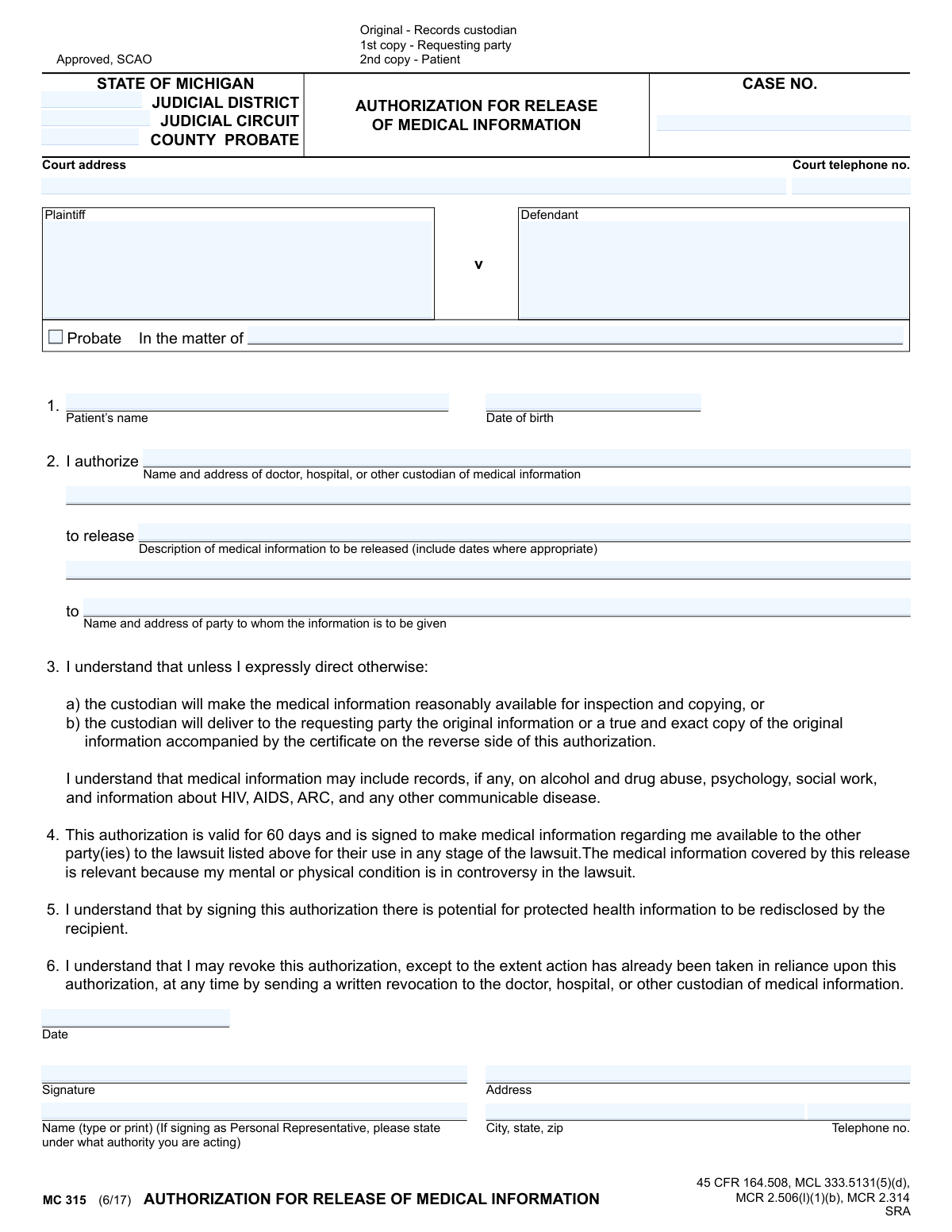
The AI does the filling. You just check it.
No typing into boxes, nothing to install.
What this form asks for
The AI fills all of it, from your answers or your documents.
The AI checks your answers before you download
14 checks built for this form, so a wrong date or a missing answer is caught before anyone else sees it.
This check verifies that the 'Date of birth' field contains a valid date in a recognized format (e.g., MM/DD/YYYY) and that the date is in the past. It is crucial for correctly identifying the patient and ensuring the authorization is for a real person, not a future date. A failed validation would prevent processing as the patient's identity cannot be confirmed.
This validation ensures that the form contains sufficient information to identify the legal case, checking that either the 'Plaintiff/Defendant' fields or the 'In the matter of' field is completed, along with the 'Case No.'. This is critical because the authorization is context-dependent on a specific lawsuit. Without a clear case identifier, the release of information would be legally ambiguous and could be misapplied.
This check confirms that the patient's signature date ('Date 1') is a valid, non-future date and is on or after the patient's date of birth. This date establishes the start of the 60-day validity period mentioned in the form. An invalid or future date would make the authorization's effective period unclear, potentially invalidating the entire document.
This validation ensures that the patient's name, date of birth, signature, and the date of signature are all present. These fields are the absolute minimum required to establish who is granting the authorization and when. Missing any of this information makes the authorization legally unenforceable and must be rejected.
This check verifies that both the 'Name and address of doctor, hospital, or other custodian' and the 'Name and address of party to whom the information is to be given' fields are filled out. The authorization is meaningless without knowing who is authorized to release the information and who is authorized to receive it. A failure here would halt processing as the core directive of the form is incomplete.
This validation ensures the 'Description of medical information to be released' field is not empty. A blank authorization is overly broad and legally problematic, violating patient privacy principles. The form must specify what information is being requested to be considered a valid and informed consent.
And 8 more checks
- Standardizes and Validates Phone Number Formats
- Ensures Case Number is Provided and Consistent
- Cross-Validates Patient Name Fields
- Validates Certificate Dates for Logical Consistency
- Verifies All Fields in the Certificate Section are Complete
- Validates City, State, and Zip Code Formatting
- Flags Authorizations Submitted After Expiration
- Ensures Required Court Information is Present
Let AI fill out your MC 315
No typing. Every field filled in seconds, checked, ready to sign.
How to Fill Out MC 315 Online for Free in 2026
What the AI walks you through.
- Navigate to Instafill.ai and upload your MC 315 form, or select it from our library of official documents.
- Use the AI assistant to accurately fill in the case details, including the court, case number, plaintiff, and defendant information.
- Enter the patient's full name and date of birth in the designated fields.
- Specify the custodian of the medical records (doctor, hospital) and the party who will receive the information, along with a clear description of the records to be released.
- Carefully review the authorization terms, including the 60-day validity period and your right to revoke the authorization.
- Electronically sign and date the form. The AI tool will ensure your signature is placed correctly and is legally binding.
- Download the completed form and distribute the copies as indicated: one for the records custodian, one for the requesting party, and one for the patient's records.
Common Mistakes in Completing MC 315
The ones the AI is built to catch.
Incomplete or Incorrect Court Case Information
Vague Custodian of Medical Information
Imprecise Description of Medical Records to be Released
Incorrectly Completing the Custodian's 'Certificate' Section
Missing Authority for Representative Signature
Patient Name or DOB Mismatch
Submitting an Expired Authorization
Illegible Handwriting
Incorrectly Identifying Case Parties
Missing Signature or Date
Frequently Asked Questions About MC 315
Is it really free for 7 days?
Can I fill other forms too?
How do I cancel?
How does the AI fill out MC 315?
What happens to my information?
How complex is MC 315 to fill out?
What is the purpose of the 'Authorization for Release of Medical Information' form?
Who needs to fill out and sign this form?
Who is the 'custodian of medical information'?
What should I write for the 'Description of medical information to be released'?
How long is this authorization valid?
Can I cancel this authorization after I've signed it?
Does this form authorize the release of sensitive information like mental health or substance abuse records?
Do I need to fill out the 'Certificate' section on the second page?
Where do I find the Case Number and other court information for the top of the form?
Who gets a copy of the completed form?
Can AI tools help me fill out this form?
How can I use Instafill.ai to complete this form online?
What should I do if the PDF version of this form is not fillable?
Get your MC 315 filled out by AI
$0 today. Cancel before Nov 11 and you pay nothing.
Other forms like this one
medical authorization forms: The Department of Medical Assistance Services Applied Behavior Analysis Preservice Service Authorization Request Form (Effective Dates of Service 09/01/2025 and after), Department of Medical Assistance Services Applied Behavior Analysis (97155, Et al.) Initial Service Authorization Request Form, Applied Behavior Analysis Concurrent Service Authorization Request Form (CPT Codes 97153, 97154, 97155, 97156, 97157, 97158, 0373T) – Virginia Department of Medical Assistance Services, Blue Shield of California Prior Authorization Request Form, Kaiser Permanente Authorization for Use or Disclosure of Patient Health Information, Kaiser Permanente Washington Request for Authorization, Blue Shield Promise Durable Medical Equipment (DME) Treatment Authorization Request Form
Medi-Cal forms: Form OWCP-915, Claim for Medical Reimbursement, Form 8994, Employer Credit for Paid Family and Medical Leave, Form OF-178, Certificate of Medical Examination, Form N-648, Medical Certification for Disability Exceptions, U.S. Coast Guard Form CG-719K, Application for Medical Certificate, The Department of Medical Assistance Services Applied Behavior Analysis Preservice Service Authorization Request Form (Effective Dates of Service 09/01/2025 and after), State of Illinois Department of Children and Family Services Medical Report on an Adult in a Child Care Facility (CFS 602), Carer Payment and Carer Allowance – Medical Report (SA431) for a child under 16 years, Medically Prescribed Treatment (Non-Medication) Form — Provider Treatment Order Form | Office of School Health | School Year 2025–2026, VA Form 10-7959f-2, Foreign Medical Program (FMP) Claim Cover Sheet, ABA Authorization Request (Medi-Cal) – Initial and Concurrent Requests, Department of Medical Assistance Services Applied Behavior Analysis (97155, Et al.) Initial Service Authorization Request Form, Applied Behavior Analysis Concurrent Service Authorization Request Form (CPT Codes 97153, 97154, 97155, 97156, 97157, 97158, 0373T) – Virginia Department of Medical Assistance Services, Department of Medical Assistance Services Enhanced Services Individual Service Plan (ISP) Template, Form DS-1843, Medical History and Examination for Individuals Age 12 and Older, Scheduled Medical Leave of Absence (MLOA) - BLET 13, Admissions Application, School of Diagnostic Imaging, Mills-Peninsula Medical Center, Albany Medical Center 2024 Benefits Guide, Form BWC-1141, Request for Medical Information, VA Form 21P-8416, Medical Expense Report
Michigan court forms: Form MC 03, Answer, Civil, Form MC 02, Appearance, Form MC 6, Notice to Appear, Form MC 01, Summons, State of Michigan, Form MC 01a, Complaint, Form MC 01b, Motion for Second Summons and Order, State of Michigan Blank Court Form, Form MC 07, Default Request and Entry, Form MC 07a, Default Request, Entry, and Judgment (Sum Certain), Form MC 09, Dismissal, Form MC 09a, Dismissal, Nonservice/No Progress, Form MC 10, Judgment, Civil, Form MC 11, Subpoena, Order to Appear and/or Produce, Request and Writ for Garnishment (Periodic), Form MC 13, Request and Writ for Garnishment (Nonperiodic), Form MC 14, Garnishee Disclosure, Form MC 15, Motion and Affidavit for Installment Payments/To Amend Order for Installment Payments, Form MC 15a, Order Regarding Installment Payments, Form MC 16, Motion to Set Aside Order for Installment Payments, State of Michigan, Form MC 16a, Order on Motion to Set Aside Order for Installment Payments
medical release forms: California HIPAA Authorization Form, Authorization for the Release of Protected Health Information, Friedman, Framme & Thrush, P.A. General Authorization Letter and Request for Letter or Telephone Call, UCLA Form #30910, Authorization for Release of Health Information
Let AI fill out your MC 315
Your trial starts once a card is added. You pay nothing before Nov 11.
Our AI already knows this form, all 34 fields of it. Skip the typing: tell it about yourself, or upload what you have, and it fills the whole form in seconds.
- AI fills every field on both pages, checkboxes included
- No typing into boxes: answer a few questions, or upload the listing or an old lease, an old copy of this form, a photo of a document
- The AI checks the answers; you review and change anything before you download
- Download the finished PDF, print it, or sign it online
- Encrypted, and never used to train AI
Cancel before Nov 11 and you pay nothing.
A card is needed to start the trial. Cancel in two clicks from your account.
Terms · Privacy