
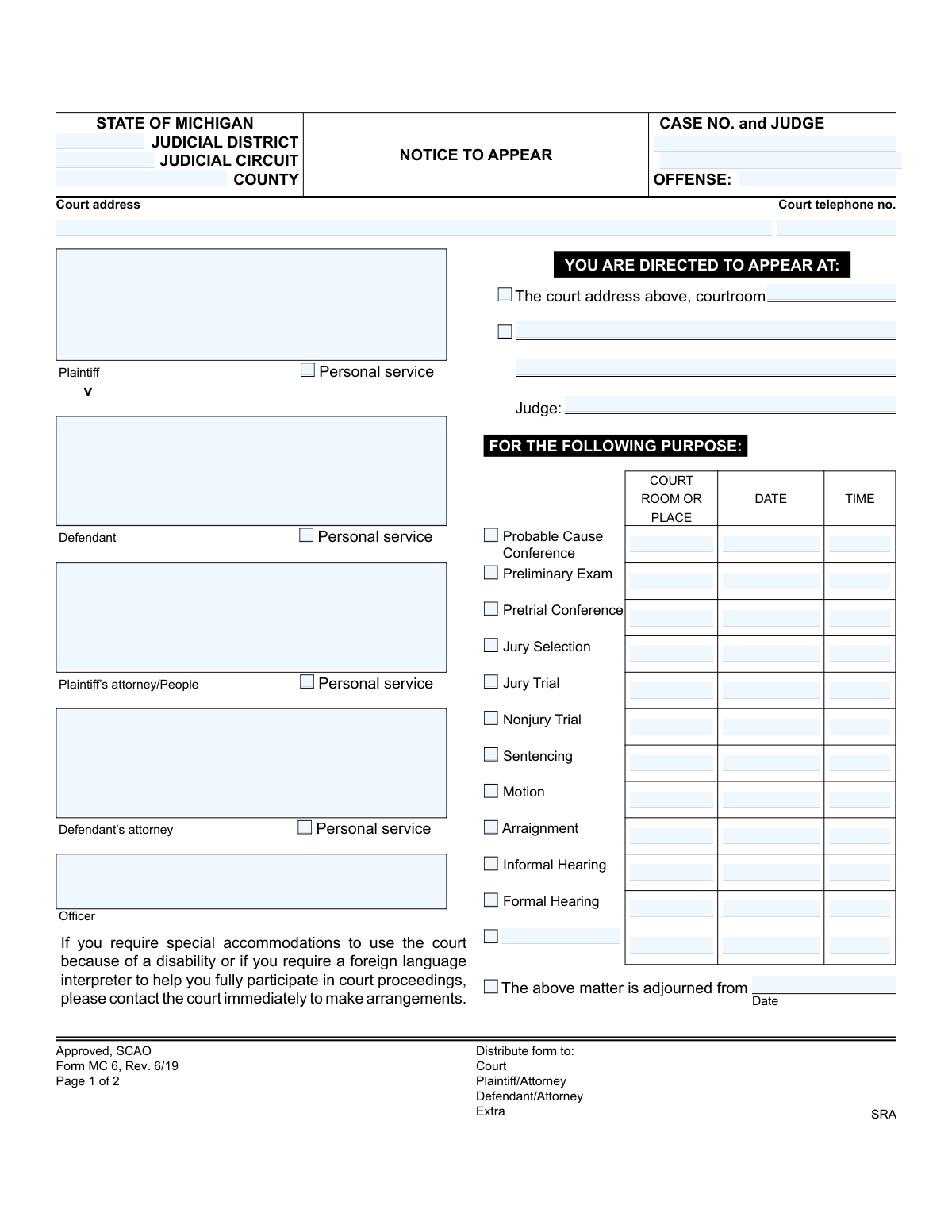
Yes! You can use AI to fill out Form MC 6, Notice to Appear
Don't type 76 fields by hand. Tell our AI about yourself, or upload a document you already have, and it fills every field in seconds. You check it, then download, print or sign.
The AI does the filling. You just check it.
No typing into boxes, nothing to install.
What this form asks for
The AI fills all of it, from your answers or your documents.
The AI checks your answers before you download
14 checks built for this form, so a wrong date or a missing answer is caught before anyone else sees it.
Checks if the 'Case no' field follows the standard Michigan court case number format. This is crucial for correctly identifying and tracking the case within the judicial system. An invalid format could lead to misfiling, delays, or inability to locate the case record.
This validation verifies that the 'Date issued' is on or before any scheduled appearance dates (Date 1-12). Issuing a notice for a past event is a logical impossibility and would render the notice invalid. This check prevents clerical errors that could lead to legal challenges or dismissal of the notice.
Verifies that at least one checkbox for the purpose of the appearance (e.g., 'Arraignment', 'Pretrial Conference') is selected. The notice is meaningless without a stated purpose, as the recipient would not know why they need to appear. Failure to select a purpose would make the form incomplete and legally insufficient.
This check ensures that if the 'Other' purpose checkbox is selected, the accompanying text field specifying that purpose is not empty. An unspecified 'Other' purpose provides no information to the recipient, defeating the point of the notice. This validation guarantees clarity and completeness for non-standard proceedings.
This validation confirms that for every selected appearance purpose, the corresponding date and time fields are populated. A notice to appear without a specific date and time is not actionable and fails to meet legal notification requirements. This check prevents the creation of ambiguous and unenforceable notices.
This check ensures all date fields on the form are entered in a valid and consistent format, such as MM/DD/YYYY. Incorrect or ambiguous date formats can lead to confusion and missed court appearances, which have serious legal consequences. This validation enforces data integrity and clarity for all parties involved.
And 8 more checks
- Validates Time Field Formatting
- Ensures a Valid Appearance Location is Specified
- Requires at Least One Judge to be Named
- Validates Court Telephone Number Format
- Validates Adjournment Date Logic
- Ensures Both Plaintiff and Defendant are Identified
- Verifies Jurisdictional Information is Complete
- Requires Offense Description
Let AI fill out your MC 6
No typing. Every field filled in seconds, checked, ready to sign.
How to Fill Out MC 6 Online for Free in 2026
What the AI walks you through.
- Navigate to Instafill.ai and upload or select the MC 6 Notice to Appear form.
- Allow the AI to scan and identify all the required fields, such as case number, court address, plaintiff, and defendant information.
- Provide the necessary details when prompted, including the names of the parties, their attorneys, and the specific offense or case type.
- Indicate the purpose of the appearance by checking the appropriate box (e.g., Preliminary Exam, Sentencing) and enter the scheduled date, time, and courtroom.
- Carefully review the auto-filled form to ensure all information, especially dates, names, and case numbers, is accurate.
- Securely download, print, or share the completed MC 6 form for distribution to the court, plaintiff, defendant, and other required parties.
Common Mistakes in Completing MC 6
The ones the AI is built to catch.
Entering an Incorrect or Incomplete Case Number
Misidentifying or Transposing Plaintiff and Defendant
Entering the Wrong Hearing Date or Time
Selecting the Incorrect Purpose for the Hearing
Providing Vague or Inaccurate Location Details
Listing Outdated or Incorrect Attorney Information
Omitting the 'Date Issued'
Entering Inconsistent Jurisdictional Information
Using an Ambiguous or Incorrect 'Offense' Description
Failing to Document the Method of Service
Frequently Asked Questions About MC 6
Is it really free for 7 days?
Can I fill other forms too?
How do I cancel?
How does the AI fill out MC 6?
What happens to my information?
How complex is MC 6 to fill out?
What is the purpose of this 'Notice to Appear' form?
What happens if I don't show up for my court date?
Where do I find the specific date, time, and location for my hearing?
I need a foreign language interpreter or an accommodation for a disability. What should I do?
Can I reschedule my court date?
What should I bring with me to court?
What does the 'Purpose' of the hearing mean (e.g., 'Preliminary Exam', 'Pretrial Conference')?
I want to hire a lawyer. What does the form say about that?
What does 'Personal service' mean on the form?
The court already filled this out. Can an AI tool still help me with this notice?
How can I use Instafill.ai to manage this 'Notice to Appear' online?
I received this as a scanned, non-fillable PDF. What can I do?
What is the difference between the Plaintiff and the Defendant?
Get your MC 6 filled out by AI
$0 today. Cancel before Nov 11 and you pay nothing.
Other forms like this one
court forms: Form Summons, Supreme Court of New York, Form SC-100, Plaintiff's Claim and ORDER to Go to Small Claims Court, Form AO 240, Application to Proceed in District Court Without Prepaying Fees or Costs, Form AO 239, Application to Proceed in District Court Without Prepaying Fees or Costs, Affidavit for Service by Publication/Posting (Circuit Court of Cook County, Illinois) (CCG 0013 A/B), Petition for Leave to Proceed In Forma Pauperis (Court of Common Pleas of Lehigh County, Pennsylvania, Civil Division), In Forma Pauperis Affidavit/Petition (AOPC 622A) – Pennsylvania Magisterial District Court, Judicial Council of California Form SC-105, Request for Court Order and Answer (Small Claims), SC-120, Defendant’s Claim and ORDER to Go to Small Claims Court (Small Claims), SC-105, Request for Court Order and Answer (Small Claims), Judicial Council of California Form SC-120, Defendant’s Claim and ORDER to Go to Small Claims Court (Small Claims), In Forma Pauperis Affidavit Petition (AOPC 622A) — Pennsylvania Magisterial District Court, Florida Supreme Court Approved Family Law Form 12.901(b)(3), Petition for Dissolution of Marriage with No Dependent or Minor Child(ren) or Property (02/18), Illinois Supreme Court Approved Form E-O 3500.3, Eviction Order, Form P3 (Rule 25-3(2)) — Affidavit of Applicant for Grant of Probate or Grant of Administration with Will Annexed (Short Form) (Supreme Court of British Columbia), Form SC-100, Plaintiff’s Claim and ORDER to Go to Small Claims Court, Designation of Record on Appeal (Civil) (Maricopa County Justice Courts, Arizona) (Form APP 8150-702), FW-003, Order on Court Fee Waiver (Superior Court), Judicial Council of California Form SER-001, Request for Sheriff to Serve Court Papers, FW-003, Order on Court Fee Waiver (Superior Court)
legal forms: Legal Aid Queensland application form (LAQAPP) – Application for Legal Aid in Queensland, Legal Aid Queensland application form (LAQAPP), Legal Aid Queensland application form (LAQAPP), Legal Aid Queensland application form (LAQAPP), Form FL-170, Declaration for Default or Uncontested Dissolution or Legal Separation, Department of Home Affairs — Appointment or cessation of a registered migration agent, legal practitioner or exempt person providing immigration assistance (Appointment notification form), Form FL-170, Declaration for Default or Uncontested Dissolution or Legal Separation (Family Law), Form 956, Appointment of a registered migration agent, legal practitioner or exempt person, Legal Entity Beneficial Ownership/Trust Certification Form, Application Form: Legal Entities | Qualified Investor Hedge Fund, Fundrock Application Form: Legal Entities | Monthly Liquidity – Qualified Investor Hedge Fund, Application Form: Legal Entities | Retail Hedge Fund - Fundrock, Fundrock Application Form: Legal Entities | Monthly Liquidity – Retail Hedge Fund, Form N461: Claim for judicial review, Friedman, Framme & Thrush, P.A. General Authorization Letter and Request for Letter or Telephone Call, Memorandum of Contract, Relinquishment of control over assets to minor form, Nova Poshta Claim Form for Legal Entities and Individual Entrepreneurs (Form F-1.5.35-1), Legal Aid Financial Eligibility Form, Form MC 01, Summons
Michigan court forms: Form MC 03, Answer, Civil, Form MC 02, Appearance, Form MC 01, Summons, State of Michigan, Form MC 01a, Complaint, Form MC 01b, Motion for Second Summons and Order, State of Michigan Blank Court Form, Form MC 07, Default Request and Entry, Form MC 07a, Default Request, Entry, and Judgment (Sum Certain), Form MC 09, Dismissal, Form MC 09a, Dismissal, Nonservice/No Progress, Form MC 10, Judgment, Civil, Form MC 11, Subpoena, Order to Appear and/or Produce, Request and Writ for Garnishment (Periodic), Form MC 13, Request and Writ for Garnishment (Nonperiodic), Form MC 14, Garnishee Disclosure, Form MC 15, Motion and Affidavit for Installment Payments/To Amend Order for Installment Payments, Form MC 15a, Order Regarding Installment Payments, Form MC 16, Motion to Set Aside Order for Installment Payments, State of Michigan, Form MC 16a, Order on Motion to Set Aside Order for Installment Payments, State of Michigan MC 17, Certificate of Satisfied Judgment
Let AI fill out your MC 6
Your trial starts once a card is added. You pay nothing before Nov 11.
Our AI already knows this form, all 76 fields of it. Skip the typing: tell it about yourself, or upload what you have, and it fills the whole form in seconds.
- AI fills every field on both pages, tables and checkboxes included
- No typing into boxes: answer a few questions, or upload a document you already have, an old copy of this form, a photo of a document
- The AI checks the answers; you review and change anything before you download
- Download the finished PDF, print it, or sign it online
- Encrypted, and never used to train AI
Cancel before Nov 11 and you pay nothing.
A card is needed to start the trial. Cancel in two clicks from your account.
Terms · Privacy