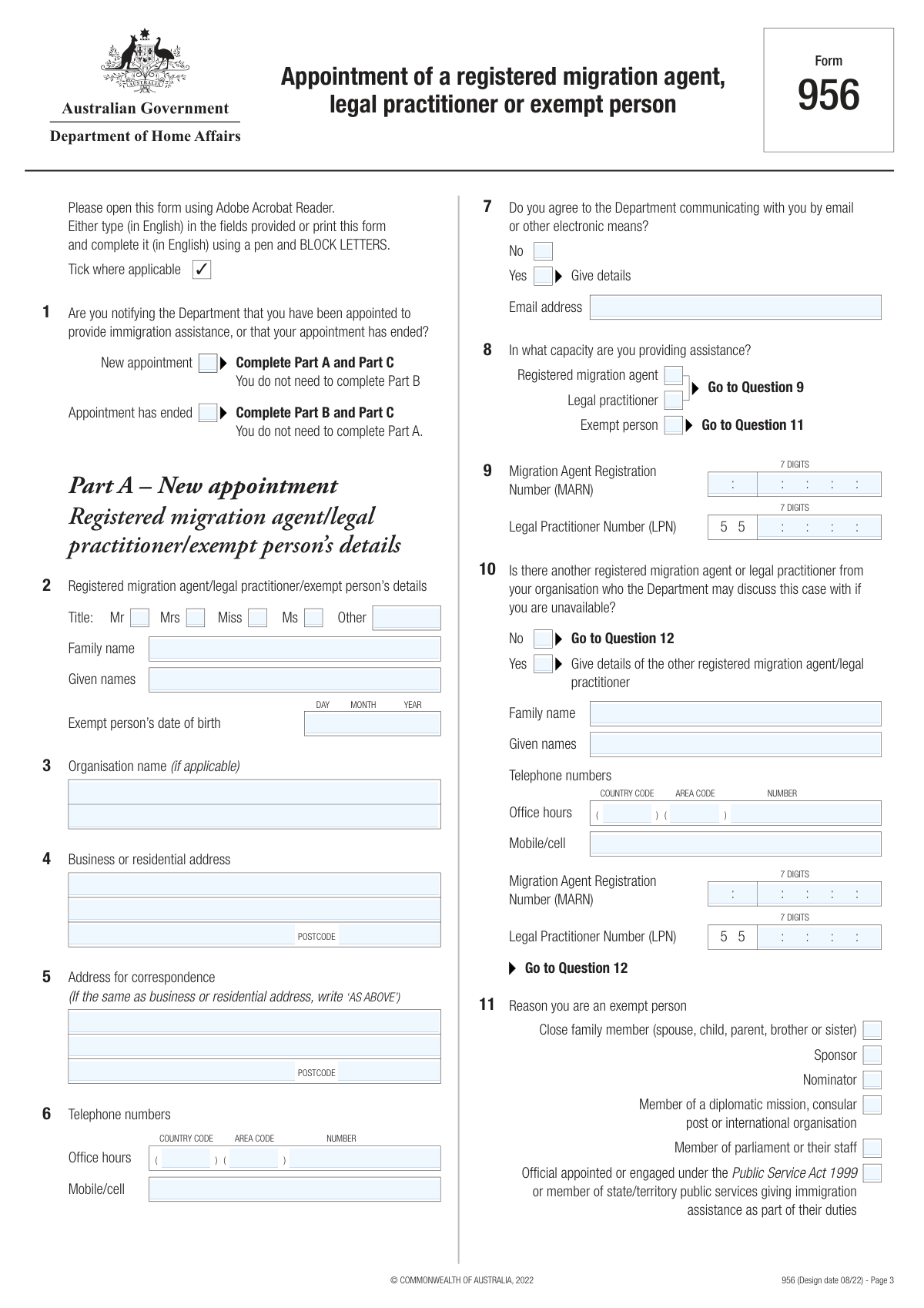
Yes! You can use AI to fill out Form 956, Appointment of a registered migration agent, legal practitioner or exempt person
Form 956 is an official Department of Home Affairs form that records who is authorised to provide immigration assistance to a client under the Migration Act 1958, and optionally who is authorised to receive written communications from the Department on the client’s behalf. It is important because it establishes the representative’s authority for a specific visa, cancellation, or other immigration matter, and ensures the Department sends correspondence to the correct person when an authorised recipient is appointed. The form can also be used to notify the Department when the appointment ends and, where relevant, to withdraw authorised recipient arrangements with the client’s confirmation. Today, this form can be filled out quickly and accurately using AI-powered services like Instafill.ai, which can also convert non-fillable PDF versions into interactive fillable forms.
Our AI automatically handles information lookup, data retrieval, formatting, and form filling.
It takes less than a minute to fill out Form 956 using our AI form filling.
Securely upload your data. Information is encrypted in transit and deleted immediately after the form is filled out.
Form specifications
| Form name: | Form 956, Appointment of a registered migration agent, legal practitioner or exempt person |
| Number of pages: | 6 |
| Language: | English |
| Categories: | Australian immigration forms, Home Affairs forms, legal forms, practitioner forms, migration forms |
Instafill Demo: filling out a legal form in seconds
How to Fill Out Form 956 Online for Free in 2026
Are you looking to fill out a FORM 956 form online quickly and accurately? Instafill.ai offers the #1 AI-powered PDF filling software of 2026, allowing you to complete your FORM 956 form in just 37 seconds or less.
Follow these steps to fill out your FORM 956 form online using Instafill.ai:
- 1 Go to Instafill.ai and upload Form 956 (or select it from the form library) and start a new guided fill session.
- 2 Choose the notification type (new appointment or appointment has ended) and confirm whether the representative is a registered migration agent, legal practitioner, or exempt person (including exemption reason if applicable).
- 3 Enter the representative’s details: name, organisation (if any), addresses, phone numbers, registration number (MARN/LPN if applicable), and email/electronic communication consent; add an alternative contact person if relevant.
- 4 Enter the client details and matter details: who the client is (visa applicant/sponsor/nominator/etc.), the type of assistance (application, cancellation, or specific matter), and key identifiers (Client ID, RID, TRN) if known; add any dependent/other clients for the same matter.
- 5 Indicate authorised recipient status (whether the representative is authorised to receive written communication) and provide any required correspondence/electronic communication details.
- 6 Review Part C declarations, ensure the correct boxes are ticked for the situation (appointment, authorised recipient, ending appointment, withdrawal), then apply e-signatures and dates for both the representative and the client as required.
- 7 Use Instafill.ai to validate required fields, export the completed PDF, and submit it to the Department of Home Affairs via the appropriate submission channel for the client’s matter.
Our AI-powered system ensures each field is filled out correctly, reducing errors and saving you time.
Why Choose Instafill.ai for Your Fillable Form 956 Form?
Speed
Complete your Form 956 in as little as 37 seconds.
Up-to-Date
Always use the latest 2026 Form 956 form version.
Cost-effective
No need to hire expensive lawyers.
Accuracy
Our AI performs 10 compliance checks to ensure your form is error-free.
Security
Your personal information is protected with bank-level encryption.
Frequently Asked Questions About Form Form 956
Form 956 is used to notify the Department of Home Affairs that a registered migration agent, legal practitioner, or exempt person has been appointed to provide immigration assistance, or that the appointment has ended. It can also be used to manage (appoint/withdraw) an authorised recipient when applicable.
Only a registered migration agent, an Australian legal practitioner, or an exempt person can use Form 956. If you are only being appointed to receive documents (and not provide immigration assistance), use Form 956A instead.
Immigration assistance involves using (or claiming to use) migration procedure knowledge/experience to help with matters under the Migration Act 1958. Simply filling in a form, translating/interpreting, or passing on information without advice is not considered immigration assistance.
Use Form 956 when you are being appointed (or ending appointment) to provide immigration assistance as a migration agent, legal practitioner, or exempt person. Use Form 956A when the appointment is only for an authorised recipient to receive documents and no immigration assistance is being provided.
Yes. The form states a separate Form 956 must be completed for each matter (for example, a different visa application, cancellation matter, or sponsorship-related issue).
If it’s a new appointment, select “New appointment” and complete Part A and Part C (you do not complete Part B). If the appointment has ended, select “Appointment has ended” and complete Part B and Part C (you do not complete Part A).
You must provide the person’s name, contact details, and their identifier: a 7-digit MARN for registered migration agents or a 7-digit LPN for legal practitioners. Exempt persons must provide their reason for exemption and date of birth.
Exempt persons include close family members, sponsors/nominators, MPs/staff, certain public servants acting in their duties, and members of diplomatic/consular/international organisations. Exempt persons must not charge a fee for assistance; charging a fee in Australia can be an offence with severe penalties.
List additional clients (for example, dependent applicants) in the “Names of other clients” section. Everyone listed will be treated as having appointed the same representative and (if selected) the same authorised recipient.
An authorised recipient is someone who receives the Department’s written communications on the client’s behalf for the specified matter. If appointed, the Department will send correspondence to the authorised recipient and treat it as received by the client, which may include sensitive information.
If ending an appointment and withdrawing authorised recipient status, complete Part B and ensure the client completes the declaration in Part C confirming the withdrawal is with their authority. Alternatively, the client can withdraw in writing or use Form 956A.
No—email/electronic communication is optional and only used if you agree and provide details. The form warns that electronic communications may not be secure unless adequately encrypted, and the government does not accept responsibility for information sent electronically.
Provide them if known, but the form allows you to proceed without them. If you do have any of these identifiers (Client ID, TRN, or RID), including them can help the Department match the form to the correct matter.
Yes. AI form-filling services like Instafill.ai can help auto-fill fields based on your provided information, reducing manual typing and common errors while keeping you in control to review before signing/submitting.
Upload the Form 956 PDF to Instafill.ai, provide the relevant details (agent/practitioner/exempt person info, client details, matter type, and authorised recipient choices), and let the AI map your answers into the correct fields. Review the completed form, then download it for signature and submission to the Department.
If the PDF isn’t fillable, Instafill.ai can convert flat non-fillable PDFs into interactive fillable forms so you can complete the fields digitally. After conversion, you can auto-fill and export a clean, typed version for signing and submission.
Compliance Form 956
Validation Checks by Instafill.ai
1
Notification Type selection is exactly one (New appointment vs Appointment has ended)
Validate that exactly one of the two Notification Type options is selected: 'New appointment' or 'Appointment has ended'. This is critical because it determines which parts of the form are applicable (Part A for new appointments, Part B for ending appointments) and which declarations must be completed. If both or neither are selected, the submission should be rejected and the user prompted to choose one option to avoid processing the wrong workflow.
2
Capacity of assistance is selected and matches required identifier fields
Ensure one capacity is selected: Registered migration agent, Legal practitioner, or Exempt person. If Registered migration agent is selected, a 7-digit MARN must be provided; if Legal practitioner is selected, a 7-digit LPN must be provided; if Exempt person is selected, an exemption reason must be selected and the exempt person DOB must be provided. If the capacity and identifiers are inconsistent (e.g., Exempt person selected but MARN provided instead of DOB/reason), fail validation and require correction to prevent invalid representation.
3
MARN/LPN format validation (7 digits only)
Validate that MARN and LPN values contain exactly 7 numeric digits with no letters, spaces, or punctuation. This ensures the Department can reliably match the representative to official registers and reduces downstream matching errors. If the value is not exactly 7 digits, block submission and request a corrected number.
4
Exempt person reason is provided and single-select
When 'Exempt person' is selected, validate that exactly one exemption reason is ticked (e.g., close family member, sponsor, nominator, MP/staff, diplomatic, public service). This is important because exemption eligibility depends on the specific category and affects compliance requirements (including fee restrictions). If none or multiple reasons are selected, fail validation and require a single clear reason.
5
Date fields are valid calendar dates and not in the future where inappropriate
Validate all date inputs (DOBs, date lodged, date visa granted, declaration dates) are real calendar dates (including leap years) and follow the expected day/month/year structure. DOBs must not be in the future, and declaration dates should not be in the future relative to submission time. If invalid or illogical dates are detected, reject the submission to prevent incorrect identity and timeline records.
6
Email consent gating and email format validation (agent/practitioner and client)
If 'Yes' is selected for electronic communication consent, require an email address and validate it against a standard email format (single @, valid domain, no spaces). If 'No' is selected, the email field should be empty or ignored to avoid accidental use of an unconsented address. If consent is 'Yes' but the email is missing/invalid, fail validation because the Department may rely on that channel for official communications.
7
Telephone number structure validation (country code/area code/number and mobile)
Validate that phone fields contain only permitted characters (digits, optional leading + for country code) and meet minimum/maximum length rules appropriate for international numbers. Where the form separates country code, area code, and number, ensure each component is numeric and that at least one contact number (office or mobile) is provided for the representative. If phone data is malformed or all contact numbers are missing, fail validation to ensure the Department can contact the appointed person.
8
Address completeness and postcode format validation
Require mandatory address components for the representative and client sections (at minimum: address line 1 and postcode; plus suburb/town where the form captures it). Validate Australian postcodes as exactly 4 digits when the address is in Australia; otherwise apply a generic alphanumeric/length rule for international postcodes if country is not captured. If required address elements are missing or postcode format is invalid, fail validation because correspondence and identity checks depend on accurate addresses.
9
Correspondence address 'AS ABOVE' handling and dependency
If the correspondence address is entered as 'AS ABOVE', ensure the business/residential address is present and complete, and copy/resolve it consistently for downstream processing. If 'AS ABOVE' is used but the base address is incomplete, fail validation because the correspondence address would be unusable. If a separate correspondence address is provided, validate it independently for completeness and postcode format.
10
Alternative contact section conditional requirements
If 'Yes' is selected for an alternative contact person, require that person’s family name, given names, and at least one contact number, and require either MARN or LPN consistent with their role (as the form indicates they must be a registered migration agent or legal practitioner). If 'No' is selected, alternative contact fields should be empty/ignored to prevent accidental data capture. If required alternative contact details are missing or inconsistent, fail validation to avoid unauthorized or unreachable secondary contacts.
11
Client type selection is exactly one and consistent with assistance type
Validate that exactly one option is selected for 'The person receiving immigration assistance is a…' (visa applicant, sponsor, nominator, proposer, visa holder for cancellation, ministerial intervention requester). This selection should be logically consistent with the assistance type (e.g., cancellation process should align with a visa holder for cancellation; ministerial intervention should align with that requester type). If multiple/none are selected or the combination is contradictory, fail validation to prevent misclassification of the matter.
12
Assistance type selection is exactly one and required subfields are completed
Ensure exactly one assistance type is selected: Application process, Cancellation process, or Specific matter. If Application process is selected, require 'Type of application' and either 'Not yet lodged' OR a valid 'Date lodged' (but not both); if Cancellation process is selected, require subclass and date visa granted; if Specific matter is selected, require descriptive details. If these dependencies are not met, fail validation because the Department cannot determine what the appointment relates to.
13
Application process lodging status mutual exclusivity and date logic
When Application process is selected, validate that 'Not yet lodged' and 'Date lodged' are mutually exclusive. If 'Date lodged' is provided, it must be a valid date and should not be after the representative/client declaration dates (as a basic timeline sanity check). If both are set or the date is illogical, fail validation to avoid incorrect case status.
14
Department identifiers format and at-least-one rule (Client ID / TRN / RID)
Where the form requests identifiers, enforce the 'provide at least one (if known)' rule by validating that if the user indicates they are known (or enters any identifier section), at least one of Client ID, TRN, or RID is populated. Apply strict character rules (typically alphanumeric, no spaces unless explicitly allowed) and length bounds to reduce transcription errors. If an identifier is provided in an invalid format, fail validation because it can misroute the case or prevent matching.
15
Authorised recipient selection drives required declarations and consistency
If the authorised recipient status is 'Yes' in Part A, require that the representative’s declaration includes 'Appointment of authorised recipient' and the client’s declaration includes 'Appointment of authorised recipient'. If authorised recipient is 'No', those declaration ticks should not be selected to avoid granting unintended authority. If the authorised recipient selection and declaration ticks conflict, fail validation because it changes who receives legally significant correspondence.
16
Ending appointment workflow completeness (Part B) and withdrawal logic
If 'Appointment has ended' is selected, require Part B fields for the ending representative and the client (including client name, DOB, and correspondence address at Question 20), and require the appropriate ending/withdrawal declaration ticks. If the form indicates the representative was an authorised recipient and the client is ending that authorised recipient appointment, require the client’s 'Withdrawal of authorised recipient appointment' declaration tick to confirm authority. If these elements are missing or inconsistent, fail validation to prevent unauthorized termination or continued correspondence to the wrong party.
Common Mistakes in Completing Form 956
People often use Form 956 to appoint someone just to receive correspondence, not realising 956 is for appointing a migration agent/legal practitioner/exempt person to provide immigration assistance (and optionally be an authorised recipient). This can lead to the Department not recognising the intended arrangement, causing missed notices or delays. If you only need an authorised recipient, use Form 956A instead; if you need immigration assistance, use 956 and complete the correct parts. AI-powered tools like Instafill.ai can flag the wrong form choice early and guide you to the correct document (and can convert a flat PDF into a fillable version if needed).
A very common error is ticking both boxes or choosing the wrong one, which then triggers the wrong sections (Part A vs Part B) to be completed. This can result in the Department treating an appointment as ended when it is meant to start (or vice versa), disrupting representation and correspondence. Tick only one option and follow the form’s instruction: New appointment = complete Part A and Part C; Appointment has ended = complete Part B and Part C. Instafill.ai can enforce single-choice logic and prevent contradictory selections.
Applicants frequently fill in Part A and Part B together, or skip the required part because the form’s branching instructions are missed. The consequence is an incomplete notification that may be rejected or require follow-up, delaying case handling. After choosing the notification type, complete only the required part and ensure Part C declarations match that action. Instafill.ai can automatically route users to the correct sections and highlight missing required fields.
Migration Agent Registration Numbers (MARN) and Legal Practitioner Numbers (LPN) are often entered with spaces, letters, too few digits, or the wrong identifier entirely. If the number cannot be validated, the Department may not accept the appointment or may be unable to confirm the representative’s authority. Enter exactly 7 digits in the correct field and double-check you’re using the right number for your capacity (agent vs practitioner). Instafill.ai can validate digit length/format and reduce transposition errors.
People sometimes tick 'Exempt person' but forget to tick the specific exemption category (close family member, sponsor, nominator, etc.) or misunderstand who qualifies. This can invalidate the appointment and may raise compliance concerns; additionally, exempt persons must not charge a fee, and charging can have serious legal consequences. Always select the exact exemption reason and ensure the exempt person’s date of birth is provided where required. Instafill.ai can prompt for the required exemption reason and ensure dependent fields (like DOB) are completed.
A frequent data-entry issue is swapping family name and given names, using nicknames, or entering names that don’t match passport/Department records. This can cause identity mismatches, delays in linking the appointment to the correct client, or requests for clarification. Enter names exactly as recorded with the Department and keep spelling consistent across all sections (including other clients/dependants). Instafill.ai can standardise name formatting and reuse verified identity data consistently across fields.
Users often enter dates in the wrong order (MM/DD/YYYY vs DD/MM/YYYY), leave out the year, or provide impossible dates. Incorrect dates can prevent correct identification of the client, confuse the matter timeline, and trigger follow-up requests. Use the form’s DAY–MONTH–YEAR boxes and ensure dates are complete and accurate; if 'Not yet lodged' is selected, don’t also enter a lodged date. Instafill.ai can enforce Australian date formatting and validate date logic.
Many people leave the Client ID/RID/TRN section blank even when they have an email/receipt containing these numbers, assuming it’s optional. While the form says 'if known,' omitting known identifiers can slow matching the appointment to the correct application or request, especially where names are common. Add at least one of Client ID, RID, or TRN whenever available and copy it exactly from Department correspondence. Instafill.ai can extract these identifiers from source documents/emails and validate their formatting.
Applicants often tick 'Yes' to being an authorised recipient but forget that this changes who receives all written communication, or they tick 'No' while expecting the agent to receive notices. Misalignment between Question 17/19 and the Part C declaration ticks can cause the Department to send correspondence to the wrong party, risking missed deadlines. Decide clearly whether the representative should receive all written communication, tick accordingly, and ensure the matching declaration boxes are selected in Part C. Instafill.ai can cross-check these dependencies and warn when declarations don’t match earlier answers.
A common contradiction is ticking 'Yes' to electronic communication but leaving the email field blank, or entering an email while ticking 'No.' This can lead to the Department defaulting to paper/postal communication or being unable to contact the representative/client quickly. If you consent to electronic communication, provide a monitored email address and ensure it is spelled correctly; if you do not consent, leave the email field consistent with that choice. Instafill.ai can validate email syntax and prevent inconsistent consent selections.
People frequently forget to sign/date, or they tick declaration options that don’t match the action (eg ticking 'Ending appointment' during a new appointment). Without correct declarations, the Department may treat the form as invalid and request resubmission, delaying representation. Tick only the declarations that apply to your situation (new appointment vs ending/withdrawal), then ensure both the representative and the client sign and date where required. Instafill.ai can highlight missing signatures/dates and ensure the correct declaration set is selected based on earlier answers.
Saved over 80 hours a year
“I was never sure if my IRS forms like W-9 were filled correctly. Now, I can complete the forms accurately without any external help.”
Kevin Martin Green
Your data stays secure with advanced protection from Instafill and our subprocessors

Robust compliance program
Transparent business model
You’re not the product. You always know where your data is and what it is processed for.
ISO 27001, HIPAA, and GDPR
Our subprocesses adhere to multiple compliance standards, including but not limited to ISO 27001, HIPAA, and GDPR.
Security & privacy by design
We consider security and privacy from the initial design phase of any new service or functionality. It’s not an afterthought, it’s built-in, including support for two-factor authentication (2FA) to further protect your account.
Fill out Form 956 with Instafill.ai
Worried about filling PDFs wrong? Instafill securely fills form-956-appointment-of-a-registered-migration-agent-legal-practitioner-or-exempt-person forms, ensuring each field is accurate.