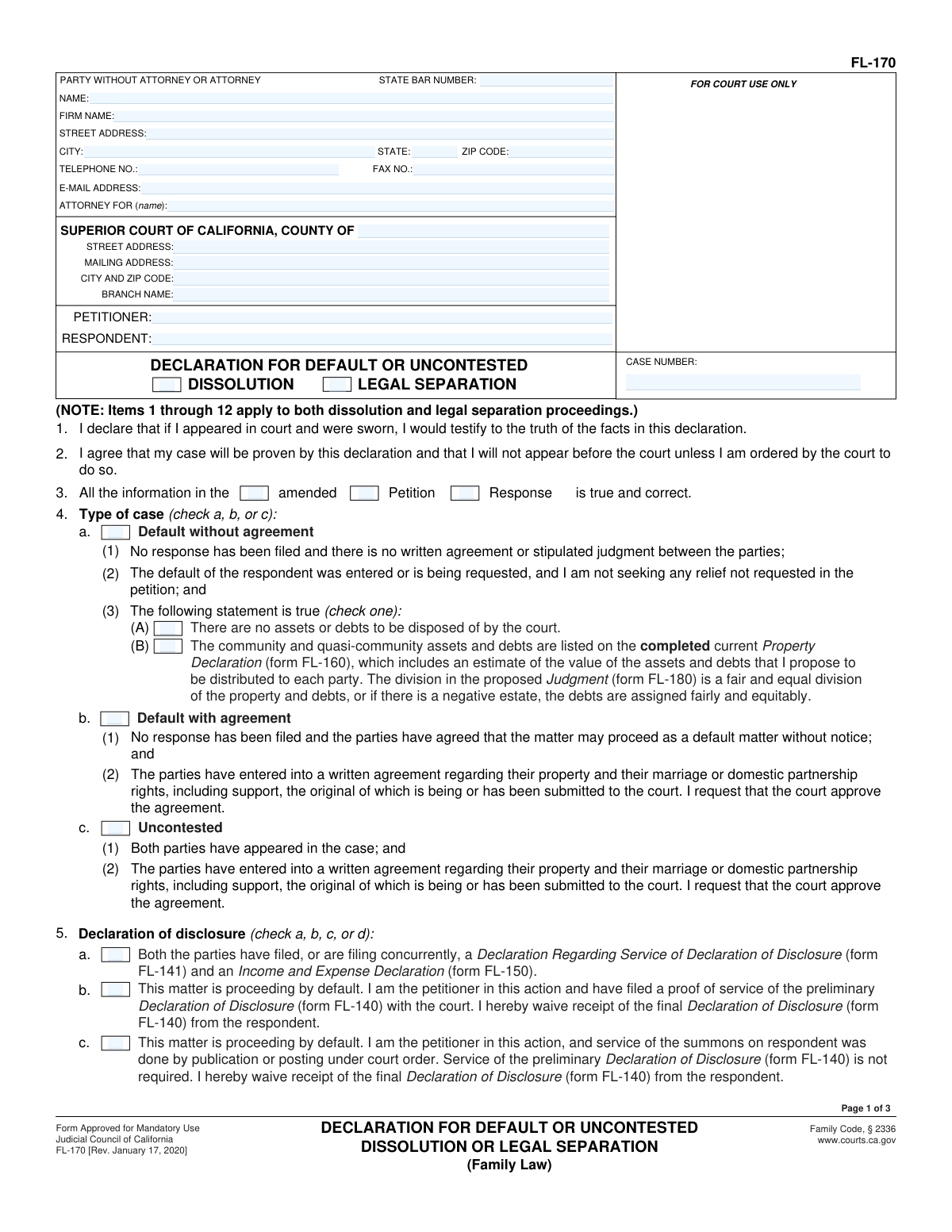
Yes! You can use AI to fill out Form FL-170, Declaration for Default or Uncontested Dissolution or Legal Separation
Form FL-170 (Declaration for Default or Uncontested Dissolution or Legal Separation) is a sworn declaration filed in California family law cases when the matter is proceeding by default or is uncontested. It tells the court the case posture (default/uncontested), confirms required disclosures and waivers (e.g., FL-140/FL-141/FL-144), and supports the orders requested in the proposed Judgment (FL-180), including property division, custody/visitation, child support, and spousal/partner support where applicable. It is important because it provides the factual basis the court relies on to enter judgment without a hearing unless the court orders an appearance. Today, this form can be filled out quickly and accurately using AI-powered services like Instafill.ai, which can also convert non-fillable PDF versions into interactive fillable forms.
Our AI automatically handles information lookup, data retrieval, formatting, and form filling.
It takes less than a minute to fill out FL-170 using our AI form filling.
Securely upload your data. Information is encrypted in transit and deleted immediately after the form is filled out.
Form specifications
| Form name: | Form FL-170, Declaration for Default or Uncontested Dissolution or Legal Separation |
| Number of pages: | 3 |
| Language: | English |
| Categories: | court forms |
Instafill Demo: filling out a legal form in seconds
How to Fill Out FL-170 Online for Free in 2026
Are you looking to fill out a FL-170 form online quickly and accurately? Instafill.ai offers the #1 AI-powered PDF filling software of 2026, allowing you to complete your FL-170 form in just 37 seconds or less.
Follow these steps to fill out your FL-170 form online using Instafill.ai:
- 1 Go to Instafill.ai and upload the FL-170 PDF (or select “FL-170” from the form library).
- 2 Enter case and court details (county, branch, addresses), party information (petitioner/respondent), and the case number exactly as shown on your court documents.
- 3 Use the guided prompts to choose the correct case type and posture (default without agreement, default with agreement, or uncontested) and confirm you are not requesting relief beyond the petition.
- 4 Complete the disclosure section by indicating which declarations were served/filed (e.g., FL-141, FL-150) and whether preliminary/final declarations of disclosure (FL-140) are waived or required, including any related stipulation (e.g., FL-144).
- 5 Fill in the requested orders and supporting facts (property/debts and references to FL-160 and FL-180; custody/visitation and UCCJEA FL-105; child support details; spousal/partner support selections; attorney fees if requested).
- 6 Review Instafill.ai’s validation checks for missing attachments, inconsistent selections, and required signatures/penalty-of-perjury language; then generate a clean, court-ready PDF.
- 7 Download, sign/date where required, attach referenced forms/attachments, and file/serve the completed FL-170 according to your county’s court rules (e-filing or in person).
Our AI-powered system ensures each field is filled out correctly, reducing errors and saving you time.
Why Choose Instafill.ai for Your Fillable FL-170 Form?
Speed
Complete your FL-170 in as little as 37 seconds.
Up-to-Date
Always use the latest 2026 FL-170 form version.
Cost-effective
No need to hire expensive lawyers.
Accuracy
Our AI performs 10 compliance checks to ensure your form is error-free.
Security
Your personal information is protected with bank-level encryption.
Frequently Asked Questions About Form FL-170
Form FL-170 (Declaration for Default or Uncontested Dissolution or Legal Separation) is used to ask the court to enter a judgment in a divorce (dissolution) or legal separation when the case is proceeding by default or is uncontested. It lets you provide sworn statements supporting the orders requested in your proposed Judgment (FL-180).
Typically, the petitioner (and sometimes a party in an uncontested matter) completes FL-170 when requesting a default judgment or submitting an uncontested judgment package. You sign under penalty of perjury that the statements are true and that the case can be decided based on the declaration.
âUncontestedâ generally means both parties have appeared and are submitting a written agreement for the court to approve. âDefault with agreementâ means no response was filed, but there is a written agreement and the parties allow the case to proceed as a default. âDefault without agreementâ means no response was filed and there is no written agreement or stipulated judgment.
YesâFL-170 repeatedly references that custody, support, property, fees, and other orders should be âas set forth in the proposed Judgment (FL-180).â In most default/uncontested judgment packets, FL-180 is a required companion form.
Many cases require a Declaration of Disclosure (FL-140) and a Declaration Regarding Service of Declaration of Disclosure (FL-141). If both parties mutually waive final disclosures in an uncontested case, the waiver is usually documented on FL-144 (or included in the agreement/proposed judgment as stated on FL-170).
FL-170 states that if the case is proceeding by default and the respondent was served by publication or posting under court order, service of the preliminary FL-140 is not required. In that situation, the petitioner can also waive receipt of the respondentâs final FL-140.
If you are the petitioner in a default case and you filed proof of service of the preliminary FL-140 with the court, FL-170 includes an option reflecting that. You can also indicate you waive receipt of the respondentâs final FL-140 (as the form provides).
FL-170 includes a statement you can select indicating there are no assets or debts for the court to dispose of. If that is true, you generally do not need to propose a division on FL-160, but your FL-180 should still be consistent with that statement.
If there are community or quasi-community assets/debts, FL-170 points you to complete a current Property Declaration (FL-160) with estimated values and the proposed distribution to each party. The proposed division should match what you request in the Judgment (FL-180).
Youâll typically complete the custody/visitation and child support items that say orders should be âas set forth in the proposed Judgment (FL-180).â FL-170 also references the UCCJEA form (FL-105) and asks whether its information has changed since it was last filed.
Often yesâFL-170 states that both parties have filed (or are filing concurrently) FL-141 and FL-150, and it also notes FL-150 is required if support or attorneyâs fees are requested unless a current one is already on file. You should include your best estimate of the other partyâs income when support is at issue.
FL-170 lets you request spousal/partner support per FL-180, ask to terminate support forever, reserve jurisdiction to award support later, or permanently waive your right to receive support. If you need to explain the basis, the form references using FL-157, an attachment (Attachment 8d), or a written agreement.
YesâFL-170 includes a section to request attorneyâs fees as set forth in the proposed Judgment (FL-180). It references using Request for Attorneyâs Fees and Costs Attachment (FL-319) to provide the supporting facts.
A status-only judgment asks the court to terminate marital or domestic partner status now, while reserving other issues (like property or support) for later determination. FL-170 includes a specific statement you can select if you are requesting status-only relief.
YesâAI tools can help reduce errors and save time by auto-filling fields from your case details; services like Instafill.ai use AI to accurately populate form fields. If your FL-170 PDF is flat/non-fillable, Instafill.ai can convert it into an interactive fillable form and then guide you to complete it online before you download, sign, and file it with the court according to your countyâs submission rules.
Compliance FL-170
Validation Checks by Instafill.ai
1
Ensures exactly one proceeding type is selected (Dissolution vs. Legal Separation)
Validate that the filer selects either DISSOLUTION or LEGAL SEPARATION, but not both and not neither. This is critical because different statutory statements and eligibility requirements apply depending on the proceeding type. If validation fails, block submission and prompt the user to choose exactly one proceeding type.
2
Validates required court and case identification fields are complete
Check that the Superior Court county, branch name (if provided on the form), court street address or mailing address, and the case number are present. These fields are required to route the filing to the correct court location and match it to the correct case. If missing or incomplete, the submission should be rejected with a message identifying which court/case fields must be completed.
3
Validates petitioner and respondent names are present and not identical
Ensure both PETITIONER and RESPONDENT names are provided and that they are not the same string (after trimming and normalizing case/spacing). This prevents misidentification of parties and downstream errors in judgment preparation and service records. If validation fails, require correction before acceptance.
4
Validates contact information formats (email, phone, fax) when provided
If an email address is entered, validate it matches a standard email format; if telephone/fax numbers are entered, validate they contain a valid number of digits (e.g., 10 digits for US numbers) and allowable punctuation. Correct formatting is important for court and party communications and to avoid undeliverable notices. If invalid, flag the specific field and require a corrected format or allow the user to clear the optional field.
5
Validates address fields are internally consistent (city/state/ZIP)
When a street address is provided, require city, state, and ZIP code to also be present, and validate state is a 2-letter code and ZIP is 5 digits (or 5+4). This ensures proper service and correspondence and reduces returned mail. If validation fails, prompt for missing components or corrected state/ZIP formatting.
6
Validates attorney section consistency (attorney vs. self-represented)
If an attorney name or firm name is provided, require a State Bar Number and attorney contact details; if the filer is self-represented, ensure attorney-only fields are blank or clearly marked as not applicable. This prevents filings from being treated as represented without required bar information. If validation fails, require either completion of attorney credentials or removal of attorney indicators.
7
Ensures exactly one 'Type of case' option is selected and matches required sub-statements
Validate that exactly one of Uncontested, Default with agreement, or Default without agreement is selected. Additionally, enforce that the corresponding required statements are satisfied (e.g., default entered/requested, no relief beyond petition, agreement submitted when 'with agreement' is selected). If inconsistent, block submission and instruct the filer to correct the type selection or complete the missing prerequisites.
8
Validates default-by-publication/posting logic and disclosure waiver consistency
If the filer indicates service of summons was by publication/posting under court order, validate that the formâs disclosure section reflects that preliminary FL-140 service is not required and that the waiver language is consistent with that pathway. This is important because disclosure requirements differ in publication/posting defaults and incorrect selections can cause rejection by the court. If validation fails, require the filer to correct the service method/disclosure selections or provide the appropriate proof/attachments.
9
Validates Declaration of Disclosure pathway selection and required companion forms/attachments
Ensure exactly one disclosure option (a, b, c, or d) is selected and that it aligns with required filings: FL-141 and FL-150 must be filed (or concurrently filed) when indicated; if mutual waiver is selected (uncontested), require FL-144 or an equivalent waiver provision in the agreement/judgment. This prevents incomplete disclosure compliance, a common reason for court rejection. If validation fails, prompt for the missing form references/attachments or require a different disclosure option.
10
Validates property/debt disposition is not contradictory (no assets/debts vs. FL-160 listing)
If 'There are no assets or debts to be disposed of by the court' is selected, ensure the filer does not also claim that community/quasi-community assets and debts are listed on FL-160 for division, unless the form provides a clear explanation (e.g., truly none and FL-160 not applicable). This logical consistency check prevents contradictory judgments and property orders. If validation fails, require the filer to choose one approach and, if applicable, attach/identify FL-160.
11
Validates child-related sections are complete when minor children or custody/support orders are requested
If the proposed judgment includes custody/visitation or child support orders, require completion of the relevant schedule/description fields and ensure the UCCJEA (FL-105) status is indicated (changed vs. not changed) with an updated form attached if changed. This is essential for jurisdictional compliance and enforceable custody/support orders. If validation fails, require the missing child schedule details and/or the updated FL-105 attachment.
12
Validates 'other case' references include both county and case number when checked
When the filer indicates an existing custody/parenting time order in another case or that child support is enforced in another case, require both the county and the case number fields to be completed. This allows the court to identify related matters and avoid conflicting orders. If validation fails, prompt for the missing county/case number or require the filer to uncheck the related-case assertion.
13
Validates public assistance selections and payee direction are consistent
If either party is marked as receiving public assistance for the child(ren), require that the support payee direction (e.g., payable to local child support agency) is completed and consistent with the selection, and that the LCSA signature requirement is satisfied when applicable. This ensures compliance with child support enforcement rules and proper payment routing. If validation fails, require correction of the assistance status and/or completion of the LCSA-related fields.
14
Validates spousal/partner support elections are mutually exclusive and complete
Ensure the filer does not simultaneously select conflicting support outcomes (e.g., 'give up forever any right to receive support' and 'reserve jurisdiction' or 'support should be ordered'). If a support order is requested, require identification of the basis (FL-157, Attachment 8d, written agreement, or other) and ensure at least one basis is selected. If validation fails, require the filer to choose a single coherent support posture and provide the required supporting attachment/reference.
15
Validates attorney fees request includes required attachment reference
If attorney fees are requested, require that the Request for Attorney's Fees and Costs Attachment (FL-319) is referenced/attached as indicated and that an FL-150 is on file or being filed unless a current one is already on file. This supports the courtâs ability to evaluate need/ability to pay and prevents incomplete fee requests. If validation fails, require the missing attachment and/or financial disclosure form.
16
Validates signature, printed name, and date are present and properly formatted
Require the declarantâs signature (or valid e-signature indicator per system rules), the typed/printed name, and a date in a valid format (e.g., MM/DD/YYYY). These elements are necessary for the declaration under penalty of perjury to be legally effective. If validation fails, prevent submission until the signature block is completed correctly.
Common Mistakes in Completing FL-170
People often misunderstand the difference between an uncontested case (both parties appeared) and a default case (no response filed), or they check multiple boxes when the form requires only one. This can cause the clerk/judge to reject the packet or require a corrected FL-170 because the requested procedure and required attachments differ by case type. Avoid this by confirming whether a Response was filed and whether there is a signed written agreement, then check only the single box that matches your situation; AI-powered tools like Instafill.ai can flag conflicting selections before you file.
In default matters, filers sometimes ask for new orders in FL-170/FL-180 (support, property division terms, fees, custody provisions) that were not requested in the original Petition. Courts generally will not grant default relief beyond what was noticed in the Petition, which can lead to denial of the proposed judgment or a requirement to amend and re-serve. To avoid this, cross-check every order in the proposed Judgment (FL-180) against the Petitionâs requests; Instafill.ai can help compare entries and warn when a requested order exceeds what was pled.
A very common error is selecting a disclosure option (items 5aâ5d) that doesnât match the case factsâespecially confusing default by publication/posting, default with proof of service of preliminary disclosures, and uncontested mutual waiver. Missing the required companion forms (FL-141, FL-144, or proof of service) can stop the judgment from being entered. Avoid this by verifying which disclosure documents were served, whether service was by publication/posting, and whether a mutual waiver was properly executed under penalty of perjury; Instafill.ai can validate that the correct supporting forms are included for the option you select.
Filers often write nothing or provide a generic statement, especially in default cases where the form explicitly asks for reasons supporting the judgment. If the court cannot see a factual basis for the requested orders (property division, support, custody), it may require an appearance, request additional declarations, or reject the submission. Provide concise, case-specific facts (dates, service method, agreement status, and why requested orders are appropriate) and reference attachments when used; Instafill.ai can prompt for the minimum factual details typically expected for each scenario.
People frequently check the box stating there are no assets or debts, but elsewhere submit or reference a Property Declaration (FL-160) or propose a division in FL-180. This inconsistency raises red flags and can delay entry of judgment because the court cannot tell whether property orders are needed. Avoid this by choosing one consistent approach: either truly no community/quasi-community property/debt, or complete FL-160 with values and a clear proposed division; Instafill.ai can detect contradictory property selections and require a consistent set of answers.
Support and attorney-fee requests often require a current FL-150, but filers sometimes rely on an old one on file or forget to attach it while still asking for spousal support, family support, or fees. The court may deny or postpone support/fee orders without current financial information, leading to re-filing and delays. Avoid this by filing an updated FL-150 whenever finances have changed or when the court requires a current declaration, and include your best estimate of the other partyâs income as instructed; Instafill.ai can remind you when FL-150 is required based on the boxes you check.
Item 8 contains multiple mutually exclusive options, and people often check more than one (e.g., âI give up foreverâ and âreserve jurisdictionâ) or select termination for the wrong party. Conflicting support selections can invalidate the requested order or force the court to request clarification because the judgment must be unambiguous. Avoid this by deciding the single intended outcome (waive forever, terminate for one party, reserve jurisdiction, or order support) and ensuring it matches any written agreement and FL-180; Instafill.ai can enforce mutually exclusive logic so incompatible boxes canât be selected together.
When minor children are involved, filers sometimes forget to confirm whether FL-105 is current, omit details about existing custody/visitation orders in another case, or leave county/case number blank. Missing or inconsistent jurisdiction information can cause the court to reject the packet or require additional filings to confirm Californiaâs authority to make orders. Avoid this by ensuring FL-105 is complete and up to date, and by listing any other cases/orders with the correct county and case number; Instafill.ai can prompt for required jurisdiction fields when children are indicated.
People often check that a party is receiving public assistance (or that child support is enforced elsewhere) but fail to complete the required follow-up details, such as the county, case number, or payee instructions involving the LCSA. This can lead to incorrect payee language in the judgment or delays while the court seeks clarification or agency sign-off. Avoid this by completing every dependent field when public assistance or enforcement is involved and ensuring the proposed judgment includes the correct payment routing; Instafill.ai can automatically require the related fields once you indicate public assistance/enforcement.
A frequent technical mistake is entering the wrong county/branch, using mailing addresses where street addresses are required, misspelling party names, or using an incorrect/incomplete case number. Even small caption errors can cause filing rejection, misrouting to the wrong courthouse, or mismatches with the courtâs case management system. Avoid this by copying the case number and court location exactly as shown on prior filed documents and using full legal names consistent across all forms; Instafill.ai can standardize and validate these fields across the entire packet.
Because FL-170 is a declaration under penalty of perjury, people sometimes forget to date it, type/print the name but donât sign, or sign in a non-signature field. An unsigned or undated declaration is typically rejected and will delay judgment entry. Avoid this by confirming the declarantâs signature, printed name, and date are all present on the correct line before filing; if youâre working from a flat non-fillable PDF, Instafill.ai can convert it into a fillable version and ensure signature/date fields arenât missed.
Saved over 80 hours a year
âI was never sure if my IRS forms like W-9 were filled correctly. Now, I can complete the forms accurately without any external help.â
Kevin Martin Green
Your data stays secure with advanced protection from Instafill and our subprocessors

Robust compliance program
Transparent business model
Youâre not the product. You always know where your data is and what it is processed for.
ISO 27001, HIPAA, and GDPR
Our subprocesses adhere to multiple compliance standards, including but not limited to ISO 27001, HIPAA, and GDPR.
Security & privacy by design
We consider security and privacy from the initial design phase of any new service or functionality. Itâs not an afterthought, itâs built-in, including support for two-factor authentication (2FA) to further protect your account.
Fill out FL-170 with Instafill.ai
Worried about filling PDFs wrong? Instafill securely fills form-fl-170-declaration-for-default-or-uncontested-dissolution-or-legal-separation forms, ensuring each field is accurate.