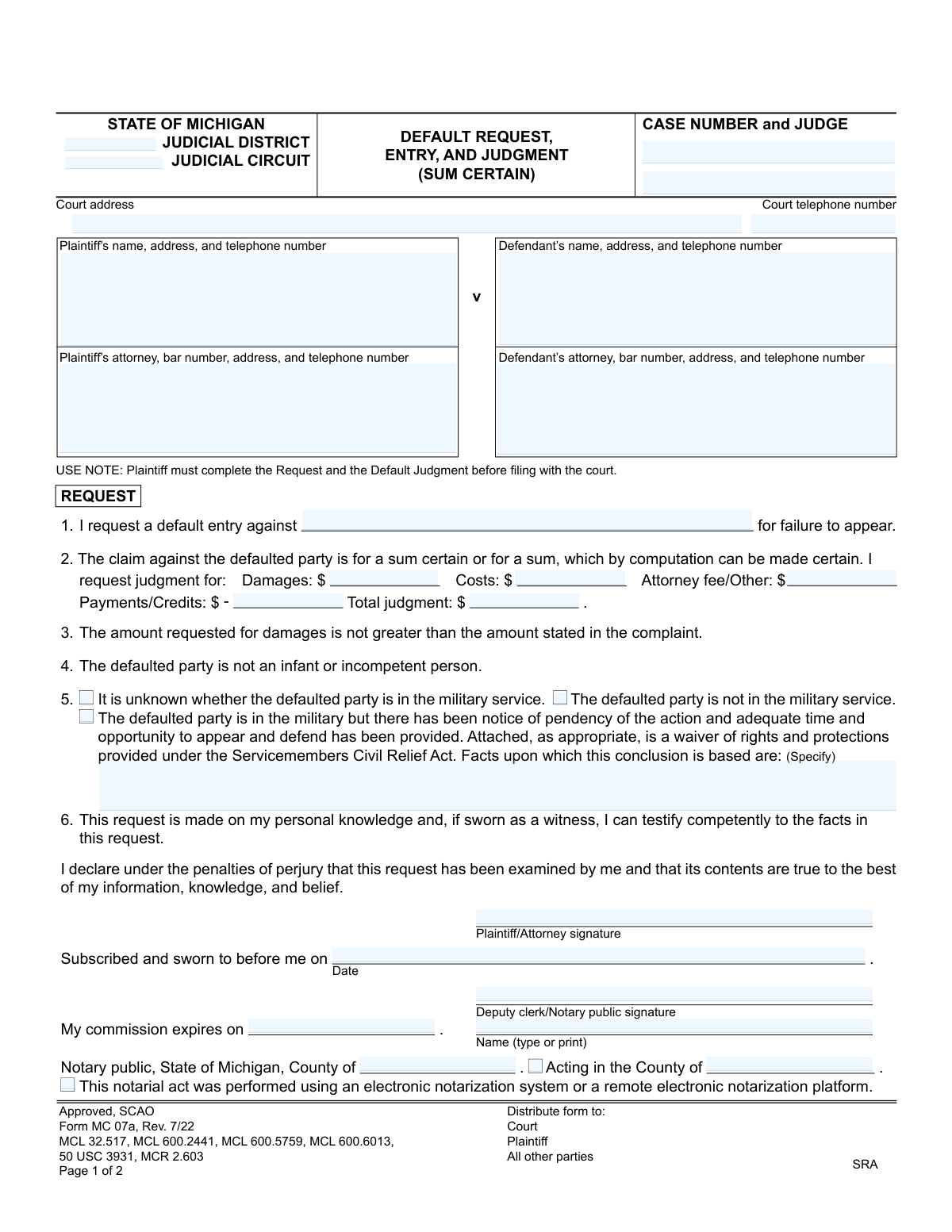
Yes! You can use AI to fill out Form MC 07a, Default Request, Entry, and Judgment (Sum Certain)
Form MC 07a is a legal document for the State of Michigan judicial system, specifically for requesting a default, its entry, and a judgment when the amount owed is a 'sum certain.' It is used by a plaintiff in a civil case when the defendant has failed to respond to the lawsuit, allowing the plaintiff to obtain a judgment without a full trial. Today, this form can be filled out quickly and accurately using AI-powered services like Instafill.ai, which can also convert non-fillable PDF versions into interactive fillable forms.
MC 07a is part of the
Michigan court forms category on Instafill.
Our AI automatically handles information lookup, data retrieval, formatting, and form filling.
It takes less than a minute to fill out MC 07a using our AI form filling.
Securely upload your data. Information is encrypted in transit and deleted immediately after the form is filled out.
Form specifications
| Form name: | Form MC 07a, Default Request, Entry, and Judgment (Sum Certain) |
| Number of fields: | 46 |
| Number of pages: | 1 |
| Language: | English |
More forms in Michigan court forms
Instafill Demo: How to fill out PDF forms in seconds with AI
How to Fill Out MC 07a Online for Free in 2026
Are you looking to fill out a MC 07A form online quickly and accurately? Instafill.ai offers the #1 AI-powered PDF filling software of 2026, allowing you to complete your MC 07A form in just 37 seconds or less.
Follow these steps to fill out your MC 07A form online using Instafill.ai:
- 1 Navigate to Instafill.ai and upload or select the Michigan Form MC 07a.
- 2 Provide the case information, including the court, case number, judge, and contact details for the court.
- 3 Enter the full details for the plaintiff and defendant, along with their attorneys' information if applicable.
- 4 Complete the 'Request' section by detailing the damages, costs, attorney fees, and any payments or credits to calculate the total judgment amount.
- 5 Certify the defendant's military status by checking the appropriate box and providing supporting facts if required.
- 6 Review all the information populated by the AI for accuracy, then e-sign the declaration under penalty of perjury.
- 7 Download the completed form, ready for notarization (if required) and filing with the court.
Our AI-powered system ensures each field is filled out correctly, reducing errors and saving you time.
Why Choose Instafill.ai for Your Fillable MC 07a Form?
Speed
Complete your MC 07a in as little as 37 seconds.
Up-to-Date
Always use the latest 2026 MC 07a form version.
Cost-effective
No need to hire expensive lawyers.
Accuracy
Our AI performs 10 compliance checks to ensure your form is error-free.
Security
Your personal information is protected with bank-level encryption.
Frequently Asked Questions About Form MC 07a
This form is used by a plaintiff to ask the court for a default judgment when a defendant has failed to respond to a lawsuit. It is specifically for cases where the amount owed is a fixed, calculable number, known as a 'sum certain'.
The plaintiff (the person who filed the lawsuit) or their attorney must complete this form when the defendant has not appeared or answered the complaint within the required time.
A 'sum certain' is a claim for a specific amount of money that can be proven with documents, like an unpaid invoice or loan agreement. It is not for damages that are subjective and need to be determined by a court, such as pain and suffering.
Before filing, the plaintiff must fully complete the 'Request' section on page 1 and also fill in the monetary amounts (damages, costs, etc.) in the 'Default Judgment' section on page 2.
This is a requirement under the federal Servicemembers Civil Relief Act (SCRA) to protect the legal rights of active-duty military personnel. A default judgment cannot be entered against a service member without following specific procedures.
To calculate the total judgment, you must add the amount of damages, court costs, and any attorney fees, then subtract any payments or credits the defendant has already made.
Yes, the 'Request' section requires your signature to be sworn to before a deputy court clerk or a notary public. They must also sign and date the form.
The court clerk will enter the default, and a judge or clerk will sign the judgment. Afterward, you are responsible for serving a copy of the signed Default Request, Entry, and Judgment on all parties in the case.
If the defendant was personally served, the default judgment becomes final 21 days after it is entered, unless the defendant files a motion to set it aside during that time.
The plaintiff who requested the default is responsible for serving all parties. You must complete the 'Certificate of Mailing' on page 2 to certify that you have mailed a copy to the defendant and any other parties.
Yes, services like Instafill.ai use AI to accurately auto-fill form fields with your case information, which can save time and help reduce errors.
You can use a service like Instafill.ai to upload the form, and its AI technology will assist you in filling out the required fields online. You can then download the completed document for printing and filing with the court.
If you have a non-fillable or 'flat' PDF, you can use a tool like Instafill.ai. It can convert the document into an interactive, fillable form that you can easily complete on your computer.
Compliance MC 07a
Validation Checks by Instafill.ai
1
Total Judgment Calculation Accuracy
This check verifies that the 'Total judgment' amount is the correct result of the calculation: Damages + Costs + Attorney fee/Other - Payments/Credits. This is a critical check for financial accuracy on a legal document concerning a specific sum. If the calculation is incorrect, the form submission will be rejected to prevent the entry of a judgment with an erroneous monetary value.
2
Mutually Exclusive Military Status
This validation ensures that only one of the three military status checkboxes ('It is unknown...', 'The defaulted party is not in the military service.', 'The defaulted party is in the military...') can be selected at a time. These options are mutually exclusive, and selecting more than one creates a logical contradiction regarding the defendant's status under the Servicemembers Civil Relief Act (SCRA). An error will be shown, forcing the user to select only one option before proceeding.
3
Conditional Requirement for Military Service Facts
This check ensures that if the checkbox 'The defaulted party is in the military...' is selected, the corresponding text field 'Facts upon which this conclusion is based are:' is not empty. This explanation is legally required to demonstrate compliance with SCRA provisions for active servicemembers. Failure to provide these facts when required will block submission and prompt the user to enter the necessary information.
4
Notary Commission Expiration Date Validity
This validation confirms that the 'My commission expires on' date for the notary public is a valid date that occurs in the future. A notarization performed by a notary with an expired commission is legally invalid. If an expired or past date is entered, the system will flag it as an error to ensure the document's legal integrity.
5
Case Number Consistency Across Pages
This check verifies that the 'Case Number' entered on Page 1 is identical to the 'Case Number' entered on Page 2. This is essential to ensure that both pages of the document are correctly associated with the same legal case file. A mismatch would cause confusion and potential filling errors, so the system will require the numbers to match perfectly before acceptance.
6
Default Party Identification
This validation ensures that the name entered for the 'Default Party' in item 1 of the Request section matches one of the defendant names listed in the 'Defendant’s name, address, and telephone number' field. This prevents ambiguity and ensures the default is entered against the correct, explicitly named party in the case. If no match is found, the submission will be flagged for correction.
7
Michigan Attorney Bar Number Format
This check validates that any value entered in the 'Plaintiff’s attorney, bar number' field follows the standard Michigan State Bar format, which is typically a 'P' followed by a sequence of digits (e.g., P12345). This helps ensure that the attorney listed is properly identified and credentialed within the state's system. An incorrectly formatted number would trigger a warning to review and correct the entry.
8
Judgment Amount Consistency
This validation compares the financial amounts (Damages, Costs, Attorney fee, Payments/Credits, Total judgment) listed in the 'Request' section on page 1 with the corresponding amounts in the 'Default Judgment' section on page 2. The values must be identical to ensure the judgment granted matches the amount requested. Any discrepancy will result in an error, forcing the user to align the figures.
9
Interest Calculation Completeness
This check ensures that if a percentage is entered for either the 'statutory rate' or 'statutory 6-month rate(s)', the corresponding 'from' and 'to' date fields are also filled out. A complete date range is necessary to calculate the interest owed accurately. The form will be considered incomplete if a rate is provided without its corresponding time period.
10
Required Plaintiff Information
This validation confirms that the 'Plaintiff’s name, address, and telephone number' field is not empty. This information is fundamental for identifying the party filing the request and is required for all official court communications and records. A submission lacking this core information will be rejected as incomplete.
11
Required Signature Field
This check ensures that the 'Plaintiff/Attorney signature' field has been completed, either through a digital signature or a confirmation checkbox. The signature, made under penalty of perjury, affirms the truthfulness of the request's contents and is a non-negotiable requirement for the document's validity. The form cannot be submitted without it.
12
Valid Date Format
This validation is applied to all date fields on the form, such as the signature date and commission expiration date, to ensure they are entered in a valid and recognizable format (e.g., MM/DD/YYYY). Consistent and correct date formatting is crucial for legal documents to establish a clear timeline of events. The system will reject entries that are not parseable as valid dates.
Common Mistakes in Completing MC 07a
Users frequently make simple arithmetic errors when calculating the 'Total judgment' amount. The form requires adding Damages, Costs, and Attorney Fees, and then subtracting any Payments or Credits. An incorrect total will cause the court clerk to reject the form, leading to delays. To avoid this, carefully double-check your calculations before submitting. AI-powered tools like Instafill.ai can prevent this by automatically performing the calculation as you enter the values.
In section 5, filers often check 'The defaulted party is not in the military service' without performing the required due diligence. The Servicemembers Civil Relief Act (SCRA) provides legal protections for active-duty military personnel, and a judgment entered in violation of the act can be voided. To avoid this, you must make a good-faith effort to verify military status, typically by checking the Department of Defense's official SCRA website, and be prepared to state the facts of your search. This is a critical legal step, not just a checkbox.
The 'Judgment interest accrued thus far' section on page 2 is highly prone to error due to its complexity. Filers must know the correct statutory interest rate(s) for the relevant time period, which can change. Mistakes include using the wrong rate, miscalculating the time period from the complaint filing date, or simply leaving it blank. An incorrect calculation can lead to an inaccurate judgment amount and post-judgment disputes. AI form-fillers like Instafill.ai can help by integrating current statutory rates to simplify these complex calculations.
A common procedural mistake is for the plaintiff or their attorney to sign in the sections reserved for the court. The 'DEFAULT ENTRY' and 'DEFAULT JUDGMENT' signature lines on page 2 are exclusively for the court clerk or judge. Signing in these areas will result in the form's immediate rejection and require refiling. Always read the form's titles and instructions carefully to ensure you are only completing sections designated for the plaintiff.
Filers often forget to enter the 'Case Number' at the top of the second page. Because pages can become separated during processing, this omission can cause significant delays or lead to the page being misfiled. This simple mistake can detach the binding judgment order from the rest of the case file. To prevent this, make it a habit to fill in repeating information like the case number on all pages first. Tools like Instafill.ai automatically populate repeating fields across all pages of a document.
The declaration in section 6 is made under penalty of perjury and must be signed in the presence of a notary public or deputy clerk. Filers may forget to get the form notarized or the notary may fail to complete their section correctly (e.g., missing commission expiration date). An un-notarized or improperly notarized request is invalid and will be rejected by the court. Always locate a notary before signing the document and verify their information is complete.
The financial breakdown for Damages, Costs, Attorney Fees, and Credits appears on both page 1 (Request) and page 2 (Default Judgment). Filers frequently enter inconsistent numbers between these two sections, creating ambiguity for the court. The amounts must be identical. This error often happens when figures are updated in one place but not the other. Using a tool like Instafill.ai can ensure consistency by linking these fields, so a change in one place automatically updates the other.
The form includes a small but important note: '*Attach bill of costs if statutory limit is exceeded.' Many filers overlook this instruction when their requested costs are higher than the standard amount allowed by statute. Failure to attach the required itemized bill of costs will result in the court denying the excess costs, reducing the total judgment amount. Always review court rules on statutory costs and prepare the necessary documentation if your request exceeds them.
In section 5, even if the filer correctly determines the defendant's military status, they often fail to specify the 'Facts upon which this conclusion is based'. Simply checking a box is not enough; the court needs to know how the determination was made to ensure SCRA compliance. Leaving this blank or writing something vague like 'I checked' can cause a judge to reject the judgment. You should specify the method, such as 'Searched the DOD SCRA website on [Date] using the defendant's name and Social Security Number, which returned a result of 'No'.
Often, court forms are only available online as flat, non-fillable PDF files, forcing users to print them and fill them out by hand. This leads to illegible handwriting, data entry mistakes, and calculation errors that can cause the form to be rejected. A better approach is to use a service that can convert the document into an interactive, fillable form. For instance, Instafill.ai can take a non-fillable PDF and make it fillable, allowing for neat, typed entries and automated calculations to ensure accuracy and a professional submission.
Saved over 80 hours a year
“I was never sure if my IRS forms like W-9 were filled correctly. Now, I can complete the forms accurately without any external help.”
Kevin Martin Green
Your data stays secure with advanced protection from Instafill and our subprocessors
Robust compliance program
Transparent business model
You’re not the product. You always know where your data is and what it is processed for.
ISO 27001, HIPAA, and GDPR
Our subprocesses adhere to multiple compliance standards, including but not limited to ISO 27001, HIPAA, and GDPR.
Security & privacy by design
We consider security and privacy from the initial design phase of any new service or functionality. It’s not an afterthought, it’s built-in, including support for two-factor authentication (2FA) to further protect your account.
Fill out MC 07a with Instafill.ai
Worried about filling PDFs wrong? Instafill securely fills form-mc-07a-default-request-entry-and-judgment-sum-certain forms, ensuring each field is accurate.