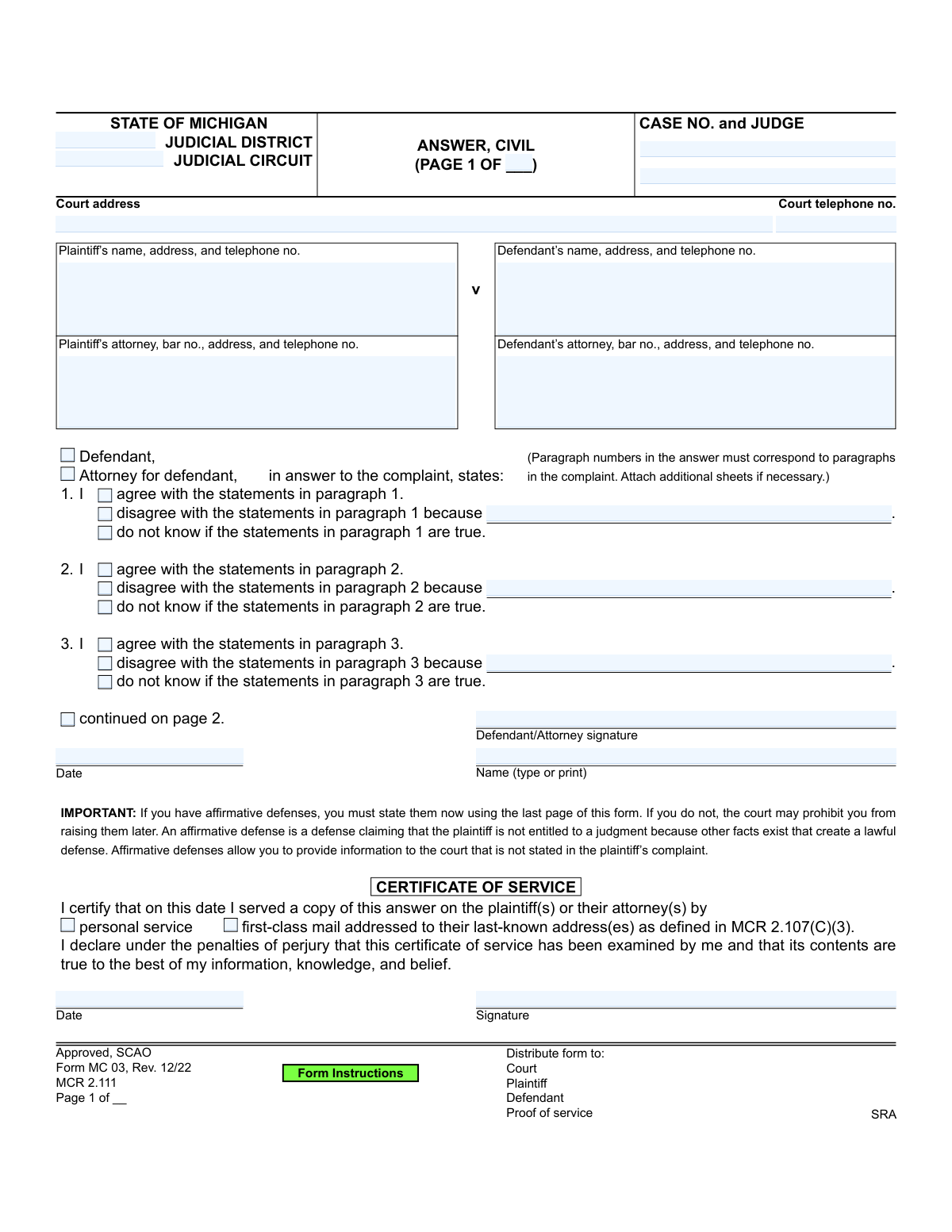
Yes! You can use AI to fill out Form MC 03, Answer (Civil)
Form MC 03 is the official Michigan court form for a defendant to file an answer in a civil lawsuit. It allows the defendant to formally respond to each allegation in the plaintiff's complaint by admitting, denying, or stating a lack of knowledge, and to assert any affirmative defenses that could defeat the plaintiff's claim. Today, this form can be filled out quickly and accurately using AI-powered services like Instafill.ai, which can also convert non-fillable PDF versions into interactive fillable forms.
Our AI automatically handles information lookup, data retrieval, formatting, and form filling.
It takes less than a minute to fill out MC 03 using our AI form filling.
Securely upload your data. Information is encrypted in transit and deleted immediately after the form is filled out.
Form specifications
| Form name: | Form MC 03, Answer (Civil) |
| Number of pages: | 1 |
| Language: | English |
Instafill Demo: How to fill out PDF forms in seconds with AI
How to Fill Out MC 03 Online for Free in 2026
Are you looking to fill out a MC 03 form online quickly and accurately? Instafill.ai offers the #1 AI-powered PDF filling software of 2026, allowing you to complete your MC 03 form in just 37 seconds or less.
Follow these steps to fill out your MC 03 form online using Instafill.ai:
- 1 Navigate to Instafill.ai and upload the MC 03 form or select it from the template library.
- 2 Use the AI assistant to automatically populate case information, including the court address, case number, and judge's name.
- 3 Enter the personal and contact details for the plaintiff(s), defendant(s), and their attorneys if represented.
- 4 Go through each numbered paragraph corresponding to the complaint, and for each one, check the box to agree, disagree (providing a reason), or state that you lack knowledge.
- 5 Proceed to the 'Affirmative Defenses' section, check all applicable defenses, and attach a statement of facts for each one as required.
- 6 Complete the 'Certificate of Service' to confirm that a copy was sent to the plaintiff or their attorney.
- 7 Review the entire form for accuracy, then electronically sign and date it before downloading the completed document for filing with the court.
Our AI-powered system ensures each field is filled out correctly, reducing errors and saving you time.
Why Choose Instafill.ai for Your Fillable MC 03 Form?
Speed
Complete your MC 03 in as little as 37 seconds.
Up-to-Date
Always use the latest 2026 MC 03 form version.
Cost-effective
No need to hire expensive lawyers.
Accuracy
Our AI performs 10 compliance checks to ensure your form is error-free.
Security
Your personal information is protected with bank-level encryption.
Frequently Asked Questions About Form MC 03
This form is used by a defendant in a Michigan civil court case to formally respond to the allegations made by the plaintiff in their complaint. It is your official opportunity to agree with, disagree with, or state you lack knowledge of the claims against you.
You must fill out this form if you are named as a defendant in a civil lawsuit in Michigan and have been served with a summons and complaint. Failure to respond in time can result in a default judgment being entered against you.
For each numbered paragraph in the plaintiff's complaint, you must check one of the three boxes on this form: 'agree,' 'disagree,' or 'do not know.' If you disagree, you must briefly explain why in the space provided.
The form provides space for up to 27 paragraphs. If the complaint has more, you must attach additional sheets, ensuring your paragraph numbers continue to correspond with the complaint's paragraphs.
An affirmative defense is a legal reason why the plaintiff should not win the case, even if the facts they alleged in the complaint are true. Examples include the statute of limitations (they waited too long to sue) or that you have already paid the debt.
You must raise any affirmative defenses you have in this Answer form. If you fail to do so, the court may prohibit you from using those defenses later in the case, which could seriously harm your legal position.
The Certificate of Service is your sworn statement that you have sent a copy of your completed Answer to the plaintiff or their attorney. You must complete this section, sign it, and indicate how you delivered it.
After completing the form, you must file the original with the court, serve a copy on the plaintiff (or their attorney), and keep a copy for your own records. Be sure to follow the court's specific instructions for filing and deadlines.
You should select this option if you lack sufficient information to either agree or disagree with a specific allegation in the complaint. This has the legal effect of a denial, requiring the plaintiff to prove the allegation.
You will need a copy of the Summons and Complaint that you were served with. This document contains the case number, court information, and the specific numbered paragraphs you need to respond to.
Yes, services like Instafill.ai use AI to help you accurately auto-fill form fields with your personal information, which can save time and reduce errors. However, you should consult with an attorney for legal advice on how to respond to the allegations and what defenses to raise.
You can use a service like Instafill.ai to easily fill out this form online. Simply upload the PDF, and the platform will make it interactive so you can type your answers directly into the fields before printing for signature and filing.
If you have a non-fillable or 'flat' PDF, you can upload it to a platform like Instafill.ai. Their technology can convert it into an interactive, fillable form that you can complete on your computer.
Compliance MC 03
Validation Checks by Instafill.ai
1
Case Number Presence and Format
This check ensures the 'CASE NO. and JUDGE' field is not empty. The case number is the primary identifier for the legal proceeding, and its absence would make it impossible to file the document correctly. If the field is empty, the submission should be rejected and the user prompted to enter the official case number assigned by the court.
2
Attorney Bar Number Format Validation
Verifies that if an attorney's information is provided, the 'bar no.' field follows the specific format for Michigan attorneys (e.g., a 'P' followed by a series of digits). This is crucial for correctly identifying the legal counsel of record and confirming their standing with the State Bar. An invalid format could lead to rejection by the court clerk or misidentification of the attorney.
3
Exclusive Paragraph Response Selection
For each numbered paragraph in the answer section, this validation ensures that only one of the three possible responses ('I agree,' 'I disagree,' or 'I do not know') is selected. Allowing multiple selections for a single paragraph would create a logically inconsistent and ambiguous legal response. The system should flag any paragraph where zero or more than one option is checked.
4
Required Explanation for Disagreement
This check enforces the rule that if the 'disagree' option is selected for any paragraph, the corresponding 'because' text field must be filled out. A simple denial is often insufficient; the court requires a basis for the disagreement. Failure to provide this explanation can result in the defense being deemed inadequate, so the form should not be submittable until the reason is provided.
5
Main Signature and Date Presence
Ensures that the primary signature block on page 1 contains both a signature (or its digital equivalent) and a valid date. The signature authenticates the document and confirms the filer's responsibility for its contents, while the date establishes when it was signed. An unsigned or undated answer is legally invalid and will be rejected by the court.
6
Certificate of Service Method Selection
Validates that exactly one method of service ('personal service' or 'first-class mail') is checked in the 'CERTIFICATE OF SERVICE' section. The filer must declare how they provided a copy of the answer to the opposing party. Selecting neither or both options makes the certificate of service ambiguous and legally deficient.
7
Certificate of Service Completeness
This check confirms that the 'CERTIFICATE OF SERVICE' section is fully completed with both a date and a signature. This section is a sworn declaration under penalty of perjury, and its completeness is non-negotiable for it to be considered valid proof of service. An incomplete certificate can lead to procedural challenges and potential dismissal of the answer.
8
Consistent Case Information Across Pages
Verifies that the 'Case No.', 'Plaintiff’s name', and 'Defendant’s name' fields are identical on every page of the document (page 1, 2, 3, etc.). This is critical for ensuring that all pages belong to the same legal filing and prevents pages from different cases from being mixed up. Any mismatch should trigger an error to be corrected before submission.
9
Conditional Requirement for Bankruptcy Case Number
If the affirmative defense 'The debt was discharged in bankruptcy' is checked, this validation ensures that the 'bankruptcy case number' field is populated. The defense is legally meaningless without the specific case number that allows the court and the plaintiff to verify the bankruptcy claim. The form should prevent submission if this defense is claimed without the required case number.
10
Conditional Requirement for Statute of Limitations Date
If the affirmative defense 'This action is barred by the statute of limitations' is checked, this rule ensures that at least one of the sub-options is selected and its corresponding 'Date' field is filled. The defense requires a specific date to establish the timeline for the claim. An error should be shown if the defense is checked but the necessary date is missing.
11
Conditional Requirement for 'Other' Affirmative Defense
This check ensures that if the 'Other' checkbox in the affirmative defenses section is selected, the adjacent text field providing an explanation is not empty. Simply checking 'Other' without specifying the defense is legally insufficient and provides no notice to the plaintiff or the court. The system must require a description for this defense to be considered complete.
12
Page Numbering Integrity
Validates the page numbering fields ('Page __ of __') for logical consistency. The total number of pages must be present and must be greater than or equal to the current page number on any given page. This ensures the document is submitted as a complete set and helps the court clerk verify that no pages are missing.
13
Role Identification (Defendant vs. Attorney)
Ensures that one of the two roles, 'Defendant' or 'Attorney for defendant,' is selected at the beginning of the answer and affirmative defense sections. This clarifies who is making the statements in the filing (a self-represented party or their legal counsel). This distinction is fundamental for legal procedure and communication.
14
Telephone Number Format
This validation checks that all telephone number fields on the form contain a valid and properly formatted phone number (e.g., 10 digits with optional formatting). Accurate contact information is essential for the court and opposing parties to communicate regarding the case. An invalid number can cause significant delays and communication failures.
Common Mistakes in Completing MC 03
Defendants often mistype the Case Number, Judge's name, or Court address when copying it from the complaint or summons. This happens due to simple data entry errors. An incorrect case number can lead to the court clerk rejecting the filing or misfiling the document, causing critical delays and potentially resulting in a default judgment against you. To avoid this, double-check every detail against the original court documents; AI-powered tools like Instafill.ai can automatically populate this information accurately from source documents.
The form requires a response to each numbered paragraph of the plaintiff's complaint, but defendants sometimes skip paragraphs they find confusing or irrelevant. Legally, any allegation not specifically denied or stated as unknown can be deemed admitted by the court, severely weakening the defense. It is crucial to go through the complaint line-by-line and provide a corresponding answer for every single paragraph, attaching extra pages if necessary.
Many filers check the box 'disagree with the statements' but then fail to explain why in the provided 'because...' space. A simple denial without a factual basis may be considered insufficient by the court, as the form explicitly asks for a reason. To create a strong answer, you must briefly state the facts that contradict the plaintiff's allegation for each paragraph you disagree with.
This is one of the most critical errors, as defendants often don't understand what an 'affirmative defense' is and skip the final page entirely. The form clearly warns that defenses not raised now may be permanently waived, meaning you lose the right to argue them later. You must review this section carefully and assert any defenses that apply to your case, such as statute of limitations or payment, to avoid forfeiting a potentially winning argument.
A common mistake is checking a box in the Affirmative Defenses section without providing the required supporting information, such as a statement of facts or proof of payment. For example, claiming the debt was paid without attaching any evidence renders the defense unsubstantiated and likely to be ignored by the court. Always ensure you attach all necessary documents and write clear, factual explanations for each defense you claim.
Defendants frequently overlook the 'Certificate of Service' section on the first page after filling out their answers. This section is your legal proof that you sent a copy of the Answer to the plaintiff or their attorney, as required by court rules. Failing to complete, sign, and date this section can lead the plaintiff to claim they never received your response and request a default judgment against you.
An unsigned or undated legal document is invalid and will be rejected by the court. People often focus on the substance of their answers and forget the final step of signing and dating the form in all required locations, including the main answer and the separate signature line on the affirmative defenses page. To prevent rejection, perform a final review to ensure all signature and date lines are properly filled.
The form includes 'Page __ of __' fields, which are often left blank, especially when extra pages are attached for additional answers or evidence. This creates confusion about whether the filing is complete and if any pages are missing. Always number your pages sequentially (e.g., Page 1 of 5, Page 2 of 5) and clearly label all attachments to ensure the court can easily follow your entire response.
Filling out the Certificate of Service is not enough; you must actually send a copy of the completed Answer to the plaintiff or their attorney via the method indicated (e.g., first-class mail). Some defendants file their Answer with the court but forget this crucial step of serving the opposing party. This procedural failure can invalidate your filing and expose you to a default judgment.
The standard form provides space to answer up to 27 paragraphs, but many civil complaints are longer. A common error is to stop answering after paragraph 27, effectively admitting all subsequent allegations. If the complaint has more paragraphs, you must continue your responses on a separate, attached sheet, ensuring each answer corresponds to the correct paragraph number. Since this form is a non-fillable PDF, a tool like Instafill.ai can convert it to a fillable format, making it easier to manage and attach additional pages.
Saved over 80 hours a year
“I was never sure if my IRS forms like W-9 were filled correctly. Now, I can complete the forms accurately without any external help.”
Kevin Martin Green
Your data stays secure with advanced protection from Instafill and our subprocessors

Robust compliance program
Transparent business model
You’re not the product. You always know where your data is and what it is processed for.
ISO 27001, HIPAA, and GDPR
Our subprocesses adhere to multiple compliance standards, including but not limited to ISO 27001, HIPAA, and GDPR.
Security & privacy by design
We consider security and privacy from the initial design phase of any new service or functionality. It’s not an afterthought, it’s built-in, including support for two-factor authentication (2FA) to further protect your account.
Fill out MC 03 with Instafill.ai
Worried about filling PDFs wrong? Instafill securely fills form-mc-03-answer-civil forms, ensuring each field is accurate.