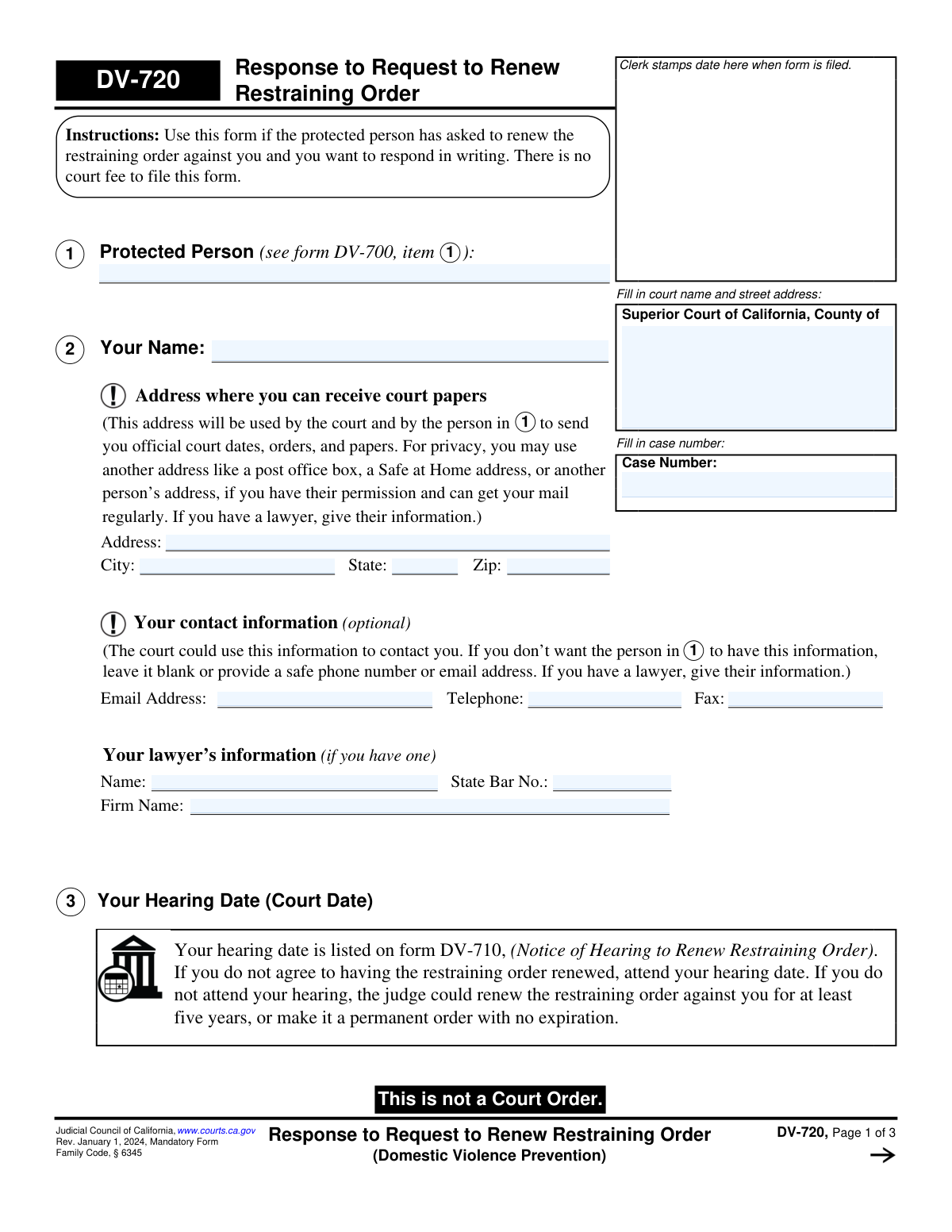
Yes! You can use AI to fill out Form DV-720, Response to Request to Renew Restraining Order (Domestic Violence Prevention)
Form DV-720, Response to Request to Renew Restraining Order, is a mandatory California court form for individuals who wish to formally respond to a protected person's request to extend a restraining order against them. It allows the respondent to either agree to the renewal or state their reasons for disagreeing, which is a critical step in presenting their case to the judge. Today, this form can be filled out quickly and accurately using AI-powered services like Instafill.ai, which can also convert non-fillable PDF versions into interactive fillable forms.
DV-720 is part of the
California court forms, court response forms, domestic violence forms and restraining order forms categories on Instafill.
Our AI automatically handles information lookup, data retrieval, formatting, and form filling.
It takes less than a minute to fill out DV-720 using our AI form filling.
Securely upload your data. Information is encrypted in transit and deleted immediately after the form is filled out.
Form specifications
| Form name: | Form DV-720, Response to Request to Renew Restraining Order (Domestic Violence Prevention) |
| Number of fields: | 38 |
| Number of pages: | 1 |
| Language: | English |
Instafill Demo: How to fill out PDF forms in seconds with AI
How to Fill Out DV-720 Online for Free in 2026
Are you looking to fill out a DV-720 form online quickly and accurately? Instafill.ai offers the #1 AI-powered PDF filling software of 2026, allowing you to complete your DV-720 form in just 37 seconds or less.
Follow these steps to fill out your DV-720 form online using Instafill.ai:
- 1 Navigate to Instafill.ai and upload or select the DV-720 form.
- 2 Provide your personal information, including your full name and a safe address for receiving court papers.
- 3 Enter the court name and case number exactly as they appear on your hearing notice (Form DV-710).
- 4 In Section 4, indicate whether you agree or disagree with the request to renew the restraining order. If you disagree, provide a clear explanation in the space provided.
- 5 Decide if you will request lawyer's fees and costs from the other party and check the appropriate box in Section 6.
- 6 Carefully review all the information populated by the AI for accuracy, then e-sign and date the form in Section 7.
- 7 Download the completed form and follow the instructions for filing it with the court and properly serving a copy to the protected person.
Our AI-powered system ensures each field is filled out correctly, reducing errors and saving you time.
Why Choose Instafill.ai for Your Fillable DV-720 Form?
Speed
Complete your DV-720 in as little as 37 seconds.
Up-to-Date
Always use the latest 2026 DV-720 form version.
Cost-effective
No need to hire expensive lawyers.
Accuracy
Our AI performs 10 compliance checks to ensure your form is error-free.
Security
Your personal information is protected with bank-level encryption.
Frequently Asked Questions About Form DV-720
Form DV-720 is used to respond in writing if a protected person has asked the court to renew a Domestic Violence Restraining Order against you. It allows you to inform the judge whether you agree or disagree with the renewal request.
You should fill out this form if you are the person named in the restraining order (the restrained person) and you have received a 'Request to Renew Restraining Order' (Form DV-700) and wish to respond.
No, the instructions on the form clearly state that there is no court fee to file your response.
If you do not attend your hearing, the judge can renew the restraining order against you for at least five years, or even make it permanent, without hearing your side of the story. Your hearing date is listed on Form DV-710.
If you disagree, you must check the box for 'I do not agree' in Section 4. You then need to write a clear explanation giving specific facts and reasons why you believe the restraining order should not be renewed.
If you run out of space in Section 5, check the box that says 'Check here if you need more space.' You can then attach a separate sheet of paper, writing 'DV-720, Additional Reasons I Do Not Agree With the Request' at the top.
After completing the form, you must file it with the court clerk. Then, have someone else (who is at least 18 and not you) mail a copy to the protected person and complete a 'Proof of Service by Mail' (Form DV-250), which you also file with the court.
Yes, you can request that the judge order the other person to pay your lawyer's fees by checking the box in Section 6. This is typically only granted if their renewal request is denied and the judge finds it was frivolous or meant to harass you.
No, providing your contact information in Section 2 is optional. If you have privacy concerns, you can leave it blank or provide a safe alternative address or number.
Yes, services like Instafill.ai use AI to auto-fill form fields accurately and save time. This can help ensure your name, case number, and other details are entered correctly and consistently.
To use Instafill.ai, you upload the DV-720 PDF to their platform. The AI will make the form fillable online, allowing you to type your information, which it can then auto-populate in the correct fields.
If you have a non-fillable or 'flat' PDF, you can use a service like Instafill.ai. It can convert the document into an interactive, fillable form so you can easily type your answers before printing.
The form must be served (mailed) by a person who is at least 18 years old and is not you or anyone else protected by the restraining order. That person must then complete and sign the Proof of Service form (DV-250).
Your case number and hearing date are not on this form; they are on the other court papers you received. Your hearing date is specifically listed on Form DV-710, 'Notice of Hearing to Renew Restraining Order'.
Compliance DV-720
Validation Checks by Instafill.ai
1
Case Number Presence and Consistency
This check ensures that the 'Case Number' field is filled out on the first page and is consistently populated on all subsequent pages. The case number is the primary identifier linking this response to the correct legal proceeding. If the case number is missing or inconsistent across pages, the document could be rejected by the court clerk or misfiled, causing significant delays.
2
Respondent Name Required
Validates that 'Your Name' in item 2 is not empty. This field identifies the person responding to the request, which is fundamental to the form's purpose. Failure to provide this name would make the form anonymous and legally invalid, leading to its rejection by the court.
3
Service Address Completeness
This check verifies that if any part of the address in item 2 ('Address where you can receive court papers') is filled, then the Address, City, State, and Zip Code fields are all completed. A complete address is legally required for the service of court documents. An incomplete address could result in the respondent not receiving important notices, including future court dates or orders.
4
Mandatory Response Selection in Item 4
Ensures that one of the two options in item 4 ('I agree' or 'I do not agree') is selected. This is the core response of the entire form, indicating the respondent's position on the renewal request. Submitting the form without making this selection would render the response ambiguous and require the court to reject it for incompleteness.
5
Conditional Explanation for Disagreement
This is a logical check that triggers if the respondent selects 'I do not agree' in item 4. It validates that the corresponding explanation text box is not empty. The court requires a stated reason for the disagreement; failing to provide one may weaken the respondent's position or lead the judge to disregard the objection.
6
Respondent Signature Date Presence
Verifies that the 'Date' field in item 7, next to the respondent's signature, is filled out. A signature on a legal document must be dated to be considered valid and to establish when the declaration was made. An undated form will be rejected by the court.
7
Signature Date Format Validation
Checks that any date entered on the form, particularly in the signature sections (items 7 and 8), is in a valid date format (e.g., MM/DD/YYYY) and represents a real calendar date. This prevents the submission of invalid or nonsensical data, such as '02/30/2024', which would cause the form to be rejected for clerical errors.
8
Printed Name in Signature Block
Validates that the 'Type or print your name' field in item 7 is completed. This field clarifies the identity of the signatory, as the handwritten signature may be illegible. A missing printed name can lead to ambiguity and potential rejection of the filing.
9
Lawyer Information Coherence
This check ensures that if the lawyer's signature section (item 8) is completed, then the lawyer's information (Name, State Bar No.) in item 2 is also filled out. This maintains consistency and confirms that the signing attorney is properly identified on the form. A mismatch or omission could raise questions about proper legal representation.
10
State Bar Number Format
If a 'State Bar No.' is provided in item 2, this validation ensures the field contains only numeric characters. This maintains data integrity for attorney records and ensures the number is in the correct format for court systems. Incorrectly formatted numbers could hinder the court's ability to verify the attorney's credentials.
11
Optional Email Address Format
If an email address is provided in the optional contact information section (item 2), this check validates that it follows a standard email format (e.g., '[email protected]'). While optional, providing an invalid email address is unhelpful and can lead to failed communication attempts by the court. This check ensures any provided data is usable.
12
Protected Person Name Required
This validation ensures that the 'Protected Person' field in item 1 is filled out. This name identifies the other party in the restraining order case and is essential for the court to correctly associate the response with the petitioner. A missing protected person's name would make it impossible to process the form correctly.
Common Mistakes in Completing DV-720
Respondents often fill in the case number on the first page but forget to enter it on pages 2 and 3. This happens because they overlook the field at the top of subsequent pages. If the pages become separated during court processing, they cannot be linked to the correct file, meaning the judge may not see the complete response. To avoid this, carefully enter the correct case number on every single page; AI-powered tools like Instafill.ai can automatically populate this across all pages after a single entry.
In a stressful situation, it's easy to mix up the parties, placing your own name in Item 1 ('Protected Person') instead of Item 2 ('Your Name'). This creates significant confusion for the court clerk and judge, which can delay the processing of your response or require you to file a corrected version. Always double-check that Item 1 lists the person who requested the order and Item 2 is for you, the respondent.
People often automatically write their current home address in Item 2 without reading the privacy warning. This address will be used for official mail and will be visible to the other party, which could compromise your safety. To avoid this, carefully consider using an alternative, safe address like a P.O. Box, a lawyer's office, or a state-provided Safe at Home address as suggested by the form.
A frequent error is checking box 4b ('I do not agree') but leaving the explanation field blank. Respondents may think checking the box is sufficient or feel unsure what to write. Without a factual explanation, the judge has no basis to understand your position, severely weakening your case and making it more likely the renewal will be granted. You must provide specific, factual reasons why the order is no longer necessary.
When more space is needed for Section 5, people attach extra sheets but fail to label them as instructed. The form requires attachments to be labeled 'DV-720, Additional Reasons I Do Not Agree With the Request' at the top. An unlabeled attachment can be misplaced or disregarded by the court, meaning your full argument will not be considered by the judge. Always check the box and label all attachments correctly.
Forgetting to sign and date the form in Section 7 is a simple but critical oversight. An unsigned form is legally invalid and will be rejected by the court clerk. This is treated as if no response was ever filed, which can lead to the judge renewing the restraining order against you by default. Always perform a final review, paying close attention to the signature block before filing.
A major error is when the respondent personally mails or hands a copy of the completed DV-720 to the protected person. The instructions explicitly state that someone else who is over 18 and not a party to the case must perform the service. Improper service means the court will not consider your response, and it could also be viewed as a violation of the existing no-contact order. You must have a third party mail the form and complete a Proof of Service (Form DV-250).
In Section 4, respondents sometimes provide explanations that are emotional, argumentative, or irrelevant to the legal standard for renewal. This happens because the situation is personal, but it undermines credibility with the judge, who needs objective facts. A weak explanation can lead the judge to believe there are no valid reasons to deny the renewal. Stick to facts about why there is no longer a reasonable fear of future abuse, such as 'We have had no contact for X years' or 'I have moved 500 miles away.'
Some individuals file the response form but fail to show up for the court hearing. They mistakenly believe filing the paperwork is the only required action, overlooking the instructions in Section 3. If you do not attend the hearing, the judge will likely grant the renewal request by default, potentially making the order last for five more years or even permanently. You must attend the hearing to present your case.
When a form is only available as a flat PDF, people print it and fill it out by hand, but their handwriting may be difficult to read. The court clerk may be unable to decipher critical information like the case number or names, leading to the filing being rejected. If the judge cannot read your explanation for disagreeing, it will not be considered. To prevent this, use a fillable version of the form or a service like Instafill.ai that can convert flat PDFs into easily fillable digital documents.
Saved over 80 hours a year
“I was never sure if my IRS forms like W-9 were filled correctly. Now, I can complete the forms accurately without any external help.”
Kevin Martin Green
Your data stays secure with advanced protection from Instafill and our subprocessors

Robust compliance program
Transparent business model
You’re not the product. You always know where your data is and what it is processed for.
ISO 27001, HIPAA, and GDPR
Our subprocesses adhere to multiple compliance standards, including but not limited to ISO 27001, HIPAA, and GDPR.
Security & privacy by design
We consider security and privacy from the initial design phase of any new service or functionality. It’s not an afterthought, it’s built-in, including support for two-factor authentication (2FA) to further protect your account.
Fill out DV-720 with Instafill.ai
Worried about filling PDFs wrong? Instafill securely fills form-dv-720-response-to-request-to-renew-restraining-order-domestic-violence-prevention forms, ensuring each field is accurate.