
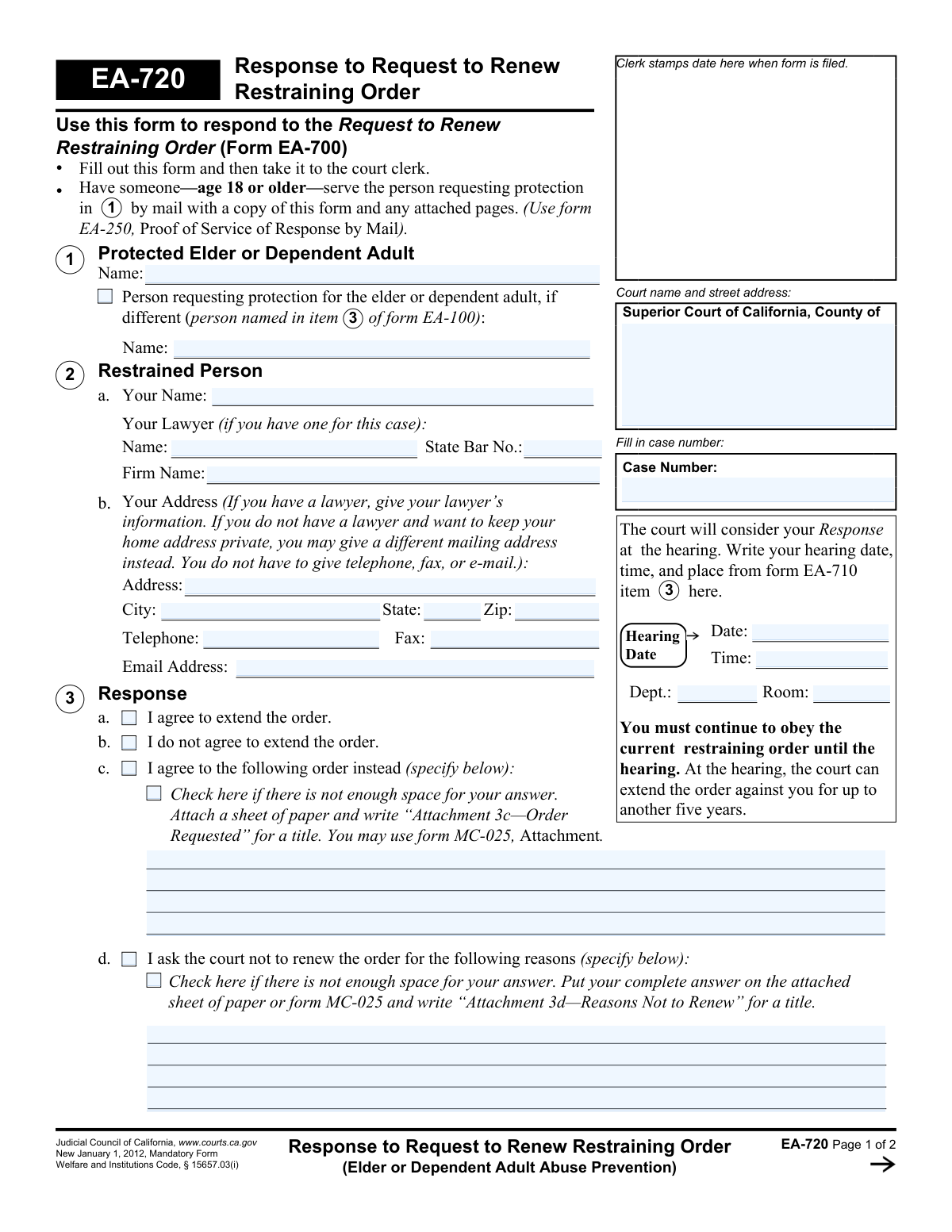
Yes! You can use AI to fill out Form EA-720, Response to Request to Renew Restraining Order (Elder or Dependent Adult Abuse Prevention)
Don't type 37 fields by hand. Tell our AI about yourself, or upload a document you already have, and it fills every field in seconds. You check it, then download, print or sign.
The AI does the filling. You just check it.
No typing into boxes, nothing to install.
What this form asks for
The AI fills all of it, from your answers or your documents.
The AI checks your answers before you download
14 checks built for this form, so a wrong date or a missing answer is caught before anyone else sees it.
This validation ensures that the 'Case Number' field is filled out on both page 1 and page 2, and that the value is identical in both locations. The case number is the primary identifier for the legal proceeding, and any discrepancy or omission can lead to the form being misfiled or rejected. Failure means the form cannot be correctly associated with the existing case file.
Checks that the 'Hearing Date' and 'Time' fields are populated. This information, copied from form EA-710, is critical for the respondent to know when and where to appear. If this information is missing, the respondent may miss the hearing, potentially resulting in a default judgment against them.
Verifies that the 'RenewHearingDate_dt' is a valid date and is set in the future. A past date would be illogical and indicates a data entry error. This check prevents confusion and ensures the hearing information is accurate for all parties involved.
Ensures that the 'Your Name' field (RestrainedFullName_ft) in section 2 is filled out. This is the primary identifier of the person responding to the request. This name must also be present in the 'Type or print your name' field on the signature block of page 2.
Validates that exactly one option from section 3 ('I agree to extend,' 'I do not agree,' or 'I agree to the following order instead') is selected. These options are mutually exclusive and represent the core response. Selecting none or more than one makes the response ambiguous and legally invalid.
If the respondent checks 'I do not agree to extend the order' (3b), this validation ensures that the reasons field (3d, 'RenewReasons_ft') is not empty. The court requires a justification for the disagreement to make an informed decision. An empty field would make the response incomplete and less persuasive.
And 8 more checks
- Conditional Requirement for Alternative Order
- Lawyer State Bar Number Validation
- Conditional Address Requirement
- ZIP Code Format
- Email Address Format
- Mandatory Signature Date
- Court Name and Address Presence
- Printed Name for Signature Requirement
Let AI fill out your EA-720
No typing. Every field filled in seconds, checked, ready to sign.
How to Fill Out EA-720 Online for Free in 2026
What the AI walks you through.
- Navigate to Instafill.ai and upload your Form EA-720, or select it from the platform's template library.
- Provide the court information and case number as indicated on the form, referencing Form EA-710 for hearing details.
- In Section 1, identify the protected elder or dependent adult. In Section 2, enter your personal information as the restrained person.
- Complete Section 3 to state your response. Check the box indicating whether you agree, disagree, or agree to an alternative order.
- If you disagree with the renewal, provide a detailed explanation in the space provided or on an attached sheet.
- Carefully review all entered information for accuracy, then date and sign the form.
- Download the completed form to file with the court clerk and serve a copy to the person requesting the renewal as instructed on the form.
Common Mistakes in Completing EA-720
The ones the AI is built to catch.
Incorrect or Missing Case Number
Omitting Hearing Information
Confusing Personal vs. Lawyer's Contact Information
Making Contradictory Selections in the Response
Providing Inadequate Explanations in Limited Space
Forgetting to Title Attachments Correctly
Forgetting to Sign and Date the Form
Failing to Properly Serve the Response
Unnecessarily Disclosing Private Information
Inconsistent Naming of Parties
Frequently Asked Questions About EA-720
Is it really free for 7 days?
Can I fill other forms too?
How do I cancel?
How does the AI fill out EA-720?
What happens to my information?
How complex is EA-720 to fill out?
What is the purpose of Form EA-720?
Who needs to fill out this form?
Where do I find the hearing information to put on the form?
What are my response options in Section 3?
What do I do after I fill out Form EA-720?
Do I still have to obey the current restraining order?
How long can the restraining order be renewed for?
What if I need more space to explain my reasons for disagreeing with the renewal?
What happens if I don't file a response using Form EA-720?
Can I use an AI tool to help me fill out this form?
How can I fill out Form EA-720 online?
The PDF of Form EA-720 I have is not fillable. What can I do?
Do I need a lawyer to respond to a restraining order renewal?
Get your EA-720 filled out by AI
$0 today. Cancel before Nov 1 and you pay nothing.
Other forms like this one
California court forms: Judicial Council of California Form SC-105, Request for Court Order and Answer (Small Claims), Judicial Council of California Form SC-120, Defendant’s Claim and ORDER to Go to Small Claims Court (Small Claims), Judicial Council of California Form SER-001, Request for Sheriff to Serve Court Papers, Judicial Council of California Form SER-001, Request for Sheriff to Serve Court Papers, Affidavit for Collection of Personal Property California Probate Code Section 13100, Form POS-040, Proof of Service—Civil, Declaration of Facts of Death (California Superior Court), declaration-of-marriage-for-court-proceeding-california-family-law, ADOPT-200, Adoption Request, ADOPT-200, Stepparent Adoption Request, ADOPT-210, Adoption Agreement, ADOPT-310, Contact After Adoption Agreement, Judicial Council of California Form ADOPT-200, Adoption Request, Form ADR-107, Mediation Attendance Sheet, Form ADR-110, Order Appointing Referee, Form ADR-109, Stipulation or Motion for Order Appointing Referee, Form ADR-102, Request for Trial De Novo After Judicial Arbitration, Form ADR-108, Referee's Report (Code Civ. Proc., §§ 638, 639), Form ADR-106, Petition to Confirm, Correct, or Vacate Contractual Arbitration Award, Form ADR-104, Rejection of Award and Request for Trial After Attorney-Client Fee Arbitration
restraining order forms: Form DV-100, Request for Domestic Violence Restraining Order, DV-100, Request for Domestic Violence Restraining Order (Domestic Violence Prevention), Judicial Council of California Form DV-110, Temporary Restraining Order (CLETS-TRO) (Domestic Violence Prevention), Form DV-116, Order on Request to Continue Court Hearing (Temporary Restraining Order) (CLETS-TRO) (Domestic Violence Prevention), Form DV-130, Restraining Order After Hearing (Order of Protection) (Domestic Violence Prevention), Form CH-110, Temporary Restraining Order (CLETS-TCH) (Civil Harassment Prevention), Form CH-120, Response to Request for Civil Harassment Restraining Orders, Form CH-130, Civil Harassment Restraining Order After Hearing (CLETS-CHO), Order on Request to Modify/Terminate Civil Harassment Restraining Order (Civil Harassment Prevention), Form CH-620, Response to Request to Modify/Terminate Civil Harassment Restraining Order (Civil Harassment Prevention), Form CIV-025, Application and Order for Reissuance of Order to Show Cause and Temporary Restraining Order, Form CD-190, Application for Temporary Restraining Order (Claim and Delivery), Order on Request to Continue Hearing (Temporary Restraining Order) (CLETS-TCH) (Civil Harassment Prevention), Form CH-610, Notice of Hearing on Request to Modify/Terminate Civil Harassment Restraining Order (Civil Harassment Prevention), Form CH-700, Request to Renew Restraining Order (Civil Harassment Prevention), Form CH-730, Order Renewing Civil Harassment Restraining Order (CLETS), Form DV-120, Response to Request for Domestic Violence Restraining Order (Domestic Violence Prevention), Form DV-300, Request to Change or End Restraining Order (Domestic Violence Prevention), Form DV-310, Notice of Court Hearing and Temporary Order to Change or End Restraining Order (Domestic Violence Prevention), Form DV-315, Request to Reschedule Hearing to Change or End Restraining Order (Domestic Violence Prevention)
court response forms: Form MC 03, Answer, Civil, Request for Reasonable Accommodations and Response, MC 70a, Review of Request for Reasonable Accommodations and Response, Form CH-120, Response to Request for Civil Harassment Restraining Orders, Form CH-178, Response to Request for Release of Minor's Confidential Information (Civil Harassment Prevention), Form CH-620, Response to Request to Modify/Terminate Civil Harassment Restraining Order (Civil Harassment Prevention), Form DV-120, Response to Request for Domestic Violence Restraining Order (Domestic Violence Prevention), Form DV-178, Response to Request for Release of Minor's Confidential Information (Domestic Violence Prevention), Form CR-402, Prosecuting Agency's Response to Petition/Application Under Health and Safety Code Section 11361.8—Adult Crimes, Form CR-417, Response by District Attorney to Petition to Terminate Sex Offender Registration, Form EA-250, Proof of Service of Response by Mail (Elder or Dependent Adult Abuse Prevention), Form EA-320, Response to Request for Elder or Dependent Adult Restraining Order Allowing Contact, Form CH-720, Response to Request to Renew Restraining Order (Civil Harassment Prevention), Form DV-720, Response to Request to Renew Restraining Order (Domestic Violence Prevention), Form EA-120, Response to Request for Elder or Dependent Adult Abuse Restraining Orders, Form FL-220, Response to Petition to Determine Parental Relationship (Uniform Parentage), Judicial Council of California Form GV-020, Response to Gun Violence Emergency Protective Order (Gun Violence Prevention), Form GV-120, Response to Petition for Gun Violence Restraining Order, Form FL-270, Response to Petition for Custody and Support of Minor Children, Form SC-224, Response to Declaration of Default in Payment of Judgment (Small Claims)
Let AI fill out your EA-720
Your trial starts once a card is added. You pay nothing before Nov 1.
Our AI already knows this form, all 37 fields of it. Skip the typing: tell it about yourself, or upload what you have, and it fills the whole form in seconds.
- AI fills every field on both pages, checkboxes included
- No typing into boxes: answer a few questions, or upload a document you already have, an old copy of this form, a photo of a document
- The AI checks the answers; you review and change anything before you download
- Download the finished PDF, print it, or sign it online
- Encrypted, and never used to train AI
Cancel before Nov 1 and you pay nothing.
A card is needed to start the trial. Cancel in two clicks from your account.
Terms · Privacy