
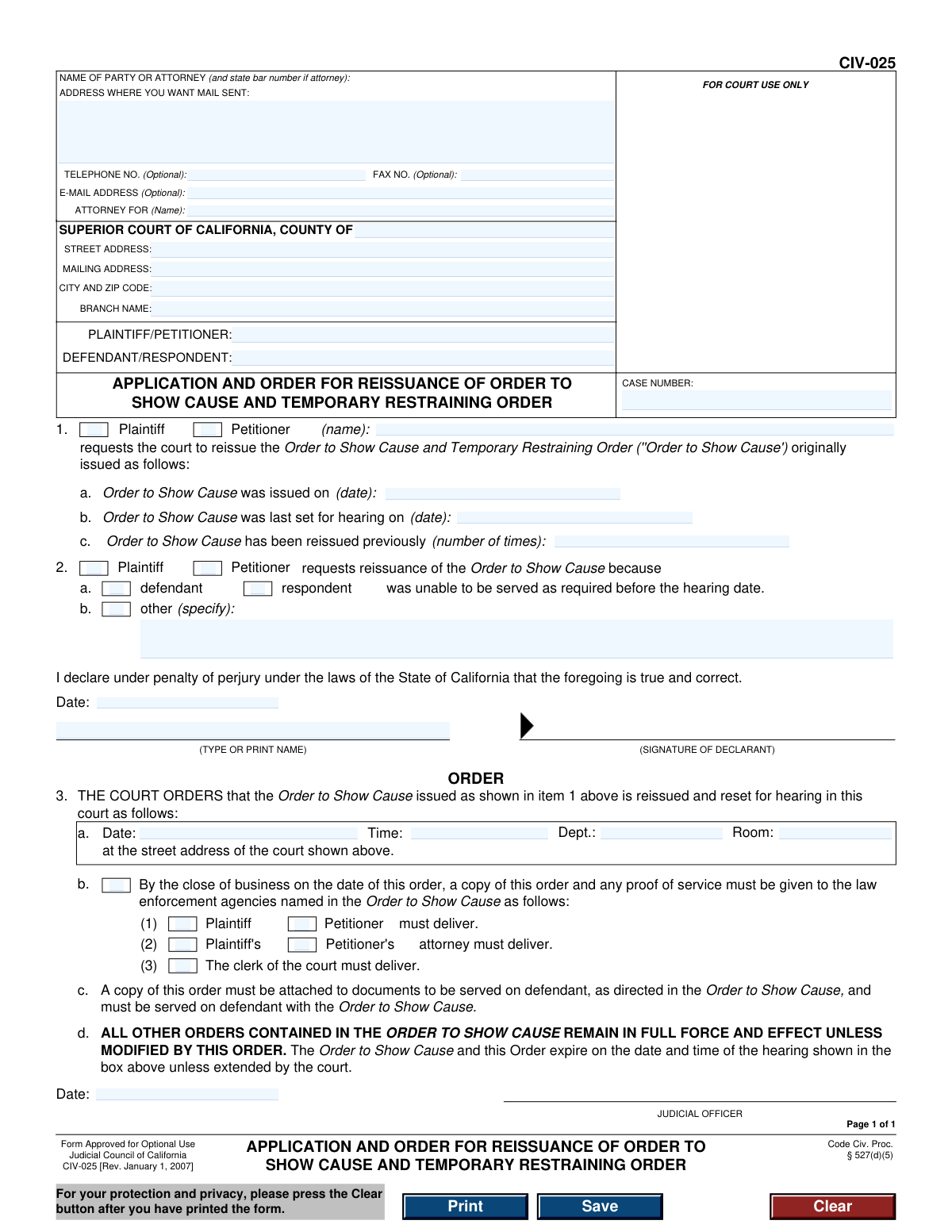
Yes! You can use AI to fill out Form CIV-025, Application and Order for Reissuance of Order to Show Cause and Temporary Restraining Order
Don't type 41 fields by hand. Tell our AI about yourself, or upload a document you already have, and it fills every field in seconds. You check it, then download, print or sign.
The AI does the filling. You just check it.
No typing into boxes, nothing to install.
What this form asks for
The AI fills all of it, from your answers or your documents.
The AI checks your answers before you download
12 checks built for this form, so a wrong date or a missing answer is caught before anyone else sees it.
Ensures the 'CASE NUMBER' field is not empty. The case number is a critical unique identifier for the legal proceeding, and its absence would make it impossible for the court to file the document correctly or associate it with the existing case file. If this validation fails, the form cannot be processed by the court clerk.
Verifies that both the 'PLAINTIFF/PETITIONER' and 'DEFENDANT/RESPONDENT' fields in the header are filled. These fields identify the primary parties in the legal action. Failure to identify both parties makes the application legally insufficient and ambiguous, leading to rejection.
Checks that the applicant's name entered in item 1 matches the name listed in the 'PLAINTIFF/PETITIONER' field in the header. This confirms the identity of the person making the request and ensures consistency throughout the document. A mismatch could cause confusion or lead to the application being rejected for ambiguity.
Validates that the date entered in item 1a, 'Order to Show Cause was issued on', is a valid calendar date and occurs in the past. An application cannot be filed to reissue an order that has not yet been issued or has an invalid date. This check prevents logical and clerical errors.
Ensures the 'Order to Show Cause was last set for hearing on' date (item 1b) is a valid date that is on or after the original issue date (item 1a). It is logically impossible for a hearing to be set before the order that created it was issued. This validation maintains the chronological integrity of the legal events.
Verifies that the value in item 1c, 'Order to Show Cause has been reissued previously (number of times)', is a non-negative integer (e.g., 0, 1, 2). This field tracks the history of the order, which can be relevant to the judge's decision. Entering text or a negative number would be invalid data and could disrupt processing.
And 6 more checks
- Reason for Reissuance Selection
- Conditional 'Other' Reason Explanation
- Declaration Completeness
- Declaration Date Logic
- Court County Specification
- Optional Email Format
Let AI fill out your CIV-025
No typing. Every field filled in seconds, checked, ready to sign.
How to Fill Out CIV-025 Online for Free in 2026
What the AI walks you through.
- Navigate to Instafill.ai and upload or select the Form CIV-025.
- Provide the case information, including the case number, court name, and party names, into the designated fields.
- Enter your information as the applicant, including your name, address, and contact details, or your attorney's information.
- Fill in the details of the original Order to Show Cause, such as the date it was issued and the date of the last scheduled hearing.
- Indicate the reason for requesting reissuance, typically by checking the box for inability to serve the defendant/respondent or specifying another reason.
- Review all the information populated by the AI for accuracy, then digitally sign and date the application under penalty of perjury.
- Download the completed form to be filed with the court and served on the opposing party along with the reissued order.
Common Mistakes in Completing CIV-025
The ones the AI is built to catch.
Incorrect or Missing Case Number
Filling in 'FOR COURT USE ONLY' Sections
Forgetting to Sign or Date the Declaration
Confusing Plaintiff/Petitioner and Defendant/Respondent Roles
Providing a Vague Reason for Reissuance
Incorrect Dates for Original Order or Hearing
Incomplete Court Address Information
Failing to Specify the Number of Prior Reissuances
Using a Typed Name Instead of a Legal Signature
Inconsistent Party Designation Throughout the Form
Frequently Asked Questions About CIV-025
Is it really free for 7 days?
Can I fill other forms too?
How do I cancel?
How does the AI fill out CIV-025?
What happens to my information?
How complex is CIV-025 to fill out?
What is the purpose of Form CIV-025?
Who should fill out this form?
What is the most common reason for filing this form?
What information do I need to provide in Section 1?
Do I need to fill out the 'ORDER' section (Section 3)?
Does filing this form automatically extend my Temporary Restraining Order (TRO)?
What do I do after the judge signs the reissuance order?
What should I write for 'other' in Section 2b?
Is there a limit to how many times I can have an order reissued?
Can I use AI to help me fill out Form CIV-025?
How can I fill out this form online?
The PDF version of this form I found isn't fillable. What can I do?
Get your CIV-025 filled out by AI
$0 today. Cancel before Nov 1 and you pay nothing.
Other forms like this one
California court forms: Judicial Council of California Form SC-105, Request for Court Order and Answer (Small Claims), Judicial Council of California Form SC-120, Defendant’s Claim and ORDER to Go to Small Claims Court (Small Claims), Judicial Council of California Form SER-001, Request for Sheriff to Serve Court Papers, Judicial Council of California Form SER-001, Request for Sheriff to Serve Court Papers, Affidavit for Collection of Personal Property California Probate Code Section 13100, Form POS-040, Proof of Service—Civil, Declaration of Facts of Death (California Superior Court), declaration-of-marriage-for-court-proceeding-california-family-law, ADOPT-200, Adoption Request, ADOPT-200, Stepparent Adoption Request, ADOPT-210, Adoption Agreement, ADOPT-310, Contact After Adoption Agreement, Judicial Council of California Form ADOPT-200, Adoption Request, Form ADR-107, Mediation Attendance Sheet, Form ADR-110, Order Appointing Referee, Form ADR-109, Stipulation or Motion for Order Appointing Referee, Form ADR-102, Request for Trial De Novo After Judicial Arbitration, Form ADR-108, Referee's Report (Code Civ. Proc., §§ 638, 639), Form ADR-106, Petition to Confirm, Correct, or Vacate Contractual Arbitration Award, Form ADR-104, Rejection of Award and Request for Trial After Attorney-Client Fee Arbitration
restraining order forms: Form DV-100, Request for Domestic Violence Restraining Order, DV-100, Request for Domestic Violence Restraining Order (Domestic Violence Prevention), Judicial Council of California Form DV-110, Temporary Restraining Order (CLETS-TRO) (Domestic Violence Prevention), Form DV-116, Order on Request to Continue Court Hearing (Temporary Restraining Order) (CLETS-TRO) (Domestic Violence Prevention), Form DV-130, Restraining Order After Hearing (Order of Protection) (Domestic Violence Prevention), Form CH-110, Temporary Restraining Order (CLETS-TCH) (Civil Harassment Prevention), Form CH-120, Response to Request for Civil Harassment Restraining Orders, Form CH-130, Civil Harassment Restraining Order After Hearing (CLETS-CHO), Order on Request to Modify/Terminate Civil Harassment Restraining Order (Civil Harassment Prevention), Form CH-620, Response to Request to Modify/Terminate Civil Harassment Restraining Order (Civil Harassment Prevention), Form CD-190, Application for Temporary Restraining Order (Claim and Delivery), Order on Request to Continue Hearing (Temporary Restraining Order) (CLETS-TCH) (Civil Harassment Prevention), Form CH-610, Notice of Hearing on Request to Modify/Terminate Civil Harassment Restraining Order (Civil Harassment Prevention), Form CH-700, Request to Renew Restraining Order (Civil Harassment Prevention), Form CH-730, Order Renewing Civil Harassment Restraining Order (CLETS), Form DV-120, Response to Request for Domestic Violence Restraining Order (Domestic Violence Prevention), Form DV-300, Request to Change or End Restraining Order (Domestic Violence Prevention), Form DV-310, Notice of Court Hearing and Temporary Order to Change or End Restraining Order (Domestic Violence Prevention), Form DV-315, Request to Reschedule Hearing to Change or End Restraining Order (Domestic Violence Prevention), Form DV-710, Notice of Hearing to Renew Restraining Order (CLETS-OAH) (Domestic Violence Prevention)
civil court forms: Petition for Leave to Proceed In Forma Pauperis (Court of Common Pleas of Lehigh County, Pennsylvania, Civil Division), Designation of Record on Appeal (Civil) (Maricopa County Justice Courts, Arizona) (Form APP 8150-702), Certificate of Service (Civil Court Claim), Pfändungs- und Überweisungsbeschluss (Garnishment and Transfer Order) – German Civil Enforcement Court Form, AOPC 308A, Civil Complaint, Form MC 03, Answer, Civil, Form POS-040, Proof of Service—Civil, ONTARIO Form 8: Application (General), Form ATJ 601.9, Application for Waiver of Court Fees (Civil), Nevada Justice / Municipal Civil Court Cover Sheet, Form MC 01, Summons, Form MC 10, Judgment, Civil, Form MC 99, Motion and Affidavit to Set Aside Default (Civil), Form MC 281a, Civil Mediator Application, Ex Parte Motion and Order to Renew Civil Judgment, AO 88B, Subpoena to Produce Documents, Information, or Objects or to Permit Inspection of Premises in a Civil Action, Form APP-031A, Application for Extension of Time to File Brief (Civil Case), Civil Appeal Case Information Statement, Form APP-014, Appellant's Proposed Statement on Appeal (Unlimited Civil Case), form-app-015-respondents-proposed-corrections-toadditions-to-appellants-proposed-settled-statement-unlimited-civil-case
Let AI fill out your CIV-025
Your trial starts once a card is added. You pay nothing before Nov 1.
Our AI already knows this form, all 41 fields of it. Skip the typing: tell it about yourself, or upload what you have, and it fills the whole form in seconds.
- AI fills every field on the form, checkboxes included
- No typing into boxes: answer a few questions, or upload a document you already have, an old copy of this form, a photo of a document
- The AI checks the answers; you review and change anything before you download
- Download the finished PDF, print it, or sign it online
- Encrypted, and never used to train AI
Cancel before Nov 1 and you pay nothing.
A card is needed to start the trial. Cancel in two clicks from your account.
Terms · Privacy