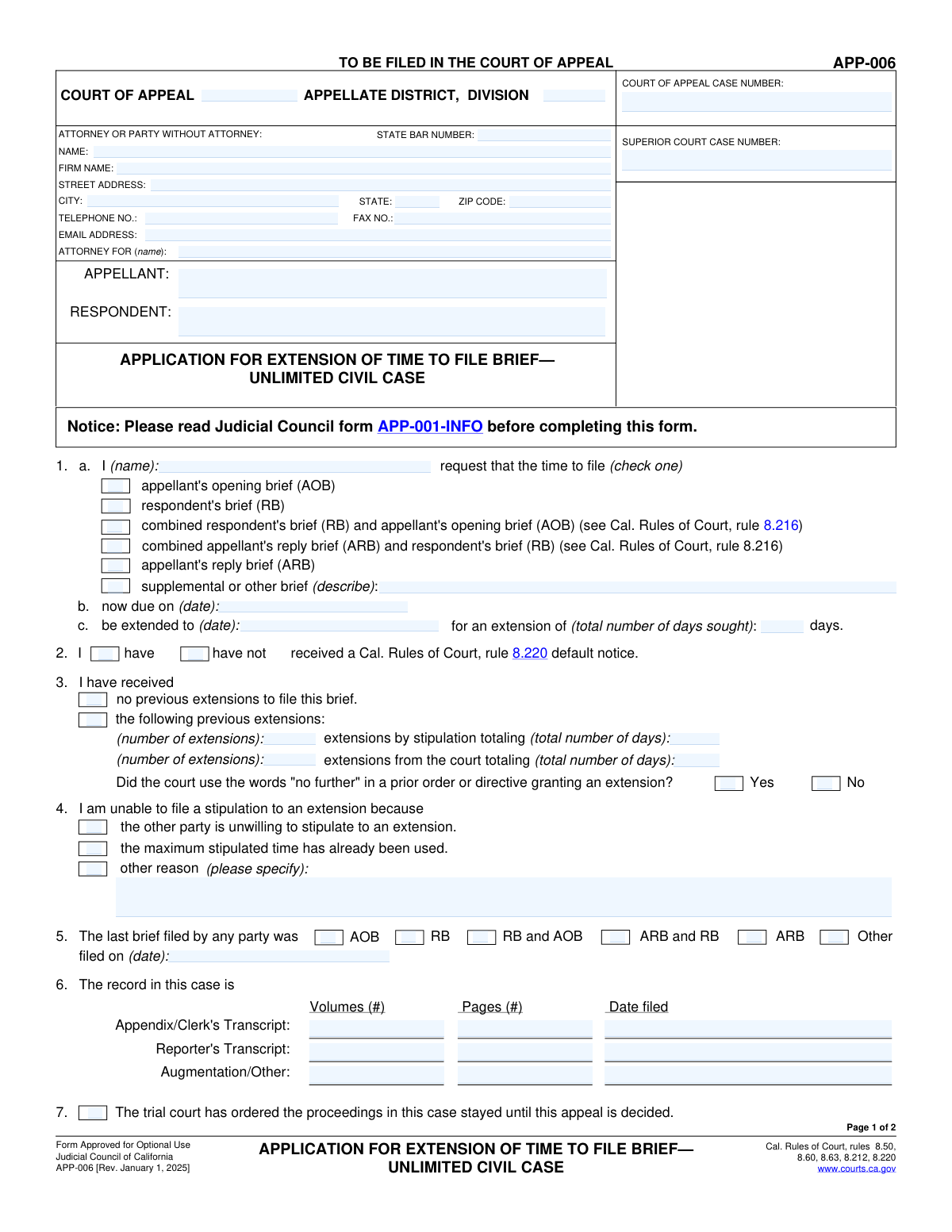
Yes! You can use AI to fill out Form APP-031A, Application for Extension of Time to File Brief (Civil Case)

Form APP-031A is a legal document filed in the California Courts of Appeal to request an extension of the deadline for filing a brief in a civil case. Parties use this form to explain why they need more time, detailing previous extensions and the reasons for the current request, as required by court rules. It is a critical motion for managing appellate litigation timelines and ensuring parties have adequate time to present their arguments. Today, this form can be filled out quickly and accurately using AI-powered services like Instafill.ai, which can also convert non-fillable PDF versions into interactive fillable forms.
Our AI automatically handles information lookup, data retrieval, formatting, and form filling.
It takes less than a minute to fill out APP-031A using our AI form filling.
Securely upload your data. Information is encrypted in transit and deleted immediately after the form is filled out.

Form specifications

Form name: Form APP-031A, Application for Extension of Time to File Brief (Civil Case)
Number of fields: 81
Number of pages: 2
Language: English
main-image

Instafill Demo: How to fill out PDF forms in seconds with AI

How to Fill Out APP-031A Online for Free in 2026

Are you looking to fill out a APP-031A form online quickly and accurately? Instafill.ai offers the #1 AI-powered PDF filling software of 2026, allowing you to complete your APP-031A form in just 37 seconds or less.
Follow these steps to fill out your APP-031A form online using Instafill.ai:
  1. 1 Navigate to Instafill.ai and upload your Form APP-031A, or select it from their library of templates.
  2. 2 Use the AI assistant to accurately input all case information, including the Court of Appeal and Superior Court case numbers, district, and division.
  3. 3 Enter your personal or firm's information, including name, address, State Bar number, and contact details.
  4. 4 Clearly specify the brief for which you are requesting an extension (e.g., Appellant's Opening Brief), the current due date, and the new extended date you are requesting.
  5. 5 Provide details about any previous extensions received and state the reasons for the current request, referencing the relevant factors from the California Rules of Court as prompted by the tool.
  6. 6 Review all the information for accuracy, then electronically sign the declaration section to certify the information provided.
  7. 7 Download the completed, ready-to-file Form APP-031A and submit it to the appropriate Court of Appeal.

Our AI-powered system ensures each field is filled out correctly, reducing errors and saving you time.

Why Choose Instafill.ai for Your Fillable APP-031A Form?

Speed

Complete your APP-031A in as little as 37 seconds.

Up-to-Date

Always use the latest 2026 APP-031A form version.

Cost-effective

No need to hire expensive lawyers.

Accuracy

Our AI performs 10 compliance checks to ensure your form is error-free.

Security

Your personal information is protected with bank-level encryption.

Frequently Asked Questions About Form APP-031A

This form is used to apply for an extension of time to file a brief in a California Court of Appeal case. It is used when a party needs more time beyond the original deadline to submit their legal arguments.

This form should be completed by an attorney or a party representing themselves (pro se) who is involved in an appeal and cannot meet the current deadline for filing a brief.

You must provide both the Court of Appeal Case Number, which was assigned when the appeal was filed, and the original Superior Court Case Number from the trial court.

If you are a party without an attorney, you can leave the 'State Bar Number' field blank. Be sure to fill in all other personal contact information, including your name, address, and phone number.

You can either write your detailed explanation in the 'Reasons for Extension' section on the form itself or attach a separate declaration. You must check the box indicating which method you are using.

If you cannot get the other party to agree to a stipulation, you should check the box for 'Other Party Unwilling' and submit this application to the court to request an order granting the extension.

This means a judge previously granted an extension with a specific warning that no more extensions would be permitted. You must disclose on the form if this language was used in a prior court order.

Yes, you must disclose all previous extensions. You need to specify how many were by agreement (stipulation) and how many were by court order, along with the total number of days granted for each.

Providing the volume and page counts for the clerk's and reporter's transcripts helps the court understand the size and complexity of the record. This information can justify the need for additional time to prepare your brief.

This is an official notice from the court stating that you have missed the deadline to file your brief. You must indicate on the form whether or not you have received this notice, as it can affect your case.

Yes, services like Instafill.ai use AI to help you accurately auto-fill form fields with your saved information, which saves time and helps prevent common errors.

To fill this form online, upload the PDF to Instafill.ai. The platform's AI will make the document interactive, allowing you to easily type in your information, save your progress, and download the completed form.

If you have a non-fillable or 'flat' PDF, you can use a service like Instafill.ai. It can convert the document into an interactive, fillable form that you can complete directly on your computer.

Choose 'Stated below' if you will write your full explanation directly into the text box provided on the form. Choose 'Separate Declaration' if you are attaching your explanation as a separate, signed document.

Compliance APP-031A
Validation Checks by Instafill.ai

1
Logical Date Order for Extension Request
This validation checks that the 'Extended Due Date' is a date that occurs after the 'Current Due Date'. This is crucial for ensuring the extension request is logical and seeks future time. A validation failure would prevent the submission of a nonsensical request, such as asking for an extension to a date that has already passed.
2
Conditional Requirement for 'Other Brief' Description
This check validates that if the 'Supplemental or Other Brief' checkbox is selected, the corresponding 'Other Brief Description' text field is not empty. This ensures the court understands the specific nature of the brief for which an extension is being requested. If this validation fails, the user is prompted to provide the necessary description before the form can be submitted.
3
Mutually Exclusive Selection for Default Notice Status
This validation ensures that the user selects either 'Have received default notice' or 'Have not received default notice', but not both. These two options are mutually exclusive and selecting both would create a logical contradiction in the filing. This check prevents ambiguity and ensures the court has a clear understanding of the case's procedural status.
4
State Field Abbreviation Format
This check verifies that the 'State' field in the attorney's address contains a valid two-letter U.S. state or territory abbreviation. This is important for mail delivery and maintaining standardized, clean address data in the court's records. An invalid entry would trigger an error message asking the user to correct the state abbreviation.
5
Zip Code Format Validation
This validation checks that the 'Zip Code' field contains either a 5-digit or 9-digit (ZIP+4) numeric format, such as '90210' or '90210-1234'. Correct formatting is essential for mail processing and data integrity. If the format is incorrect, the system should reject the entry and guide the user to provide a valid zip code.
6
Email Address Syntax Validation
This check confirms that the value entered in the 'Email Address' field follows the standard syntax for an email address, including an '@' symbol and a domain. This is critical for ensuring that electronic communications and notifications from the court can be successfully delivered. A failed validation would prevent form submission until a correctly formatted email is provided.
7
Conditional Requirement for Previous Extension Details
This validation ensures that if the 'Following previous extensions' box is checked, the user must provide details in the subsequent fields, such as 'Number of Extensions by Stipulation' or 'Number of Extensions from Court'. This information is mandatory for the court to evaluate the current extension request in the context of prior delays. Failure to provide these details would block submission and prompt the user for the required information.
8
Consistency Check for Extension Days
This check validates that the number entered in 'Total Days Sought for Extension' accurately reflects the calculated number of days between the 'Current Due Date' and the 'Extended Due Date'. This check prevents clerical errors and ensures the requested duration is explicitly and correctly stated. If the values do not match, an alert should be shown to the user to review and correct the dates or the total days requested.
9
Conditional Requirement for Calendar Preference Explanation
This validation verifies that if the 'Appeal Eligible for Calendar Preference/Priority' checkbox is selected, the 'Calendar Preference Explanation' text field is filled out. The court requires a specific legal authority or reason to grant priority, so this explanation is not optional. A failed validation would require the user to either provide the explanation or uncheck the priority request box.
10
Completeness of 'Reason for Extension'
This check ensures that if the 'Stated below' option is selected under 'Reason for Extension', the corresponding 'Reasons for Extension' text area is not left empty. The justification for the extension is a critical component of the application. The form cannot be processed without this detailed explanation if the user indicates it will be provided on the form itself.
11
Mutually Exclusive Selection for Previous Extension Status
This validation ensures that a user selects either 'No previous extensions' or 'Following previous extensions', but not both, as they are mutually exclusive statuses. This prevents contradictory information from being submitted regarding the history of extensions in the case. A validation failure would require the user to select only one of the two options.
12
Required Selection of Brief Type for Extension
This check validates that at least one checkbox from the 'Time Extension Request' section (e.g., 'Appellant's Opening Brief', 'Respondent's Brief') is selected. The form's purpose is to request a time extension for a specific brief, so this information is fundamental. Without a selection, the request is incomplete and cannot be processed by the court.
13
State Bar Number Format
This validation checks that the 'State Bar Number' field contains only numeric characters. A state bar number is a unique identifier for an attorney and typically follows a specific numeric format. Enforcing this format helps ensure data accuracy and proper identification of the filing attorney within the court's system.
14
Conditional Requirement for 'Other Reason' Stipulation
This check validates that if the 'Other Reason' checkbox is selected under 'Reason for Inability to Stipulate', the corresponding 'Other Reason' text field is filled in. The court needs to understand the specific circumstances preventing a stipulation, and this field provides that necessary context. A failure would prompt the user to provide the explanation or choose a different reason.
15
Declarant Name Presence
This validation ensures that the 'Declarant Printed Name' field is filled out when a reason for the extension is provided. The declaration requires the name of the person making the statement under penalty of perjury. This check is essential for the legal validity of the application.

Common Mistakes in Completing APP-031A

Transposing Court of Appeal and Superior Court Case Numbers

Filers often inadvertently enter the Superior Court case number in the field designated for the Court of Appeal case number, and vice versa. This happens due to haste or confusion between the two distinct identifiers. This error can lead to immediate rejection of the filing or significant processing delays as clerks must manually locate the correct case file, potentially causing the filer to miss the original deadline. To avoid this, carefully double-check that each case number is entered into its corresponding field before submission. AI-powered tools like Instafill.ai can help prevent this by saving and correctly populating case information from previous sessions.

Incomplete Information for Previous Extensions

When a filer checks the box for 'Following previous extensions,' they frequently forget to fill out the mandatory subsequent fields detailing the number and duration of extensions granted by stipulation or by the court. This omission makes it impossible for the court to assess the request in the context of the case's history. As a result, the application may be deemed incomplete and denied. Always ensure that if you indicate previous extensions were granted, you provide all the required specifics. Using a smart form filler can help by highlighting required fields based on your checkbox selections.

Inconsistent Date and Day Count Calculation

A common error is a mismatch between the 'Current Due Date,' the 'Extended Due Date,' and the 'Total Days Sought for Extension.' Filers may miscalculate the number of days, forgetting to account for weekends or court holidays, leading to a discrepancy. This inconsistency can cause the court to question the filer's diligence and may result in the request being denied or granted for a shorter period than requested. To prevent this, use a calendar to carefully count the days and verify that the three fields align perfectly. Some advanced form-filling tools can automatically calculate this duration for you.

Failing to Specify 'Other' Reasons or Brief Types

The form allows filers to select 'Other' for various fields, such as 'Supplemental or Other Brief' or 'Other Reason' for inability to stipulate. A frequent mistake is checking the 'Other' box but failing to provide the required written explanation in the corresponding text field. Without this clarification, the court has no basis to evaluate the selection, which almost always leads to the request being rejected. Always provide a clear and concise description whenever you select an 'Other' option. If the form is a non-fillable PDF, a tool like Instafill.ai can convert it to a fillable version, making it easier to see and complete these dependent fields.

Providing a Vague or Insufficient Reason for Extension

In the 'Reasons for Extension' section, many filers provide generic or conclusory statements like 'heavy caseload' or 'need more time to review the record' without sufficient detail. The court rules (e.g., Cal. Rules of Court, rule 8.63) require a specific, factual showing of good cause, including details about the case's complexity and the attorney's diligence. A weak justification is a primary reason for denial. To avoid this, provide a detailed narrative that explains the specific circumstances, references the size of the record (pages/volumes), and demonstrates why the extension is necessary for a just and thorough briefing.

Confusing Appellant and Respondent Parties

Filers, especially those new to appellate practice, sometimes confuse the 'Appellant' (the party appealing) with the 'Respondent' (the party responding to the appeal). This can lead to incorrect information being entered in the 'Case Parties' section or the wrong brief type being selected for the extension request. Such an error reflects poorly on the filer and can create significant confusion, potentially leading to the application being denied. Before filling out the form, confirm the official designation of all parties in the appeal and enter their names carefully in the correct fields.

Forgetting to Complete the Applicant Declaration

The 'Applicant Declaration' section, which includes the date and the declarant's printed name, is a critical component that certifies the truthfulness of the application under penalty of perjury. Because it is located near the end of the form, it is often overlooked and left blank. An unsigned or undated declaration renders the entire application invalid and will result in its summary rejection. Always scroll to the bottom of the form and ensure the declaration is properly dated and your name is printed as the declarant. Smart form fillers can flag these mandatory signature areas to ensure they are not missed.

Incorrectly Indicating Default Notice Status

The form requires the filer to state whether they have received a 'rule 8.220 default notice,' which is a critical warning from the court that a brief is overdue. Filers may misunderstand what this notice is, or forget they have received one, and check the wrong box. Misrepresenting this status can mislead the court and may result in the appeal being dismissed if the court believes no notice was sent when one was. Carefully check all court correspondence to confirm whether a default notice has been issued before answering this question.

Omitting Details of the Record on Appeal

The form asks for specific details about the record, including the number of volumes and pages for the clerk's and reporter's transcripts. Many filers leave these fields blank, viewing them as optional. However, this information is crucial for the court to gauge the complexity of the appeal and the reasonableness of the time extension requested. Failing to provide these details weakens the justification for the extension and may contribute to a denial. Always gather this information from the record itself and enter it accurately to support your request.

Incorrect State Bar Number or Attorney Information

Simple data entry errors in the 'Attorney or Party Information' section, such as a typo in the State Bar Number, name, or email address, are very common. An incorrect State Bar Number can prevent the court clerk from verifying the attorney's standing, causing delays. An incorrect email address means the filer will not receive crucial electronic notifications from the court regarding their application. To avoid this, proofread all contact information carefully. Using a tool like Instafill.ai can help by storing and accurately auto-filling this recurring information across all legal forms.
Saved over 80 hours a year

“I was never sure if my IRS forms like W-9 were filled correctly. Now, I can complete the forms accurately without any external help.”

Kevin Martin Green

Your data stays secure with advanced protection from Instafill and our subprocessors

Robust compliance program

Transparent business model

You’re not the product. You always know where your data is and what it is processed for.

ISO 27001, HIPAA, and GDPR

Our subprocesses adhere to multiple compliance standards, including but not limited to ISO 27001, HIPAA, and GDPR.

Security & privacy by design

We consider security and privacy from the initial design phase of any new service or functionality. It’s not an afterthought, it’s built-in, including support for two-factor authentication (2FA) to further protect your account.

Fill out APP-031A with Instafill.ai

Worried about filling PDFs wrong? Instafill securely fills form-app-031a-application-for-extension-of-time-to-file-brief-civil-case forms, ensuring each field is accurate.