Yes! You can use AI to fill out Certificate of Service (Civil Court Claim)

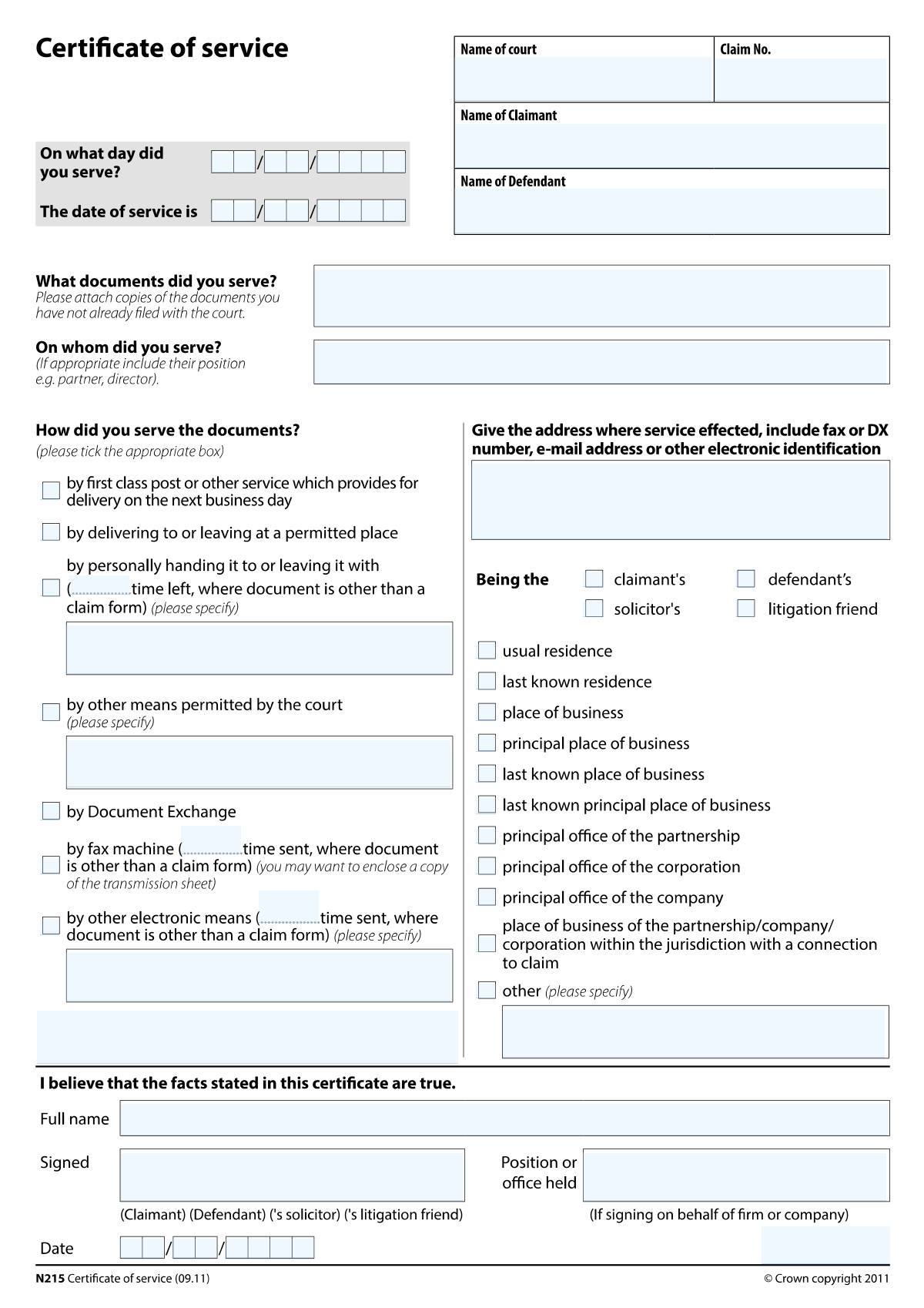
A Certificate of Service is a court form/statement used in civil proceedings to formally record the service of documents (what was served, the date of service, the method used, and the address/recipient details). It helps the court and the parties verify that service rules were followed and establishes key timelines (including the deemed date of service) that can affect deadlines and case progress. The form typically includes case details (court, claim number, claimant/defendant), the documents served, the service method (post, DX, personal service, fax, electronic, or court-permitted alternatives), and a signed certification by the person making the statement. Today, this form can be filled out quickly and accurately using AI-powered services like Instafill.ai, which can also convert non-fillable PDF versions into interactive fillable forms.
Our AI automatically handles information lookup, data retrieval, formatting, and form filling.
It takes less than a minute to fill out Certificate of Service using our AI form filling.
Securely upload your data. Information is encrypted in transit and deleted immediately after the form is filled out.

Form specifications

Form name: Certificate of Service (Civil Court Claim)
Number of pages: 2
Language: English
Categories: court forms, litigation forms, legal forms, civil court forms
main-image

Instafill Demo: filling out a legal form in seconds

How to Fill Out Certificate of Service Online for Free in 2026

Are you looking to fill out a CERTIFICATE OF SERVICE form online quickly and accurately? Instafill.ai offers the #1 AI-powered PDF filling software of 2026, allowing you to complete your CERTIFICATE OF SERVICE form in just 37 seconds or less.
Follow these steps to fill out your CERTIFICATE OF SERVICE form online using Instafill.ai:
  1. 1 Go to Instafill.ai and upload the Certificate of Service form (or select it from the form library).
  2. 2 Let the AI detect and map the fields, then confirm the form type and jurisdiction if prompted.
  3. 3 Enter the court and case details (Name of Court, Claim Number, Claimant Name, Defendant Name).
  4. 4 Provide service details: Person/Entity Served On, Service Address (and relationship/address type), Documents Served, and any Additional Service Information.
  5. 5 Select the method of service (e.g., first class post, DX, personal delivery, delivery to a permitted place, fax, other electronic means, or other court-permitted means) and complete any conditional time/detail fields that appear.
  6. 6 Enter the service date information (day/month/year served, date of service, and deemed day of service where required) and any method-specific identifiers (e.g., fax number and time sent).
  7. 7 Complete the certificate statement (signer full name, firm/company and position if applicable, signature name, and date signed), then review, validate, and download/submit the completed form.

Our AI-powered system ensures each field is filled out correctly, reducing errors and saving you time.

Why Choose Instafill.ai for Your Fillable Certificate of Service Form?

Speed

Complete your Certificate of Service in as little as 37 seconds.

Up-to-Date

Always use the latest 2026 Certificate of Service form version.

Cost-effective

No need to hire expensive lawyers.

Accuracy

Our AI performs 10 compliance checks to ensure your form is error-free.

Security

Your personal information is protected with bank-level encryption.

Frequently Asked Questions About Form Certificate of Service

This form is a Certificate of Service used to confirm that specific court documents were served (delivered/sent) to a person or organisation. It records who was served, what was served, how it was served, and the relevant dates and times.

The person who carried out the service (or is making the statement of service) should complete it. The signer must provide their full name and sign/date the certificate, and include their position and firm/company name if signing on behalf of an organisation.

You’ll need the Name of Court, Claim Number, Claimant Name, and Defendant Name. These should match exactly what appears on the court claim/case documents.

Enter the full name of the individual or organisation that received the documents. If relevant, include their role or position (e.g., “Director,” “Partner,” or “Solicitor for the Defendant”).

List each document you served by its title/name (for example, “Claim Form,” “Particulars of Claim,” “Witness Statement,” etc.). If multiple documents were served, include them all so the certificate clearly covers everything sent or delivered.

Tick the box that matches how you served the documents (e.g., first class post, DX, personal delivery/left with, delivery to a permitted place, fax, other electronic means, or other means permitted by the court). Only complete the extra time/details fields for the method(s) you selected.

You must enter a time if you served by fax, other electronic means, or personally handed/left the documents (and you ticked those boxes). If you served by post or DX, the form typically focuses on the date of service rather than a specific time.

Enter the address where service was effected, and include any relevant fax number, DX number, email address, or electronic identifier used for service. Also tick the appropriate address type/relationship box (e.g., defendant’s, solicitor’s, usual residence, principal office).

Tick 'Other (please specify)' and complete 'Address Type/Relationship - Other (specify)' with a clear description. Make sure the description explains why that address is a permitted or relevant service address.

Both sets capture the date the documents were served, broken into day/month/year fields. If the form includes both, enter the same service date consistently in each relevant place unless the form instructions for your jurisdiction indicate otherwise.

The deemed day of service is the date the court rules treat service as having occurred, which can differ from the date you sent the documents (especially for post or DX). Enter the deemed day based on the service method used and the applicable court rules for your case.

Use this only if the court has specifically allowed an alternative method of service. Tick the box and describe the method in the details field (for example, service via a particular platform or method ordered by the court).

Add any helpful context not captured elsewhere, such as reference numbers, delivery confirmations, who accepted the documents, or clarifying notes about the circumstances of service. Keep it factual and consistent with the method you selected.

Yes—AI tools can help by extracting case details and service information from your documents and placing them into the correct fields. Services like Instafill.ai use AI to auto-fill form fields accurately and save time, while you still review and approve everything before signing.

Upload the PDF to Instafill.ai, add or connect your case/service details, and let the AI map the information into the correct fields for review and export. If the PDF is flat/non-fillable, Instafill.ai can convert it into an interactive fillable form before auto-filling.

Compliance Certificate of Service
Validation Checks by Instafill.ai

1
Validates Certificate Signed Date components form a real calendar date
Checks that 'Date signed - day', 'Date signed - month', and 'Date signed - year' are all present and together form a valid date (e.g., no 31/02, month between 1–12, day within the month’s range). This is important because the certificate’s execution date can affect procedural validity and timelines. If validation fails, block submission and prompt the user to correct the date fields.
2
Validates Date of Service components form a real calendar date
Ensures 'Date of Service - Day', 'Date of Service - Month', and 'Date of Service - Year' are provided and constitute a valid calendar date. Accurate service dates are critical for calculating deadlines and deemed service rules. If invalid or incomplete, the system should reject the submission and highlight the missing/incorrect components.
3
Ensures Day Served date fields are complete and consistent with Date of Service
Checks that 'Day Served - Day/Month/Year' are either all completed or all blank, and if completed, they match the 'Date of Service' date (or follow a defined rule if the form distinguishes them). This prevents contradictory statements about when service occurred. If inconsistent, require the user to reconcile the dates or explain via an allowed additional information field.
4
Prevents future-dated service and signature dates (unless explicitly allowed)
Validates that the 'Date of Service' and 'Date signed' are not in the future relative to the submission date/time, unless the business process explicitly permits future dating. Future dates can invalidate the certificate or indicate data entry errors. If a future date is detected, block submission and request correction or an override with justification (if supported).
5
Validates chronological order: service date must not be after certificate signed date (or must follow configured rule)
Checks logical consistency between 'Date of Service' and 'Date signed' (typically service occurs on or before the certificate is signed). This is important because signing before service (or long after) may be procedurally questionable and can trigger disputes. If the order violates the configured rule, flag as an error or require confirmation and an explanation in 'Additional Service Information'.
6
Requires at least one Service Method checkbox to be selected
Ensures the user selects at least one method among the service method options (e.g., first class post, DX, delivery to permitted place, fax, other electronic means, other means permitted by court, personal delivery/left with). The method is essential to determine deemed service and required supporting details. If none are selected, prevent submission and prompt the user to choose a method.
7
Conditional requirement: Fax details must be provided when 'By fax machine' is selected
If 'By fax machine (time sent)' is checked, validates that 'Fax Time Sent' and 'Fax number used for service' are present and correctly formatted. This is necessary to evidence transmission and identify the destination number. If missing or malformed, block submission and request the time and fax number.
8
Validates time format for all 'time sent/left' fields
Checks that 'Fax Time Sent', 'Other electronic means - Time sent', and 'Personal Delivery/Left With - Time Left' follow a consistent time format (e.g., HH:MM in 24-hour time) and represent a valid time. Correct time capture supports proof of service and deemed service calculations. If invalid, reject the entry and prompt for a correctly formatted time.
9
Conditional requirement: Other electronic means details must be provided when selected
If 'By other electronic means (time sent)' is checked, requires both 'Other electronic means - Time sent' and 'Other electronic means - Details' to be completed. This ensures the platform/identifier is recorded and the time of sending is captured for evidential purposes. If either is missing, block submission and direct the user to complete the required fields.
10
Conditional requirement: Personal delivery/left with details must be provided when selected
If 'Personally handed to or left with (time and details)' is checked, requires 'Personal Delivery/Left With - Time Left' and 'Personal Delivery/Left With - Details'. These details are needed to identify who received the documents and the circumstances of delivery. If incomplete, prevent submission and request the missing time/details.
11
Conditional requirement: Court-permitted alternative service details must be provided when selected
If 'Other means permitted by the court (please specify)' is checked, requires 'Other Means Permitted by Court (Details)' to be populated with a meaningful description. This is important because alternative service must be clearly tied to a court permission and described precisely. If the details field is empty or too short to be meaningful, fail validation and request a fuller description.
12
Validates Service Address completeness and contact identifier formats (email/fax/DX) when present
Checks that 'Service Address (including fax/DX/email if applicable)' is not blank and contains sufficient address information (e.g., at least a line and locality/postcode where applicable), and validates any included email/fax/DX identifiers against expected patterns. This matters because service must be effected at an identifiable address or electronic destination. If the address is missing or identifiers are malformed, block submission and prompt for correction.
13
Ensures exactly one Address Type/Relationship is selected (or enforces allowed multi-select rule)
Validates the selection among address type/relationship checkboxes (e.g., claimant’s, defendant’s, solicitor’s, usual residence, principal office, etc.) according to the form’s intended behavior—typically exactly one should describe the address used. This prevents ambiguity about whose address was used and under what rule. If none (or too many, if not allowed) are selected, require the user to correct the selection.
14
Conditional requirement: 'Other (please specify)' address type must include a specification
If 'Other (please specify)' under Address Type/Relationship is checked, requires 'Address Type/Relationship - Other (specify)' to be completed with a clear label. This ensures the address relationship is not left undefined. If missing, block submission and prompt the user to provide the specification.
15
Validates required party/case identifiers are present and plausibly formatted
Ensures 'Name of Court', 'Claim Number', 'Claimant Name', and 'Defendant Name' are all provided and meet basic plausibility rules (e.g., not placeholder text, minimum length, claim number matches an expected pattern if configured). These fields are essential to link the certificate to the correct proceedings and parties. If any are missing or clearly invalid, prevent submission and highlight the specific field(s).
16
Ensures signer identity fields are complete and consistent (Signer full name vs Signed by; firm/position logic)
Checks that 'Signer full name' and 'Signed by' are present and consistent (e.g., same person name or an allowed variation), and if 'Firm or company name' is provided then 'Position or office held' is also provided (and vice versa, per business rules). This is important to establish who is making the statement and in what capacity. If inconsistent or incomplete, fail validation and request corrections to the signer/capacity information.

Common Mistakes in Completing Certificate of Service

Mixing up 'Date of Service' vs 'Day Served' vs 'Date signed'

People often assume these date sections are duplicates and either fill only one set or copy the same date into all of them. This can create an inconsistent certificate (e.g., the certificate is signed before service occurred, or the “day served” doesn’t match the “date of service”), which may lead to rejection or challenges to validity. Avoid this by treating each as a separate requirement: the service date(s) must reflect when service happened, and the signed date must reflect when the certificate was signed. AI-powered tools like Instafill.ai can help by mapping each date to the correct field and flagging inconsistencies.

Entering dates in the wrong format (month/day/year split fields)

Because the form splits dates into day, month, and year fields, many users enter a full date (e.g., 12/01/2026) into a single field or put the month number into the day box. This can result in an impossible or ambiguous date (e.g., day 20, month 35) and can undermine the accuracy of the service record. Avoid this by entering only the day number in the day field, the month (as required—number or name) in the month field, and a 4-digit year in the year field. Instafill.ai can automatically format and place date components into the correct boxes.

Leaving conditional 'details' fields blank after selecting a service method

A very common error is checking a method like fax, personal delivery, other electronic means, or other means permitted by the court, but not completing the required time/details fields that become mandatory. This creates an incomplete certificate and may cause the court or the other party to dispute whether service was properly effected. Avoid this by treating any checked method as a trigger: you must complete the corresponding time sent/time left and narrative details fields. Instafill.ai can prompt for missing dependent fields and prevent submission when required details are absent.

Providing an incomplete 'Person/Entity Served On' name (missing role/position)

Users often enter only a company name or only an individual’s first name, and omit the recipient’s role (e.g., director, partner) when service is on an organisation. This can create uncertainty about whether service was made on an authorised person and can lead to challenges about proper service. Avoid this by entering the full legal name and, where applicable, the position/role of the person served (or the department/office). Instafill.ai can help standardize names and remind you to include role/position when the recipient is an organisation.

Listing 'Documents Served' too vaguely or not matching the actual bundle

People frequently write generic descriptions like “court documents” or omit key items (e.g., claim form, particulars of claim, response pack), especially when multiple documents were served. If the list doesn’t match what was actually served, the certificate may be questioned and you may need to re-serve or provide further evidence. Avoid this by listing each document by its exact title and version/date (if relevant), and ensure it matches what was sent/handed over. Instafill.ai can help by reusing document titles consistently and reducing omissions.

Incorrect or incomplete service address (missing email/fax/DX identifiers)

The service address field often needs more than a street address—users forget to include the email address used, the fax number dialed, or the DX number when those methods are selected. Missing identifiers makes it harder to prove where service was effected and can weaken the certificate if challenged. Avoid this by entering the full address plus any electronic identifiers actually used for service (email, fax, DX, platform reference). Instafill.ai can validate address completeness and ensure the right identifiers are included for the chosen method.

Checking the wrong 'Address Type/Relationship' box (or checking multiple conflicting boxes)

Because there are many similar options (usual residence, last known residence, principal office, solicitor’s, claimant’s/defendant’s), users often pick the closest-sounding one or tick several. Conflicting selections can create ambiguity about whether the address is a permitted place for service, risking invalid service. Avoid this by selecting the single option that precisely matches the legal basis for that address and the party served, and use “Other (please specify)” only when none apply. Instafill.ai can guide selection by asking clarifying questions and preventing incompatible combinations.

Using 'Other (please specify)' without actually specifying

A frequent oversight is ticking an “Other (please specify)” option for address type/relationship or service method but leaving the specification field blank. This results in an incomplete statement that provides no usable information and may be treated as an error requiring correction. Avoid this by immediately completing the corresponding “Other – specify” text with a clear, concrete description (e.g., “service at registered office per Companies House record”). Instafill.ai can enforce that any “Other” selection requires a non-empty specification.

Missing or inconsistent times for fax/other electronic/personal delivery

When service is by fax, other electronic means, or personal delivery, people often omit the time, use an unclear time format, or enter a time that doesn’t align with the stated date of service. This can affect calculation of deemed service and may create disputes about whether service occurred within deadlines. Avoid this by entering the time in a consistent format (preferably 24-hour time) and ensuring it matches the correct service date. Instafill.ai can standardize time formatting and cross-check time/date consistency.

Incorrect 'Deemed day of service' for the chosen method

Users commonly guess the deemed service day or confuse it with the actual sending/handing date, especially for first class post, DX, and electronic methods where deemed service rules apply. An incorrect deemed date can lead to missed deadlines (e.g., for acknowledgments/defences) or procedural disputes. Avoid this by calculating deemed service according to the applicable rules for the selected method and ensuring it aligns with the service date/time entered. Instafill.ai can help by calculating and validating deemed service dates based on the method and timestamps provided.

Signature and signer details mismatch (Signed by vs Signer full name vs firm/position)

People often type a name in “Signer full name” but leave “Signed by” blank, use initials in one place and a full name in another, or forget to add firm/company name and position when signing on behalf of an organisation. This can raise questions about who is certifying service and whether they have authority, potentially requiring re-execution. Avoid this by using the same full legal name consistently across signer fields and completing firm/company and position/office held when applicable. Instafill.ai can keep signer identity consistent across fields and prompt for missing authority details.
Saved over 80 hours a year

“I was never sure if my IRS forms like W-9 were filled correctly. Now, I can complete the forms accurately without any external help.”

Kevin Martin Green

Your data stays secure with advanced protection from Instafill and our subprocessors

Robust compliance program

Transparent business model

You’re not the product. You always know where your data is and what it is processed for.

ISO 27001, HIPAA, and GDPR

Our subprocesses adhere to multiple compliance standards, including but not limited to ISO 27001, HIPAA, and GDPR.

Security & privacy by design

We consider security and privacy from the initial design phase of any new service or functionality. It’s not an afterthought, it’s built-in, including support for two-factor authentication (2FA) to further protect your account.

Fill out Certificate of Service with Instafill.ai

Worried about filling PDFs wrong? Instafill securely fills certificate-of-service-civil-court-claim forms, ensuring each field is accurate.