Yes! You can use AI to fill out Form APP-014, Appellant's Proposed Statement on Appeal (Unlimited Civil Case)

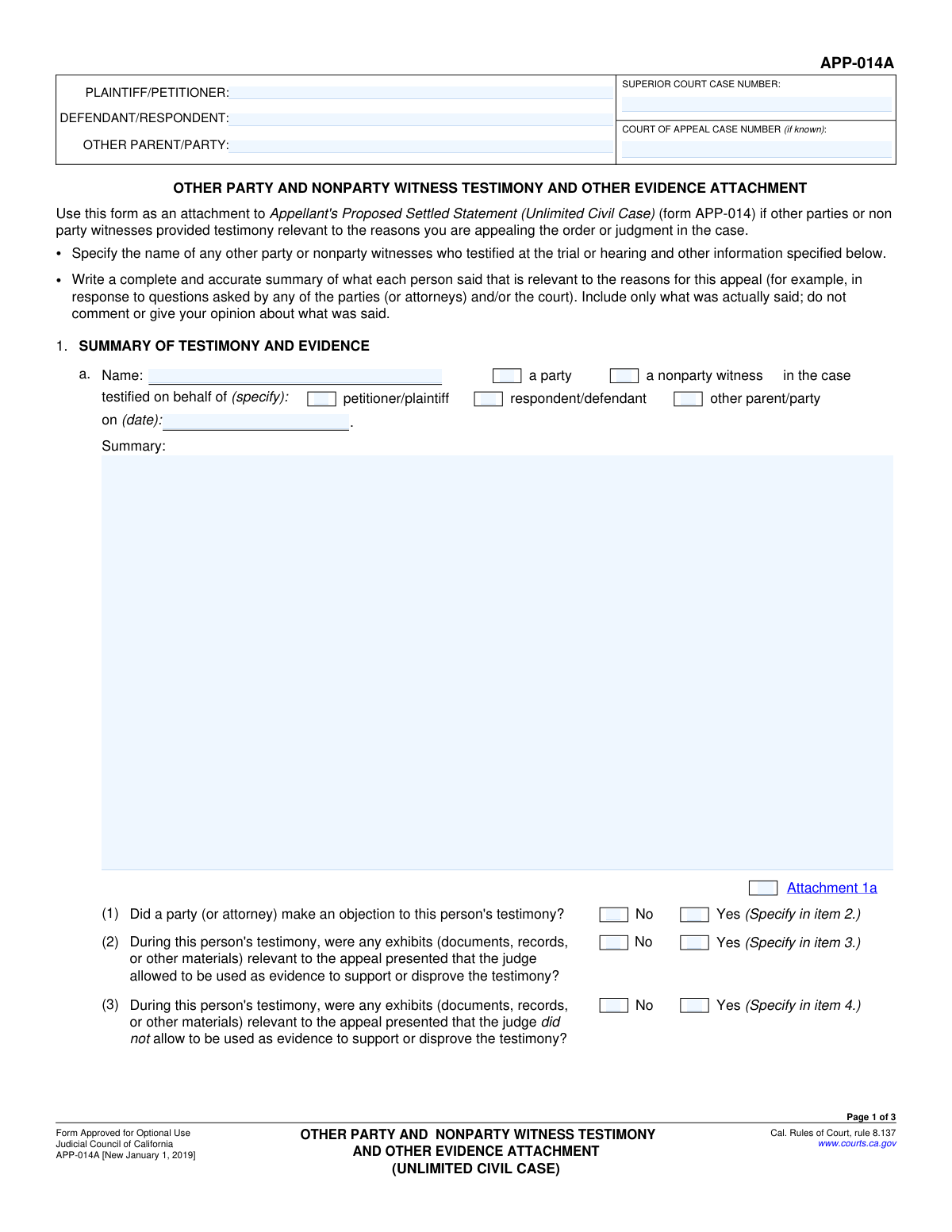
Form APP-014, Appellant's Proposed Statement on Appeal, is a California judicial council form used in civil appeals to summarize the oral proceedings of the trial court. It's filed by the appellant to provide the appellate court with a record of witness testimony, objections, and evidence when a reporter's transcript is unavailable or not being used. This document is critical because it forms the basis of the record the appellate court will review to decide the case. Today, this form can be filled out quickly and accurately using AI-powered services like Instafill.ai, which can also convert non-fillable PDF versions into interactive fillable forms.
Our AI automatically handles information lookup, data retrieval, formatting, and form filling.
It takes less than a minute to fill out APP-014 using our AI form filling.
Securely upload your data. Information is encrypted in transit and deleted immediately after the form is filled out.

Form specifications

Form name: Form APP-014, Appellant's Proposed Statement on Appeal (Unlimited Civil Case)
Number of fields: 57
Number of pages: 3
Language: English
Categories: appellant forms, civil appeal forms, NJ state forms, PA state forms
main-image

Instafill Demo: How to fill out PDF forms in seconds with AI

How to Fill Out APP-014 Online for Free in 2026

Are you looking to fill out a APP-014 form online quickly and accurately? Instafill.ai offers the #1 AI-powered PDF filling software of 2026, allowing you to complete your APP-014 form in just 37 seconds or less.
Follow these steps to fill out your APP-014 form online using Instafill.ai:
  1. 1 Navigate to Instafill.ai and upload or select Form APP-014, Appellant's Proposed Statement on Appeal.
  2. 2 Use the AI assistant to populate the case information, including the names of all parties and the Superior Court and Court of Appeal case numbers.
  3. 3 For each witness whose testimony is relevant to the appeal, enter their name, identify them as a party or nonparty, and provide a complete and accurate summary of their testimony.
  4. 4 Document any objections made to the testimony, specifying the nature of the objection and the judge's ruling.
  5. 5 List and describe all exhibits that were either allowed or disallowed as evidence during the testimony, including details of any related objections and court rulings.
  6. 6 If necessary, use the attachment sections to provide continued summaries or additional details, checking the corresponding boxes on the main form.
  7. 7 Review the entire completed statement for accuracy and completeness, then use Instafill.ai to securely save, print, or prepare the document for filing with the court.

Our AI-powered system ensures each field is filled out correctly, reducing errors and saving you time.

Why Choose Instafill.ai for Your Fillable APP-014 Form?

Speed

Complete your APP-014 in as little as 37 seconds.

Up-to-Date

Always use the latest 2026 APP-014 form version.

Cost-effective

No need to hire expensive lawyers.

Accuracy

Our AI performs 10 compliance checks to ensure your form is error-free.

Security

Your personal information is protected with bank-level encryption.

Frequently Asked Questions About Form APP-014

This form is used to create a summary of testimony, objections, and exhibits from a court hearing for an appeal. It should be filled out by a party involved in the appeal who needs to provide the appellate court with a record of what happened during the original testimony.

You will need the full names of all parties involved (plaintiff/petitioner, defendant/respondent, etc.) and the Superior Court case number. If you have one, you will also need the Court of Appeal case number.

A 'party' is one of the main people involved in the case, such as the plaintiff or defendant. A 'nonparty witness' is someone who provides testimony but is not directly part of the lawsuit, like an expert or an eyewitness.

Provide a complete and accurate summary of what the person said that is relevant to your appeal. Focus only on the facts of their testimony and do not include your own opinions or arguments.

If you check 'Yes' for an objection, you must provide details about who objected, the reason for the objection, and the judge's ruling. If the summary is long, you may need to use an attachment.

'Allowed Exhibits' are documents or items the judge permitted to be used as evidence during the testimony. 'Disallowed Exhibits' are items the judge ruled could not be used as evidence.

Use an attachment if your summary of testimony, objections, or exhibits is too long to fit in the provided space. Make sure to check the corresponding attachment box on the form (e.g., Attachment 1a, 2, 3, or 4).

This form appears to be designed for summarizing the testimony of a single witness. You will likely need to complete a separate form for each witness whose testimony you need to summarize.

Yes, you can still complete the form. The field for the Court of Appeal Case Number is only required 'if known,' so you can leave it blank if one has not been assigned yet.

Yes, services like Instafill.ai use AI to help you accurately auto-fill form fields with your saved information, which can save you significant time and reduce errors.

Simply upload the form to the Instafill.ai platform. The AI will identify the fields, and you can click to fill them with your securely stored personal information, or type directly into the fields online.

You can use a service like Instafill.ai, which can convert flat, non-fillable PDFs into interactive, fillable forms. This allows you to easily type your information directly onto the form online.

For your security and privacy, the form recommends pressing the 'Clear This Form' button after you have finished printing. This will erase all the personal information you entered.

Yes, if you answer 'Yes' to questions about objections or exhibits, you must provide a detailed summary in the corresponding section. The form specifies which summary sections to fill based on your answers.

Compliance APP-014
Validation Checks by Instafill.ai

1
Superior Court Case Number Presence
This check ensures that the 'Superior Court Case Number' field is not empty. This number is a critical identifier for the entire legal proceeding, and its absence would make it impossible to file or associate the form with the correct case. If this field is left blank, the form submission will be rejected with an error message prompting the user to provide the required case number.
2
Testimony Date Format and Chronology
This validation verifies that the 'Testimony Date' is entered in a valid date format (e.g., MM/DD/YYYY) and that the date is not in the future. It is crucial for establishing an accurate timeline of events for the court record. An invalid format would cause data processing errors, and a future date is logically impossible, so submissions with such dates will be flagged for correction.
3
Mutually Exclusive Witness Type Selection
This check ensures that a user selects either the 'A party' checkbox or the 'A nonparty witness' checkbox, but not both. These two categories are mutually exclusive, and selecting both would create a logical contradiction in the witness's status. If both are checked, an error will be displayed, forcing the user to clarify whether the witness is a party to the case or not.
4
Conditional Party Role Requirement
This validation rule is triggered when the 'A party' checkbox is selected. It ensures that the user then selects one of the corresponding party roles: 'Petitioner/plaintiff', 'Respondent/defendant', or 'Other parent/party'. Failing to specify the role of the party witness leaves the record incomplete, so the form will not be accepted until a role is chosen.
5
Mutually Exclusive Objection Status
This check validates that for the 'Objection to Testimony' section, only one of the 'Yes' or 'No' options is selected. Allowing both to be checked would result in ambiguous and unusable data. The system should enforce this exclusivity, typically using radio buttons, and reject the submission if this logical rule is violated.
6
Required Objection Details on 'Yes'
This validation ensures that if a user checks 'Yes' to indicate an objection was made, the corresponding 'Testimony Objections Details' text area must be filled out. It is critical to capture the specifics of the objection for the appeal record. If 'Yes' is selected but the details are missing, the submission will be blocked until the required explanation is provided.
7
Required Allowed Exhibits Summary on 'Yes'
This check verifies that if the user selects 'Yes' for 'Allowed Exhibits', the 'Summary of Allowed Exhibits' field is not left empty. The purpose of indicating 'Yes' is to provide details about those exhibits. An empty summary would make the 'Yes' selection meaningless, so the form will prompt the user to provide the summary before proceeding.
8
Required Disallowed Exhibits Summary on 'Yes'
This validation ensures that if a user checks 'Yes' to indicate there were disallowed exhibits, the 'Summary of Exhibits Not Allowed as Evidence' field must contain text. This information is vital for the appeal, as the exclusion of evidence could be a key point. The submission will be considered incomplete and rejected if the summary is missing after 'Yes' is selected.
9
Witness Name Completeness
This check ensures the 'Witness Name' field is not left blank. The identity of the person who testified is a fundamental piece of information for the testimony record. Without a name, the summary of testimony is not attributable and is therefore invalid for legal purposes, so the form cannot be submitted without it.
10
Testimony Summary Completeness
This validation confirms that the 'Testimony Summary' text area contains content and is not empty. The summary is the primary purpose of this section of the form, capturing the substance of what the witness said. An empty summary provides no value, so the system will prevent submission until a summary is entered.
11
Plaintiff/Petitioner Name Requirement
This check validates that the 'Plaintiff/Petitioner Name' field is filled out across all relevant sections of the form. This name is a primary identifier for the case and is essential for legal documentation and processing. The form submission will fail if this mandatory field is left empty, ensuring the case can be correctly identified.
12
Logical Consistency of Nonparty Witness Name
This validation cross-references the 'Witness Name' with the names entered for 'Plaintiff/Petitioner Name' and 'Defendant/Respondent Name' when 'A nonparty witness' is checked. A nonparty witness, by definition, should not be one of the primary parties. If a match is found, an error or warning should be displayed to the user to confirm the witness's status, preventing potential data entry errors.
13
Attachment Checkbox Dependency for Objections
This check ensures the 'Attachment 2' checkbox can only be selected if the user has also selected 'Yes' for the 'Objection to testimony' question. It prevents users from indicating an attachment exists for details that are not being provided. This maintains logical consistency and prevents confusion about the contents of the submission.
14
Case Number Format Validation
This check verifies that the value entered into the 'Superior Court Case Number' field adheres to a predefined format, such as a specific combination of letters, numbers, and hyphens. This is important for data integrity and ensuring the case number can be correctly processed by court computer systems. An incorrectly formatted number could lead to filing errors, so the user will be prompted to correct it before submission.

Common Mistakes in Completing APP-014

Inconsistent Party and Witness Naming

This form requires entering the names of the plaintiff, defendant, and witnesses multiple times across different sections. A common error is to use abbreviations, initials, or slight variations of a name in different fields. This inconsistency can cause confusion and processing delays, as it may not be clear if 'John Smith', 'J. Smith', and 'John A. Smith' refer to the same individual. To avoid this, carefully enter the full legal name as it appears on official court documents every time it is requested. AI-powered tools like Instafill.ai can prevent this by auto-populating repeated fields, ensuring perfect consistency throughout the document.

Incorrect or Incomplete Case Numbers

Users often enter case numbers incorrectly, transposing digits, omitting leading zeros, or failing to use the correct format required by the court. Another frequent mistake is confusing the Superior Court case number with the Court of Appeal case number. An incorrect case number can lead to the document being misfiled or rejected entirely, causing critical delays in the appeal process. Always copy the case numbers directly from official court notices or filings to ensure accuracy. If the form is a non-fillable PDF, tools like Instafill.ai can convert it to a fillable version and help validate data formats.

Providing Biased or Opinionated Summaries

The form explicitly asks for a 'complete and accurate summary' of testimony and exhibits, and warns not to 'comment or give your opinion'. However, filers often inject their own arguments, interpretations, or emotional language into these summaries. This undermines the purpose of the document, which is to present a factual record for the appellate court. A biased summary can damage the filer's credibility and may be disregarded by the judges. To avoid this, stick strictly to the facts: what was said, what was presented, and what the judge ruled, without adding any personal commentary.

Mismatching 'Yes'/'No' Answers with Required Explanations

The form contains numerous conditional fields where checking 'Yes' (e.g., for 'Objection to Testimony') requires filling out a corresponding detailed explanation section. A very common mistake is checking 'Yes' but then failing to provide the mandatory summary, or checking 'No' and incorrectly writing an explanation. This leaves the claim unsubstantiated and renders it useless for the appeal. Before submitting, meticulously review the form to ensure every 'Yes' answer is supported by a complete explanation in the designated field.

Forgetting to Check Corresponding Attachment Boxes

When a summary is too long for the provided space, the form allows for attachments (e.g., Attachment 1a, 2, 3). A critical error is to include the physical attachment but forget to check the corresponding box on the form itself. Legally, this can cause the attachment to be considered separate from the form and overlooked by the court clerk and judges. This could mean crucial evidence or testimony is not considered in the appeal. Always double-check that every attachment you include has its corresponding box ticked on the main form.

Incomplete Description of Objections

When detailing an objection, the form requires the name of the person testifying, the specific objection made, the court's ruling, and any explanation from the court. Filers often provide a vague statement like 'The lawyer objected to the testimony.' This is insufficient for an appellate review, as it lacks the context needed to evaluate the judge's ruling. To avoid this, refer to the court transcript to gather all required components of the objection before filling out this section.

Confusing Allowed vs. Disallowed Exhibits

The form has separate, distinct sections for summarizing exhibits the judge 'allowed' as evidence and those the judge 'disallowed'. People can easily get confused and list an exhibit in the wrong section, which fundamentally misrepresents the trial record. This error creates a false narrative for the appellate court and can severely damage the filer's credibility. It is essential to consult court records or transcripts to confirm the final status of each exhibit before documenting it on the form.

Contradictory Witness Status Selection

The form asks if a witness is 'A party' or 'A nonparty witness,' and then has sub-options for which party they testified for. Users frequently create contradictions, such as checking both 'A party' and 'A nonparty witness,' or checking 'A party' without specifying which one (Petitioner or Respondent). This ambiguity forces the court to guess the witness's role and relationship to the case. To prevent this, carefully select only one primary status and, if 'A party' is chosen, ensure the correct corresponding party type is also selected.

Including Information Not 'Relevant to the Appeal'

The instructions specify summarizing testimony and exhibits that are 'relevant to the appeal.' A common pitfall is to include an exhaustive summary of the entire trial, rather than focusing only on the specific points and rulings being contested. This buries the key issues in irrelevant detail, frustrating the court and weakening the overall argument. Before filling out the form, clearly outline the specific grounds for the appeal and include only the information that directly supports those points.
Saved over 80 hours a year

“I was never sure if my IRS forms like W-9 were filled correctly. Now, I can complete the forms accurately without any external help.”

Kevin Martin Green

Your data stays secure with advanced protection from Instafill and our subprocessors

Robust compliance program

Transparent business model

You’re not the product. You always know where your data is and what it is processed for.

ISO 27001, HIPAA, and GDPR

Our subprocesses adhere to multiple compliance standards, including but not limited to ISO 27001, HIPAA, and GDPR.

Security & privacy by design

We consider security and privacy from the initial design phase of any new service or functionality. It’s not an afterthought, it’s built-in, including support for two-factor authentication (2FA) to further protect your account.

Fill out APP-014 with Instafill.ai

Worried about filling PDFs wrong? Instafill securely fills form-app-014-appellants-proposed-statement-on-appeal-unlimited-civil-case forms, ensuring each field is accurate.