Yes! You can use AI to fill out Form APP-011, Appellant's Reply Brief (Limited Civil Case)
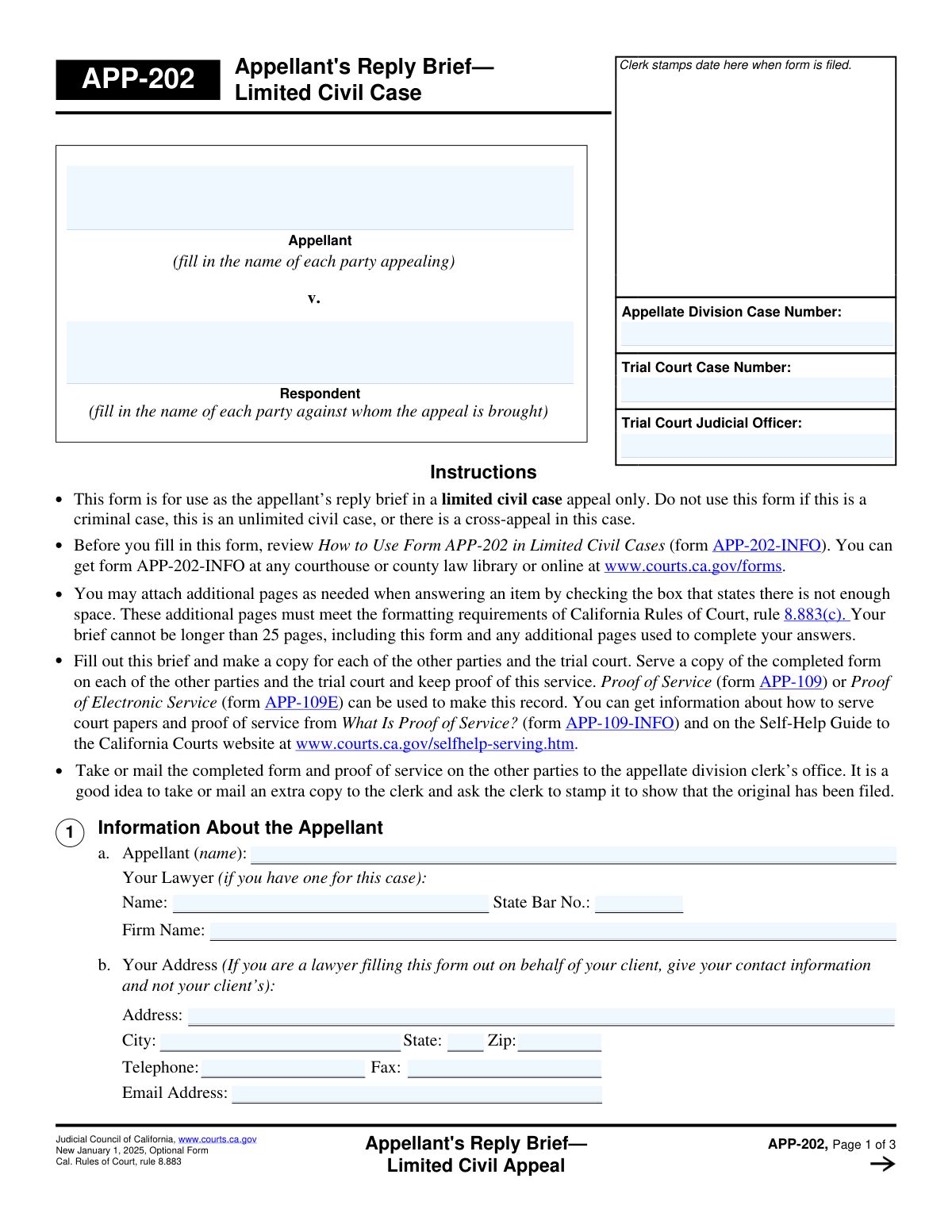
Form APP-011, the Appellant's Reply Brief, is a crucial legal document used in California's appellate courts for limited civil cases. It allows the appellant (the party who filed the appeal) to respond directly to the arguments presented in the respondent's brief. This is the appellant's final written statement to the court, making it a vital step in the appeals process to counter the respondent's points and reinforce their own arguments. Today, this form can be filled out quickly and accurately using AI-powered services like Instafill.ai, which can also convert non-fillable PDF versions into interactive fillable forms.
APP-011 is part of the
appellant forms category on Instafill.
Our AI automatically handles information lookup, data retrieval, formatting, and form filling.
It takes less than a minute to fill out APP-011 using our AI form filling.
Securely upload your data. Information is encrypted in transit and deleted immediately after the form is filled out.
Form specifications
| Form name: | Form APP-011, Appellant's Reply Brief (Limited Civil Case) |
| Number of fields: | 33 |
| Number of pages: | 3 |
| Language: | English |
Instafill Demo: How to fill out PDF forms in seconds with AI
How to Fill Out APP-011 Online for Free in 2026
Are you looking to fill out a APP-011 form online quickly and accurately? Instafill.ai offers the #1 AI-powered PDF filling software of 2026, allowing you to complete your APP-011 form in just 37 seconds or less.
Follow these steps to fill out your APP-011 form online using Instafill.ai:
- 1 Navigate to Instafill.ai and upload or select Form APP-011, the Appellant's Reply Brief.
- 2 Provide the case information when prompted by the AI, including the Appellate Division and Trial Court case numbers.
- 3 Identify all parties to the appeal by entering the full names of the appellant(s) and respondent(s).
- 4 Enter your personal and/or your lawyer's contact information, including name, address, and State Bar number.
- 5 Carefully detail the respondent's arguments you are addressing and write your corresponding replies, including any supporting law or facts.
- 6 Indicate via checkboxes if you are attaching additional pages for lengthy arguments, ensuring they are labeled correctly as per the form's instructions.
- 7 Review the entire completed brief for accuracy, then provide your signature and the date before saving or printing for filing.
Our AI-powered system ensures each field is filled out correctly, reducing errors and saving you time.
Why Choose Instafill.ai for Your Fillable APP-011 Form?
Speed
Complete your APP-011 in as little as 37 seconds.
Up-to-Date
Always use the latest 2026 APP-011 form version.
Cost-effective
No need to hire expensive lawyers.
Accuracy
Our AI performs 10 compliance checks to ensure your form is error-free.
Security
Your personal information is protected with bank-level encryption.
Frequently Asked Questions About Form APP-011
This form is an Appellant's Reply Brief, used by the person appealing a case (the appellant) to formally respond to the arguments made by the opposing party (the respondent) in their brief.
The appellant, who is the party that initiated the appeal, or their lawyer must complete and file this form with the court.
You must provide both the case number assigned by the Appellate Division and the original case number from the Trial Court.
In this section, you must first identify the specific argument from the respondent's brief you are addressing. Then, you provide your detailed reply, including any supporting laws or facts.
If your answer doesn't fit, check the corresponding box for an attachment (e.g., 'First Reply Details Attachment'). Continue your full response on a separate sheet of paper, labeling it as indicated on the form.
To address more than two points, check the 'Additional Replies' box. You can then provide your additional replies on a separate sheet of paper labeled 'Attachment 2c'.
The State Bar Number is required if a lawyer is completing the form on behalf of the appellant. If you are representing yourself (pro se), you would leave this field blank.
For your protection and privacy, especially on a shared computer, you should press the 'Clear This Form' button to erase all your personal information after printing.
Yes, services like Instafill.ai use AI to accurately auto-fill form fields with your information, which can save time and help reduce errors.
To fill this form online, you can upload it to a platform like Instafill.ai. The service will make the document interactive, allowing you to type your information directly into the fields and save or print the completed form.
If you have a non-fillable or 'flat' PDF, you can use a service like Instafill.ai to convert it into an interactive, fillable form that you can complete on your computer.
This is the name of the judge or judicial officer who presided over your case in the original Trial Court, from which you are appealing.
The 'Appellant Name' is the name of the party or parties filing the appeal. The 'Respondent Name' is the name of the party or parties against whom the appeal is being brought.
Compliance APP-011
Validation Checks by Instafill.ai
1
Ensures Consistency Across All Appellate Case Number Fields
This check verifies that the value entered for 'Appellate Division Case Number' is identical across all three instances where it appears on the form. It is critical for data integrity and to prevent filing errors associated with the wrong case. If the numbers do not match, the user will be prompted to correct the discrepancy before submission.
2
Validates State Bar Number Format and Presence
This validation ensures that if a 'Lawyer Name' is provided, the 'State Bar Number' field is also filled and conforms to the expected format for that jurisdiction (e.g., a specific number of digits). This is crucial for verifying the lawyer's credentials and active status with the state bar. A failure would prevent submission until a valid bar number is entered for the listed attorney.
3
Verifies Signature Date is Valid and Not in the Future
This check confirms that the 'Signature Date' is a real, correctly formatted date and is not a future date. Legal documents must be dated on or before the day they are signed and submitted. An invalid or future date would cause the form to be rejected, so the system will require the user to enter a date that is today or in the past.
4
Confirms Signatory Name Matches Appellant or Lawyer
This validation cross-references the 'Signatory Printed Name' with the 'Appellant Name' and 'Lawyer Name' fields. The person signing the document must be a party to the case (the appellant) or their legal representative. A mismatch indicates a potential unauthorized signature, and the form will prompt the user to ensure the correct person is signing.
5
Enforces Conditional Logic for Argument Sections
This check ensures that the fields for the 'Second Response or Argument' and the 'Additional Replies' checkbox can only be filled if the 'First Respondent Argument' field is not empty. This maintains the logical flow of the document, preventing users from creating replies to non-existent arguments. If the condition is not met, these dependent fields will be disabled or trigger a validation error.
6
Validates Email Address Format
This check verifies that the entry in the 'Email Address' field follows the standard internet format (e.g., '[email protected]'). This is essential for ensuring that court notices and other electronic communications are deliverable. If the format is incorrect, the user will receive an error message and must correct the email address to proceed.
7
Validates State Field is a Two-Letter Abbreviation
This validation ensures the 'State' field contains a valid, two-letter postal abbreviation (e.g., 'CA', 'NY', 'TX'). Using a standardized format is necessary for mail delivery and database consistency. The system should reject full state names or incorrect abbreviations, prompting the user to enter a valid two-letter code.
8
Ensures Zip Code is a Valid 5 or 9-Digit Format
This check validates that the 'Zip Code' field contains either a five-digit or nine-digit (ZIP+4) numeric code. A correct zip code is critical for the successful mailing of physical documents to the provided address. The validation will fail if the entry contains non-numeric characters or an incorrect number of digits.
9
Requires Core Case Information Fields to be Complete
This validation confirms that the 'Appellate Division Case Number', 'Trial Court Case Number', and 'Trial Court Judicial Officer' fields are all filled out. These fields are fundamental for identifying the case and its history. A submission with any of these fields empty would be incomplete and likely rejected by the court clerk.
10
Validates Telephone Number Format
This check ensures the 'Telephone Number' field conforms to a standard format, such as (XXX) XXX-XXXX or XXX-XXX-XXXX, and contains the correct number of digits. This is important for ensuring the court or opposing counsel can successfully contact the party. An improperly formatted number would trigger an error, requiring the user to correct it.
11
Ensures Required Argument Replies are Provided
This validation checks that if a 'First Respondent Argument' is entered, the corresponding 'Reply to First Argument' field is also filled out. It is illogical to identify an argument you are replying to without providing the actual reply. If the reply field is empty while the argument field is filled, the system will flag it as an incomplete section.
12
Verifies Completeness of Parties to the Appeal
This check ensures that at least one 'Appellant Name' and at least one 'Respondent Name' are provided in the 'Parties to the Appeal' section. A legal appeal must have at least one party appealing and one party against whom the appeal is brought. The form would be considered incomplete and invalid without this fundamental information.
13
Flags Submission for Expected Attachments
This validation checks if any of the attachment checkboxes (e.g., 'First Argument Reply Attachment', 'Attached Sheet for Reply 2b(2)') are ticked. If a box is checked, the system flags that a separate, corresponding document is expected as part of the submission package. While not a direct field validation, it's a crucial processing rule to prevent submissions where the filer indicates an attachment but fails to provide one.
14
Ensures Completeness of Lawyer's Contact Information
This check verifies that if a 'Lawyer Name' is entered, then the complete address ('Address Line 1', 'City', 'State', 'Zip Code') and 'Telephone Number' are also provided. This information is mandatory for official communication and service of documents. A failure would prompt the user to complete the lawyer's contact details before the form can be saved or submitted.
Common Mistakes in Completing APP-011
Filers often confuse the 'Trial Court Case Number' with the 'Appellate Division Case Number' and enter them in the wrong fields. This happens due to carelessness when referencing multiple documents. This error can lead to significant processing delays or even rejection of the filing, as the document cannot be correctly docketed. Always double-check the case numbers against the official court notices for both the trial and appellate levels before submission.
A critical error is providing additional information on a separate sheet but forgetting to check the corresponding box (e.g., 'First Argument Reply Attachment') on the form. Conversely, a filer might check the box but fail to label the physical attachment with the specific required name, such as 'Attachment 2a(1)'. This mismatch can result in the court disregarding the supplementary information entirely, fatally weakening the argument.
The form asks for the 'Appellate Division Case Number' in at least three separate locations. It is common for filers to enter it correctly in one field but introduce a typo in another. This inconsistency creates ambiguity and can cause administrative confusion or delays in processing the document. It is crucial to ensure the number is identical in every field where it is required.
Filers may use abbreviations, initials, or slight variations for the 'Appellant Name' and 'Respondent Name' instead of the full, official names as they appear on court records. This can create legal ambiguity regarding the identity of the parties involved. To avoid this, use the complete and exact names as stated in the original judgment or notice of appeal.
In the 'First Respondent Argument' field, filers often provide a vague or incomplete summary of the point they are rebutting. This makes it difficult for the judicial officer to understand the context of the reply. To be effective, you should precisely paraphrase or directly quote the specific argument from the respondent's brief that you are addressing.
When filling out the 'Reply to First Argument' section, a common mistake is to state a conclusion without providing the necessary legal or factual support. A reply that lacks citations to relevant statutes, case law, or evidence from the record is unpersuasive and likely to be dismissed by the court. Always substantiate your claims to build a strong, credible argument.
Data entry errors in the address section, such as writing the full state name instead of the required two-letter abbreviation or entering an incorrect zip code, are frequent. These mistakes can lead to returned mail and missed deadlines for crucial case communications. Using an AI-powered form filler like Instafill.ai can help prevent these errors by automatically validating and formatting address components correctly.
Users filling out the PDF on a computer may accidentally click 'Clear This Form' instead of 'Save this form' or 'Print this form', instantly losing all their work. This is particularly risky on public terminals. To prevent data loss, save the form frequently to your local device. If the original form is a non-fillable PDF, tools like Instafill.ai can convert it into a fillable version that can be saved progressively.
While the form does not have a physical signature line in the fields provided, filers often forget to enter the 'Signature Date' and 'Signatory Printed Name'. An unsigned or undated document is invalid and will be rejected by the court clerk. Always ensure the date of signing is accurate and the signatory's name is printed clearly as required before printing the final version for physical signature.
The form contains conditional fields, such as the 'Second Response or Argument' section, which should only be filled if the preceding argument section is also completed. Filers sometimes ignore this structure, skipping the first argument and starting with the second, which disrupts the logical flow of the document. This can make the brief appear disorganized and difficult for the court to follow.
Saved over 80 hours a year
“I was never sure if my IRS forms like W-9 were filled correctly. Now, I can complete the forms accurately without any external help.”
Kevin Martin Green
Your data stays secure with advanced protection from Instafill and our subprocessors




Robust compliance program
Transparent business model
You’re not the product. You always know where your data is and what it is processed for.
ISO 27001, HIPAA, and GDPR
Our subprocesses adhere to multiple compliance standards, including but not limited to ISO 27001, HIPAA, and GDPR.
Security & privacy by design
We consider security and privacy from the initial design phase of any new service or functionality. It’s not an afterthought, it’s built-in, including support for two-factor authentication (2FA) to further protect your account.
Fill out APP-011 with Instafill.ai
Worried about filling PDFs wrong? Instafill securely fills form-app-011-appellants-reply-brief-limited-civil-case forms, ensuring each field is accurate.
