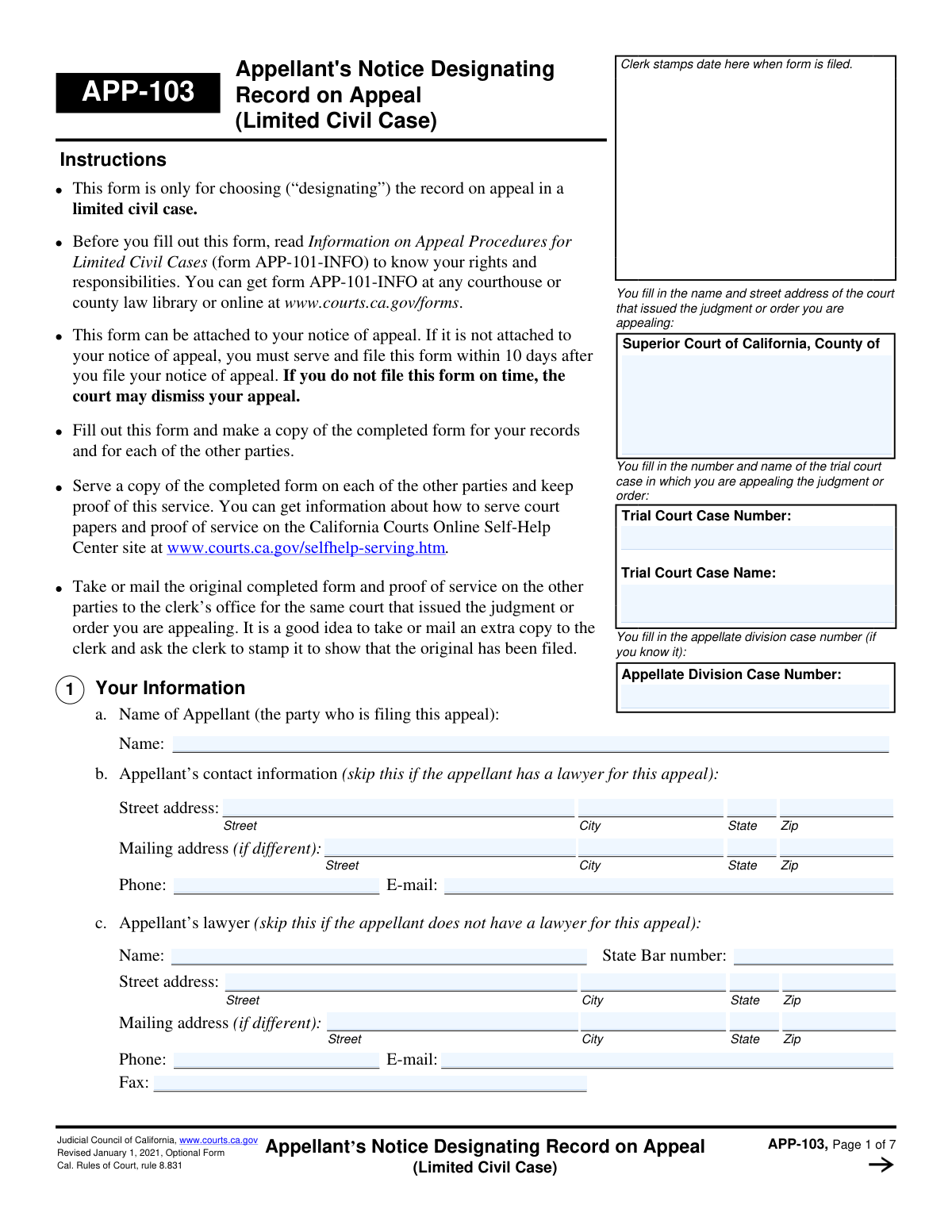
Yes! You can use AI to fill out Form APP-103, Appellant's Notice Designating Record on Appeal (Unlimited Civil Case)

Form APP-103, Appellant's Notice Designating Record on Appeal, is a legal document filed in California courts by the party appealing a case (the appellant). Its purpose is to formally list the specific documents and transcripts of oral proceedings from the original trial that should be compiled into the official record for the appellate court's review. This is a critical step, as the appellate court's decision will be based solely on the contents of this designated record. Today, this form can be filled out quickly and accurately using AI-powered services like Instafill.ai, which can also convert non-fillable PDF versions into interactive fillable forms.
Our AI automatically handles information lookup, data retrieval, formatting, and form filling.
It takes less than a minute to fill out APP-103 using our AI form filling.
Securely upload your data. Information is encrypted in transit and deleted immediately after the form is filled out.

Form specifications

Form name: Form APP-103, Appellant's Notice Designating Record on Appeal (Unlimited Civil Case)
Number of fields: 186
Number of pages: 7
Language: English
Categories: appellant forms, civil appeal forms
main-image

Instafill Demo: How to fill out PDF forms in seconds with AI

How to Fill Out APP-103 Online for Free in 2026

Are you looking to fill out a APP-103 form online quickly and accurately? Instafill.ai offers the #1 AI-powered PDF filling software of 2026, allowing you to complete your APP-103 form in just 37 seconds or less.
Follow these steps to fill out your APP-103 form online using Instafill.ai:
  1. 1 Navigate to Instafill.ai and upload or select Form APP-103.
  2. 2 Use the AI assistant to accurately fill in the court and case information, including the trial court name, case number, and appellate case number if known.
  3. 3 Provide your personal information as the appellant and your attorney's details, allowing the AI to pre-fill recurring data.
  4. 4 Make your election for the record of oral proceedings, choosing whether to include a reporter's transcript, an agreed statement, or another option, and specify the exact proceedings required.
  5. 5 Designate the record of documents by choosing a clerk's transcript or an appendix, and list any additional documents or exhibits to be included for the appeal.
  6. 6 Indicate your payment method for the preparation of the record or attach the necessary forms if you are applying for a fee waiver.
  7. 7 Carefully review all AI-populated fields for accuracy, then electronically sign and date the form to finalize it for filing with the court.

Our AI-powered system ensures each field is filled out correctly, reducing errors and saving you time.

Why Choose Instafill.ai for Your Fillable APP-103 Form?

Speed

Complete your APP-103 in as little as 37 seconds.

Up-to-Date

Always use the latest 2026 APP-103 form version.

Cost-effective

No need to hire expensive lawyers.

Accuracy

Our AI performs 10 compliance checks to ensure your form is error-free.

Security

Your personal information is protected with bank-level encryption.

Frequently Asked Questions About Form APP-103

This form is used by an appellant to designate, or choose, which documents and oral proceeding records from the trial court case should be prepared and included in the official record for the appeal.

The appellant is the person or party filing an appeal against a trial court's decision. The appellant or their lawyer is responsible for completing and filing this form.

A Reporter's Transcript is the written record of what was said in court, such as testimony and arguments. A Clerk's Transcript is a collection of the paper documents filed in the case, like motions, orders, and the judgment.

It's okay to leave the 'Appellate Division Case Number' field blank if you don't know it. You must, however, provide the original Trial Court Case Name and Number.

No, it is not required. You can choose to proceed with your appeal without a record of the oral proceedings by checking the appropriate box in the 'Record of Oral Proceedings Election' section.

The form allows you to request transcripts at no cost by indicating you are applying to the Transcript Reimbursement Fund or by attaching an application or order for a waiver of court fees.

For each hearing you want included, you must list its date, the court department, a description of the proceeding (e.g., 'motions' or 'testimony'), and the court reporter's name if known.

An Agreed Statement is a summary of the trial court proceedings that all parties in the case have agreed is accurate. It can be used as the record instead of a full reporter's transcript.

No, the form automatically includes certain required documents like the judgment and notice of appeal. You only need to list the specific additional documents or exhibits you want included in the record.

The form includes checkboxes to indicate that you are attaching a separate page. Be sure to label the attachment correctly as instructed on the form.

Yes, services like Instafill.ai use AI to help you accurately auto-fill form fields with your saved information, which can save time and reduce errors.

You can upload the form to the Instafill.ai platform, which will make the fields interactive. You can then type in your information or use the auto-fill feature to complete the form quickly.

You can use a service like Instafill.ai to convert the non-fillable PDF into an interactive form. This allows you to easily type your answers, save, and print the completed document.

Compliance APP-103
Validation Checks by Instafill.ai

1
Consistent Trial Court Case Information
This validation compares all instances of 'Trial Court Case Name' and 'Trial Court Case Number' across the form to ensure they are identical. Inconsistent case information can cause confusion and lead to the appeal being filed against the wrong case or being rejected entirely. This check guarantees that all sections of the form refer to the same legal matter.
2
Mutually Exclusive Oral Proceedings Election
Ensures that the user selects either 'Proceed WITHOUT a record' or 'Proceed WITH a record', but not both. These options are mutually exclusive and define the entire basis for the record on appeal. Selecting both creates a logical contradiction, making it impossible to process the request, and the form will be returned for correction.
3
Conditional Initials for Oral Proceedings Election
This check verifies that if 'Proceed WITH a record' or 'Proceed WITHOUT a record' is checked, the corresponding initials field is filled. The initials serve as a formal confirmation of the appellant's choice under penalty of perjury. Failure to provide initials for a selected option may invalidate that election, leading to processing delays or rejection of the form.
4
Date Field Format and Validity
Validates that all date fields, such as 'Appeal Notice Date' and 'First Proceeding Date', are entered in a recognized format (e.g., MM/DD/YYYY) and represent a valid, non-future date. This ensures data consistency and prevents errors in legal timelines. An invalid date could lead to misinterpretation of filing deadlines and rejection of the document.
5
Required Points on Appeal for Partial Testimony
This check ensures that if the user selects 'Do not include testimony', the 'Points to Raise on Appeal' text field must be filled. This is a legal requirement to inform the court and opposing party of the scope of the appeal when a full transcript is not provided. Failure to list the points on appeal will render the designation of the record defective and may lead to the appeal being dismissed.
6
Complete Mailing Address if Provided
Checks that if any part of the Appellant's or Lawyer's Mailing Address (Street, City, State, Zip) is filled out, then all parts of that mailing address are completed. A partial mailing address is unusable and will lead to failed mail delivery of important legal documents. This ensures that if an alternate address is provided, it is a complete and valid address.
7
Exclusive Payment Method Selection
Verifies that for a given payment section, such as 'Payment for Reporter's Transcript,' only one payment option is selected (e.g., 'Deposit Estimated Cost', 'File Written Waiver', or 'Apply to Transcript Reimbursement Fund'). Selecting multiple conflicting payment methods creates ambiguity about the appellant's intent. The form would be rejected, requiring clarification on how the transcript costs will be handled.
8
Cost Waiver Documentation Requirement
Validates that if a user requests a transcript or recording at no cost (e.g., checks 'Request Transcript at No Cost'), they must also check one of the supporting documentation boxes ('Attached Order Granting Waiver' or 'Attached Application for Waiver'). A request for a fee waiver is invalid without the required legal documentation. The form would be rejected pending submission of the necessary order or application.
9
Complete Proceeding Designation Block
Ensures that if a user enters a date for any proceeding (e.g., 'First Proceeding Date'), they must also fill in the corresponding 'Department', 'Description', and 'Reporter Name' for that proceeding. A partially filled block is incomplete and does not provide enough information for the court clerk to identify the correct transcript. The form will be returned to obtain the missing details for each designated proceeding.
10
Exclusive Yes/No Selection for Proceeding Preparation
Verifies that for each proceeding or exhibit listed, only one of the 'Yes' or 'No' checkboxes for a given question (e.g., 'Previously prepared?', 'Admitted Into Evidence') is selected. Checking both or neither for a single item creates an ambiguous and invalid state. This check prevents contradictory information and ensures the clerk has clear instructions.
11
State Bar Number Format
Validates that the 'State Bar Number' field, if filled, contains a numeric or alphanumeric value consistent with the format used by the relevant state bar association. An incorrect or invalid bar number can prevent the court from verifying the lawyer's credentials and authority to practice. This could halt the proceedings until the lawyer's information is corrected.
12
Signature Date and Printed Name Completion
This check ensures that the 'Signature Date' and 'Printed Name' fields at the end of the form are both completed. A signature and date are fundamental legal requirements to attest to the truthfulness of the form's contents and to establish the filing date. An unsigned or undated form is legally invalid and will be rejected by the court clerk.
13
Email Address Format Validation
Verifies that the 'Email Address' and 'Lawyer's Email Address' fields contain a string that follows the standard email format (e.g., [email protected]). This is crucial for ensuring that the court and other parties can reliably send electronic communications and notices. An invalid email will result in failed communication, potentially causing the appellant to miss critical updates or deadlines.
14
Chronological Proceeding Dates
This validation checks that all entered proceeding dates ('First Proceeding Date', 'Second Proceeding Date', etc.) are chronologically ordered. It also verifies that these dates occur on or before the 'Appeal Notice Date'. Out-of-order or future dates suggest a data entry error that could cause confusion when assembling the court record and timeline of events.

Common Mistakes in Completing APP-103

Contradictory Election for Oral Proceedings Record

Users often make conflicting selections by checking the box to proceed 'WITH' a record of oral proceedings and also the box to proceed 'WITHOUT' one. These options are mutually exclusive, and selecting both or neither will lead to the form's rejection and a notice of default from the court. To avoid this, carefully choose only one option and provide your initials in the corresponding box to confirm your choice.

Failing to Specify Proceedings for Reporter's Transcript

A frequent error is checking the box to use a 'Reporter's Transcript' but then failing to provide the specific details for each proceeding, such as the date, department, description, and reporter's name. Simply requesting the transcript is insufficient; the court needs this precise information to identify and prepare the correct records. This omission will halt the appeal process until an amended, complete notice is filed.

Transposing or Misstating Case Numbers

Appellants often confuse the 'Trial Court Case Number' with the 'Appellate Division Case Number' or make typographical errors when entering them. An incorrect case number can cause the filing to be misdirected, associated with the wrong case, or rejected outright, leading to significant delays and potentially jeopardizing appeal deadlines. Always double-check these numbers against official court documents before submitting the form.

Requesting a Cost Waiver Without Attaching Proof

Many filers check a box to request a transcript at no cost due to inability to pay but forget to attach the required supporting documentation, such as an 'Order Granting Waiver' or a completed 'Application for Waiver'. The selection on the form is not sufficient on its own and will be considered incomplete without the attached proof. This results in the court demanding payment and delaying the preparation of the record until the fee is paid or the proper waiver documents are filed.

Misunderstanding Clerk's vs. Reporter's Transcript

This form requires separate elections for the record of documents ('Clerk's Transcript') and the record of oral proceedings ('Reporter's Transcript'). A common misunderstanding is assuming one includes the other, leading filers to designate only one when both are needed for their appeal. This can result in a critically incomplete record, undermining the arguments on appeal, and may be difficult or impossible to correct later.

Providing Vague Descriptions for Designated Documents

When requesting additional documents for the 'Clerk's Transcript', users often provide ambiguous descriptions like 'summary judgment motion' instead of the required full document title and filing date. Court clerks handle thousands of documents, and without precise information, they cannot locate the correct item, which will then be omitted from the record. This can severely weaken an appeal by leaving out crucial evidence or filings.

Ignoring Required Conditional Fields

The form is heavily conditional, where checking one box requires filling out several subsequent fields. For example, a user might elect to use a 'Reporter's Transcript' but then skip the entire section for designating the specific proceedings and selecting a payment option. This renders the initial selection invalid and incomplete, forcing the court to issue a notice to correct the error, thereby delaying the case.

Unclear or Contradictory Payment Selections

The payment sections for transcripts are complex, with multiple checkboxes for how payment will be handled (e.g., 'I will pay,' followed by 'Deposit Estimated Cost' or 'File Written Waiver of Deposit'). Users often select the top-level 'I will pay' box but fail to specify the action they will take, or they select contradictory options. This ambiguity forces the clerk to seek clarification, which stalls the preparation of the appeal record until the payment intention is made clear.

Failing to List Points on Appeal When Required

If an appellant chooses to proceed with a partial reporter's transcript that does not include all testimony, they are required to list the 'Points to Raise on Appeal'. A critical mistake is checking the box for 'Do not include testimony' but then leaving the 'Points to Raise on Appeal' section blank. This is a procedural requirement that, if missed, can lead to the appeal being limited or even dismissed for failure to comply with court rules.

Inconsistent Case Information Across Form Sections

The form asks for the 'Trial Court Case Name' and 'Trial Court Case Number' in multiple locations. Filers sometimes enter this information inconsistently, with minor variations in spelling or numbering between sections. This creates confusion and can raise red flags during processing, potentially causing delays while the clerk verifies the correct information. Using an AI-powered tool like Instafill.ai can prevent this by auto-populating recurring information consistently across the entire document.
Saved over 80 hours a year

“I was never sure if my IRS forms like W-9 were filled correctly. Now, I can complete the forms accurately without any external help.”

Kevin Martin Green

Your data stays secure with advanced protection from Instafill and our subprocessors

Robust compliance program

Transparent business model

You’re not the product. You always know where your data is and what it is processed for.

ISO 27001, HIPAA, and GDPR

Our subprocesses adhere to multiple compliance standards, including but not limited to ISO 27001, HIPAA, and GDPR.

Security & privacy by design

We consider security and privacy from the initial design phase of any new service or functionality. It’s not an afterthought, it’s built-in, including support for two-factor authentication (2FA) to further protect your account.

Fill out APP-103 with Instafill.ai

Worried about filling PDFs wrong? Instafill securely fills form-app-103-appellants-notice-designating-record-on-appeal-unlimited-civil-case forms, ensuring each field is accurate.