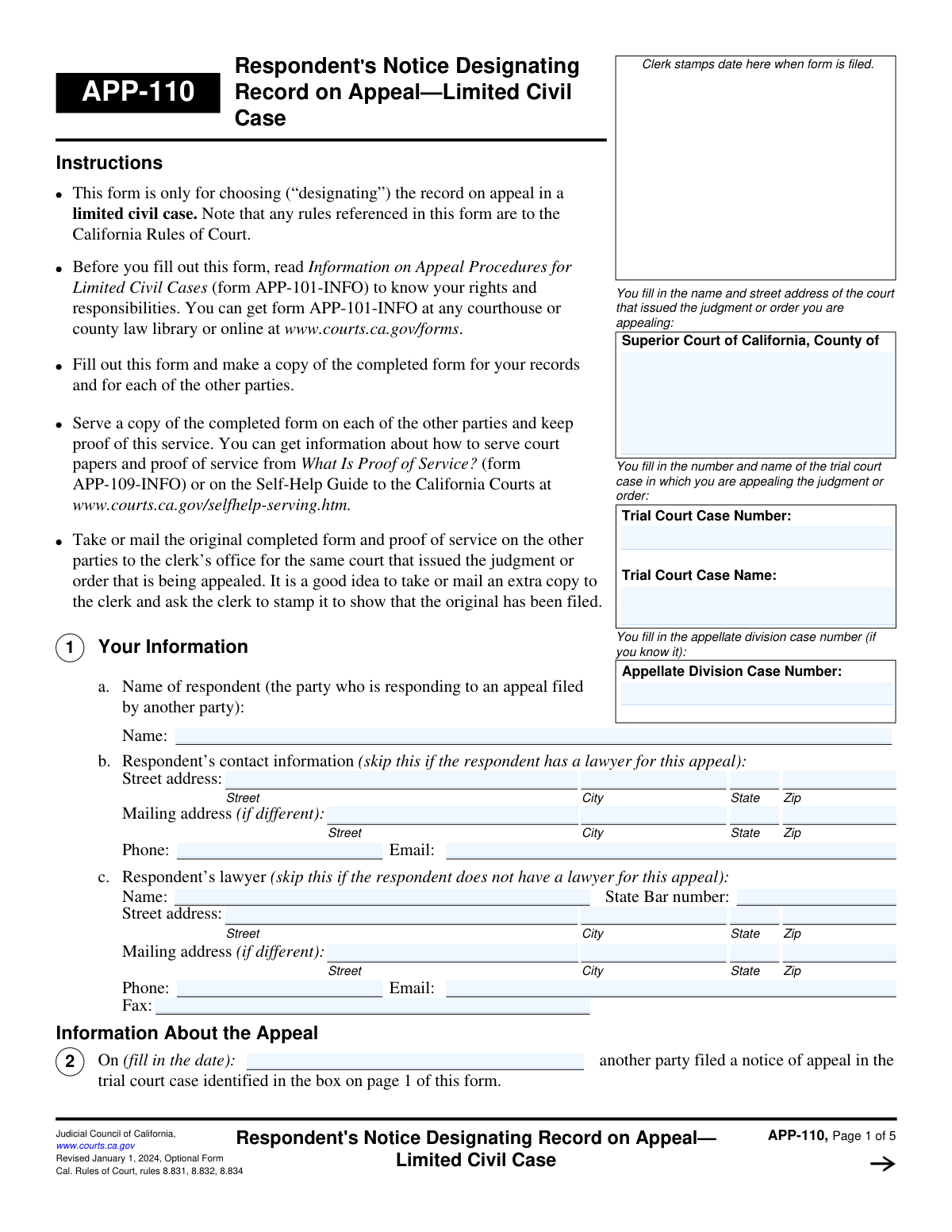
Yes! You can use AI to fill out Form APP-110, Respondent's Notice of Election/Designation of Record on Appeal (Limited Civil Case)

Form APP-110, Respondent's Notice of Election/Designation of Record on Appeal, is a legal document used in California limited civil case appeals. It is filed by the respondent to inform the court of their choices regarding the preparation of the official record for the appeal, such as electing to use a clerk's transcript or an appendix, and to designate any additional documents or oral proceedings they want included. This ensures the appellate court has all necessary materials to review the case. Today this form can be filled out quickly and accurately using AI-powered services like Instafill.ai, which can also convert non-fillable PDF versions into interactive fillable forms.
Our AI automatically handles information lookup, data retrieval, formatting, and form filling.
It takes less than a minute to fill out APP-110 using our AI form filling.
Securely upload your data. Information is encrypted in transit and deleted immediately after the form is filled out.

Form specifications

Form name: Form APP-110, Respondent's Notice of Election/Designation of Record on Appeal (Limited Civil Case)
Number of fields: 157
Number of pages: 5
Language: English
Categories: civil appeal forms
main-image

Instafill Demo: How to fill out PDF forms in seconds with AI

How to Fill Out APP-110 Online for Free in 2026

Are you looking to fill out a APP-110 form online quickly and accurately? Instafill.ai offers the #1 AI-powered PDF filling software of 2026, allowing you to complete your APP-110 form in just 37 seconds or less.
Follow these steps to fill out your APP-110 form online using Instafill.ai:
  1. 1 Navigate to Instafill.ai and upload or select Form APP-110.
  2. 2 Enter the court and case information, including the county, trial court case name, and case number.
  3. 3 Provide your information as the respondent, including your name, address, and contact details, along with your attorney's information if applicable.
  4. 4 Make your election for the record of documents (e.g., clerk's transcript or appendix) and designate any additional documents or exhibits you want included.
  5. 5 Choose the record for oral proceedings (e.g., reporter's transcript) and designate any additional proceedings, providing dates, departments, and reporter names.
  6. 6 Specify your payment method or request a fee waiver for the preparation of the requested transcripts or recordings.
  7. 7 Carefully review all entered information for accuracy, then date and sign the form before filing it with the court.

Our AI-powered system ensures each field is filled out correctly, reducing errors and saving you time.

Why Choose Instafill.ai for Your Fillable APP-110 Form?

Speed

Complete your APP-110 in as little as 37 seconds.

Up-to-Date

Always use the latest 2026 APP-110 form version.

Cost-effective

No need to hire expensive lawyers.

Accuracy

Our AI performs 10 compliance checks to ensure your form is error-free.

Security

Your personal information is protected with bank-level encryption.

Frequently Asked Questions About Form APP-110

This form is for a respondent in a California Superior Court appeal. You use it to designate additional documents, exhibits, and oral proceedings you want included in the official record for the appeal, beyond what the appellant has already requested.

The 'Trial Court Case Number' is the number from the original case that is being appealed. The 'Appellate Division Case Number' is the new number assigned to the appeal itself; you should fill it in if you know it, but it's okay to leave it blank if you don't.

A clerk's transcript contains copies of the written documents filed in the trial court, like motions and judgments. A reporter's transcript is a written record of the spoken proceedings, such as witness testimony and oral arguments, prepared by a court reporter.

Check the box for 'Request Clerk Include Additional Documents' and then list the title and filing date of each document you want to add. If you run out of space, check the box indicating you will attach a separate page with the additional items.

You can request the transcript at no cost by checking the appropriate box for a fee waiver. You will need to either attach an existing court order that waives your fees or submit a new 'Application for waiver of court fees and costs' with this form.

Check the box to 'Designate additional proceedings' and provide the date, department, description, and court reporter's name for each proceeding you want to add. If you don't know the reporter's name, you may need to contact the court clerk for that information.

No, the lawyer information section is only for respondents who are represented by an attorney. If you are representing yourself (pro se), you can leave the lawyer's name, bar number, and contact details blank.

Using an appendix means the parties, not the court clerk, are responsible for compiling and submitting the required documents from the trial court record. This is an alternative to having the clerk prepare the official transcript of documents.

You only need to complete the 'Mailing Address' section if it is different from the 'Street Address' you already provided. If your physical street address is also where you receive mail, you can leave the mailing address fields blank.

Under the 'Format of Reporter's Transcript' section, you can select whether you want your copy in electronic format, paper format, or both. Choose the option that best suits your needs for reviewing the appeal record.

Yes, services like Instafill.ai use AI to accurately auto-fill form fields from your saved information, which can save you significant time and reduce errors. This is especially helpful for repetitive information like case numbers and personal details.

You can use a service like Instafill.ai to easily complete this form on your computer or mobile device. Simply upload the form, and the platform will make it interactive so you can type directly into the fields and save your progress.

If you have a flat, non-fillable PDF, you can use a tool like Instafill.ai to convert it into an interactive, fillable form. This allows you to type your answers directly onto the form instead of having to print it and fill it out by hand.

Compliance APP-110
Validation Checks by Instafill.ai

1
Ensures Trial Court Case Number Consistency
This validation checks that all fields for 'Trial Court Case Number' entered throughout the form contain the exact same value. This is critical for ensuring data integrity and that all sections of the form correctly reference the same legal case. If the numbers do not match, the submission will be flagged for correction to prevent processing errors.
2
Validates State Bar Number Format
This check verifies that the 'State Bar Number' field contains only numeric characters. A valid state bar number is essential for correctly identifying the lawyer of record. An invalid format could lead to misidentification or an inability to verify the lawyer's credentials, so the user will be prompted to enter a valid number if the validation fails.
3
Mutually Exclusive Transcript Election
This validation ensures that the user selects either 'Agree to Clerk's Transcript' or 'Elect to use an Appendix', but not both. These are mutually exclusive options for how the record of documents is prepared for the appeal. If both or neither are selected (when required), the form will show an error and require the user to make a single, valid choice.
4
Conditional Requirement for Waiver Documentation
This check enforces a logical rule: if the user checks 'Request No Cost Transcript', they must also check either 'Order granting waiver of cost' or 'Application for waiver of court fees and costs'. This ensures that a request for a free transcript is accompanied by the necessary supporting documentation status. Failure to select a supporting document option will result in an error message prompting the user to specify the waiver status.
5
Mutually Exclusive Exhibit Admission Status
For each exhibit listed, this validation ensures that only one of the 'Admitted Into Evidence: Yes' or 'Admitted Into Evidence: No' checkboxes is selected. An exhibit cannot be both admitted and not admitted simultaneously. This check prevents contradictory data entry and ensures the record accurately reflects the status of each exhibit, requiring the user to correct any ambiguities.
6
Conditional Requirement for Additional Document Details
This validation ensures that if the 'Request Clerk Include Additional Documents' box is checked, the user must provide details for at least the first document (i.e., 'First Document Title and Description' and 'First Document Date of Filing'). Checking the box indicates an intent to add documents, so the form must not be submitted with this box checked but no documents listed. If this rule is violated, the user will be prompted to either provide document details or uncheck the box.
7
Validates Chronological Order of Dates
This check verifies that the 'Signature Date' is on or after the 'Date of Appeal Notice' and 'Appellant's Notice Filing Date'. A form cannot be signed before the events it references have occurred. This validation prevents logical impossibilities and ensures the timeline of events is accurate, flagging any chronological errors for user correction.
8
Standard Email Address Format
This validation ensures that the 'Email Address' and 'Lawyer's Email Address' fields contain a value that conforms to the standard email format (e.g., '[email protected]'). This is crucial for ensuring that legal notices and communications sent via email are deliverable. If the format is invalid, the user will be required to correct the entry before submission.
9
Valid US Zip Code Format
This check verifies that all zip code fields ('Zip Code', 'Mailing Zip Code', 'Lawyer Zip Code', etc.) contain a valid 5-digit or 9-digit (ZIP+4) numeric format. Correctly formatted zip codes are essential for the timely and accurate delivery of physical mail. The system will reject entries that do not match this format and prompt the user for a correction.
10
Completeness of Core Case Information
This validation ensures that the primary case identification fields, 'Court County Name', 'Trial Court Case Number', and 'Trial Court Case Name', are not left blank. This information is fundamental to identifying the case being appealed and is required for the form to be processed by the court. If any of these fields are empty, the submission will be blocked until they are completed.
11
Mutually Exclusive Reporter's Transcript Payment Method
This check ensures that if a user indicates 'I will pay for the reporter's transcript', they must select only one of the two payment methods: 'Deposit with Trial Court' or 'Pay Reporter Directly'. These options are mutually exclusive, and selecting both or neither would create ambiguity in the payment process. The form will prompt the user to make a single, clear choice if this rule is violated.
12
Conditional Requirement for Additional Proceedings Details
This validation confirms that if the 'Designation of additional proceedings to be included in the reporter's transcript' box is checked, the user must fill out the details for at least the 'First Additional Proceeding' (Date, Department, Description, and Reporter's Name). This prevents a user from indicating they want to add proceedings without specifying what they are. An error will be shown if the box is checked but no proceeding details are provided.
13
Valid State Abbreviation
This check ensures that all 'State' fields (for respondent and lawyer addresses) contain a valid two-letter US state or territory abbreviation. Using standardized abbreviations is crucial for address validation and mail delivery systems. The form should provide a dropdown or reject free-text entries that do not match a predefined list of valid abbreviations.

Common Mistakes in Completing APP-110

Inconsistent or Incorrect Case Numbers

Users often mistype the Trial Court Case Number or enter it inconsistently across the multiple sections where it is required. This happens due to manual data entry errors or confusion between different case numbers. An incorrect case number can lead to the form being rejected or misfiled, causing significant delays in the appeal process. To avoid this, carefully cross-reference the number with official court documents for each entry. AI-powered tools like Instafill.ai can autofill this information consistently across the entire form, preventing such errors.

Conflicting Record Election Choices

This form presents several mutually exclusive options for the record on appeal, such as agreeing to a 'Clerk's Transcript' or electing to use an 'Appendix'. A common mistake is selecting conflicting options, which demonstrates a misunderstanding of court rules and halts the preparation of the record. This requires the court clerk to seek clarification, delaying the appeal. Carefully read Rule 8.832 and 8.845 to understand the choices and select only one appropriate path for the record of documents.

Ignoring Conditional Field Logic

Many fields are conditional, meant to be filled only if a specific preceding box is checked (e.g., listing additional documents is only valid if 'Agree to Clerk's Transcript' is selected). People often ignore these instructions and either fill out irrelevant sections or skip required ones. This leads to an incomplete or confusing filing that may be returned for correction. Pay close attention to instructions like 'Fill only if...' to ensure you complete the form correctly. Instafill.ai can help by automatically showing or hiding relevant sections based on your answers.

Vague Descriptions for Additional Items

When requesting the inclusion of additional documents, exhibits, or proceedings, users provide vague descriptions like 'motion' or 'hearing transcript'. This is insufficient for the clerk to identify the correct item from potentially hundreds in the case file. The consequence is an incomplete appellate record, which can severely weaken your case. Always provide the full title of the document, the exact date of filing or the proceeding, and any other specific identifiers available.

Incomplete Fee Waiver Justification

A frequent error is checking the box to 'Request No Cost Transcript' without also checking the corresponding box to indicate whether an 'Order granting waiver' or an 'Application for waiver' is attached. Simply requesting the waiver is not enough; you must provide the supporting documentation. Failing to do so will result in the court billing you for the transcript, and non-payment can jeopardize your appeal. Ensure you select the correct supporting document option and attach the required paperwork.

Omitting the Lawyer's State Bar Number

While the lawyer's name is provided, the 'State Bar Number' is often left blank. This unique number is the primary way the court and other parties verify an attorney's identity and standing. Omitting it can cause processing delays while the clerk's office attempts to look it up. To prevent this, always include the attorney's State Bar Number, which can be found on their official correspondence or the state bar website.

Incorrectly Designating Exhibits as Admitted

When listing exhibits to be included in the record, filers must check 'Yes' or 'No' to indicate if the exhibit was 'Admitted Into Evidence'. People sometimes guess, leave it blank, or get it wrong. The distinction is critical for the appellate court, as the standard of review can differ for admitted versus refused evidence. Incorrectly designating an exhibit can prejudice your appeal. Always verify the status of each exhibit from the trial court record or reporter's transcript.

Failing to Specify Payment Method for Transcripts

When requesting a copy of a reporter's transcript, users may check 'I will pay' but then fail to specify the payment method ('Deposit with Trial Court' or 'Pay Reporter Directly'). This ambiguity stops the process, as the clerk or reporter does not know how to proceed with billing. This can lead to significant delays in transcript preparation. You must make a clear choice and follow through with the required action, such as filing a waiver of deposit if paying the reporter directly.

Redundant Mailing Address Information

The form asks for a mailing address only if it is different from the street address for both the respondent and their lawyer. A common mistake is to re-enter the same address in both sections. While seemingly harmless, this clutters the form and can occasionally create confusion during data processing. To avoid this, only fill out the mailing address fields if the party genuinely receives mail at a separate location, such as a P.O. Box.

Incomplete Details for Additional Proceedings

When designating additional oral proceedings for the reporter's transcript, users often provide only the date or a partial description. The form requires the date, department, a specific description, and the court reporter's name for each requested proceeding. Missing any of these details makes it difficult or impossible for the clerk to locate the correct session, resulting in an incomplete record. If the form is a non-fillable PDF, a tool like Instafill.ai can convert it into a fillable version, making it easier to enter all the required details without missing a field.
Saved over 80 hours a year

“I was never sure if my IRS forms like W-9 were filled correctly. Now, I can complete the forms accurately without any external help.”

Kevin Martin Green

Your data stays secure with advanced protection from Instafill and our subprocessors

Robust compliance program

Transparent business model

You’re not the product. You always know where your data is and what it is processed for.

ISO 27001, HIPAA, and GDPR

Our subprocesses adhere to multiple compliance standards, including but not limited to ISO 27001, HIPAA, and GDPR.

Security & privacy by design

We consider security and privacy from the initial design phase of any new service or functionality. It’s not an afterthought, it’s built-in, including support for two-factor authentication (2FA) to further protect your account.

Fill out APP-110 with Instafill.ai

Worried about filling PDFs wrong? Instafill securely fills form-app-110-respondents-notice-of-electiondesignation-of-record-on-appeal-limited-civil-case forms, ensuring each field is accurate.