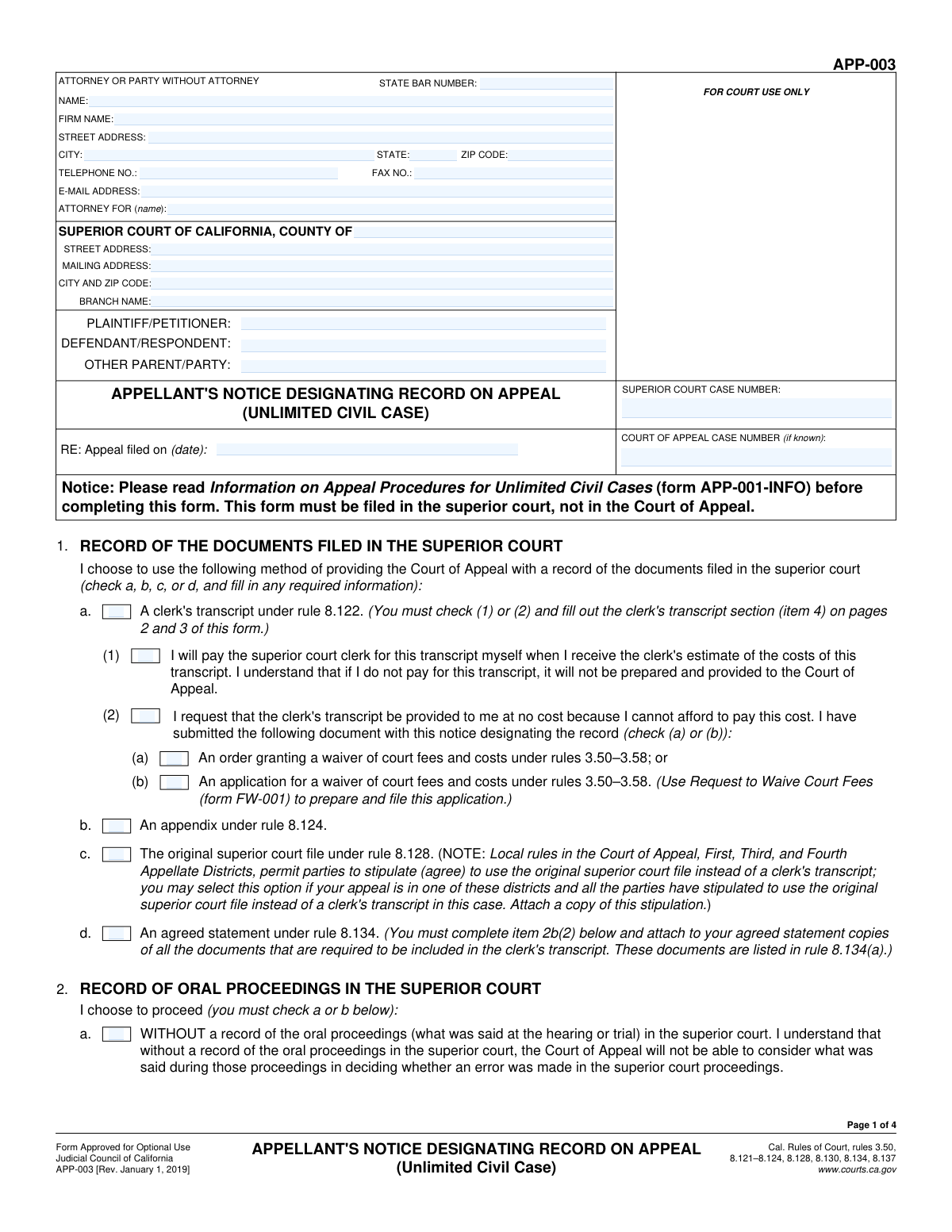
Yes! You can use AI to fill out Form APP-003, Notice Designating Record on Appeal (Unlimited Civil Case)

Form APP-003, Notice Designating Record on Appeal, is a mandatory California Judicial Council form used in unlimited civil cases to inform the court which documents and oral proceedings should be compiled for the appellate court's review. It is a critical step in the appeals process, as the appellate court can only consider evidence and proceedings that are part of this official record. Today, this form can be filled out quickly and accurately using AI-powered services like Instafill.ai, which can also convert non-fillable PDF versions into interactive fillable forms.
Our AI automatically handles information lookup, data retrieval, formatting, and form filling.
It takes less than a minute to fill out APP-003 using our AI form filling.
Securely upload your data. Information is encrypted in transit and deleted immediately after the form is filled out.

Form specifications

Form name: Form APP-003, Notice Designating Record on Appeal (Unlimited Civil Case)
Number of fields: 166
Number of pages: 4
Language: English
Categories: civil appeal forms
main-image

Instafill Demo: How to fill out PDF forms in seconds with AI

How to Fill Out APP-003 Online for Free in 2026

Are you looking to fill out a APP-003 form online quickly and accurately? Instafill.ai offers the #1 AI-powered PDF filling software of 2026, allowing you to complete your APP-003 form in just 37 seconds or less.
Follow these steps to fill out your APP-003 form online using Instafill.ai:
  1. 1 Navigate to Instafill.ai and upload or select Form APP-003, Notice Designating Record on Appeal.
  2. 2 Provide your personal and case information, including attorney details, court information, case numbers, and party names.
  3. 3 Use the AI assistant to select the method for preparing the record of documents (e.g., Clerk's Transcript, Appendix) and the record of oral proceedings (e.g., Reporter's Transcript, Settled Statement).
  4. 4 Follow the prompts to specify exactly which documents, exhibits, and oral proceedings (by date and description) you want included in the appeal record.
  5. 5 Indicate your payment method for the transcripts or attach necessary fee waiver documentation if applicable.
  6. 6 Carefully review all the information populated by the AI for accuracy, then electronically sign and date the form.
  7. 7 Download, print, and file the completed Form APP-003 with the superior court clerk according to court rules.

Our AI-powered system ensures each field is filled out correctly, reducing errors and saving you time.

Why Choose Instafill.ai for Your Fillable APP-003 Form?

Speed

Complete your APP-003 in as little as 37 seconds.

Up-to-Date

Always use the latest 2026 APP-003 form version.

Cost-effective

No need to hire expensive lawyers.

Accuracy

Our AI performs 10 compliance checks to ensure your form is error-free.

Security

Your personal information is protected with bank-level encryption.

Frequently Asked Questions About Form APP-003

This form, the Appellant's Notice Designating Record on Appeal, is used to specify which documents and oral testimony from the superior court case should be included in the official record for the Court of Appeal to review.

The appellant (the party appealing the court's decision) or their attorney must complete and file this form after filing a Notice of Appeal. It is a required step to prepare the case for the appellate court.

A 'Clerk's Transcript' is a record of the case documents prepared by the superior court clerk, for which the court charges a fee. An 'Appendix' is a record of documents prepared by the parties themselves, which can be faster and more cost-effective but requires careful assembly.

You can choose a 'Reporter's Transcript' (a word-for-word transcript from the court reporter), a 'Settled Statement' (a summary approved by the judge), or an 'Agreed Statement' (a summary agreed upon by all parties). You may also choose to proceed without a record of oral proceedings, but the appellate court cannot consider what was said in court.

If you cannot afford the fees, you can request transcripts at no cost by checking the appropriate box on the form. You must have an existing court order waiving your fees or have a pending application for a fee waiver.

The Court of Appeal assigns a case number after the Notice of Appeal is filed and processed. If you do not know it when you are filling out this form, you can leave that field blank.

If the court reporter's name is unknown, you may leave that field blank. However, you must provide the correct date, department, and a clear description of the proceeding so the clerk can identify the correct record.

The form provides a checkbox to indicate that you are attaching additional pages. If you check this box, list the extra items on a separate sheet of paper labeled with the correct attachment number (e.g., 'Attachment 4b').

If you only designate a portion of the oral proceedings, you must state the issues you plan to raise on appeal. This informs the other parties what you will argue, so they can decide if they need to request other parts of the transcript to respond effectively.

You must file the completed and signed form with the clerk of the superior court where the original case was heard, not with the Court of Appeal. You must also serve a copy on all other parties in the case.

Yes, services like Instafill.ai use AI to auto-fill form fields accurately and save time. This is especially helpful for entering repetitive information like your name, case number, and attorney details across multiple legal documents.

You can use a service like Instafill.ai to complete this form online. Simply upload the PDF, and the platform will make it interactive, allowing you to type your information directly into the fields and save your progress.

If you have a non-fillable or 'flat' PDF, you can use a tool like Instafill.ai to instantly convert it into an interactive, fillable form. This allows you to easily type your answers instead of printing the form and filling it out by hand.

The form allows you to choose electronic format, paper format, or both. Electronic formats are often easier to search and use when writing your appeal brief, but you should choose the format that works best for you.

Compliance APP-003
Validation Checks by Instafill.ai

1
Mandatory Superior Court Case Number
This check ensures that the 'Superior Court Case Number' field is not empty. This number is the primary identifier for the case being appealed and is essential for the court to locate and process the filing correctly. If this field is left blank, the submission will be rejected as it cannot be associated with a specific case.
2
State Abbreviation Format
Validates that the 'State' field in the attorney/party address contains a two-letter abbreviation. This ensures data consistency and compliance with standardized postal formats, which is crucial for mailing official correspondence. An invalid entry will trigger an error message prompting the user to enter a valid two-letter state code.
3
Date Chronology for Appeal
This validation checks that the 'Appeal Filing Date' is on or after the 'Judgment or Order Appealed From Date'. It is logically impossible to appeal a judgment before it has been issued. This check prevents simple data entry errors that could invalidate the filing or cause significant processing delays.
4
Exclusive Selection of Record Method
Ensures that the user selects exactly one method for providing the record of documents from the available options (e.g., Clerk's Transcript, Appendix, Agreed Statement). Selecting multiple methods or none at all would create ambiguity and procedural errors. The system should enforce a single choice to ensure the filing is clear and actionable.
5
Conditional Clerk's Transcript Payment Choice
This check is triggered if the user selects 'Clerk's Transcript (Rule 8.122)'. It requires that the user must then select one of the two payment options: 'I will pay for transcript' or 'Request transcript at no cost'. This ensures that the intention regarding payment is clearly stated, which is necessary for the court clerk to proceed with preparing the transcript.
6
Conditional Fee Waiver Justification
If a user selects 'Request transcript at no cost', this validation ensures they also select a justification, either 'Order Granting Fee Waiver' or 'Application for Fee Waiver'. This is a nested dependency that prevents incomplete requests for no-cost transcripts. Failure to provide the justification would result in the request being denied or delayed until the proper documentation is provided.
7
Mutually Exclusive Oral Proceedings Choice
Validates that the user selects either 'Without Record of Oral Proceedings' or 'Record of Oral Proceedings Selection', but not both. These options are mutually exclusive and define a major component of the appeal. This check prevents contradictory instructions and ensures the user makes a clear, unambiguous choice about the oral record.
8
Conditional Oral Proceedings Type Selection
If the user checks 'Record of Oral Proceedings Selection', this validation requires that one of the specific types ('Reporter's Transcript', 'Agreed Statement', or 'Settled Statement') must be chosen. This ensures that when an oral record is requested, the exact type of record is specified as required by court rules. An incomplete selection would halt the processing of the record request.
9
Mutually Exclusive Testimony Scope
Ensures that if a record of oral proceedings is designated, the user must select either 'Include All Testimony' or 'Do Not Include All Testimony', but not both. This choice has significant legal implications for the scope of the appeal. The validation prevents ambiguity and ensures the filer makes a conscious, singular choice.
10
Mandatory Points on Appeal Statement
This validation enforces a critical court rule: if the user selects 'Do Not Include All Testimony', they must provide a 'Points on Appeal Statement'. This statement is legally required to inform the court and opposing parties of the specific issues being raised. The form will be considered incomplete and invalid if this statement is missing when required.
11
Conditional Administrative Record Details
If the 'Request Transmission of Administrative Proceeding Record' box is checked, this validation ensures that the 'Title' and 'Date' for at least the first administrative proceeding are filled out. This prevents a user from requesting a record transmission without specifying which record to transmit. The submission would be invalid without this essential identifying information.
12
Reporter's Transcript Format Selection
If the user indicates they will use a 'Reporter's Transcript', this check ensures they select at least one format option ('Electronic Format', 'Paper Format', or 'Electronic and Paper Format'). This information is required for the court reporter to prepare and deliver the transcript correctly. Failure to select a format would leave the order incomplete.
13
State Bar Number Format
Validates that the 'State Bar Number' field, if filled, contains only numeric digits. This ensures data integrity for attorney records and allows for proper identification and verification within the court's systems. An entry with letters or special characters would be rejected to maintain clean data.
14
Signature and Date Requirement
This check verifies that both the 'Signature Date' and 'Typed or Printed Name' fields are completed before final submission. A signature and date are fundamental requirements for a legal document to be considered valid and executed. The form cannot be officially filed without this information, as it confirms the identity of the filer and the date of signing.

Common Mistakes in Completing APP-003

Incomplete Conditional Selections

This form contains many conditional fields that only become required after a specific checkbox is selected. For example, a user might check 'Clerk's Transcript (Rule 8.122)' but then fail to select a mandatory sub-option for payment ('I will pay for transcript' or 'Request transcript at no cost'). This oversight leads to an incomplete filing, causing the court clerk to reject the form and return it for correction, which delays the appeal process. To avoid this, carefully review each section and ensure that for every box you check, you also complete all subsequent required fields and selections that depend on it.

Failing to Provide the 'Points on Appeal' Statement

When a party elects not to include all testimony by checking 'Do Not Include All Testimony', they are legally required to provide a 'Points on Appeal Statement' under rule 8.130(a)(2). Many filers miss this critical step, which can severely limit the issues they are allowed to argue in their appeal. The court may refuse to consider any point not included in this statement. To prevent this, always complete item 7 if you are designating a partial reporter's transcript, clearly listing every point you intend to raise.

Making Contradictory Record Designations

The form requires the filer to choose a single method for providing the record of documents (e.g., 'Clerk's Transcript', 'Appendix', 'Agreed Statement'). A common error is checking multiple, mutually exclusive options, which creates ambiguity and invalidates the designation. This happens when filers are unsure which method to use and check several boxes. This will result in the form being rejected, requiring clarification and refiling. Before filling, you must decide on one method and select only the corresponding box.

Forgetting to Attach Required Documents

Several selections on this form require an attachment, such as a stipulation to use the original court file (Rule 8.128) or a separate page listing additional documents ('Attachment 4b'). Filers often check the box indicating an attachment will be provided but then forget to physically or digitally include the document with their submission. This leads to an incomplete filing and can halt the preparation of the appeal record. Always create a checklist of all required attachments as you fill out the form and verify they are all included before submission.

Using Vague Descriptions for Documents or Proceedings

When requesting specific documents for a clerk's transcript or designating oral proceedings, filers often provide generic descriptions like 'Motion' or 'Hearing'. This is insufficient for the court clerk or reporter to identify the correct item from potentially hundreds in the case file. This ambiguity causes significant delays as the clerk must seek clarification. To avoid this, provide the full, specific title of the document and its filing date, or a detailed description of the proceeding (e.g., 'Hearing on Plaintiff's Motion for Summary Judgment').

Incorrect or Incomplete Case Number Entry

Filers sometimes enter the Superior Court case number in the field for the Court of Appeal case number, or vice-versa, or they omit prefixes and suffixes. The Court of Appeal number is often not known when this form is filed and should be left blank if that is the case. Incorrect case numbers can lead to the document being misfiled or rejected, delaying the entire appeal. Always double-check that the correct number is in the correct field and matches the court's official records exactly.

Inaccurate Filing Dates for Designated Documents

When requesting documents for the clerk's transcript, the form requires the exact date of filing. People often guess or estimate these dates from memory, leading to errors. An incorrect date makes it difficult or impossible for the clerk to locate the correct document, especially in a complex case with many filings. To prevent this, you must refer to the official court docket or register of actions to find the precise filing date for every document you list.

Confusion by Parties Without an Attorney (Pro Se)

Individuals representing themselves often get confused by the 'Attorney or Party Without Attorney Information' section. They may incorrectly fill in the 'Firm Name' field or the 'Attorney For Name' field, which is meant to state the party the attorney represents. This can cause confusion in court records about their representation status. If you are representing yourself, you should enter your own name, address, and contact information, leave 'Firm Name' blank, and write 'In Pro Per' or your own name in the 'Attorney For Name' field.

Missing Signature or Date

Forgetting to date and sign the form is a simple but surprisingly common mistake. An unsigned or undated legal filing is generally considered invalid by the court and will be rejected outright. This often happens when filers are in a rush to print and submit the document. To avoid this critical error, make it a final habit to always review the signature block and ensure you have provided a valid signature and the current date before filing. AI-powered tools like Instafill.ai can help by highlighting required signature fields.

Failing to Specify Court Branch Information

Many superior courts have multiple branches or locations within a single county. Filers often list the county but neglect to enter the specific 'Court Branch Name' and its corresponding street address. This can lead to the notice being sent to the wrong courthouse, causing delays in processing the appeal record. Always verify the exact branch where the original proceedings took place and enter its full name and address to ensure the request is routed correctly. If the form is a non-fillable PDF, a tool like Instafill.ai can convert it to a fillable version to make entering this information easier.
Saved over 80 hours a year

“I was never sure if my IRS forms like W-9 were filled correctly. Now, I can complete the forms accurately without any external help.”

Kevin Martin Green

Your data stays secure with advanced protection from Instafill and our subprocessors

Robust compliance program

Transparent business model

You’re not the product. You always know where your data is and what it is processed for.

ISO 27001, HIPAA, and GDPR

Our subprocesses adhere to multiple compliance standards, including but not limited to ISO 27001, HIPAA, and GDPR.

Security & privacy by design

We consider security and privacy from the initial design phase of any new service or functionality. It’s not an afterthought, it’s built-in, including support for two-factor authentication (2FA) to further protect your account.

Fill out APP-003 with Instafill.ai

Worried about filling PDFs wrong? Instafill securely fills form-app-003-notice-designating-record-on-appeal-unlimited-civil-case forms, ensuring each field is accurate.