
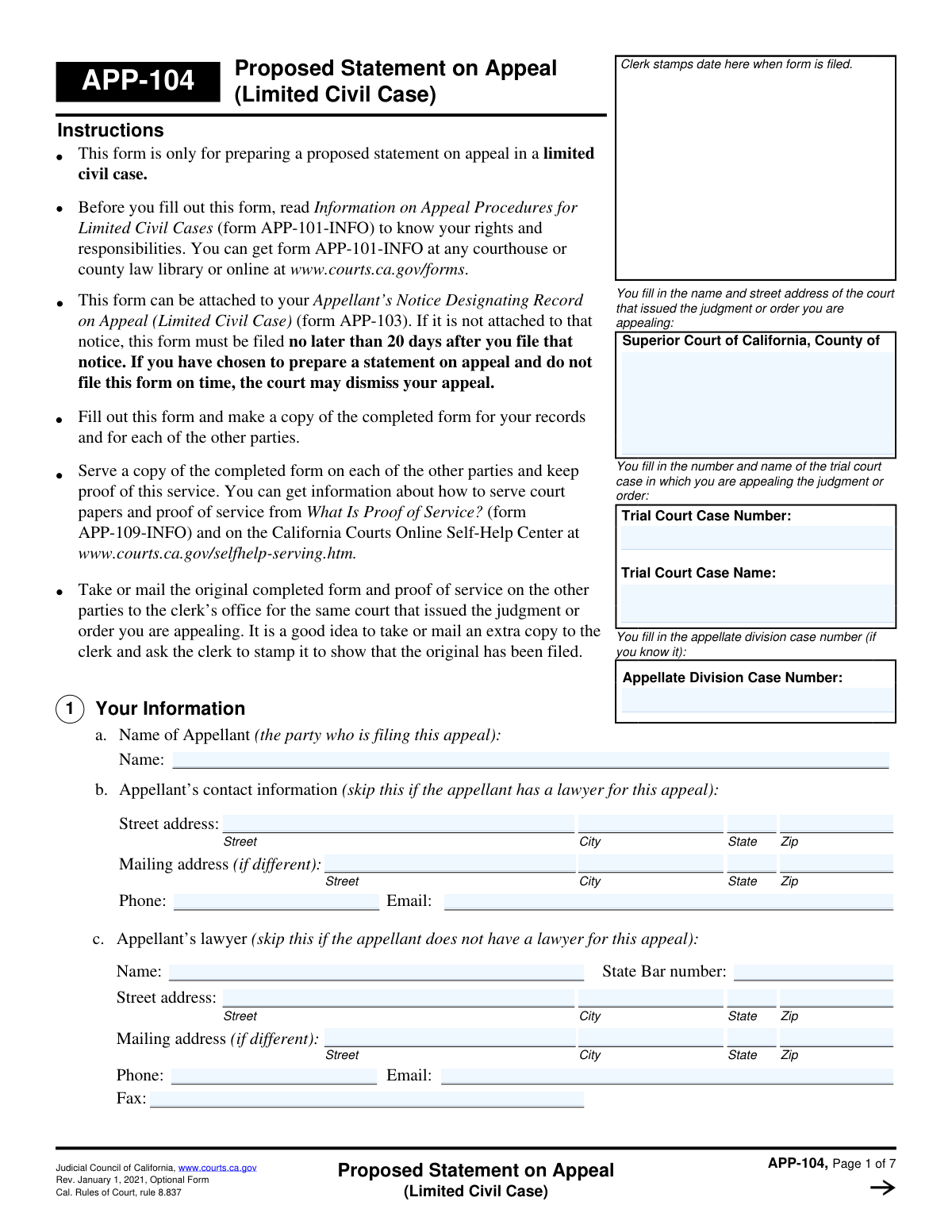
Yes! You can use AI to fill out Form APP-104, Appellant's Proposed Statement on Appeal (Limited Civil Case)
Don't type 122 fields by hand. Tell our AI about yourself, or upload a document you already have, and it fills every field in seconds. You check it, then download, print or sign.
The AI does the filling. You just check it.
No typing into boxes, nothing to install.
What this form asks for
The AI fills all of it, from your answers or your documents.
The AI checks your answers before you download
14 checks built for this form, so a wrong date or a missing answer is caught before anyone else sees it.
This check verifies that the value entered for 'Trial Court Case Number' is identical across all sections of the form where it appears (e.g., header, body, footer). Maintaining consistency is critical for ensuring the document is correctly filed and associated with the proper case record. If the numbers do not match, the user will be prompted to correct the discrepancy to prevent filing errors.
This validation ensures that the 'State Bar Number' field for the lawyer is not empty if a lawyer's name is provided and that it conforms to the expected format (e.g., a specific number of digits or alphanumeric pattern). This number is a unique identifier for the attorney, crucial for verifying their standing and eligibility to practice. A failure would trigger an error message requesting a valid state bar number.
This check enforces a logical rule: if the 'Lack of Substantial Evidence' checkbox is selected as a reason for appeal, the corresponding 'Explanation for Lack of Substantial Evidence' text field cannot be empty. This ensures that any claim made is substantiated with a required explanation, making the filing complete and actionable. If the box is checked but the explanation is missing, the form submission will be blocked until the field is filled.
This validation confirms that if the user checks 'Yes' for the 'Motion Inquiry' question, they must provide details in the 'First Motion Description' field. This prevents users from indicating that relevant motions exist without describing them, which would leave a critical section incomplete. A validation failure would require the user to either describe the motion or change their answer to 'No'.
This check ensures that if the user selects 'Yes, Trial' under 'Trial Status', they must also select one of the two mutually exclusive options: 'Jury trial' or 'Trial by judge only'. This is important for providing a complete picture of the trial court proceedings. If 'Yes, Trial' is checked but a trial type is not specified, the user will be prompted to make a selection before proceeding.
This validation ensures that for the 'Client's Role in Trial Court' section, only one of 'Plaintiff' or 'Defendant' can be selected. A party cannot be both the plaintiff and the defendant in the same action. This check prevents logically impossible and contradictory data entry, and if both are selected, an error will require the user to choose only one.
And 8 more checks
- Chronological Validation of Appeal Filing Dates
- Format Validation for Appellant's Contact Information
- Zip Code Format and State Consistency
- Conditional Requirement for Damage Amount
- Conditional Requirement for Motion Hearing Summary
- Conditional Requirement for Client Testimony Summary
- Completeness of Lawyer Information
- Completeness of Mailing Address Block
Let AI fill out your APP-104
No typing. Every field filled in seconds, checked, ready to sign.
How to Fill Out APP-104 Online for Free in 2026
What the AI walks you through.
- Navigate to Instafill.ai and upload or select Form APP-104.
- Provide the case information, including the court name, trial court case number, and case name.
- Enter the personal and contact details for the appellant and their legal representative, if applicable.
- Clearly state the reasons for the appeal, detailing any claims of insufficient evidence or errors in law or procedure.
- Summarize relevant motions, trial proceedings, witness testimonies, and evidence presented in the trial court.
- Describe the trial court's final judgment or order that is being appealed.
- Review all entered information for accuracy, then use the AI assistant to finalize, sign, and date the form before saving or printing for filing.
Common Mistakes in Completing APP-104
The ones the AI is built to catch.
Confusing Trial Court and Appellate Case Numbers
Incomplete or Vague Explanations for Appeal
Incorrectly Summarizing Testimony or Hearings
Failing to Attach and Properly Label Required Documents
Ignoring Conditional Logic and Instructions
Inconsistent Information in Repeated Fields
Confusing Physical and Mailing Addresses
Misidentifying 'Plaintiff' and 'Defendant' Roles
Entering Incorrect Filing Dates
Omitting the Lawyer's State Bar Number
Providing Vague Descriptions of Court Orders
Manual Data Entry Errors on Non-Fillable Forms
Frequently Asked Questions About APP-104
Is it really free for 7 days?
Can I fill other forms too?
How do I cancel?
How does the AI fill out APP-104?
What happens to my information?
How complex is APP-104 to fill out?
What is the purpose of this form?
Who is the 'appellant' and who needs to fill out this form?
What's the difference between my street address and mailing address?
What if I don't know my Appellate Division Case Number yet?
What is the difference between appealing for 'Lack of Substantial Evidence' versus 'Law or Court Procedure Error'?
What should I include when describing motions that were made in the trial court?
What do I do if my case was decided without a trial?
How should I summarize testimony from the trial?
What if I run out of space to describe an error or summarize evidence?
Do I need to fill out the lawyer information if I am representing myself?
Can AI tools help me fill out this form?
How can I fill this form out online using Instafill.ai?
The PDF of this form I found is not fillable. What can I do?
Get your APP-104 filled out by AI
$0 today. Cancel before Oct 31 and you pay nothing.
Other forms like this one
PA state forms: Form 1095-A, Health Insurance Marketplace Statement, Form W-2, Wage and Tax Statement, Form 593, Real Estate Withholding, Form 8938, Statement of Specified Foreign Financial Assets, Form CMS-2567, Statement of Deficiencies, Form 1098, Mortgage Interest Statement, Form 1098-T, Tuition Statement, Form 1099-S, Proceeds From Real Estate Transactions, Form 1098-E, Student Loan Interest Statement, Form DS-3053, Statement of Consent, Form DS-86, Statement of Non-Receipt of a U.S. Passport, Form DS-86, Statement of Non-Receipt of a U.S. Passport, Form 108, Statement of Intention, Form 107, Statement of Financial Affairs, Form 121, Statement About Your SSNs, Form 122A-1, Chapter 7 Statement of Current Monthly Income, Center for Infertility & Reproductive Surgery – New Patient Questionnaire and Patient/Guarantor Statement (Brigham and Women’s Hospital, Department of Obstetrics and Gynecology), Adult Travel Document Application for Stateless and Protected Persons in Canada (16 years of age or over) (PPTC 190), Form W-8IMY (Rev. October 2021), Certificate of Foreign Intermediary, Foreign Flow-Through Entity, or Certain U.S. Branches for United States Tax Withholding and Reporting, Form W-2, Wage and Tax Statement (2025)
appellant forms: Form N161, Appellant's Notice (All appeals except small claims track appeals and appeals to the Family Division of the High Court), Form N161, Appellant’s notice (All appeals except small claims track appeals and appeals to the Family Division of the High Court), Form APP-014, Appellant's Proposed Statement on Appeal (Unlimited Civil Case), form-app-015-respondents-proposed-corrections-toadditions-to-appellants-proposed-settled-statement-unlimited-civil-case, Form APP-103, Appellant's Notice Designating Record on Appeal (Unlimited Civil Case), Form APP-014, Appellant's Proposed Statement on Appeal (Limited Civil Case), form-app-011-appellants-reply-brief-limited-civil-case
civil appeal forms: Designation of Record on Appeal (Civil) (Maricopa County Justice Courts, Arizona) (Form APP 8150-702), Civil Appeal Case Information Statement, Form APP-005, Abandonment of Appeal (Unlimited Civil Case), Form APP-010, Respondent's Designation of the Record on Appeal (Unlimited Civil Case), Form APP-003, Notice Designating Record on Appeal (Unlimited Civil Case), Form APP-014, Appellant's Proposed Statement on Appeal (Unlimited Civil Case), Form APP-103, Appellant's Notice Designating Record on Appeal (Unlimited Civil Case), Form APP-015, Order on Proposed Statement on Appeal (Limited Civil Case), Form APP-014, Appellant's Proposed Statement on Appeal (Limited Civil Case), Form APP-004, Civil Case Information Statement—Appeal (Unlimited Civil Case), Form APP-110, Respondent's Notice of Election/Designation of Record on Appeal (Limited Civil Case), Form APP-002, Notice of Appeal/Cross-Appeal (Unlimited Civil Case), Judicial Council of California, Form APP-102, Notice of Appeal/Cross-Appeal—Limited Civil Case
NJ state forms: Form 1095-A, Health Insurance Marketplace Statement, Form W-2, Wage and Tax Statement, Form 593, Real Estate Withholding, Form 8938, Statement of Specified Foreign Financial Assets, Form CMS-2567, Statement of Deficiencies, Form 1098, Mortgage Interest Statement, Form 1098-T, Tuition Statement, Form 1099-S, Proceeds From Real Estate Transactions, Form 1098-E, Student Loan Interest Statement, Form DS-3053, Statement of Consent, Form DS-86, Statement of Non-Receipt of a U.S. Passport, Form DS-86, Statement of Non-Receipt of a U.S. Passport, Form 108, Statement of Intention, Form 107, Statement of Financial Affairs, Form 121, Statement About Your SSNs, Form 122A-1, Chapter 7 Statement of Current Monthly Income, Center for Infertility & Reproductive Surgery – New Patient Questionnaire and Patient/Guarantor Statement (Brigham and Women’s Hospital, Department of Obstetrics and Gynecology), Adult Travel Document Application for Stateless and Protected Persons in Canada (16 years of age or over) (PPTC 190), Form W-8IMY (Rev. October 2021), Certificate of Foreign Intermediary, Foreign Flow-Through Entity, or Certain U.S. Branches for United States Tax Withholding and Reporting, Form W-2, Wage and Tax Statement (2025)
state ID forms: Application for Renewal or Duplicate of Alabama Driver License or ID card, Form 1095-A, Health Insurance Marketplace Statement, Form W-2, Wage and Tax Statement, Form 593, Real Estate Withholding, Form 8938, Statement of Specified Foreign Financial Assets, Form CMS-2567, Statement of Deficiencies, Form 1098, Mortgage Interest Statement, Form 1098-T, Tuition Statement, Form 1099-S, Proceeds From Real Estate Transactions, Form 1098-E, Student Loan Interest Statement, Form DS-3053, Statement of Consent, Form DS-86, Statement of Non-Receipt of a U.S. Passport, Form 108, Statement of Intention, Form 107, Statement of Financial Affairs, Form 121, Statement About Your SSNs, Form 122A-1, Chapter 7 Statement of Current Monthly Income, Center for Infertility & Reproductive Surgery – New Patient Questionnaire and Patient/Guarantor Statement (Brigham and Women’s Hospital, Department of Obstetrics and Gynecology), Adult Travel Document Application for Stateless and Protected Persons in Canada (16 years of age or over) (PPTC 190), Form W-8IMY (Rev. October 2021), Certificate of Foreign Intermediary, Foreign Flow-Through Entity, or Certain U.S. Branches for United States Tax Withholding and Reporting, Form W-2, Wage and Tax Statement (2025)
Let AI fill out your APP-104
Your trial starts once a card is added. You pay nothing before Oct 31.
Our AI already knows this form, all 122 fields of it. Skip the typing: tell it about yourself, or upload what you have, and it fills the whole form in seconds.
- AI fills every field on all 7 pages, tables and checkboxes included
- No typing into boxes: answer a few questions, or upload a document you already have, an old copy of this form, a photo of a document
- The AI checks the answers; you review and change anything before you download
- Download the finished PDF, print it, or sign it online
- Encrypted, and never used to train AI
Cancel before Oct 31 and you pay nothing.
A card is needed to start the trial. Cancel in two clicks from your account.
Terms · Privacy