Yes! You can use AI to fill out Form APP-015, Order on Proposed Statement on Appeal (Limited Civil Case)

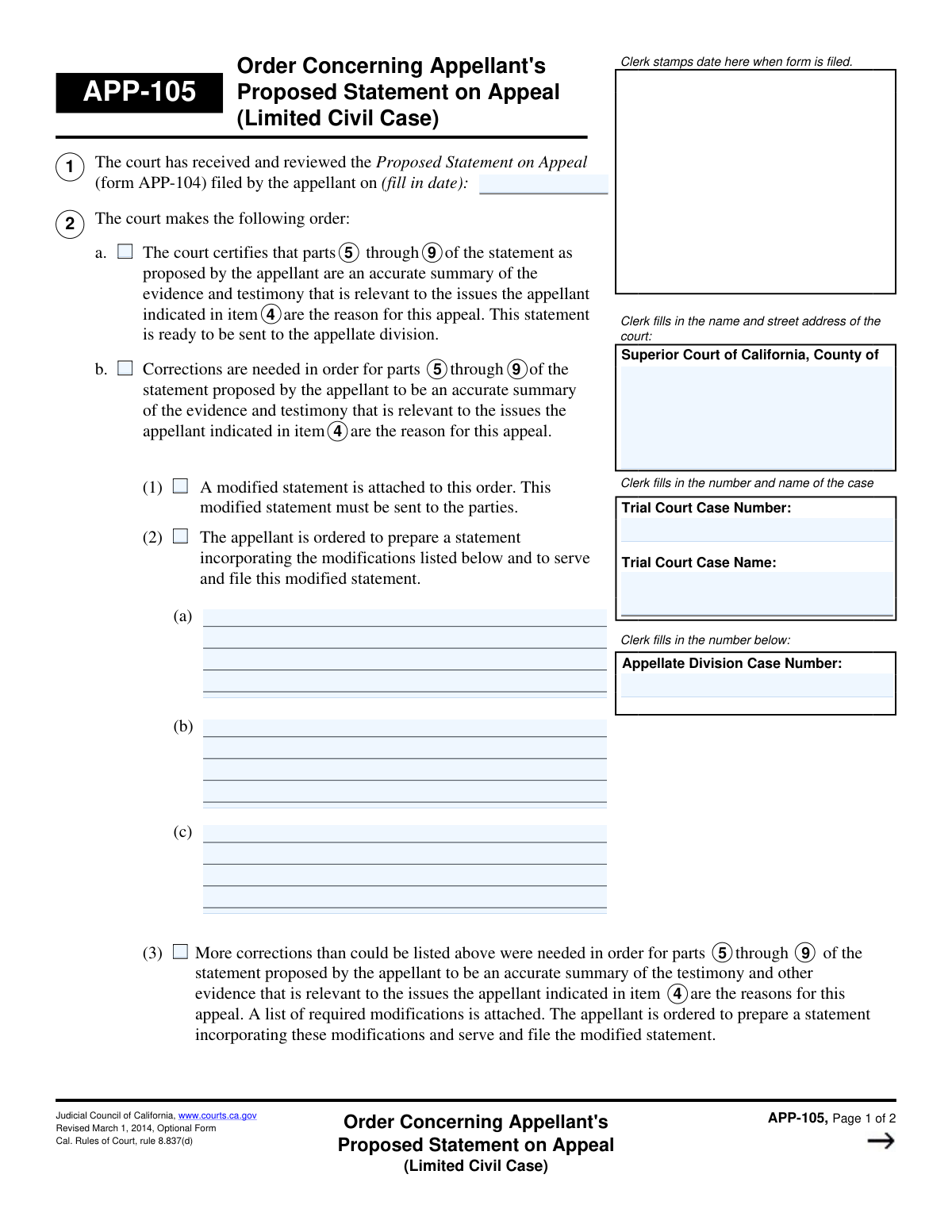
Form APP-015 is a legal document used by the California Superior Court in limited civil cases. It serves as the court's official order regarding the appellant's summary of the trial evidence and proceedings, known as the 'Proposed Statement on Appeal.' The court uses this form to either certify the statement as accurate or to detail the specific corrections required before it can be sent to the appellate division. Today, this form can be filled out quickly and accurately using AI-powered services like Instafill.ai, which can also convert non-fillable PDF versions into interactive fillable forms.
Our AI automatically handles information lookup, data retrieval, formatting, and form filling.
It takes less than a minute to fill out APP-015 using our AI form filling.
Securely upload your data. Information is encrypted in transit and deleted immediately after the form is filled out.

Form specifications

Form name: Form APP-015, Order on Proposed Statement on Appeal (Limited Civil Case)
Number of fields: 23
Number of pages: 2
Language: English
Categories: civil appeal forms, NJ state forms, PA state forms
main-image

Instafill Demo: How to fill out PDF forms in seconds with AI

How to Fill Out APP-015 Online for Free in 2026

Are you looking to fill out a APP-015 form online quickly and accurately? Instafill.ai offers the #1 AI-powered PDF filling software of 2026, allowing you to complete your APP-015 form in just 37 seconds or less.
Follow these steps to fill out your APP-015 form online using Instafill.ai:
  1. 1 Navigate to Instafill.ai and upload or select Form APP-015.
  2. 2 Enter the court and case information in the designated fields, including court name, trial court case number, and appellate division case number.
  3. 3 Indicate the court's primary order by checking the box to either certify the statement or specify that corrections are needed.
  4. 4 If corrections are needed, select the appropriate method, such as attaching a modified statement or ordering the appellant to incorporate listed modifications.
  5. 5 If ordering the appellant to make changes, clearly list each required modification in the provided spaces.
  6. 6 Address any other court orders, such as missing material or the need for a transcript, by checking the relevant boxes and providing details as required.
  7. 7 Review all entered information for accuracy, date the form, and use Instafill.ai's tools to save, print, or e-file the completed document.

Our AI-powered system ensures each field is filled out correctly, reducing errors and saving you time.

Why Choose Instafill.ai for Your Fillable APP-015 Form?

Speed

Complete your APP-015 in as little as 37 seconds.

Up-to-Date

Always use the latest 2026 APP-015 form version.

Cost-effective

No need to hire expensive lawyers.

Accuracy

Our AI performs 10 compliance checks to ensure your form is error-free.

Security

Your personal information is protected with bank-level encryption.

Frequently Asked Questions About Form APP-015

This form is a court order used by a judge to either certify an appellant's Proposed Statement on Appeal as accurate or to order specific corrections that must be made before it can be sent to the appellate division.

A trial court judge or authorized court personnel completes this form. The parties in the case, especially the appellant who filed the appeal, receive the completed order and must follow its instructions.

This is good news for the appellant; it means the court has approved the Proposed Statement on Appeal as an accurate summary. The statement is now considered 'settled' and will be sent to the appellate division as part of the record on appeal.

You must revise your Proposed Statement on Appeal based on the court's instructions. The order will specify whether the court is providing a modified statement or if you must prepare a new one incorporating the listed modifications.

These are the specific changes, additions, or deletions the court requires you to make to your statement. You must incorporate these exact modifications into a revised statement, then serve it on the other parties and file it with the court.

If more changes are needed than can fit on the form, the court will check the box for 'Extensive Modifications Required' and attach a separate list. You must then prepare a new statement that incorporates all the modifications from that list.

This means your statement lacks content required by the California Rules of Court, such as a list of the issues you will raise on appeal. You must add the specific material detailed in the order to your revised statement.

If the trial proceedings were officially recorded by a court reporter or an electronic device, the court can order a transcript or a copy of the recording to serve as the official record. This is often considered a more accurate alternative to a settled statement.

The form requires the full Trial Court Case Name, the Trial Court Case Number, and the Appellate Division Case Number. This information ensures the order is correctly associated with your appeal.

Read the order carefully to see if your statement was certified or if corrections are required. If corrections are ordered, you must prepare, serve, and file a revised statement according to the court's specific instructions and deadlines.

Yes, if you are ordered to prepare a modified statement, services like Instafill.ai can help. They use AI to auto-fill case information and other fields on the blank form, saving you time and helping ensure accuracy.

You can upload the blank Proposed Statement on Appeal form to Instafill.ai. The service will make the form fillable online, allowing you to easily type in your case details and the court-ordered modifications before printing.

You can use a service like Instafill.ai, which can convert flat, non-fillable PDFs into interactive, fillable forms. Simply upload your document, and the tool will allow you to type directly into the fields.

Compliance APP-015
Validation Checks by Instafill.ai

1
Mutually Exclusive Court Order Selection
This check ensures that only one of the two main court order options, 'Court Certifies Statement' or 'Corrections Needed', is selected. It is logically impossible for the court to both certify a statement as accurate and simultaneously declare that it requires corrections. If both are selected, the form submission should be rejected with an error asking the user to choose only one primary action.
2
Required Correction Method
This validation confirms that if the 'Corrections Needed' checkbox is selected, at least one of the corresponding correction methods ('Modified Statement Attached', 'Appellant Ordered to Modify Statement', or 'Extensive Modifications Required') is also selected. This ensures that when corrections are deemed necessary, a clear path for implementing them is specified. A failure indicates an incomplete order and prevents the form from being processed.
3
Required Modification Specification
This check ensures that if the 'Appellant Ordered to Modify Statement' checkbox is selected, the 'Modification 1' text field is not empty. The purpose of this order is to provide specific instructions, so it cannot be issued without at least one modification being detailed. This validation prevents vague or incomplete orders from being filed.
4
Required Missing Material Explanation
This validation verifies that if the 'Proposed Statement Missing Material' checkbox is checked, the 'Missing Material Details' text area is filled out. This check is crucial for providing clarity to the appellant about what specific information is missing per rule 8.837. Submitting the form without these details would make the order unhelpful and non-actionable.
5
Logical Date Sequence
This check confirms that the final signature 'Date' on the form is on or after the 'Date of Statement'. A court order cannot be dated and signed before the document it is ruling on has been filed. This validation prevents chronological errors that could invalidate the legal standing of the order.
6
Case Information Consistency Check
This validation ensures that the values entered into the two 'Trial Court Case Number' fields are identical, and that the values in the two 'Trial Court Case Name' fields are also identical. This is important for maintaining document integrity and preventing confusion from conflicting information in the header and body of the form. A mismatch would require user correction before submission.
7
Completeness of Core Case Identifiers
This check ensures that the 'Superior Court Name and Address', 'Trial Court Case Number', and 'Trial Court Case Name' fields are all filled. These fields are the primary identifiers for the case and the jurisdiction, and are essential for routing and filing the document correctly. An incomplete submission would be unidentifiable and would be rejected.
8
Valid Date of Statement Format
This validation checks that the 'Date of Statement' is entered in a valid and recognizable date format, such as MM/DD/YYYY. This is critical for data integrity and ensures the date can be correctly interpreted by court processing systems. An invalid format would cause a parsing error and require the user to correct the entry.
9
Prohibited Correction Method Selection
This check ensures that if 'Court Certifies Statement' is selected, none of the correction method options ('Modified Statement Attached', 'Appellant Ordered to Modify Statement', etc.) are checked. Since the statement is being certified as accurate, there is no need for a correction method. This prevents contradictory and confusing form submissions.
10
Prohibited Modification Details
This validation verifies that the 'Modification 1', 'Modification 2', and 'Modification 3' fields are empty if the 'Appellant Ordered to Modify Statement' option is not selected. Providing modification details without the corresponding order is illogical and creates ambiguity. This check maintains the form's internal consistency and clarity.
11
Trial Court Case Number Format
This validation checks if the 'Trial Court Case Number' conforms to the expected format for the specified jurisdiction. Case numbers often follow a strict pattern, and validating this format helps prevent typographical errors and ensures the case can be located in the court's system. An invalid format would prompt the user to review and correct the number.
12
Required Signature Date
This check ensures the final 'Date' field, which represents the date the order is signed, is not left blank. This date is legally significant as it marks when the order becomes effective. Without this date, the document is incomplete and cannot be officially processed or filed by the court clerk.

Common Mistakes in Completing APP-015

Entering an Incomplete Superior Court Address

Users often provide a partial court name or address, such as 'LA Superior Court,' omitting the specific street address, city, and county. This happens due to haste or assuming the recipient knows the details. An incomplete address can lead to processing delays or rejection of the filing, as court clerks need precise information to identify the correct courthouse. To avoid this, always use the full, official courthouse address; AI-powered tools like Instafill.ai can help by autocompleting and validating addresses to ensure they are complete and correctly formatted.

Transposing Trial and Appellate Case Numbers

The form requires both a 'Trial Court Case Number' and an 'Appellate Division Case Number.' A frequent error is entering these numbers in the wrong fields or using the same number for both. This critical mistake can cause the document to be misfiled with the wrong case or rejected entirely, jeopardizing appeal deadlines. To prevent this, carefully verify each number against official court documents before entering it. Using a tool like Instafill.ai can help by saving and correctly populating recurring information like case numbers, reducing the risk of manual entry errors.

Inconsistent Case Information Across Repeated Fields

The 'Trial Court Case Name' and 'Trial Court Case Number' fields appear in two different sections of the form. Users sometimes enter slightly different information in these duplicate fields, creating ambiguity. This inconsistency can confuse court staff and automated systems, potentially delaying the processing of the document until the discrepancy is resolved. Advanced form fillers like Instafill.ai prevent this by automatically populating all identical fields once the information is entered a single time, ensuring consistency.

Using the Incorrect Date for 'Date of Statement'

This field specifically asks for the date the 'Proposed Statement on Appeal was filed,' not the date the current form is being completed. People often mistakenly enter the current date out of habit. This error can misrepresent the case timeline, potentially affecting legal arguments or compliance with procedural deadlines. Always refer to the filing receipt for the Proposed Statement on Appeal to find the correct date.

Making Contradictory Selections in 'Court Order'

A user might erroneously check both 'Court Certifies Statement' and 'Corrections Needed.' These options are mutually exclusive; the statement cannot be both certified as accurate and in need of correction simultaneously. This logical error makes the court's order unclear and requires clarification, halting the appeal process. If the form is a non-fillable PDF, a tool like Instafill.ai can convert it into an interactive version with built-in validation rules to prevent such conflicting selections.

Ignoring Conditional Field Logic

The form contains several fields that are conditional upon a checkbox being selected, such as providing 'Modification 1' only if 'Appellant Ordered to Modify Statement' is checked. Users may fill in these conditional fields without selecting the corresponding option, or vice-versa. This creates a confusing and invalid submission that court clerks may reject. Smart form-filling tools like Instafill.ai can enforce this logic by automatically showing or hiding fields based on your checkbox selections, making it impossible to fill out a field incorrectly.

Providing Vague or Unactionable Modification Instructions

When filling the 'Modifications' text boxes, users may provide unclear instructions like 'Fix witness testimony' or 'Add missing facts.' Such descriptions are not actionable for the appellant and lead to further disputes. To be effective, modifications must be specific, citing page and line numbers or quoting the exact text to be added or changed. If you receive a flat PDF, Instafill.ai can make it fillable, providing ample, clean space for these detailed descriptions.

Forgetting to Attach Required Documents

The form allows users to indicate that a 'Modified Statement' or a 'separate list of required modifications' is attached. A common and serious mistake is checking one of these boxes but failing to include the actual attachment with the submission. This renders the filing incomplete and can lead to its immediate rejection by the court clerk. Always create a checklist of all documents before submission and verify all files are uploaded when filing electronically.

Failing to Specify Details of Missing Material

Users may check the box for 'Proposed Statement Missing Material' to indicate a deficiency but then leave the 'Missing Material Details' field blank. This identifies a problem without providing the necessary information for the appellant to fix it. The order becomes ineffective, as the opposing party has no guidance on how to comply with rule 8.837. Tools like Instafill.ai can help by highlighting required conditional fields, reminding you to provide necessary details before finalizing the form.

Misinterpreting the 'Transcript Ordered' Requirement

This checkbox applies only under specific circumstances related to Government Code section 69957. Users may incorrectly check this box for any proceeding that was recorded, without verifying if the specific legal conditions are met. This can lead to the wrong type of record being prepared for the appeal, causing significant delays and potentially incurring unnecessary costs. It is crucial to understand the specific legal rules cited on the form before making a selection.
Saved over 80 hours a year

“I was never sure if my IRS forms like W-9 were filled correctly. Now, I can complete the forms accurately without any external help.”

Kevin Martin Green

Your data stays secure with advanced protection from Instafill and our subprocessors

Robust compliance program

Transparent business model

You’re not the product. You always know where your data is and what it is processed for.

ISO 27001, HIPAA, and GDPR

Our subprocesses adhere to multiple compliance standards, including but not limited to ISO 27001, HIPAA, and GDPR.

Security & privacy by design

We consider security and privacy from the initial design phase of any new service or functionality. It’s not an afterthought, it’s built-in, including support for two-factor authentication (2FA) to further protect your account.

Fill out APP-015 with Instafill.ai

Worried about filling PDFs wrong? Instafill securely fills form-app-015-order-on-proposed-statement-on-appeal-limited-civil-case forms, ensuring each field is accurate.