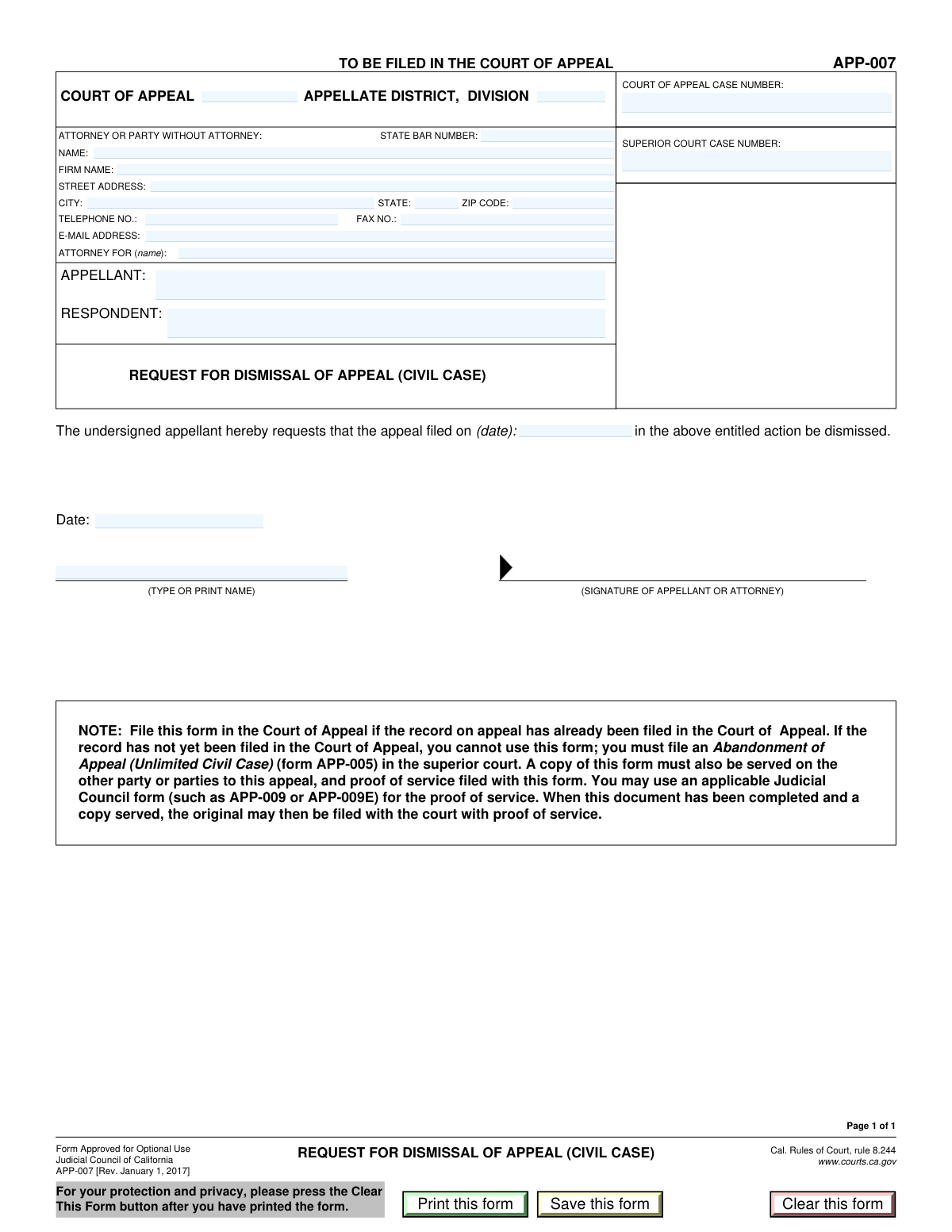
Yes! You can use AI to fill out Civil Appeal Case Information Statement
A Civil Appeal Case Information Statement is a crucial document filed at the beginning of the appellate process. It provides the court with vital data such as the original and appellate case numbers, the parties involved (appellant and respondent), and contact information for the attorneys or self-represented litigants. This ensures the court can properly docket and manage the appeal. Today, this form can be filled out quickly and accurately using AI-powered services like Instafill.ai, which can also convert non-fillable PDF versions into interactive fillable forms.
Our AI automatically handles information lookup, data retrieval, formatting, and form filling.
It takes less than a minute to fill out Civil Appeal Statement using our AI form filling.
Securely upload your data. Information is encrypted in transit and deleted immediately after the form is filled out.
Form specifications
| Form name: | Civil Appeal Case Information Statement |
| Number of fields: | 23 |
| Number of pages: | 1 |
| Language: | English |
| Categories: | civil appeal forms, NJ state forms, PA state forms |
Instafill Demo: How to fill out PDF forms in seconds with AI
How to Fill Out Civil Appeal Statement Online for Free in 2026
Are you looking to fill out a CIVIL APPEAL STATEMENT form online quickly and accurately? Instafill.ai offers the #1 AI-powered PDF filling software of 2026, allowing you to complete your CIVIL APPEAL STATEMENT form in just 37 seconds or less.
Follow these steps to fill out your CIVIL APPEAL STATEMENT form online using Instafill.ai:
- 1 Navigate to Instafill.ai and upload your Civil Appeal Case Information Statement or select it from the template library.
- 2 Use the AI assistant to automatically populate court information, including the appellate district and division.
- 3 Enter the specific Superior Court and Court of Appeal case numbers in the designated fields.
- 4 Provide the complete attorney or party information, including name, State Bar number, firm name, and full contact details.
- 5 Clearly identify the names of the appellant and respondent in the appropriate sections.
- 6 Review all entered information for accuracy, then date and sign the document in the signature section.
- 7 Download, save, or print the completed form for filing with the appropriate court of appeal.
Our AI-powered system ensures each field is filled out correctly, reducing errors and saving you time.
Why Choose Instafill.ai for Your Fillable Civil Appeal Statement Form?
Speed
Complete your Civil Appeal Statement in as little as 37 seconds.
Up-to-Date
Always use the latest 2026 Civil Appeal Statement form version.
Cost-effective
No need to hire expensive lawyers.
Accuracy
Our AI performs 10 compliance checks to ensure your form is error-free.
Security
Your personal information is protected with bank-level encryption.
Frequently Asked Questions About Form Civil Appeal Statement
This form is used to provide essential case, party, and attorney information for a matter before the Court of Appeal. It helps the court identify the case, the parties involved (appellant and respondent), and their legal representation.
This form should be completed by the attorney representing a party in the appeal or by the party themselves if they are self-represented (pro se).
These numbers are assigned by the respective courts and can be found on all official notices, filings, and correspondence related to your case. The Superior Court number is from the original trial, and the Court of Appeal number is assigned when the appeal is initiated.
If you are self-represented, enter your own name, address, and contact information in the 'Attorney or Party Information' section. You can leave the 'State Bar Number' and 'Firm Name' fields blank, and in the 'Attorney For' field, you can write 'Self-Represented' or 'In Pro Per'.
This information is determined by the geographic location of the Superior Court where your case was originally heard. You can find this on previous court notices or by checking the court's official website.
The Appellant is the party who is filing the appeal to challenge the decision of the lower court. The Respondent is the party who is responding to the appeal, typically defending the lower court's decision.
This is the date that the initial Notice of Appeal was officially filed with the court. You can find this date on the file-stamped copy of your Notice of Appeal document.
While a fax number may be optional, providing an email address is highly recommended as courts increasingly use email for official correspondence. Check your local court rules, but it is best practice to provide all requested contact information to ensure you receive timely notices.
The form must be signed by the attorney of record for the party filing the document. If a party is self-represented, that individual must sign the form.
The form includes 'Print' and 'Save' options, suggesting it can be filed either as a hard copy or electronically. You must check the specific filing rules for the Court of Appeal in your district to determine the correct submission procedure.
Yes, services like Instafill.ai use AI to accurately auto-fill form fields with your saved information, which can save you significant time and help prevent errors.
Simply upload the form to the Instafill.ai platform. The AI will identify the fields and you can use its browser extension to auto-fill your personal, case, and attorney information from your secure profile in just a few clicks.
If you have a non-fillable or 'flat' PDF, you can use a service like Instafill.ai. It can convert the static document into an interactive, fillable form that you can easily complete and save online.
Compliance Civil Appeal Statement
Validation Checks by Instafill.ai
1
Valid State Bar Number Format
This check ensures the 'State Bar Number' field contains a valid, typically numeric, identifier. It is crucial for verifying the attorney's credentials and good standing with the state bar. If the number is malformed or invalid, it could delay case processing or lead to the rejection of the filing until the attorney's identity is properly confirmed.
2
Standard Email Address Format
This validation verifies that the 'Email Address' field follows the standard '[email protected]' format. An accurate email address is essential for electronic communication, service of documents, and receiving notifications from the court. An invalid format would prevent the court and other parties from contacting the filer, causing critical communication failures.
3
Required Case Number Presence
This check ensures that at least one of the case number fields ('Court of Appeal Case Number' or 'Superior Court Case Number') is filled out. A case number is the primary identifier for a legal matter, and its absence makes it impossible to associate the filing with the correct case. The form submission would be rejected as it cannot be docketed without this fundamental information.
4
Logical Date Sequence for Filing and Signature
This validation confirms that the 'Signature Date' is on or after the 'Appeal Filing Date'. A document cannot be signed before the event it relates to has occurred, and this check prevents logical impossibilities and potential backdating issues. A failure would indicate a data entry error that must be corrected for the document's timeline to be legally coherent.
5
Completeness of Primary Parties
This check verifies that both the 'Appellant Name' and 'Respondent Name' fields are completed. These names identify the core parties involved in the appeal, and their absence would render the document fundamentally incomplete. A form submitted without identifying both the appellant and respondent cannot be processed.
6
Valid US Zip Code Format
This validation ensures the 'Zip Code' field contains either a 5-digit or 9-digit (ZIP+4) numeric code. A correct zip code is vital for the accurate and timely delivery of physical mail and for address verification purposes. An invalid format could lead to returned mail and significant delays in communication.
7
Valid Date Format for All Date Fields
This check ensures that both 'Appeal Filing Date' and 'Signature Date' are entered in a recognized date format (e.g., MM/DD/YYYY) and represent an actual calendar date. Using a consistent and valid format is essential for accurate record-keeping and preventing system errors. An invalid date would be ambiguous and require correction before the form can be accepted.
8
Attorney Representation Specification
This validation checks that if a 'State Bar Number' is provided, the 'Attorney For' field is also filled out. It is legally necessary to know which party an attorney is representing in the action. Omitting this information creates ambiguity and could lead to the filing being rejected until the representation is clarified.
9
Signer Name Consistency
This check compares the 'Signer's Printed Name' with the 'Attorney or Party Name' to ensure they match. This confirms that the individual identified as the filer is the same person signing the document, which is a key requirement for document authenticity. A mismatch could indicate an unauthorized signature and invalidate the submission.
10
Required Filer Name
This validation ensures the 'Attorney or Party Name' field is not empty. This field identifies the person or entity submitting the form, which is a fundamental requirement for any legal filing. Without this information, the court has no record of who filed the document, and the submission would be immediately rejected.
11
Standard Telephone Number Format
This check verifies that the 'Telephone Number' conforms to a standard format, such as (XXX) XXX-XXXX or XXX-XXX-XXXX. A properly formatted phone number ensures that court staff and opposing counsel can reliably contact the filer. An incorrectly formatted number might be unusable, hindering urgent communication.
12
Valid State Abbreviation
This validation ensures the 'State' field contains a valid two-letter US state or territory abbreviation. Using standardized abbreviations is crucial for address validation systems and ensuring mail is routed correctly. An incorrect or non-standard entry could cause delivery failures or data processing errors.
13
Completeness of Address Information
This check ensures that if a 'Street Address' is entered, the 'City', 'State', and 'Zip Code' fields are also completed. A partial address is unusable for mailing or location purposes, making it impossible to serve documents or contact the party. The system should prompt the user to complete the address to ensure it is valid and deliverable.
14
Case Number Format Validation
This check verifies that the 'Court of Appeal Case Number' and 'Superior Court Case Number' adhere to the expected format for the jurisdiction, which often includes letters, numbers, and hyphens in a specific sequence. An incorrect format can prevent the case from being found in the court's system. This validation helps catch typos and ensures the filing is linked to the correct record.
Common Mistakes in Completing Civil Appeal Statement
Filers often mistakenly enter the Superior Court case number in the field for the Court of Appeal, and vice versa. This happens because both numbers are associated with the same legal matter and can look similar. This critical error can lead to the document being rejected or misfiled, causing significant delays and potentially jeopardizing deadlines. To avoid this, carefully cross-reference the numbers with official court notices for both the trial and appellate levels.
Parties, especially those without legal representation, may not know or may guess the correct Appellate District and Division for their case. This information is crucial for routing the document to the correct judicial panel and an error will almost certainly result in the filing being rejected. Always confirm the correct district and division from the notice of appeal or the court's official website before filling out the form.
When a party is self-represented, they often get confused by the 'Attorney For' field and may leave it blank or re-enter their own name. This creates ambiguity for the court clerk processing the document. The correct procedure is to write 'Pro Se' or 'In Pro Per' to clearly indicate self-representation and avoid processing delays.
Attorneys may accidentally transpose digits in their State Bar Number, while self-represented parties might leave the field blank, unsure of what to enter. Either error can cause processing delays while the clerk seeks clarification or verifies the attorney's standing. Attorneys should double-check their number, and pro se litigants should enter 'N/A' to indicate the field is not applicable.
Filers sometimes use abbreviations, nicknames, or slightly different spellings for the Appellant or Respondent names than what is on the official case caption. This creates ambiguity and can cause issues with the court's record-keeping and database searches. Always use the full, official legal names of all parties exactly as they appear on previous court documents, such as the judgment or notice of appeal.
A common error is entering the current date (the date of signing) in the 'Appeal Filing Date' field. The 'Appeal Filing Date' is a specific, historical date that marks the official start of the appeal and must be accurate. This mistake misrepresents the case timeline and can lead to rejection. The 'Appeal Filing Date' must be copied from the conformed Notice of Appeal, while the 'Signature Date' should be the actual date the form is being signed.
A single typo in an email address is a frequent and costly mistake, as courts increasingly use email for official notices, orders, and deadlines. An incorrect email means you will not receive these critical communications, potentially leading to missed hearings or even dismissal of the case. Carefully proofread the email address character by character before submitting the form. AI-powered form filling tools like Instafill.ai can help prevent these errors by validating email formats.
When a field like 'Firm Name' or 'Fax Number' does not apply, people often leave it empty. This is ambiguous, as the court clerk may not know if the information was omitted by mistake or is truly not applicable, triggering unnecessary inquiries. The best practice is to explicitly enter 'N/A' or 'None' to show that the field was reviewed and is intentionally left without data.
Confusion arises if the name in the 'Signer's Printed Name' field does not match the name in the 'Attorney or Party Name' field at the top. This can happen when a paralegal fills out the form but the attorney signs it, creating ambiguity about who is attesting to the document's contents. The signer's printed name must always match the individual who is actually signing and is authorized to do so.
Filers frequently provide a street address but forget to include essential details like a suite, floor, or apartment number, especially for law firm addresses. An incomplete address can result in failed service of process or returned mail from the court, leading to missed notices and critical delays. Always provide the full, detailed mailing address to ensure reliable delivery. If the form is a flat PDF, a tool like Instafill.ai can make it fillable and help validate address data.
Saved over 80 hours a year
“I was never sure if my IRS forms like W-9 were filled correctly. Now, I can complete the forms accurately without any external help.”
Kevin Martin Green
Your data stays secure with advanced protection from Instafill and our subprocessors

Robust compliance program
Transparent business model
You’re not the product. You always know where your data is and what it is processed for.
ISO 27001, HIPAA, and GDPR
Our subprocesses adhere to multiple compliance standards, including but not limited to ISO 27001, HIPAA, and GDPR.
Security & privacy by design
We consider security and privacy from the initial design phase of any new service or functionality. It’s not an afterthought, it’s built-in, including support for two-factor authentication (2FA) to further protect your account.
Fill out Civil Appeal Statement with Instafill.ai
Worried about filling PDFs wrong? Instafill securely fills civil-appeal-case-information-statement forms, ensuring each field is accurate.