
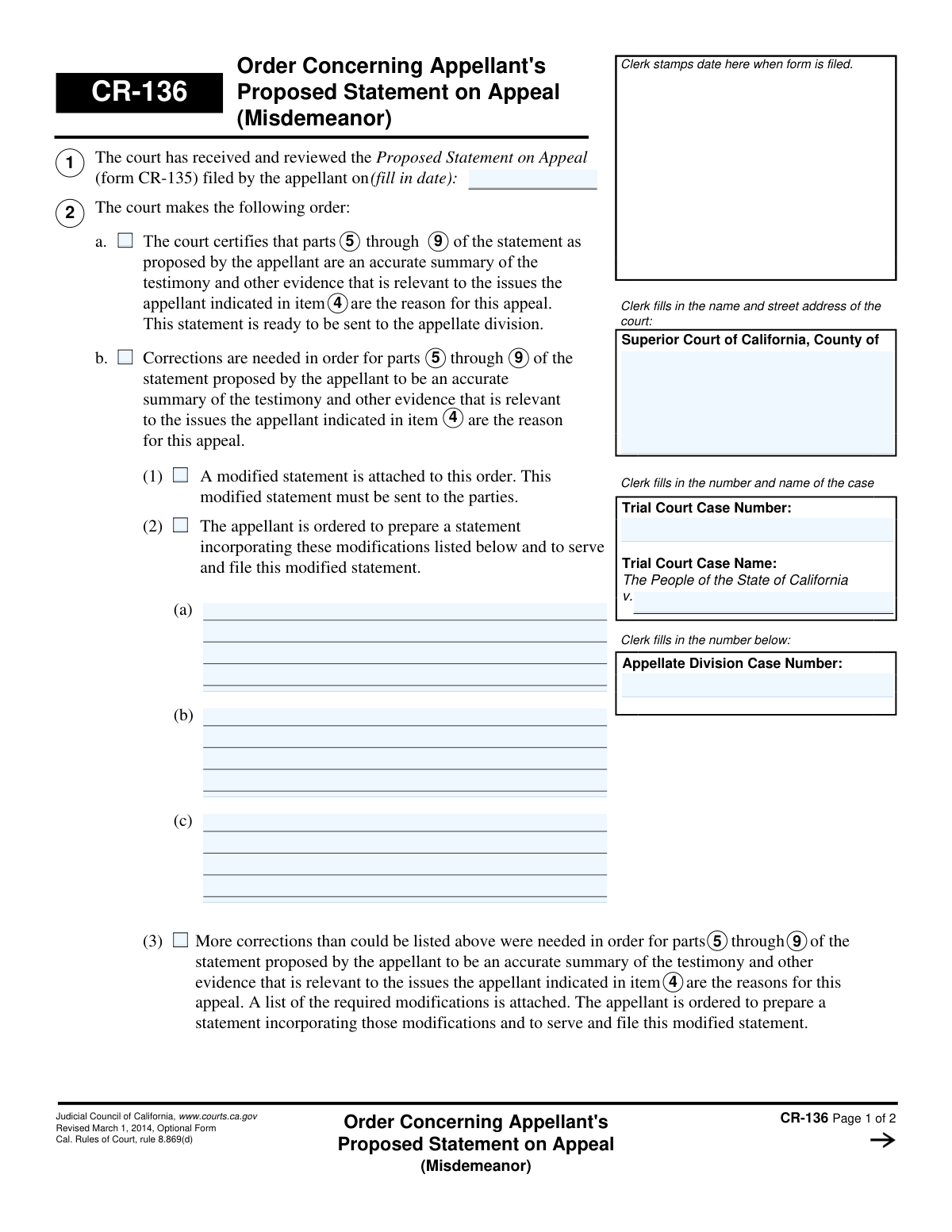
Yes! You can use AI to fill out Form CR-136, Order Concerning Appellant's Proposed Statement on Appeal (Misdemeanor)
Don't type 23 fields by hand. Tell our AI about yourself, or upload a document you already have, and it fills every field in seconds. You check it, then download, print or sign.
The AI does the filling. You just check it.
No typing into boxes, nothing to install.
What this form asks for
The AI fills all of it, from your answers or your documents.
The AI checks your answers before you download
13 checks built for this form, so a wrong date or a missing answer is caught before anyone else sees it.
This check verifies that the 'Trial Court Case Number' entered on page 1 is identical to the 'Trial Court Case Number' on page 2. Maintaining consistency is crucial for document integrity and ensuring the order is correctly associated with the unique case file. A mismatch could lead to filing errors, delays in the appeal process, or the document being rejected by the clerk.
This validation confirms that the 'Trial Court Case Name' on page 1 exactly matches the 'Trial Court Case Name' on page 2. Consistent case naming is essential for accurate record-keeping and preventing confusion when the document is processed, served, and archived. If the names differ, the form should be flagged for correction to avoid being filed under the wrong case.
Verifies that the header fields for the court's name and address, 'Trial Court Case Name', and 'Trial Court Case Number' are all completed. These fields are fundamental for identifying the jurisdiction and specific case to which this order applies. An incomplete header would render the document invalid and un-fileable, as it cannot be properly docketed.
Confirms that only one of the primary order options in section 4 (4a, 4b, 4c, 4d, or 4e) is selected. These options represent distinct and mutually exclusive legal decisions by the court. Selecting more than one creates an ambiguous and unenforceable order, which would be rejected by the court clerk for clarification.
If checkbox 4a ('The court certifies...') is selected, this check ensures the corresponding 'parts...through...' and 'item...' fields are filled. This information is necessary to precisely specify which parts of the appellant's statement are being certified as accurate. Failure to provide these details makes the certification order incomplete and legally insufficient.
Validates that if checkbox 4b ('Corrections are needed') is selected, at least one of its sub-options (4b(1), 4b(2), or 4b(3)) is also checked. This is required to specify the court's directive on how the corrections should be handled. An incomplete selection would leave the next steps unclear for the appellant and the court, halting the appeal process.
And 7 more checks
- Conditional Text for Order 4c
- Logical Date Sequence
- Mandatory Order Date
- Valid Date Format
- Valid Range for 'Parts' Specification
- Completeness of Order 4b(3)
- Trial Court Case Number Format
Let AI fill out your CR-136
No typing. Every field filled in seconds, checked, ready to sign.
How to Fill Out CR-136 Online for Free in 2026
What the AI walks you through.
- Navigate to Instafill.ai and upload or select the Form CR-136.
- Use the AI assistant to input the Superior Court information, Trial Court Case Name, and relevant case numbers.
- Enter the date the appellant's Proposed Statement on Appeal (form CR-135) was filed.
- Select the appropriate court order by checking the box that corresponds to the court's decision, such as certifying the statement or ordering corrections.
- If corrections are ordered, specify the modifications required in the provided space or indicate that a list is attached.
- Enter the date of the order and secure the signature of the trial court judicial officer.
- Review the completed form for accuracy and then download, print, or file it as directed by the court.
Common Mistakes in Completing CR-136
The ones the AI is built to catch.
Appellant Filling Out a Form Meant for the Court
Entering Incorrect or Mismatched Case Numbers
Inconsistent Case Information Between Pages
Failing to Attach Required Modifications
Using Vague References to the Appellant's Statement
Omitting the Judicial Officer's Signature and Date
Selecting an Unauthorized Record Preparation Method
Appellant Misinterpreting the Order to Modify
Using a Non-Fillable or Outdated Version of the Form
Entering the Wrong Date for the Appellant's Filing
Frequently Asked Questions About CR-136
Is it really free for 7 days?
Can I fill other forms too?
How do I cancel?
How does the AI fill out CR-136?
What happens to my information?
How complex is CR-136 to fill out?
What is the purpose of Form CR-136?
Who fills out and sends this form?
I received Form CR-136. What does it mean?
What does it mean if box 4a is checked on my form?
The court checked box 4b. What do I need to do now?
What if box 4c is checked on the order?
What is the difference between the orders in box 4d and 4e?
How long do I have to make the corrections ordered by the court?
I have to create a modified statement. Can AI tools help me with this?
How can I use Instafill.ai to fill out my revised appeal forms online?
The PDF form for my revised statement is not fillable. What should I do?
What is a 'Proposed Statement on Appeal'?
Do I need to sign or file Form CR-136?
Get your CR-136 filled out by AI
$0 today. Cancel before Oct 31 and you pay nothing.
Other forms like this one
California state forms: Judicial Council of California Form DE-111, Petition for Probate (Probate—Decedents Estates), DS 1891, Applicant/Vendor Disclosure Statement (State of California Department of Developmental Services), Judicial Council of California Form DE-120, Notice of Hearing—Decedent's Estate or Trust, Judicial Council of California Form DE-120, Notice of Hearing—Decedent's Estate or Trust, Murrieta Police Department Citizen Complaint Form (California Penal Code § 148.6 Advisory Statement), California Department of Social Services, Sworn Statement, State of California Department of Transportation California Civil Rights Laws Certification, State of California Department of Transportation Darfur Contracting Act Certification, Form DOT ADM-0077, State of California Department of Transportation, Contract Requirements, State of California Department of Transportation Subcontractor List, State of California Department of Transportation, Certified DVBE Summary, Bidder Declaration GSPD-05-105, State of California Level of Care Rate Determination Protocol Matrix, State of California Accessible Form, State of California Form SOC 321, Request for Order and Consent - Paramedical Services, State of California Darfur Contracting Act Certification, State of California Department of Veterans Affairs COMMERCIALLY USEFUL FUNCTION (CUF) CERTIFICATION FORM, Form ADR-100, Statement of Agreement or Nonagreement, Civil Appeal Case Information Statement, Form APP-014, Appellant's Proposed Statement on Appeal (Unlimited Civil Case)
California court forms: Judicial Council of California Form SC-105, Request for Court Order and Answer (Small Claims), Judicial Council of California Form SC-120, Defendant’s Claim and ORDER to Go to Small Claims Court (Small Claims), Judicial Council of California Form SER-001, Request for Sheriff to Serve Court Papers, Judicial Council of California Form SER-001, Request for Sheriff to Serve Court Papers, Affidavit for Collection of Personal Property California Probate Code Section 13100, Form POS-040, Proof of Service—Civil, Declaration of Facts of Death (California Superior Court), declaration-of-marriage-for-court-proceeding-california-family-law, ADOPT-200, Adoption Request, ADOPT-200, Stepparent Adoption Request, ADOPT-210, Adoption Agreement, ADOPT-310, Contact After Adoption Agreement, Judicial Council of California Form ADOPT-200, Adoption Request, Form ADR-107, Mediation Attendance Sheet, Form ADR-110, Order Appointing Referee, Form ADR-109, Stipulation or Motion for Order Appointing Referee, Form ADR-102, Request for Trial De Novo After Judicial Arbitration, Form ADR-108, Referee's Report (Code Civ. Proc., §§ 638, 639), Form ADR-106, Petition to Confirm, Correct, or Vacate Contractual Arbitration Award, Form ADR-104, Rejection of Award and Request for Trial After Attorney-Client Fee Arbitration
court appeal forms: Form N161, Appellant's Notice (All appeals except small claims track appeals and appeals to the Family Division of the High Court), Designation of Record on Appeal (Civil) (Maricopa County Justice Courts, Arizona) (Form APP 8150-702), Form N161, Appellant’s notice (All appeals except small claims track appeals and appeals to the Family Division of the High Court), Declaration for Court of Appeal Proceedings, Form MC 55, Claim of Appeal, Form MC 56, Bond on Appeal, Form MC 57, Certificate of Records Transmitted for Appeal and Notice to Parties, Form MC 60, Notice of Record Return from Circuit Court/Court of Appeals, Form MC 501, Reporter/Recorder Certificate of Ordering Transcript on Appeal, Form MC 503, Motion to Change Time for Filing Transcript on Appeal, Civil Appeal Case Information Statement, Form APP-014, Appellant's Proposed Statement on Appeal (Unlimited Civil Case), Form CR-125, Notice of Appeal—Commitment (Penal Code or Welfare and Institutions Code), Form CR-134, Notice Regarding Record on Appeal (Misdemeanor), Form CR-135, Proposed Statement on Appeal (Misdemeanor), Form CR-137, Abandonment of Appeal (Misdemeanor), Form CR-142, Notice of Appeal and Record on Appeal (Infraction), Form CR-143, Proposed Statement on Appeal (Infraction), Form CR-105, Defendant's Financial Statement on Eligibility for Appointment of Counsel and Reimbursement and Record on Appeal at Public Expense, Form CR-133, Request for Court-Appointed Lawyer in Misdemeanor Appeal
Let AI fill out your CR-136
Your trial starts once a card is added. You pay nothing before Oct 31.
Our AI already knows this form, all 23 fields of it. Skip the typing: tell it about yourself, or upload what you have, and it fills the whole form in seconds.
- AI fills every field on both pages, checkboxes included
- No typing into boxes: answer a few questions, or upload a document you already have, an old copy of this form, a photo of a document
- The AI checks the answers; you review and change anything before you download
- Download the finished PDF, print it, or sign it online
- Encrypted, and never used to train AI
Cancel before Oct 31 and you pay nothing.
A card is needed to start the trial. Cancel in two clicks from your account.
Terms · Privacy